
Oct 22, 2026 • Filed to: Recover Emails • Proven solutions
 TL;DR:
You can reset a forgotten TikTok password by verifying either your registered mobile number or email address, but if you lack access to both, you must submit a manual recovery request through the app's support center.
● To bypass a lost email, select the "Forgot password?" option on the login screen, choose the phone number recovery route, and enter the 6-digit SMS verification code to create new credentials.
● To bypass a lost phone number, navigate to "Manage my account" within the app settings, tap "Password," and authenticate the reset using a 6-digit code sent to your registered email.
● Because TikTok offers no automated recovery feature when both contact methods are lost, you must submit a custom ticket via "Report a problem" under the "Account and Profile" menu and await manual assistance.
Ask AI for a summary
 ChatGPT
 Perplexity
 Gemini
 Claude
 Grok
Grok
TikTok is a popular video-sharing application, and millions of people are using it around the globe. With this app you can create, upload, and share your short video clips. This support both Android and iOS devices.
Many people have a lot of questions about TikTok, and the most common is "how to reset TikTok password?"
If you are also looking for the answer of the above question, then this guide is for you.
In this article, we will discuss effective ways to recover and reset TikTok password without email or phone number. Follow all the steps mentioned below carefully to reset or recover your TikTok password.
Take a look!
Part 1. What if I Forgot My TikTok Email and Password?
🔑 TikTok Identity Verification and Recovery Options
Select your current account situation to find the most direct recovery process:
| What Credentials Do You Have? | Missing Credentials | Verification Method | Recommended Solution Path |
| Username + Active Phone Number | Registered Email Lost | SMS 6-Digit Code | Method 1: Use Phone Bypass |
| Username + Active Email Account | Phone Number Changed | Email Verification Link | Method 2: Use Email Authentication |
| Username Only | Both Phone & Email Inaccessible | Manual Support Review | Method 3: Submit Feedback Ticket |
| Saved Device Login Files | Forgotten Password | Local Storage Scan | Pro Tip: Cache Data Recovery |
TikTok is a popular app, that people often use for entertainment purpose and to record their videos. To use TikTok, you must know the login credentials that you have filled during the sign up process.
In case, you forget TikTok email and password, and you are not able to login to your account. But, you can reset TikTok password without email or phone number so that you can use your account once again.
Now, you do not need to worry about "what if I forgot my TikTok password and email". In the below section, we have mentioned steps that help you to reset or recover TikTok password.
Part 2. How to Reset TikTok Password Without an Email Address
If you have lost access to your registered email or don't remember which email you linked to TikTok, you can complete account verification using your registered mobile phone number.
- Access the TikTok Login Portal (Initiate the account access request)
Launch the TikTok app on your Android or iOS device. If you are already logged into an alternate profile, navigate to your Profile tab, tap the menu icon, select settings, and tap Switch Account > Add Account.

- Target the Username Authentication View (Bypass standard email input prompts)
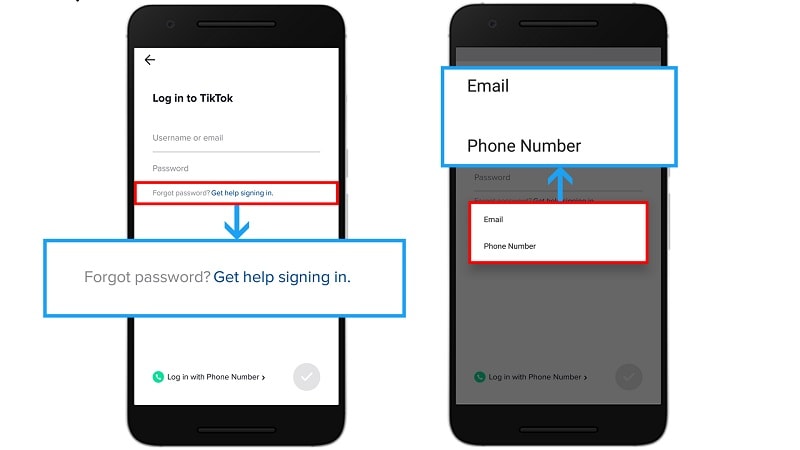
Select the Use phone / email / username option from the main connection page. Tap the Email / Username tab, type your exact TikTok username handle into the input box, and tap Forgot password?.

- Redirect Code Routing to Mobile SMS (Select your active validation channel)
On the pop-up verification menu, select Phone Number. Choose your specific country area code from the dropdown selector list, type your phone number, and tap Send code.
- Establish Your New System Password (Commit the update changes securely)
Input the six-digit verification token sent to your phone via SMS text. On the Reset password console screen, input a secure new password and tap Log In.
The procedure above on how you reset TikTok password using a phone number can help you in many ways.
Part 3. How to Change TikTok Password Without a Phone Number
If you created your TikTok account using an email address or have an inactive mobile phone number attached to your profile, you can change your security options through the configuration panel.
- Open the Profile Configuration Panel (Access app security infrastructure)
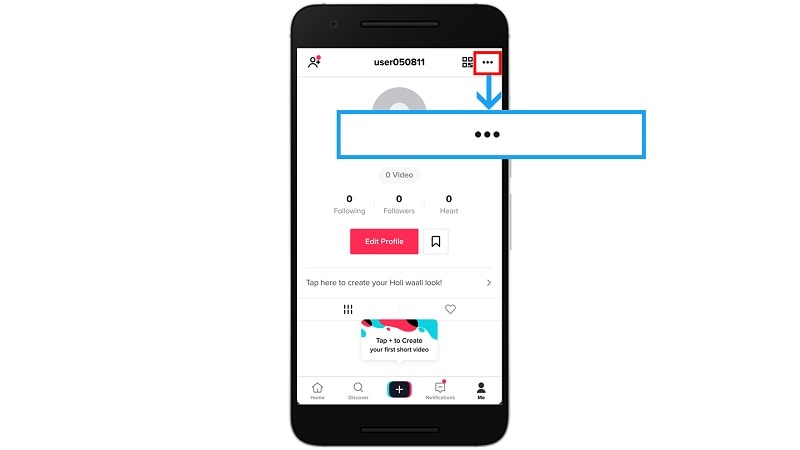
Open TikTok and navigate to your personal Profile tab in the bottom right corner. Tap the three horizontal lines (hamburger icon) in the top-right corner and select Settings and privacy.
- Trigger Password Modification Controls (Navigate to security management)
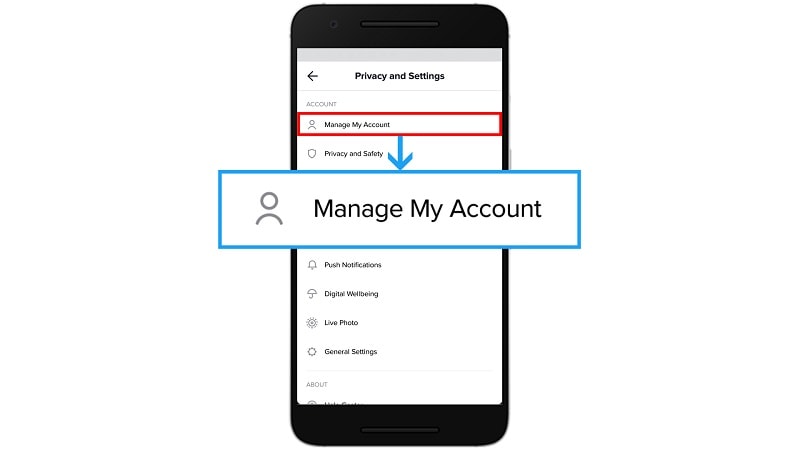
Tap Account at the top of the menu screen, then select Password.
- Process the External Email Token (Verify identity via inbox verification)
TikTok will automatically transmit an identity verification message to your registered email address. Open your inbox, retrieve the six-digit security token, and input it into the verification field inside the app. - Confirm the Secure Password Update (Save your configuration changes)
Type your new password according to the security criteria (letters, numbers, and special characters) and tap Next to complete the update.
If you have previously logged into your TikTok account via a web browser on your PC or Mac, or kept your credentials stored in a local note document that has been deleted, your password credentials may still exist in your system's storage blocks.
When file structures or app configuration documents are deleted, the raw clusters remain on your hard drive. You can deploy Wondershare Recoverit to run a target sector scan on your computer's local hard drive or external backup storage. By parsing through unallocated file system space, Recoverit helps you locate and restore lost text documents, spreadsheet files, or browser profile data folders containing your saved login information.
Part 4. How to Reset TikTok Password Without Both Phone and Email
If you have lost access to both your phone number and your registered email address, you cannot use the automated verification system. You will need to submit an official ticket to the TikTok Trust & Safety review board.
- Navigate to the Feedback and Reporting Panel (Open the support portal interface)
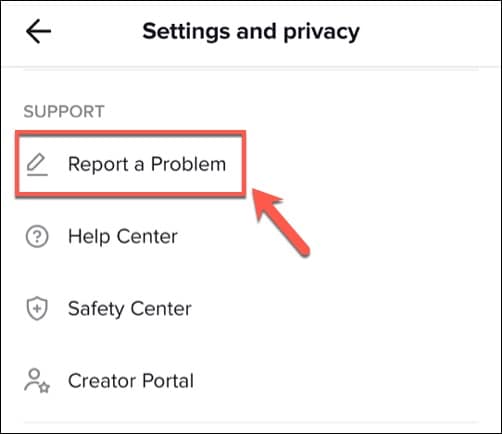
From the TikTok login helper page or within an active profile screen, navigate to Settings and privacy, scroll down to the support division, and select Report a problem.
- Locate the Identity Review Stream (Target login support options)
Tap Account and Profile, select the category labeled Login, and tap the option titled Other. - Submit a Detailed Verification Request (Explain your account ownership details)
Click on the Still have a problem? text hyperlink. Inside the message text box, clearly explain your issue (e.g., 'I have lost access to my registered phone number and old email account. I need to update my contact information to regain access.'). - Provide Account Context and Send (File the ticket for agent review)
Include your exact account username handle, the approximate date the account was created, and the mobile devices used to access the account. Tap Submit and await verification instructions from a support agent via the support dashboard.
This is how you can report your problem to TikTok. Now, you have to wait for a replay from TikTok to get the helpful guide to reset password of TikTok without email and phone number.
Conclusion
We hope that from the above article, you have learned how to reset TikTok password without email or phone number. Now, you can easily reset and change TikTok password and can enjoy creating new videos.
No matter how you lost or forgot your TikTok password, with the above mention methods, you can recover your lost TikTok logins easily.
Recover and Repair Email
- Repair and Recover Emails
- Get Email Password Back


Recoverit Editorial Team
chief Editor