
Linux File Recovery
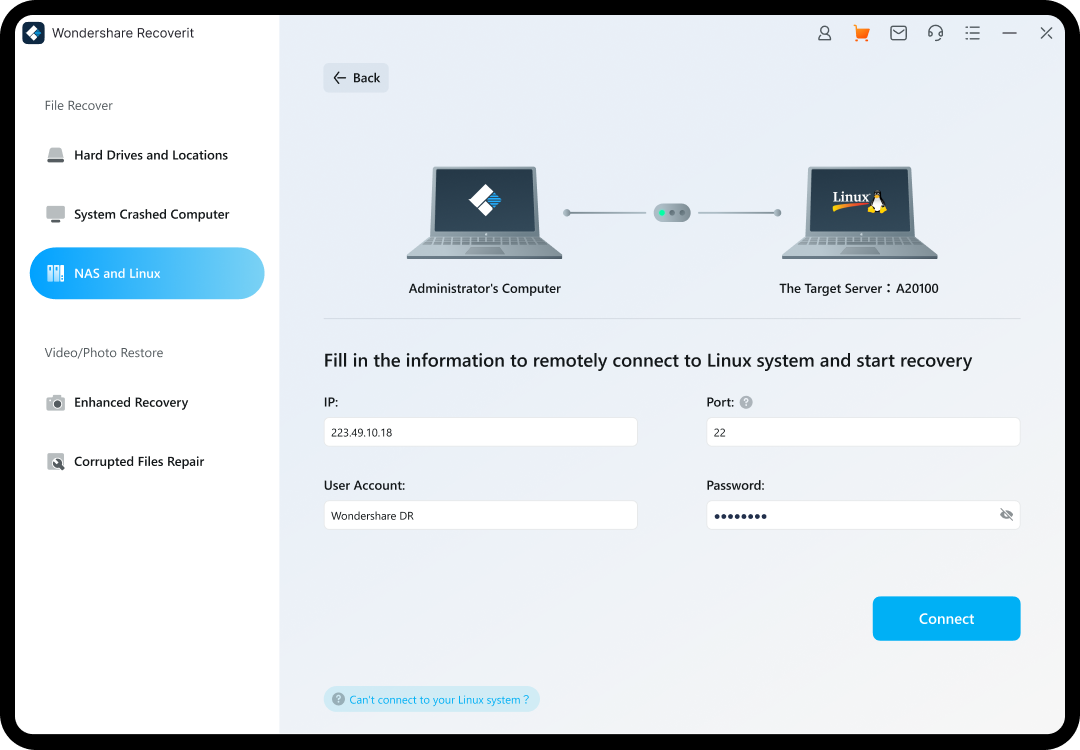
Recoverit helps recover recoverable files from Linux servers, desktops, and laptops when the storage is still readable. It can also support remote Linux recovery workflows from a Windows or Mac computer by entering the Linux IP address, port, username, and password.


One-Stop Linux Data Recovery Software
Recover From Anything
You can lose data in many ways. Recoverit features the fastest and easiest Linux file recovery for restoring deleted files in all these scenarios, over a thousand file formats, and with all popular Linux distros.
Recover Linux Data in 500+ Data Loss Scenarios Such As

Accidental Deletion
You may accidentally delete files, especially when running the "rm" command in the Linux terminal. Recoverit can successfully undelete these files.

Disk Formatting
Formatting is a straightforward way to fix hard drive errors, but it will erase all data. Recoverit effectively handles formatted Linux hard drive recovery.

System Crashes
Even the best-maintained Linux systems can crash from time to time, resulting in data loss. Run the Linux data recovery software to rescue your data.

Power Failure
Power loss is often out of your hands and can happen when you least expect it, damaging or losing files in the process. Don’t Panic. Recoverit helps you recover deleted files from Linux in such case.

Improper Shutdown
Although Linux is equipped with mechanisms handling improper shutdown, several adverse outcomes exist, including losing data. Rest assured when you’ve Recoverit installed on your PC.
Support Recovery of 1000+ File Formats
Linux is a large open-source ecosystem with many customized file formats, and Recoverit Linux Data Recovery software can recognize and recover all your mission-critical data, including:

Video Files

Graphics Files

Documents

Email Files

Other Files
Scenarios
Linux Distros
File Formats


Simple Interface
The simple point-and-click interface allows novices and pros alike to recover deleted Linux data in just a few clicks.
The simple point-and-click interface allows novices and pros alike to recover deleted Linux data in just a few clicks.

Quick Locating
Multiple filter options help narrow your search to quickly find your desired ones from tons of scanned files.
Multiple filter options help narrow your search to quickly find your desired ones from tons of scanned files.

File Preview
You can free preview all scanned files before the final recovery. Then, only make payment when you find your desired files.
You can free preview all scanned files before the final recovery. Then, only make payment when you find your desired files.

Professional-grade
Engaged in data recovery for over 20 years, Recoverit has obtained 35 patents to offer you with a 95% recovery success rate.
Engaged in data recovery for over 20 years, Recoverit has obtained 35 patents to offer you with a 95% recovery success rate.

Stable Performance
Never worry about system or software crashes during Linux file recovery. The stability of Recoverit has reached an industry-leading level.
Never worry about system or software crashes during Linux file recovery. The stability of Recoverit has reached an industry-leading level.

Remote Connection
The Linux data recovery tool works remotely, enabling you to continue your operations on Linux while retrieving data.
The Linux data recovery tool works remotely, enabling you to continue your operations on Linux while retrieving data.
Help Anyone Who Needs Linux Data Recovery


Enterprises
Developers
Technophiles
How to Recover Deleted Files from Linux with Recoverit
Connect to the Linux machine or readable volume, scan for recoverable files, preview the results, and save them to another location before you repair or reinstall anything.


Tech Specs
Supported Operating Systems
- Windows 11/10/8.1/8/7/Vista
- Windows Server 2003 - 2022
- MacOS 10.10 or later
Supported Linux File Systems
- EXT4 , BTRFS, XFS, and BFS
Required Storage Space
- 56MB minimum space for installing


Tips & Tricks for Recovering Linux Deleted Files


See What Our Users Ask Frequently
 Can deleted Linux files be recovered?


Often yes, if the storage is still readable and the data has not been overwritten. Stop using the drive first, then scan it before making repairs or reinstalling Linux.
What should I do after deleting files with `rm`?
Stop writing new data to the Linux storage and start recovery as soon as possible. `rm` removes files without a Trash restore path in many workflows.
Should I check Trash before using recovery software?
Yes, if the files were deleted through a desktop environment that uses Trash. If the files were removed with `rm` or Trash was emptied, treat it as a harder recovery case.
Can I recover files from a formatted Linux partition?
Often yes, if the partition is still readable and the new data has not overwritten the old files. Avoid formatting or repairing the volume first.
Do I need SSH or root access for Linux recovery?
Some remote recovery workflows may require those permissions. The important point is whether the Linux storage can still be reached safely through the supported connection method.
Where should I save recovered Linux files?
Save them to another drive, partition, or external storage. Do not save them back to the original location if that could overwrite other recoverable files.
Can software recover files from a physically damaged Linux drive?
Software needs readable storage. If the drive is not detected, repeatedly fails, or has physical damage, professional recovery is usually safer.
Why does Linux scanning take time?
Linux volumes can be large and contain many file entries, so a full scan may take time before recoverable files appear in the preview.