
Jun 12, 2026 • Filed to: Windows Computer Solutions • Proven solutions
 TL;DR:
You can customize Windows 8 and Windows 7 with Windows 10 visual styles by downloading compatible themes and applying them directly through the desktop personalization menu.
● The 10 compatible themes offer diverse aesthetics, including dark interfaces like Base and Space Blueberries, light layouts like White Dior, and transparent window designs such as Elune.
● These specific Windows 10 themes are fully backward compatible and safely run on Windows 7, Windows 8, and Windows 8.1 without requiring complex system modifications.
● To activate a downloaded theme on Windows 8, right-click the desktop, open the Personalize menu, locate the themes section, and click your preferred theme to apply it automatically.
Ask AI for a summary
 ChatGPT
 Perplexity
 Gemini
 Claude
 Grok
Grok
Every Windows OS has been created by Microsoft and it is because the user can apply the methods as well as the overall methodologies about other systems that are launched by the same company. It is also to be noted that the user in this regard should make sure that the methods are applied or else the OS is so vast in term of size and terminology that the user will find himself lost within it and sometimes it is fatal as the overall system damage can occur about this subject. The developments of windows OS have, at last, found its peak and it is in form of windows 10 which will be launched on 29th July 2015, and as per Microsoft, it is the last version of the windows series. This tutorial has been written to make sure that the windows 10 themes that apply to windows 8 are not only discussed in great detail but the tech-savvy users also get a got insight regarding the topic so that require changes, as well as the implementation of the themes, is not a difficult task at all. As it has been mentioned earlier that the user will be able to use the related themes and the functionalities in the best manner when it comes to the Microsoft platform therefore it is important to note that the user can make sure that the methods that are mentioned here are applied in the manner they have been written so that any inconvenience is avoided in this regard.
🔍 Technical Overview: Windows 10 Visual Styles for Windows 8/8.1
The following table provides an analysis of the top 10 custom visual styles designed to replicate Windows 10 aesthetics on a Windows 8 system architecture. These themes modify core shell layouts, window borders, taskbars, and user interface controls:
| Theme Name | Design Style & Aesthetic | UI Modification Focus | System RAM Footprint | Best Used For |
| 1. Base Dark Edition | Dark Flat / Minimalist | High-pixel contrast maps | Extremely Low | Low-spec setups / Low eye strain |
| 2. Snowy Glossy Hybrid | Glossy Light / Soft Frost | Metallic window accents | Low | Clean desktop look |
| 3. White Dior Productivity Pack | Clean Light / Modern | High-productivity spacing | Minimal | Office & business environments |
| 4. Simplex Minimalist | Minimalist Borderless | Custom frames & controls | Low | Cross-platform look |
| 5. Chromium OS Simulation | Material Flat Design | Google Chrome OS look | Balanced | Modern browser look |
| 6. Gray 8 Transparent Color Pack | Semi-Transparent Matte | Soft glass windows | Balanced | High-DPI screen setups |
| 7. Space Blueberries Visual Style | Cyberpunk Deep Dark | Custom dark navigation maps | Low | Multi-media editing suites |
| 8. Work Redux Engine | High-Contrast Workspace | Professional dark borders | Low | Long coding sessions |
| 9. Glow Dark Custom Revamp | Neon Accent Dark Theme | Glowing control states | Balanced | Custom desktop setups |
| 10. Elune Glass Framework | Premium Aero Glass | Fully transparent panels | Moderate | High-performance graphics cards |
10 beautiful windows 10 themes for windows 8
The following are the ten most important, useful, and beautiful themes when it comes to windows 10 and these all can be applied windows 8 as well as windows 7 without any issue and trouble.
1. Base Dark Edition
[Theme Source Link](http://link6155.deviantart.com/art/Base-for-Windows-8-1-358462823)
The Base visual style is an exceptional choice for users looking for high-pixel-density rendering on a dark backdrop. Engineered explicitly to decrease monitor glare, it updates system borders with a clean, borderless dark skin. It runs with an extremely small memory footprint, making it ideal for keeping your desktop fast and responsive.

2. Snowy Glossy Hybrid
[Theme Source Link](http://carborunda.deviantart.com/art/Snowy-v3-0-363931948)
Snowy bridges the design gap between Windows 8's flat accents and the refined, glossy windows seen in modern preview builds. It maps clean white frames onto active windows while preserving core system stability. This makes it a great entry point for users looking to update their user interface without a total system overhaul.

3. White Dior Productivity Pack
[Theme Source Link](http://ridkurn.deviantart.com/art/UPDATE-WhiteDior-Visual-Style-for-Windows-8-8-1-361644703)
White Dior is a light-mode theme optimized for office and development environments where clarity is essential. By restructuring interior padding sizes and system navigation buttons, this style organizes your display layout to improve reading comfort and reduce visual clutter.

4. Simplex Minimalist
[Theme Source Link](http://link6155.deviantart.com/art/Simplex-RC-for-Windows-8-355032339 )
Simplex uses a modern, thin-frame design that pairs perfectly with high-resolution screens. It offers great cross-platform optimization, ensuring that text elements, folder structures, and context menus render accurately across both Windows 8 and 8.1 platforms.

5. Chromium OS Simulation
[Theme Source Link](http://raymonvisual.deviantart.com/art/Chromium-RC2-vs-updated-may16-2013-350902327)
For desktops that favor a clean, web-centric interface, Chromium applies an aesthetic inspired by cloud operating systems. It flattens design controls, adjusts active title tabs, and creates an organized, browser-like workspace across local explorer windows.

6. Gray 8 Transparent Color Pack
[Theme Source Link](http://gsw953onda.deviantart.com/art/Gray8-Color-Pac-346973557)
Gray 8 brings back the popular transparent title-bar windows using a light gray palette. It provides highly flexible color configurations, allowing customization enthusiasts to fine-tune active workspace gradients while maintaining a uniform, modern flat-plane layout.
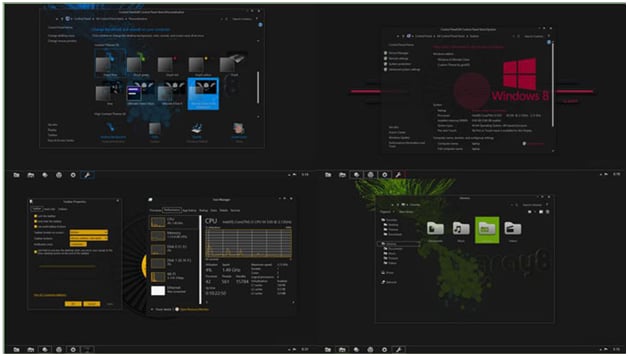
7. Space Blueberries Visual Style
[Theme Source Link](http://neiio.deviantart.com/art/Space-Blueberries-8-1-338438411)
Space Blueberries delivers a rich, dark workspace accented by subtle blue and purple tones. This layout modifies everything from folder panels to checkbox graphics, making it an excellent backdrop for creative professional software arrays.

8. Work Redux Engine
[Theme Source Link](http://neiio.deviantart.com/art/Work-Redux-8-1-337353688)
Designed for extended workstation sessions, Work Redux uses an optimized low-contrast dark interface to help prevent eye strain. Its sharp window lines and structured side navigation panels give legacy Windows 8 platforms a clean, updated look.

9. Glow Dark Custom Revamp
[Theme Source Link](http://seahorsepip.deviantart.com/art/glow-dark-update-347268598)
Glow Dark combines dark primary panels with vibrant neon element indicators. It features fully updated system assets that have been tested to ensure smooth rendering and stable performance across Windows 7, 8, and 8.1 architectures.
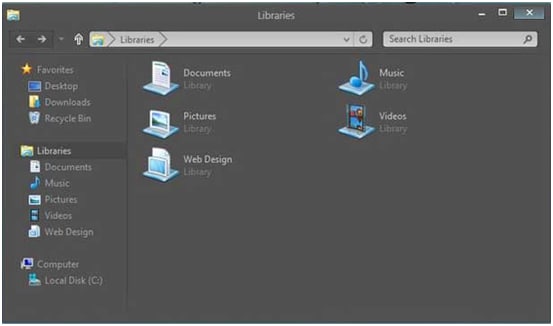
10. Elune Glass Framework
[Theme Source Link](http://neiio.deviantart.com/art/Elune-for-Windows-8-1-379882888)
Elune is a premier choice for users looking for clean transparency. By modifying the system’s core layout engine, it creates beautiful glass-like window frames and smooth, rounded interface panels that bring a sleek, modern feel to legacy desktops.

🛠️ Step-by-Step Manual: Installing Third-Party Visual Styles Safely
Because custom desktop layouts change internal operating system configurations, apply this step-by-step procedure to patch your system and switch layouts securely:
- Create an Emergency System Restore Point
Press the Windows Key + Q, type `Create a restore point` into the search bar, and select the system utility. Click the Create button, label it `Pre-Theme Patching`, and hit Enter. This ensures you can revert to a functional desktop configuration if a third-party theme files causes an issue.

- Patch System UXTheme Files
Download a trusted parsing utility like UltraUXThemePatcher. Right-click the installation package and choose Run as Administrator. Follow the installation prompts to patch your system files (`uxtheme.dll`, `themeui.dll`, and `uxinit.dll`), and restart your computer to apply the patches. - Extract and Move Theme Files to the Windows Resource Directory
Locate the theme package folder you downloaded from DeviantArt. Extract the zip folder contents, select the `.theme` file along with its matching configuration asset folder, and copy them. Navigate to your root directory path: `C:\Windows\Resources\Themes\` and paste the files into this location. - Activate the Theme via the Personalization Panel
Right-click an empty space on your desktop and select Personalize. Under the main window selections, look for your new theme listed under the Installed Themes or Third-Party Styles category. Click on your preferred layout option and wait a few moments while Windows adjusts your desktop layout.

People Also Ask
-
Why did my desktop background turn black and lose all text formatting after applying a custom theme?
This error typically means that the theme file you applied does not match your specific version of Windows (for example, applying a theme built for Windows 8.1 onto a standard Windows 8 installation). This mismatch causes the Windows Desktop Window Manager (DWM) shell to fail to read the theme's properties. To fix this, restart your computer in Safe Mode, open the native Personalize dashboard, and switch back to the default Windows Classic theme. Always check the theme creator's system compatibility notes before installing third-party files. -
Do third-party theme setups cause system slows or high CPU usage?
No, standard visual styles that copy Windows 10 layouts do not cause noticeable performance drops because they use the operating system's native rendering engine (`themeservice.dll`). They simply swap out image assets and adjust border sizes. However, if you use a theme that requires complex background tools to add transparency or custom start menus, you may see a small increase in RAM usage. To maximize system performance, choose clean, minimalist options like Base or Simplex. -
How do I fix text alignment and font rendering problems on high-resolution screens?
Text alignment and blurry font rendering are usually caused by high-DPI scaling configurations on modern displays. Many legacy themes were designed for older, standard monitors. To fix this, right-click on your desktop, select Screen Resolution, and click Make text and other items larger or smaller. Set your display scaling back to a standard 100% or 125%. Alternatively, you can search for a theme that explicitly supports high-DPI setups to ensure clear text rendering on your screen. -
What should I do if a modified system file corrupts my OS and prevents boot up?
If a custom theme causes a system file conflict that stops Windows from booting properly, do not panic. Restart your computer and press F8 repeatedly to open the Advanced Boot Options menu, then select Last Known Good Configuration or run System Restore to roll back your files. If the system remains unbootable and you need to rescue critical files on your drive, create a bootable media drive using Wondershare Recoverit on another computer. Boot your system from that USB drive to securely extract your important files before performing a clean Windows reinstallation.
Computer Data Recovery
- Windows PE
- System problems
- Reset Windows 10
- Install Windows 10 on SSD
- Can't Enter Safe Mode
- Fix no Sound issue
- Parameter is Incorrect
- PC Errors


David Darlington
staff Editor