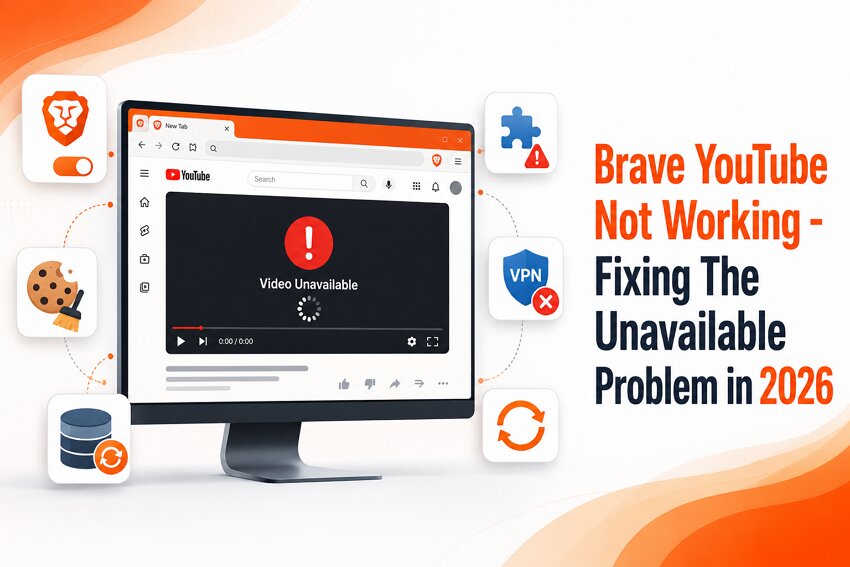

Brave Browser offers a range of privacy-enhancing tools, including an integrated ad blocker, which makes it popular for its privacy features. While people use it for specific purposes, they also utilize it for running YouTube. However, according to many users on the Brave Community page, there is a consistent error when running YouTube.
Although people have addressed disabling Brave Shields as a solution, it might not work every time. For that, this guide presents the most effective fixes that can help users fix the "Brave YouTube not working" error.
Try Recoverit to Perform Data Recovery
 Security Verified. 3,591,664 people have downloaded it.
In this article
Part 1. Why Is YouTube Not Working on Brave Browser?
YouTube not working across the Brave Browser might sound like a very basic problem. However, at times, it neither gets fixed nor the issue gets cleared for the user. The problem might not be only associated with the exceptional ad-blocking facility of Brave Browser. This is why users look deeper into why YouTube does not work on their browser.
What Causes the Brave YouTube Video Unavailable Problem?
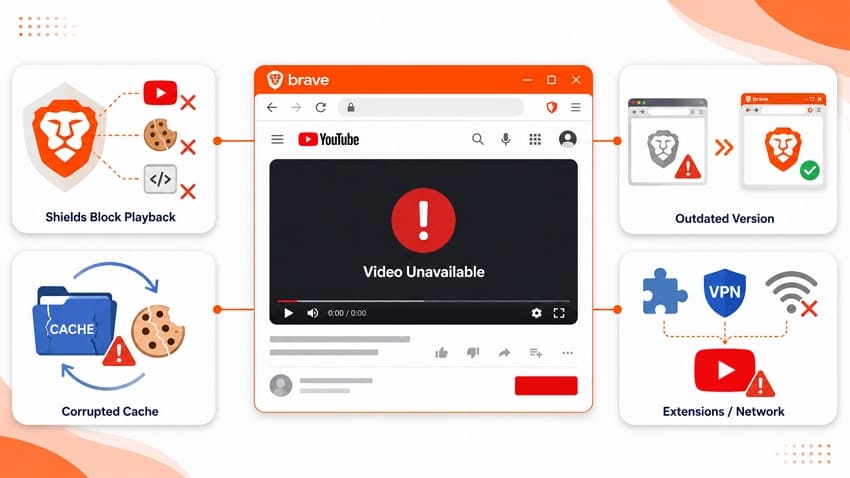
Many reasons could result in a non-functional YouTube on Brave Browser. Some of the causes are listed below to help understand the basics behind this issue:
- Brave Shields Blocking YouTube Content: The built-in Shields feature can stop the YouTube scripts, ads, or cookies essential for video playback. Due to this, videos may fail to load across YouTube and display a "Video Unavailable" error.
- Corrupted Browser Cache and Cookies: With time, cache and cookies across the browser can get outdated. This may lead to content corruption, which will stop YouTube to communicate directly with the browser, leading to such playback issues.
- Outdated Brave Browser Version: An outdated version of Brave browser can influence compatibility issues with YouTube. This mismatch may trigger errors when attempting to watch videos.
- Conflicting Extensions or Network Issues: Third-party browser extensions, VPNs, or unstable internet connections can disrupt YouTube services. These conflicts may block video requests and result in videos becoming inaccessible.
Part 2. Quick Checks of Brave YouTube Not Working
Before you try out any invasive fixes to resolve the "Brave browser YouTube not working" issue, it is better to ensure that you have performed the following checks:
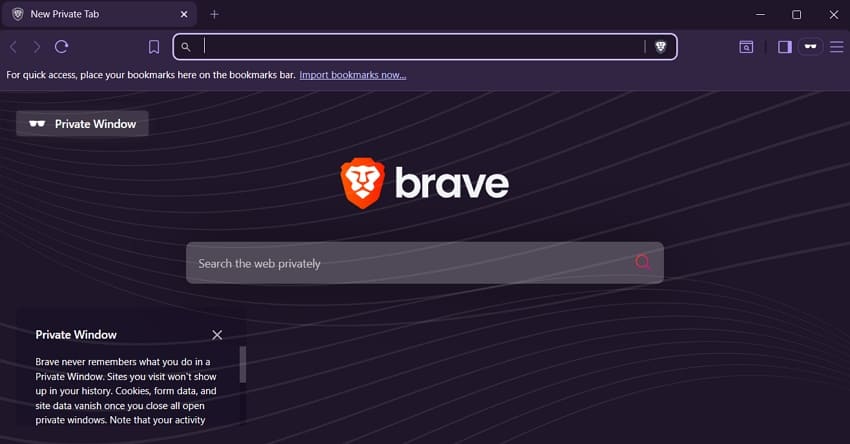
Try YouTube in a Private Window or Another Browser
Running YouTube in a private window or changing the browser can be an easy solution to using YouTube again. When the problem is related to Brave browser settings, its extensions, or cached data, running YouTube in a private browser does the trick. If it remains, try running YouTube across another browser to check if the problem is directly related to YouTube or not.
Check If YouTube Is Down
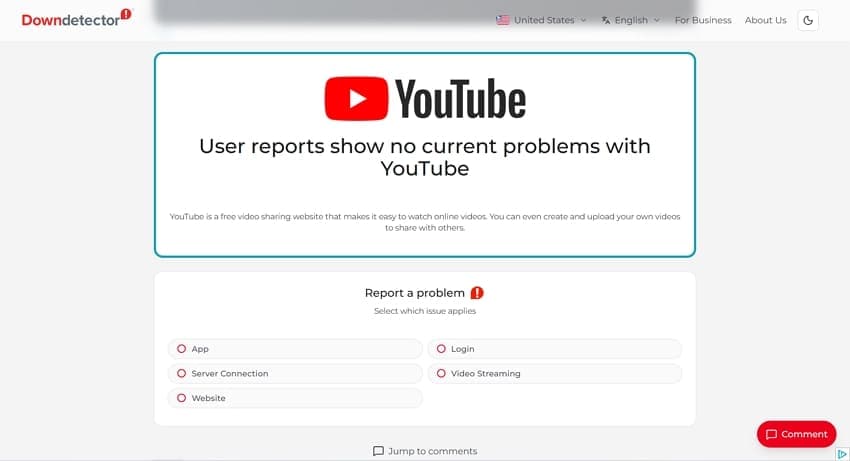
The problem involving YouTube’s video playback is not always associated with Brave Browser. It is quite possible that YouTube is having a temporary server outage. You can always look into services like Downdetector to determine whether YouTube is down when Brave YouTube isn't working.
Confirm Only Brave Browser Is Affected
It is best to confirm where the problem is originating from. If YouTube runs perfectly on other browsers and devices, the problem is not external. This means that Brave Browser has some direct issues that are leading to such errors.
Part 3. Brave Browser YouTube Not Playing Videos? Complete Fix Guide
YouTube in Brave Browser may stop working for various reasons, ranging from corrupted cache files to video playback errors. Trying out the following fixes might help you restore normal browser function when the Brave browser YouTube is not working:
Fix 1. Restart Brave Browser
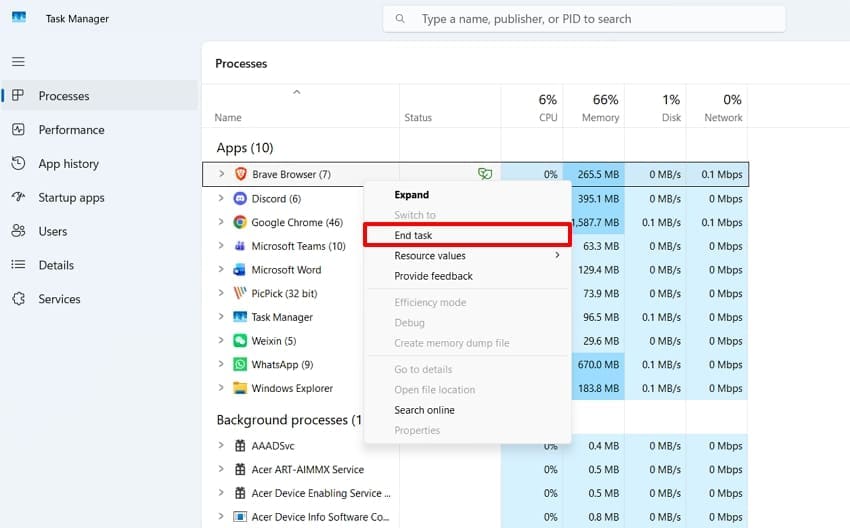
Temporary glitches in Brave can prevent YouTube to load its videos properly. Restarting the browser will refresh all active sessions and clear out minor software issues that interfere with the video playback. The simple guide will help you resolve the temporary browser issue by restarting it:
Instructions. To turn off all running operations of Brave Browser, open Task Manager on your device. Right-click on the respective browser services and select the "End task" button to stop its operations. Restart it again normally to start using Brave Browser for YouTube again.
Fix 2. Disable Brave Shields for YouTube (Per‑Site)
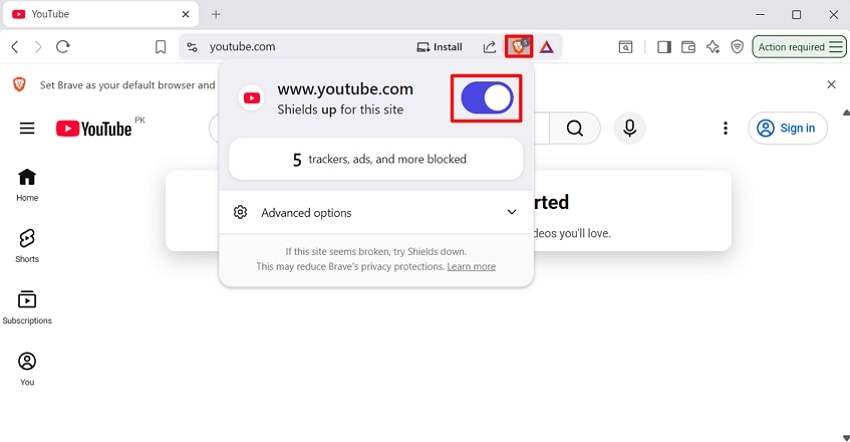
Brave Shields block trackers, scripts, and certain website elements to enhance privacy. However, YouTube sometimes relies on these components to function correctly. Disabling Shields specifically for YouTube can eliminate conflicts while preserving protection on other websites, allowing videos to load and play normally. Follow the instructions below and learn how to fix the "YouTube not working on Brave" issue by disabling Brave Shields:
Instructions. Open YouTube on the Brave browser and expand the "Shields" menu at the top right. Toggle the Shields button and refresh the page to continue using the website normally.
Fix 3. Clear Cache and Cookies in Brave
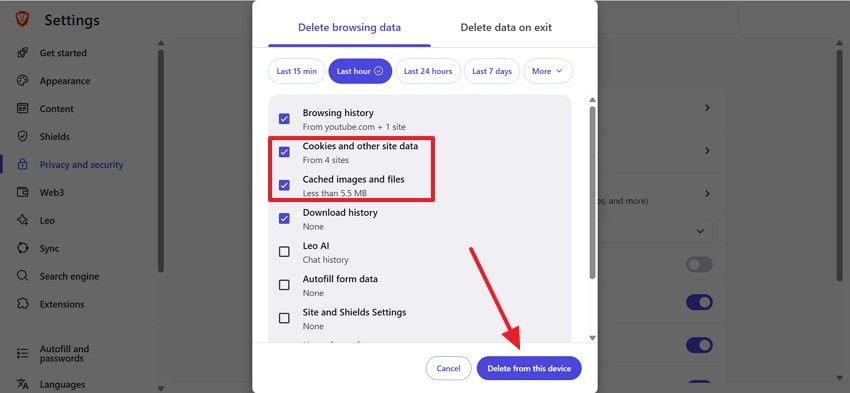
Stored cache files and cookies can become outdated or corrupted over time. When this happens, YouTube may fail to load content correctly or display playback errors. Clearing browser data removes potentially problematic files and forces Brave to retrieve fresh information from YouTube's servers. Clear cache and cookies in Brave by following the instructions below to fix the "Brave YouTube not working 2026" issue:
Instructions. Open the Brave browser and press the "Ctrl + Shift + Del" keys to open the browser’s settings page. Here, mark the "Cookies and Other Site Data" and the "Cached Images and Files" boxes. After selecting the suitable time range, click the "Delete from this Device" button to remove them successfully.
Fix 4. Update Brave Browser to the Latest Version
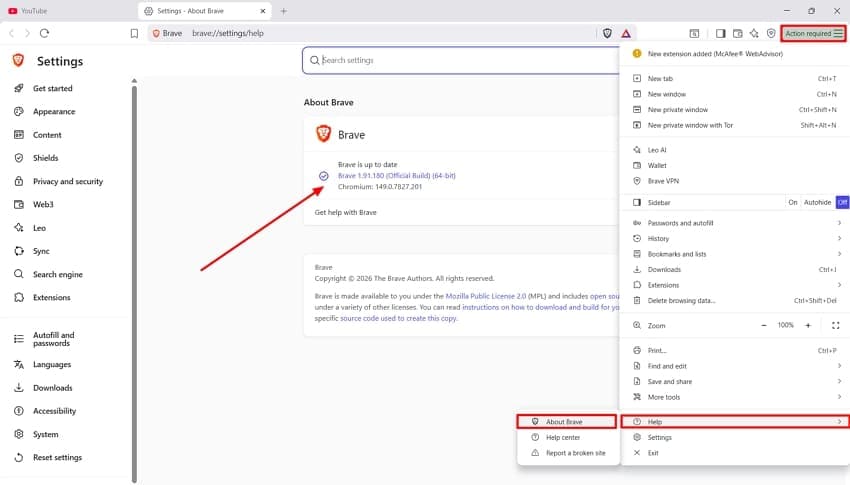
Old versions of Brave browser may contain bugs which directly affects YouTube playback. Updating the browser helps ensure that you receive the latest security patches and compatibility fixes. The following tutorial will help you fix the Brave YouTube "An Error Occurred Please Try Again" problem by updating the browser:
Instructions. In the Brave browser, expand the "Horizontal Lines" menu icon at the top right and hover the cursor over "Help" to select "About Brave." If you see any pending updates on the next page, install them to ensure proper browser function.
Fix 5. Disable Browser Extensions (Especially Ad Blockers and Script Blockers)
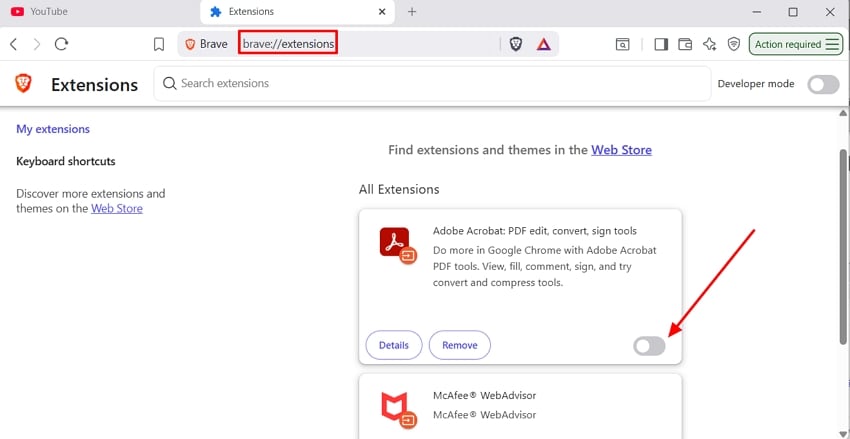
The use of extensions can often block ads, scripts, cookies, or network requests, which directly affects the website. Such modifications interfere with YouTube’s operations and stop the videos from loading. Disable browser extensions by following the guide below when the Brave YouTube is not working:
Instructions. Open the Brave browser and type "brave://extensions" in the address bar. Using the next page, "Disable" all extensions manually and re-enable extensions one by one to locate the problematic extension.
Fix 6. Turn Off VPN or Proxy Services
People usually enable VPN or proxy services across their devices to avoid location barriers. However, due to enabled VPN or proxy services, basic websites like YouTube might not operate. Check out the following instructions and learn how to resolve the "Brave browser YouTube not working" issue using this technique:
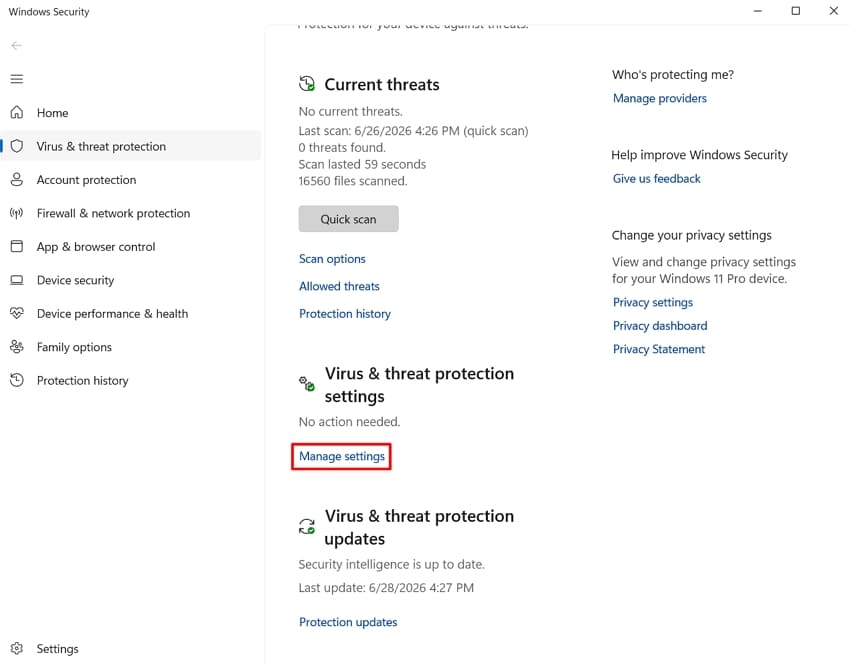
Step 1. To start the process, search for "Virus & threat protection" settings across the Search bar. As it opens up a new window, look for the "Manage settings" button in the "Virus & threat protection settings" section.
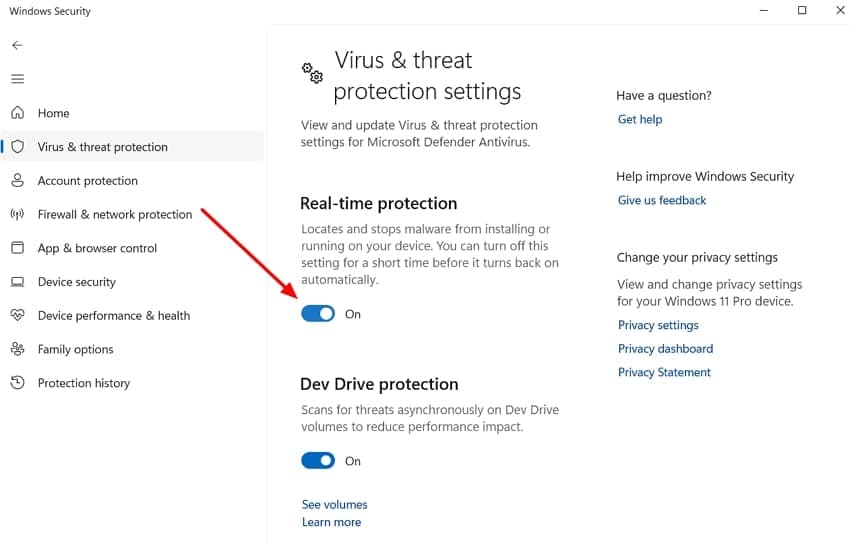
Step 2. This will lead you to a new window, where you need to turn off the toggle under the "Real-time protection" settings.
Fix 7. Disable Hardware Acceleration in Brave
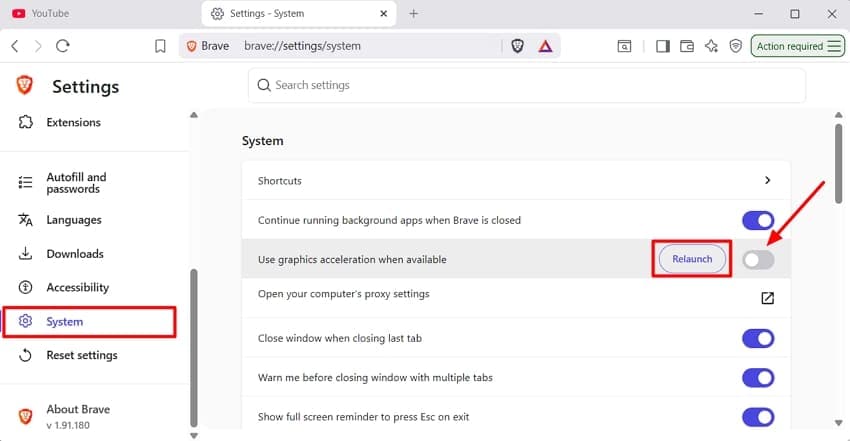
Hardware acceleration improves the browser’s speed by consuming your computer’s graphic card. This leads to glitches and freezes in the playback due to outdated drivers and video compatibility issues. Upon disabling the feature, it will force Brave to use software rendering, which can fix this issue. The following instructions features a simple solution to fix the "YouTube not working on Brave" issue:
Instructions. Open the Brave browser’s "Settings" page and expand the "System" tab from the left panel. Find and disable the "Use Graphics Acceleration When Available" toggle. Now, relaunch the browser and replay the video to see if it plays.
Fix 8. Reset Brave Browser Settings to Default
Misconfigured browser settings, experimental features, or unwanted changes can disrupt YouTube functionality. Resetting Brave restores default settings without uninstalling the browser. This can eliminate hidden configuration issues and provide a clean environment for YouTube to operate properly. The steps below explain how to reset Brave Browser settings to fix the "Brave YouTube not working 2026" issue:
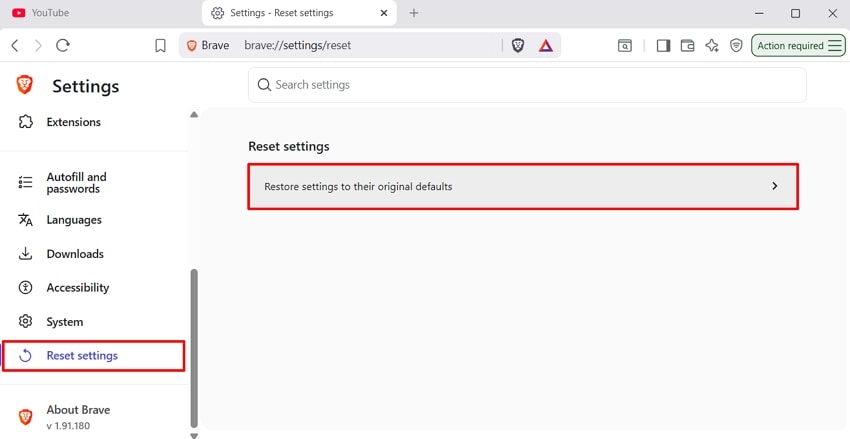
Step 1. Upon accessing the "Settings" page of Brave Browser, expand the "Reset Settings" tab on the left. Select the "Restore Settings to their Original Defaults" to open a pop-up menu.
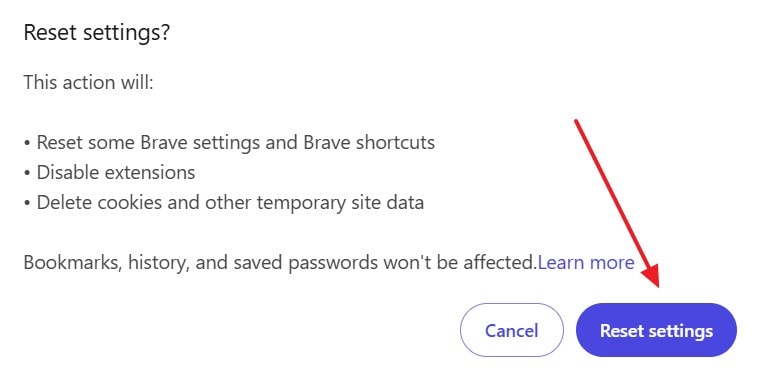
Step 2. Click "Reset Settings" in the following pop-up to go back to the browser’s original settings.
Pro Tip: Recover Lost Brave Browser Downloads with Recoverit
The fixes related to the "Brave YouTube not working" issue will surely help you in watching your favorite videos across the browser. However, downloading YouTube videos is quite common among everyday users. In such cases, losing these Brave browser downloads can also occur due to many reasons. Luckily, Recoverit lets you regain access to all the lost videos using its advanced algorithms.
It offers a 99.5% recovery rate, delivering successful results across Windows and Mac. Unlike other recovery tools, Recoverit helps users recover their lost videos with no quality loss. It easily recovers HD, 4K, and 8K Brave browser YouTube downloads while maintaining the file integrity.
Key Features
AI-Powered Recovery: Recoverit offers assisted AI recovery services, where it exclusively diagnoses the issue, improving the efficiency of recovering videos by 1.8x.
Matches Video Fragments: The platform has the ability to recognize and restructure the scattered video fragments of a single video using a diversified algorithm.
Deep Scan: The Deep Scan feature in Recoverit lets you look for your lost videos through an extensive search across your device.
A Complete Guide to Retrieve Lost Brave Browser Downloads Using Recoverit
While you've learned much about Recoverit's capabilities, look into the following steps to understand the process involved in restoring lost Brave downloads:
Step 1. Specify the Missing Video Location
Open Recoverit and select the location of your missing YouTube video from the main interface.

Step 2. Look for the Lost Videos
After you are in the drive of the lost Brave videos, use the quick scan feature to find them. As you spot the videos, click the "Recover" button to start retrieving.

Step 3. Preview the Videos Before You Retrieve Them
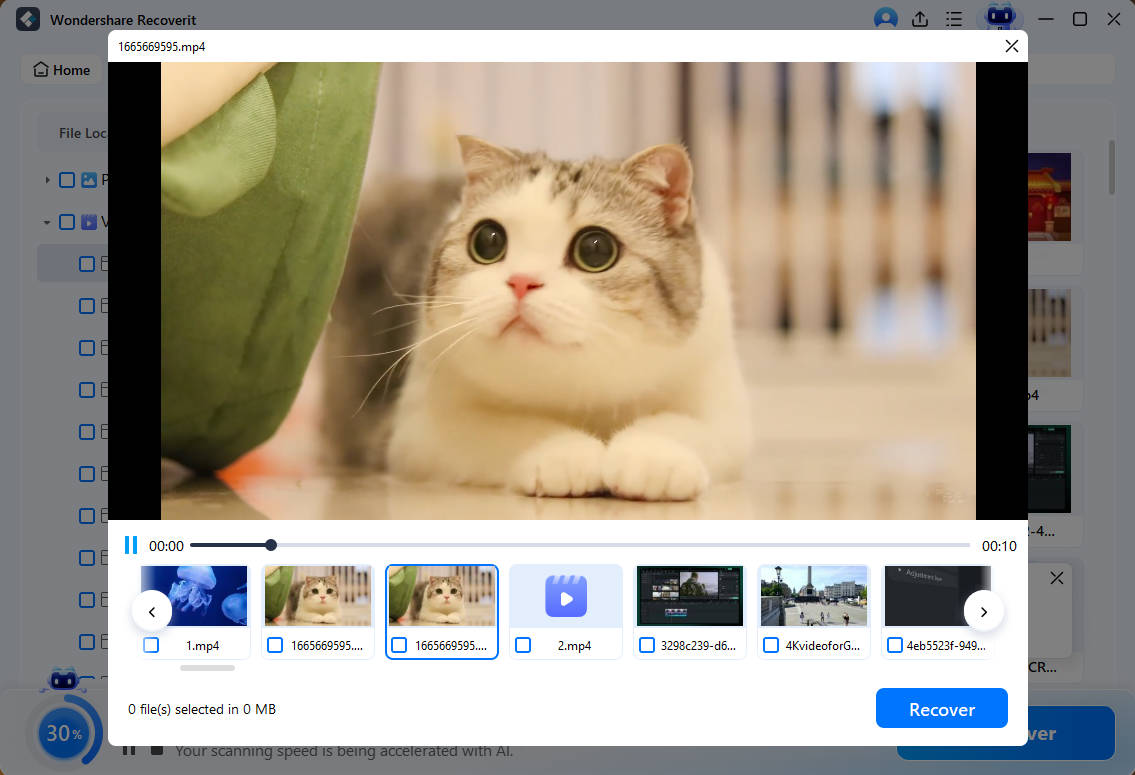
With the missing YouTube downloads restored, preview them and click "Recover" to export. them to your device.
Conclusion
Brave YouTube not working is usually caused by browser settings, extensions, outdated components, or network-related issues. This guide explained the most common reasons behind the problem and shared 8 practical fixes to restore YouTube playback. If you lose downloaded YouTube videos during troubleshooting, Recoverit can help recover them from your computer or storage device quickly.
FAQ
-
1. Can Brave Shields prevent YouTube videos from playing?
Brave Shields can occasionally block scripts or cookies that YouTube needs to function properly. Disabling Shields for YouTube often resolves playback issues. -
2. Why does YouTube work in other browsers but not in Brave?
If YouTube does not work on Brave, this leads to a browser-specific problem, which might involve its settings, extensions, or cache data. You should always check YouTube across another browser to confirm the source. -
3. How can I retrieve the videos I downloaded in Brave YouTube?
The videos downloaded through Brave YouTube can be retrieved using Recoverit. This platform supports batch processing and recovers multiple videos in a single go. -
4. Can I get the same video quality after retrieving videos downloaded through Brave YouTube?
Recoverit has advanced algorithms that restore the Brave YouTube videos without deteriorating the original quality. Its 1.8x efficient recovery helps in restoring the video in high-quality, and in no time.


