
Many players encounter a black screen when launching 007 First Light, preventing the game from loading beyond the opening screen. Although the issue can be frustrating, it is often caused by common problems such as graphics drivers, corrupted game files, or incorrect display settings. This guide explains the most effective ways to fix the 007 First Light black screen issue on your PC and get the game running normally again.
Try Recoverit to Perform Data Recovery
 Security Verified. 3,591,664 people have downloaded it.
In this article
Part 1. Understanding the "007 First Light Black Screen" Issue
The 007 First Light black screen issue is a critical startup failure. It stops the game from loading visual assets during initial boot. This technical glitch traps players on a dark, unresponsive monitor display. Your system runs in the background but fails to render game graphics. Many different factors can trigger this annoying black screen problem quickly.
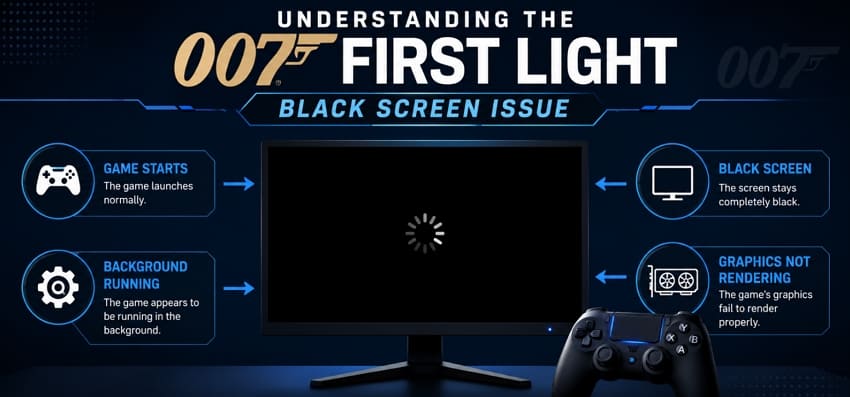
Why Does 007 First Light Get Stuck on a Black Screen?
Several factors can cause the 007 First Light to be stuck on a black screen, as explored below:
| Reason | Cause |
| Wrong GPU Selected | The game runs on the integrated GPU instead of the dedicated graphics card. |
| Fullscreen Mode Conflict | Fullscreen mode conflicts with your display settings or graphics driver. |
| Outdated Graphics Drivers | Old, corrupted, or incompatible GPU drivers prevent the game from rendering properly. |
| Overlay Software Conflict | Overlays from Discord, Xbox Game Bar, MSI Afterburner, or similar apps interfere with startup. |
| Compatibility or Permission Issues | Incorrect compatibility settings or missing administrator privileges block normal game startup. |
| Corrupted Game Files | Missing or damaged game files prevent essential assets from loading correctly. |
| Corrupted Shader Cache | Damaged shader cache files cause rendering failures and black screen issues. |
Part 2. How to Fix the 007 First Light Black Screen Issue
Almost every player can fix the 007 First Light black screen on PC using simple methods. Developers also actively track and post known startup game issues, according to 007 First Light Player Support. Hence, look at these practical solutions to resolve your game crash:
Fix 1. Confirm 007 First Light Game Servers Are Up and Running
Sometimes server outages cause your game to freeze. The application stays black while waiting for a response from network hosts. You must check official social media channels for recent server status updates. Gamers can also look at community forums like Reddit to see if other players report issues. Moreover, OutageScope or similar websites often provide real-time connection status reports.
Fix 2. Restart 007 First Light or PC
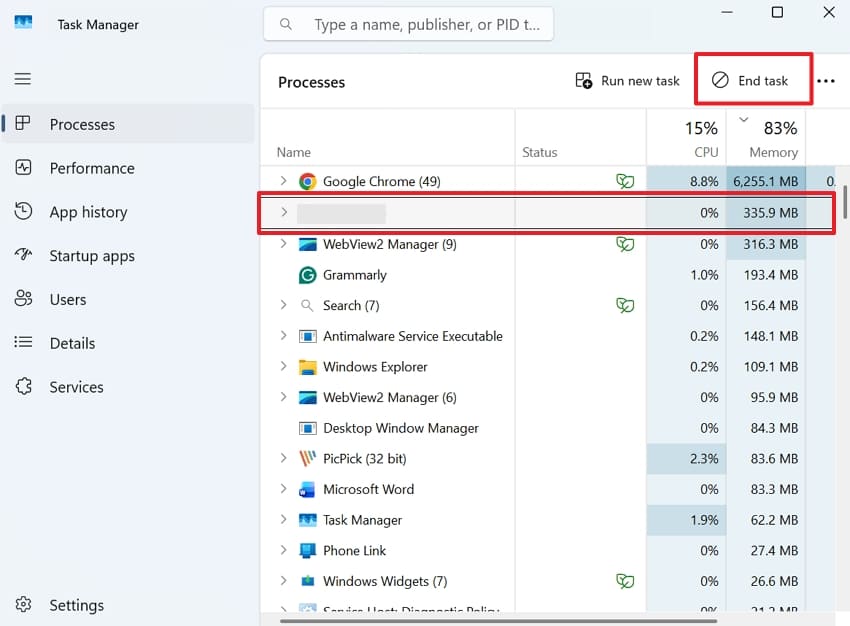
Background processes can interfere with the game during startup and cause it to freeze on a black screen. Ending the game through Task Manager clears any stuck processes, while restarting your PC refreshes system memory and reloads the graphics driver for a clean launch. Review the steps to resolve the 007 First Light black screen on launch by restarting the game:
Instructions. Upon pressing “Ctrl + Shift + Esc” together, click on “007 First Light” and press “End Task.” After a few moments, launch the game again to check whether the black screen issue is resolved. If the problem continues, restart your PC and try launching the game again.
Fix 3. Update Your Graphics Drivers
Many times, old drivers fail to support newer games and their graphics demands. Corrupted driver files can also block proper game display rendering. Yet, fresh drivers fix bugs and improve overall system graphics performance, too. Platforms, including NVIDIA and Intel, regularly release updates for better game compatibility. Gamers now adhere to these steps to update their graphics drivers:
Step 1. Choose the “Open” option for “Device Manager” after searching for it in the "Start” menu.
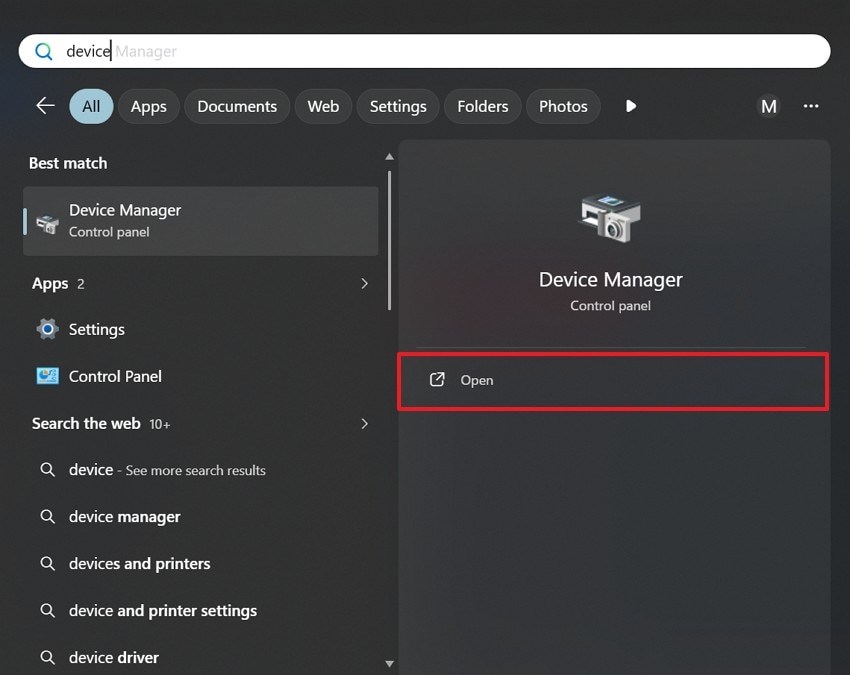
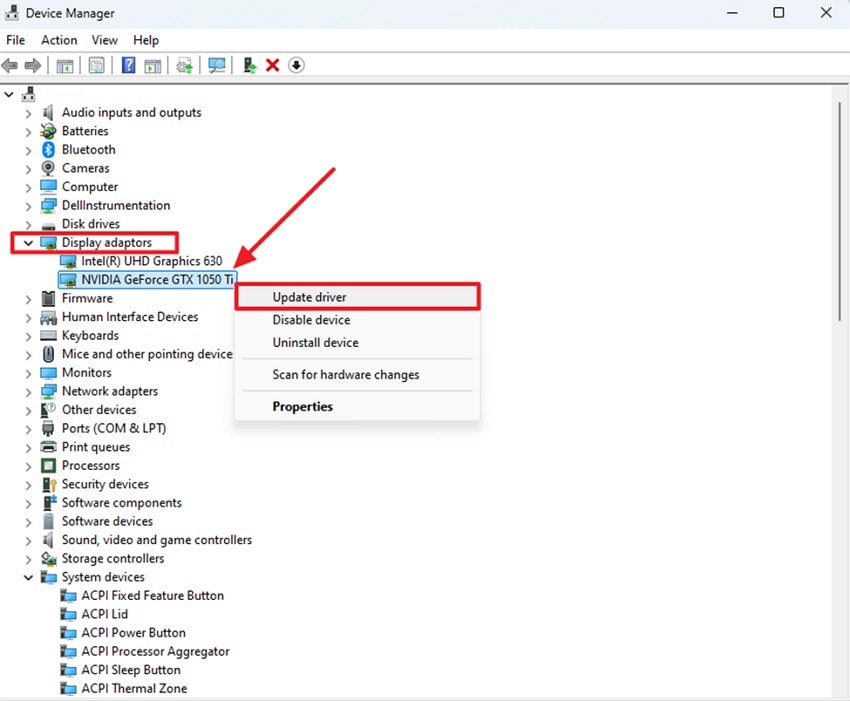
Step 2. Inside the following display, click the “Display Adapters” section to reveal options. Then, right-click your GPU and opt for “Update Driver” from the menu.
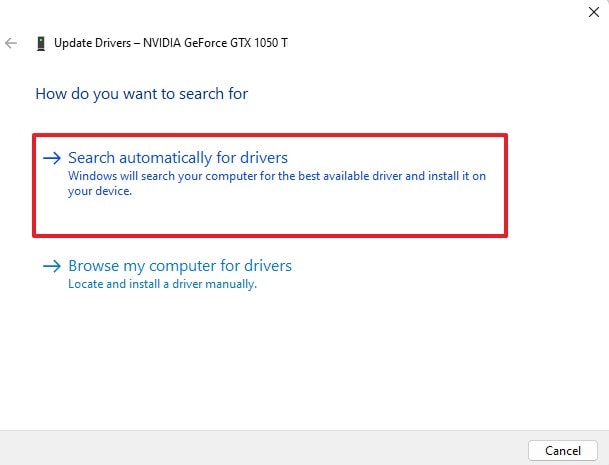
Step 3. Press “Search Automatically for Drivers” to allow Windows to scan for the latest compatible driver.
Fix 4. Force 007 First Light Onto Dedicated GPU
Laptops often run games on a weak integrated graphics chip instead. This weaker GPU cannot handle demanding games and causes display issues. Still, Windows settings let you assign specific apps to your preferred GPU. On the Steam Community, players also confirmed that forcing dedicated GPU use resolved the issue. You can manually cater to the 007 First Light black screen at startup via these steps:
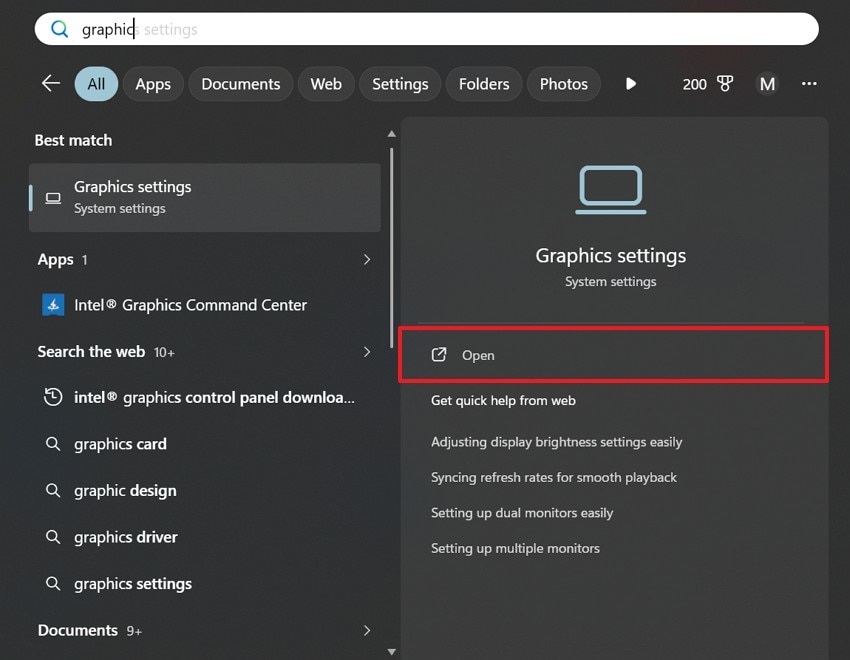
Step 1. As you search for “Graphics Settings,” launch it via the “Open” option.
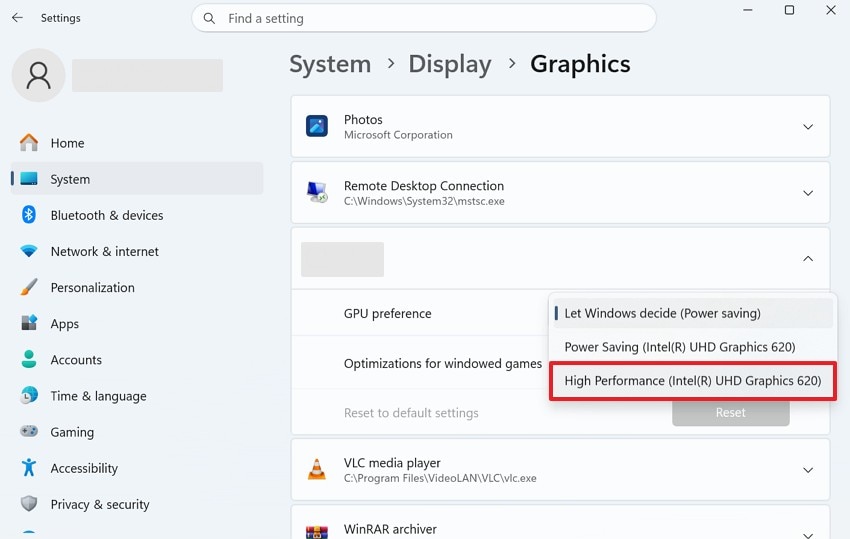
Step 2. Scroll down to find the “007 First Light” game and click the drop-down box next to “GPU Preference.” After that, you need to select “High Performance,” so it uses your dedicated GPU.
Fix 5. Verify Integrity of Game Files
Often, damaged or missing game files cause this disturbing black screen problem. It might be possible that failed downloads or updates can corrupt important core game files. These broken files block the game from loading its visual assets. Nonetheless, Steam’s native tool detects and repairs corrupted local game files. So, perform the following steps to use this fix and resolve the issue:
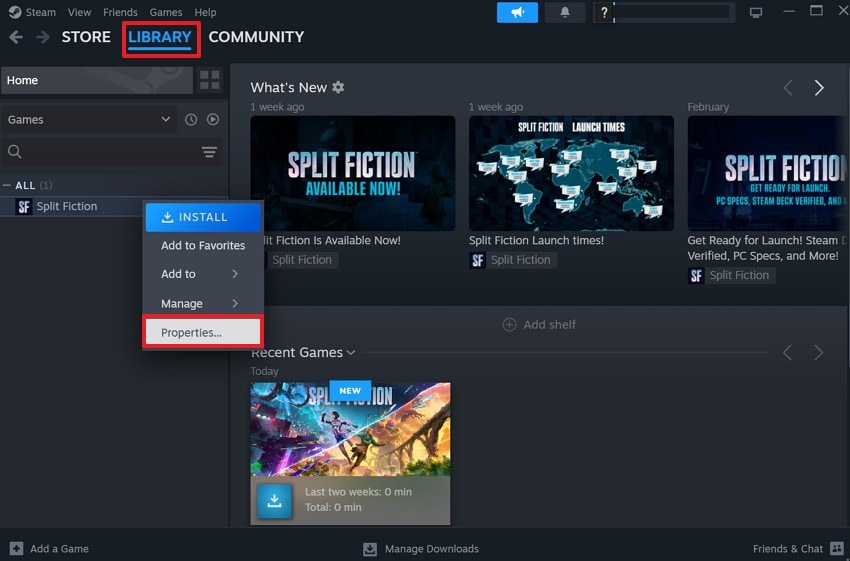
Step 1. Run your game platform, like Steam, and access “Library” where your installed games are listed. Find “007 First Light” and right-click its name to choose “Properties.”
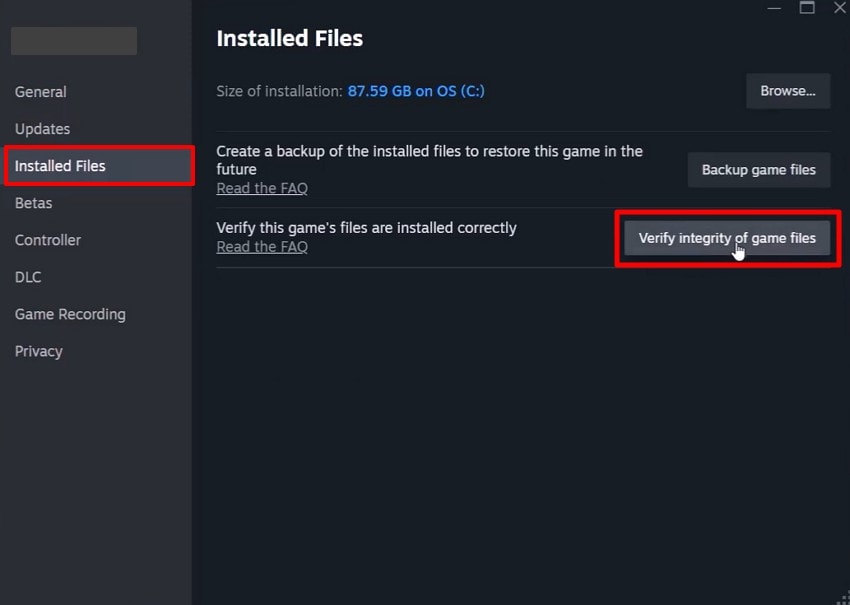
Step 2. Moving ahead, access the “Installed Files” tab and select “Verify Integrity of Game Files.” The launcher will scan the game installation and download clean replacements if needed.
Fix 6. Run the 007 First Light in Windowed or Borderless Mode
It may also be possible that full-screen mode conflicts with certain driver setups. This conflict traps the game behind a black, unresponsive display screen. Yet, windowed or borderless mode avoids this common full-screen rendering conflict. Your screen stays visible, and the game runs in a frame. So, this adjustment via the given steps can fix the 007 First Light black screen without hassle:
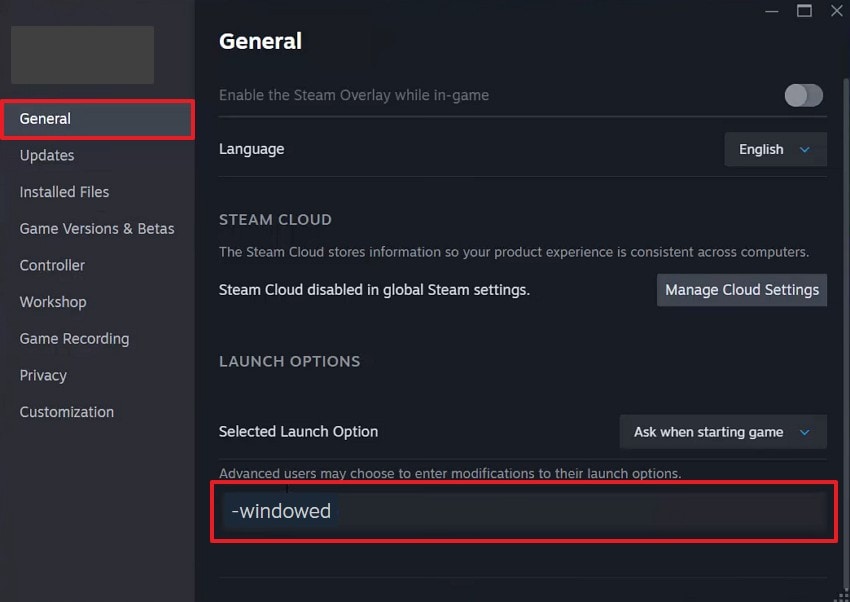
Instructions. Open the “Properties” menu for 007 First Light from your game launcher. Next, navigate to the “General” section and locate the “Launch Options” box. Players need to input “-windowed” into the field and save the change.
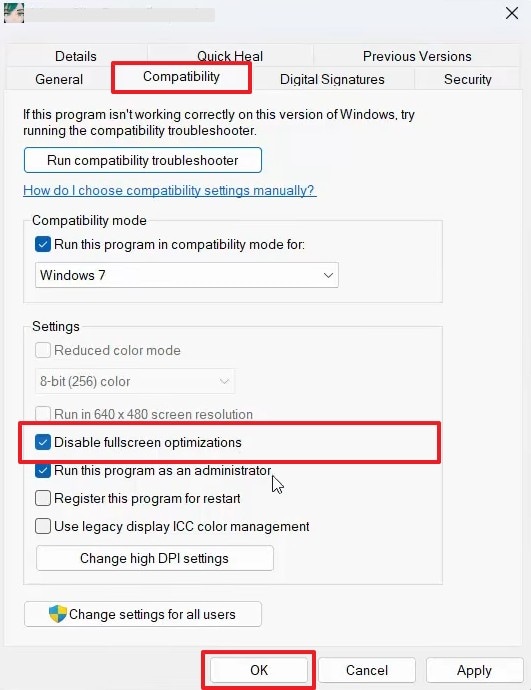
Fix 7. Disable Fullscreen Optimizations
This compatibility feature also triggers a blank display when launching desktop programs. Turning off this native setting allows the software to take direct control. The desktop window manager stops forcing unneeded adjustments onto the gaming window. Therefore, you can alter these executable properties via these steps and fix the 007 First Light black screen at startup:
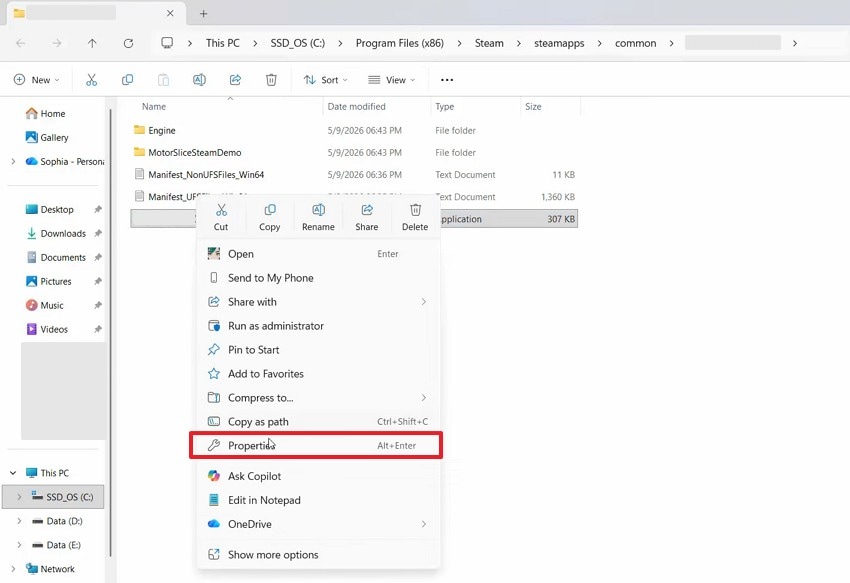
Step 1. Locate the “007 First Light” .exe file and right-click on it to select “Properties.”
Step 2. You need to check the box next to “Disable Fullscreen Optimizations” upon switching to the “Compatibility” tab. Go ahead and click “Apply,” followed by “OK” to save the changes.
Fix 8. Update DirectX and Visual C++ Redistributable
Missing runtime components often prevent games from rendering graphics. DirectX handles core graphics processing for most modern PC games. On the other hand, Visual C++ Redistributable supports essential game functions and stable performance. Outdated versions of these tools can cause startup crashes and freezes. Upon updating, it even helps gamers resolve the 007 First Light being stuck on a black screen. Follow these simple steps to update these system components:
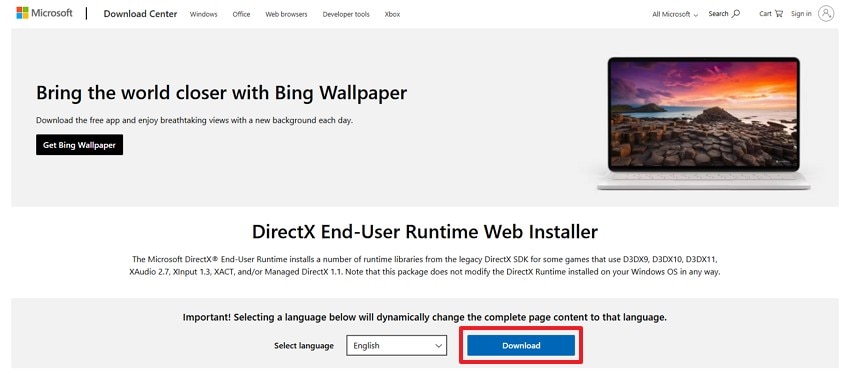
Update DirectX
Step 1. Upon visiting the “DirectX End-User Runtime Web Installer” page, click “Download” to get the latest setup package.
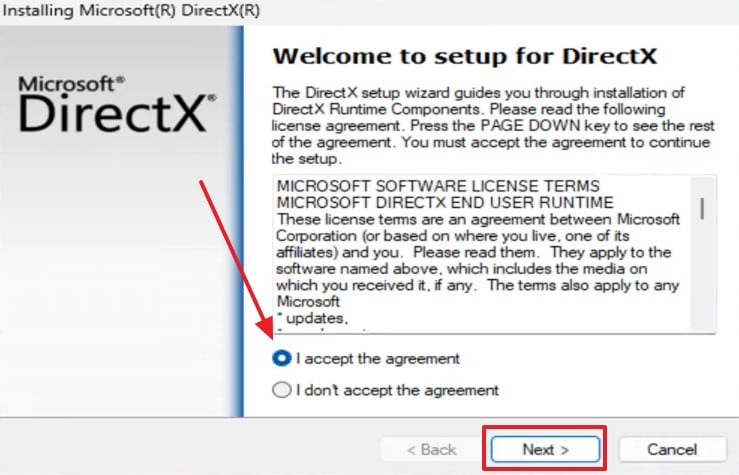
Step 2. Going ahead, launch the downloaded installer and review the license terms. Prior to pressing “Next,” select “I Accept the Agreement” to continue with installation.
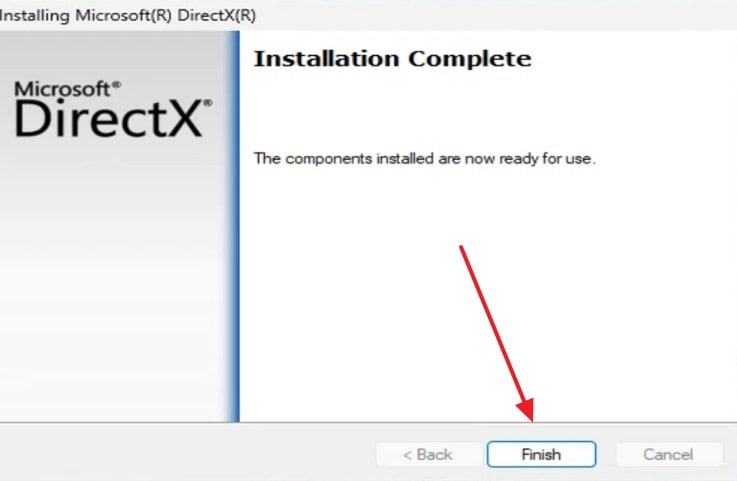
Step 3. Then, move forward via the visual prompts to install the required DirectX files. After that process, click “Finish” and restart your PC if prompted to apply the changes.
Update Visual C++ Redistributable
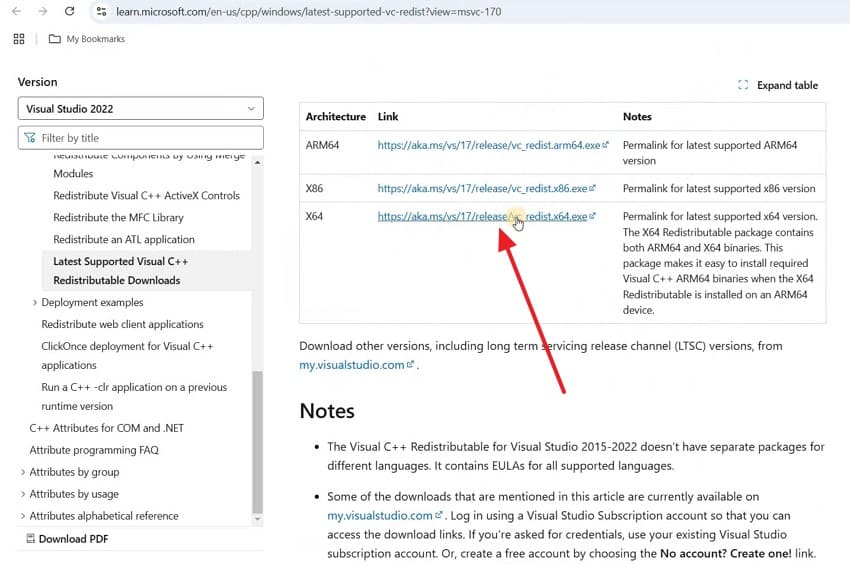
Step 1. Initially, visit the official “Microsoft Visual C++ Redistributable” download page and get the appropriate x64 installer.
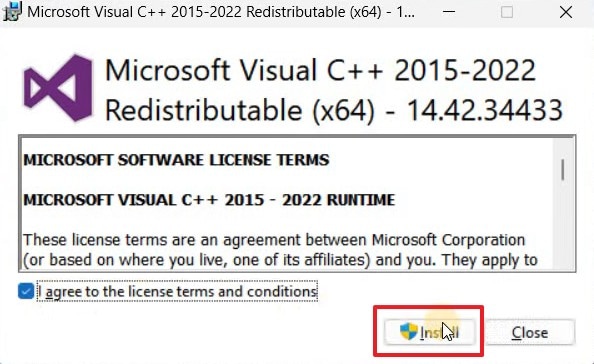
Step 2. After you run the setup file, accept the license terms and click “Install” to begin installation.
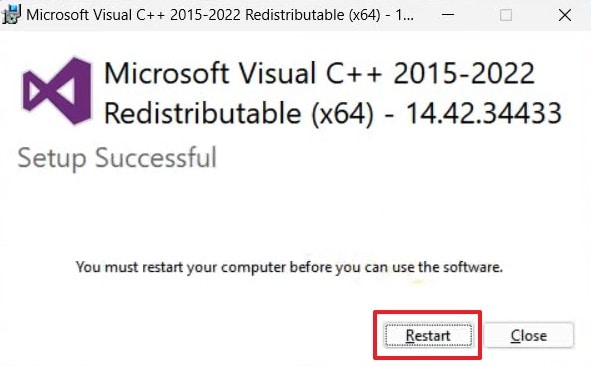
Step 3. Players then complete the setup by following the guide displayed on the screen. Once the installation is finished, press “Restart” when prompted to ensure all changes take effect.
Fix 9. Lower In-Game Graphics Settings Before Launch
High graphics settings sometimes overwhelm weaker or outdated graphics card hardware. Such a strain may also cause display failures and show a black screen. That’s why lowering these settings reduces the load on your graphics card. Simple changes like resolution or texture quality can prevent this issue. Gamers now need to review the following steps to fix the 007 First Light black screen on PC:
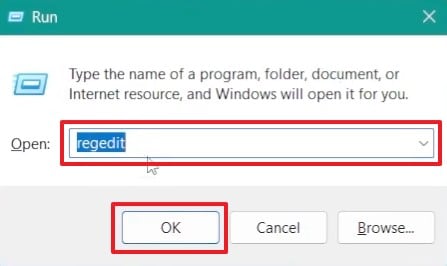
Step 1. Input the “regedit” command after pressing “Windows + R” and click “OK.”
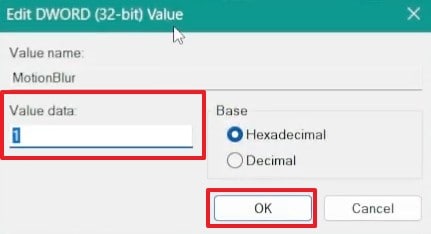
Step 2. Then, head to “HKEY_CURRENT_USER\Software\IO Interactive\007 First Light.” Following this, look for graphics-related values such as “Motion Blur” and right-click it to choose “Modify.”
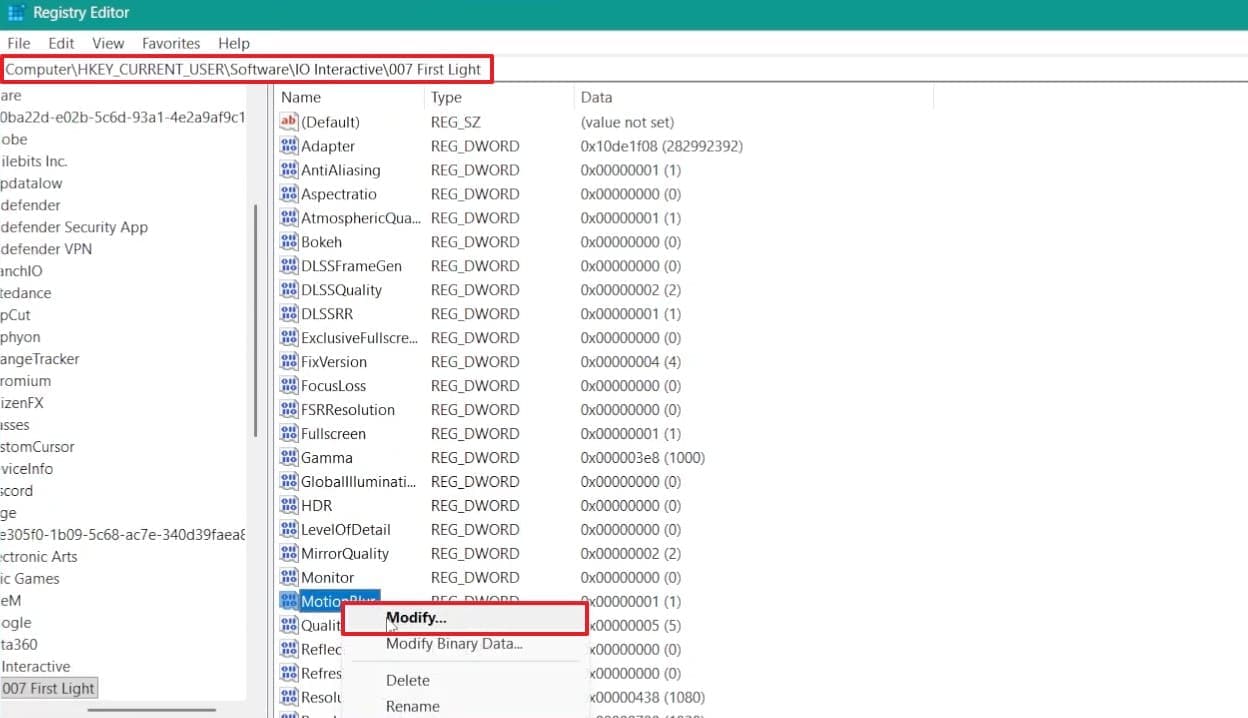
Step 3. Moving forward, set the “Value Data” from “1” to “0” and click the “OK” button.
Pro Tip. Recover Lost Save Files of 007 First Light with Recoverit
After trying to address and resolve the 007 First Light black screen on launch, some players still face missing or corrupted files. Startup crashes or even accidental deletion often trigger permanent data loss. In such cases, tools like Recoverit can help players recover important lost game files. This data recovery tool works after deletion, formatting, or sudden system crashes, too.
Alongside that, it even recovers files from many consoles and external storage devices. The powerful scanning engine restores files lost during sudden system crash events. Recoverit also retrieves data deleted during incomplete patch installations quite fast. Moreover, gamers can even preview the discovered game files and save them to their preferred location.
Key Features
Advanced File Recovery: Recoverit uses intelligent scanning algorithms to find lost game files, save data, and deleted folders from PCs, drives, and external storage devices.
Safe Read-Only Recovery Process: The software scans storage without modifying original data, reducing the risk of overwriting recoverable game files.
AI-Powered File Recovery: Recoverit uses AI-based algorithms to identify file patterns and improve recovery accuracy across different data loss situations, including deleted or corrupt game files.
Guide to Recover Your Lost 007 First Light Game Files with Recoverit
You can now follow these steps to retrieve lost save files of 007 First Light via this data recovery tool:
Step 1. Select Location Containing 007 First Light
Upon navigating to “Hard Drives and Locations,” choose the drive or folder where the 007 First Light game files were stored.

Step 2. Scan Storage for Missing 007 First Light Data
Once you select the target location, Recoverit will immediately begin scanning. During this process, the software searches for deleted or lost 007 First Light files and displays all the recoverable results.

Step 3. Save the Required 007 First Light Files
Finally, review the discovered files and use the preview feature to verify their contents. When you find the 007 First Light files you need, click “Recover” and save them to a different location.

Conclusion
FAQ
-
Does verifying game files delete my saved progress?
No, verifying game files only checks and repairs core game data. Your saved progress and settings remain completely untouched during this process. This method only replaces missing or corrupted files, not personal saves. -
Should I disable my antivirus before reinstalling the game?
Temporarily disabling antivirus during installation can prevent unnecessary file interference issues. This allows the installer to write files without any security blocks. Yet, remember to enable your antivirus again after the installation finishes. -
Does reinstalling the game delete my saved files too?
Reinstalling typically only removes core game files, not your cloud saves. However, local saves stored outside cloud sync may get deleted. If files go missing, tools like Recoverit may help restore your lost data. -
Does using a wired connection help prevent the black screen issue?
Yes, unstable internet connections can worsen server-related black screen problems. When you use a wired connection, it provides more stable connectivity than wireless networks. This reduces connection drops that sometimes trigger black screen freezes.


