
 TL;DR:
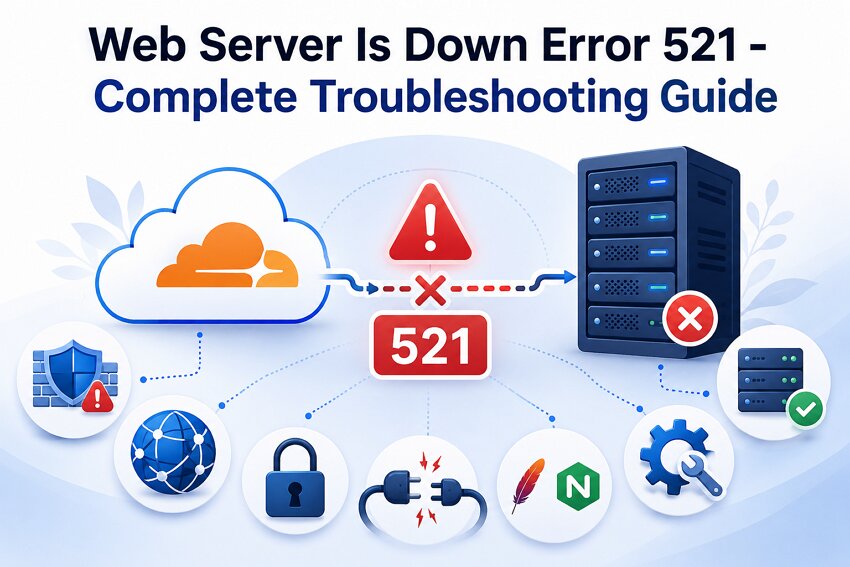
Cloudflare Error 521 indicates a connection failure between the content delivery network and your origin web server, requiring you to resolve server-side firewall blocks, correct port configurations, or adjust mismatched SSL/TLS settings.
● Configure the Cloudflare SSL/TLS encryption mode to "Full" or "Full (Strict)" if the origin server has a valid HTTPS certificate, or select "Flexible" for non-HTTPS origins.
● Clear temporary software hangs by restarting web services via command line, utilizing `httpd.exe -k restart` or `nginx -s reload` for Windows, and `systemctl restart` for Apache or Nginx on Linux.
● Whitelist official Cloudflare IP ranges within your hosting provider's firewall rules to prevent the origin server's security devices from actively blocking the incoming connection requests.
Ask AI for a summary
 ChatGPT
 Perplexity
 Gemini
 Claude
 Grok
Grok
You are trying to launch a campaign online, and everything seems ready for it. The website has been tested, and the content has been live. A message “Error 521: Web Server is Down” suddenly appears on your homepage. Visitors are unable to access your site, and potential customers are lost.
Error 521 typically occurs when a content delivery network fails to connect with the origin web server. While this error seems complicated, it can be fixed using the right troubleshooting techniques. Read the article to understand how to fix the Web Server Error 521 with the appropriate methods.
Try Recoverit to Perform Data Recovery
 Security Verified. 3,591,664 people have downloaded it.
In this article
Part 1. Understanding the "Web Server Is Down" Message
The “Web Server is Down” message shows a connection failure between Cloudflare’s network and origin server. Visitors are unable to access the website and may see a message stating that the web server is unavailable. The error shows that the requested webpage cannot be delivered successfully. Website owners often encounter Error 521 while monitoring site performance or availability.
Why Does Error Code 521 Occur?
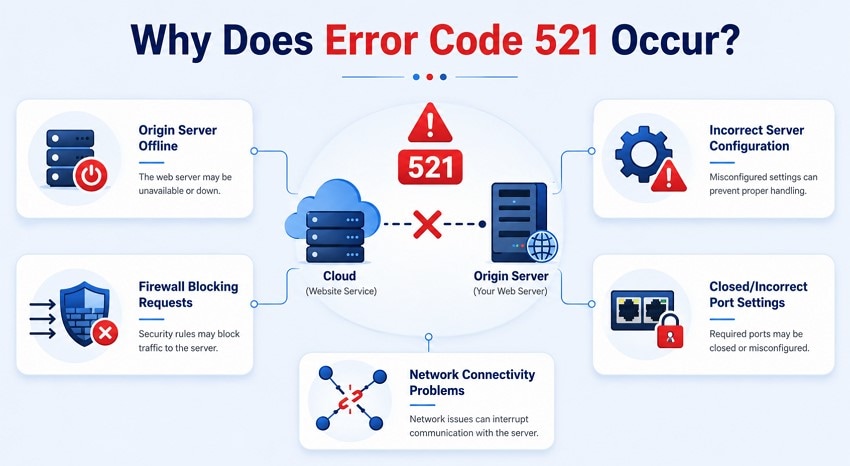
Understanding the root causes of this error is important to fix Error 521. Mentioned below are some of the reasons why this error takes place:
- Origin Server Offline: The web server hosting the website may be unavailable due to maintenance or downtime. Connections cannot be established when the server stops responding.
- Firewall Blocking Requests: Security rules on the server may prevent traffic from reaching the website. Overly restrictive firewall settings can interfere with normal communication.
- Incorrect Server Configuration: A web server setting that is not correct can prevent proper handling of incoming requests. Errors in server setup often lead to connection failures.
- Closed or Incorrect Port Settings: The server must listen on the appropriate ports to accept website traffic. Connections may fail if required ports are not configured correctly or are blocked.
- Network Connectivity Problems: Interruptions in network communication can affect the connection between website services and the origin server. This results in a temporary issue with accessibility.
Part 2. How to Fix the "Web Server Is Down" Error 521
After learning why the Cloudflare Error 521 happens in the first place, let’s have a look at some top methods that can be used to fix it:
Fix 1. Verify the Origin Server Process Is Running
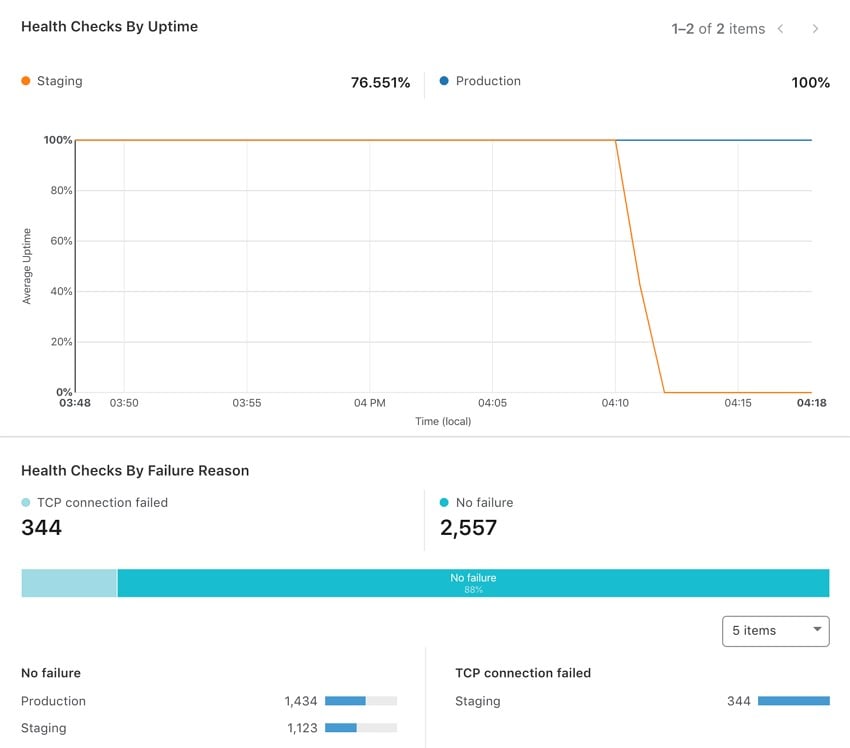
The first step in resolving Error 521 is confirming that your origin web server is actually running. Incoming requests fail if the origin server has stopped due to a crash. Checking the operational status of the server helps users determine whether the website is capable of handling the incoming traffic. To learn how to check the status of the origin server, read the instructions provided below:
Instructions. Log in to your Cloudflare dashboard and access the “Health Checks” page to check if the origin is running or returning errors. Check your hosting panel as well to confirm if the web service is operational and the site is responding without Cloudflare.
Fix 2. Restart Web Server Services (Apache/Nginx)
Temporary software issues with web servers, such as Apache or Nginx, can prevent them from processing requests correctly. This can happen even when the service appears active. A successful restart can restore normal communication and resolve the "Cloudflare error 521 web server is down" error. Follow the steps provided below to learn how to restart the web server services:
Step 1. After opening CMD as an administrator, restart Apache with “httpd.exe -k restart -n ServiceName.”
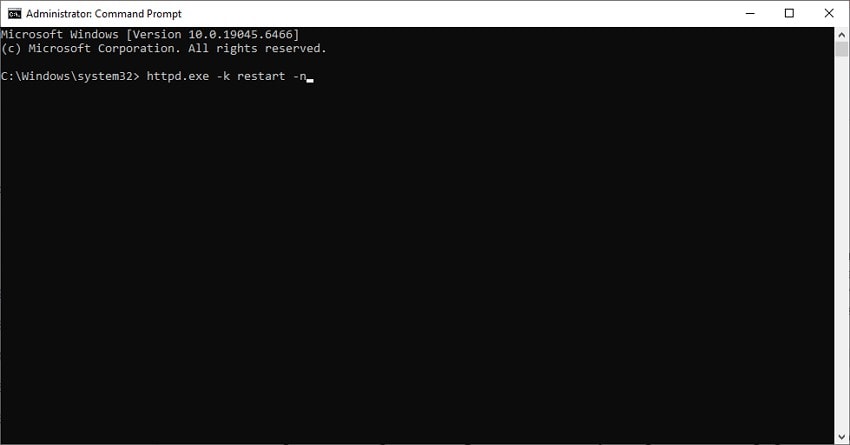
Step 2. Restart Nginx with “nginx -s reload” or by killing and relaunching nginx.exe. Refresh the site through Cloudflare and confirm the origin responds normally.
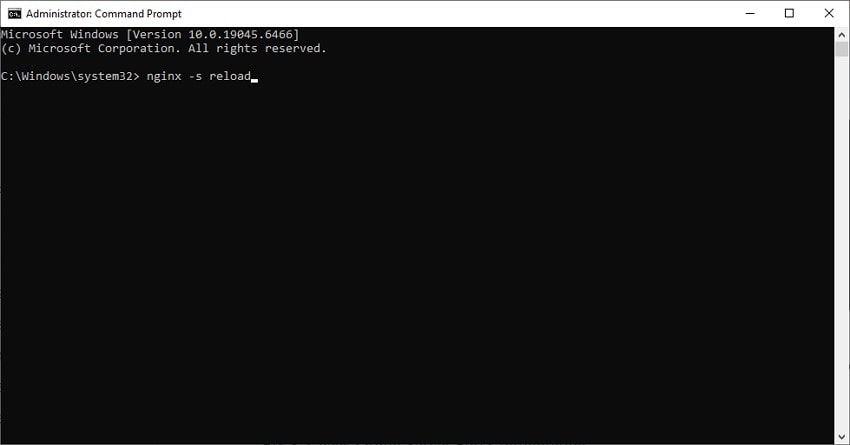
Note: Bear in mind that these only apply for Windows; however, for Linux users, you might have to use commands like “systemctl restart apache2” or “systemctl restart nginx.”
Fix 3. Check Origin Server Port Configuration
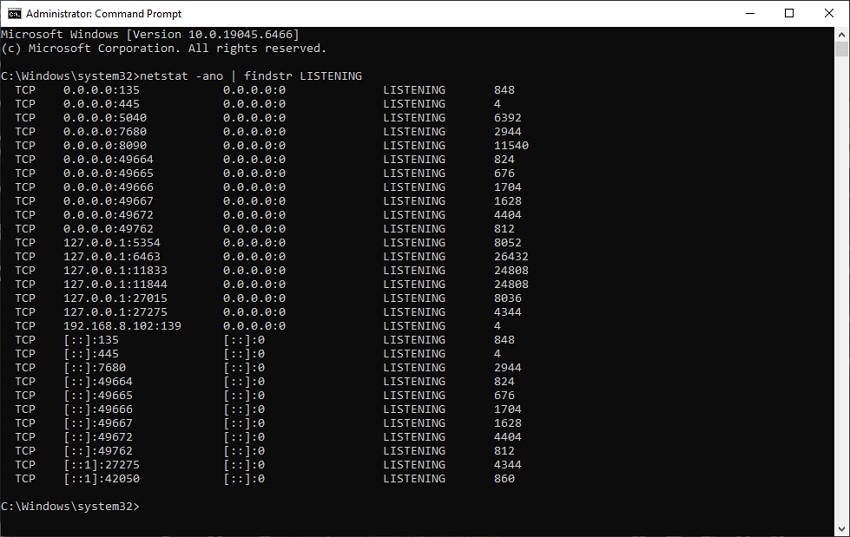
Web servers rely on designated ports to receive and process website traffic. Requests cannot reach the origin server successfully if these ports are closed or blocked. “Error 521 Web Server is Down” may appear when the server is running but unable to accept incoming connections. Read the instructions provided below to learn how to perform this fix:
Instructions. Open the Command Prompt with admin access and type "netstat -ano". If the ports are showing LISTENING status, the server is actively accepting connections on that port.
Fix 4. Review .htaccess or Nginx Configuration Files
Configuration files control how the server handles requests and security rules. A small mistake in these files can lead to connection failures and server disconnection. Reviewing these configurations helps in identifying problematic inconsistencies. Correcting these issues ensures that incoming requests are processed properly. Follow the steps mentioned below to learn how to review these configuration files and fix Error 521:
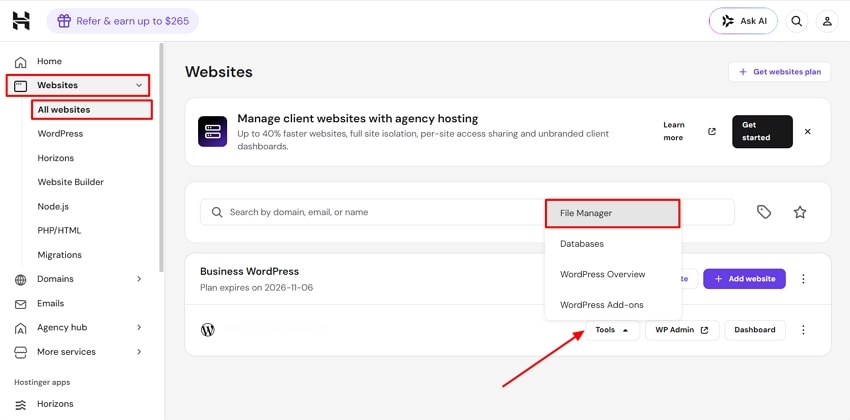
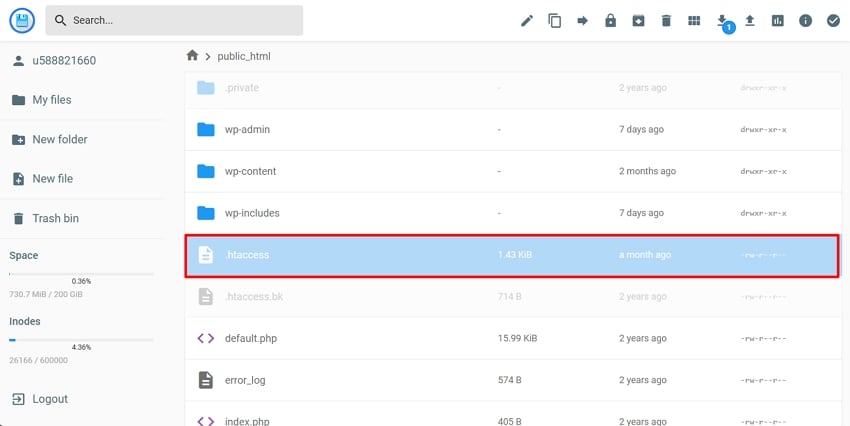
Step 1. Log in to your hosting panel and access the “Websites” option on the homepage. Following this, select “All websites” to lead to a new screen. Select “Tools” and choose “File Manager” from the drop-down.
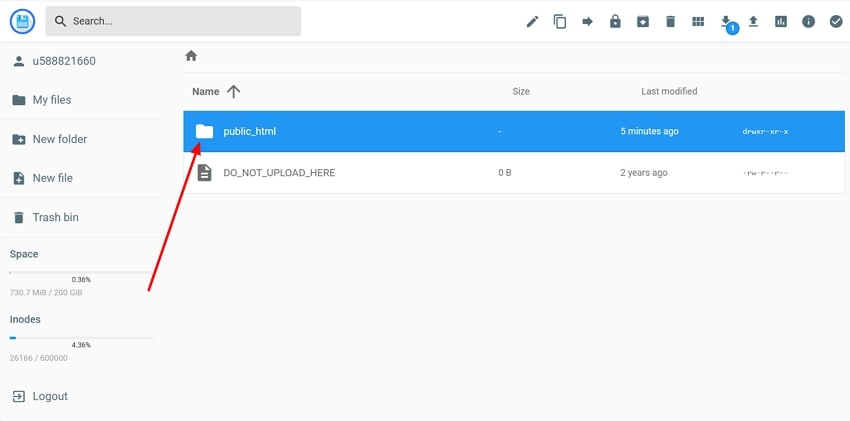
Step 2. Following this, select to view the files of the website to open another window. Here, search for the “public_html” folder and open it.
Step 3. In the following interface, locate the “.htaccess” file and open it in a new window.
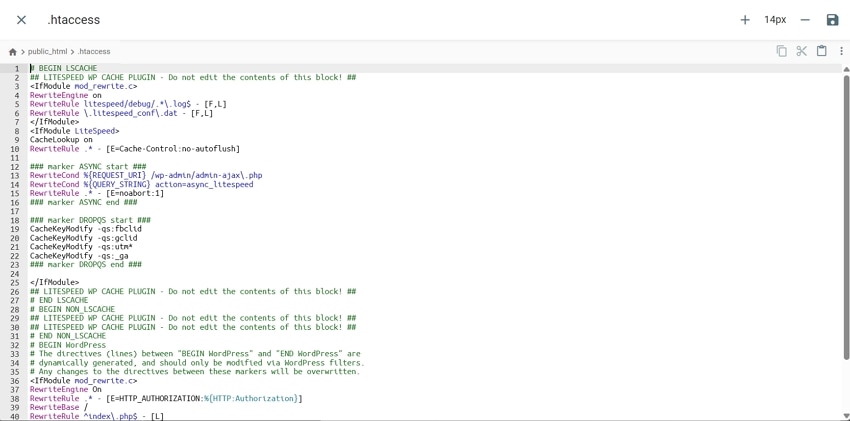
Step 4. View the content of the .htaccess file and check for any syntax errors to resolve.
Fix 5. Allow Cloudflare IP Addresses on Your Server
The hosting provider can be blocked by servers protected by firewalls or security devices. The Cloudflare Error 521 can occur while the server is up, even when it is unable to connect to the origin server. This approach is relevant in cases where a website has strict firewall policies. Follow the steps mentioned below to learn how to allow the IP addresses on your server:
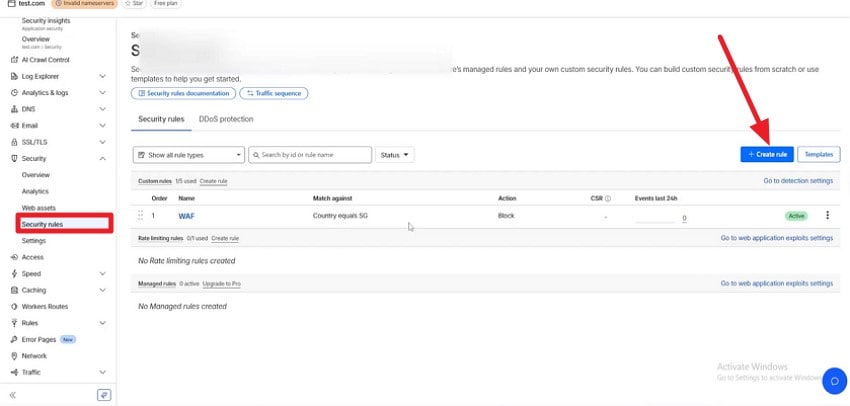
Step 1. Look for the official Cloudflare IP ranges, copy them, and log in to your hosting provider. Click the “Create Rule” button from the “Security Roles” option on the left.
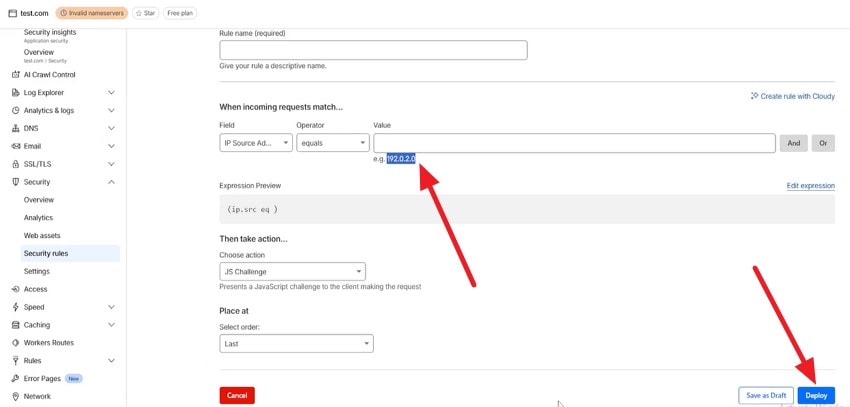
Step 2. Input the firewall rule with the Cloudflare IP ranges. Configure all necessary settings and hit “Deploy” to add them to your server.
Fix 6. Verify DNS Records and Cloudflare Settings
Incorrect DNS entries can send traffic to outdated or invalid server addresses. This can result in failed connections. Cloudflare settings that do not match the current hosting environment may also contribute to communication problems. The best way to resolve the “Cloudflare Error 521: Web Server is Down” issue is to verify that the settings are properly configured. The steps provided below show how you can verify these settings:
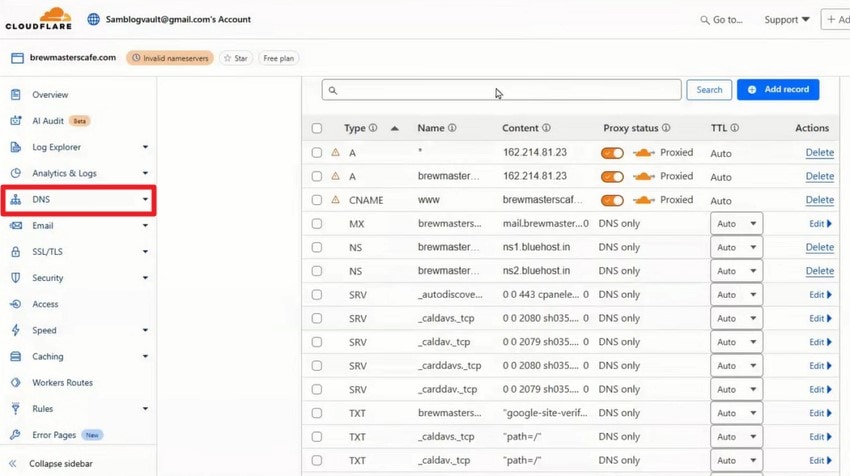
Instructions. Open Cloudflare and access the options on the left. Click on the “DNS" option on the left and check the records from the list.
Fix 7. Check SSL/TLS Configuration
These are security protocols that offer secure communication over the network. Problems such as expired certificates or incorrect modes can interfere with server communication. These issues may prevent secure connections from being established. Maintaining a valid and correctly configured SSL environment not only improves security but also prevents “Error 521 Web Server is Down”. Here is how you can check the SSL/TLS configurations:
Step 1. Access the Cloudflare dashboard and locate the “SSL/TSL” option located within the interface.
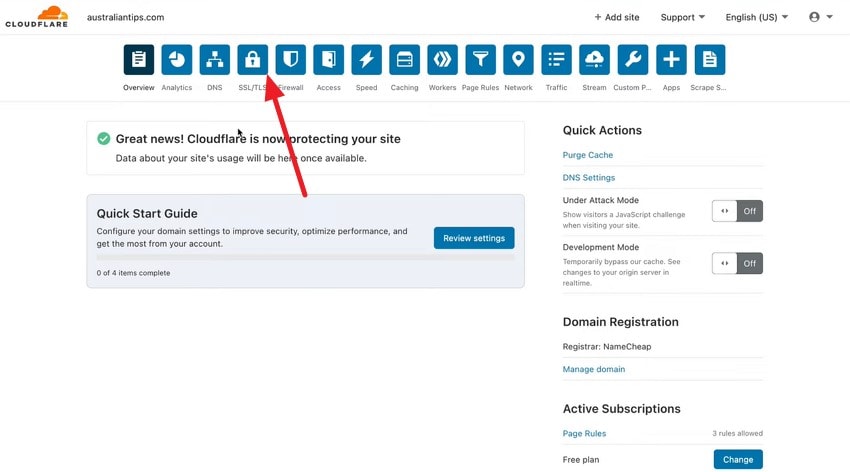
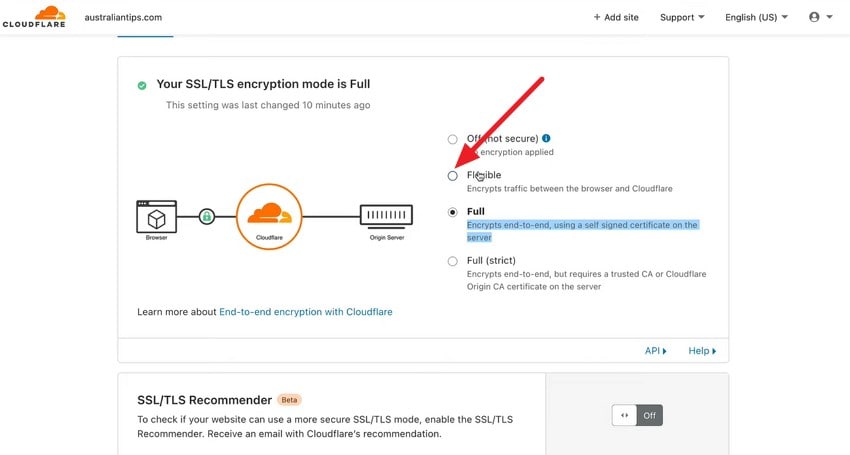
Step 2. Scroll through the settings and go for "Full” or “Full (Strict) options if you have a proper HTTS certificate. Choose the “Flexible” radio button to encrypt traffic between the browser and Cloudflare for a non-HTTPS origin.
Fix 8. Reduce Server Resource Usage
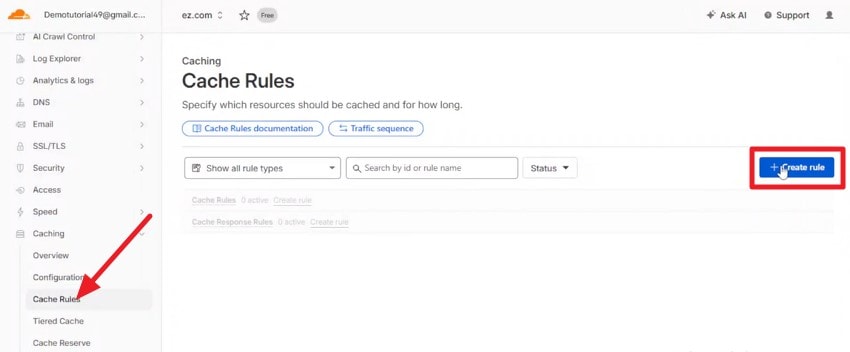
The excess usage of resources can make the server slow and cause Cloudflare error 521. Reducing unnecessary workloads can improve server responsiveness. You reduce future connectivity problems by keeping the resource usage under control. One of the ways to reduce resources is by caching everything. To learn how to create a cache rule on Cloudflare, read the steps provided below:
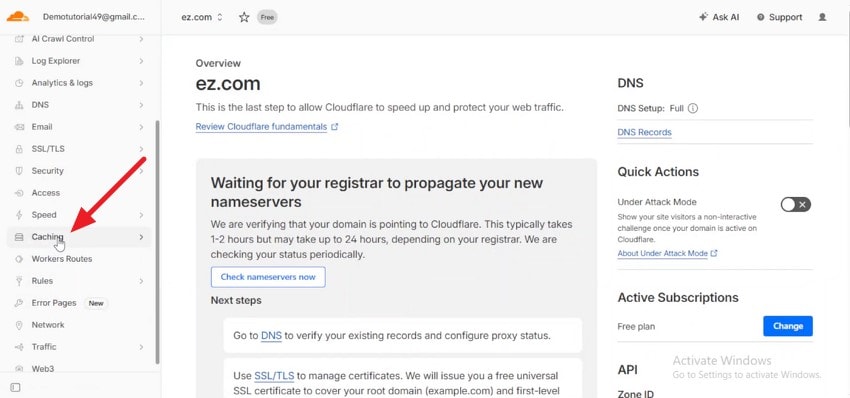
Step 1. Access the Cloudflare dashboard and expand the “Caching” option from the section on the left.
Step 2. Now, click on the “Create Rule” option after choosing “Cache Rule” from the left.
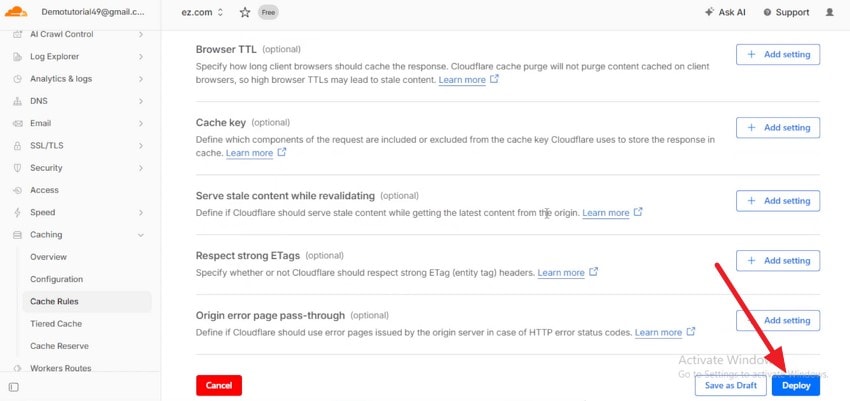
Step 3. Configure other cache settings and hit the “Deploy” button located at the bottom.
Fix 9. Reconfigure Server Network Settings
Network settings in a web environment determine how traffic enters and leaves the server environment. Issues with the network are often difficult to identify because the server itself may appear functional while remaining inaccessible. The communication barriers are eliminated when network settings are configured. Follow the steps mentioned below to learn how to change the server network settings and fix Error 521:
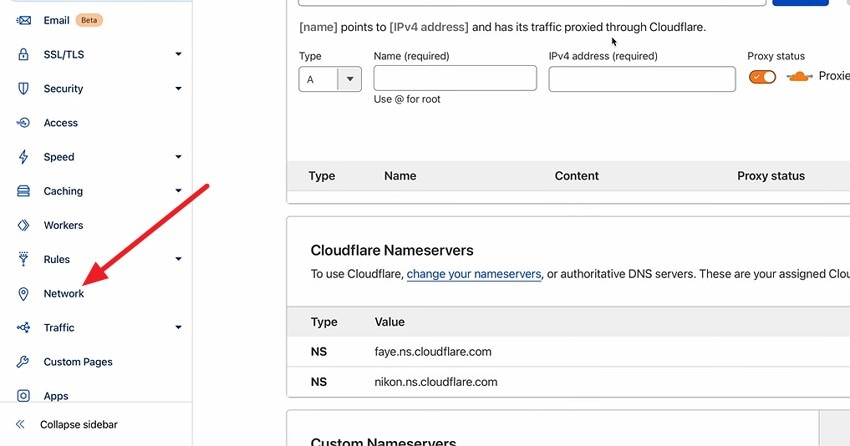
Step 1. Open the dashboard and click on the “Network” option located on the left.
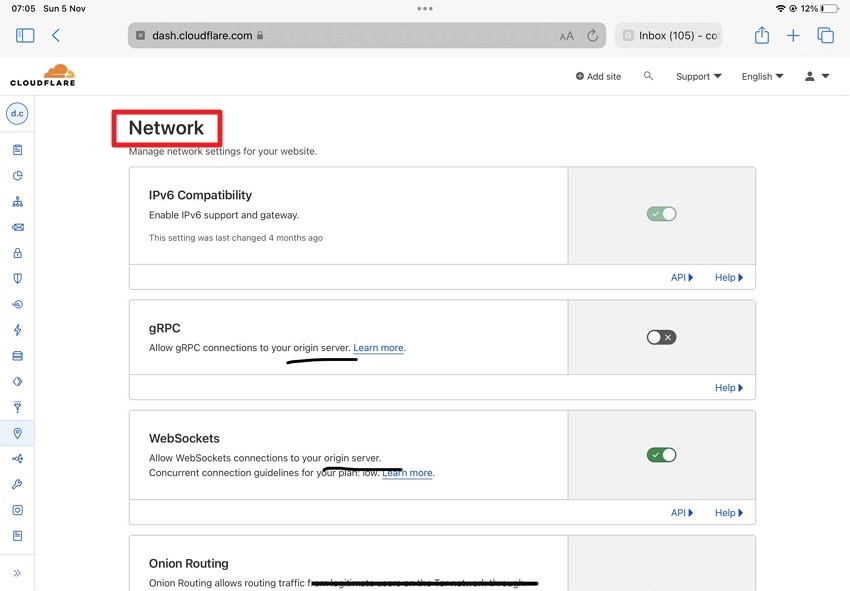
Step 2. Under the “Network” section, configure the settings if required by your hosting environment.
Fix 10. Contact Your Hosting Provider
Several types of Cloudflare Error 521 are not caused on the website and can only be dealt with by the hosting provider. When you cannot resolve the issue with the regular techniques, it’s better to contact the hosting provider. They can be contacted from their website, where a chatbot is also available for quick help.
Pro Tip: Recover Lost Web Downloads from Local Storage Using Recoverit
You discover that some of the files have been deleted while you were resolving the “Error 521 Web Server is Down” error. Your website becomes much more challenging when you lose these essential downloads. Tools like Recoverit help in getting back such files from your storage. It runs a deep scan within your storage device to get back the documents in their original form.
Users get the ability to recover 1000+ types of file formats, including photos and videos. With its previewing ability, it helps ensure that the correct data is restored. The AI-powered data recovery allows users to recover their data through the platform by 1.8x faster speed. Recoverit’s user friendly interface makes the process easier for beginners to understand with no technical knowledge.
Key Features
- Recovery from Multiple Devices: It provides the ability to recover files from 1 million+ devices, such as SSDs or external hard drives.
- Cross-Platform Compatibility: The tool offers recovery for various computer devices, such as Windows and Mac.
- Large File Recovery: Users get the ability to get back large files, such as web archives and media assets, in no time.
Comprehensive Steps to Recover Web Downloads Using Recoverit
As discussed, Recoverit allows users to get back their lost files with no technical skills. Follow the steps mentioned below to learn how to use this tool for recovering lost web files:
Step 1. Begin By Selecting Location
Start the process by launching the tool on your device and accessing the "Hard Drives and Location" section from the left. The platform will start the scanning process when you choose the right location.

Step 2. Choose Files For Recovery
Select the web downloads you want to recover by clicking on them and pressing the "Recover” button located at the bottom.

Step 3. Export Recovered Web Files
Preview all recovered files within the platform’s interface for checking the results. Use the “Recover” button at the bottom for saving all results to your computer.

Conclusion
This article discussed several methods to resolve the “Error 521: Web Server is Down” error. Each fix discussed in the article allows users to get their website running in no time. For cases where you lose your website downloads, tools like Recoverit help you restore these important documents. The platform performs a deep scan within the computer to get the files back with quality and formatting maintained.
FAQ
-
Does Error 521 mean my website data is lost?
The issue only shows that there is a connection problem between the server and the network delivery. However, many people face data loss upon deletion during the process of troubleshooting this error. -
How can I check if my origin server is online?
You can log in to your hosting account and check if the service is running or not. Many online server monitoring tools can also help you with the process. -
What should I do if I accidentally delete important web downloads during troubleshooting?
You should stop using the drive where the files were saved for preventing overwriting. Recoverit helps you in getting back your deleted web downloads with its intuitive performance. -
Which tool is best for recovering lost website backups and downloads?
Many tools offer file recovery when your data is lost or damaged. One such tool that offers 99.5% success rate is Recoverit. It offers data recovery for more than 1000 file types.


