

 TL;DR:
Successfully recovering an inaccessible LUKS partition depends on the specific damage and typically involves using cryptsetup for logically locked drives, fsck for corrupted internal file systems, or specialized software like Recoverit for accidentally deleted partition tables.
● Data retrieval is impossible without the correct passphrase or a previously generated LUKS header backup, as the encryption standard provides no backdoor bypass.
● If the encrypted partition utilizes LVM setups, unlocking the drive is insufficient; administrators must subsequently execute vgscan and vgchange -ay to activate the logical volumes before files become accessible.
● When repairing internal corruption, never run fsck directly on the raw encrypted block; it must only be executed on the unmounted, mapped device after a successful cryptsetup luksOpen operation to prevent severe data damage.
Ask AI for a summary
 ChatGPT
 Perplexity
 Gemini
 Claude
 Grok
Grok
Data security plays a major role in modern computing. Many Linux users rely on encryption to protect sensitive files. One of the most trusted encryption systems in Linux is LUKS. It protects entire partitions with strong encryption methods.
However, encrypted partitions can also face problems. A drive may fail to unlock. A header may become damaged. Files may disappear after a crash. In such situations, many users search for how to recover a LUKS partition.
This complete guide explains the recovery process in clear and simple language. It also shows how to recover lost data from a LUKS partition safely and correctly.
Table of Contents
Part 1: What is a LUKS Partition?
To solve recovery problems, you must first understand what is a LUKS partition. LUKS stands for Linux Unified Key Setup. It is a disk encryption standard used mainly in Linux systems. It protects data by encrypting an entire partition.
When you create a LUKS partition, the system stores encryption details inside a special header. This header manages passphrases and encryption keys. Only users with the correct passphrase can unlock and mount the partition. Without proper authentication, the data remains unreadable.
Understanding what is a LUKS partition also means knowing how it works internally. LUKS uses strong encryption algorithms such as AES. It supports multiple passphrases. It also allows secure header backups. Because of this structure, data remains safe even if someone removes the drive and connects it to another computer.
Key Features
- Full disk or partition-level encryption
- Uses strong encryption standards like AES
- Supports multiple passphrases
- Stores metadata in a dedicated header
- Compatible with LVM setups
- Prevents unauthorized access
- Allows header backup and restoration
- Works across most modern Linux distributions
Knowing these features is important before learning How to recover a LUKS partition.
Part 2: Common Reasons Behind LUKS Partition Inaccessibility
LUKS partitions are secure, but they are not immune to problems. Encryption adds complexity. Even a small issue can prevent access. Before attempting recovery, it is necessary to understand why LUKS partiton data lost in different situations.
When a partition becomes inaccessible, users often assume the worst. In reality, the issue may be simple. It could be a damaged file system inside the encrypted layer. It could also be a corrupted header. Below are the most common causes.
- Incorrect passphrase entered: Entering the wrong password multiple times may prevent access. Some systems temporarily block further attempts.
- Corrupted LUKS header: The header stores critical encryption data. If this header becomes corrupted, unlocking becomes impossible.
- Accidental deletion: Users may accidentally delete the partition while resizing or managing disks.
- Sudden power failure: A system crash during write operations may damage internal file structures.
- Hardware failure: Bad sectors or disk wear may interrupt access to encrypted blocks.
- File system corruption inside LUKS: The encryption layer may be intact, but the file system inside could be damaged.
- Mistakes during system upgrade: Some upgrades may affect encryption modules or drivers.
- Malware or malicious scripts: Though encrypted, the operating system itself can still be attacked.
Understanding why LUKS partiton data lost helps you choose the correct solution and avoid further damage.
Part 3: Top 5 LUKS Partition Recovery Methods
Recovering encrypted data requires patience and care. The correct method depends on the type of damage. In many cases, the encryption itself is not broken. Instead, the problem lies in unlocking or mounting the partition.
Below are five trusted methods to recover lost data from a LUKS partition.
Method 1: Use Recoverit
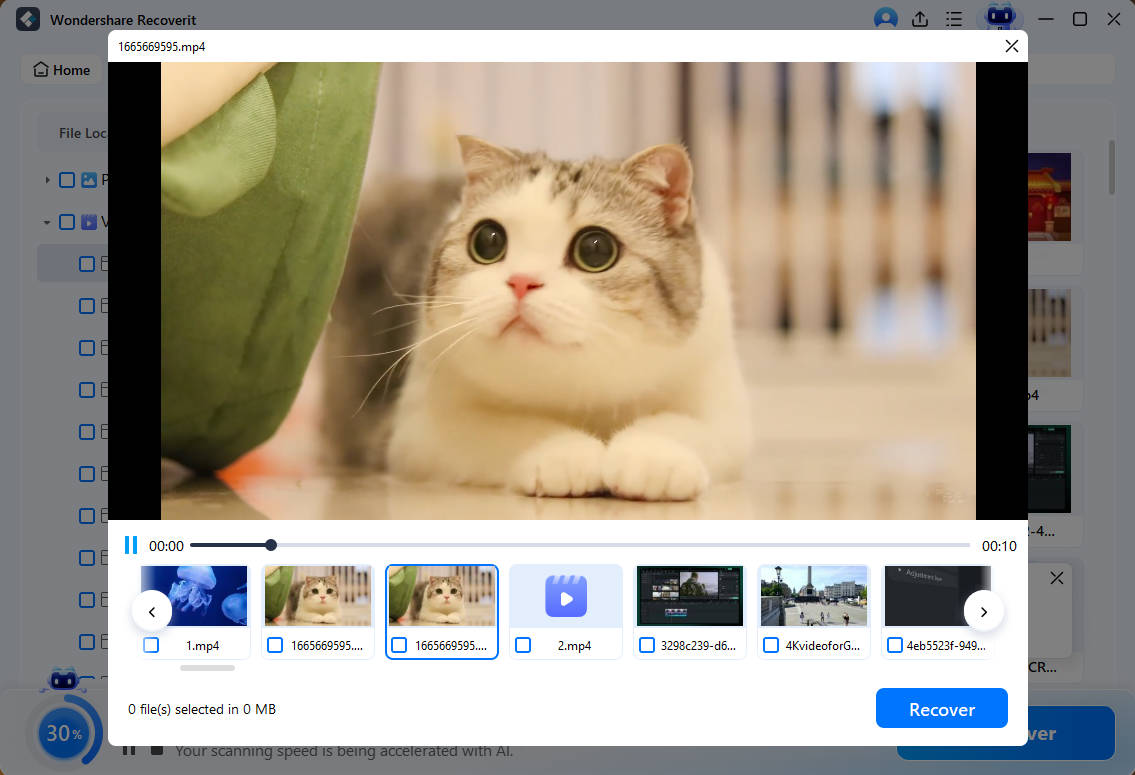
Recoverit is professional data recovery software designed to retrieve lost, deleted, or formatted files from different storage devices. It supports hard drives, SSDs, USB drives, and even external disks. It is especially helpful when a partition has been deleted by mistake or formatted during troubleshooting. The software performs a deep scan and reads raw disk sectors to locate traces of lost files.
This method is recommended when the LUKS partition does not appear properly in the system or shows as unallocated space. It can still detect data even if the partition table is damaged or missing. Recoverit runs a detailed scan of the entire disk surface. It looks for file signatures, hidden fragments, and broken directory structures. In many cases, it can rebuild files that seem completely lost.
If you are trying for how to restore lost data from a LUKS partition after accidental deletion, this solution can save time and effort. It reduces the need for complex manual commands. The interface is simple and guides you step by step. This makes it suitable for users who are not comfortable working with advanced Linux tools.
Steps
Step 1: Install Recoverit on a separate healthy drive. Select the physical disk that previously contained the encrypted partition. Select Linux Recovery.
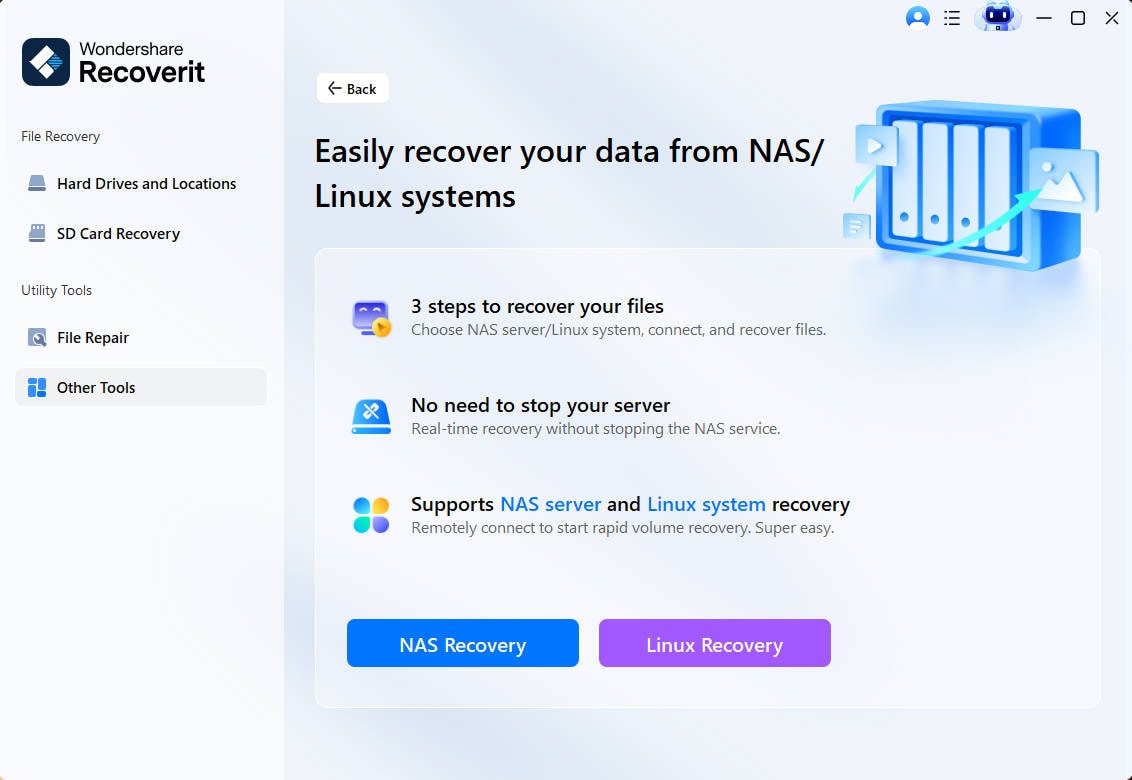
Step 2: After the scan completes, preview available files.
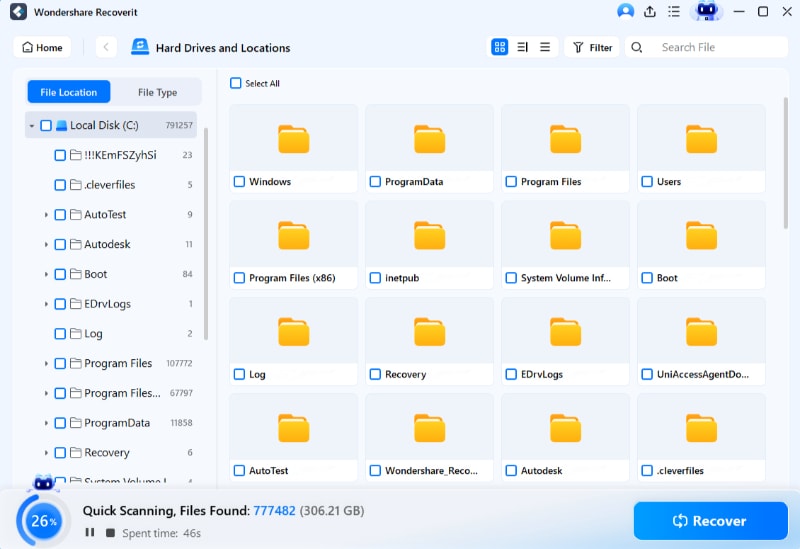
Step 3: Save recovered data to an external drive. Never restore files to the same disk.
Method 2: Use cryptsetup luksOpen with the Correct Passphrase
Sometimes the partition is not damaged. It is simply locked. In such cases, cryptsetup can unlock it safely.
Cryptsetup is a built-in Linux tool. It manages LUKS partitions. If you have the correct passphrase, unlocking is simple. Many users search How to recover a LUKS partition when the solution is only proper unlocking.
This method should always be tried before advanced recovery.
Steps
- Open Terminal and run sudo cryptsetup luksOpen /dev/sdX luks_recovery Enter the correct passphrase when prompted.
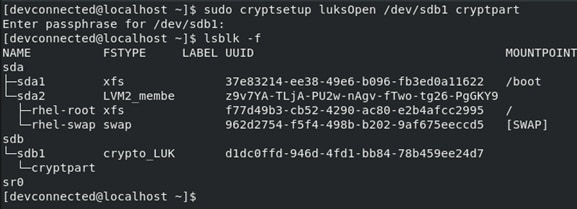
- Mount the unlocked partition using sudo mount /dev/mapper/luks_recovery /mnt/recovery Access your files from the mount point.
Method 3: Use vgscan and lvscan for LVM Volumes
Some LUKS partitions contain LVM volumes. In such cases, unlocking alone is not enough. Logical volumes must also be activated.
If LVM metadata is not scanned properly, partitions may appear empty. Users often believe data is gone. In reality, the logical volumes are inactive.
This method helps when you need to recover lost data from a LUKS partition that uses LVM.
Steps
- After unlocking the LUKS partition, run sudo vgscan Then run sudo lvscan Activate the volume group using sudo vgchange -ay
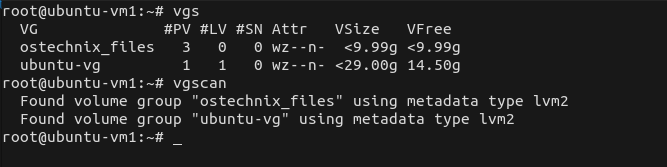
- Mount the logical volume using sudo mount /dev/mapper/volume_name /mnt/recovery Check whether files are accessible.
Method 4: Run File System Repair Tools After Unlocking
If the partition unlocks but files are missing, the file system may be corrupted. Repair tools can help.
The most common Linux repair tool is fsck. It checks file system consistency. It can fix minor structural errors.
Use this method carefully. Always ensure the partition is not mounted before running repair tools.
Steps
- Unlock the partition using cryptsetup. Then run sudo fsck.ext4 /dev/mapper/luks_recovery
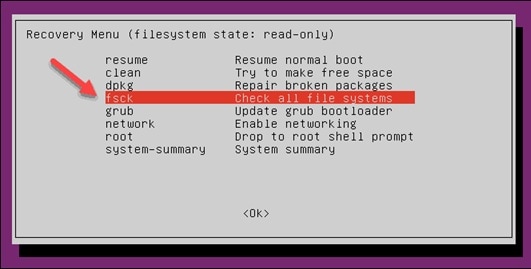
- Follow on-screen instructions. After the repair, mount the partition and verify your data.
This method often solves issues related to why LUKS partition data is lost after a sudden shutdown.
Method 5: Seek Expert Recovery Services
If the LUKS header is severely damaged, software methods may fail. In such cases, professional recovery services may help.
Experts use advanced tools to rebuild headers or extract encrypted blocks. This process is complex and expensive. It should be considered when data is highly valuable.
When header backup is unavailable, this may be the only option left in How to recover a LUKS partition cases.
Steps
- Stop using the affected drive immediately. Remove it carefully from the system.

- Contact a trusted data recovery laboratory. Provide information about the encryption type and system details.
Part 4: Smart Ways to Prevent Future LUKS Partition Loss
Prevention is always better than recovery. Encrypted partitions require careful handling. With proper precautions, you can reduce risks and avoid situations where you must search for how to restore lost data from a LUKS partition.
Below are important preventive measures.
- Backup LUKS header regularly: The LUKS header contains critical encryption information. If it becomes corrupted, the partition may not unlock. Use the cryptsetup luksHeaderBackup command to create a header backup. Store this backup on external storage such as a USB drive. Keep it in a safe location separate from the main system.
- Keep multiple data backups: Do not rely on a single backup copy. Store important files on at least two different storage devices. You may also use secure cloud storage for an additional layer of safety. Multiple backups protect you against hardware failure and accidental deletion.
- Avoid forced shutdown: Sudden power loss can damage the file system inside the encrypted partition. Always shut down the system through normal procedures. If possible, use a UPS to protect against power outages.
- Monitor disk health: Hard drives and SSDs can develop bad sectors over time. Use SMART monitoring tools such as smartctl to check disk condition. Early detection of hardware problems helps prevent serious data loss.
- Use strong but memorable passphrases: Choose a passphrase that is secure yet easy for you to remember. Avoid simple or common passwords. Store recovery keys and important credentials securely in a password manager or write them down in a safe place.
- Test backups periodically: Creating backups is not enough. You must also verify that they work. Periodically attempt to access backup files to ensure they are not corrupted. This confirms that recovery will be possible when needed.
- Avoid risky disk operations: Be careful when resizing, formatting, or deleting partitions. Double-check device names before running disk commands. A small mistake in disk management can erase important encrypted data.
Following these tips reduces cases related to why LUKS partiton data lost.
Part 5: Dynamic Partition Management:How to Adjust Your Disk Layout
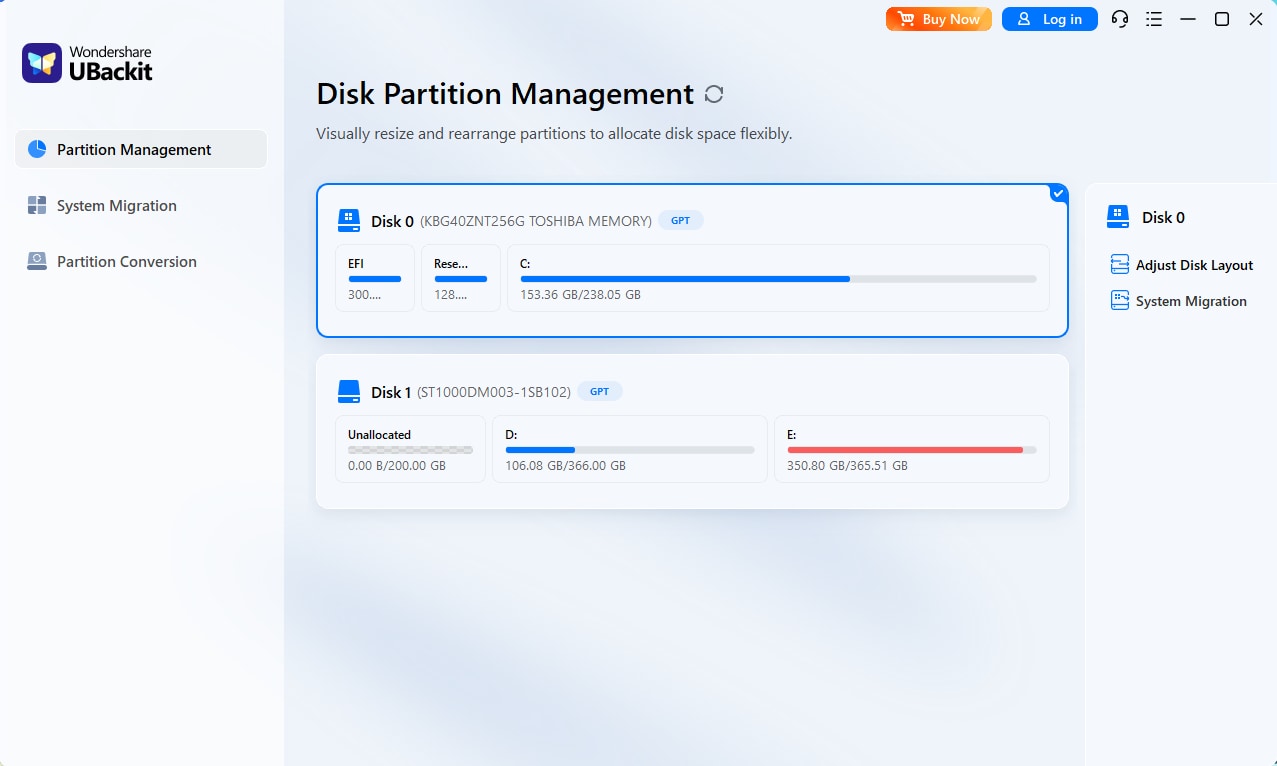
When your C Drive is clogged with system files and "Low Disk Space" warnings appear, UBackit allows you to intelligently borrow unused space from other partitions (like your D Drive) to balance your disk layout.
Step 1. Identify and Select Disk
Launch UBackit and navigate to the Partition Management tab. Select the physical disk you wish to modify. Double-click the disk or click the Adjust Disk Layout option from the right pane to continue.
Step 2. Adjust the Disk Layout
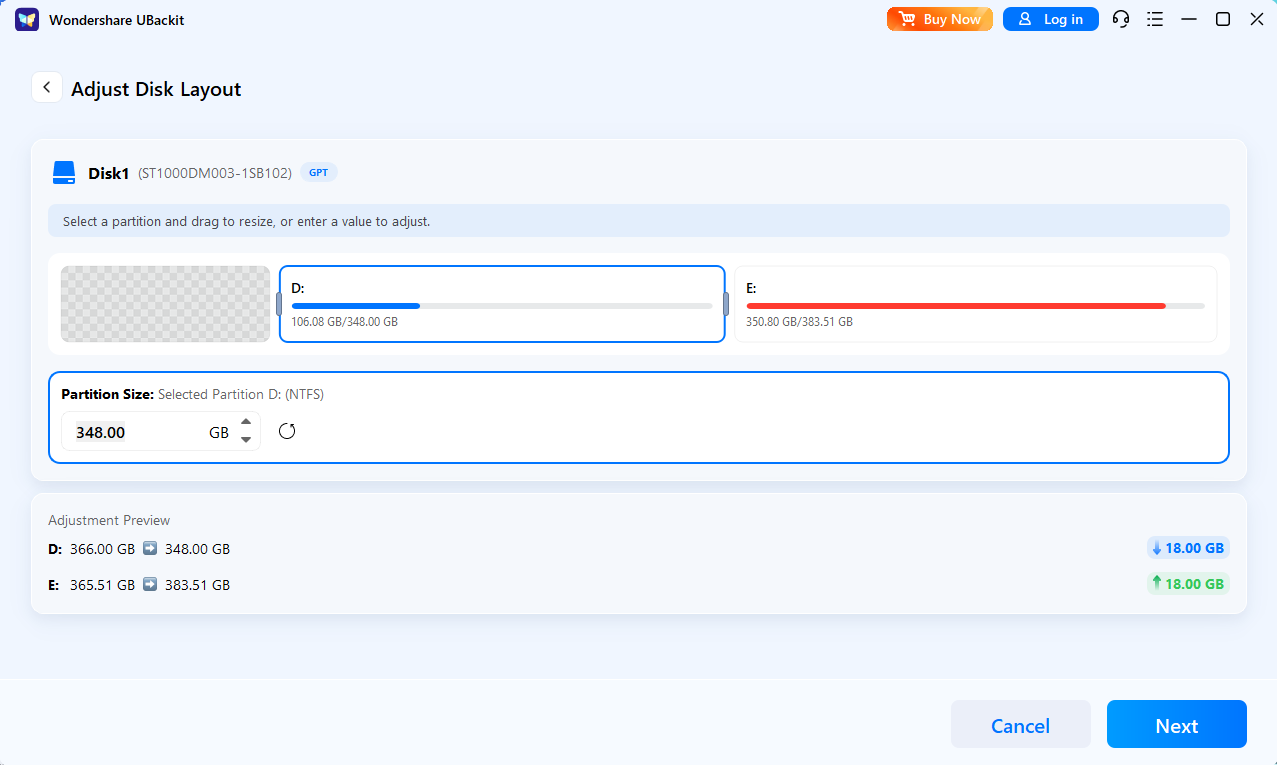
Use the intuitive visual interface to drag the edges of your partitions. Alternatively, enter specific GB/MB values to precisely reallocate unallocated space from one volume to another.
Step 3. Initiate the Process
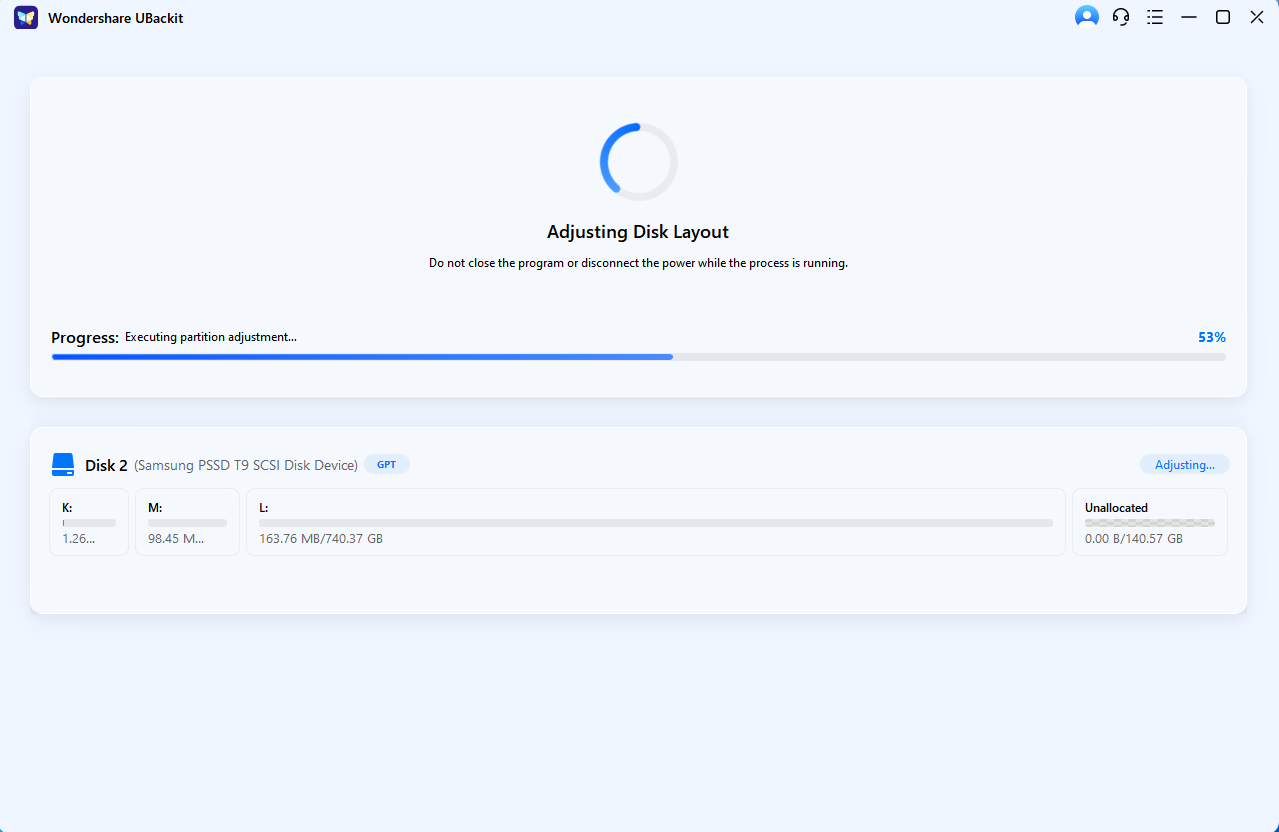
Review and confirm the partition layout. Once confirmed, click Next to execute the operation.
Step 4. Complete Management
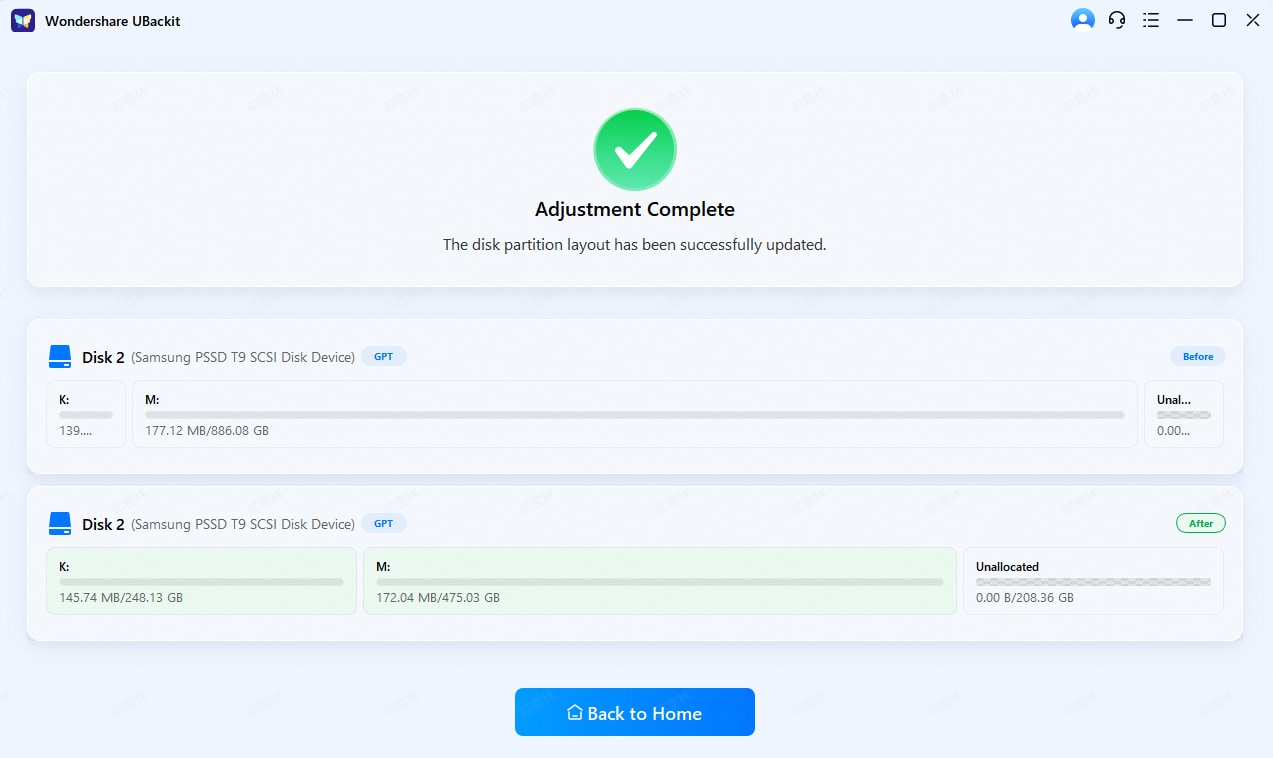
Wait for the process to finish and view the updated disk layout. UBackit will safely move data blocks to accommodate the new boundaries. Once the progress bar reaches 100%, your disk will reflect the updated capacity instantly.
Conclusion
LUKS encryption provides strong protection for sensitive data. It keeps personal and business files safe from unauthorized access. Many Linux users depend on it to secure full partitions and external drives. It ensures privacy and strengthens overall system security. However, even with strong encryption, technical problems can still occur. Hardware failure, accidental deletion, or header damage can block access. Losing access to encrypted data can be stressful, especially when important documents are involved.
This guide explained what is a LUKS partition, the common causes of failure, and practical recovery methods that can help in different situations.
By understanding the structure of LUKS and the reasons why LUKS partiton data lost, you can respond more calmly and choose the right solution. With the correct tools and careful steps, you can recover lost data from a LUKS partition safely and reduce further damage.
FAQs
-
1. Can I recover data without the LUKS passphrase?
In most cases, no. LUKS encryption is built to block access without the correct passphrase. If you do not have the passphrase or a valid header backup, the data remains encrypted and unreadable. The encryption system does not provide a backdoor. Recovery becomes extremely difficult and often impossible without proper credentials. -
2. Is it safe to run fsck on an encrypted partition?
Yes, but only after you unlock the partition using cryptsetup. The repair tool must be run on the mapped device, not on the locked, encrypted block. Running fsck directly on the encrypted device can cause serious damage. Always ensure the partition is unmounted before starting the repair process. -
3. How can I avoid losing encrypted data again?
The best way to prevent future loss is to maintain regular backups of both your data and your LUKS header. Store backups on separate drives. Monitor disk health using diagnostic tools. Avoid sudden shutdowns and unsafe disk operations. Careful system maintenance reduces the risk of corruption or accidental data loss.


