
 TL;DR:
Choose your Ubuntu data recovery tool based on the specific failure layer—using TestDisk for lost partitions, PhotoRec for raw file carving, GNU ddrescue for imaging failing drives, or Recoverit for guided recovery—while immediately stopping all writes to the affected drive to prevent permanent data loss.
● Wondershare Recoverit is not a native Ubuntu application; it requires the Linux machine to remain network-reachable so it can connect remotely from a Windows or macOS host.
● Despite remaining in Ubuntu package repositories, Ext4magic is abandoned and explicitly incompatible with modern EXT4 filesystems, while Extundelete relies on outdated 2013 code that only works on unmounted EXT3 or journaled EXT4 volumes.
● If a drive exhibits physical read errors or logical corruption, you must first use GNU ddrescue with a mapfile to create a sector-by-sector image to a healthy destination before running extraction software or attempting structural repairs like fsck.
Ask AI for a summary
 ChatGPT
 Perplexity
 Gemini
 Claude
 Grok
Grok
Quick answer: Match the tool to the failure. Use TestDisk to investigate a lost partition, PhotoRec to carve files from a formatted or badly damaged filesystem, and GNU ddrescue to image a drive that is returning read errors. Extundelete is a legacy, journal-based option for unmounted EXT3/EXT4 volumes. Ext4magic is still packaged by Ubuntu, but its own upstream project now says it is incompatible with current EXT4 filesystems and should not be used. For users who want a graphical workflow, Wondershare Recoverit connects to a reachable Ubuntu machine from Windows or macOS; it is not a native Ubuntu application.
The phrase Ubuntu data recovery software covers several very different jobs. Rebuilding a lost partition table is not the same as undeleting one file. Copying readable sectors off a failing disk is not the same as repairing its filesystem. Choosing by interface alone can therefore waste the most important resource in recovery: the unmodified source data.
This guide keeps the useful structure and screenshots from the source draft but updates the tool list and safety advice to the September 2026 state of the official projects. It also separates tools that are actively suitable for current recovery work from packages that remain installable but carry serious upstream compatibility warnings.
Try Wondershare Recoverit to Perform Data Recovery
 Security Verified. Over 7,302,189 people have downloaded it.
In this article
Part 1. Best Ubuntu Data Recovery Software: Quick Comparison
No single program is best for every Ubuntu loss case. The table distinguishes the recovery layer, whether the program actually runs on Ubuntu, and the limitation most likely to change your decision.
| Software | Best for | GUI or CLI | Ubuntu-native | File-system support | Difficulty |
| Wondershare Recoverit | Guided recovery from a reachable Linux machine | GUI on Windows or macOS | No; remote connection | Officially lists EXT4, BTRFS, XFS, and BFS | Low, if the Ubuntu host and storage remain reachable |
| TestDisk | Lost partitions and selected boot-sector problems | Terminal menu | Yes, in the testdisk package | Broad partition and filesystem recognition; capabilities differ by filesystem | Moderate; writing a partition table requires careful verification |
| PhotoRec | File carving after deletion, formatting, or filesystem damage | Terminal menu | Yes; included with TestDisk | Works below the filesystem layer and recognizes many file signatures | Moderate; names and folders are usually lost |
| GNU ddrescue | Imaging a drive with bad sectors or read errors | CLI | Yes, packaged as gddrescue | Filesystem-independent block copying | High; a wrong source or destination can overwrite good data |
| Extundelete | Journal-based undelete on an unmounted EXT3/EXT4 volume | CLI | Yes, in Ubuntu Universe | EXT3 and journaled EXT4 | High; upstream 0.2.4 dates to 2013 |
| Ext4magic | Historical EXT3/EXT4 recovery workflows only | CLI | A package exists, but use is not recommended | Upstream says current EXT4 is no longer compatible | Do not use on a current filesystem |
Package availability does not equal current suitability. Ubuntu’s package index currently lists TestDisk and PhotoRec together, while GNU ddrescue is installed through the gddrescue package even though the executable is named ddrescue. Extundelete is also packaged for current Ubuntu releases, but its upstream code is old. Most importantly, the Ext4magic upstream project explicitly changed its status to abandoned and tells users not to use it on current EXT4 filesystems.
Editorial verdict: the four practical choices for most readers are Recoverit, TestDisk, PhotoRec, and GNU ddrescue. Extundelete is a cautious legacy option for a copy of a compatible EXT filesystem. Ext4magic is included because it appears in searches and repositories, but current evidence disqualifies it as a recommended recovery choice.
Part 2. Which File Recovery Software for Ubuntu Should You Choose?
Start with the symptom, not the brand. This decision guide keeps repair operations behind read-only discovery and imaging because recovery becomes harder after metadata or deleted blocks are changed.
- Accidentally deleted files: First check the desktop Trash if deletion happened in Files or another graphical file manager. A file removed with rm normally has no Trash restore path. On an EXT3/EXT4 volume, Extundelete may use surviving journal records, but its 2013 upstream age demands caution and an image-based test. PhotoRec is the metadata-independent fallback when names and folders are less important than file content. Recoverit is the GUI option when the Ubuntu machine is reachable through its supported remote workflow.
- Deleted partition: Choose TestDisk. It searches for partition structures and lets you inspect discovered files before you consider writing a corrected partition table. If the disk has read errors, image it with ddrescue first and run TestDisk against the image.
- Formatted Ubuntu drive: Stop using the drive. PhotoRec can carve recognized file types without relying on the previous filesystem, while Recoverit can scan supported, readable Linux storage through its remote connection. Expect PhotoRec to lose original filenames and directory structure. A quick format does not guarantee recovery; new writes and TRIM may already have removed usable content.
- Corrupted EXT4 partition: Preserve an image before running fsck or another repair operation. TestDisk can locate EXT backup superblocks, but that does not make it a universal EXT4 repair tool. For file extraction, try a current tool against the image before repair. Extundelete is limited to journal-dependent undelete, not general corruption repair.
- Failing HDD with read errors: Use GNU ddrescue to copy readable regions to an equal-or-larger healthy destination or image file. Continue from its mapfile if interrupted. Then use TestDisk, PhotoRec, or another parser on the copy. Stop DIY attempts and contact a lab if the drive clicks, spins down, disappears, or has irreplaceable data.
- Users who prefer a GUI: Recoverit offers the easiest visual workflow in this group, but the application runs on Windows or macOS and connects to the Linux host. It is a poor fit when Ubuntu cannot boot, SSH cannot be enabled, the network is unavailable, or the disk is not readable by the host.
- Users who prefer free command-line tools: TestDisk and PhotoRec cover partition search and file carving; ddrescue protects unstable media by imaging it. Extundelete is specialized and old. Exclude Ext4magic from a current workflow despite package availability because its maintainer warns that it no longer handles current EXT4 correctly.
Two source-draft tools still matter outside this six-tool comparison. The Sleuth Kit can perform forensic filesystem analysis and extract data from disk images, while btrfs restore can salvage files from a damaged Btrfs filesystem without modifying the source. They are narrower specialist alternatives, not substitutes for ddrescue when the physical device is unstable.
Part 3. Best Recovery Software for Ubuntu: Current Tool Reviews
This section reviews documented capabilities and current project status. It does not invent laboratory recovery rates: real results depend on overwriting, TRIM, filesystem metadata, encryption, fragmentation, and hardware condition.
Wondershare Recoverit for Easy GUI Recovery
Recoverit Linux Data Recovery is the visual option in this comparison. The current technical specifications list Windows and macOS as the host operating systems, not Ubuntu. From that host, the Linux Recovery workflow connects remotely to a reachable Linux machine and scans supported storage without installing the desktop application on the affected Ubuntu volume.

Choose Recoverit when you want filtering and preview in a GUI and can safely connect to the Ubuntu system. Do not present it as a native Ubuntu package, a way to repair EXT4, a replacement for ddrescue, or a method for scanning a drive that the Linux system cannot read.
Five practical characteristics define its role:
- Remote Linux workflow: It connects from the Windows or macOS app to the Linux device rather than installing a GUI recovery program on Ubuntu.
- Documented Linux filesystems: The current product page lists EXT4, BTRFS, XFS, and BFS.
- Result filtering: Filters can narrow a large scan by attributes such as file type or path when those details are available.
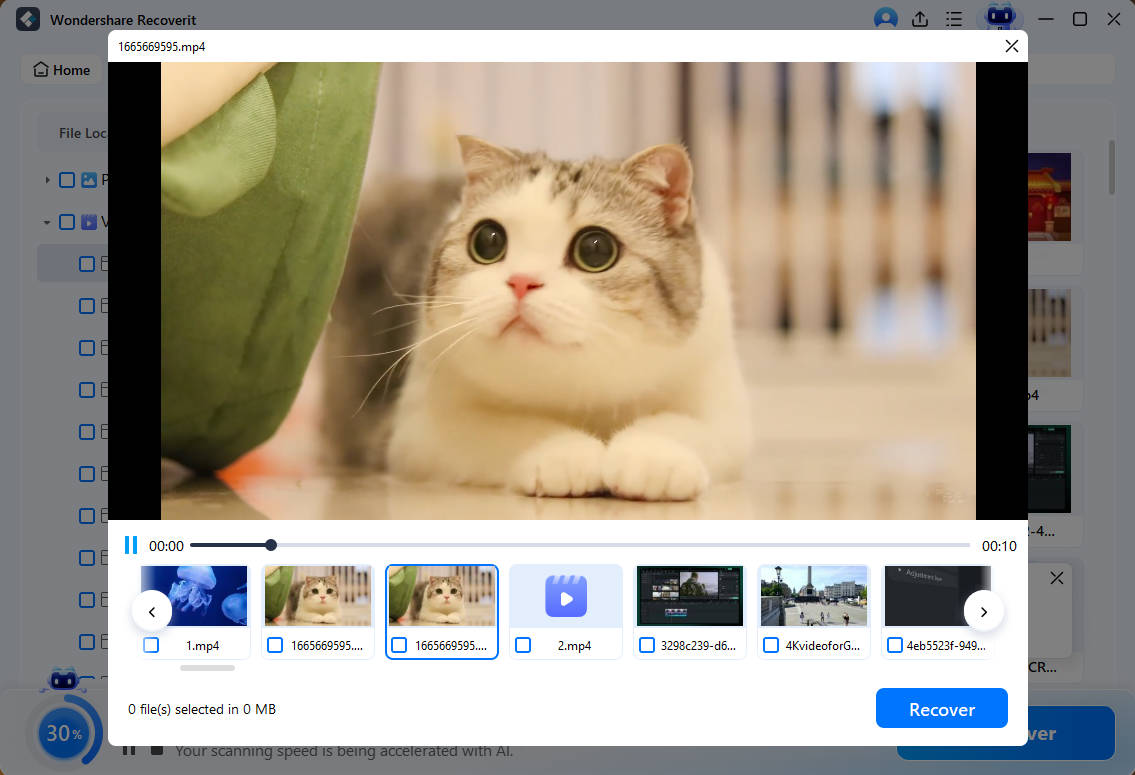
- Preview: Supported files can be previewed before you choose what to save; a preview is evidence that a candidate is readable, not a guarantee that every file will be intact.
- Separate destination: Recovered data should be written to other healthy storage, never back to the affected source.
The safe sequence is to stop unnecessary writes on Ubuntu, confirm that the system and target storage remain reachable, and prepare a different destination for recovered files.
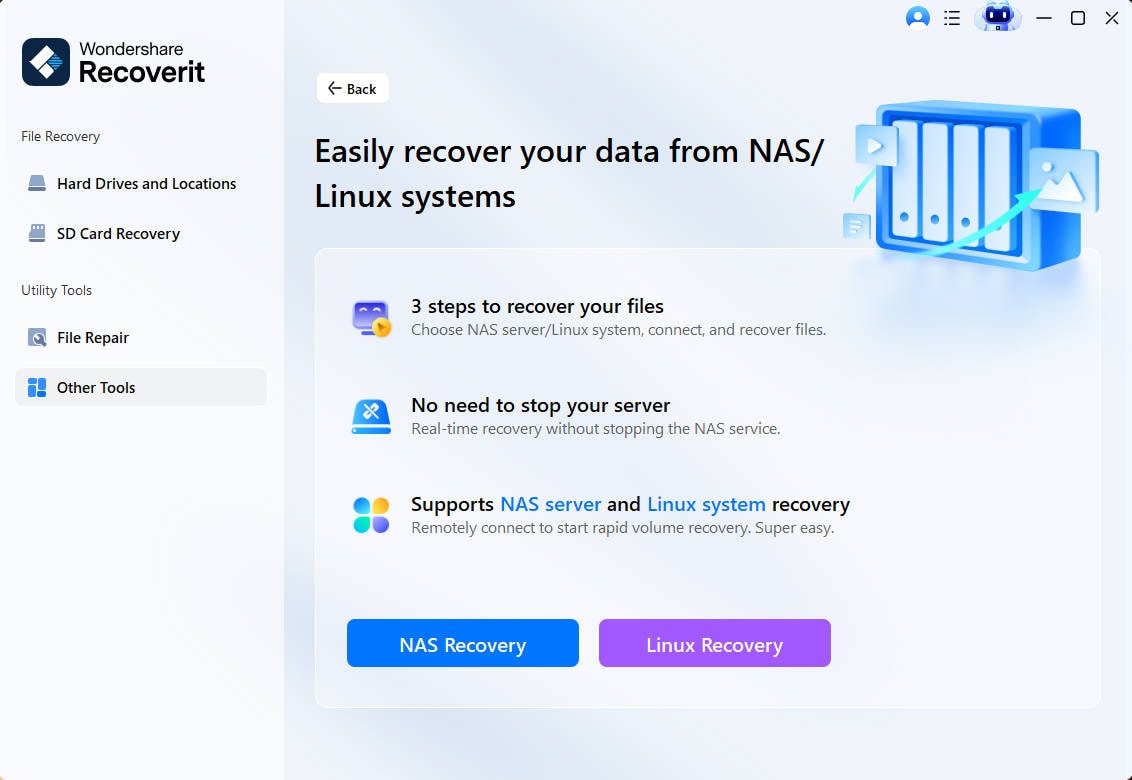
Step 1. Open Linux Recovery. Install and launch Recoverit on a Windows or macOS computer. Select Other Tools, then choose Linux Recovery. Do not install new software onto the Ubuntu volume that contains the deleted data.
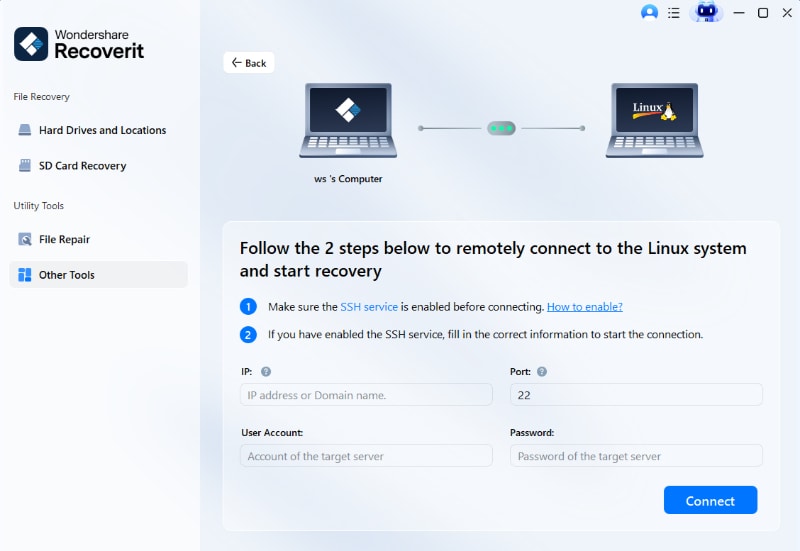
Step 2. Connect to the Ubuntu system. When the Linux machine is online and SSH access is available, enter the documented IP address or domain, port, user account, and password, then connect. This route will not help if Ubuntu cannot start or the storage is missing from the operating system.
Step 3. Scan, preview, and recover elsewhere. Let the scan run, filter the results, and preview supported candidates. Select the required files and save them to another healthy drive. Open the saved copies before changing or repairing the original filesystem.
Recovery depends on readable data remaining. Recoverit cannot reconstruct overwritten blocks, bypass LUKS encryption, repair a physically damaged device, or remotely scan a Linux machine that cannot be reached.
Try Wondershare Recoverit to Perform Data Recovery
Security Verified. Over 7,302,189 people have downloaded it.
TestDisk for Deleted Partitions
TestDisk is the strongest fit here when a whole partition vanished, a partition table was damaged, or a disk stopped booting because of logical partition metadata. CGSecurity’s current download page lists TestDisk 7.2 as the latest stable release, while Ubuntu versions vary by release. Installing testdisk also provides PhotoRec.
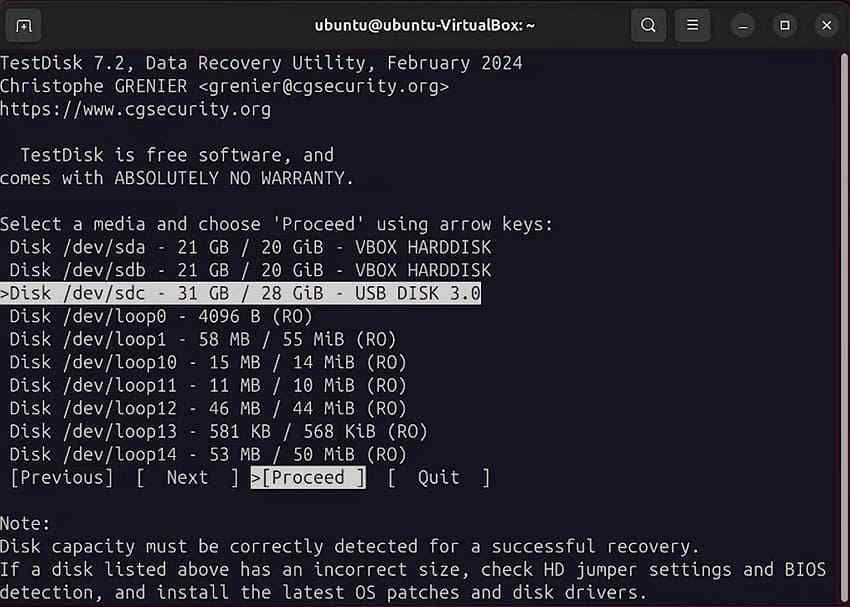
- Useful analysis: TestDisk searches for partition boundaries and can list files on many discovered filesystems, which helps validate a result before a write.
- Selective repair capability: It can recover deleted partitions and handle specific FAT or NTFS boot-sector problems. For EXT filesystems, it can locate backup superblocks; that is not the same as restoring arbitrary deleted EXT4 files.
- Main risk: Analysis is different from choosing Write. A wrong partition-table write can make later recovery harder, so record the original layout and prefer working on an image.
On a healthy source or a verified image, install with sudo apt install testdisk and launch with sudo testdisk. Do not install the package onto the affected filesystem if that installation could overwrite deleted data; use live media or another system instead.
PhotoRec for Deleted or Formatted Files
PhotoRec ignores the filesystem and searches raw storage for recognized file signatures. That makes it useful when deletion records are gone, a partition was reformatted, or filesystem structures are too damaged for normal directory-based recovery. It runs on Linux and is included in the TestDisk package.
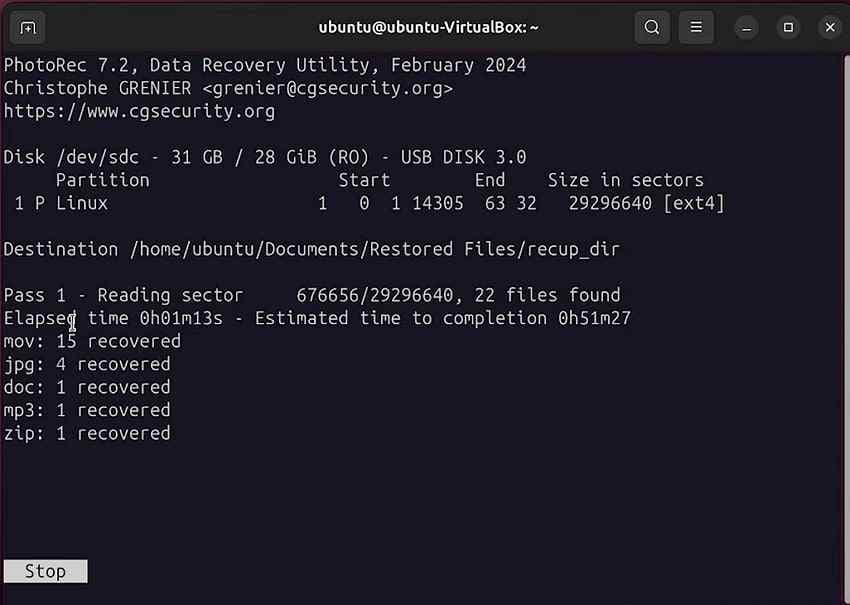
- Best strength: It can recover recognizable file content even when the original filesystem cannot be mounted.
- Read-only source access: PhotoRec reads the source, but the operator must still select a separate destination. CGSecurity explicitly warns against saving recovered files to the same partition.
- Main tradeoff: File carving generally cannot preserve original filenames or folders. Fragmented files may also be incomplete because signatures do not always reveal every fragment.
Launch it with sudo photorec from live media or another installation. Choose the source device or image carefully, select a destination on other physical storage, and limit file families if sorting thousands of carved files would be impractical.
GNU ddrescue for Failing Ubuntu Drives
GNU ddrescue is the first tool to consider when the source returns I/O errors, reads intermittently, or has known bad sectors. It copies blocks from one device or file to another, prioritizes easier areas, and records progress in a mapfile. It does not search for filenames and it does not repair the filesystem; its purpose is to preserve the best possible working copy for later recovery.
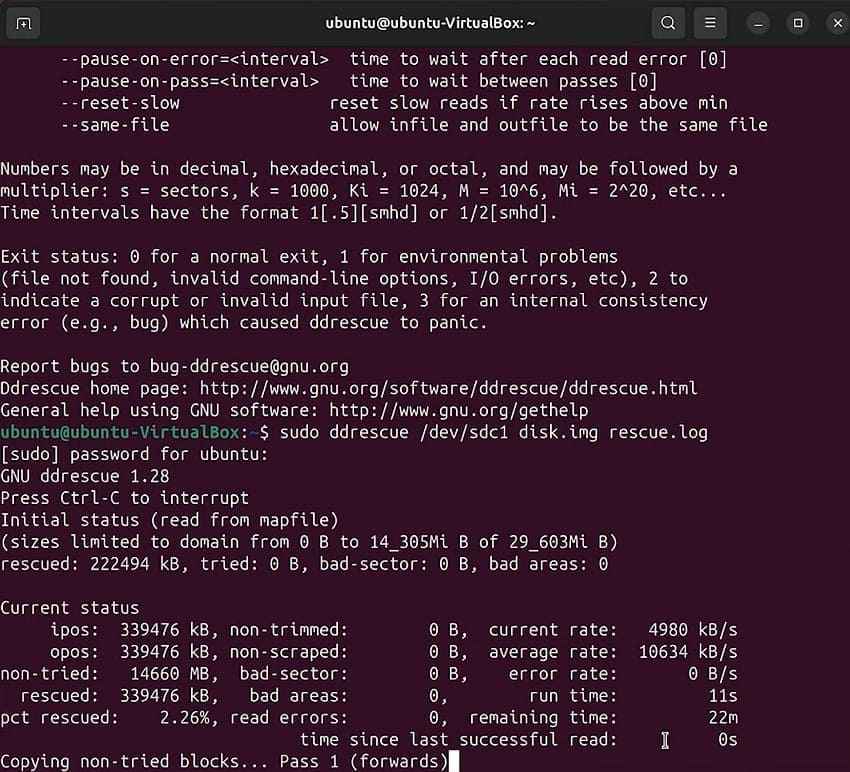
- Ubuntu naming: Install the gddrescue package, then run the ddrescue executable. Do not confuse it with the unrelated dd_rescue program.
- Mapfile value: Always use a mapfile. It records what was copied and lets a later pass resume without reading good regions again.
- Destination planning: A full-device image requires a filesystem that supports a file at least as large as the source. A direct clone requires an equal-or-larger destination that can be overwritten completely.
- Professional boundary: If the drive clicks, repeatedly powers down, is absent from firmware or Ubuntu, or holds uniquely valuable data, software retries may worsen the situation.
The Ubuntu community recovery guide recommends imaging damaged media and then working on the image. Because device names can change between boots, verify source and destination by model, serial number, capacity, and mount status before running any copy command.
Extundelete for Legacy EXT File Recovery
Extundelete uses an EXT3 or EXT4 journal to attempt recovery of deleted files and, when metadata survives, may restore original paths or names. Ubuntu currently packages version 0.2.4, but the upstream project released that version in January 2013. That age is not an automatic proof of failure, yet it is a major compatibility warning for modern EXT4 features and libraries.
- Required conditions: The source must be an EXT3 or journaled EXT4 filesystem, and it should be unmounted. Recovery output belongs on another mounted filesystem.
- Useful modes: The documented options include restoring one file, a directory, or all recoverable files, and accepting a partition image instead of a block device.
- Limitations: The project does not guarantee recovery, does not restore hard or symbolic links as links, and does not restore extended attributes.
- Current-use caution: Install and test it in a separate environment against a clone or image. Do not treat a successful package installation as proof that a modern filesystem layout is supported.
The broad command extundelete /path/to/image --restore-all writes results to a RECOVERED_FILES directory under the current working directory. Point the current directory to a healthy destination with sufficient space. If a targeted path matters, consult the Ubuntu Extundelete manual instead of starting with an unrestricted restore.
Ext4magic: A Historical Tool Not Recommended for Current EXT4
Ext4magic was designed for journal-assisted recovery from EXT3 and EXT4. It remains present in Ubuntu package listings, which can make it look like a current advanced choice. That impression is no longer safe.
In January 2025, the upstream project marked Ext4magic abandoned and explained that roughly a decade of e2fsprogs and library changes were not reflected in its code. The maintainer says current filesystems are no longer compatible, reports that the program no longer processes current EXT4 successfully, and explicitly recommends that users do not use it.
- Do not run it on a current EXT4 source: Package availability does not override the project’s compatibility warning.
- Historical images only: A specialist might preserve the binary for research on an old, matching filesystem image, never as the first tool on the original disk.
- Safer present-day path: Image unstable media with ddrescue, then choose a current parser, PhotoRec, TestDisk for its documented role, Recoverit when the Linux host is reachable, or professional recovery.
This current-status correction is why Ext4magic is not labeled “best for advanced EXT4 recovery” in the verdict. Including an abandoned tool without its warning would turn an SEO comparison into risky technical advice.
Part 4. Ubuntu Data Recovery Software by Data-Loss Scenario
The best first tool depends on whether you lost a directory entry, partition metadata, filesystem structure, or physical readability. This table puts preservation before repair.
| Data-loss situation | Best tool or first action | Alternative | Main limitation |
| rm deleted a file on EXT4 | Stop writes, unmount, then assess Extundelete on an image | PhotoRec or Recoverit | Journal records, data blocks, or names may already be gone; Extundelete is old |
| Trash was emptied | Stop writes and scan the source or image | PhotoRec or Recoverit | Emptying Trash removes the normal restore path |
| Partition was formatted | PhotoRec on an image | Recoverit if the Linux host and storage are reachable | Carving usually loses names and folders; TRIM or overwriting may defeat recovery |
| Partition disappeared | TestDisk analysis on an image | Professional analysis for complex layouts | Writing the wrong partition table can hide or overwrite structures |
| Filesystem is corrupted | Image first, then extract files before repair | TestDisk for documented structures or a filesystem-specific recovery tool | fsck modifies metadata and may reduce undelete options |
| HDD reports read errors | GNU ddrescue image or clone | Professional recovery | Software needs the device to remain readable and stable enough to copy |
| External USB or SD card lost files | PhotoRec | Recoverit | Save results elsewhere; flash TRIM/discard and overwriting may reduce results |
Before scanning, check whether a desktop-deleted file is still in Trash. The FreeDesktop.org Trash specification defines a file area and matching metadata that records the original path. Command-line rm does not normally use this mechanism. If the file is already gone from Trash, do not create a new recovery-tool installation, download, or image on the affected volume.
Part 5. What to Do Before Using Ubuntu Recovery Software
The first minutes matter more than a long feature list. Ubuntu’s data-recovery guidance warns against writing to the failed device because new writes can overwrite lost data and can aggravate some hardware failures.
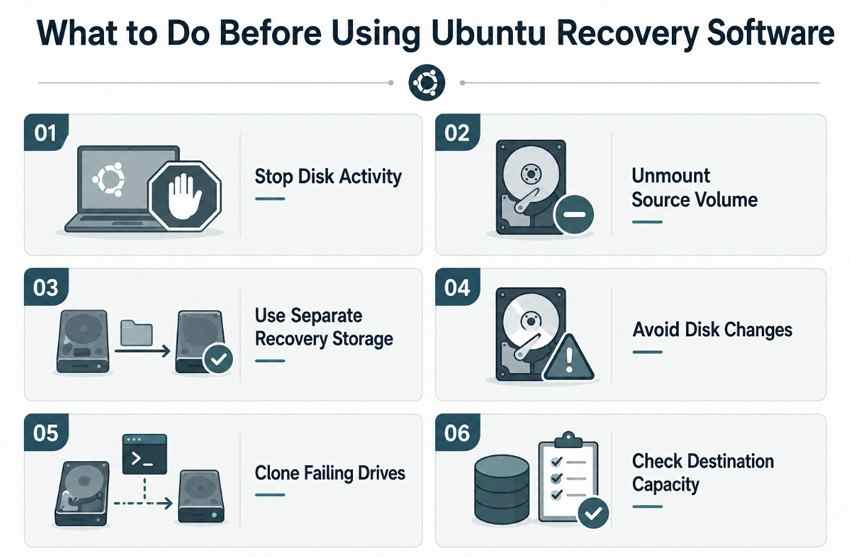
- Stop using the affected drive: Pause downloads, package updates, browser activity, synchronization, and normal work. If the Ubuntu root filesystem contains the lost data, shut down and boot trusted live media rather than continuing from it.
- Unmount the affected partition when possible: Confirm the device and mount point first. A journaled filesystem can change metadata during ordinary mounting and background activity.
- Do not save recovered files to the source: Use another physical drive. A different folder or partition on the same disk may still overwrite source blocks and offers no protection if the hardware fails.
- Avoid formatting, repartitioning, and premature repair: These operations can rewrite metadata that partition and undelete tools need. Recover files first; repair a verified copy later.
- Clone a failing drive before deep recovery: Use ddrescue with a mapfile to reduce repeated stress on unreadable regions. Run higher-level tools on the image or clone.
- Prepare enough destination space: A full disk image can be as large as the source device. The destination filesystem must support a file of that size, and recovery results need additional room.
If the storage is encrypted with LUKS, preserve the header and credentials along with the image. Recovery tools do not bypass encryption. If the header is destroyed or the key is unavailable, scanning ciphertext will not recreate normal files.
Part 6. Free vs Paid Ubuntu Data Recovery Software
Free and paid are not opposites in capability. Ubuntu-native tools often expose lower-level functions that a graphical program does not attempt, while a paid GUI may make a supported remote file scan easier to filter and review.
| Factor | Free Ubuntu tools | Paid recovery software |
| Interface | Terminal menus or CLI | Guided graphical workflow |
| Learning curve | Device names, images, filesystems, and command options require care | Easier navigation, but the user still must protect the source and destination |
| Partition recovery | TestDisk can search for and write lost partition entries after verification | Recoverit scans supported Linux storage for files; it is not a partition-table editor |
| File carving | PhotoRec reads signatures independently of the filesystem | Recoverit provides a scan, filters, and supported-file preview |
| Failing-drive imaging | GNU ddrescue is purpose-built for block copying with a mapfile | Not Recoverit’s primary Linux recovery function |
| Preview | Varies; PhotoRec does not offer a normal filename-and-folder preview workflow | Recoverit previews supported scan results |
| Best user type | Users who understand storage layouts or can follow a verified recovery plan | Users who want a GUI and have a reachable supported Linux host |
The safest toolkit may combine both categories. For example, ddrescue can preserve an unstable disk, TestDisk can evaluate partition structures in the image, and PhotoRec can carve files if metadata recovery fails. Recoverit fits when the Linux machine remains reachable and a guided scan is more important than low-level partition or imaging control.
Part 7. When Ubuntu File Recovery Software May Not Work
Recovery software can only use information still present and readable. A scan that finds filenames is not proof that the corresponding file data is intact.
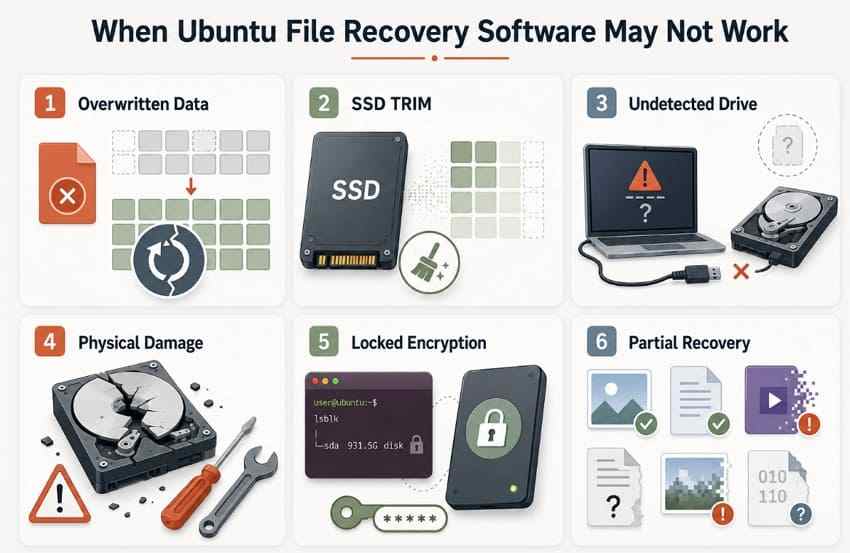
- Deleted data was overwritten: Once other content reuses the same blocks, software cannot infer the original bytes.
- SSD TRIM or discard cleared blocks: When discard has been completed, deleted flash blocks may no longer return their former data. Stopping writes remains important, but no setting can restore blocks already cleared.
- The drive is not detected: A software scanner cannot access a device that never appears to the operating system. Repeated power cycling or adapter swaps can be risky on physically failing media.
- Severe physical damage exists: Head crashes, controller faults, damaged connectors, and unstable electronics need hardware expertise, not repeated deep scans.
- Encrypted storage cannot be unlocked: Tools cannot bypass a missing LUKS passphrase, damaged keyslot, or destroyed header. Preserve encryption metadata and known credentials.
- Recovered file data is incomplete: Missing or overwritten fragments can corrupt large videos, databases, archives, and virtual-machine images even when a header survives.
- The selected tool does the wrong job: ddrescue creates a copy but does not undelete files; TestDisk is primarily a partition and boot-structure tool; PhotoRec carves content without normal names; Extundelete depends on an EXT journal.
Stop DIY work when the cost of another read outweighs the benefit. Irreplaceable data on a mechanically unstable drive is a professional-recovery case, especially if no verified image exists.
Part 8. How to Improve Ubuntu Data Recovery Chances
Good recovery practice is mostly restraint: preserve the evidence, work on copies, and choose the least invasive tool that answers the current question.
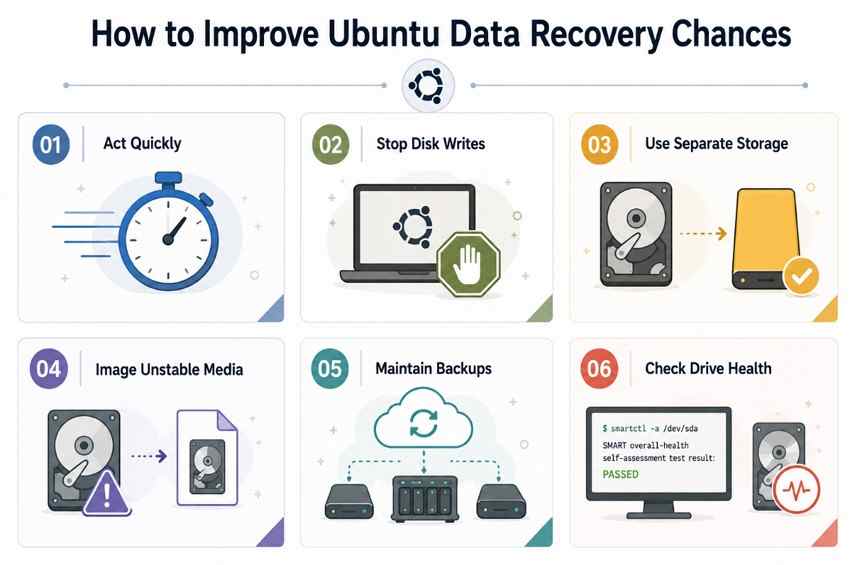
- Act immediately: Stop normal activity as soon as deletion, formatting, or corruption is discovered.
- Avoid further writes: Use live media or another computer so logs, updates, swap, caches, and recovery-tool installation do not modify the source.
- Recover to another physical drive: Separate output prevents recovered data from overwriting items that have not yet been found.
- Use a disk image for unstable media: Create one best-possible copy with ddrescue and a mapfile, preserve it, then duplicate the image for experiments.
- Keep regular backups: Maintain at least one separate, tested backup and verify that important files can actually be restored.
- Monitor drive health: Ubuntu’s Disks guidance explains how to view SMART data and run self-tests on supported drives. SMART can reveal warnings, but a healthy status does not guarantee that a drive will not fail.
The practical order is: stop writes, identify the loss type, image failing media, scan or inspect the copy, recover to other storage, verify the recovered files, and only then attempt filesystem repair. That sequence gives every tool a better source and keeps one mistake from becoming permanent.
Conclusion
The best recovery software for Ubuntu is the tool that matches the failed layer. TestDisk addresses lost partitions; PhotoRec carves recognizable files; GNU ddrescue protects readable sectors on an unstable disk; and Recoverit offers a GUI for a reachable Linux machine from Windows or macOS. Extundelete remains a legacy EXT journal tool that deserves image-only caution. Ext4magic should not be used on current EXT4 because its own project says it is abandoned and incompatible.
Do not run fsck, format, repartition, or save results to the source before preserving the data. If the disk is physically unstable or the files are irreplaceable, stop and choose professional recovery rather than exhausting the drive with repeated scans.
FAQ
-
Can Ubuntu Recover Files Deleted With rm?
Sometimes, but rm normally bypasses the desktop Trash. Stop using the affected filesystem, unmount it, and work from an image when possible. Extundelete may recover files from a compatible journaled EXT3/EXT4 volume if metadata and blocks survive, but its upstream version is old. PhotoRec can carve recognizable content when names and directories are no longer recoverable. SSD TRIM, overwriting, encryption, and fragmentation can make recovery impossible or incomplete. -
Can Windows Data Recovery Software Recover an Ubuntu EXT4 Drive?
Only if the software explicitly understands EXT4 or uses a supported connection to a Linux host. Windows itself does not provide ordinary native access to an EXT4 volume, so do not accept a prompt to format or repair an unfamiliar drive. Recoverit’s current Linux workflow runs on Windows or macOS and connects remotely to a reachable Linux machine; it is not a native Windows mount driver and cannot scan an unreachable device through SSH. -
Is PhotoRec Better Than TestDisk for Deleted Files?
PhotoRec is generally the better fit for carving deleted file content because it searches for file signatures without relying on the filesystem. TestDisk is primarily for lost partitions and selected boot or filesystem structures. PhotoRec’s tradeoff is that recovered files usually lose their original names and folder structure. If a partition disappeared intact, analyze it with TestDisk before falling back to carving. -
Should You Run fsck Before Ubuntu Data Recovery?
Not on the only copy when lost files still matter. fsck repairs filesystem consistency by changing metadata, and those changes can remove evidence that undelete or forensic tools could use. Stop writes, image the source first—using ddrescue if the media has read errors—and recover important files from a copy. Run repair tools only after the image is preserved and the risks are understood.


