

 TL;DR:
Keep Wise Data Recovery 6.2.2 for straightforward Windows deletions under its 2GB free allowance, but switch to alternatives like Wondershare Recoverit for Mac and NAS support, Recuva for uncapped free Windows recovery, or R-Studio for complex RAID reconstruction.
● Recuva and Windows File Recovery offer free Windows data recovery without advertised byte caps, whereas EaseUS Data Recovery Wizard 20.5 matches Wise's 2GB maximum limit, and DMDE 4.4.4 allows recovering up to 4,000 files from a single directory per free operation.
● Disk Drill 6 and Wondershare Recoverit V14 introduce disk-image scanning to safely reduce repeated reads on unstable logical drives, though their Windows free saving limits are restricted to 100MB and 500MB respectively, while Stellar Data Recovery 12.6 operates as the actual provider behind Wise's Mac partnership.
● No software alternative can reconstruct data already cleared by SSD TRIM or repair physical hardware failures such as clicking drives, meaning users must stop use immediately and install recovery utilities on a separate healthy drive to prevent overwriting.
Ask AI for a summary
 ChatGPT
 Perplexity
 Gemini
 Claude
 Grok
Grok
TL;DR: the best Wise Data Recovery alternatives
Best overall upgrade: Recoverit. A guided Windows and Mac workflow with disk-image scanning, BitLocker, NAS/Linux access, and Enhanced Photo & Video Recovery. The free edition saves up to 500MB.
Best lightweight free Windows option: Recuva. Its official Free plan includes advanced file recovery and does not advertise a byte cap, but the interface and feature set are basic.
Best for imaging and recovery protection: Disk Drill. Current Windows 6 provides byte-to-byte backup and Recovery Vault, but saves only 100MB for free.
Best like-for-like 2GB allowance: EaseUS Data Recovery Wizard Free. It matches Wise's maximum free allowance and adds a more guided workflow, while advanced functions are paid.
Best guided alternative with a Mac edition: Stellar Data Recovery. Its Windows free limit is 1GB by default, with another 1GB after sharing, and individual saved files are capped at 100MB.
Best for advanced RAID and file-system work: R-Studio. Powerful, cross-platform, and technical; its demo saves only files no larger than 1024KB.
Best technical value: DMDE. The free edition can recover up to 4,000 files from one selected directory per operation and includes imaging and RAID tools.
Best first-party command-line option: Windows File Recovery. Microsoft's utility is free, but has no graphical preview and requires separate source and destination drives.
Most important safety rule: Install and save to another drive. Stop DIY work if the device clicks, disconnects, reports the wrong capacity, or is not detected.
Wise Data Recovery 6.2.2 offers 2GB free, but it is not the best fit for every Mac, RAID, camera card, damaged disk, or command-line user. Compare eight current alternatives by real limits, specialist tools, and recovery risk.
Fact-checked on August 18, 2026: The versions, free saving limits, supported operating systems, and listed prices below were checked against official vendor pages. Prices and promotions can vary by country and checkout date. No vendor-sponsored recovery-rate claim is treated as an independent benchmark.
Try Wondershare Recoverit to Perform Data Recovery
 Security Verified. Over 7,302,189 people have downloaded it.
In this article
Part 1. Best Wise Data Recovery Alternative: Quick Verdict
There is no universal replacement for Wise because the right tool depends on what was lost, where it was stored, and whether the device is still healthy. A free undelete utility can be ideal for one deleted document and completely inappropriate for a degraded RAID or an SSD after TRIM.
Best Choice by Situation
| Recovery situation | Best first choice | Why it fits | Main limitation |
| Recent deletion on a healthy Windows drive, under 2GB | Wise Data Recovery | Portable option and a generous free allowance | Windows-focused workflow |
| Mixed Windows or Mac recovery, formatted media, camera footage, NAS, or Linux storage | Recoverit | Guided interface plus specialist media and storage workflows | Free saving limit is 500MB |
| Basic Windows undelete with no advertised free byte cap | Recuva | Lightweight and easy to run | No Mac version and fewer advanced storage tools |
| Create an image before scanning a questionable logical drive | Disk Drill, Recoverit, R-Studio, or DMDE | Image or byte-to-byte backup workflow reduces repeated reads from the source | An image does not repair physical damage |
| Guided Windows recovery with up to 2GB free | EaseUS Data Recovery Wizard Free | Like-for-like free allowance and broad scan workflow | Advanced functions and larger saves require payment |
| Advanced RAID, Storage Spaces, or complex file systems | R-Studio or DMDE | Technical control over parameters, images, and virtual arrays | Steeper learning curve |
| Completely free Microsoft command-line recovery | Windows File Recovery | First-party utility with Regular and Extensive modes | No graphical preview; local storage only |
| Clicking, burning smell, repeated disconnects, wrong capacity, or no detection | Professional laboratory | Hardware stabilization may be required before any scan | Higher cost and no guaranteed outcome |
When Wise Data Recovery Is Still Enough
Do not replace a useful tool merely because alternatives exist. The current Wise Data Recovery product page lists a 2GB free recovery allowance, unlimited validity and computer installations for the Free edition, keyword filtering, previews, and a portable build. That makes it a strong first pass when all of the following are true:
- The source is a healthy Windows-accessible drive or removable device.
- The loss is logical, such as a recent deletion or formatting event.
- You need to save no more than 2GB before deciding whether to pay.
- You do not need a native Wise-branded Mac application, technical RAID reconstruction, or a specialized media-fragment workflow.
- You can install or run the utility from a different drive and save results elsewhere.
If those conditions are met, Wise may be the most economical answer. An alternative becomes useful when the storage type, operating system, damage pattern, or required recovery volume falls outside that simple case.
Part 2. What Wise Data Recovery 6.2.2 Offers
Wise Data Recovery is a Windows file-recovery utility from WiseCleaner. As of this review, the official site lists version 6.2.2 with an 11.4MB installer. It searches supported local and removable storage for deleted or lost files and lets users filter, preview, and save selected results.
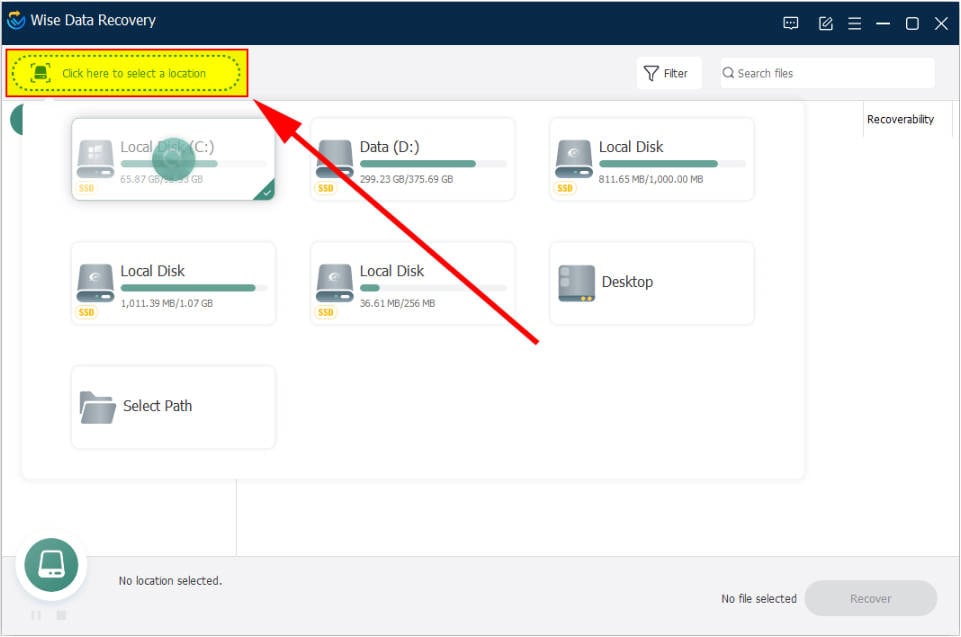
Interface verification: The screenshot above is the Wise Data Recovery 6 interface published in the current official Wise user guide.
Wise Free vs Pro
| Item | Wise Data Recovery Free | Wise Data Recovery Pro |
| Recovery allowance | 2GB total | Unlimited recovery |
| License term | Unlimited validity | One-year subscription on the current purchase page |
| Computer limit | Unlimited computers | 1 PC or 3 PCs, depending on plan |
| Current listed price | Free | $39.97 for 1 PC or $49.99 for 3 PCs at the time checked |
| Portable build | Available | Available |
| Best fit | Small recent-loss jobs and evaluation | Saving more than 2GB on Windows |
Wise lists NTFS, FAT-family, HFS-family, and Ext-family support across its current page and product materials. However, a recognized file system is not the same as recoverable data. Overwriting, SSD TRIM, encryption, metadata damage, and fragmentation can still prevent a usable result.
Is There a Native Wise Data Recovery for Mac?
Not in the sense most shoppers expect. WiseCleaner has a page called Wise Data Recovery for Mac, but its own FAQ says the product is not the Mac edition of Wise Data Recovery and is produced through a strategic partnership with Stellar. That partner product currently advertises 1GB free with a 25MB maximum per individual file.
This distinction matters. If you need the same vendor's native Windows and Mac workflow, compare Recoverit, Disk Drill, R-Studio, DMDE, or Stellar directly. Do not assume a Wise Windows license, interface, saving allowance, or feature set automatically carries over to the Mac partner page.
Part 3. Why Look for an Alternative to Wise Data Recovery?
Wise's 2GB allowance and portable build solve the uncomplicated end of the market well. The reasons to switch should therefore be specific, not generic claims that another tool has a higher success rate.
- You work across Windows and Mac: Wise's Mac page is a Stellar partnership rather than the same native product family.
- You want to image a source before scanning: A sector-level image can reduce repeated reads from an unstable but still detectable logical drive. Recoverit, Disk Drill, R-Studio, and DMDE provide clearer image-based workflows.
- You lost fragmented camera video: Ordinary file carving can find incomplete clips. Recoverit's Enhanced Photo & Video Recovery is designed to assemble related media fragments from supported devices.
- You need NAS, Linux, BitLocker, RAID, or Storage Spaces support: These require product-specific workflows and, for RAID, accurate array parameters. Feature availability varies by edition.
- You need transparent technical control: R-Studio and DMDE expose file-system, imaging, and virtual-array controls that consumer utilities intentionally hide.
- You want a no-cost option beyond 2GB: Recuva does not advertise a byte cap for its Free tier, DMDE uses a per-directory file-count rule, and Windows File Recovery is free without a commercial saving quota.
- The drive may be physically failing: This is a reason to stop using all DIY alternatives. Software cannot repair a failed controller, damaged heads, or unstable NAND.
Part 4. How We Compared the Alternatives
This comparison prioritizes decision value over affiliate-style rankings. We checked each vendor's current product, download, pricing, or support page on August 18, 2026 and recorded the public free limit, operating-system coverage, image or backup capability, specialist storage support, and recovery workflow. The interface image for each tool comes from an official product or guide page whenever available. Where a vendor did not publish a current interface, the image source is identified explicitly.
We did not assign recovery-rate percentages or speed scores. A valid lab benchmark would require identical drives, file sets, allocation states, overwrite patterns, SSD TRIM conditions, file-system damage, and hash verification. Results from different vendor demos cannot establish which engine will recover a particular user's file.
Editorial disclosure
This article is published on the Recoverit website, and Recoverit is one of the compared products. To reduce commercial bias, Wise is retained as the recommended choice where its free allowance and portable Windows workflow are genuinely sufficient. Every tool is also given a clear use case and limitation.
Part 5. 8 Best Wise Data Recovery Alternatives
1. Wondershare Recoverit: Best Overall Upgrade
Best for: Users who want a guided Windows and Mac application plus disk-image scanning, formatted-device recovery, BitLocker support, NAS/Linux access, and specialized camera-media reconstruction.
Wondershare Recoverit is the most complete consumer-facing upgrade in this comparison, but not the most generous free option. The current Free edition saves up to 500MB, versus Wise's 2GB. The reason to choose it is coverage: the current V14 product family combines ordinary deleted-file recovery with disk imaging, Enhanced Photo & Video Recovery, NAS and Linux workflows, and paid bootable-media options.

For a memory card that held long 4K or 8K recordings, the specialist media path is more relevant than a generic claim about scanning depth. For a logically unstable but still readable disk, creating an image before repeated analysis can reduce direct reads from the source. Recoverit can also scan an unlocked BitLocker volume, but it cannot bypass a missing recovery key or repair physical hardware failure.
Choose Recoverit over Wise when: the job involves Mac, disk imaging, camera-media fragments, NAS/Linux storage, BitLocker, or a broader guided recovery path. Keep Wise when the job is a small recent deletion on a healthy Windows device and its 2GB allowance is enough.

2. Recuva: Best Lightweight Free Windows Alternative
Best for: Straightforward recovery of recently deleted Windows files when you want a small utility without an advertised free byte cap.
Recuva is the closest philosophical alternative to Wise: a lightweight Windows utility focused on undeleting files from drives and removable media. The current official Recuva page lists Advanced File Recovery in the Free plan. It does not advertise a byte-based recovery ceiling. The Professional plan adds virtual hard drive support, automatic updates, and premium support.
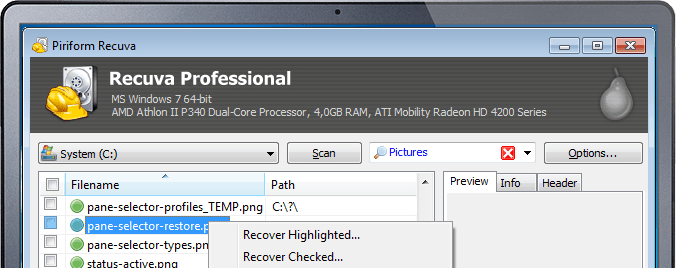
The interface looks older than most competitors, but the screenshot above is still the one used on Recuva's current official product page. That visual age is not evidence of poor recovery. The practical limitations are narrower platform coverage and fewer specialist workflows for Mac, NAS, complex RAID, or fragmented professional video.
Choose Recuva over Wise when: the 2GB Wise cap is the only blocker and your source is a healthy Windows-accessible device. Choose Wise when portability, its current interface, and a clearly documented allowance matter more.
3. Disk Drill: Best for Source Imaging and Recovery Protection
Best for: Users who want a polished Windows or Mac workflow, byte-to-byte backup, preview tools, and proactive recovery protection.
Disk Drill 6 combines file recovery with a byte-to-byte backup feature that can create an image before deeper analysis. The official download page lists Windows version 6.3.1398, released July 22, 2026, and support for Windows 10, Windows 11, and Windows 11 on ARM. Its Windows Free edition saves only 100MB, far less than Wise.
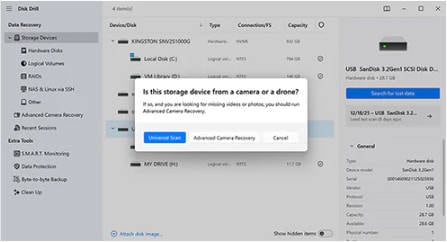
Disk Drill's free value is broader than its saving allowance suggests: users can scan, preview recoverable files, create byte-to-byte backups, and use Recovery Vault where supported. On Mac, the ordinary free edition generally evaluates and previews recoverability rather than saving deleted files without an upgrade, so Windows and Mac shoppers should not assume identical free terms.
Choose Disk Drill over Wise when: you value source imaging, proactive protection, cross-platform design, and preview quality more than the amount you can save for free.
4. EaseUS Data Recovery Wizard: Best Like-for-Like 2GB Alternative
Best for: Windows users who want Wise's maximum 2GB free allowance in a more guided, full-screen workflow.
The current EaseUS Data Recovery Wizard Free page lists version 20.5.0 and up to 2GB of free recovery. Its scan, filter, preview, and save sequence is familiar to nontechnical users. Paid editions add larger saving capacity and list features such as BitLocker recovery, NAS access, file repair, and WinPE bootable media.
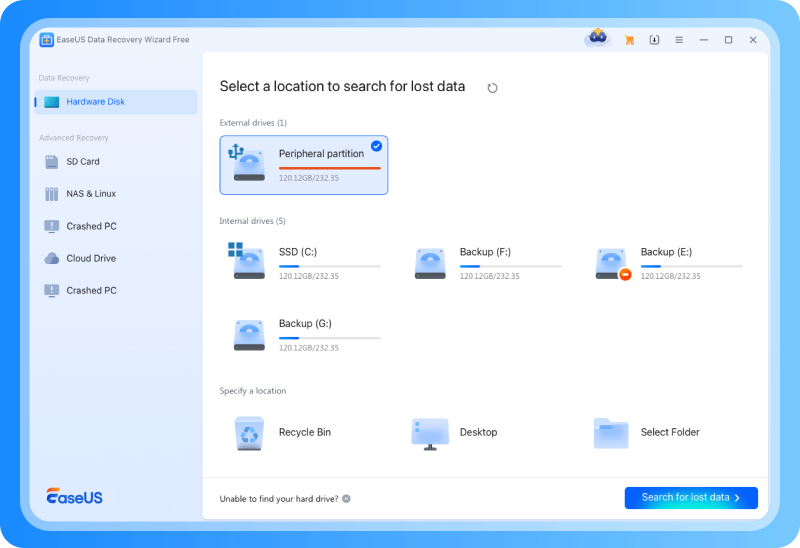
The phrase "up to 2GB" matters: promotional conditions can affect how the maximum allowance is unlocked, so verify the current in-app terms before relying on it for an emergency. Also distinguish finding a file from recovering a valid file. A preview or post-recovery integrity check is more meaningful than a large count of raw scan results.
Choose EaseUS over Wise when: you want a similar maximum free allowance with a more guided interface and a paid upgrade path for NAS, BitLocker, or WinPE. Choose Wise for portability and simpler licensing.
5. Stellar Data Recovery: Best Guided Alternative with Clear Mac Context
Best for: Users who want a guided Windows or Mac product and a clearly tiered path toward drive monitoring, cloning, RAID, or media repair.
Stellar is particularly relevant because WiseCleaner identifies Stellar as the producer behind the Wise-branded Mac partner page. Buying or downloading that Mac offer should therefore be evaluated under its own terms, not as an extension of the Wise Windows product.
The current Stellar Free Data Recovery page lists Windows version 12.6.0.0. It provides 1GB free by default and another 1GB after a social share, with a 100MB maximum for each saved file. Those details make Stellar less suitable for a single 300MB video even if the total free allowance appears comparable to Wise.
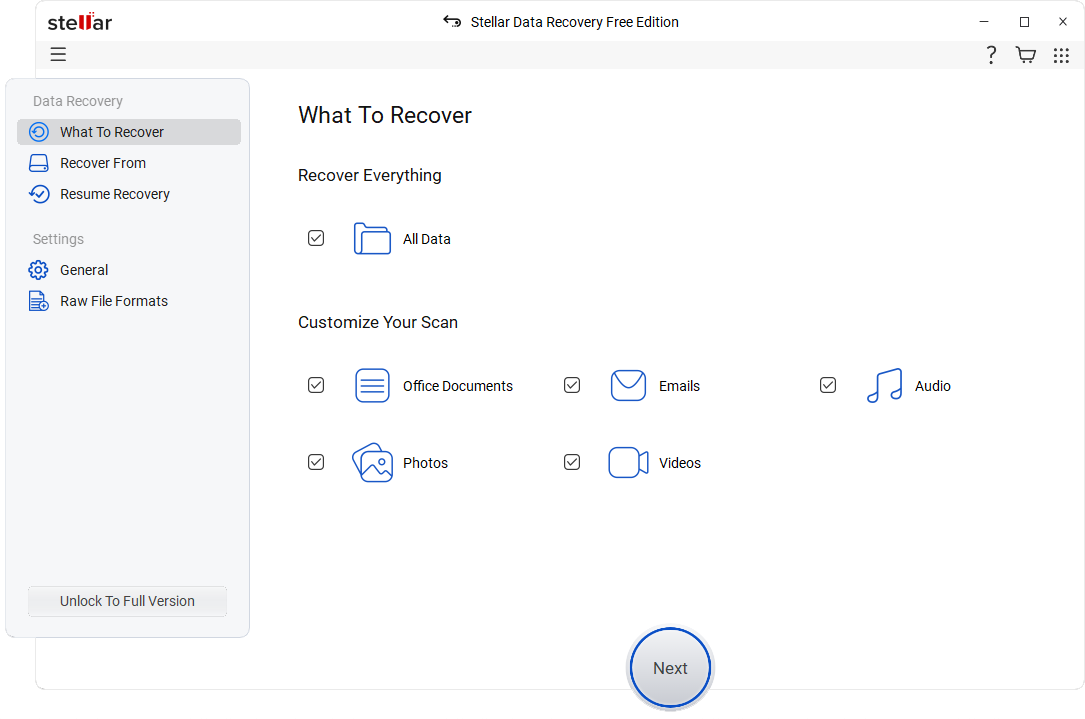
Choose Stellar over Wise when: you want a directly supported Mac edition or a guided upgrade path into drive monitoring, cloning, RAID, or media repair. Read the exact edition matrix before purchasing.
6. R-Studio: Best for Advanced RAID and File-System Recovery
Best for: Experienced users, IT teams, and recovery professionals who need granular scan parameters, images, complex file systems, or virtual RAID reconstruction.
R-Studio is not an open-source text-only utility. It is a commercial graphical recovery suite with Windows, Mac, and Linux editions. The current R-Studio download page lists version 9.5 build 191810, released June 20, 2026. The demo can save files no larger than 1024KB, which makes it a diagnostic tool rather than a practical free recovery solution for photos or video.
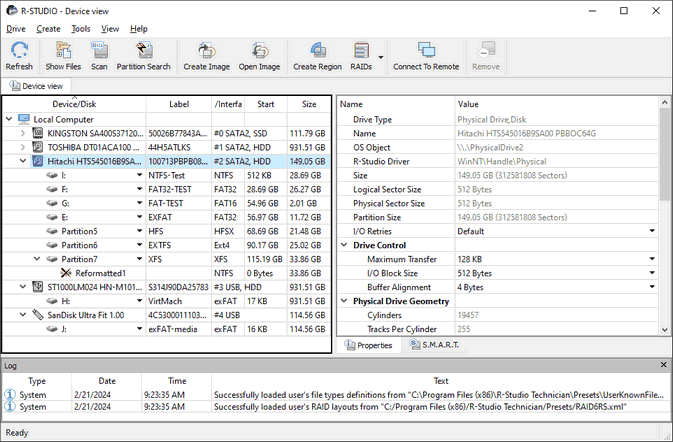
R-Studio's strength is control: recognized file systems, raw signatures, regions, images, parameters, and RAID layouts can be inspected and adjusted. The standard Windows license is currently listed at $79.99. Network recovery is not included in that standard tier; the Corporate and Technician licenses serve different deployment and commercial-use needs.
Choose R-Studio over Wise when: you understand disk structures and need RAID, imaging, complex file systems, or granular recovery control. It is excessive for a simple recent deletion.
7. DMDE: Best Technical Value
Best for: Technically confident users who want partition editing, imaging, virtual RAID, and a useful free recovery rule without a conventional byte cap.
DMDE 4.4.4 is available for Windows, macOS, Linux, and DOS. Its Free Edition can recover up to 4,000 files from one selected directory per operation, and the operation can be repeated. This rule can be generous for organized folders but inconvenient when files are scattered across many reconstructed directories.
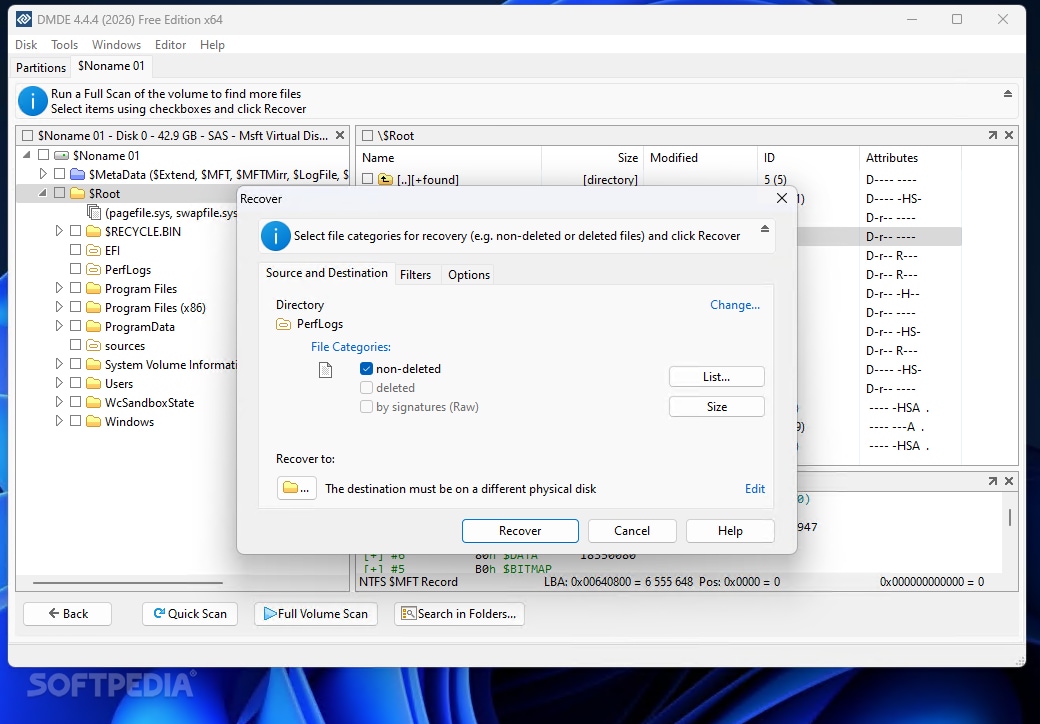
Interface verification: DMDE's official feature page still uses an older illustrative build. The screenshot above is a real DMDE 4.4.4 Free Edition interface published on the current Softpedia product listing.
DMDE can create images or clones, scan partitions, reconstruct supported arrays, and expose disk structures directly. That power also creates risk: writing partition changes to the source is very different from read-only recovery. Save scan logs, clone when appropriate, and recover files to separate storage before considering any on-disk repair.
Choose DMDE over Wise when: you need imaging, virtual RAID, or partition-level inspection and understand the risks. Choose Wise when simplicity and a clear 2GB allowance are more important.
8. Windows File Recovery: Best Free Microsoft Command-Line Option
Best for: Windows users who want a free first-party utility and are comfortable typing recovery commands without a graphical preview.
Windows File Recovery is Microsoft's command-line app for Windows 11 and Windows 10. It recovers from local internal drives, external drives, and USB devices, but not cloud storage or network shares. The source and destination must be different drives.
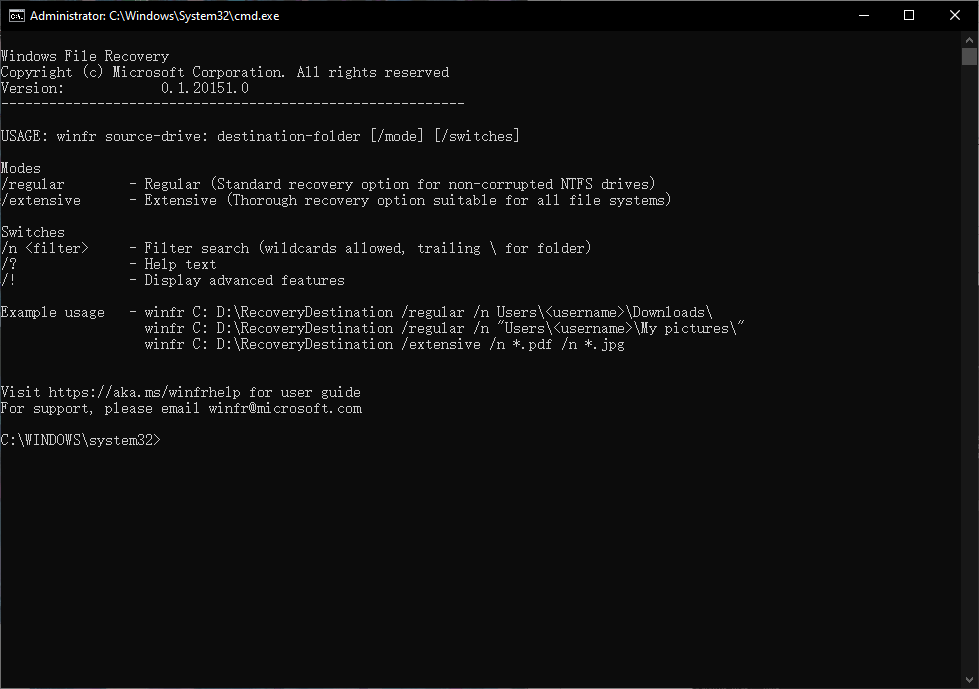
Interface verification: Microsoft Store currently provides the app icon but no full console screenshot. The real console image above is published in a current Windows File Recovery tutorial and matches Microsoft's documented winfr source-drive: destination-drive: [/mode] [/switches] syntax.
Regular mode is intended for recently deleted files on a healthy NTFS volume. Extensive mode performs a broader search and is the usual choice for older deletion, formatting, or non-NTFS media. Filters can narrow the search, but there is no thumbnail gallery or preview. Recovered results are written into a recovery folder on the destination.
Choose Windows File Recovery over Wise when: you want a completely free, first-party CLI tool and can work safely with drive letters and filters. Choose Wise for preview-driven recovery and a simpler interface.
Part 6. Wise Data Recovery Alternatives Compared
The table below compares public product terms, not laboratory recovery rates. "Image workflow" means the product can create or work with a disk image as part of a logical recovery process. It does not mean the software can stabilize mechanically failing hardware.
| Tool | Current free saving rule | Platforms | Image workflow | Specialist strength | Best reason to choose it |
| Wise Data Recovery 6.2.2 | 2GB total | Windows; Mac page is a Stellar partnership | Not a headline Free feature | Portable Windows undelete | Small, recent loss with a generous free allowance |
| Recoverit V14 | 500MB | Windows and Mac | Yes | Camera media, BitLocker, NAS, Linux, bootable recovery by edition | Broad guided recovery across varied storage |
| Recuva | No byte cap advertised for Free | Windows | No dedicated current image-first workflow | Lightweight undelete | Basic Windows recovery beyond 2GB |
| Disk Drill 6 | 100MB on Windows; Mac terms differ | Windows and Mac | Yes, byte-to-byte backup | Recovery protection and polished previews | Image-first workflow and usability |
| EaseUS Data Recovery Wizard 20.5 | Up to 2GB on Windows | Windows and Mac | Feature availability varies by edition | Guided consumer workflow; paid NAS and BitLocker paths | Like-for-like 2GB alternative |
| Stellar Data Recovery 12.6 | 1GB plus 1GB after sharing; 100MB per file | Windows and Mac product lines | Available by edition | Tiered cloning, monitoring, RAID, and repair | Guided recovery with direct Mac support |
| R-Studio 9.5 | Files up to 1024KB in demo | Windows, Mac, and Linux | Yes | Advanced file systems and virtual RAID | Professional technical control |
| DMDE 4.4.4 | 4,000 files from one selected directory per operation | Windows, Mac, Linux, and DOS | Yes | Partition work, imaging, and virtual RAID | Technical capability at low cost |
| Windows File Recovery | Free with no commercial byte cap | Windows 11 and Windows 10 | No built-in GUI imaging path | First-party command-line recovery | Free Microsoft CLI workflow |
What the table cannot tell you
A tool can list a file name yet return an unusable file because its content blocks were overwritten, trimmed, encrypted, or reconstructed incorrectly. Preview critical files where possible. After saving them to separate storage, open them and verify their contents. For business-critical archives, databases, or media, validate checksums or application-level integrity rather than relying on a green status label.
Part 7. How to Recover Files with Recoverit
Use this workflow only when the source device is detected consistently and shows no signs of physical failure. If the affected drive contains the operating system, minimize use immediately. Download and install Recoverit for Windows on another drive, or connect the affected storage to a healthy computer. Prepare a separate destination with enough free capacity for the recovered files.
Step 1. Select the Affected Storage
Launch Recoverit and select the drive, partition, external device, or supported location that contained the lost files. Confirm the capacity and device identity before scanning. If the source appears twice, shows the wrong size, or repeatedly disconnects, stop and reassess the hardware.

Step 2. Scan and Filter Results
Start the scan. Use file type, size, date, path, status, and keyword filters to reduce noise while the scan proceeds. If you created a disk image first, scan the image instead of repeatedly reading the source. For camera cards with missing or unplayable long-form footage, use the relevant camera recovery or Enhanced Photo & Video Recovery workflow where available.

Step 3. Preview and Save Elsewhere
Preview representative documents, photos, audio, or video before committing to a large recovery. Select the required files and save them to a different physical drive. Do not restore to another folder on the same source disk, because those writes can overwrite files that have not yet been recovered.

After recovery, open important files from the destination and confirm that they are complete. A thumbnail alone does not prove that a large video, archive, project, or database is intact. If the first logical scan cannot produce valid files, do not cycle through multiple write-based repair tools on the original. Preserve the source or its image and decide whether a second engine or professional service is justified.
Part 8. Recover Safely and Know When to Stop
The software choice matters less than avoiding preventable writes. File recovery reads remnants that the operating system may consider free space. Every install, download, cache update, reboot, or saved result on the source can reuse that space.
- Stop ordinary use: Do not download, edit, update, defragment, or install onto the affected storage.
- Check non-destructive restore sources: Look in Recycle Bin, File History, OneDrive version history, Time Machine, cloud trash, NAS snapshots, and other backups first.
- Use another system or drive: Run the recovery application from separate storage whenever possible.
- Image a questionable logical drive: If the device is readable but unstable and there are no mechanical symptoms, an image can preserve one acquisition state. Do not keep retrying a drive that is deteriorating.
- Scan read-only: Avoid CHKDSK, formatting, initialization, partition writes, secure erase, and "repair" operations before recovering files.
- Save elsewhere: Use a different physical disk, then validate recovered files.
- Escalate when the value or hardware demands it: Critical business data and unstable hardware justify professional evaluation before DIY scanning.
| Symptom or condition | What it may mean | Safest next action |
| File deleted recently from a healthy HDD or USB drive | Directory entry may be gone while content remains | Stop writes and run a read-only scan from another drive |
| File deleted from an SSD with TRIM enabled | Blocks may already have been cleared | Stop use, check backups, and scan once; do not promise recovery |
| Formatted but consistently detected device | Logical metadata loss may be recoverable | Image if appropriate, then scan without reformatting |
| BitLocker volume is locked | Data remains encrypted | Locate the password or recovery key; software cannot bypass encryption |
| RAID configuration lost | Member order, offsets, stripe size, or parity may be unknown | Image members and reconstruct virtually; do not rebuild on original disks |
| Clicking, scraping, burning smell, or spin problems | Likely hardware failure | Power down and contact a qualified lab |
| Repeated disconnects, wrong capacity, or intermittent detection | Controller, cable, enclosure, media, or firmware instability | Rule out a safe cable or port issue once, then stop repeated scans |
| Device not detected in firmware or Disk Management | Software may have no readable source | Seek hardware-level diagnosis rather than installing more apps |
Why SSD recovery is different
On an SSD, deleting a file can trigger TRIM. The operating system informs the controller that associated blocks are no longer required, and garbage collection may clear them. Once those blocks return zeros or inaccessible data, changing recovery software will not reconstruct the original content. Disabling TRIM after deletion does not bring already cleared blocks back and can create additional writes.
For a deeper explanation, see the Recoverit guide to SSD recovery and partition loss. The honest answer is probabilistic: an external SSD disconnected quickly, an untrimmed file system, a device image, or an existing backup may preserve options, but none guarantees recovery.
Part 9. Final Verdict
Wise Data Recovery is not obsolete. Version 6.2.2 remains a practical portable Windows utility with a 2GB free allowance. For a small recent deletion on a healthy drive, replacing it may add cost without adding meaningful value.
Recoverit is the strongest overall alternative when the job extends to Windows and Mac, disk images, formatted storage, camera-media fragments, BitLocker, NAS, or Linux access. Its tradeoff is a smaller 500MB free saving allowance. Recuva is the better lightweight free choice when a byte cap is the main concern. Disk Drill is compelling for imaging and recovery protection. EaseUS provides the closest guided 2GB alternative. Stellar offers direct Mac products and a tiered specialist path.
For expert work, R-Studio and DMDE expose the controls that consumer tools omit. For a completely free Microsoft option, Windows File Recovery is credible if you can use the command line. None of them should be used to keep stressing a physically failing device.
The best purchasing sequence is simple: protect the source, check backups, scan and preview, verify the free saving rule, and pay only after the tool shows the specific files you need. If a preview is corrupt or absent, a license cannot reverse overwritten, trimmed, or physically unreadable data.
FAQs
-
What is the best free alternative to Wise Data Recovery?
Recuva is the closest lightweight Windows alternative because its Free plan does not advertise a byte cap. Windows File Recovery is also free without a commercial saving quota, but it uses commands and has no preview. DMDE Free can recover up to 4,000 files from one selected directory per operation. Wise itself may still be better for a simple job under 2GB. -
Is Wise Data Recovery really free?
Yes. Wise Data Recovery Free currently allows up to 2GB of recovered data, with unlimited validity and computer installations according to the official comparison table. Recovering more than 2GB requires Pro. Always verify the current in-app allowance because product terms can change. -
Is Recoverit better than Wise Data Recovery?
Recoverit is a better fit for Windows and Mac coverage, disk-image scanning, fragmented camera media, NAS, Linux, BitLocker, and broader guided workflows. Wise is the better value for a small Windows recovery because it offers 2GB free versus Recoverit's 500MB. Neither can recover overwritten data or repair physical hardware failure. -
Does Wise Data Recovery work on Mac?
WiseCleaner publishes a Mac recovery page, but its own FAQ says the offered product is not a Mac edition of Wise Data Recovery and is produced through a strategic partnership with Stellar. Its allowance and licensing differ from the native Wise Windows utility. -
Can free recovery software recover an unlimited amount of data?
It depends on the license model. Recuva and Windows File Recovery do not advertise commercial byte caps for their free use, while Wise caps saving at 2GB, Recoverit at 500MB, and Disk Drill Windows at 100MB. DMDE uses a per-directory limit of 4,000 files per operation rather than a byte limit. -
Can any Wise Data Recovery alternative recover files after SSD TRIM?
No software can reconstruct content after the SSD has cleared the relevant blocks. A scan may still find metadata, cached copies, untrimmed areas, or files on another layer of storage, but a listed filename does not prove that its original content survives. -
Should I run CHKDSK before data recovery?
Usually not when important files are missing. CHKDSK is a file-system repair tool and may change metadata. Recover or image the source first, then perform repair work on a copy when appropriate. -
Which alternative is best for RAID recovery?
R-Studio and DMDE provide the most granular virtual RAID controls in this list. Recoverit and higher paid tiers from other vendors may support particular NAS or RAID workflows. Do not rebuild an unknown array on the original member disks; image them and confirm order, offsets, stripe size, and parity first. -
Can data recovery software fix a physically damaged drive?
No. Consumer software reads storage that the operating system can access. Clicking, scraping, repeated disconnects, a burning smell, wrong capacity, or total non-detection may require hardware stabilization and component-level work by a qualified laboratory.


