

 TL;DR:
D-Back Hard Drive Recovery Expert is a legitimate, beginner-friendly tool for recovering logically lost files from readable HDDs, SSDs, USB drives, and SD cards, but its strict 100 MB free trial limit makes it suitable primarily for testing rather than complete data restoration.
● To avoid permanently overwriting your recoverable data, you must install the software on a separate partition and never save the restored files back to the original affected storage location.
● The software handles accidental deletions, formatted drives, and RAW partitions on Windows 11/10/8/7 via deep scans, but it will not bypass encryption or retrieve data from physically failing, clicking, or undetected hardware.
● Wondershare Recoverit serves as a better alternative for users who require a more mature workflow for large hard drives, clearer file previews, or support for crashed computer recovery.
Ask AI for a summary
 ChatGPT
 Perplexity
 Gemini
 Claude
 Grok
Grok
Data loss can happen after accidental deletion, formatting, partition loss, RAW drive errors, virus damage, or system crashes. That is why many users search for reviews on the D-Back Hard Drive Recovery Expert before installing it. They want to know whether it is safe, what it can recover, how much the free trial allows, and whether there is a better alternative for serious hard drive recovery.
This updated review checks D-Back Hard Drive Recovery Expert against current iMyFone product information, Microsoft Store availability, user needs, and practical recovery limits. It also compares Wondershare Recoverit as an alternative for users who need a broader data recovery workflow, clearer previews, and support for multiple storage devices.
Important safety note: stop using the affected drive immediately. Do not install recovery software on the same drive where files were lost, and do not save recovered files back to the original location. New writes can overwrite recoverable data.
In this article
Part 1. D-Back Hard Drive Recovery Expert Review Verdict
Quick verdict: D-Back Hard Drive Recovery Expert is a legitimate and beginner-friendly recovery option for Windows users who need to scan readable HDDs, SSDs, USB drives, SD cards, and lost partitions. It is best for logical data loss, such as deletion, formatting, RAW partitions, and minor file system problems. It is not designed to repair physically damaged drives, recover overwritten data, or bypass encryption.
| Review Area | Verdict | Why It Matters |
| Overall rating | 3.9/5 for beginner hard drive recovery | Easy workflow and broad file support, but the free trial is limited and advanced cases may need a stronger tool. |
| Best for | Deleted files, formatted drives, RAW partitions, USB drives, SD cards, and readable hard drives | Works best when the drive is still detected and data has not been overwritten. |
| Not for | Clicking drives, severe bad sectors, encrypted data without keys, or physically failed disks | Repeated scans can worsen unstable hardware. |
| Free trial | Official iMyFone page currently lists 100 MB recovery in the free trial | Enough for testing small files, not enough for full drive recovery. |
| Pricing | Official pages show a $49.99 full-version starting point and separate monthly, yearly, and lifetime purchase options | Prices and bundles can change, so confirm on the checkout page before buying. |
| Best alternative | Wondershare Recoverit | Better when users need broader recovery workflows, stronger preview, crashed computer recovery, and more mature hard drive recovery coverage. |
Review Scorecard
| Category | Score | Review Notes |
| Ease of use | 4.2/5 | The interface is simple enough for home users and follows a select, scan, preview, recover workflow. |
| File type support | 4.1/5 | Official pages list support for 1000+ file types, including documents, photos, videos, audio, emails, and archives. |
| Device support | 4.0/5 | Supports common storage such as HDDs, SSDs, USB drives, SD cards, cameras, and Windows PCs. |
| Free trial value | 3.0/5 | Useful for scanning, previewing, and recovering tiny files, but the 100 MB recovery cap is restrictive. |
| Deep scan performance | 3.6/5 | Deep scan can take time on large or damaged drives; results depend on storage health and overwriting. |
| Advanced recovery fit | 3.5/5 | Works for logical recovery, but severe corruption, failing drives, and complex partition cases may need stronger tools or professional service. |
| Trust and safety | 3.9/5 | Safe when downloaded from official iMyFone or Microsoft Store pages and used without writing to the affected drive. |
Who Should Use It
| User Situation | Use D-Back? | Better Option If Not |
| You deleted a small set of files recently | Yes, try the free trial and preview first. | Recoverit if you need broader file filtering or larger recovery. |
| You formatted a drive or partition | Maybe, use deep scan and stop writing to the drive. | Recoverit or professional service if the drive is unstable or high-value. |
| The drive appears as RAW | Maybe, if Windows still detects the drive. | Image the drive first if it has bad sectors or disconnects. |
| You need to recover large videos or project folders | Maybe, but free trial is not enough. | Recoverit is a stronger alternative for larger mixed-file recovery workflows. |
| The hard drive clicks or is not detected | No. | Stop DIY scans and use professional data recovery. |
Part 2. Overview of D-Back Hard Drive Recovery Expert
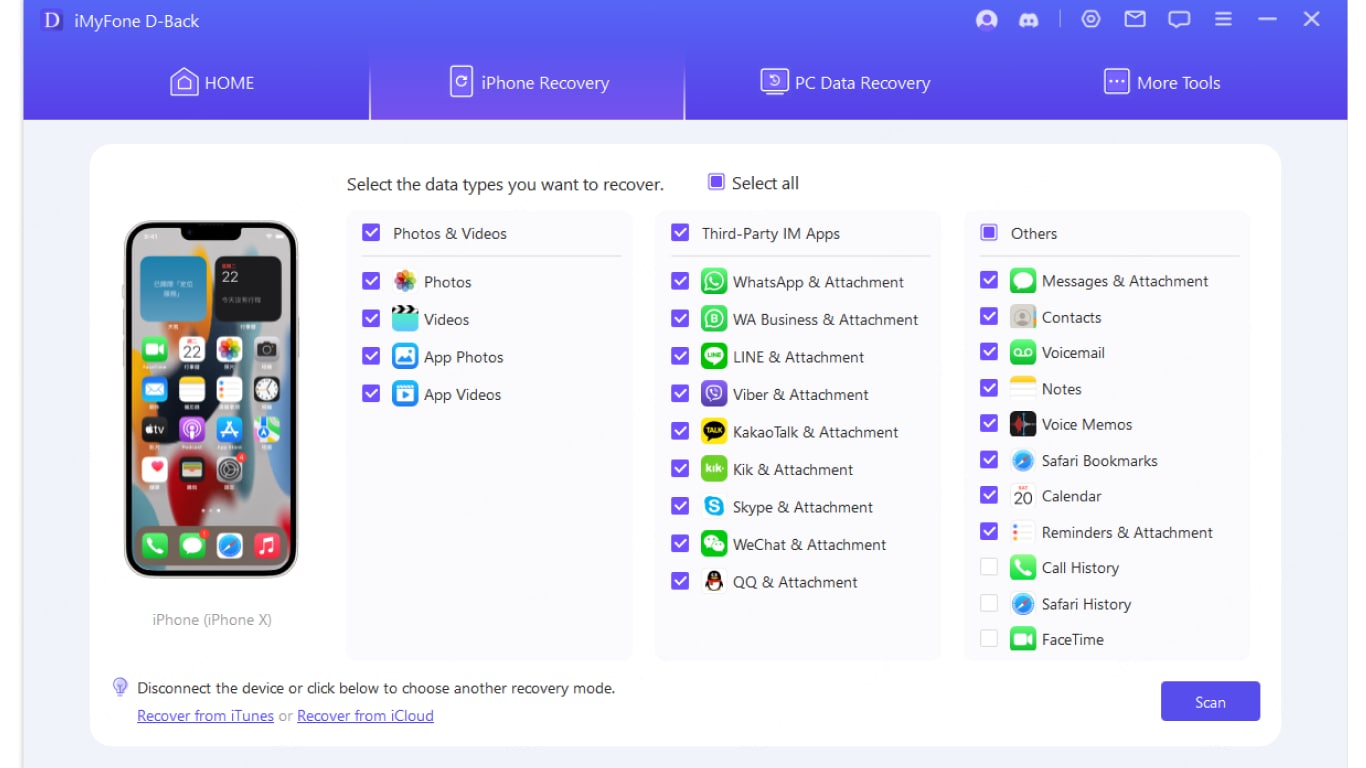
D-Back Hard Drive Recovery Expert is a Windows data recovery app associated with iMyFone D-Back for Windows. The official iMyFone product page describes it as data recovery software for deleted or formatted files from Windows PCs, HDDs, SSDs, USB drives, SD cards, cameras, and other readable storage devices.
The tool scans the selected location for file traces and lets users preview recoverable data before final recovery. It is mainly designed for logical data loss: accidental deletion, formatted partitions, lost partitions, RAW partitions, and readable external devices. It should not be treated as a hardware repair tool. If a drive has physical symptoms such as clicking, repeated disconnects, overheating, or failure to appear in Disk Management, software scans may increase risk.
| Product Detail | Current Information | Review Note |
| Official name used on iMyFone pages | D-Back for Windows / D-Back Hard Drive Recovery Expert | The Microsoft Store listing uses the Hard Drive Recovery Expert wording. |
| Supported OS | Windows 11/10/8/7 and Windows Server 2022/2019/2016/2012/2008/2003 on current iMyFone tech-spec pages | Check the exact download page before installation. |
| Minimum hardware | 1 GHz CPU, 256 MB RAM minimum, 1024 MB recommended, 200 MB disk space | Modern PCs should meet these requirements easily. |
| File systems | FAT, exFAT, NTFS, NTFS5, ext2, ext3, HFS+, and ReFS are listed on official tech-spec pages | Support does not guarantee recovery from encrypted or overwritten data. |
| Free trial | 100 MB recovery cap is listed on the current D-Back for Windows page | Good for testing, limited for practical hard drive recovery. |
Part 3. Key Features of D-Back Recovery Tool
D-Back Hard Drive Recovery Expert includes the core features users expect from a consumer recovery app. Its strength is a simple workflow rather than technician-level disk repair.
| Feature | What It Does | Review Verdict |
| Quick scan | Searches recently deleted files from a selected location. | Good first step when files were deleted recently and the drive has not been used heavily. |
| Deep scan | Performs a more complete search for files after formatting, partition loss, or older deletion. | Useful but slower on large HDDs, SSDs, USB drives, and memory cards. |
| Preview before recovery | Lets users inspect files before saving. | Important for avoiding corrupted or unwanted recovery results. |
| 1000+ file type support | Official pages list documents, photos, videos, audio, emails, archives, and other formats. | Strong for everyday personal and work files. |
| Multiple devices | Supports PC drives, HDDs, SSDs, USB drives, SD cards, cameras, and external storage. | Useful for common storage devices, as long as they remain readable. |
| Lost partition and RAW recovery | Scans raw, formatted, corrupted, or lost partitions where supported. | Worth trying before formatting again, but save recovered files elsewhere. |
| Search and filters | Helps narrow results by type, path, size, or name. | Essential when deep scans return thousands of files. |
| Corrupted video repair add-on | Official pages describe a video repair feature for corrupted videos in supported packages. | Useful for video workflows, but it should not be described as guaranteed repair. |
Part 4. Pros and Cons of D-Back Hard Drive Recovery
Understanding the pros and cons of D-Back Hard Drive Recovery Expert is important before paying for the full version. Like every recovery tool, it works best under the right conditions and has clear limits.
Part 5. How to Use D-Back Hard Drive Recovery Tool
Many users search for how to use the D-Back Hard Drive Recovery Tool correctly. The workflow is simple, but safe handling matters. Install the software on a different drive if possible, run the scan, preview results, and save recovered files to another storage device.
- Install and select a location. Download D-Back from the Microsoft Store listing or iMyFone's official page. Install it on a safe drive. Launch the program and select the hard drive, partition, or external device where data was lost.
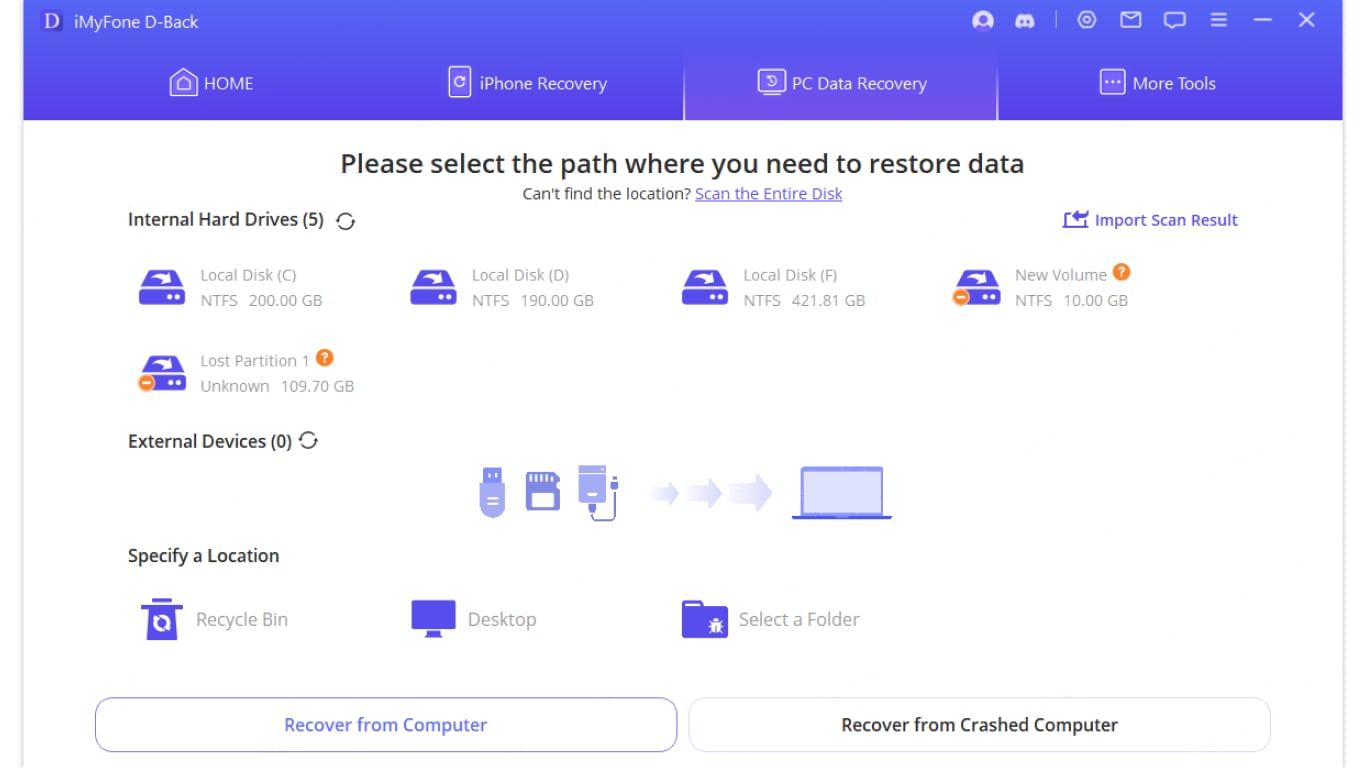
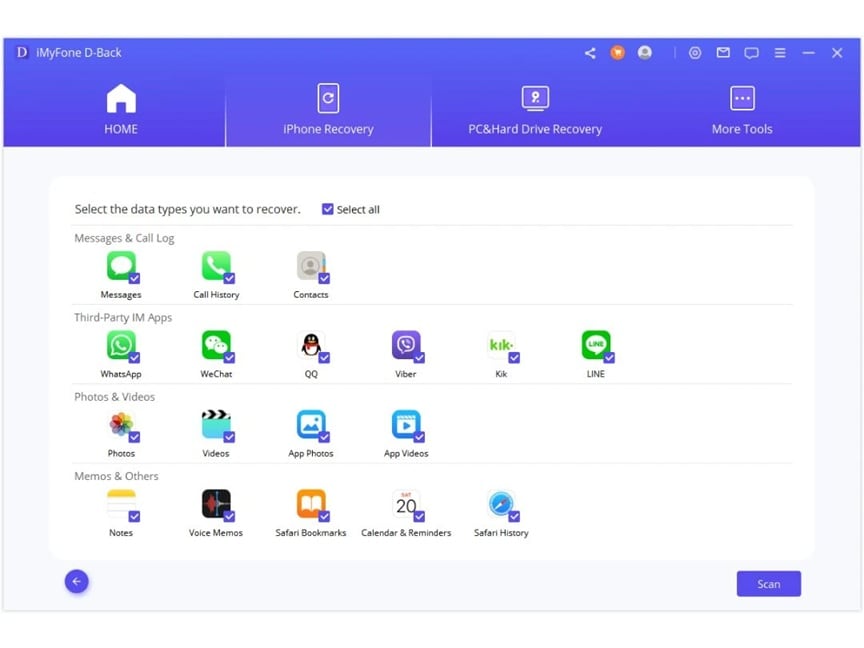
- Run the scan. Choose the data types for recovery and click Scan. Allow the scan to finish without interruption. Scan time depends on drive size, file system, connection speed, and drive condition.
- Preview and recover files. Browse scan results, use filters if needed, preview selected files, and recover them to a different storage location.
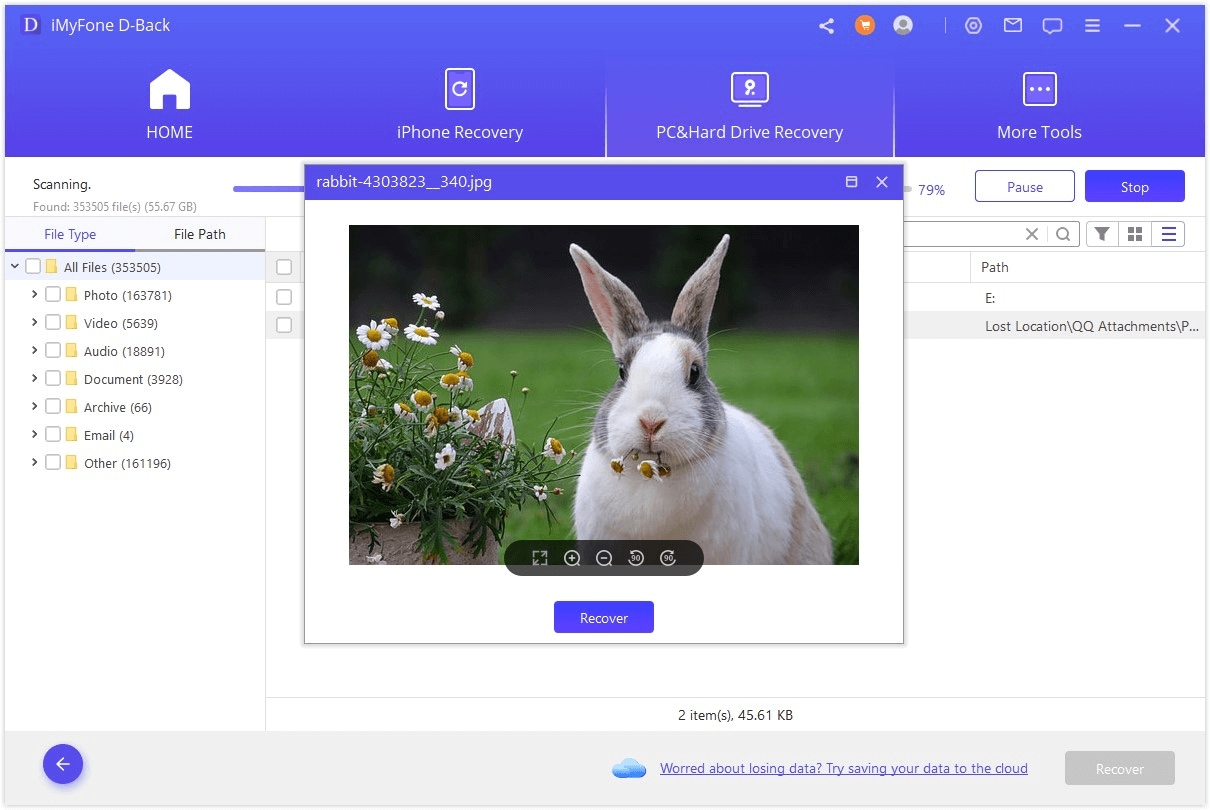
If the software finds your files but preview fails, try recovering a small sample first. If the drive disconnects or freezes during scanning, stop and avoid repeated scans.
Part 6. Performance, Reliability, and Pricing
D-Back Hard Drive Recovery Expert performs best in logical data loss cases. Recently deleted files usually have a better chance of recovery than files lost long ago. Formatted drives, RAW partitions, and deleted partitions may require deep scan, and the result depends on how much new data was written after the loss.
| Scenario | Expected Fit | Important Limit |
| Accidental deletion | Good first attempt | Stop using the drive immediately to reduce overwriting. |
| Formatted hard drive | Worth trying with deep scan | Recovery is less likely if the drive has been reused heavily. |
| RAW partition | Possible if the drive is still detected | Do not format the partition before recovering data. |
| Large video recovery | Possible, but results vary | Fragmented or corrupted videos may not preview or play correctly. |
| Physically damaged disk | Not recommended | Repeated scans can worsen hardware failure. |
Current official pricing information varies by page and package. The Windows product page lists a free trial and a full version starting at $49.99, while iMyFone purchase pages also show monthly, annual, and lifetime plans with device limits and renewal terms. Confirm the final price, renewal type, device count, and refund terms before checkout.
Part 7. Best Alternative to D-Back Hard Drive Recovery Expert: Recoverit
Many users look for alternatives of D-Back Hard Drive Recovery Expert when they need broader file recovery, clearer previews, Mac support, crashed computer recovery, or a stronger workflow for larger drives. Recoverit is a well-known data recovery program for internal drives, external devices, formatted partitions, lost files, and supported crashed computer recovery workflows.
Recoverit is not a hardware repair tool and cannot guarantee recovery. It can help recover files from readable storage before risky actions such as formatting, reinstalling Windows, replacing a drive, or sending a device for service.
D-Back vs Recoverit
| Recovery Need | D-Back Hard Drive Recovery Expert | Wondershare Recoverit |
| Beginner recovery workflow | Simple select, scan, preview, recover process | Guided workflow with broader file and device recovery coverage |
| Free trial | Official page lists 100 MB recovery cap | Free download and preview before recovery |
| File type support | 1000+ file types listed by iMyFone | Broad recovery for common documents, photos, videos, audio, emails, and other file types |
| Large hard drive recovery | Deep scan is available but can be slow | Better fit when users need a more mature workflow for large drives and mixed file results |
| Crashed computer recovery | Some iMyFone purchase pages mention crashed Windows computer support in supported packages | Supports crashed computer data recovery workflows where applicable |
| Product boundary | Data recovery software, not hardware repair | Data recovery software, not hardware repair or encryption bypass |
How to Recover Files With Recoverit
- Select a drive. Open Recoverit and choose the location where data was lost.

- Scan the storage. Start scanning. Recoverit will search for recoverable files automatically. Wait until scanning finishes for the best result.

- Preview and restore. Preview found files, select the required data, and recover it to a secure separate storage device.

Part 8. Smart Tips to Use the Tool More Effectively
Using D-Back Hard Drive Recovery Expert correctly increases the chance of a useful result. Small mistakes can overwrite deleted files or make recovery harder.
- Stop using the drive immediately: continued use may overwrite deleted files.
- Install software on another drive: avoid installing recovery tools on the affected hard drive.
- Start with preview: preview a few files before paying or recovering large batches.
- Use deep scan for formatted or older losses: it is more thorough but slower.
- Keep the system stable during scan: avoid shutdowns, restarts, or unplugging external drives.
- Use filters to save time: sort by file type, size, path, or name.
- Recover to external storage: never save recovered files to the same disk.
- Stop DIY recovery on failing hardware: clicking, overheating, repeated disconnects, or non-detection require professional handling.
- Maintain regular backups: File History, cloud backup, NAS, or external drives reduce reliance on recovery software.
Part 9. Conclusion
D-Back Hard Drive Recovery Expert is a practical recovery tool for common logical data loss. It offers quick scan, deep scan, file preview, broad file type support, and support for devices such as HDDs, SSDs, USB drives, SD cards, and readable partitions. It is easiest to recommend for beginners who want to test whether lost files can still be found.
Its limits are equally important. The current free trial recovery cap is small, deep scan can be slow on large drives, and no software can recover overwritten data or repair a physically failed hard drive. For more advanced or broader data recovery needs, Recoverit is a stronger alternative to compare before buying.

FAQ
-
Is D-Back Hard Drive Recovery Expert safe to use?
It is generally safe when downloaded from official iMyFone pages or the Microsoft Store listing. For safer recovery, install it on another drive and save recovered files to a different storage device. -
Can D-Back recover formatted hard drives?
It may recover files from formatted drives if the data has not been overwritten and the drive is still readable. Use deep scan and avoid formatting or writing new files before recovery. -
Is there a free version of D-Back Hard Drive Recovery Expert?
Yes. The current iMyFone Windows product page lists a free trial with a 100 MB recovery cap. It is useful for testing scan and preview, but large recovery requires a paid version. -
Does D-Back work on physically damaged drives?
No consumer recovery software is a safe choice for physically damaged drives. If the disk clicks, disconnects, overheats, or is not detected, stop scanning and consider professional recovery. -
What is the best alternative to D-Back Hard Drive Recovery Expert?
Recoverit is a strong alternative when users need broader file recovery, clearer previews, Windows and Mac workflows, external device support, and supported crashed computer recovery. It cannot guarantee recovery or repair hardware.


