


 TL;DR:
An ESXi Datastore is a logical storage container that holds essential virtual machine files—such as virtual disks, configurations, and snapshots—abstracting physical hardware complexity to enable advanced VMware features like multi-host access and live migration.
● Administrators must select a datastore type based on infrastructure requirements: VMFS provides block-based clustered access for SAN or local disks, NFS offers simpler file-based access for NAS, vSAN pools local cluster disks automatically, and vVols enable granular storage control at the individual VM level.
● Creating a new datastore via the ESXi Host Client requires formatting the selected storage device, meaning the target disk must be completely unused and devoid of critical data to prevent permanent data loss during initialization.
● If a datastore becomes corrupted or files are accidentally deleted, you must immediately stop writing new data to the drive and connect the affected storage to a separate working system to perform a recovery scan using specialized software like Recoverit.
Ask AI for a summary
 ChatGPT
 Perplexity
 Gemini
 Claude
 Grok
Grok
Virtualization has changed how businesses manage servers and applications. Instead of running many physical machines, companies now use virtual machines on a single host. In a VMware environment, storage plays a central role. Virtual machines need a reliable place to store their files, disks, and configuration data. That storage space is called a datastore.
Many administrators and beginners often ask what is ESXi Datastore when they start working with VMware ESXi. A datastore is more than just a folder or disk. It is a structured storage unit managed by ESXi.
In this guide, you will clearly understand what an ESXi Datastore is, how it works, and why it is important. You will also learn how to create a datastore on the ESXi data store in simple steps. If something goes wrong, we will also explain how to recover lost data in the ESXi datastore in a safe and practical way.
Table of Contents
What is ESXi DataStore?

To understand VMware storage, you must first understand what is ESXi Datastore. An ESXi datastore is a logical container that holds virtual machine files. These files include virtual disks, configuration files, snapshots, ISO files, and logs. The datastore can exist on local disks, SAN storage, NAS devices, or clustered storage systems.
In simple terms, what is ESXi Datastore can be explained as a storage space that ESXi uses to organize and manage VM data. It provides a consistent structure so that virtual machines can access their files quickly and safely. The datastore abstracts the physical storage from the virtual machines.
This means administrators can manage storage more efficiently without exposing hardware complexity to the VMs. It also supports advanced VMware features such as High Availability and live migration.
A datastore is formatted using a specific file system, depending on its type. VMware ensures that the datastore remains accessible to one or multiple hosts, based on the configuration. This flexibility makes ESXi datastores suitable for both small businesses and large data centers.
Types of Datastores
VMware ESXi supports multiple datastore types. Each type is designed for different storage environments and performance needs. Understanding these options helps administrators choose the right storage model for their infrastructure.
VMFS (Virtual Machine File System)
VMFS is VMware’s native clustered file system. It is block-based and specially designed for virtualization environments. It is widely used in enterprise setups.
VMFS allows multiple ESXi hosts to access the same storage device at the same time. This is useful in clustered environments. It ensures safe read and write operations across hosts.
Key features:
- Block-based storage structure
- Optimized for VMware virtual machines
- Supports multiple host access
- High performance for production workloads
VMFS is commonly deployed on SAN or local disks attached to ESXi hosts. It supports large file sizes and is designed to handle many simultaneous virtual machine operations.
NFS (Network File System)
NFS is a file-based datastore type. It connects ESXi hosts to network-attached storage devices. It uses standard network protocols.
NFS is often preferred in environments where simplicity is important. It does not require a complex SAN configuration. Setup is usually straightforward.
Key features:
- File-based access over the network
- Easy to configure and maintain
- Works with NAS storage
- Flexible scaling options
NFS datastores rely on network stability. Good network performance is important to avoid latency issues. Many small and mid-sized organizations use NFS due to its convenience.
vSAN Datastore
The vSAN datastore is created automatically when VMware vSAN is enabled in a cluster. It combines local disks from multiple ESXi hosts into a shared storage pool.
This solution removes the need for external SAN hardware. It is fully integrated with VMware management tools. It also provides redundancy and high availability.
Key features:
- Automatically created with vSAN
- Uses local disks from cluster hosts
- Built-in redundancy
- Scales as new hosts are added
vSAN is popular in hyperconverged infrastructure designs. It simplifies storage architecture and centralizes management within VMware tools.
Virtual Volumes (vVols)
Virtual Volumes provide more granular control over storage at the virtual machine level. Instead of managing storage at the datastore level, administrators can apply policies per VM.
This improves flexibility and efficiency. Storage arrays handle tasks such as snapshots and replication.
Key features:
- VM-level storage management
- Storage policy-based control
- Better integration with storage arrays
- Improved flexibility for workloads
vVols are suitable for environments that require advanced storage features. They allow more detailed control compared to traditional datastore methods.
Why Are Datastores Important in ESXi?
Datastores are the foundation of any ESXi deployment. Without them, virtual machines cannot store or retrieve essential data. They provide structure, organization, and performance optimization.
Here are key reasons why datastores are important:
- Store virtual machine disk files
- Maintain VM configuration files
- Support snapshots and cloning
- Enable shared storage between hosts
- Allow live migration between hosts
- Support backup and restore processes
- Improve storage organization
- Help administrators manage capacity effectively
A clear understanding of what ESXi Datastore is helps in designing stable and scalable virtual environments.
How to Create a Datastore in ESXi
Creating a datastore is an essential administrative task. If you are learning how to create a datastore on ESXi data store, the process is simple when performed carefully. Always ensure that the selected disk is not in use and does not contain critical data.
Step 1: Access the ESXi Host Client
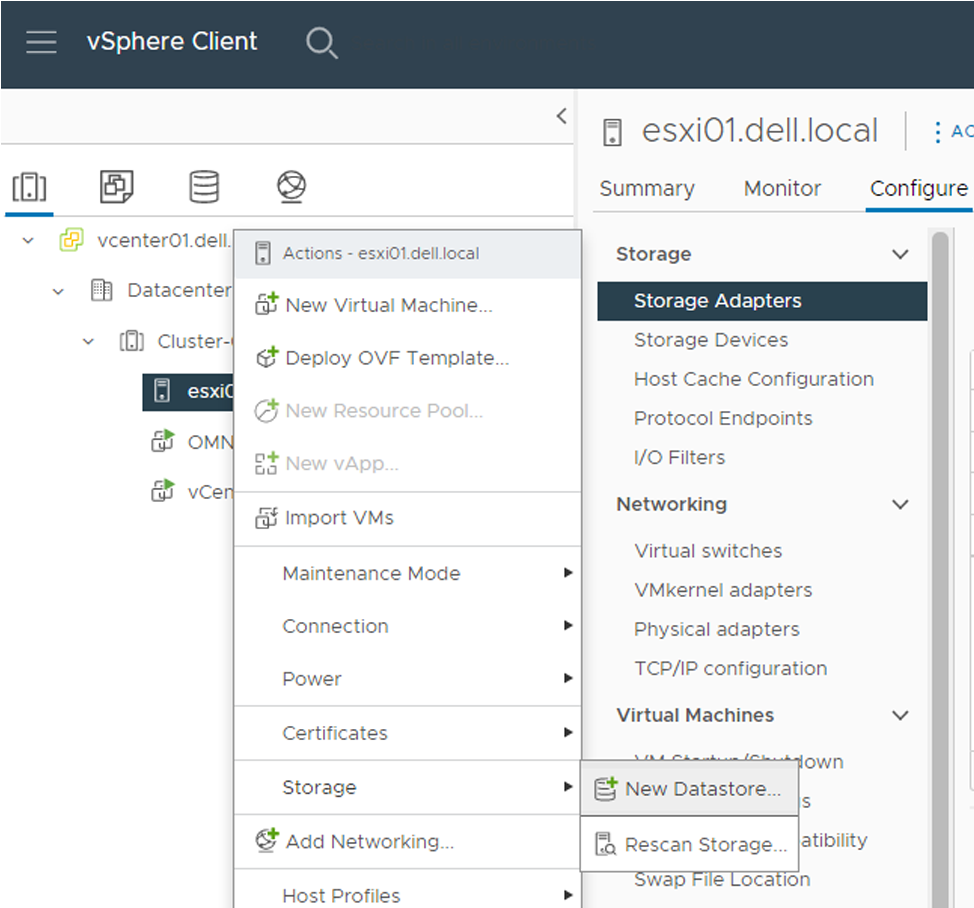
Log in to the ESXi Host Client using your browser. From the dashboard, select Storage from the left panel. Click on New Datastore to begin the setup process.
Step 2: Select Datastore Type and Storage Device
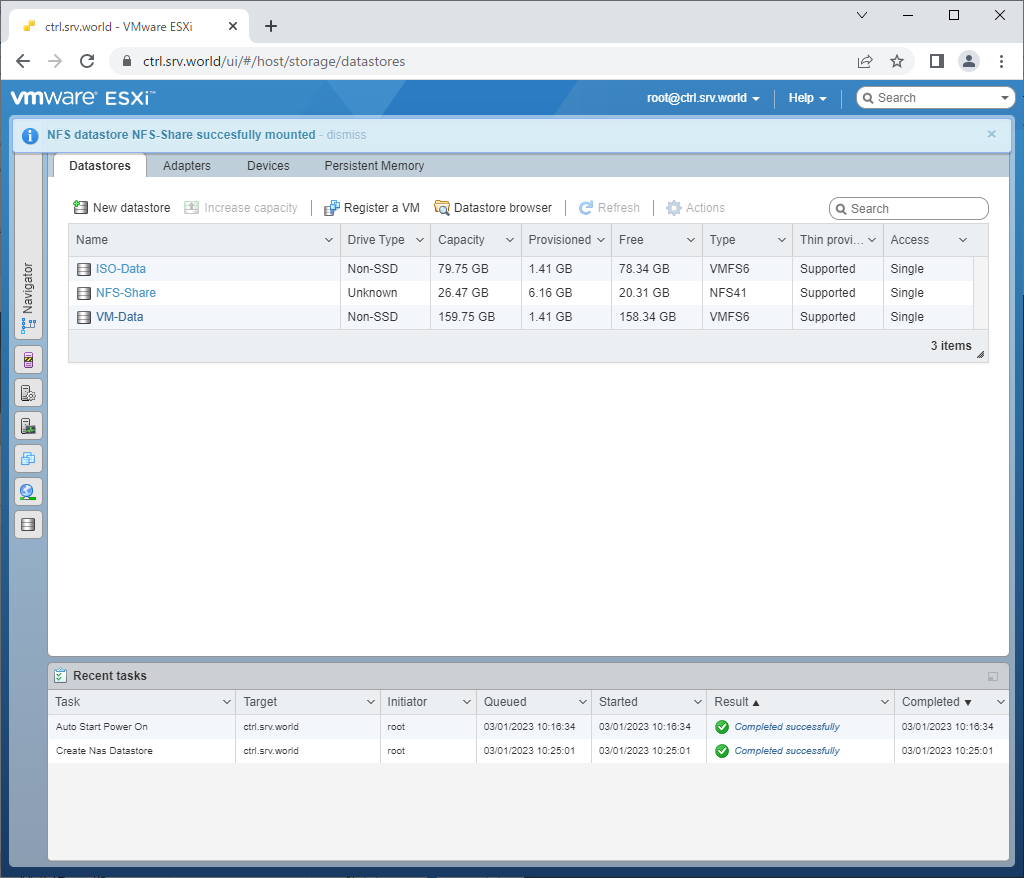
Choose the datastore type, such as VMFS for local or SAN storage, or NFS for network storage. Then select the available disk or enter the NFS server details. Assign a clear and meaningful name to the datastore.
Step 3: Review and Finish Configuration
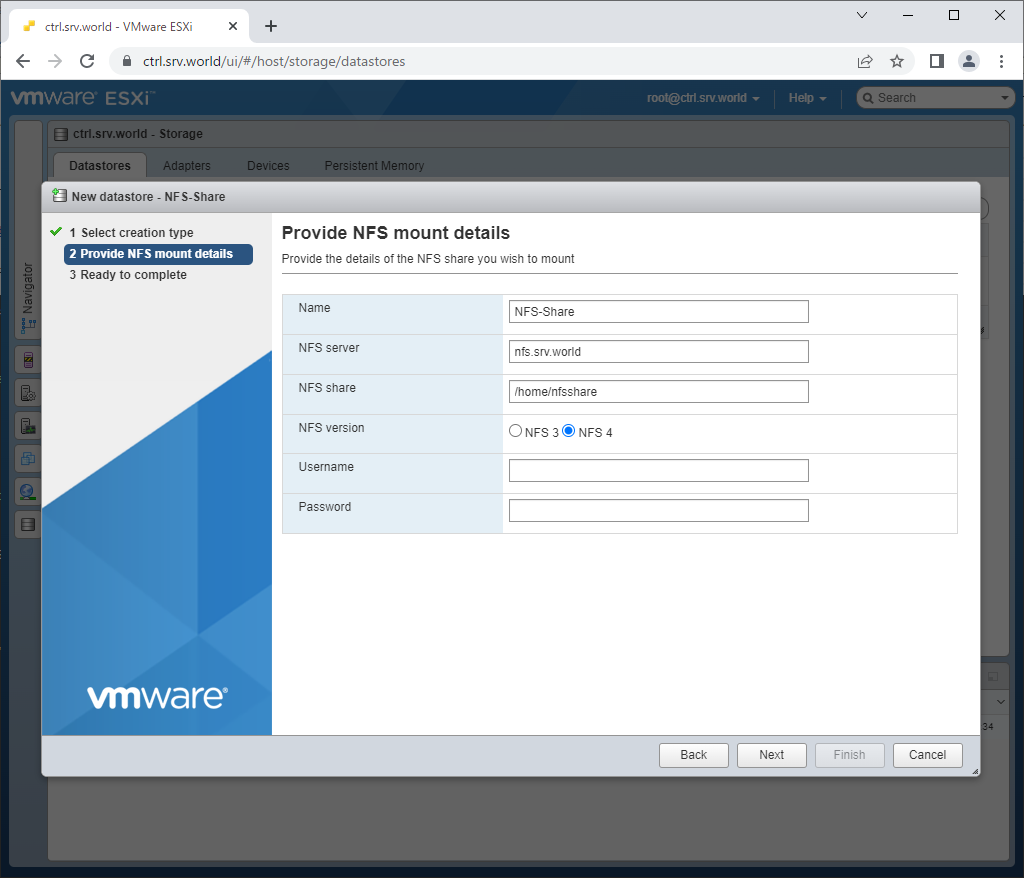
Review the selected storage device, capacity, and format version. Confirm that all details are correct. Click Finish to complete the creation process. The datastore will now appear in the Storage list and be ready for use.
These steps explain clearly how to create a datastore on ESXi data store using network storage.
Common Issues When Creating Datastores
While setting up storage, administrators may face technical problems. These issues can delay deployment or affect system stability.
Common issues include:
- Disk not detected due to hardware malfunction
- Incorrect disk partition format
- Insufficient user permissions
- Network connectivity problems in the NFS setup
- Storage device already mounted elsewhere
- VMFS version mismatch
- Incorrect NFS path configuration
- Corrupted storage metadata
Understanding these errors reduces downtime and prevents mistakes during deployment.
Lost Data in ESXi Datastore? Here’s How to Create and Recover Using Recoverit
Data loss in virtual environments can occur due to accidental deletion, datastore corruption, formatting errors, or hardware failures. When this happens, many administrators search for how to recover lost data in ESXI datastore quickly and safely.
Recoverit is a professional data recovery solution that supports virtual environments. It can scan storage devices that contain VMware datastores. The software is designed to locate deleted, formatted, or inaccessible virtual machine files. It helps administrators restore important VM data without complicated procedures.

If you are looking for how to recover lost data in ESXI datastore, a specialized recovery tool is often required. Manual attempts may cause further damage. Recoverit provides a structured recovery process and helps minimize data loss risks.
Why use Recoverit:
- Supports VMFS based recovery
- Recovers deleted virtual disk files
- Works after accidental formatting
- Deep scan technology
- User-friendly interface
- Secure recovery process
Detailed Recovery Steps
Step 1: Connect the affected storage device to a working system. Install and open Recoverit. Select the disk that contains the ESXi datastore.

Step 2: Start a deep scan. The software will search for lost or deleted virtual machine files within the datastore structure.

Step 3: Preview the detected files. Select required items and save them to a secure location on a different storage device.

These steps provide practical guidance for administrators exploring how to recover lost data in ESXI datastore after unexpected failures.
Pro Tips for Managing ESXi Datastores
Effective datastore management improves system performance and reduces risk. Proper planning prevents storage bottlenecks and data loss.
Here are practical tips for long-term management:
- Monitor storage usage regularly to avoid overflow: Check the datastore capacity on a weekly basis. Use built-in monitoring tools to track free space. Set alerts so you are warned before storage reaches critical levels. This prevents sudden VM shutdowns.
- Maintain updated backups of critical virtual machines: Create regular backups of important VMs. Store copies on separate storage or external backup systems. Verify that backups complete without errors. Updated backups reduce risk during hardware failure or accidental deletion.
- Avoid filling a datastore beyond recommended limits: Do not allow a datastore to reach full capacity. Keep enough free space for snapshots and temporary files. A nearly full datastore can slow performance and cause VM issues. Maintain a safe buffer at all times.
- Use storage policies carefully: Apply storage policies based on workload needs. Match performance and redundancy settings to each VM. Review policies periodically to ensure they still meet business requirements. Incorrect policies may waste storage or reduce efficiency.
- Perform regular disk health checks: Inspect physical disks and storage arrays for warning signs. Use hardware monitoring tools to detect bad sectors or failing drives. Early detection helps prevent datastore corruption and unexpected downtime.
- Keep ESXi updated with stable versions: Install stable and tested ESXi updates. Updates often include performance improvements and security fixes. Avoid skipping important patches. Always test updates in a controlled environment before full deployment.
Careful management ensures better performance and reliability across your VMware environment.
Conclusion
Understanding what is an ESXi Datastore is essential for anyone working with VMware ESXi. A datastore serves as the main storage container for virtual machine files. It organizes data, supports advanced features, and ensures smooth operation of virtual environments.
You also learned how to create a datastore on ESXi data store through clear steps for both VMFS and NFS setups. In addition, you now have practical guidance on how to recover lost data in the ESXi datastore if data loss occurs. With proper configuration, monitoring, and backups, you can maintain a stable and efficient ESXi storage environment.
FAQs
-
1. What is an ESXi Datastore in simple terms?
An ESXi Datastore refers to a storage container used by VMware ESXi to hold virtual machine files such as disks, configuration data, and logs. It organizes storage so virtual machines can function properly. -
2. How to create a datastore on the ESXi data store safely?
To understand how to create a datastore on the ESXi data store, access the ESXi Host Client, go to Storage, choose New Datastore, and follow the setup steps carefully. Always verify that the selected disk does not contain important data before proceeding. -
3. How to recover lost data in the ESXi datastore after deletion?
If files are deleted or the datastore is corrupted, avoid writing new data to the same storage device. Use a trusted recovery solution to scan and restore files. This is the recommended method when searching for how to recover lost data in the ESXi datastore securely.


