

 TL;DR:
iCare SD Memory Card Recovery is a usable Windows-only tool for restoring deleted, quick-formatted, or RAW files from readable memory cards, but users needing macOS compatibility or advanced large video recovery should utilize Wondershare Recoverit instead.
● Successful recovery strictly requires the SD card to be physically intact, currently detectable by Windows, and free from overwritten data, meaning users must stop using the card immediately and save any recovered files to an entirely separate drive.
● iCare is best suited for basic photo and document retrieval on Windows 2000 through Windows 11, whereas Wondershare Recoverit is the necessary alternative for macOS environments from macOS X 10.10 to 15 and complex cases involving fragmented 4K or 8K camera videos.
● The developer enforces varying data limits and feature restrictions across its Free and Pro editions depending on the specific data loss scenario, so users should rely on the free scan and preview functions to verify file integrity before committing to a paid license.
Ask AI for a summary
 ChatGPT
 Perplexity
 Gemini
 Claude
 Grok
Grok
iCare SD Memory Card Recovery: The Quick Verdict
Is iCare SD Memory Card Recovery worth using? Yes, if you need a Windows tool for deleted, formatted, RAW, inaccessible, or virus-affected SD card recovery and your memory card is still detected by the computer. It is simple enough for home users, supports common memory card types, and its official page describes the tool as read-only. However, its licensing and product lineup can be confusing, deep scans may take time, and it is not the best fit for physically damaged cards, overwritten data, macOS users, or users who need a more modern guided workflow.
- Overall rating: 3.6/5.0
- Best for: Windows users recovering files from readable SD, microSD, SDHC, SDXC, CF, XD, and camera memory cards.
- Not ideal for: Mac users, physically failing cards, overwritten files, encrypted cards without the correct key, and large damaged video projects that need advanced recovery handling.
SD cards are used in phones, cameras, drones, action cameras, dash cams, gaming devices, and tablets. They store travel photos, wedding videos, study files, work documents, and daily memories. Because SD cards are small and frequently removed from devices, they can fail after accidental deletion, formatting, virus infection, power loss, interrupted transfer, card reader errors, or unsafe removal.
People searching for reviews of iCare SD Memory Card Recovery usually want a straight answer before installing recovery software: what is the iCare SD card recovery tool, does it really recover files, what are its limits, and what is the best alternative if it is not enough? This review answers those questions with current product information and a safer recovery workflow.
Data safety first: stop using the SD card immediately. Do not take new photos, record new videos, format the card again, run repair tools, or save recovered files back to the same card. If the card is cracked, overheats, disconnects, or is not detected by reliable card readers, stop direct software scanning and consider a professional recovery service.
In this article
Part 1. iCare SD Memory Card Recovery Review Verdict
iCare SD Memory Card Recovery is a usable Windows recovery tool for common SD card data loss, but it needs realistic expectations. It can help when files were deleted, a card was quick-formatted, a camera or phone card became RAW, or Windows asks to format the card. It works best when the card is still detected and has not been reused after data loss.
The tool is less convincing when users need a polished modern interface, clear licensing, Mac support, advanced video recovery, NAS/Linux recovery, disk-image workflows, or recovery from severely unstable cards. Its official pages also use several product names, including iCare SD Card Recovery, iCare Data Recovery Free, iCare Data Recovery Pro, and iCare Format Recovery, so users must confirm which installer and license they are actually using.
Review Scorecard
| Review Area | Rating | 2026 Review Notes |
| Overall rating | 3.6/5 | Good for basic Windows SD card recovery, but product naming, licensing, and advanced recovery depth reduce confidence. |
| SD card recovery focus | 3.9/5 | Official SD card page targets SD, microSD, SDHC, SDXC, CF, XD, camera cards, and Android microSD cards. |
| Ease of use | 3.8/5 | Simple scan and preview workflow, suitable for beginners. |
| Free value | 3.4/5 | iCare has free recovery options, but limits differ by edition and scenario; formatted/RAW/lost partition cases can be restricted. |
| Compatibility | 3.4/5 | Download center lists Windows 2000 through Windows 11, but the SD card product is Windows-only. |
| Advanced recovery | 3.1/5 | Deep scan is available, but there is less evidence of modern advanced workflows such as disk-image recovery, NAS recovery, or fragmented video reconstruction. |
| Transparency | 2.9/5 | Official pages contain useful details but also mixed free/Pro messaging and multiple product pages that can confuse buyers. |
How We Evaluated iCare
This review is based on the original Recoverit source article, preserved screenshots, iCare's official SD card recovery page, download center, edition comparison page, store page, and data recovery safety principles. We also compared the article structure against modern review-page expectations: quick verdict, scorecard, compatibility, free limits, pricing, real-world performance, safe workflow, user feedback signals, pros and cons, and alternative comparison.
| Evaluation Question | Why It Matters | Finding |
| Can it scan SD card data loss cases? | The page intent is memory card recovery. | Yes, iCare's official page lists deletion, formatting, virus attack, RAW drive error, reformat prompts, denied accessibility, and unsafe removal. |
| Does it handle physical damage? | Users may scan failing cards repeatedly. | No. iCare's own page says recovery applies only if the memory card is not physically damaged. |
| Is it free? | Many users search for free SD card recovery. | There are free options, but iCare's comparison page shows different limits by edition and recovery scenario. |
| Is it suitable for modern multi-platform recovery? | Many users recover from Mac, NAS, Linux, or crashed computers. | No. The SD card product is Windows-focused; users needing broader platform support should compare Recoverit. |
Who Should Use It?
| User Scenario | Should You Try iCare SD Recovery? | Reason |
| You deleted photos or documents from an SD card and stopped using it. | Yes. | Simple deletion is one of the best cases for recovery software. |
| You quick-formatted a camera card by mistake. | Yes, cautiously. | Recovery may be possible if the card has not been overwritten by new recordings. |
| The SD card asks to be formatted. | Maybe. | Do not format it first. Scan only if the card is stable and detected by Windows. |
| You need to recover large 4K drone, GoPro, or camera videos. | Maybe, but compare alternatives. | Large videos can be fragmented and may need a stronger video recovery workflow. |
| You use macOS as your main computer. | No for this product. | iCare SD Card Recovery is listed for Windows; choose a Mac-supported recovery tool. |
| The card is physically broken, cracked, or not detected by any reader. | No direct scan. | Software recovery cannot repair physical damage. Use a professional lab. |
Part 2. What Is iCare SD Card Recovery Tool?
The iCare SD card recovery tool is Windows recovery software designed to restore lost files from SD cards and other memory cards. It scans the selected card for recoverable file records and file signatures. If a deleted file has not been overwritten, the software may be able to rebuild it and save it to another drive.
iCare SD Memory Card Recovery is relevant for accidental deletion, quick format, card not formatted errors, RAW file-system problems, virus infection, interrupted transfer, and unsafe removal. It does not repair a broken SD card, fix a damaged card controller, restore overwritten data, or recover files from a card that is not detected by the computer.
Current Product Status and Free Limits
iCare's current website is not as cleanly organized as many modern recovery brands. The SD card page promotes iCare SD Card Recovery Free Edition, the download center lists Free SD Card Recovery with Buy options, and the compare page explains differences between iCare Data Recovery Free and Pro. This matters because users may install one edition while reading claims from another page.
| Item | Current Official Information | Review Note |
| Product focus | SD, microSD, SDHC, SDXC, CF, XD, camera cards, Android microSD cards, and other memory cards. | Good topic fit for SD card recovery searches. |
| Operating system | Download center lists Windows 2000/XP/Vista/7/8/8.1/10/11. | Windows-only for the SD card product. |
| File systems | Official SD card page lists NTFS, FAT32, and exFAT. | Relevant to common SD and microSD cards. |
| Free vs paid | iCare Free and Pro pages show different recovery limits; Pro plans are sold through the official store. | Check the exact edition before relying on free recovery. |
| Pro price | Official store lists iCare Recovery Pro Home License at US$69.99 for 1 PC/year at the time checked. | Prices can change and may exclude VAT. |
| Physical damage | Official SD card page says recovery applies only if the memory card is not physically damaged. | This is an important safety boundary. |
Key Features and Supported Devices
iCare's strongest feature set is straightforward SD card scanning. It is not packed with professional options, but it covers the common storage types and file categories most home users care about.
- Recover common file types: photos, videos, music/audio, Microsoft documents, emails, and other common files are listed on the official SD card page.
- Support common cards: SD, microSD/TF, SDHC, SDXC, CF, XD, camera SD cards, and other memory cards.
- Support common brands: SanDisk, Samsung, Kingston, PNY, Transcend, Sony, Lexar, Toshiba, ADATA, and other brands are referenced on iCare's page.
- Deep Scan: searches memory cards more thoroughly after deletion, formatting, RAW errors, or accessibility problems.
- Preview before recovery: lets users check recoverable files before saving them.
- Read-only access: iCare says its Free Edition is read-only and does not harm the device or previous lost data.
| Supported Scenario | Can iCare Help? | Important Limit |
| Accidental deletion | Yes. | Best chances occur before new files are written to the card. |
| Quick format | Often. | Recovery drops if the card was reused after formatting. |
| Full format | Maybe. | Modern full format behavior and overwriting can reduce recoverability. |
| RAW or inaccessible card | Maybe. | Only if the card is still readable and not physically failing. |
| Virus attack | Maybe. | Remove malware risk from the computer first and recover to another safe drive. |
| Broken card or controller failure | No. | Software cannot repair hardware damage. |
Part 3. Reviews of iCare SD Memory Card Recovery
Reviews of iCare SD Memory Card Recovery are mixed in the practical sense: users like the simple interface and basic recovery path, but results depend heavily on the SD card condition. A recently deleted JPEG set on a healthy card is very different from a heavily reused drone card with fragmented 4K videos.
User Experiences and Feedback
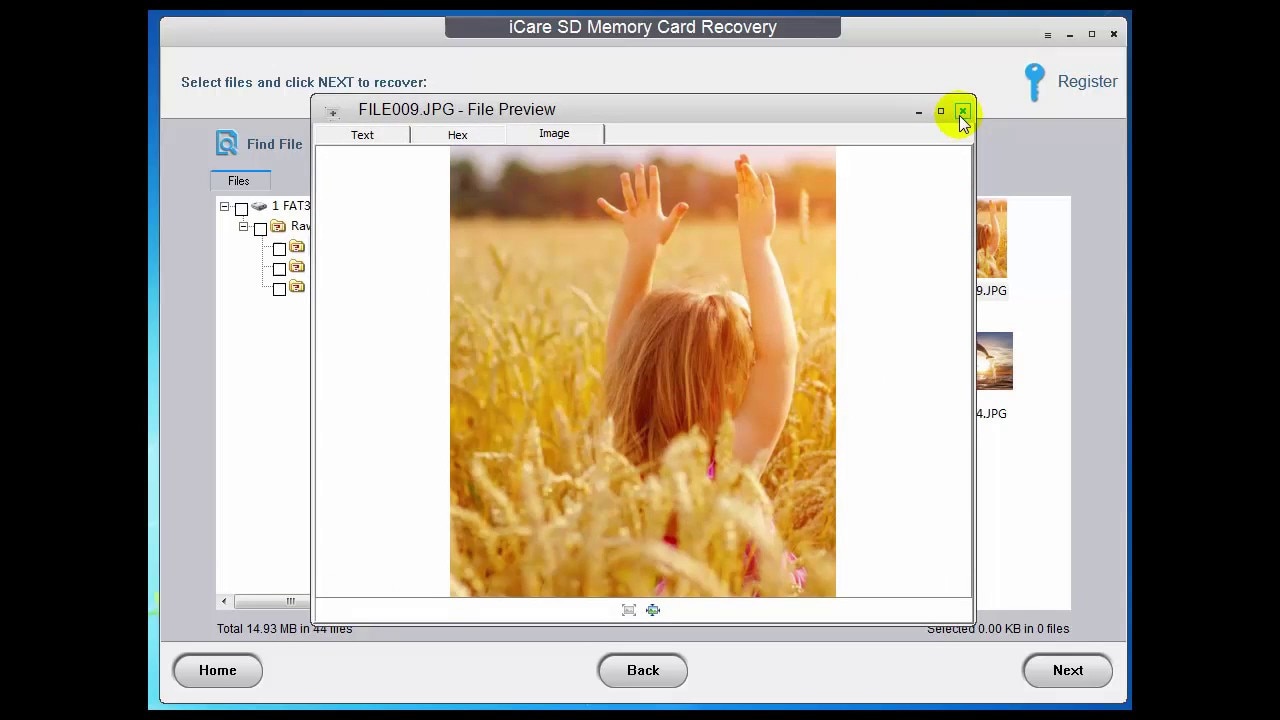
Positive feedback usually focuses on usability. The interface is not complicated, users can start scanning quickly, and preview helps them check whether found files are worth saving. That makes iCare attractive for home users who deleted photos, videos, or documents by mistake.
Negative feedback tends to focus on expectations. Some users expect free full recovery in every scenario, while iCare's own edition comparison shows limits by edition and case. Others report that file names or folder paths may not always be preserved, especially after formatting or file-system damage. That behavior is common in recovery software, but the article needs to explain it clearly.
Performance by File Type
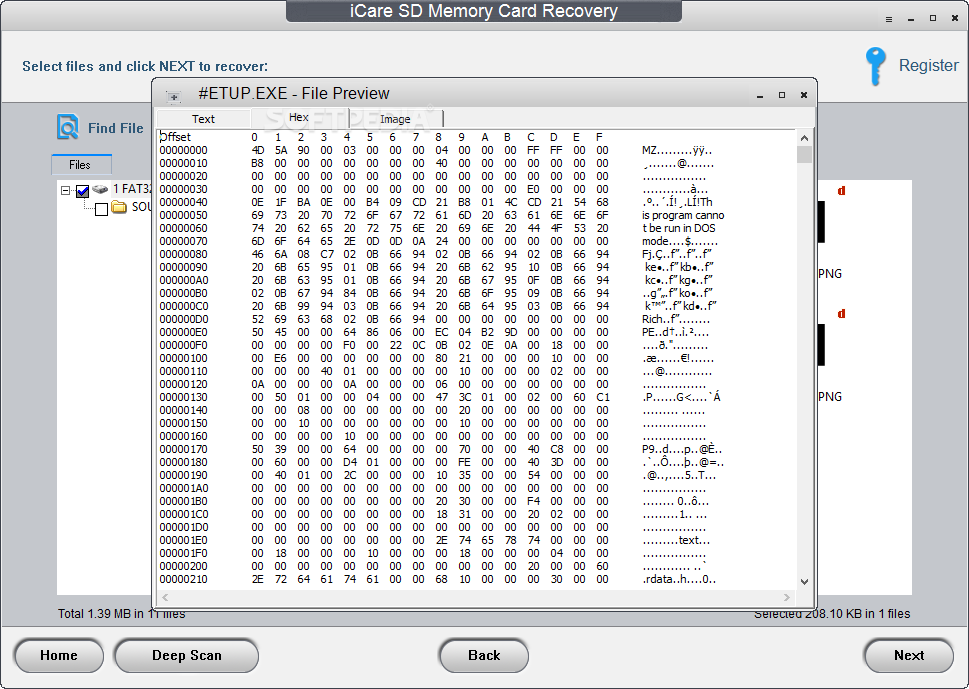
Photo recovery is usually the easiest category when files have not been overwritten. JPEG, PNG, and some camera RAW files may be recovered when file data remains intact. Documents and audio files can also recover well in simple deletion or quick-format cases.
Large video files are harder. SD cards used in drones, action cameras, dash cams, and 4K cameras may store video in fragments. If the card was reused after loss, recovered videos can be incomplete, corrupted, or unplayable. iCare can scan for videos, but users working with large HD, 4K, or 8K video should compare tools with stronger enhanced video recovery workflows.
| File Type | Expected Performance | Review Notes |
| Photos | Best category for basic recovery. | Preview recovered photos before saving; check full resolution, not only thumbnails. |
| Documents | Good in simple deletion cases. | File names and folder paths may be missing after format or file-system damage. |
| Audio | Moderate to good. | Works best when the card has not been reused. |
| Small videos | Moderate. | Short MP4/MOV files may recover if not fragmented or overwritten. |
| Large 4K/8K videos | Uncertain. | Fragmented footage may need a more advanced video recovery workflow. |
Reliability and Ease of Use
Reliability depends on the card, not only the software. iCare works best when Windows can detect the card, the card capacity appears correctly, and scans do not freeze. It is less reliable when the card repeatedly disconnects, shows a wrong capacity, becomes hot, or asks to format every time it is inserted.
Ease of use is the clear advantage. The tool does not require command-line knowledge, partition editing, or manual file carving. Users can select the SD card, run a scan, preview files, and recover selected data. For beginners, that is enough for many basic cases.
Limitations Reported by Users
The most important limitations are predictable: free recovery limits, Windows-only support for the SD card product, slower deep scans, limited advanced controls, and weaker results when files were overwritten or the card is physically unstable. Users should also be careful with "repair" wording. Data recovery software can copy recoverable files from readable storage, but it cannot repair a cracked SD card, damaged controller, or worn-out NAND memory.
| Limitation | What It Means | Best Next Step |
| Free limits vary by edition | Some scenarios may be capped or require Pro. | Confirm limits before scanning a large card. |
| No Mac SD card product | Mac users need another tool or Windows access. | Use a Mac-supported recovery tool such as Recoverit for Mac. |
| Long deep scans | Large cards can take hours. | Keep power stable and do not disconnect the card. |
| Damaged videos may not play | Recovery and video repair are different tasks. | Recover files first, then use a video repair tool if needed. |
| Physical card failure | Software cannot read what the computer cannot detect. | Use professional recovery service. |
Part 4. Pros and Cons of iCare SD Card Recovery Tool
Understanding the pros and cons of iCare SD card recovery tool helps users decide whether it is enough or whether a stronger alternative is more practical.
Part 5. How to Use iCare Recovery Tool
Many users search how to use iCare recovery tool because they need a quick answer during a stressful data loss moment. The workflow is simple, but the safety steps before scanning are just as important as the software buttons.
Before You Scan the SD Card
- Remove the SD card from the camera, phone, drone, or device safely.
- Do not record new videos or take new photos on the card.
- Use a reliable card reader connected directly to the computer.
- Install iCare on the computer drive, not on the SD card.
- If Windows asks to format the card, cancel the prompt.
- Prepare another drive for saving recovered files.
Step-by-Step iCare Recovery Workflow
- Install and open the program. Download the iCare SD Memory Card Recovery tool from the official page. Install it on your PC, launch it, and insert the SD card. Wait until the card appears in the drive list.
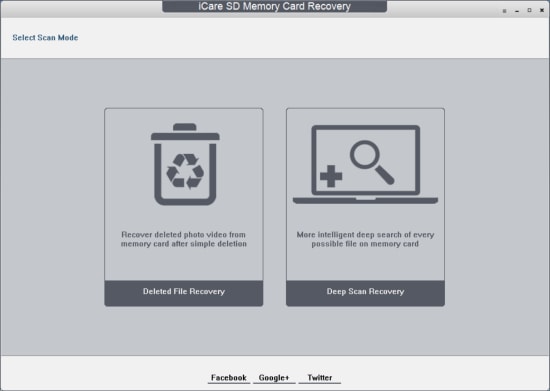
- Choose a scan mode and scan the card. Start with deleted file recovery for recent deletion. Use Deep Scan Recovery when the card was formatted, became RAW, or the first scan does not find the files. Let the scan finish when possible.
- Preview and recover safely. After results appear, preview files to check their condition. Select the files you need and recover them to a different storage location, such as your computer hard drive or another external drive.
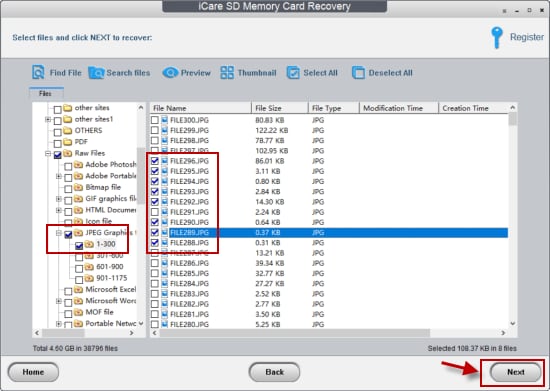
Review tip: if iCare finds multiple folder trees or numbered files, recover the most important items first. Then open several recovered photos, documents, and videos to confirm that the saved files work before deleting or reformatting the card.
Part 6. Best Alternative to iCare Recovery Tool: Wondershare Recoverit
Some users need stronger recovery support than iCare provides. In those cases, Wondershare Recoverit is the best alternative of iCare recovery tool to compare. It supports Windows and Mac, offers a more modern scan and preview workflow, and covers broader storage scenarios, including SD card recovery, external devices, disk images, NAS, Linux, and crashed computer recovery where supported.
Recoverit is a data recovery tool. It can help recover files from readable storage, but it cannot repair broken SD card hardware, recover overwritten data, or bypass encryption without the correct credentials. For physically damaged cards, professional recovery service is still the safer option.
Why Use Recoverit Instead of iCare?
- Broader platform support: the Recoverit guide lists Windows 11/10/8.1/8/7/Vista, Windows Server versions, and macOS X 10.10 through macOS 15 Sequoia.
- More storage scenarios: Recoverit supports recovery from internal drives, external devices, SD cards, USB flash drives, disk images, NAS, Linux devices, and crashed computers where supported.
- Better preview and filters: users can scan, preview, filter, and recover selected files through a more modern interface.
- Video-focused recovery options: Recoverit includes Enhanced Recovery for deeply hidden and large videos from supported digital devices.
- Clearer product workflow: the steps are organized around select location, scan, preview, and recover.
iCare SD Recovery vs Wondershare Recoverit
| Comparison Item | iCare SD Memory Card Recovery | Wondershare Recoverit |
| Best use case | Basic Windows SD card recovery from readable memory cards. | Broader Windows/Mac recovery from SD cards, drives, external storage, disk images, NAS, Linux, and crashed computers where supported. |
| Operating systems | Windows 2000 through Windows 11 listed in iCare download center. | Windows 11/10/8.1/8/7/Vista, Windows Server versions, and macOS X 10.10 to macOS 15 Sequoia listed in Recoverit guide. |
| Supported devices | SD, microSD, SDHC, SDXC, CF, XD, and memory cards. | SD cards, CF cards, cameras, drones, action cameras, USB drives, HDDs, SSDs, NAS, Linux devices, and more readable storage sources. |
| Preview | Preview is available for found files. | Preview and thumbnails are available before recovery for supported files. |
| Large video recovery | Basic recovery may struggle with damaged or fragmented large videos. | Enhanced Recovery is designed for lost large video files from supported digital devices. |
| Free limits | Limits differ by iCare Free, Pro, and scenario pages. | Scan and preview are free; saving files requires registration or paid access based on current product rules. |
| Hardware failure | Not supported. | Not supported; professional recovery service is recommended. |
Recovery Steps Using Wondershare Recoverit
Use Recoverit when your SD card is detected by the computer and you want a more guided recovery workflow. Do not install Recoverit onto the SD card, and do not save recovered files back to it.
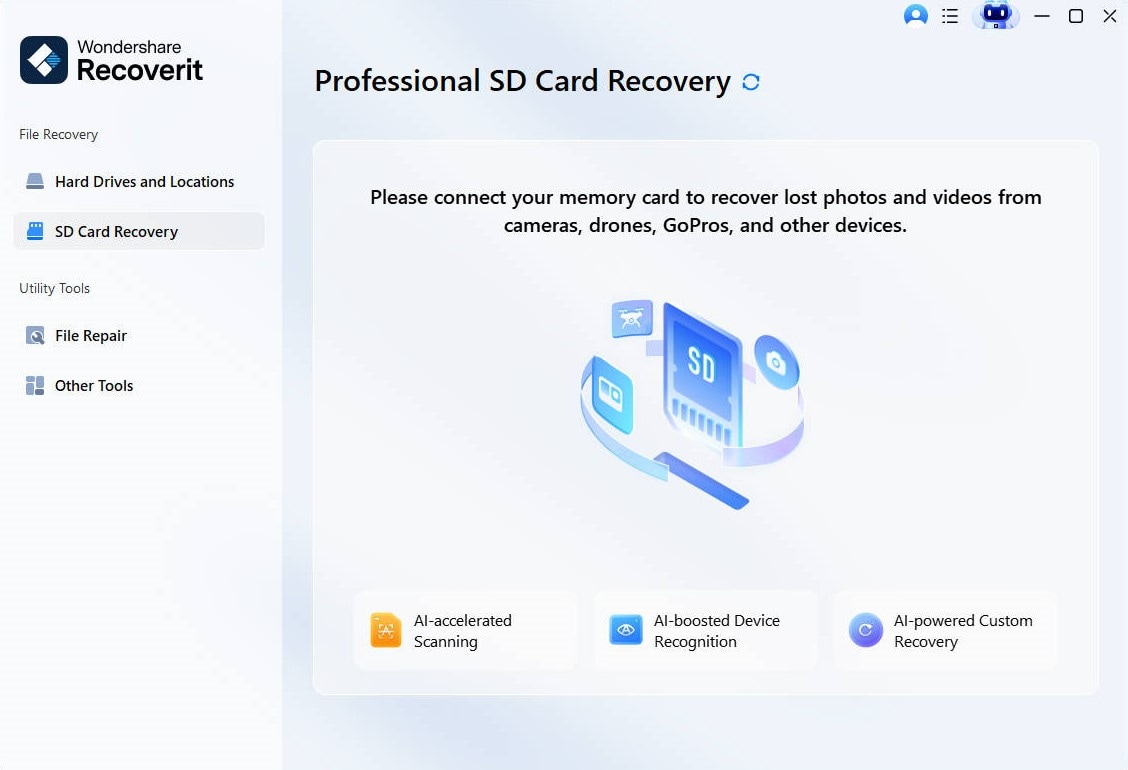
- Select the SD card location. Install Recoverit on your PC or Mac, connect the SD card through a reliable card reader, and choose the SD card from the storage list.
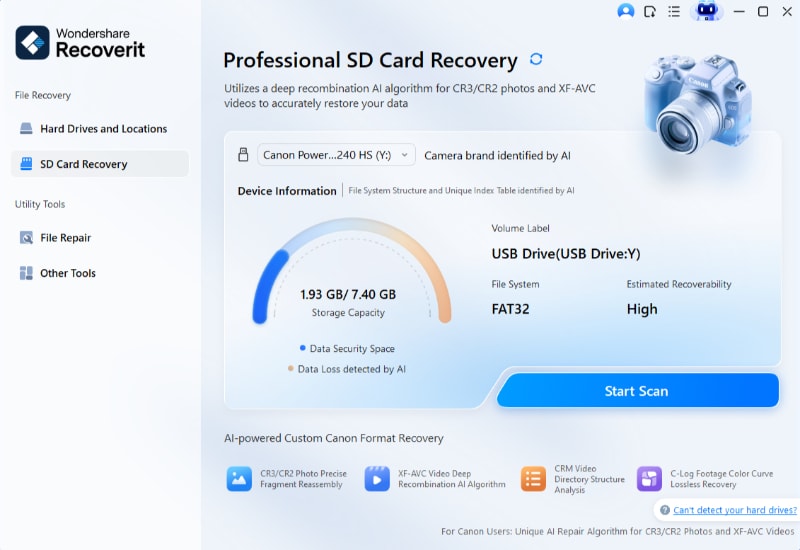
- Scan the card. Click Start Scan and wait while Recoverit searches for lost files. Use filters to locate specific photos, videos, documents, or file types faster.
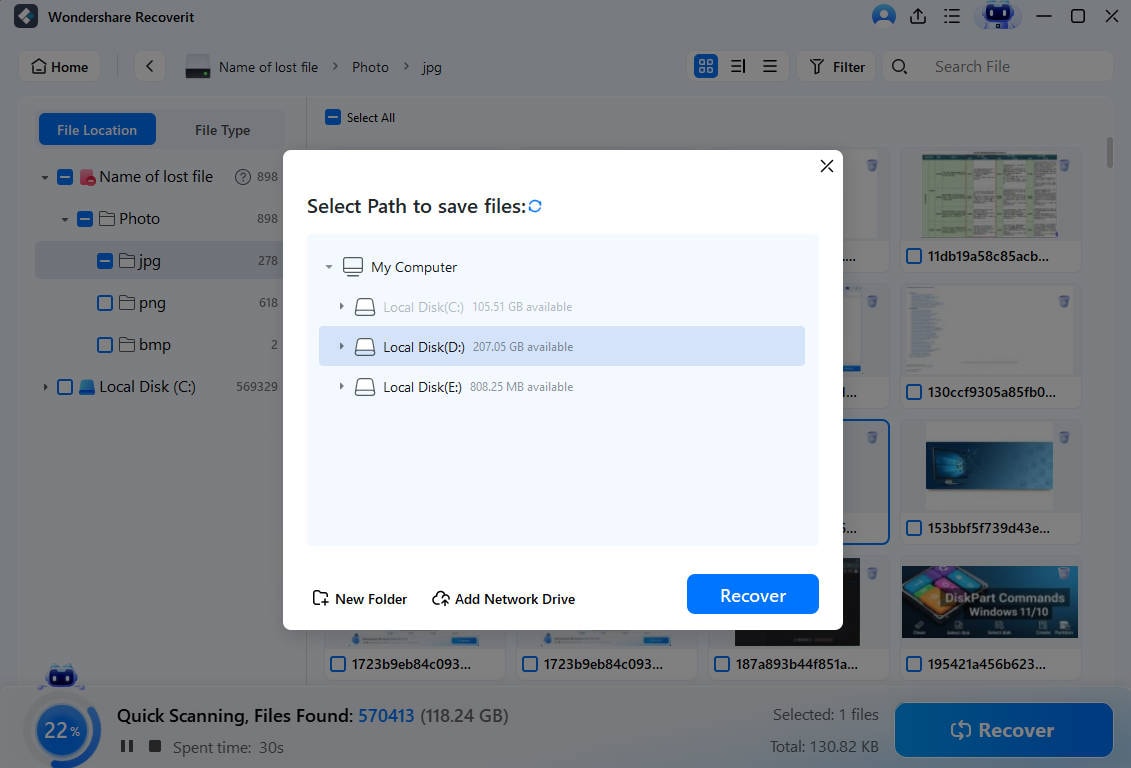
- Preview and save files safely. Preview recoverable files, choose the items you need, and save them to another drive or safe folder instead of the original SD card.

Part 7. Smart Tips Before Using SD Card Recovery Software
Data recovery from an SD card is time-sensitive. Every new photo, video, app write, or formatting attempt can overwrite recoverable data. Follow these tips before using iCare, Recoverit, or any other recovery tool.
- Stop using the SD card immediately after data loss.
- Do not format the card, even if Windows or the camera asks you to.
- Do not run CHKDSK, repair, or format tools before recovery if the data matters.
- Use a quality card reader and avoid unstable USB hubs.
- Recover the most important files first.
- Save recovered files to another physical drive.
- Preview recovered files before assuming they are usable.
- If the card is unstable, consider creating an image or using a professional recovery lab.
- After recovery, replace questionable cards instead of trusting them again for important shoots.
Part 8. Final Verdict
iCare SD Memory Card Recovery is worth considering for basic Windows SD card recovery. It is simple, supports common card types, includes preview, and can help in common deletion, quick-format, RAW, and inaccessible-card cases when the card is still readable.
Its weaknesses are also clear. The product pages and license rules are not as transparent as they could be, the SD card tool is Windows-focused, deep scans can be slow, and large damaged videos or physically failing cards may need a stronger approach. Users should test scan and preview results before paying and should never save recovered files back to the same card.
For users who need broader Windows/Mac support, a more modern interface, SD card recovery plus external drive, disk image, NAS, Linux, crashed computer, and large video workflows, Wondershare Recoverit is the stronger iCare recovery alternative to compare.
FAQ
-
Is iCare SD Memory Card Recovery free?
iCare offers free recovery products, but limits vary by edition and scenario. The official comparison page shows different rules for iCare Free and Pro, while the store sells paid Pro licenses. Check the exact installer and plan before purchase. -
Does iCare SD Card Recovery work on Windows 11?
Yes, iCare's official download center lists Windows 11 support for Free SD Card Recovery. The SD card product is still Windows-focused, so Mac users should choose a Mac-supported tool. -
Can iCare recover data after a full format?
It may help after some format cases, but a full format can reduce recovery chances, especially if data was overwritten. Quick-format cases usually have better recovery potential than overwritten cards. -
Does iCare support large-capacity SD cards?
iCare's official pages mention SDHC, SDXC, microSD, CF, XD, and exFAT support. Large cards can take longer to scan, and recovery depends on card condition and overwriting. -
How long does iCare scanning take?
Quick scans can finish faster for recently deleted files. Deep scans can take much longer because they inspect more of the card. Large cards and unstable cards require more time. -
Can iCare repair a physically damaged SD card?
No. iCare's own SD card page states recovery applies only if the card is not physically damaged. If the card is cracked, overheats, or is not detected, use a professional recovery service. -
What is the best alternative to iCare recovery tool?
Wondershare Recoverit is the best alternative for users who need a modern Windows/Mac recovery workflow, SD card recovery, external device recovery, disk image recovery, NAS/Linux support, crashed computer recovery, and stronger preview/filter tools.


