

iCare Data Recovery attracts attention for one simple reason: its Windows freeware can recover recently deleted files without a data-size cap in one recovery mode. That is more generous than many commercial trials, but it is not the whole story. Deep Scan and RAW recovery have a file-count limit, the product is Windows-only, and recovery quality depends heavily on what happened to the drive.
This evidence-led iCare Data Recovery review separates the Free edition from the Pro trial, checks current pricing and official limitations, examines independent scan evidence, and compares iCare with Recoverit Data Recovery Free. It also explains when you should stop using DIY software and contact a recovery laboratory.
Editorial disclosure: Recoverit publishes this review and is one of the alternatives discussed below. Product specifications and prices are linked to official iCare pages. Independent performance observations are labeled as third-party findings, not presented as tests performed by Recoverit.
Fact-checked: August 17, 2026. Prices and free limits can change, so verify them before downloading or purchasing.
TL;DR: iCare Data Recovery in 30 seconds
- Best for: Recovering recently deleted files from a Windows NTFS, FAT, FAT32, or exFAT drive when the drive is healthy and has not been used since the deletion.
- What is genuinely free: iCare Recovery Free offers unlimited recovery in Deleted File Recovery mode. Deep Scan Recovery and RAW Drive Recovery allow up to 500 recovered files per 24-hour period.
- Main limitations: No native macOS version, an aging interface, less transparent version information, and mixed independent evidence for complex media recovery.
- Buying verdict: Try the free portable edition first for a simple Windows undelete. Consider a broader alternative before paying if you need Mac support, strong photo/video workflows, disk-image recovery, NAS or Linux-device scanning, or clearer preview and filtering tools.
In this article
Part 1. iCare Data Recovery Review: Quick Verdict
Our verdict: iCare Recovery Free is unusually valuable for basic deleted-file recovery on Windows because its Deleted File Recovery mode does not impose a data-size cap. It becomes less compelling as the case gets harder. Formatted, RAW, partition, camera-media, and fragmented-video recoveries require deeper scanning, where the free limit changes to 500 recovered files per 24 hours and independent reviews report less consistent results.
| Decision factor | Editorial assessment | What it means for you |
| Basic Windows undelete | Strong | The unlimited Deleted File Recovery mode is the product's clearest advantage. |
| Formatted or RAW drive recovery | Mixed | Supported, but the free edition limits recovery to 500 files per 24 hours in Deep Scan and RAW modes. |
| Photo and video recovery | Mixed | Common formats are supported, but independent testing has reported weaker outcomes for some RAW photos and video files. |
| Free value | Strong for one narrow use case | Excellent for simple undelete; more restrictive for complex recovery. |
| Platform coverage | Weak | The desktop recovery software is for Windows. Mac users need another product. |
| Pricing and transparency | Mixed | Current prices are published, but the official download center does not prominently show a build number or release history. |
Choose iCare If...
- You deleted ordinary files on a healthy Windows drive and stopped using the drive immediately.
- You want a portable download that can run from a separate USB drive.
- Your priority is maximizing free basic undelete volume, not getting the newest interface or cross-platform support.
Skip iCare If...
- You use macOS or need recovery from Mac-native APFS or HFS+ volumes.
- You lost fragmented 4K/8K camera video, specialized RAW photos, or a large mixed-media project.
- The drive clicks, disconnects, disappears intermittently, or reports abnormal capacity. Those are possible hardware-failure signs.
- The missing files were overwritten, securely erased, or deleted from a TRIM-enabled SSD after TRIM completed. No recovery software can reconstruct overwritten sectors.
Part 2. How We Evaluated iCare Data Recovery
This revision uses an evidence hierarchy instead of treating every online claim as equally reliable:
- Official product facts: iCare's current Free comparison, download center, store, system requirements, and user guide.
- Independent hands-on evidence: Published reviews that disclose test media, scan observations, or recovery outcomes.
- Editorial analysis: Whether the product's limits, workflow, platform coverage, and price make sense for a specific recovery scenario.
Important testing note: Recoverit did not run a new controlled iCare benchmark for this article revision. We therefore do not claim a proprietary success rate or present third-party results as our own. A future lab update should publish the drive model, capacity, file system, connection type, sample-file manifest, deletion or formatting method, elapsed scan time, found-file count, uniquely recoverable-file count, and file-integrity checks.
Part 3. What Is iCare Data Recovery? Free vs Pro Explained
iCare Data Recovery is a Windows utility for logical data-loss cases such as accidental deletion, formatting, inaccessible partitions, and RAW file systems. The official site lists support for Windows 11, 10, 8.1, 8, 7, Vista, XP, and 2000. The Pro download center also lists multiple Windows Server editions.
Its product naming can be confusing because iCare Recovery Free and the iCare Recovery Pro free trial do not use the same recovery limit:
| Edition or mode | Current free allowance | Best fit |
| iCare Recovery Free: Deleted File Recovery | Unlimited recovery | Files recently deleted from a healthy Windows volume |
| iCare Recovery Free: Deep Scan Recovery | Up to 500 recovered files every 24 hours | Formatted media or files not found by basic undelete |
| iCare Recovery Free: RAW Drive Recovery | Up to 500 recovered files every 24 hours | RAW, inaccessible, damaged, or missing-partition cases |
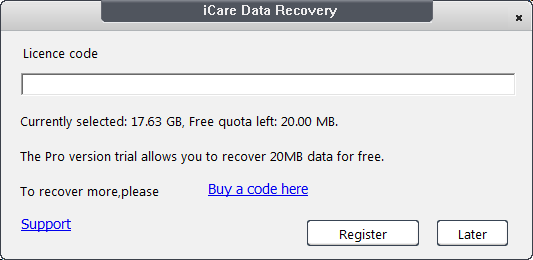
| iCare Recovery Pro free trial | Up to 1GB before purchase | Evaluating Pro features before unlocking unlimited recovery |
These limits come from the official iCare Free comparison, checked on August 17, 2026. This distinction matters: saying simply that "iCare is limited to 1GB" is inaccurate because it describes the Pro trial, not the standalone Free edition's basic undelete mode.
Supported File Systems, Formats, and Devices
iCare's official comparison lists FAT, FAT32, exFAT, NTFS, and NTFS5. It also advertises support for more than 800 file types across documents, photos, video, audio, email, and archives. Typical sources include internal drives, external hard drives, USB flash drives, SD cards, and other removable media.
This corrects another outdated statement in the original article: exFAT is officially listed as supported. Support does not guarantee a successful recovery in every exFAT case. Formatting method, overwritten sectors, fragmentation, device health, and the selected scan mode still affect results.
Current iCare Data Recovery Pro Pricing
At the time of verification, the official iCare store displayed the following prices. VAT is excluded, and the two annual plans renew automatically unless canceled.
| Plan | Displayed price | License scope |
| Home License | US$69.99 per year | 1 PC, home use, unlimited data recovery |
| Premium License | US$99.99 per year | 2 PCs, home and workstation use, unlimited data recovery |
| Unlimited License | US$399.99 | Unlimited PCs and years within one company; technician and IT service use allowed |
The store also advertises a 15-day money-back policy. Read the applicable terms before purchasing because a money-back statement is not the same as an unconditional refund for every recovery outcome.
Part 4. Core Features: Useful Basics, Limited Modern Depth
Three Recovery Modes
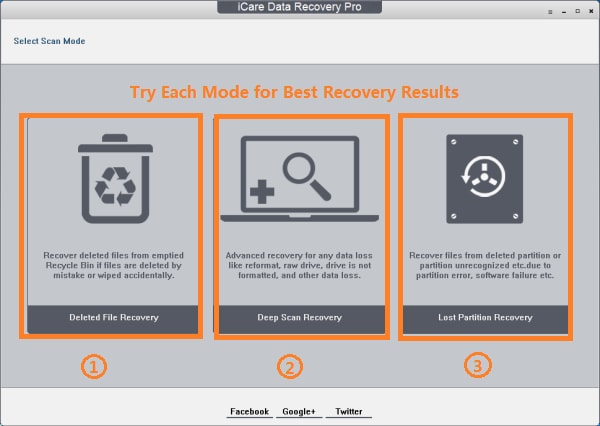
- Deleted File Recovery: The fastest and most economical choice for a normal deletion or an emptied Recycle Bin on a healthy volume.
- Deep Scan Recovery: A block-level search for formatted or more difficult logical-loss cases. It takes longer and may return files without their original names or folders.
- RAW Drive Recovery: Intended for a drive that appears as RAW, inaccessible, or associated with a lost partition.
Portable Edition
iCare offers a portable ZIP download. That is a meaningful safety advantage when the missing files were on the system drive: you can download and extract the program on another computer or drive, then run it from a separate USB device. Do not download, extract, or install recovery software onto the affected volume.
BitLocker Recovery with a Key
The official Free comparison lists BitLocker recovery, but the drive must first be unlocked with the correct password or recovery key. Recovery software cannot bypass BitLocker's encryption. If an encrypted drive was reformatted and its key or encryption metadata is unavailable, DIY recovery may not be feasible.
Preview and File-Tree Browsing
iCare lets you browse scan results and preview supported files before saving. Use preview as an integrity check, not just as a discovery tool. A filename in the results does not prove that the file body is intact.
What Is Missing or Less Transparent
The official download center identifies the current product lines and supported operating systems but does not prominently publish a build number, release date, or detailed changelog. That makes it harder to verify how recently the scan engine, file-signature library, and Windows compatibility layer were updated. The product also lacks native macOS recovery.
Part 5. Does iCare Data Recovery Work? Performance Evidence and Limits
The honest answer is: it can work well for a narrow, favorable case, but no single success percentage applies to every drive. Recovery depends on the storage technology, file system, file fragmentation, amount of subsequent writing, and whether the loss is logical or physical.
Scan Speed: Official Estimate vs Independent Observation
iCare's current user guide estimates about 4 to 5 minutes for 16GB, 20 minutes for 128GB, and around one hour for a healthy 1TB drive. Those are vendor estimates, not guarantees. An independent Handy Recovery review reported roughly 20 minutes for a 16GB flash drive during its test. The gap is a useful warning: scan mode, device speed, USB interface, drive condition, and PC performance can change scan time substantially.
Practical interpretation: Do not judge a recovery tool only by how quickly it finishes. A fast scan that misses file signatures is not useful, while an abnormally slow scan accompanied by disconnections or read errors can indicate failing hardware. If the drive is mechanically unstable, repeated deep scans can make the situation worse.
What iCare Appears to Do Best
- Recently deleted office documents and common images on Windows file systems.
- Basic recovery from healthy USB drives and memory cards.
- Low-cost diagnosis when the Free edition can preview the needed files.
Where the Evidence Is Less Convincing
- Camera RAW and video: Independent reviewers have reported weaker or inconsistent recovery for some RAW photo and video samples. A listed extension does not prove that fragmented media will be reconstructed correctly.
- Original names and folders after deep scan: Signature-based carving may recover file contents while losing the original path and filename.
- Overwritten or TRIM-processed data: Recovery software cannot restore sectors that contain new data. Modern SSD TRIM can also make deleted blocks inaccessible very quickly.
- Physical drive damage: Software is not a substitute for a cleanroom or hardware imaging tools when a drive clicks, fails to spin, overheats, or repeatedly disconnects.
Why a Published Recovery-Rate Claim Can Mislead
A single percentage hides the scenario. Recovering 95 of 100 freshly deleted JPG files from a healthy NTFS USB drive is not comparable to recovering fragmented 8K MOV files after an SD card format. A trustworthy benchmark must disclose the dataset, exact loss method, device and file system, scan mode, duplicates, corrupt outputs, and hash or playback validation. iCare does not publish enough of that detail on its product pages to support a universal recovery-rate claim.
Part 6. Is iCare Data Recovery Safe?
iCare is a legitimate Windows recovery product, but safe recovery depends on both the download source and how you use it. Download only from the official iCare domain or its official download host. An independent review reported a clean VirusTotal result for the installer it checked, but that point-in-time result applies only to that exact file and should not be treated as a permanent guarantee for every mirror or future build.
Five safety rules before you scan
- Stop writing to the affected drive immediately.
- Download and run the recovery tool from a different, healthy drive.
- Never save recovered files back to the source volume.
- Avoid cracked activation keys and repackaged installers. They add malware risk and can overwrite recoverable data.
- If the drive clicks, vanishes, reports the wrong capacity, or repeatedly stalls, power it down and consult a professional lab.
Should You Download iCare Data Recovery Pro Crack?
No. A crack is not a free edition of the official software. It is an altered executable from an unverified distributor. Besides legal and security risks, installing a large repackaged program on the source drive can overwrite the files you are trying to recover. Use the official Free edition, evaluate the Pro trial, or choose another legitimate tool.
Part 7. How to Recover Deleted Files with iCare Recovery Free
These steps are appropriate for a healthy Windows drive with logical data loss. If possible, use the portable edition from a separate USB drive. Keep another healthy drive ready for the recovered files.
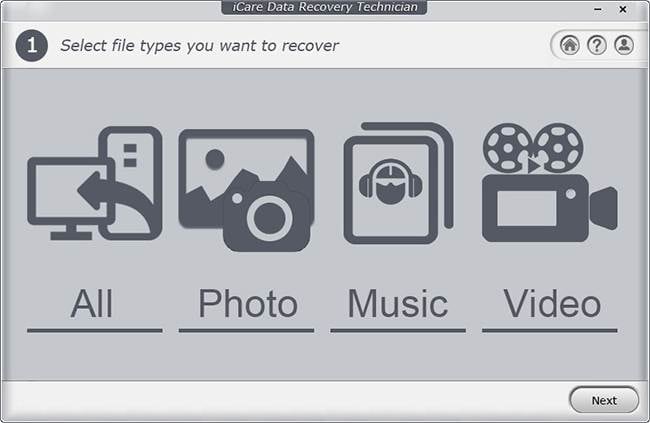
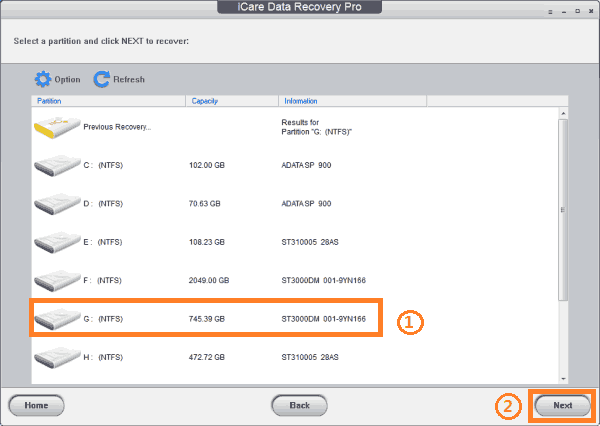
Step 1 Launch iCare and choose the mode that matches the loss. Start with Deleted File Recovery for a normal deletion. Use Deep Scan Recovery for formatting or when the basic scan finds nothing. Choose the affected partition or external device.
Step 2 Start the scan and let iCare build the result tree. Avoid opening, editing, or copying files on the source drive while the scan runs.
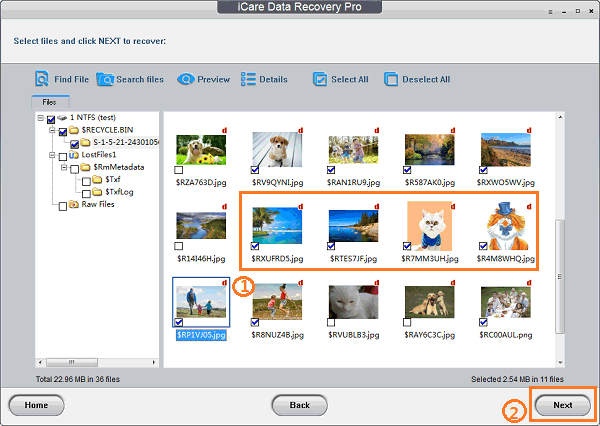
Step 3 Filter or browse the results. Preview a representative set of important photos, documents, and videos. Check content, not only filenames.
Step 4 Select the files you need and recover them to a different physical drive. Open several recovered files from the destination to verify integrity before you reuse or format the source.
Part 8. iCare Data Recovery Pros and Cons
| Pros | Cons |
| Unlimited recovery in the Free edition's Deleted File Recovery mode | Windows-only desktop application |
| Portable ZIP option reduces the need to install on the affected PC | Deep Scan and RAW recovery are limited to 500 recovered files per 24 hours in the Free edition |
| Supports FAT, FAT32, exFAT, NTFS, and NTFS5 according to the official comparison | Official site lacks a prominent build number and detailed release history |
| Simple three-mode workflow | Interface and result organization feel dated compared with newer tools |
| BitLocker recovery is listed when the correct unlock key is available | Independent evidence is mixed for specialized RAW photos and video recovery |
| Paid options provide unlimited recovery and technical support | Annual licenses auto-renew, VAT may be added, and the top license is expensive for a one-time personal recovery |
Who Should Use iCare?
Use iCare Recovery Free if you have a straightforward Windows deletion, can keep the source drive untouched, and want to recover more than the data-size caps imposed by many free trials. Preview the important files first and recover them elsewhere.
Who Should Choose Something Else?
Choose another tool if you use a Mac, need disk-image workflows, have a very large mixed-media recovery, or want stronger support for fragmented camera video and modern storage scenarios. Use a professional service, not another DIY app, if the device shows physical-failure symptoms.
Part 9. Best iCare Data Recovery Alternatives in 2026
The best alternative depends on the problem, not on a universal leaderboard:
| Tool | Best for | Main trade-off |
| iCare Recovery Free | Unlimited basic deleted-file recovery on Windows | 500-file daily limit for Deep/RAW recovery; no macOS version |
| Recoverit Data Recovery Free | Windows and Mac users; modern preview/filtering; broad photo, video, device, disk-image, NAS, and Linux-device workflows | Free recovery is capped at 500MB; more data requires a paid plan |
| Recuva | Fast, simple Windows undelete on healthy drives | Less suitable for complex formatted-media and fragmented-media recovery |
| PhotoRec | Free, open-source signature carving across Windows, macOS, and Linux | Command-line-style workflow; original filenames and folder structures are often lost |
Part 10. iCare Data Recovery vs Recoverit: Which One Fits Your Case?
Recoverit is not the better choice in every scenario. If you only need to restore a large batch of recently deleted files on Windows, iCare's unlimited basic mode can be more generous than Recoverit's 500MB free allowance. Recoverit becomes the stronger fit when platform coverage, media recovery, preview tools, and more complex storage workflows matter.
Recoverit Data Recovery Free
- Available for Windows and macOS, with separate desktop installers.
- Officially supports more than 1,000 file types and more than 2,000 types of storage media.
- Includes Quick Scan, Deep Scan, preview, file-type filters, and disk-image recovery.
- Provides up to 500MB of free recovery; paid editions remove the recovery-size limit.
Feature-by-Feature Comparison
| Factor | iCare Recovery Free / Pro | Recoverit Data Recovery Free / Premium |
| Operating systems | Windows | Windows and macOS |
| Free recovery allowance | Unlimited in Deleted File Recovery; 500 files per 24 hours in Deep Scan and RAW; Pro trial up to 1GB | Up to 500MB across supported recovery scenarios |
| Advertised file-type coverage | 800+ file types | 1,000+ file types |
| Portable edition | Yes | No comparable portable desktop edition advertised |
| Disk-image recovery | Not prominently documented on the reviewed official pages | Yes |
| Media-focused recovery | Common photo and video formats supported | Enhanced photo/video recovery and repair-related workflows in eligible editions |
| NAS and Linux-device scanning | Not prominently listed as dedicated workflows | Available as dedicated workflows |
| Best fit | Free basic undelete on Windows | Cross-platform and more complex data or media recovery |
How to Recover Lost Data with Recoverit
Step 1 Install Recoverit on a healthy drive, not the drive that lost data. Open Hard Drives and Locations.
Step 2 Select the affected disk, partition, or external device and start the scan.

Step 3 Let the scan run while using file type, size, date, and other filters to narrow the result set. Stop using the source drive for all unrelated work.

Step 4 Preview the files that matter, select them, and click Recover. Save them to a different physical disk, then open a sample from every important file type to confirm integrity.

Part 11. Final Verdict: Is iCare Data Recovery Worth It in 2026?
Yes, for simple Windows undelete. Maybe, for complex recovery. Not for damaged hardware.
iCare Recovery Free deserves consideration when files were recently deleted from a healthy Windows drive. Its unlimited Deleted File Recovery mode is a genuine advantage, and the portable edition helps reduce installation-related overwrite risk. That narrow value proposition is stronger than the original article acknowledged.
The trade-offs appear when the loss involves formatting, RAW volumes, large mixed datasets, modern camera media, or another operating system. Deep and RAW recovery use a 500-file daily allowance in the Free edition, iCare provides no native Mac application, and the official site offers limited visibility into build history and controlled recovery benchmarks. The annual Pro price can be reasonable if its preview confirms your critical files, but do not pay based only on a filename list.
For broader Windows and Mac coverage, stronger preview and filtering, disk-image recovery, and media-focused workflows, Recoverit is the more complete option. Its 500MB free cap is less generous for bulk basic undelete, so the fairest advice is to match the tool to the loss scenario rather than calling either product universally best.
FAQ
-
Is iCare Data Recovery really free?
Yes, but the allowance depends on the mode. iCare Recovery Free provides unlimited recovery in Deleted File Recovery mode. Deep Scan Recovery and RAW Drive Recovery allow up to 500 recovered files per 24 hours. The separate Pro trial provides up to 1GB before purchase. -
Is iCare Data Recovery safe to download?
The product is legitimate, but download it only from the official iCare site or its official download host. Avoid cracks and third-party repackaged installers. Run the software from a different drive and save recovered files somewhere other than the source. -
Does iCare Data Recovery work on Mac?
No native iCare Data Recovery desktop app for macOS is listed in the official download center. Mac users should choose a recovery tool that explicitly supports macOS and the source volume's file system. -
Can iCare recover files from an exFAT drive?
iCare officially lists exFAT support for memory cards, USB drives, and other volumes. Actual recovery still depends on whether the relevant sectors were overwritten, the type of formatting, fragmentation, and device health. -
Can iCare recover files from a formatted drive?
It can scan formatted drives with Deep Scan Recovery, but no tool can guarantee the result. A quick format on an otherwise untouched drive is generally more recoverable than a full format, secure erase, subsequent rewrite, or SSD deletion followed by TRIM. -
Can iCare recover overwritten files?
No software can restore file data after its physical sectors have been overwritten with new data. A scan may find an old filename or partial metadata even when the content is no longer recoverable. -
Does iCare unlock BitLocker without a password or recovery key?
No. The official product information requires the correct unlock key or password. Data recovery software cannot bypass properly implemented BitLocker encryption. -
Which is better, iCare or Recoverit?
iCare is the better free-value choice for bulk, recently deleted files on Windows because its basic mode is unlimited. Recoverit is the better all-round choice for Windows and Mac users who need broader device support, modern filtering and preview, disk-image recovery, or media-focused workflows.


