 TL;DR:
AI data recovery leverages machine learning to piece together missing file fragments and reconstruct damaged data structures, significantly increasing retrieval success rates compared to traditional fixed-rule methods.
● Select the right tool for your specific scenario: use local software like Recoverit for offline drive scanning, AI-based cloud services like Google Drive for predictive version restoration, or specialized tools like Vmake to reconstruct corrupted photos and videos frame-by-frame.
● To maximize recovery chances, you must immediately stop using the affected device to prevent overwriting the hidden data remnants, run deep scans, and strictly save any retrieved files to a separate external drive rather than the original location.
● Be aware of key limitations: AI cannot salvage data from severely physically damaged drives, advanced features generally require paid subscriptions, and cloud-based AI recovery introduces potential privacy risks by necessitating data uploads via an active internet connection.
Ask AI for a summary
 ChatGPT
 Perplexity
 Gemini
 Claude
 Grok
Grok
Important files can go missing. Photos vanish. Work documents are gone. Backups stop working. It happens to everyone. But tech has come a long way. Artificial intelligence can bring your files back. Recovery is now quicker and smarter.
Traditional recovery methods often fail. They miss hidden files. They can't fix badly damaged data. But AI changes everything. It learns patterns in data. It predicts where files might be hiding. Learning how to recover lost data using AI opens new possibilities.
This guide will show you exactly how AI helps the data recovery process work better.
Table of Contents:
Part 1: Can AI Really Help Recover Lost Data?
Yes, AI can recover lost data effectively. It uses machine learning to scan storage devices. The technology identifies file patterns that humans might miss. AI algorithms can recognize fragments of deleted files. They piece together broken data like solving a puzzle. This makes recovery more successful than old methods.
AI excels at handling complex recovery situations. It can restore files from formatted drives. It repairs corrupted photos and videos. The technology adapts to different file types automatically. Traditional tools follow fixed rules. But AI learns from millions of recovery cases. This experience helps it make smarter decisions. When you recover data using AI, the success rate jumps significantly higher.
Part 2: How to Recover Lost Data Using AI?
AI-powered recovery tools make the process simple. You don't need technical expertise. The software guides you through each step. AI works in the background to find your files. It analyzes your storage device intelligently. The technology detects patterns and recovers data automatically.
Different methods work for different situations. Some tools focus on hard drives. Others specialize in cloud recovery. Media-specific tools restore photos and videos. Diagnostic tools handle physically damaged drives. Choosing the right method depends on your needs. Let's explore each approach in detail.
Method 1: Use AI-Powered Software Like Recoverit
AI-powered recovery software is the most popular option. These programs install on your computer. They scan your drives using artificial intelligence. The software finds deleted and lost files quickly. Tools like Recoverit use advanced algorithms. They detect file signatures even after deletion.
These programs work automatically. You select the drive to scan. The AI does the heavy lifting. It searches through every sector. The software rebuilds file structures intelligently. This approach works for accidental deletions. It handles formatted drives too. Understanding how to recover lost data using AI starts with using the right software.
How It Helps:
- Scans drives faster than traditional methods
- Identifies file fragments that manual searches miss
- Repairs damaged file structures automatically
- Supports hundreds of different file formats
Step 1: Download and install Recoverit AI-powered recovery software on your computer. Open the app.

Step 2: Select the drive where you lost data and click scan to start the AI recovery process.

Step 3. Preview the results. Select what you need. Save the files to a safe spot.

Method 2: Try AI-Based Cloud Backup Recovery
Cloud services now use AI for backup management. These systems track your files constantly. They create recovery points automatically. When data disappears, AI finds the right backup version. The technology knows which copy is most recent. It can even predict which files you'll need.
Cloud AI learns your usage patterns. It prioritizes important files in backups. The system can restore entire folders quickly. It also handles individual file recovery. This method works great for ongoing protection. You need internet access for cloud recovery. But the convenience is worth it. How AI helps the data recovery process in the cloud is remarkable.
How It Helps:
- Automatically saves multiple versions of your files
- Predicts which backup version you need
- Restores data from anywhere with internet
- Prevents permanent data loss through continuous backup
Step 1: Log into your cloud storage service like Google Drive. Navigate to the recovery section.
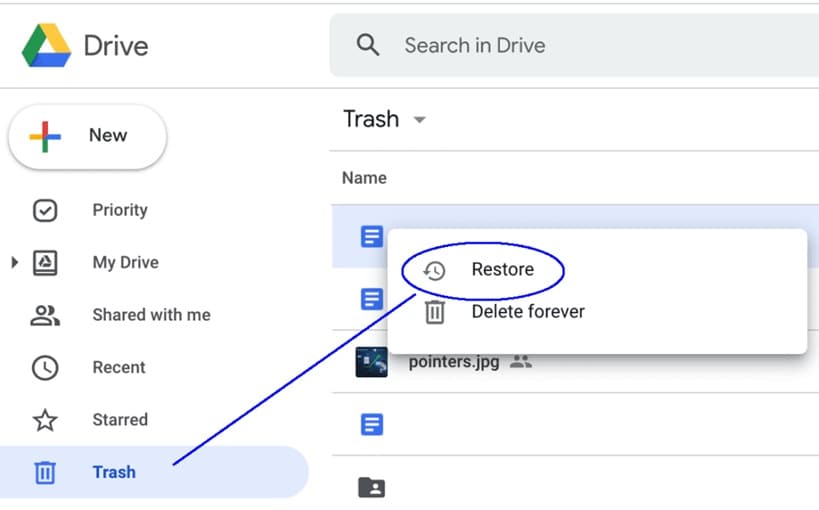
Step 2: Select the files and date you want to restore, then let AI retrieve your data.
Method 3: Use AI to Restore Corrupted Media Files
Photos and videos get corrupted easily. A sudden shutdown damages them. File transfer errors break them. Traditional tools can't fix these problems. AI-powered media recovery is different. It analyzes the file structure deeply. The technology rebuilds missing data intelligently.
AI understands how media files work. It knows the patterns in images. It recognizes video codec structures. When files are partially damaged, AI fills the gaps. It uses data from intact portions. The software reconstructs playable videos. It fixes pixelated photos. This specialized recovery saves precious memories. When you recover data using AI for media files, the results are impressive.
How It Helps:
- Repairs photos with missing or corrupted sections
- Reconstructs broken video files frame by frame
- Fixes audio files with data corruption
- Works with multiple media formats simultaneously
Step 1: Open your AI media repair tool like Vmake. Import the corrupted files.
Step 2: Run the AI analysis and repair process, then save the fixed media files.
Part 3: Pros and Cons of AI Data Recovery
AI technology transforms data recovery significantly. But it's not perfect for every situation. Understanding both advantages and limitations helps you decide. You'll know when AI tools work best. You'll also recognize when other methods are better. Let's examine the pros and cons of AI data recovery honestly.
Advantages of Using AI
- Higher Success Rates: AI finds files that traditional methods miss. The technology recognizes patterns in damaged data. It recovers more files overall.
- Faster Recovery Process: Scanning takes less time with AI. The software works efficiently. You get your files back quicker.
- Automatic Repair Functions: AI fixes corrupted files automatically. You don't need technical knowledge. The software handles complex repairs.
- Continuous Learning: AI improves with every recovery. It learns from past cases. Future recoveries become more effective.
- User-Friendly Interface: Most AI tools are simple. Anyone can use them. No special training is required.
Disadvantages to Consider
- Cost Factor: AI-powered tools cost more. Premium features require subscriptions. Traditional free tools might be cheaper.
- Internet Dependency: Some AI tools need online connections. Cloud features require internet access. This limits offline recovery.
- Not Always Perfect: AI can't recover everything. Severely damaged data is still lost. Physical drive damage has limits.
- Privacy Concerns: Cloud AI tools upload your data. This raises security questions. Local software is more private.
- Learning Curve for Advanced Features: Basic recovery is simple. But advanced AI features need practice. Optimization takes time to master.
Part 4: Pro Tips for Using AI Tools Effectively
AI recovery tools deliver best results with proper use. Small mistakes can reduce effectiveness. Following expert tips improves your success rate. These strategies help you maximize AI capabilities. They prevent common errors during recovery. Apply these tips every time you recover data using AI.
Pro Tips:
- Stop using the device immediately when data is lost: Every new action overwrites deleted files. Turn off the device right away. This preserves recoverable data.
- Choose AI tools that match your specific data type: Some tools specialize in photos. Others work better for documents. Select software designed for your file types.
- Run the deepest scan available even if it takes longer: Quick scans miss hidden files. Deep AI scans find more data. The extra time is worth it.
- Save recovered files to a different drive than the original: Never save to the same location. This prevents overwriting remaining data. Use external storage for safety.
- Keep your AI recovery software updated regularly: Updates improve AI algorithms. New versions find more files. Check for updates monthly.
- Create multiple backups before attempting physical drive recovery: Damaged drives can fail completely. Make an image backup first. This gives you multiple recovery attempts.
- Use preview features to verify files before recovery: Check if files are intact. Preview ensures recovery quality. Don't waste time on unrecoverable items.
- Combine AI tools with professional services for critical data: Important business data needs experts. Use AI first for assessment. Consult professionals if AI fails.
Conclusion
Learning how to recover lost data using AI empowers everyone. The technology makes recovery accessible. You don't need to be an expert anymore. AI tools guide you through the process. They handle the technical complexity automatically. From simple deletions to corrupted files, AI provides solutions.
The future of data recovery is intelligent. AI continues improving every year. New algorithms recover more file types. Success rates keep climbing. While the pros and cons of AI data recovery show some limitations, the advantages are clear. Start with basic AI tools. Learn their capabilities. Your lost files might be more recoverable than you think. Take action quickly when data disappears. AI stands ready to help restore what matters most.
Try Recoverit to Recover Lost Data
 Security Verified. Over 7,302,189 people have downloaded it.
Frequently Asked Questions (FAQs)
-
Can AI recover permanently deleted files?
Yes, AI can often recover permanently deleted files. When you delete files, they're not immediately erased. The system marks that space as available. But the actual data remains on the drive. AI algorithms scan for these remnants. They identify file signatures and patterns. The technology reconstructs files from fragments. Success depends on several factors. Time matters most. The sooner you try recovery, the better. -
Is AI data recovery safe for my remaining files?
AI data recovery is generally safe when done correctly. Good recovery software operates in read-only mode. It scans without modifying existing data. The tools create file copies rather than moving originals. However, you should still take precautions. Never install recovery software on the affected drive. Use a different computer or external drive. This prevents accidental overwrites. Stop using the damaged device immediately. Every action risks overwriting recoverable data. Professional AI tools include safety features. They prevent harmful operations automatically. -
How much does AI-powered data recovery cost?
AI data recovery costs vary widely by method. Basic software ranges from $50 to $150. Premium tools with advanced AI features cost $200 to $500. These are one-time purchases or annual subscriptions. Free versions exist but have limitations. They recover fewer files or smaller sizes. Cloud-based AI recovery depends on your subscription. Many services include recovery in existing plans. Physical drive damage costs more.



