

 TL;DR:
You can recover deleted contacts on Android and iPhone using cloud backups, built-in restore features, or third-party data recovery tools depending on your device and backup status.
● Android users can turn on "Contacts sync" in their Google Account settings, or use the "Undo changes" feature on Google Contacts web to roll back their contact list up to 30 days.
● iPhone users can retrieve contacts by turning on Contacts sync in iCloud settings, or by restoring a previous device backup via iTunes or Finder on a computer.
● If no cloud backups exist, check if contacts are saved on your SIM card by inserting it and importing, or use external data recovery software like Wondershare Recoverit to scan SD cards or external phone storage for lost contact files.
Ask AI for a summary
 ChatGPT
 Perplexity
 Gemini
 Claude
 Grok
Grok
Losing contact numbers feels stressful. Isn’t it? Yes, mostly it often happens by mistake. A wrong tap or a failed sync can erase all names from your phone. You may worry about work numbers and family numbers. You may fear you cannot get them back.
This guide explains simple ways to fix this. You will learn how to recover deleted contacts with easy methods. You will also learn how to restore deleted contacts through backups and cloud accounts.
Try Recoverit to Recover Lost Data
 Security Verified. Over 7,302,189 people have downloaded it.
Table of Contents:
How to Recover Deleted Contacts on Android and iPhone?
Many simple ways can help you recover lost contact names. Each method works on different devices. We show how to recover deleted contacts in simple steps. These ideas also help you learn how to restore deleted contacts through backup accounts. You will also see how to retrieve deleted contacts from SIMs. Some people want to know how to get deleted contacts back when there is no backup. Some want to know how to recover erased contacts from old storage. You can try one method after another.
This part also helps you understand how to recover the deleted contacts when cloud sync fails. You can also learn how to retrieve deleted numbers when you change SIM or sign out. You will also know how to get deleted numbers back from external tools.
Fix 1: Restore Contacts from Google Account (Android)
Many Android users save phone numbers in Google. When contacts vanish, your cloud may still store them. This method can help you find them again. It often helps when you add Gmail to a new phone.
The main value is safety. Google stores data in cloud. Your list comes back once you sign in. It works fast.
How to Restore Contacts from Google Account (Android):
Step 1: Open Settings. Sign in to Google. Turn on Contacts sync.
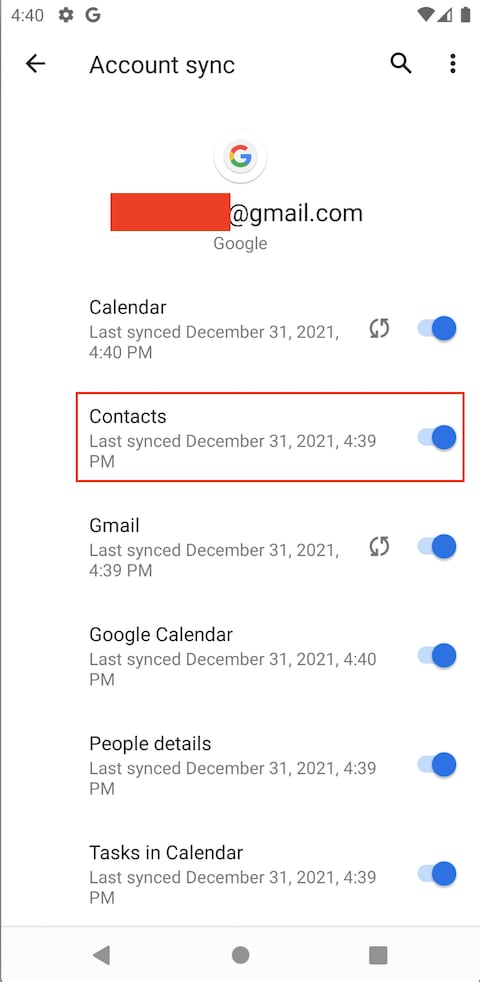
Step 2: Open the Contacts app. Numbers appear.
This process gives a clear path on how to recover deleted contacts. It also guides on how to restore deleted contacts without stress.
Fix 2: Recover Contacts via iCloud (iPhone)
iCloud saves items online. If your iPhone lost numbers, iCloud may still have them. This is quick and safe. It helps after resets and updates.
The process is simple. Once sync is on, your items return.
How to Recover Contacts via iCloud (iPhone):
Step 1: Sign in to iCloud. Turn on Contacts.
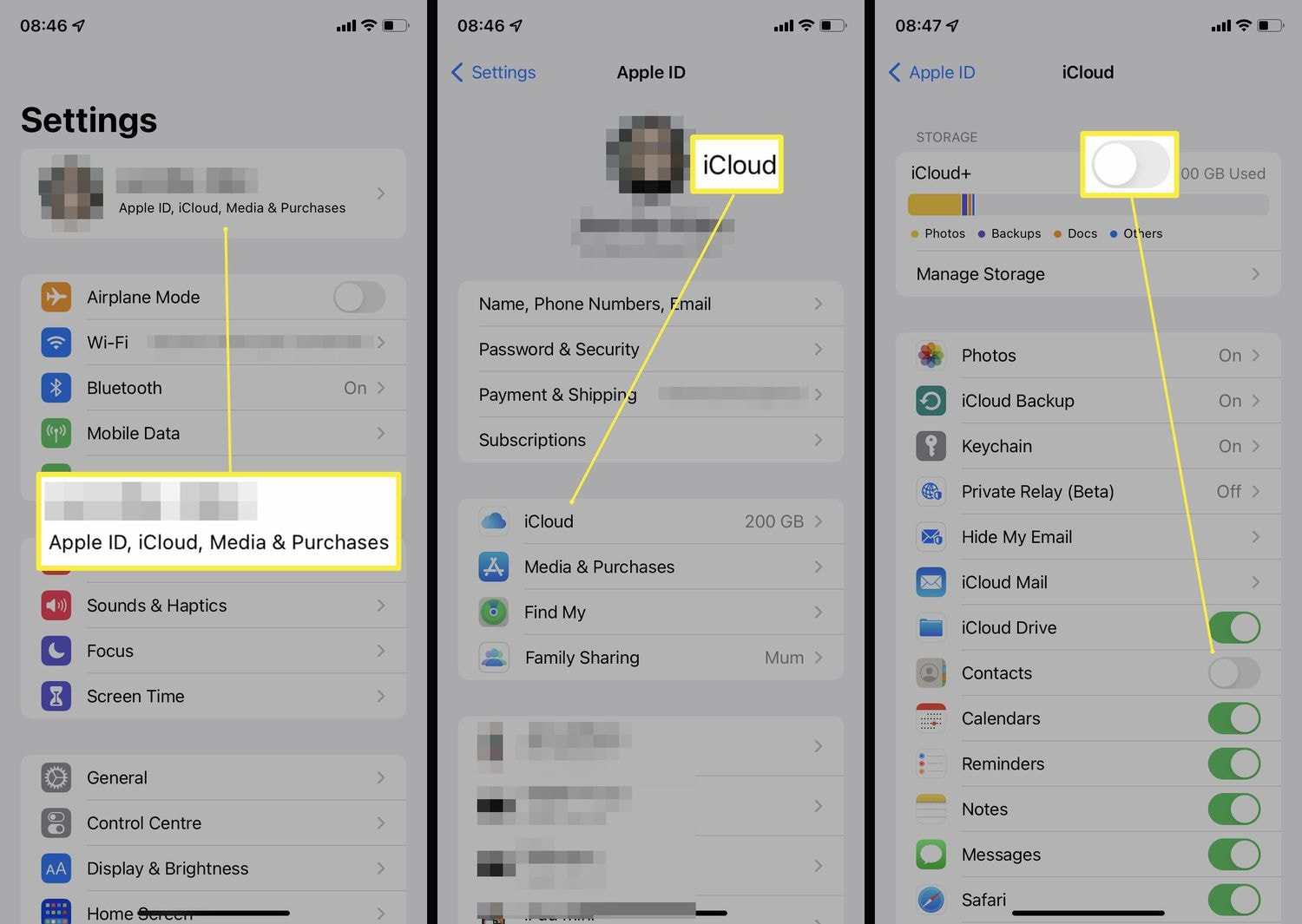
Step 2: Open the Contacts app. Wait to see the names.
iCloud helps you learn how to retrieve deleted contacts. It also supports how to recover the deleted contacts after an update.
Fix 3: Use Google Contacts' Undo Changes Feature
Google Contacts has a time feature. You can undo changes from a past time. It works if you made a mistake. If you deleted names yesterday, you can roll back.
The feature saves time. You select a time and restore.
How to Use Google Contacts' Undo Changes Feature:
Step 1: Open Google Contacts on the web.

Step 2: Click Undo changes. Choose a time. Confirm.
This helps people see how to retrieve deleted numbers. It also shows how to get deleted numbers back using time change.
Fix 4: Restore from iTunes or Finder Backup (iPhone)
If you save a backup on a laptop, iTunes or Finder can restore. It works if you back up before deleting.
Connect your iPhone. You select the latest backup. Restore.
How to Restore from iTunes or Finder Backup (iPhone):
Step 1: Open iTunes or Finder. Connect the iPhone.
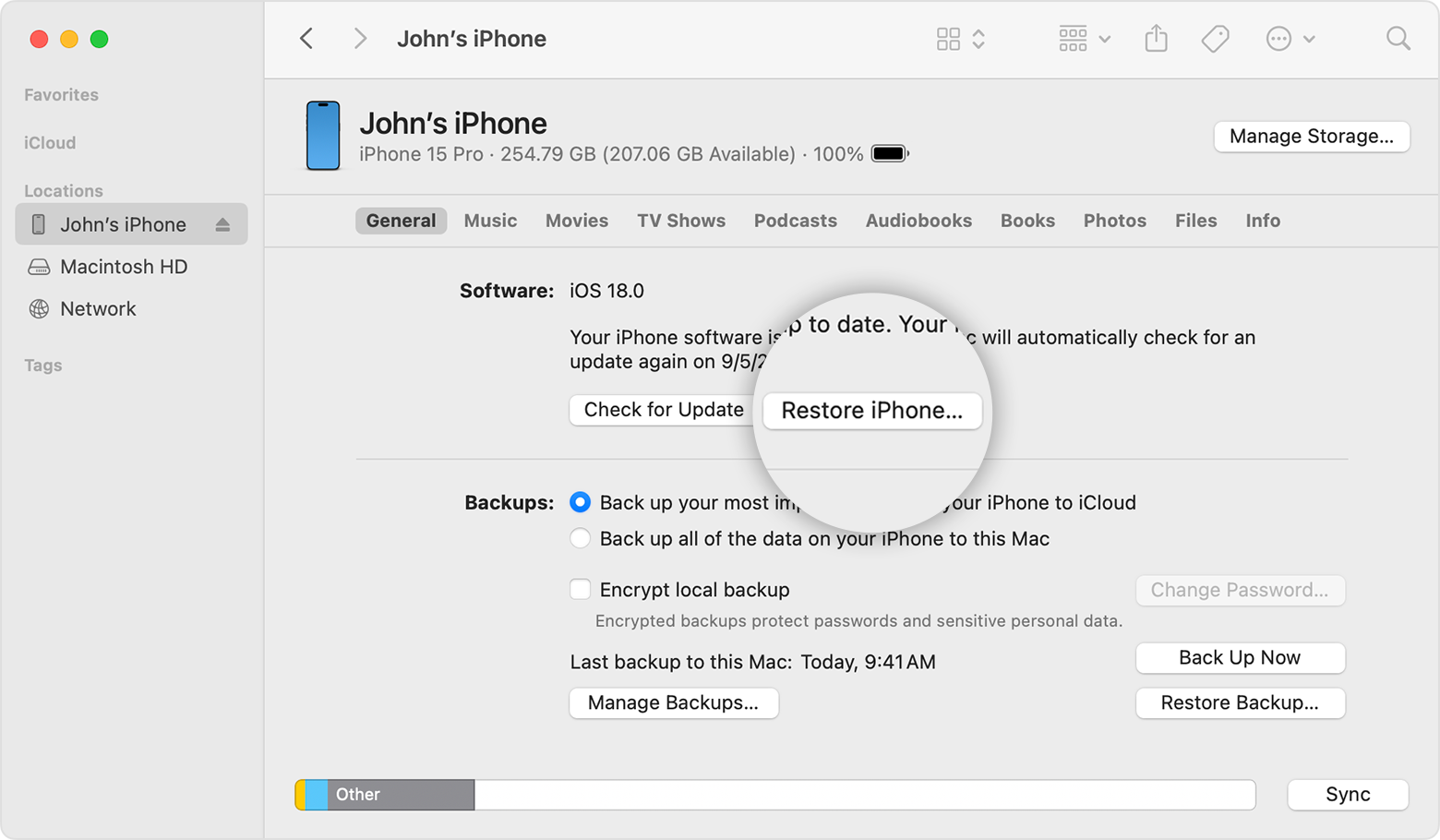
Step 2: Choose Restore. Select backup.
This method explains how to recover erased contacts. It also tells how to get deleted numbers back.
Fix 5: Check SIM Card or Third-Party Sync Services
Some users save numbers on SIMs. If phone storage is empty, check the SIM. Also, check other sync apps. These include email apps. They may store data.
How to Check SIM Card or Third-Party Sync Services:
Step 1: Insert the old SIM. Open Contacts.

Step 2: Import from SIM.
This helps with how to recover the deleted contacts from the SIM. It also gives a way on how to retrieve deleted numbers if sync fails.
Fix 6: Use Contact Recovery Apps or Tools
Some tools find old data. These apps scan storage. They may find lost numbers that are hidden.
How to Use Contact Recovery Apps or Tools:
Step 1: Install a trusted app like Deleted Contact Recovery App.

Step 2: Open the app. Scan. Save the found numbers.
These apps help with how to recover deleted contacts. They also help on how to restore deleted contacts from old device files. They help on how to recover erased contacts from deep storage.
Lost Contacts? Use Recoverit for External Device Data Recovery
Many times, the numbers you need were saved on an SD card or old backup. The main phone cannot find them. You may have moved from another phone. You may have copied files on a drive. Those files can still hold names. Recoverit is a dependable tool that works with drives and storage cards.
Recoverit is helpful when cloud sync fails. Some people never turned on cloud. So they worry. The tool scans many storage paths. It looks for data that is lost. It can detect contacts stored in files. Many users like its simple style.
Recoverit works on many devices. It can scan external cards and drives. It works when phone apps fail. It checks deep parts of storage. Hidden files appear. You can pick and restore. This gives peace
Recovery steps
Step 1: Install and launch Recoverit on your computer. Connect the SD card, phone storage, or external drive where your contacts might be stored.

Step 2: Select the target location in the Recoverit window and begin the scan. The tool will search for contact data and related files.

Step 3: When the scan finishes, review the results. Choose the items you need and save them to a safe folder on your computer.

This approach supports how to recover deleted contacts. It also helps with how to restore deleted contacts from old files. It works well for how to retrieve deleted contacts from SD cards.
Conclusion
Contact loss can bring trouble. You may lose family and work numbers. You may feel anxious. But there are ways to solve it. Simple cloud sync helps. Backup files restore data. Tools can scan old storage. After using these steps, you can bring back numbers.
This guide showed how to recover deleted contacts. It also explained how to restore deleted contacts and how to retrieve deleted contacts from many sources. You learned how to get deleted contacts back with many tips. You also studied how to recover erased contacts from backup, SD card, and cloud. These steps also help you understand how to recover the deleted contacts.
Try Recoverit to Recover Lost Data
Security Verified. Over 7,302,189 people have downloaded it.
FAQs
-
Can I get my numbers back without backup?
Yes. Some deleted data may still stay in phone storage for a short time. A recovery tool can scan deep files and pull hidden contacts. You can also check your SIM card. If you linked contacts to an email account, sign in and review the list. The sooner you try, the better your chance to recover your numbers. -
Will Google keep my lost numbers?
Yes, if sync was on. Google stores your contact list online. Even if you delete a name on your phone, Google may still have an older copy. Go to Google Contacts in a browser to check. You may also use Undo Changes to roll back the list up to 30 days. If you used more than one Google account, check each one. -
Can I get numbers from an old device?
Yes. If you used iCloud or Google, sign in on your new phone and turn on sync. If numbers are on the SIM, insert it and import contacts. If you made a backup with iTunes, Finder, or Google, restore it. If this fails, use a recovery tool to scan the old device or memory card.


