

 TL;DR:
Zilkee Hard Drive Recovery primarily functions as a USB 3.0 IDE/SATA adapter paired with basic software to help users access working 2.5-inch and 3.5-inch drives from dead computers, but it cannot fix physically damaged, clicking, or hardware-failed disks.
● The Zilkee Ultra Recovery Converter supports up to 6TB IDE or SATA drives and requires the included 12V 2A adapter for 3.5-inch disks, but it is entirely incompatible with M.2, NVMe, SCSI, SAS, and Fibre Channel interfaces.
● If a connected drive successfully mounts but files are deleted, formatted, or missing, users must scan it using the free Zilkee Recovery Wizard or dedicated tools like Wondershare Recoverit and save any recovered files to a separate storage device.
● To prevent permanent data loss, users must decline any Windows prompts to format the connected drive, ensure they have the legitimate BitLocker key for encrypted volumes, and immediately disconnect power if the old drive emits grinding or clicking sounds.
Ask AI for a summary
 ChatGPT
 Perplexity
 Gemini
 Claude
 Grok
Grok
Zilkee Hard Drive Recovery is worth considering if your main problem is access, not a dead drive. The Zilkee Ultra Recovery Converter is a USB 3.0 IDE/SATA adapter that connects old 2.5-inch and 3.5-inch hard drives or SSDs to a modern computer. It can be useful when an old desktop or laptop no longer boots, but the drive itself still spins, powers on, and is readable.
It is not a magic data recovery machine. If a hard drive is clicking, grinding, physically damaged, encrypted without the key, or no longer detected by any computer, Zilkee is unlikely to solve the problem. If the drive connects but files are deleted, formatted, missing, or corrupted, you may need recovery software such as the Zilkee Recovery Wizard or a dedicated tool like Wondershare Recoverit.
- Overall editorial rating: 3.6/5 for old-drive access and basic home recovery scenarios.
- Best for: old IDE/SATA drives from retired PCs, non-booting computers, basic file transfer, backup, and copying data from a readable drive.
- Not ideal for: physically failed drives, BitLocker-locked disks without the key, M.2/NVMe drives, SCSI/SAS/Fibre Channel drives, or overwritten files.
- Best Recoverit fit: use Recoverit after Zilkee makes the old drive readable, especially when files were deleted, formatted, or missing from a drive that the computer can detect.
Lost access to an old hard drive? Your computer will not boot anymore? You may still have photos, documents, videos, emails, project files, or family archives trapped on the disk. A USB adapter such as Zilkee Hard Drive Recovery can help in the right situation, but it is important to understand exactly what it can and cannot do before connecting an aging drive.
This Zilkee hard drive recovery review covers the current Zilkee Ultra Recovery Converter, the Zilkee Recovery Wizard, supported drive types, safety limits, price, user review signals, real use cases, and the best Recoverit alternative workflow when an adapter alone is not enough. The goal is simple: help you recover data in the safest order, not just plug in hardware and hope.
For broader hard drive data loss scenarios, Recoverit's hard drive recovery guide is a useful next step before formatting, repartitioning, or trying risky repairs.
Try Recoverit After the Old Drive Becomes Readable
 Security Verified. Over 7,302,189 people have downloaded it.
In this article
Part 1. What Is Zilkee Hard Drive Recovery?
Zilkee Hard Drive Recovery usually refers to the Zilkee Ultra Recovery Converter, a USB adapter for old internal hard drives. It is designed to connect 2.5-inch and 3.5-inch SATA or IDE drives to a modern computer through USB. If the old computer is dead but the drive still works, the adapter can help the computer read the drive like external storage.
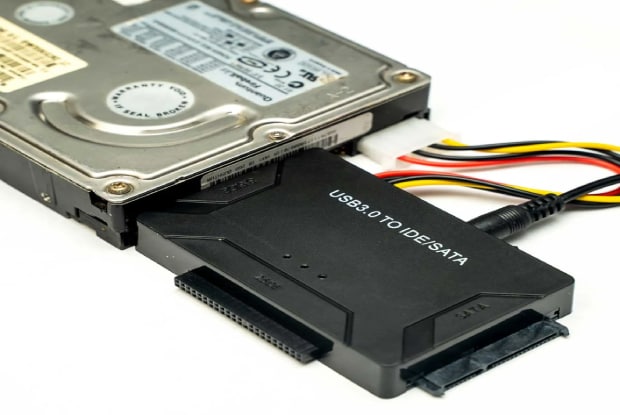
The key point is that Zilkee starts as a connection tool. It does not make a physically broken hard drive healthy. It does not remove BitLocker encryption. It does not support every old enterprise interface. Its best job is bridging old IDE/SATA storage to a modern USB port so you can copy files or scan the disk.
The current Zilkee support pages also describe the Zilkee Recovery Wizard, a free program that guides users through the process and can look for deleted or formatted files. That means the older "Zilkee is hardware only" explanation is incomplete in 2026. The converter connects the disk; the wizard and other recovery software handle file-search workflows.
Who Should Use It?
| Situation | Is Zilkee a Good Fit? | Why |
| Old desktop or laptop will not boot | Yes, if the internal drive still works. | You can remove the drive and connect it by USB to another computer. |
| Drive is IDE or SATA | Yes. | Zilkee officially supports 2.5-inch and 3.5-inch IDE/SATA drives. |
| Drive is M.2 or NVMe | No. | You need a dedicated M.2/NVMe enclosure or adapter. |
| Drive is SCSI, SAS, or Fibre Channel | No. | Zilkee's official FAQ says the adapter does not work with these interfaces. |
| Drive clicks, grinds, or will not spin normally | No, stop DIY use. | Mechanical symptoms can worsen if powered repeatedly. |
| Drive asks for BitLocker recovery key | Only with the key. | No adapter or program can open encrypted data without the legitimate key. |
| Files were deleted but the drive is detected | Maybe. | Connect the drive, avoid writing to it, then scan with recovery software. |
Review Scorecard
| Review Area | Rating | 2026 Notes |
| Old drive access | 4.0/5 | Useful for readable IDE/SATA drives from old computers. |
| Ease of setup | 3.8/5 | Plug-and-play in simple cases, but IDE power and drive removal can confuse beginners. |
| Data recovery depth | 3.0/5 | The adapter solves connection access; deleted/formatted file recovery depends on software and drive condition. |
| Hardware compatibility | 3.5/5 | Good for IDE/SATA, weak for M.2/NVMe and enterprise interfaces. |
| Safety for failing drives | 2.8/5 | Safe enough for functional drives, risky for clicking or mechanically damaged disks. |
| Trust signals | 3.1/5 | Trustpilot shows many positive reviews but also a meaningful 1-star share and BBB complaints. |
| Recoverit pairing value | 4.3/5 | Strong when Zilkee makes an old drive visible and users need to recover deleted, formatted, or missing files. |
Part 2. Zilkee Specs, Price, and What Comes in the Box
Zilkee's official product page lists the Ultra Recovery Converter at $38.98 during a sale at the time checked, with a regular crossed-out price of $77.95. It also lists single, double, and triple bundles with US, UK, EU, and AU plug options. Treat this as current page pricing, not a permanent price.
| Spec | Zilkee Ultra Recovery Converter | Review Notes |
| Supported drive interfaces | 2.5-inch and 3.5-inch SATA HDD/SSD; 2.5-inch and 3.5-inch IDE HDD | Good for many old laptop and desktop drives. |
| Optical drive support | DVD-ROM, CD-ROM, CD-RW, DVD-RW, DVD+RW, Blu-ray drive | Useful if you also need to read old optical drives. |
| Unsupported interfaces | SCSI, SAS, Fibre Channel; M.2/NVMe requires another adapter | Check the connector before buying. |
| USB interface | USB 3.0, backward compatible with USB 2.0 | USB 3.0 can be faster, but actual transfer speed depends on the drive and port. |
| Advertised transfer speed | Up to 5 Gbps | This is interface speed, not a promise that old hard drives will transfer that fast. |
| Storage support | Up to 6TB listed by Zilkee | Enough for many old desktop drives. |
| Power | 12V 2A power adapter | Important for 3.5-inch desktop drives and IDE drives. |
| Operating systems | Windows, Mac OS, Chrome OS, Linux listed across Zilkee pages | The drive's file system may still limit what a computer can read natively. |
| Package contents | USB 3.0 IDE/SATA converter, power adapter, USB cable, Molex power cable | Confirm your package includes the cable needed for your old drive. |
Important buyer check: open the old computer and identify the drive connector before ordering. A SATA drive has a flat L-shaped connector. Older IDE/PATA drives use rows of pins. M.2 and NVMe drives look like small circuit-board sticks and need a different adapter.
Part 3. How Zilkee Works
Zilkee works by converting an old internal drive connection into a USB connection. After the old drive is connected to the adapter and the adapter is powered on, your computer should detect it like an external drive. If it mounts normally, you can copy files to a safe location.
| Step | What to Do | Safety Note |
| 1. Remove the old drive | Take the hard drive out of the old computer or enclosure. | Power off the device first and avoid touching circuit boards unnecessarily. |
| 2. Match the connector | Connect SATA or IDE to the correct Zilkee port. | Do not force a connector. Bent IDE pins can make the drive harder to read. |
| 3. Connect power | Use the 12V adapter and Molex power cable when required. | Many desktop IDE and 3.5-inch drives need external power. |
| 4. Connect USB | Connect Zilkee to your computer through USB. | Use a direct USB port when possible, not an unstable hub. |
| 5. Check Disk Management or Disk Utility | See whether the drive is detected. | If Windows asks to format, cancel if files matter. |
| 6. Copy or scan files | Copy visible files or scan with recovery software if files are missing. | Save files to a different drive, never back to the old drive. |
If the drive appears normally, copy important files first. Do not start with repair, formatting, initialization, or CHKDSK. Those actions may write to the disk and reduce recovery chances if files are missing.
Part 4. Zilkee Data Recovery Software: Myth or Reality?
Searchers often ask for "Zilkee data recovery software" because the product marketing has changed. The older answer was simple: Zilkee was a hardware adapter, not software. The current answer is more nuanced.
Zilkee's current troubleshooting pages say the product comes in two parts: the converter, which connects the old drive to the computer, and the Zilkee Recovery Wizard, a free program that walks users through the process and can run deeper scans when files were deleted or the drive was formatted.
| Component | What It Does | What It Does Not Do |
| Zilkee converter | Connects IDE/SATA drives to a computer through USB. | Does not repair a physically failed drive or bypass encryption. |
| Zilkee Recovery Wizard | Guides setup and can look for deleted/formatted files according to Zilkee support pages. | Does not remove the need for a readable drive and cannot recover overwritten data. |
| Wondershare Recoverit | Scans readable storage for deleted, formatted, or lost local files. | Does not repair Zilkee hardware, repair Windows, or reset passwords. |
| Professional recovery lab | Handles physical damage, clicking drives, head problems, and platter-level cases. | Usually costs more and is not needed for every simple access issue. |
Practical interpretation: if the drive becomes visible and your files are simply there, Zilkee may be all you need. If the drive appears but files are deleted, formatted, hidden, or missing, use recovery software before writing anything to the drive. If the drive is physically failing, stop powering it and consider a lab.
Part 5. Is Zilkee Safe to Use?
Zilkee can be safe for functional drives, but the drive's condition matters more than the adapter. Old hard drives can fail suddenly after years in storage. Powering a weak mechanical drive repeatedly can make recovery harder.
When Zilkee Is Safe to Try
- The drive spins normally and does not click, grind, scrape, or repeatedly spin up and down.
- The drive connector is IDE or SATA and fits the adapter without force.
- The data is not locked by BitLocker, FileVault, or another encryption system without the key.
- You only need to copy files from a readable old drive.
- You can save copied or recovered files to a different drive.
When You Should Stop
| Warning Sign | What It Means | Safer Action |
| Clicking or grinding sound | The drive may have internal mechanical damage. | Turn it off and consider a professional recovery lab. |
| Burning smell or overheating | Electrical or motor issue is possible. | Disconnect power immediately. |
| Windows asks to format | The file system may be damaged or unreadable. | Do not format. Scan with recovery software or create an image first. |
| BitLocker recovery key prompt | The drive is encrypted. | Find the legitimate recovery key. No adapter can unlock it without the key. |
| Drive not detected anywhere | Adapter, cable, power, or drive failure is possible. | Test connections once, then stop repeated power cycles if symptoms continue. |
| Drive was recently deleted or formatted | Data may still exist but can be overwritten. | Do not copy new files to the drive. Recover to another disk. |
Safety is not only about electricity. It is also about data preservation. The safest recovery sequence is: connect carefully, copy visible files first, recover missing files to another storage device, and only then consider repair or formatting.
Part 6. User Reviews, Trust Signals, and Red Flags
Zilkee has mixed public trust signals. On the official product page checked, the product page displayed "No reviews" and "Be the first to write a review" for that product listing. Trustpilot, however, lists Zilkee with a 3.4 average TrustScore from 1,155 reviews, with 67% 5-star and 13% 1-star reviews at the time checked. Trustpilot also notes that the company has a claimed profile, asks customers to review, and replies to 100% of negative reviews.
BBB complaint data adds a more cautious signal. The Better Business Bureau page for Zilkee says the business is not BBB accredited and lists 5 complaints in the last 3 years, including product, customer service, sales/advertising, and billing issues.
| Trust Signal | What Was Checked | How to Interpret It |
| Official product page | Product page showed current specs, price, and product claims. | Useful for specs, but marketing language should not be treated as independent proof. |
| Trustpilot | 3.4 average TrustScore from 1,155 reviews at the time checked. | There are many positive experiences, but the 1-star share is large enough to read complaints before buying. |
| BBB | Not BBB accredited, 5 complaints in the last 3 years. | Not a reason by itself to reject the product, but it supports a cautious buyer approach. |
| Official FAQ | States the drive must be in working condition, warns against formatting, and says clicking drives need a specialist. | These limits are important and should be followed before DIY recovery. |
Review verdict on reputation: Zilkee appears useful for some users with old readable drives, but expectations should be realistic. Read recent user reviews, confirm the return policy, check whether your drive interface is supported, and avoid relying on social-media claims that imply every drive can be recovered.
Part 7. Pros and Cons of Zilkee Hard Drive Recovery
Here is the balanced view. Zilkee can be helpful, but its usefulness depends on the exact reason you cannot access the old drive.
| Pros | Why It Matters |
| Simple old-drive access | It can connect many IDE/SATA drives to modern USB computers without installing special drivers for the adapter. |
| Supports both 2.5-inch and 3.5-inch drives | Useful for old laptop and desktop hard drives. |
| Includes external power | 3.5-inch desktop drives and some IDE drives need more power than USB alone provides. |
| USB 3.0 interface | Can be faster than older USB adapters when the drive and computer support it. |
| Can help with non-booting PCs | You do not need the old Windows installation to boot if the drive itself is readable. |
| Current support pages mention Recovery Wizard | The guided software can help less technical users understand what to do next. |
| Cons | Why It Matters |
| Does not fix physical drive failure | Clicking, grinding, or non-detected drives need professional diagnosis, not repeated DIY power cycles. |
| Limited to certain interfaces | It does not support SCSI, SAS, Fibre Channel, M.2, or NVMe drives. |
| Deleted-file recovery still depends on software | The adapter only gets the drive connected; software must scan for lost data. |
| Encryption still blocks access | BitLocker or other encryption requires the legitimate recovery key. |
| Old drives can fail during use | Years of storage can make mechanical drives fragile. |
| Public reviews are mixed | Trustpilot and BBB signals suggest checking recent complaints and refund terms before buying. |
| Marketing claims can sound broader than reality | Do not assume the adapter can recover every broken or corrupted drive. |
Part 8. Best Alternative to Zilkee Hard Drive Recovery: Wondershare Recoverit
Zilkee and Recoverit do different jobs. Zilkee helps connect old IDE/SATA drives. Wondershare Recoverit helps scan readable storage for deleted, formatted, or lost files. They can work together when the old drive becomes visible through the adapter but the files are missing.
Recoverit is not a hardware adapter and cannot make a physically failed drive readable. It also cannot bypass encryption or recover overwritten files. It is useful after the old drive, external disk, USB drive, SD card, or local backup is detected by the computer.
When Recoverit Makes More Sense
| Problem | Zilkee Role | Recoverit Role |
| Old PC will not boot, but drive works | Connect the drive to a working computer. | Scan if important files are deleted, missing, or inaccessible. |
| Files were deleted from the old drive | Only provides the USB connection. | Scan the readable drive for deleted files. |
| Drive was formatted | Connect the disk safely without writing to it. | Scan for recoverable files and save them to another drive. |
| Drive asks to format | Do not format; use the adapter only to connect. | Try recovery from the readable disk or disk image. |
| Drive is clicking | Stop using the adapter. | Software recovery is not the first step; consider a professional lab. |
| Drive is BitLocker encrypted | Connects the drive only. | Cannot decrypt without the legitimate key. |
Recoverit also has specialized guides and product pages for other cases mentioned in the original article, including SD card recovery software, drone recovery, GoPro recovery, video recovery, audio recovery, email recovery, PDF recovery, PowerPoint recovery, and 4K/8K video recovery.
How to Use Recoverit After Connecting an Old Drive
Step 1: Connect the old drive and launch Recoverit.

Connect the old IDE/SATA drive through Zilkee or another adapter. Wait for the computer to detect the drive. Open Recoverit and choose the old drive or the relevant partition. Do not install Recoverit on the affected old drive.
Step 2: Scan the connected drive.

Start the scan. If the drive is large or damaged at the file-system level, scanning may take time. Use filters for file type, date, size, or keyword to focus on the data you need most.
Step 3: Preview and recover files to another drive.

Preview files when available. Select the files you need, click recover, and save them to a different drive, such as your computer's internal storage or a separate external disk. Never save recovered files back to the same old drive.


Part 9. Final Verdict
Zilkee Hard Drive Recovery is useful when the old drive is readable and the main barrier is connection. It can help you access old IDE/SATA drives from computers that no longer boot. It is relatively affordable, supports several legacy drive types, and can be paired with recovery software when files are not visible.
It is not a replacement for professional data recovery. If the drive is clicking, grinding, electrically damaged, encrypted without the key, or physically undetected, stop DIY attempts. If the drive is visible but files are deleted or formatted, use recovery software before writing anything to the drive.
The most practical workflow is: identify the drive type, connect it carefully, copy visible files first, scan missing files only from readable storage, save recovered files to another drive, and avoid formatting or repair until data is safe.
FAQ
-
Does Zilkee Hard Drive Recovery work for all hard drives?
No. Zilkee is designed for 2.5-inch and 3.5-inch IDE/SATA drives and some optical drives. It does not support SCSI, SAS, Fibre Channel, M.2, or NVMe drives without another adapter. -
Can Zilkee recover deleted files by itself?
The adapter itself only connects the drive. Zilkee now also offers a Recovery Wizard that can look for deleted or formatted files, but recovery still depends on the drive being readable and the data not being overwritten. -
Is Zilkee safe for old hard drives?
It can be safe for functional IDE/SATA drives when connected correctly. Stop immediately if the drive clicks, grinds, overheats, smells burned, or is not detected after checking cables and power. -
Should I format the drive if Windows asks after connecting Zilkee?
No. If you need the files, cancel the format prompt. Formatting can write new file-system data and reduce recovery chances. Scan the drive or create an image first. -
Can Zilkee open a BitLocker drive without the recovery key?
No. No adapter or recovery program can open encrypted files without the legitimate key. Look for the recovery key in the Microsoft account or ask the authorized IT administrator. -
Does Zilkee work with MacBook drives?
It may work with compatible IDE/SATA Mac drives, but not all Mac storage is IDE or SATA. Newer MacBook SSDs often use proprietary, M.2, NVMe, or soldered storage that needs a different workflow. -
When should I use Recoverit instead of Zilkee?
Use Zilkee or another adapter to connect the drive. Use Recoverit when the connected drive is readable but files are deleted, formatted, missing, or inaccessible at the file level. -
Can Recoverit fix a physically broken hard drive?
No. Recoverit can scan readable storage for lost files, but it cannot repair hardware damage or make an undetected physically failed drive readable. -
Where should I save recovered files?
Save recovered files to a different drive, such as your computer's internal storage or another external disk. Do not save recovered files back to the old drive you are scanning.


