

 TL;DR:
Smart Partition Recovery is a basic, lightweight tool designed for general Windows users to restore simply lost or damaged partitions, but struggles with severe drive failures or large disks.
● Its core function involves scanning disk records to locate and rebuild lost partition pointers, supplemented by a raw mode for finding traces of files without paths.
● The software uses a read-first approach for safety but lacks comprehensive customer support and may lag during scans of large drives.
● Recoverit is recommended as a stronger alternative for complex data losses, offering deeper raw data scanning, broader file system compatibility, and a file preview feature before restoration.
Ask AI for a summary
 ChatGPT
 Perplexity
 Gemini
 Claude
 Grok
Grok
Data loss often comes without warning. A sudden system crash or partition error can hide years of files. In 2025, more people need simple repair tools because storage devices are now larger and hold more valuable work. When a drive goes silent, people look for a clear and safe method to fix it.
Smart Partition Recovery aims to make the job manageable for regular users. This review collects information about how the software works, its features, strengths, and limitations.
You will learn what Smart Partition Recovery is, the pros and cons of Smart Partition Recovery software, the price of Smart Partition Recovery software, the best alternative to Smart Partition Recovery software, and how to use Smart Partition Recovery software.
Part 1: What is Smart Partition Recovery Software?
Smart Partition Recovery is a tool designed to help people find and restore lost disk partitions. Many users ask what is Smart Partition Recovery is because its name often appears in tech forums. The tool scans a drive and tries to rebuild lost records. It may help when a drive table is damaged. It may help when a file path is no longer correct. Many users report that the tool works for simple partition losses.
The software is aimed at general users. It works on common file systems found on home and office systems. It tries to guide users with simple steps. Its main work is to find missing sections of a drive and put them back into use. The program also supports limited raw recovery. People often want to know what is Smart Partition Recovery is when they face a sudden loss of a volume. It can be helpful in such cases.
Key Features
- Simple scan to search for lost partitions
- Basic raw recovery for damaged file paths
- Support for common file systems
- Lightweight installation
- Friendly layout for new users
- Works on standard Windows machines
- Helps fix simple cases of partition loss
- This answers what is Smart Partition Recovery is and gives a clear picture of its basic work.
Part 2: Smart Partition Recovery Software: Key Features Explained
Many users seek deeper detail on Smart Partition Recovery. When we discuss what is Smart Partition Recovery, we look at what the tool offers in real use. The product aims to solve small to moderate issues. Its key feature is a scan tool that reads disk records. The tool tries to find pointers to a lost partition. It can be helpful when the drive still holds the core data but cannot show it.
3.1 Scan features
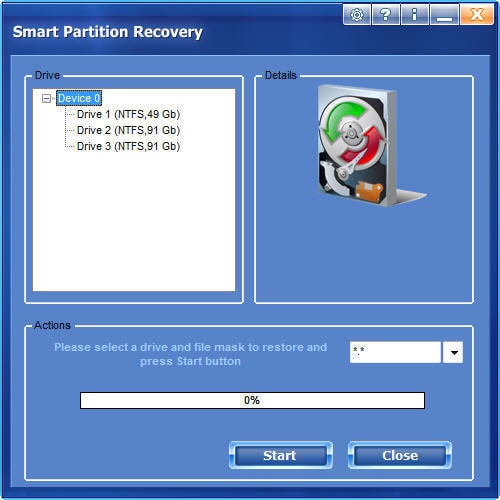
The scan reads drive records. It checks for missing partitions. The results show possible volumes. The user picks a result and tries to restore. It offers a raw mode for deeper help. Raw mode looks for file traces even if paths are gone.
3.2 Speed
The scan speed is fair. It runs well on small drives. Large drives take longer. It does not freeze often. Time depends on drive health and size.
3.3 System support
It works on common Windows systems. It reads standard drive types used at home or work. Users who ask what is Smart Partition Recovery will find that it focuses on regular setups.
3.4 File types
The tool can bring back mixed file types. This includes photos, videos, text, and other common formats. Raw mode may also reveal hidden data.
3.5 Repair process
The repair tries to rebuild the partition record. It first scans without writing. When you confirm, it restores entries. This process is simple. It helps in small cases. In big damage, the results are limited.
3.6 User experience
The design is simple. Main buttons are clear. New users can learn how to use Smart Partition Recovery software without trouble. Guidance is basic. More detail would help some users.
3.7 Safety
The scan is read-first. You choose the restore step. This lowers risk. Still, users should not write new data to the drive before the scan.
3.8 Support
Support is limited. Some users say the response is slow. More help pages would improve the tool.
Part 3: Pros and Cons of Smart Partition Recovery Software
Many users look for the truthful pros and cons of Smart Partition Recovery software before they decide. This helps them know what to expect. The tool is simple and has helpful features. Yet it does not suit every case.
When we look at pros and cons of Smart Partition Recovery software, we see that it works best in simple cases. It is not great for severe failures.
You may be also be interested in: How to Delete the Healthy Recovery Partition?
Part 4: How to Use Smart Partition Recovery Software
Many new users want to understand how to use Smart Partition Recovery software. The steps are simple. You download the program. You install it. Then you run the scan. The tool guides you. If you find your lost partition, you can try to restore it. New users appreciate the simple layout and clear labels. Some wish for more help notes.
You can learn how to use Smart Partition Recovery software in a short time. The steps do not require technical skill. You only follow basic actions. You look at the result. You choose what to restore.
Steps
Step 1. Install the Smart Data Recovery software and open it.
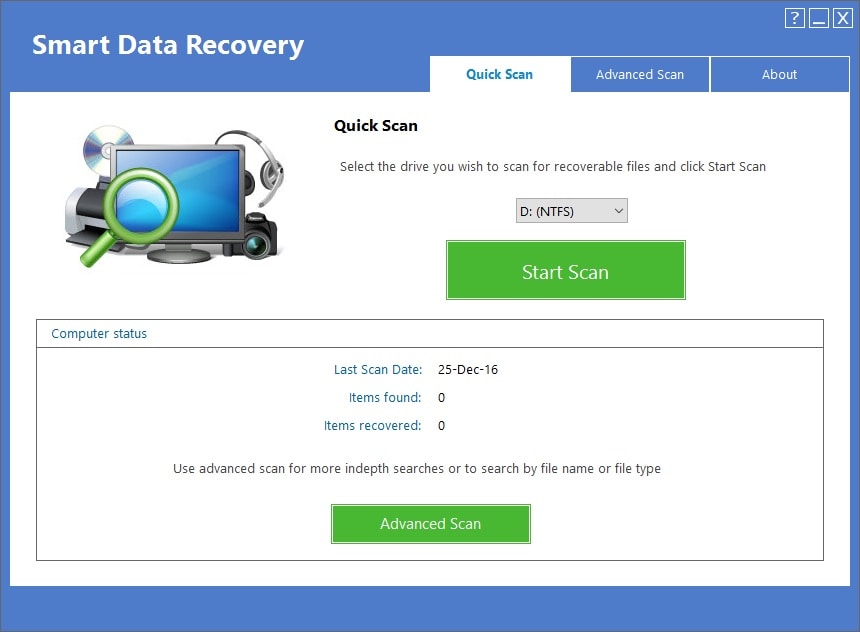
Step 2. Pick the drive and run a scan.
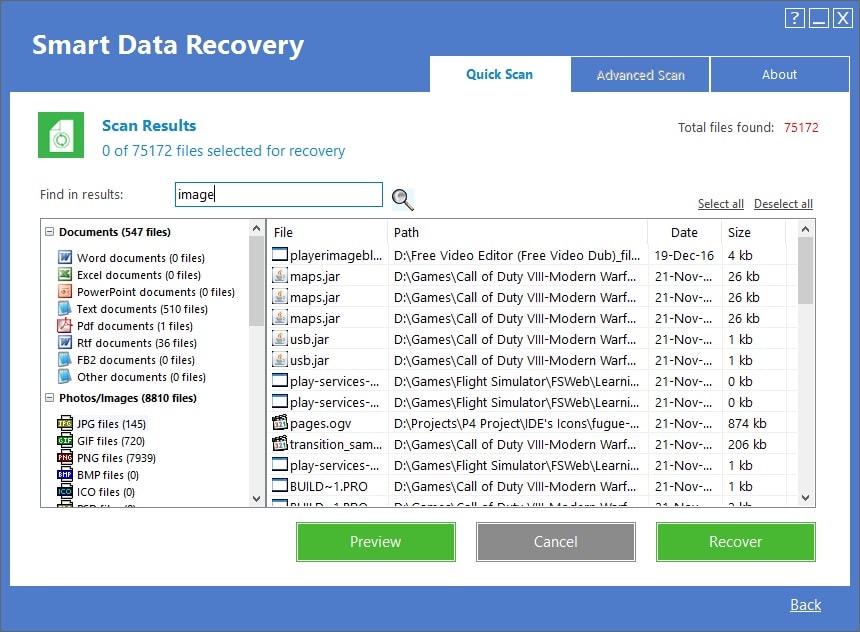
Step 3. Choose the found partition to restore.
These simple steps reflect how to use Smart Partition Recovery software. Many users can finish in one session.
Part 5: What Is the Price of Smart Partition Recovery Software
Smart Partition Recovery Software prices in 2025 typically range from $18 to $55 USD, depending on the brand and license type.
Here’s a detailed breakdown of popular options:
Common Price Ranges
- Basic licenses (single user, limited features): $18–$25
- Professional licenses (multi-user, full recovery suite): $35–$55
- Lifetime licenses or bundles: $50+
Tips for Buyers:
- Many vendors offer free trials with limited recovery capabilities.
- Look for seasonal discounts or bundle offers that include other utilities like disk cloning or backup tools.
- Some tools offer EMI or subscription plans, especially in international markets.
Part 6: Best Alternative to Smart Partition Recovery Software: Recoverit Tool
Some users need stronger help. They look for the best alternative to Smart Partition Recovery software. Many people speak of Recoverit. It is well known in the market. It helps in deep data recovery. It supports many file systems. It reads many file types. It has a simple flow that helps new users and experts. For people who want more than basic repair, this tool is worth a look.
Recoverit has a clear window. It leads you from scan to restore. Many users feel safe using it. It can manage simple and complex losses. When other tools fail, some users get better luck with it. This makes it the best alternative to Smart Partition Recovery software for many.
Recoverit has strong scan tools. It can read raw data. It finds deep file traces. It also gives a preview. This helps you know if a file is ok before you recover. The speed is fair. The support is helpful. Many users trust the brand. This is why some call it the best alternative of Smart Partition Recovery software.
Steps:
Step 1. Install and open Recoverit. Choose the drive and scan.

Step 2. Wait for the scan process. The results will appear on the screen.
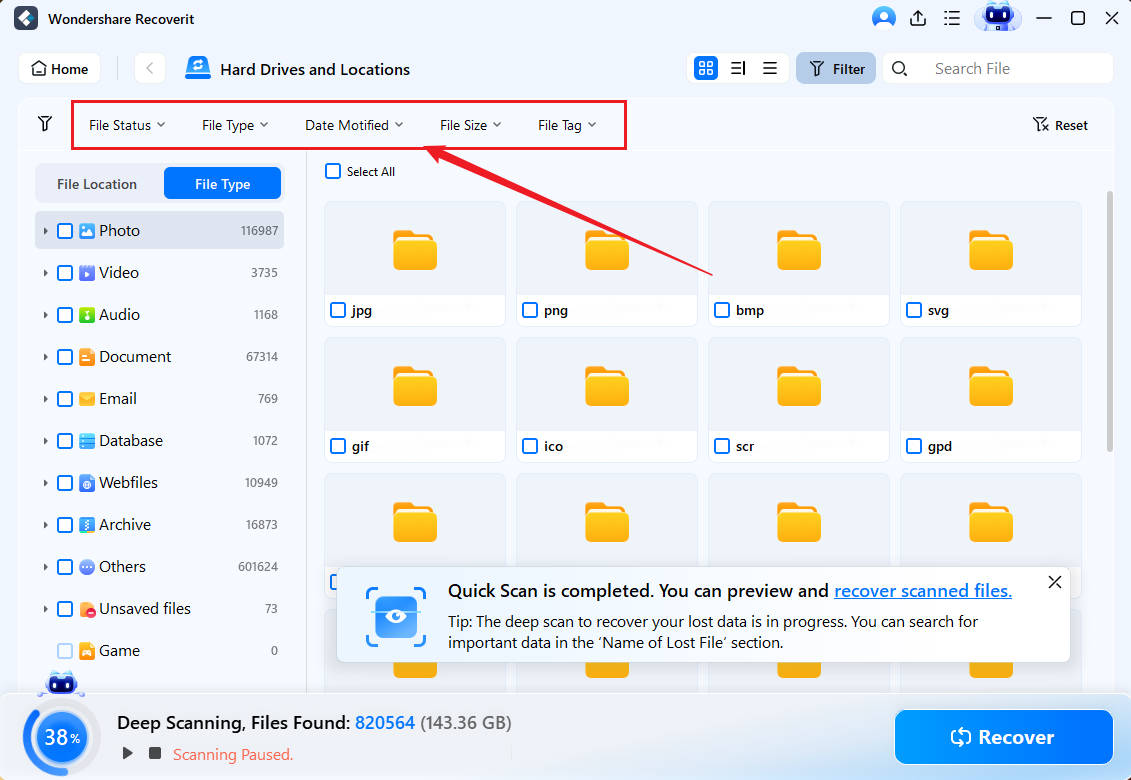
Step 3. Preview and restore your data.

These steps show how simple the tool is. People who want a strong tool often see Recoverit as the best alternative of Smart Partition Recovery software.
Conclusion
Smart Partition Recovery is a helpful tool for simple lost partition jobs. It offers clean steps. It can help users who see sudden loss of a volume. You now understand what is Smart Partition Recovery. You also know pros and cons of Smart Partition Recovery software.
The world of data repair keeps growing. Users want safe ways to save files. It is smart to keep backups. It is smart to know about recovery tools. A good tool can give you peace of mind. You can now choose what fits your needs. Test the free option. Check the paid plans. Use the knowledge to keep your data safe in 2025.


