 TL;DR:
Files deleted from an emptied Recycle Bin can still be recovered because the operating system only marks the storage space as available, provided you immediately stop saving or downloading new data to the affected drive to prevent permanent overwriting.
● If you previously enabled system backups or cloud synchronization, you can restore older file states for free using Windows File History, Windows Previous Versions, Mac Time Machine, or the cloud trash in services like OneDrive.
● Users without prior backups who are comfortable with command-line interfaces can use Microsoft's free Windows File Recovery tool to extract hidden data from NTFS, FAT, and exFAT file systems.
● When built-in options fail or no system snapshots exist, third-party GUI software like Recoverit can perform deep scans on both internal and external drives to locate and retrieve the residual file data.
Ask AI for a summary
 ChatGPT
 Perplexity
 Gemini
 Claude
 Grok
Grok
Every computer user has faced this problem at least once. You delete some files, then empty the Recycle Bin, only to realize you still need them. It happens suddenly. Maybe it was a document, photo, video, or work file. The panic that follows is real. You open the Recycle Bin, but it’s empty. Now you want to know if there is any way to bring those files back.
The good news is that deleted does not always mean gone forever. You can often retrieve files after emptying Recycle Bin. There are ways to recover deleted files from Recycle Bin after empty using tools and built-in options.
In this detailed guide, you’ll learn several simple methods. You’ll also learn tips to prevent permanent loss in the future.
Table of Contents:
Part 1: Can You Recover Files After Emptying the Recycle Bin?
You might think once you empty the Recycle Bin, everything is gone forever. But that is not always true. When you empty the Recycle Bin, the files are not erased right away. The system only marks the disk space as “available.” The data itself still exists until something new overwrites it.
So yes, in many cases, you can restore files after emptying Recycle Bin. But you must act quickly. The more you use the computer, the higher the chance that your lost files will be replaced with new data. So stop downloading, saving, or updating anything on that drive. That increases your recovery chances.
Part 2: How to Retrieve Files After Emptying Recycle Bin?
Here are six simple and proven methods for how to retrieve files after emptying Recycle Bin. Each one includes what it does, why it helps, and two clear steps. These methods also explain how to recover files after deleting from the Recycle Bin.
Method 1: Use Recoverit
Recoverit is one of the best recovery tools. It helps you scan your disk and bring deleted files back. It is safe, quick, and simple to use. Even if you are not a tech expert, you can use it easily.
This method is effective when you don’t have backups or previous versions. The tool digs deep into the drive to find hidden data. It supports all file types such as photos, documents, and videos.
How it helps:
- Scans drives deeply for deleted data
- Let's you preview files before recovery
- Works on internal and external drives
Steps:
Step 1. Download and install Recoverit. Then open it and select the drive where your deleted files were. In this case, select the “Recycle Bin” option from the main interface of Recoverit.

Step 2. Click “Scan.” Wait until it finishes.
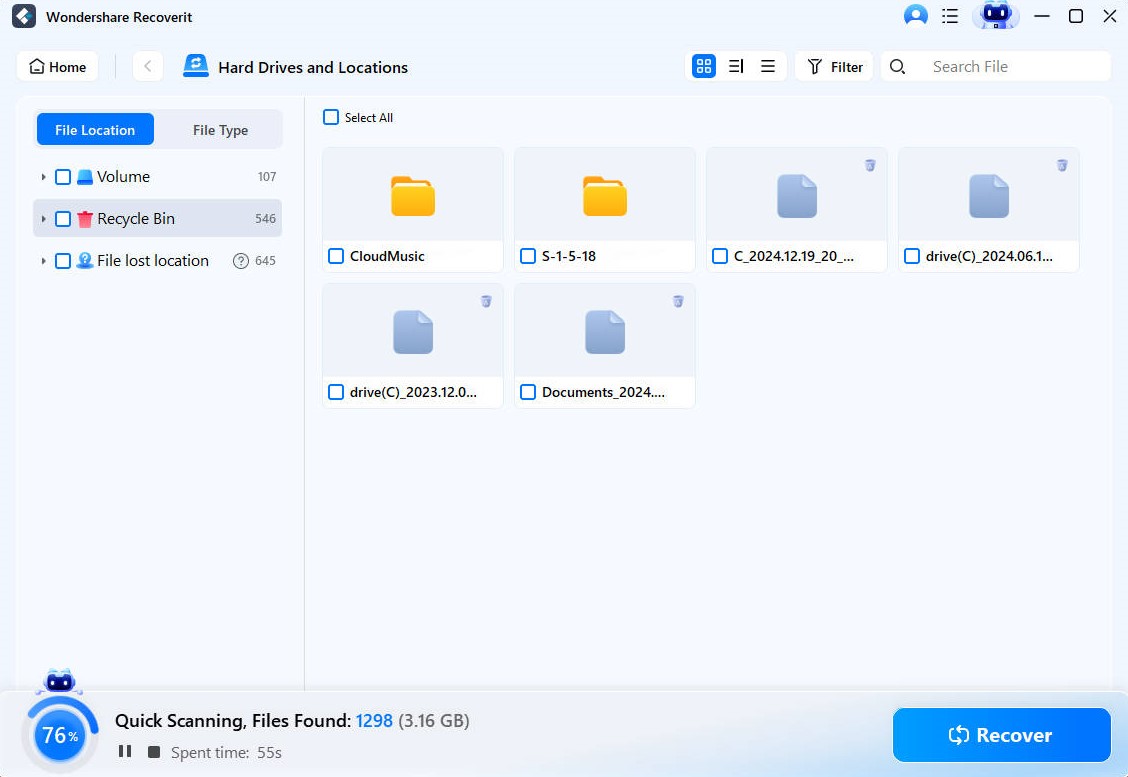
Step 3. Then select the files you want and click “Recover.”
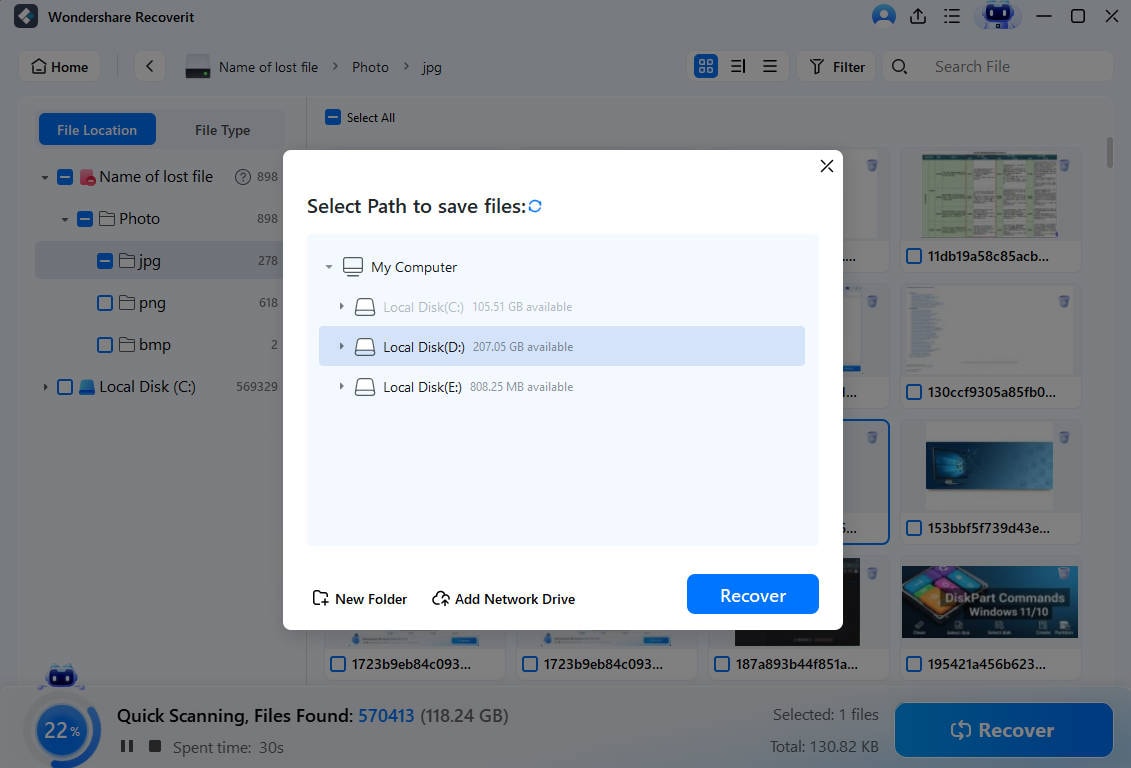
Recoverit is reliable and fast. It’s the best answer when you ask how to recover deleted files from the Recycle Bin after emptying it.
Method 2: Restore from File History or Backup
If you have File History or Backup enabled on your Windows system, this can save you. Windows keeps a copy of your data if the feature was turned on. You can easily bring back files or folders even after emptying the Recycle Bin.
File History creates snapshots of files over time. You can restore older versions of folders or individual files. This works even when the Recycle Bin is cleared.
How it helps:
- Restores older file versions
- Brings back folders and their structure
- Works without extra software
Steps:Step 1. Click Start, then search for Control Panel and open it. Go to System and Security > File History. If File History is turned on, you'll see the option to restore files.
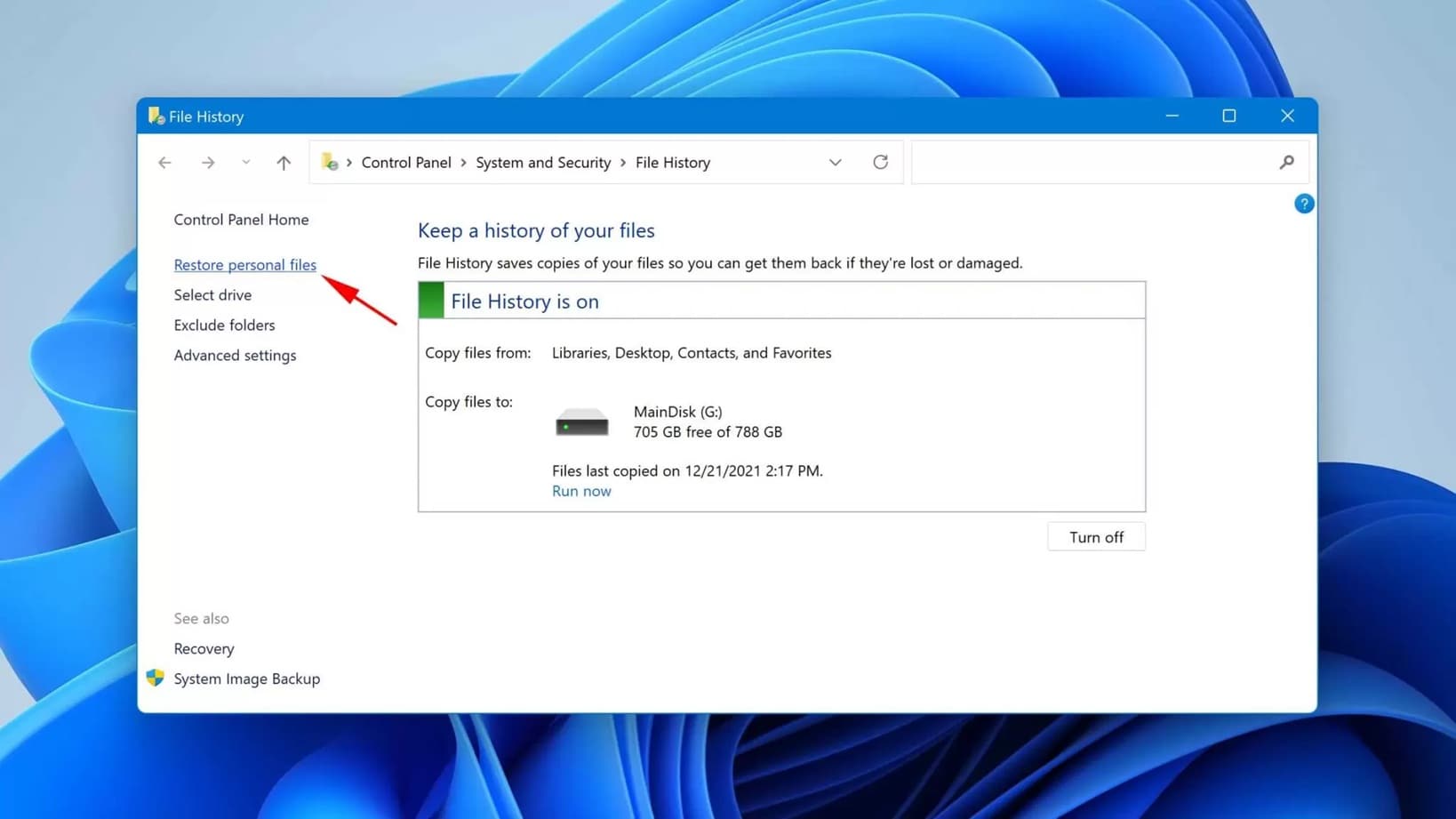
Step 2. Click “Restore personal files” in the left pane. Use the arrow buttons at the bottom to browse through different backup versions. Navigate to the folder or file you want to recover.
This is one of the easiest ways to restore files after emptying Recycle Bin if backup is active.
Method 3: Use Windows Previous Versions Feature
Windows also includes a “Previous Versions” feature. It lets you roll back folders or drives to an earlier date. This feature uses restore points and File History data. If you enabled these before, you can recover your lost files.
How it helps:
- Let's you browse old folder states
- Works directly inside File Explorer
- Restores deleted files in seconds
Steps:
Step 1. Right-click the folder that once contained your lost file. Choose “Properties,” then “Previous Versions.”
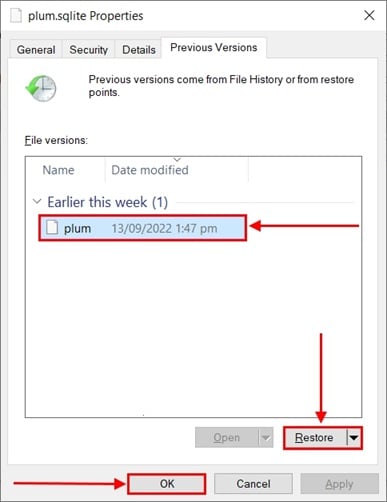
Step 2. Select a version from before you emptied the Recycle Bin. Click “Restore” to recover.
This is a built-in way to how to restore Recycle Bin after empty indirectly by using system history. It’s fast and doesn’t need extra software.
Method 4: Recover from OneDrive or Cloud Sync
If your files were saved in a synced folder, like OneDrive, Google Drive, or Dropbox, recovery is easy. Cloud storage keeps copies of your files and even older versions. It has its own recycle bin too.
Even if you emptied the local Recycle Bin, your cloud still keeps them. You can log in and restore the lost items.
How it helps:
- Keeps online backups automatically
- Stores previous file versions
- Works even if local data is lost
Steps:Step 1. Log in to your OneDrive or other cloud account.
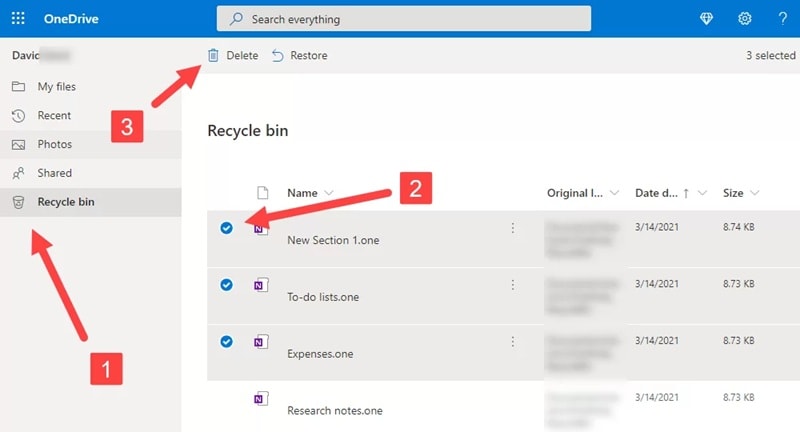
Step 2. Open the recycle bin or trash in the web interface. Select the files and click “Restore.”
This is a simple fix for how to recover files after deleting from the Recycle Bin if you use cloud sync. It works from anywhere and is safe.
Method 5: Try Command Prompt with Windows File Recovery Tool
Microsoft offers a free tool called “Windows File Recovery.” It runs through Command Prompt and can bring files back from formatted or emptied drives. It’s more advanced, but very powerful.
This tool uses different recovery modes. You can choose regular, extensive, or segment modes depending on the drive. It works with NTFS, FAT, and exFAT file systems.
How it helps:
- Works when GUI tools fail
- Supports deep recovery
- Free from Microsoft
Steps:
Step 1. Install “Windows File Recovery” from the Microsoft Store. Then open Command Prompt as Administrator.
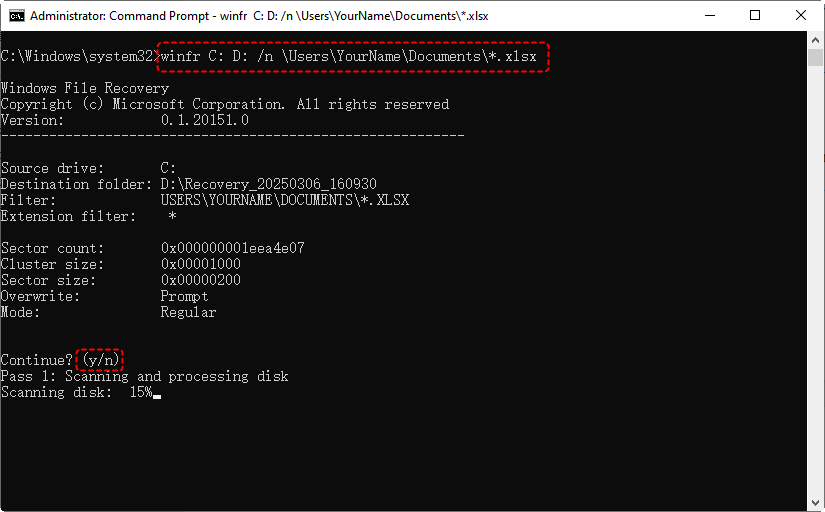
Step 2. Use a command like: winfr C: E: /n \Users\YourName\Documents\
Here C is your source drive, and E is where recovered files will be saved.
This is a solid method for how to retrieve deleted files after emptying Recycle Bin using command-line tools.
Method 6: BONUS: Use Mac Time Machine (for macOS users)
If you’re using a Mac, you can use Time Machine. It automatically backs up your entire system. You can go back to a previous snapshot and get your files even if you deleted them.
This is one of the easiest ways for Mac users to recover deleted files from Recycle Bin after empty.
How it helps:
- Takes hourly backups of your system
- Works with all file types
- Simple and built-in
Steps:
Step 1. Connect your Time Machine backup drive. Then click the Time Machine icon and choose “Enter Time Machine.”
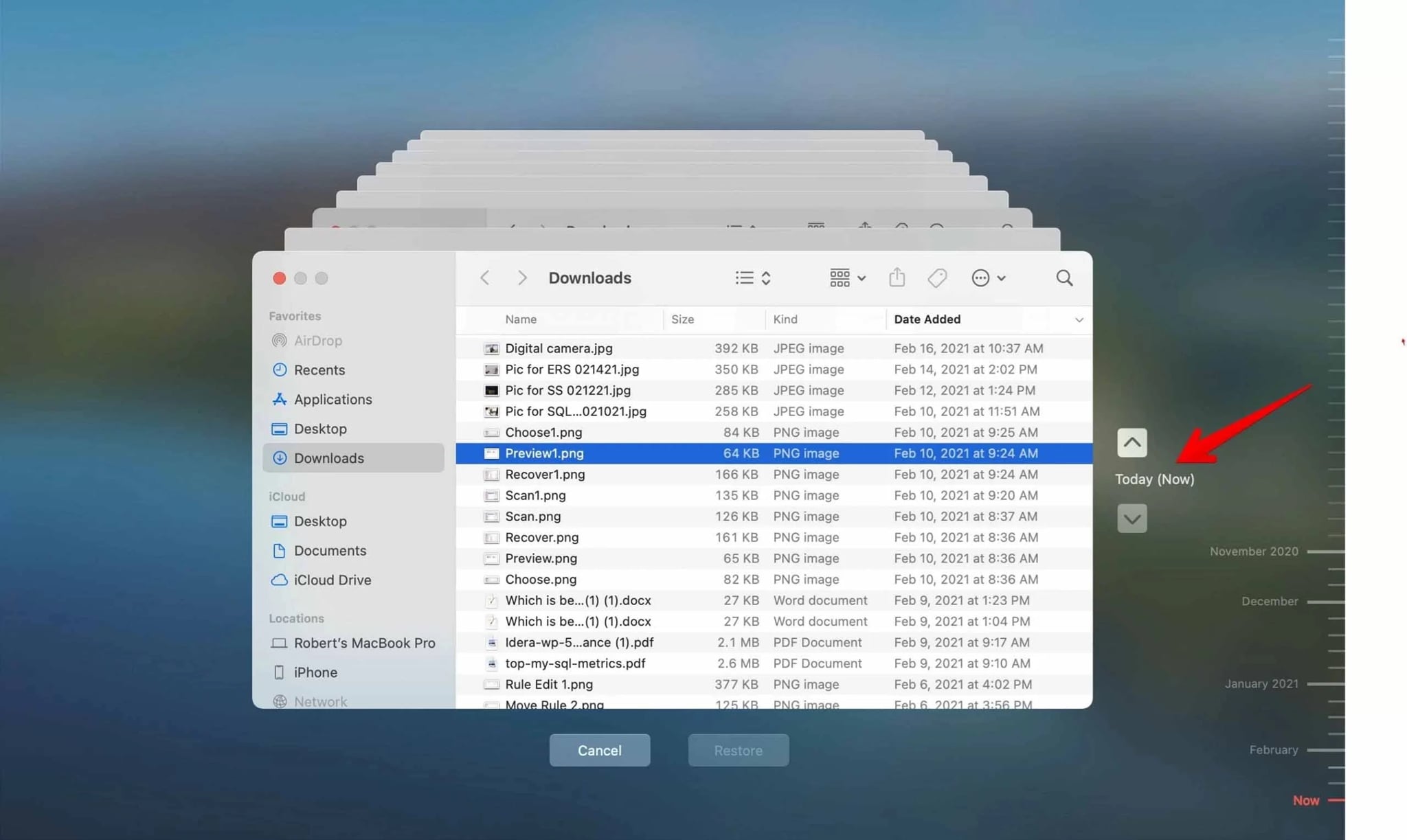
Step 2. Navigate to the folder where the deleted file was. Choose the file and click “Restore.”
This method is ideal if you want to restore files after emptying Recycle Bin on a Mac.
Part 3: Pro Tips to Prevent Permanent File Loss
You can save yourself from future trouble by preparing ahead. Here are easy habits to protect your data. These tips will help make how to retrieve files after emptying Recycle Bin less stressful next time.
- Turn On File History or Time Machine Turn on File History in Windows or Time Machine in macOS. These tools save older versions of your files automatically. You can restore them anytime without using third-party tools. It’s an easy way to restore files after emptying Recycle Bin.
- Create Regular Backups Back up your files every week or month. Use an external drive or USB stick. Label backups with the date. If you delete something by mistake, you can recover it easily from your backup.
- Use Cloud Storage Services Save your files in OneDrive, Google Drive, or Dropbox. Cloud storage keeps copies online and saves older versions too. Even if your Recycle Bin is empty, you can log in to the cloud and get your files back. It’s a safe way to recover files after deleting from the Recycle Bin.
- Stop Using the Drive After Deletion When you delete a file by accident, stop using the drive right away. Do not install or download anything new. New data can overwrite your deleted files. Acting fast increases your chance to recover deleted files from the Recycle Bin after emptying.
- Use Trusted Recovery Tools Keep reliable recovery software ready, such as Recoverit, Stellar, or EaseUS. Install them before you need them. Avoid unverified tools from unknown sites. They might harm your system or corrupt your data.
Following these tips will keep your files safe. You’ll know how to recover deleted files from the Recycle Bin after emptying it without panic in the future.
Conclusion
Emptying the Recycle Bin feels final, but it’s not always the end. You can still recover files after deleting from the Recycle Bin using the right tools. Recoverit, File History, and OneDrive all help bring your files back. Even if you have no backup, tools like Windows File Recovery can still find data hidden on your drive.
The key is timing. Stop using the drive and start recovery as soon as you notice a loss. Waiting too long reduces your chances. Always make regular backups and use cloud syncs. That way, you won’t have to worry again about how to retrieve files after emptying Recycle Bin or how to restore Recycle Bin after empty.
Losing files is stressful, but you can recover. With the steps above, you can restore your documents, photos, and videos safely. Just stay calm, follow each method, and act quickly.
Try Recoverit to Recover Lost Data
 Security Verified. Over 7,302,189 people have downloaded it.
FAQs
-
1. Can I recover files after emptying the Recycle Bin for free?
Yes, some methods are free. You can use File History, Previous Versions, or the Windows File Recovery tool. These don’t need any payment. You can also use OneDrive’s built-in restore. Some third-party apps like Recoverit offer a free trial. Try those before paying. -
2. Will using the computer after emptying the Recycle Bin harm recovery chances?
Yes. Using your computer after emptying the Recycle Bin can overwrite the deleted data. Every new file, download, or update can replace the old ones. Stop using that drive right away. Begin recovery as soon as possible. That’s the best way to improve your chances. -
3. Is there a guarantee I will always restore files after emptying the Recycle Bin?
No, there is never a 100% guarantee. File recovery depends on how the storage drive handles data. If the deleted files are overwritten or damaged, recovery may not be possible. Using the right software and acting fast gives you the best chance, but results vary.



