

 TL;DR:
To successfully recover deleted photos from a Zenza Bronica camera, immediately stop using the memory card to prevent data overwriting and use a reliable read-only tool like Recoverit to scan for hidden or formatted RAW and JPEG files.
● Connecting the memory card to a computer and enabling the system settings to show hidden files can sometimes reveal missing images without requiring third-party software.
● If the storage card has suffered physical damage from water, bending, or static shock, software recovery will not work and you must contact a certified professional data recovery service.
● To minimize future file system corruption and write errors, always format the memory card using the camera's built-in format option rather than formatting it on a computer or other devices.
Ask AI for a summary
 ChatGPT
 Perplexity
 Gemini
 Claude
 Grok
Grok
Bronica cameras are respected for their strong build and excellent image quality. Many professional photographers have trusted cameras made by Zenza Bronica for medium format photography. These cameras produce sharp detail and rich tones. Each photograph often holds creative, personal, or even commercial value.
Losing photos from such a camera can be stressful. Many users search for how to recover deleted photos from a Bronica camera after they notice missing files. With calm action and the correct method, you can restore important images safely and successfully.
Try Recoverit to Recover Lost Data
 Security Verified. Over 7,302,189 people have downloaded it.
Table of Contents
Part 1: Why Photos Get Deleted from the Bronica Camera
Before learning how to recover deleted photos from a Bronica camera, it is important to understand why photos get removed in the first place. In many cases, deletion is not permanent. Files may still exist in a hidden form on the storage card until new data overwrites them.
Below are common reasons photos disappear from a Bronica camera:
- Accidental deletion: Photos are often removed while reviewing images. A quick press of the delete button can remove important files without warning.
- Formatting the memory card: Formatting clears the card completely. If done without backup, all photos appear lost immediately.
- Corrupted memory card: Memory cards can become unreadable due to age, improper use, or sudden power failure. This may hide all images stored on the card.
- Virus infection: When a memory card connects to an infected computer, malware may hide, damage, or delete files.
- File system errors: Improper removal of the memory card from a computer can damage the file structure. This can make images inaccessible.
- Interrupted file transfer: If the transfer process stops suddenly due to cable removal or power failure, files may not save correctly.
- Camera firmware issues: Rare software problems inside the camera may affect how data is written to the card.
- Physical damage to the card: Water, dust, bending, or static shock can damage a memory card and cause file loss.
Understanding these causes helps when deciding how to retrieve accidentally deleted images from Bronica Camera safely.
Part 2: How to Recover Deleted Photos from a Bronica Camera (Step-by-Step)
If you notice missing files, stop using the memory card immediately. Continued use may overwrite deleted data. Recovery becomes harder after new photos are stored in the same space.
Below are reliable methods to help restore your lost images. Follow each method carefully. Choose the one that best fits your situation.
Method 1: Use Recoverit Data Recovery Software
Recoverit is a professional data recovery program designed to restore lost files from memory cards, hard drives, and other storage devices. It performs a deep scan that checks every sector of the memory card used in your Bronica camera. Even files that no longer appear in the camera menu can often be detected. The software provides a guided process, which makes it suitable for users who want a safe and structured solution.

This method is effective in many common loss situations. It works when photos are deleted by mistake during playback. It also works after a memory card has been formatted inside the camera or on a computer. In cases where the file system becomes corrupted due to improper removal or power failure, the program can still identify hidden file traces and attempt recovery.
Many photographers choose this option when searching for how to recover permanently lost pictures from a Bronica camera because the steps are simple and clear. No advanced technical knowledge is required. The interface explains each stage of the recovery process, which reduces confusion and improves the chance of restoring valuable images successfully.
Step 1: Remove the memory card from your Bronica camera. Insert it into a card reader and connect it to your computer.
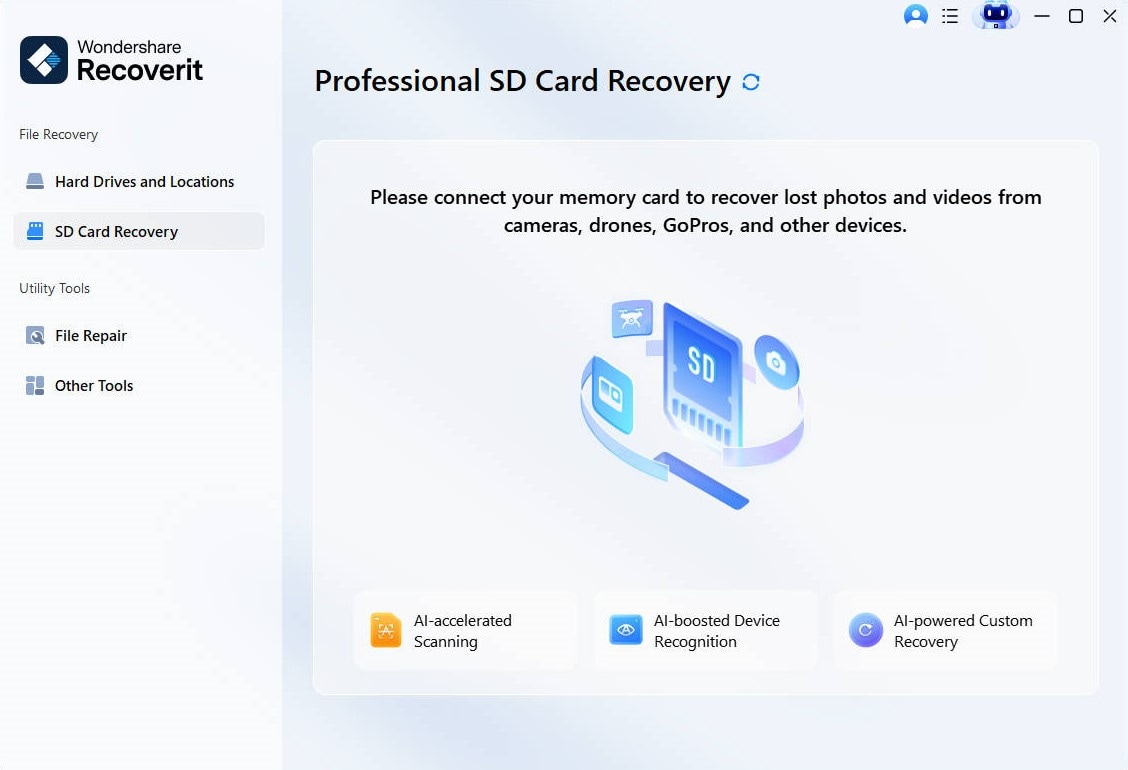
Step 2:Open Recoverit and select the memory card from the list of available drives.
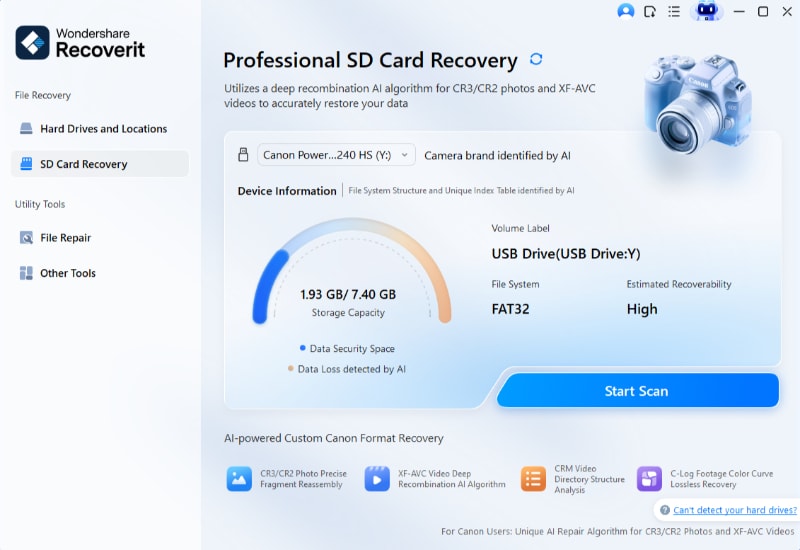
Step 3: Start the scan process. Wait until scanning completes. Preview the found photos carefully.
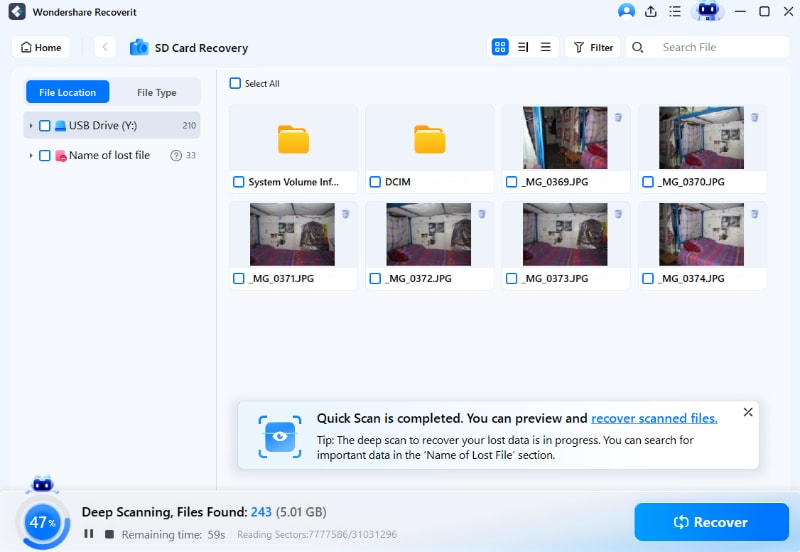
Step 4: Select the files you need and recover them to a different storage location on your computer.
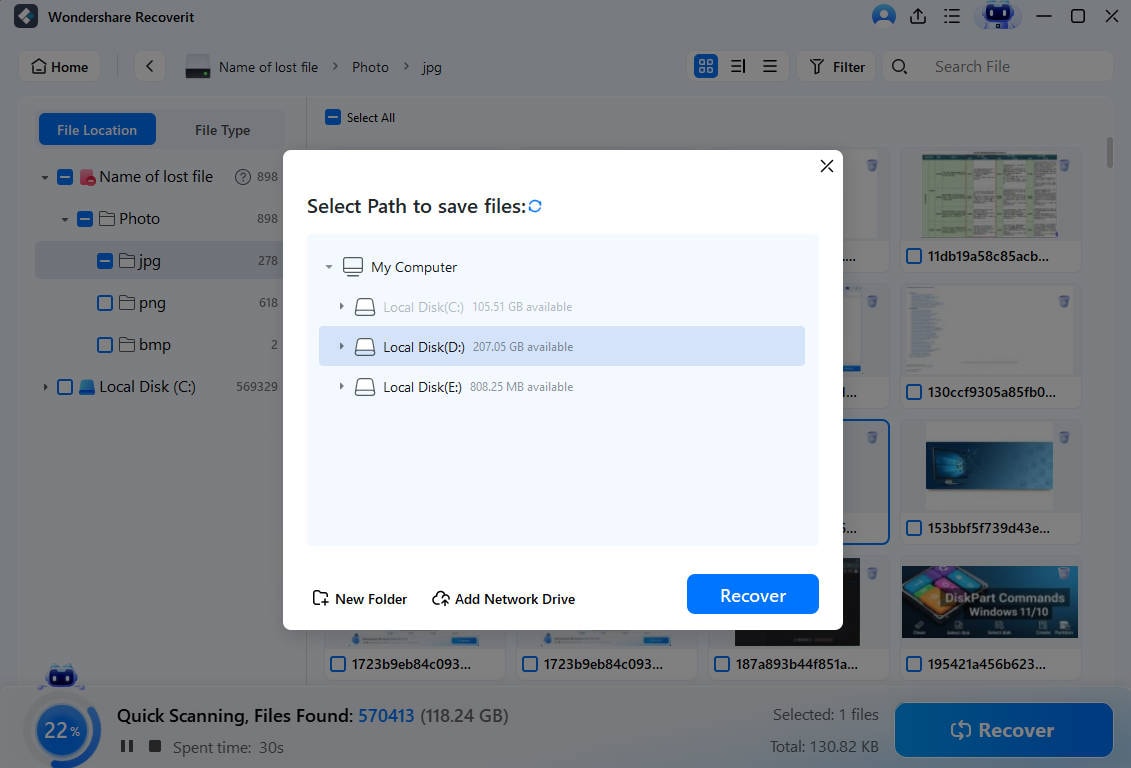
This method is highly recommended for users looking for how to recover lost photos from a Zenza Bronica Camera quickly and safely.
Method 2: Check Camera Storage or Trash (If Available)
Some digital camera systems provide a temporary storage area. Deleted images may remain there for a short time.
Although most Bronica cameras do not have a modern trash folder, checking inside the camera menu is still useful.
This simple step may solve the issue instantly without extra tools.
Step 1: Turn on the camera. Open the playback mode and check if there is a recently deleted folder or protection setting that hides images.
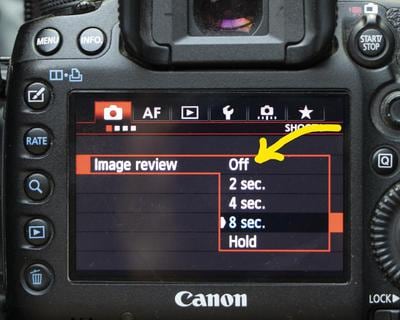
Step 2: If available, restore the images directly from the menu. Save them to avoid further deletion.
Method 3: Connect the Bronica Camera or Memory Card to a Computer
Sometimes images seem missing in the camera but are visible on a computer.
Connecting the camera allows you to check the memory card structure directly.
This method helps identify hidden files.
Step 1: Connect the camera using a USB cable or insert the memory card into a card reader.
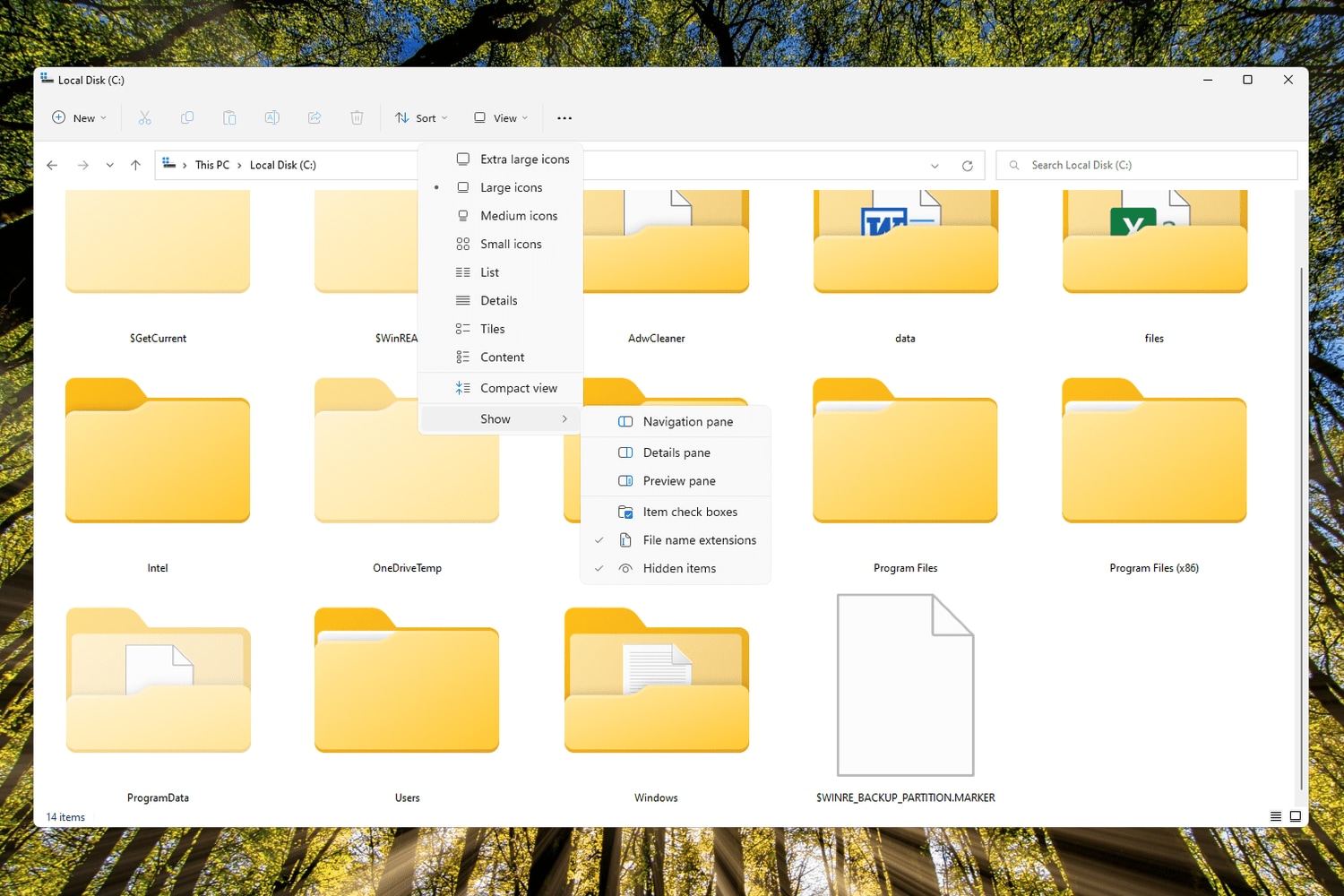
Step 2: Open the memory drive on your computer. Enable “show hidden files” in settings. Check all folders for image files.
This process may assist users searching for how to retrieve accidentally deleted images from Bronica Camera without additional software.
Method 4: Restore from Backup (External Drive or Cloud)
If you regularly back up your photos, recovery becomes simple.
Backups may exist on an external hard drive or cloud storage.
Many photographers create duplicate copies after every photoshoot.
Step 1: Connect your external drive or log into your cloud account.
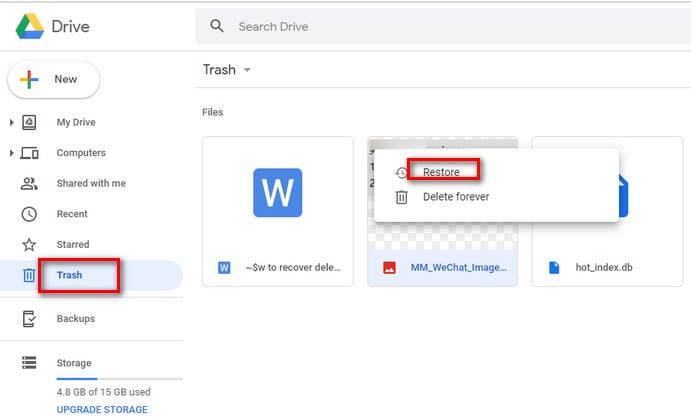
Step 2: Search for the photo folder. Copy the missing images back to your main system.
Method 5: Seek Professional Data Recovery Services
If the memory card is physically damaged, professional help may be needed.
Recovery labs have specialized tools. They can extract data from damaged storage devices.
This option is more expensive but useful in serious cases.
Step 1: Stop using the damaged card immediately to avoid further damage.

Step 2: Contact a certified data recovery service. Provide full details about the issue.
Part 3: Why Recoverit is the Best Data Savior Tool for Bronica Camera Recovery
Recoverit stands out as a reliable solution for camera photo recovery. It is designed to scan deeply and restore various file formats. For those researching how to recover deleted photos from a Bronica camera, this tool provides a simple and guided process.
Key advantages include:
- Deep scanning technology: It performs a sector-by-sector scan of the memory card. This allows the software to locate file fragments that are not visible in normal view. Even data stored in hidden or damaged areas can often be detected and reconstructed.
- Wide file format support: It supports common photo formats such as RAW and JPEG. It also works with other image file types used by professional cameras. This ensures that high resolution and original quality files can be restored without conversion.
- Simple user interface: The program layout is clear and well-organized. Each step is shown in order, which reduces confusion. Beginners can follow the instructions without a technical background.
- Preview feature: You can open and check photos before recovery. This helps confirm that the correct images are selected. It also prevents restoring unnecessary or damaged files.
- Safe recovery process: The software does not overwrite the original memory card during scanning. It reads data carefully and allows you to save recovered files to a different location. This protects the remaining data from further damage.
- Fast scanning speed: The scanning engine is optimized for large storage devices. Even high-capacity memory cards can be processed within a reasonable time. This saves effort during urgent recovery situations.
- Compatibility: It works smoothly on both Windows and Mac computers. Users do not need to switch systems to perform recovery. Installation and operation remain consistent across platforms.
- Reliable success rate: Many users report successful restoration even after accidental deletion or full formatting. The advanced scanning method increases the chance of finding usable files in difficult cases.
Part 4: Smart Tips to Prevent Future Data Loss in Bronica Cameras
Protecting your photos is easier than recovering them. Prevention reduces stress and saves time.
- Back up photos regularly: Create copies after every important shoot. Store them on an external hard drive or trusted cloud storage. Having at least two copies reduces the risk of permanent loss.
- Use high-quality memory cards: Choose trusted brands with good speed ratings. Reliable cards handle data writing more smoothly. This lowers the chance of corruption or sudden file errors.
- Avoid sudden power loss: Make sure your camera battery is properly charged before long sessions. Do not remove the battery while the camera is saving images. A sudden shutdown can damage files.
- Remove cards safely: Always use the safe eject option when disconnecting from a computer. Wait until file transfers are fully complete. Improper removal can harm the file system.
- Format in camera: If formatting is needed, do it using the camera’s built-in format option. This prepares the card correctly for that specific device. Avoid formatting on multiple devices unless necessary.
- Protect cards physically: Store memory cards in protective cases. Keep them away from moisture, dust, and extreme heat. Physical care helps maintain long-term reliability.
- Update firmware carefully: Follow official instructions when updating camera firmware. Ensure the battery is fully charged during the update process. Interrupting firmware installation can cause serious issues.
- Avoid filling the card completely: Leave some free space on the memory card. When storage is nearly full, writing speed may slow down. Keeping free space helps maintain stable performance.
These habits lower the chances of searching for how to recover permanently lost pictures from Bronica camera in the future.
Conclusion
Photo loss can happen to anyone. It may result from accidental deletion, formatting, or card corruption. The important step is to stop using the memory card immediately. Acting quickly increases recovery success.
With the right methods and tools, restoring images is often possible. Whether you choose software, backup restoration, or professional help, solutions are available. If you are looking into how to recover lost photos from a Zenza Bronica Camera, follow the structured methods above carefully.
FAQs
-
Can I recover photos after formatting the memory card?
Yes, recovery is often possible if the memory card has not been heavily used after formatting. When a card is formatted, the data is not immediately erased from the storage sectors. It only becomes invisible to the system. If you stop using the card right away and use reliable recovery software, there is a strong chance that many photos can still be restored. -
Are permanently deleted photos truly gone?
In most cases, permanently deleted photos are not instantly destroyed. The storage space they used becomes available for new data, but the original file content may remain until it is overwritten. If no new files replace that space, recovery tools can scan the card and rebuild the deleted images. Acting quickly improves the results. -
Is it safe to use photo recovery software?
Yes, it is safe when you use trusted and well known recovery programs. Good software scans the memory card in read only mode, which means it does not change or damage the existing data. You should always save recovered photos to a different drive to avoid overwriting remaining files.


