 TL;DR:
AI-powered audio recovery tools can effectively restore deleted or corrupted files by rebuilding hidden data fragments, provided the original storage sectors have not been overwritten by new data.
● Free recovery capacities vary significantly: Recoverit limits you to 100MB, Disk Drill allows 500MB, and Stellar offers 1GB, while Recuva provides unlimited free recovery but only operates on Windows systems.
● Successful retrieval requires immediately stopping use of the affected device, installing the recovery software on a completely separate drive, and saving the restored audio to an alternate location to prevent permanent data overwriting.
● While advanced options like Stellar Data Recovery can repair damaged files that refuse to play, overall recovery success rates drop considerably on Solid-State Drives (SSDs) due to TRIM commands or if significant time has passed since deletion.
Ask AI for a summary
 ChatGPT
 Perplexity
 Gemini
 Claude
 Grok
Grok
Ever had an audio file just disappear? Maybe you hit delete by accident, or the file got corrupted. It’s annoying. But not the end of the world. Free AI audio recovery tools are designed to help you bring those files back using smart, efficient tech.
AI-powered software has changed how we recover deleted files. The best AI audio recovery software works fast and efficiently. These programs scan your device for missing files. They can restore music, podcasts, voice notes, and recordings. Best of all, many top 5 AI audio recovery tools are completely free to use.

Table of Contents:
Part 1: Can AI Recover Damaged or Corrupted Audio Files?
Yes, AI can recover damaged audio files in most cases. Audio recovery tools use artificial intelligence to scan storage devices. They look for file fragments and signatures. When a file gets deleted, it doesn't disappear right away. The data stays on your device until new files overwrite it. AI algorithms can detect these hidden file traces and rebuild them.
Exploring Siri Gemini and understand its role in Apple future artificial intelligence plans.
Part 2: 5 Free AI Audio Recovery Tools
Finding the right recovery software matters. The top 5 AI audio recovery tools each have unique strengths. Some work better for specific file types. Others excel at deep scanning. Let's explore each option to help you choose wisely.

#1 Recoverit
Recoverit stands out as one of the best AI audio recovery software options available. This powerful tool has helped millions recover lost files. It works on both Windows and Mac computers. The interface is clean and easy to navigate.
Recoverit uses advanced AI algorithms to scan your drives thoroughly. It can recover over 1000 file types, including all major audio formats. The preview feature lets you listen to files before recovering them. This saves time and ensures you restore the right files. The free version allows recovery of up to 100MB of data.
Key Features:
- Recovers audio from hard drives, USB drives, and SD cards
- Supports MP3, WAV, M4A, FLAC, and more
- Deep scan mode for thorough searches
- Preview files before recovery
- Works after accidental deletion, formatting, or corruption
Video Tutorial: How to Fix the Audio Codec Not Supported Error?

#2 Recuva

Recuva is one of the most popular free AI audio recovery tools worldwide. Developed by Piriform, the makers of CCleaner, this tool has earned trust over many years. It's lightweight and doesn't require many system resources. The software works on Windows computers efficiently.
Recuva uses smart scanning technology to locate deleted files quickly. The wizard mode guides beginners through the recovery process step by step. Advanced users can switch to manual mode for more control. The tool can recover audio from hard drives, memory cards, and USB drives. It even works on damaged or formatted drives.
Key Features:
- Simple wizard interface for easy recovery
- Deep scan mode for thorough searches
- Secure file deletion for privacy
- Portable version available (no installation needed)
- Recovers from damaged or formatted drives
Pros and Cons:
#3 Aiseesoft Data Recovery

Aiseesoft Data Recovery is a powerful recovery solution for all file types. This tool excels at finding and restoring audio files from various devices. It works on both Windows and Mac operating systems. The interface is clean and professional-looking.
The software uses advanced scanning algorithms to detect deleted files. It can recover audio from computer crashes, accidental deletions, and virus attacks. Aiseesoft supports all popular audio formats, including MP3, WAV, and FLAC. The filter feature helps you find specific files quickly among scan results.
Key Features:
- Recovers from computers, hard drives, and removable devices
- Supports multiple audio formats
- Quick and deep scan modes
- File type and date filtering
- Safe recovery with no data overwriting
Pros and Cons:
#4 Stellar Data Recovery

Stellar Data Recovery brings professional-grade features to everyday users. This audio recovery tool has been on the market for over two decades. The software is trusted by millions worldwide. It offers comprehensive recovery options for audio files.
The AI-powered scanning engine in Stellar is highly sophisticated. It can recover files from formatted, corrupted, and encrypted drives. The tool also repairs damaged audio files that won't play properly. Stellar supports recovery from all types of storage media. The preview feature lets you hear files before recovering them.
Key Features:
- Recovers from all storage devices
- Repairs corrupted audio files
- Advanced deep scan technology
- Drive monitoring and cloning options
- Recovers lost or deleted partitions
Pros and Cons:
#5 Disk Drill

Disk Drill offers a modern approach to data recovery. This tool combines sleek design with powerful functionality. It works seamlessly on both Mac and Windows systems. The software is known for its user-friendly interface.
Disk Drill uses multiple scanning algorithms to find lost files. It includes Recovery Vault, which protects files from future deletion. The tool can recover audio from internal and external drives. It even works with iOS and Android devices. The free version allows recovery of up to 500MB of data.
Key Features:
- Cross-platform support (Mac and Windows)
- Recovery Vault for file protection
- Recovers from mobile devices
- Duplicate file finder
- Disk health monitoring tools
Pros and Cons:
Part 3: Lost Audio Files? Use Recoverit Today!
Recoverit deserves special attention among free AI audio recovery tools. This software consistently ranks as the best AI audio recovery software for good reason. It combines power with simplicity. Even complete beginners can use it successfully.
The AI technology in Recoverit continues to improve with each update. It learns from millions of recovery operations worldwide. This data helps it locate files more accurately. The software can recover audio from crashed computers, too. You can create a bootable USB drive for emergency situations.
Recoverit offers both quick and deep scan options. Quick scan finds recently deleted files in minutes. Deep scan searches every sector of your drive thoroughly. This takes longer but finds files that other audio recovery tools miss. The software also includes video tutorials within the interface.
Why Choose Recoverit:
- Highest Success Rate: Recovers files even when other tools fail completely
- Universal Compatibility: Works with all storage devices and operating systems
- Safe and Secure: Read-only scanning ensures no further data damage
- Regular Updates: Constantly improving AI algorithms and format support
- Professional Support: Free technical assistance available through multiple channels
3 Simple Steps to Use Recoverit:
Step 1: Download and install Recoverit. Install it on a different drive from where you lost files. This prevents overwriting the data you want to recover. Launch the program and select your scan location.

Step 2: Choose between quick scan or deep scan mode. Quick scan works for recently deleted files. Deep scan is better for older deletions or formatted drives. The AI will search for all recoverable audio files. You can pause and resume scanning anytime.

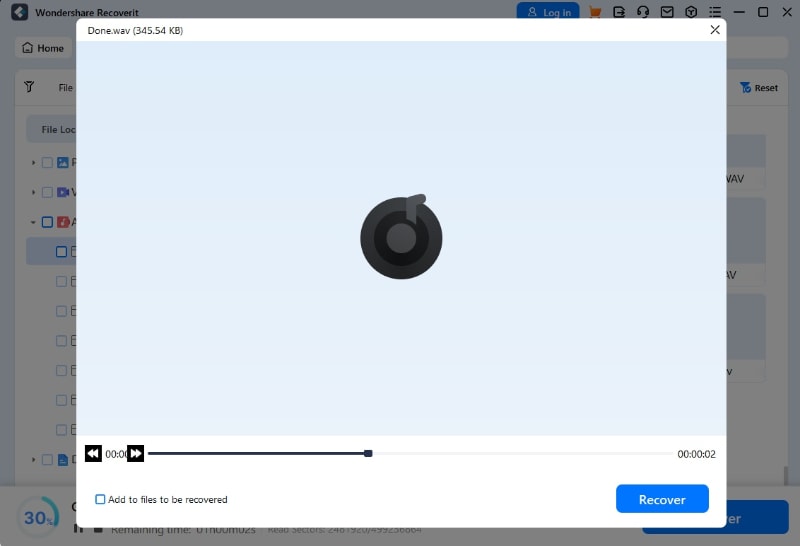
Step 3: Browse the scan results and preview audio files. Listen to files before recovering them. Select the files you want to restore. Choose a safe location to save them. Never save recovered files to the same location where they were lost.
Part 4: Pro Tips for Using AI Audio Recovery Tools Effectively
Getting the best results from audio recovery tools requires some knowledge. Following these tips increases your success rate significantly. Most recovery failures happen because users make common mistakes. Let me share what works best.
- Act Fast: Stop using the device immediately when you lose files. Every new write operation reduces recovery chances. The sooner you scan, the better your results will be.
- Never Save to the Same Location: Always recover files to a different drive. Saving to the same location can overwrite the data you're trying to recover. Use an external drive or a different partition.
- Try Multiple Tools: Different free AI audio recovery tools use different methods. If one tool doesn't find your files, try another. The top 5 AI audio recovery tools each have unique strengths.
- Use Deep Scan for Old Files: Quick scans work for recent deletions only. For files deleted weeks or months ago, always use deep scan mode. It takes longer but finds more files.
- Check All Format Options: Sometimes files recover with wrong extensions. The best AI audio recovery software can find files even without proper extensions. Check multiple format categories in the results.
- Avoid Using the Device: Don't install recovery software on the drive you're scanning. Don't save files, browse the internet, or do other activities. This prevents overwriting recoverable data.
- Preview Before Recovery: Always preview files when possible. This confirms the files are intact and playable. It also helps you identify the correct files among duplicates.
- Keep Backup Copies: After successful recovery, immediately back up the files elsewhere. Consider using cloud storage or multiple physical drives. Prevention is better than repeated recovery attempts.
Conclusion
Free AI audio recovery tools have made file recovery accessible to everyone. You don't need technical expertise or expensive software anymore. The top 5 AI audio recovery tools we covered each offer unique benefits. Recoverit stands out for overall performance and ease of use. DJ GPT excels for music professionals. The other options serve specific needs well.
With the right tool and proper technique, you can recover most lost audio files successfully. Download one of these audio recovery tools today and start getting your files back.
Try Recoverit to Recover Lost Data
 Security Verified. Over 7,302,189 people have downloaded it.
Frequently Asked Questions
-
Q1: Are free AI audio recovery tools safe to use?
Yes, reputable free AI audio recovery tools are safe when downloaded from official sources. Programs like Recoverit use read-only scanning technology. This means they don't modify or damage your existing data. Always download recovery software from the developer's official website. Avoid third-party download sites that might bundle unwanted software. Check user reviews and ratings before installing any tool. -
Q2: Can I recover audio files deleted months ago?
Recovery of older files is possible but not guaranteed. The chances decrease as time passes and the drive gets used. Free AI audio recovery tools work best within days or weeks of deletion. However, some tools can find files deleted months ago if the storage hasn't been heavily used. Solid-state drives (SSDs) are harder to recover from than traditional hard drives due to TRIM commands. -
Q3: What's the difference between free and paid audio recovery tools?
Free versions typically limit the amount of data you can recover. Most top 5 AI audio recovery tools offer 50MB to 100MB free recovery. Paid versions remove these limits and add advanced features. These include priority technical support, lifetime updates, and specialized recovery modes. For occasional use or small files, free AI audio recovery tools work perfectly fine. Consider upgrading only if you need to recover large amounts of data frequently. The core recovery technology is often identical between free and paid versions.



