

 TL;DR:
DMA (Direct Memory Access) transfer accelerates system performance by allowing hardware devices to move data directly to system memory via a DMA controller, bypassing continuous CPU involvement.
● Transfers execute in three distinct modes: Burst Mode for high-speed large data blocks (which temporarily pauses CPU memory access), Cycle Stealing for balanced moderate data loads, and Transparent Mode for slower background transfers restricted strictly to CPU idle times.
● Stable operations require compatible hardware, updated device drivers, and correct BIOS settings; driver conflicts, channel overlaps, or power interruptions during active transfers risk severe file corruption.
● If an interrupted or failed DMA operation results in missing or inaccessible files, users must run a deep scan on the affected storage drive using the Wondershare Recoverit Data Recovery Tool to retrieve the corrupted data.
Ask AI for a summary
 ChatGPT
 Perplexity
 Gemini
 Claude
 Grok
Grok
Computers handle large volumes of data every second. Information shifts from memory to storage and then back again. It also passes between hardware components such as hard drives, keyboards, and network cards. When this flow is delayed, overall performance suffers. When it runs quickly and smoothly, the system responds well and remains stable.
Many users ask an important question: what is DMA transfer and why is it important in computers. DMA plays a key role in speeding up data movement. It reduces the load on the processor and allows devices to communicate with memory directly. To understand this clearly, we must first learn what is DMA and then understand how does DMA works in real systems.
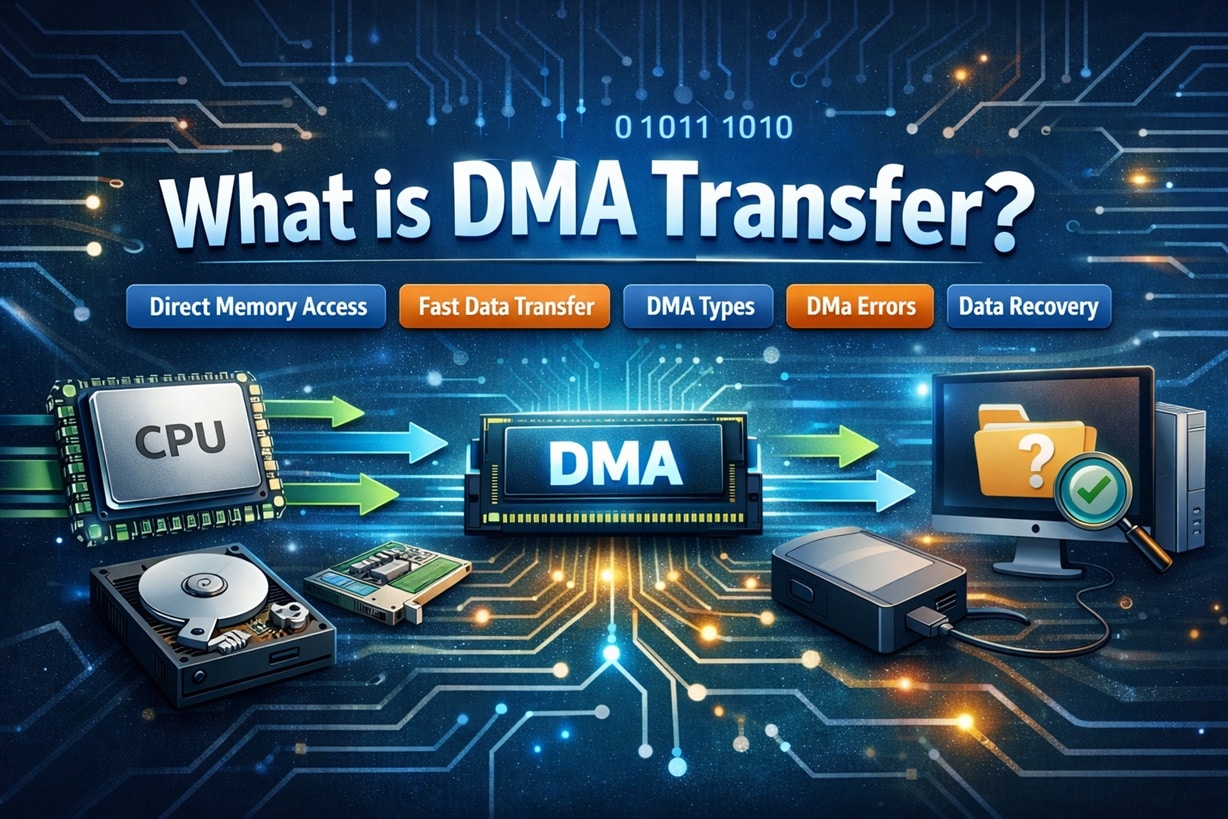
Table of Contents
Part 1: What is DMA?
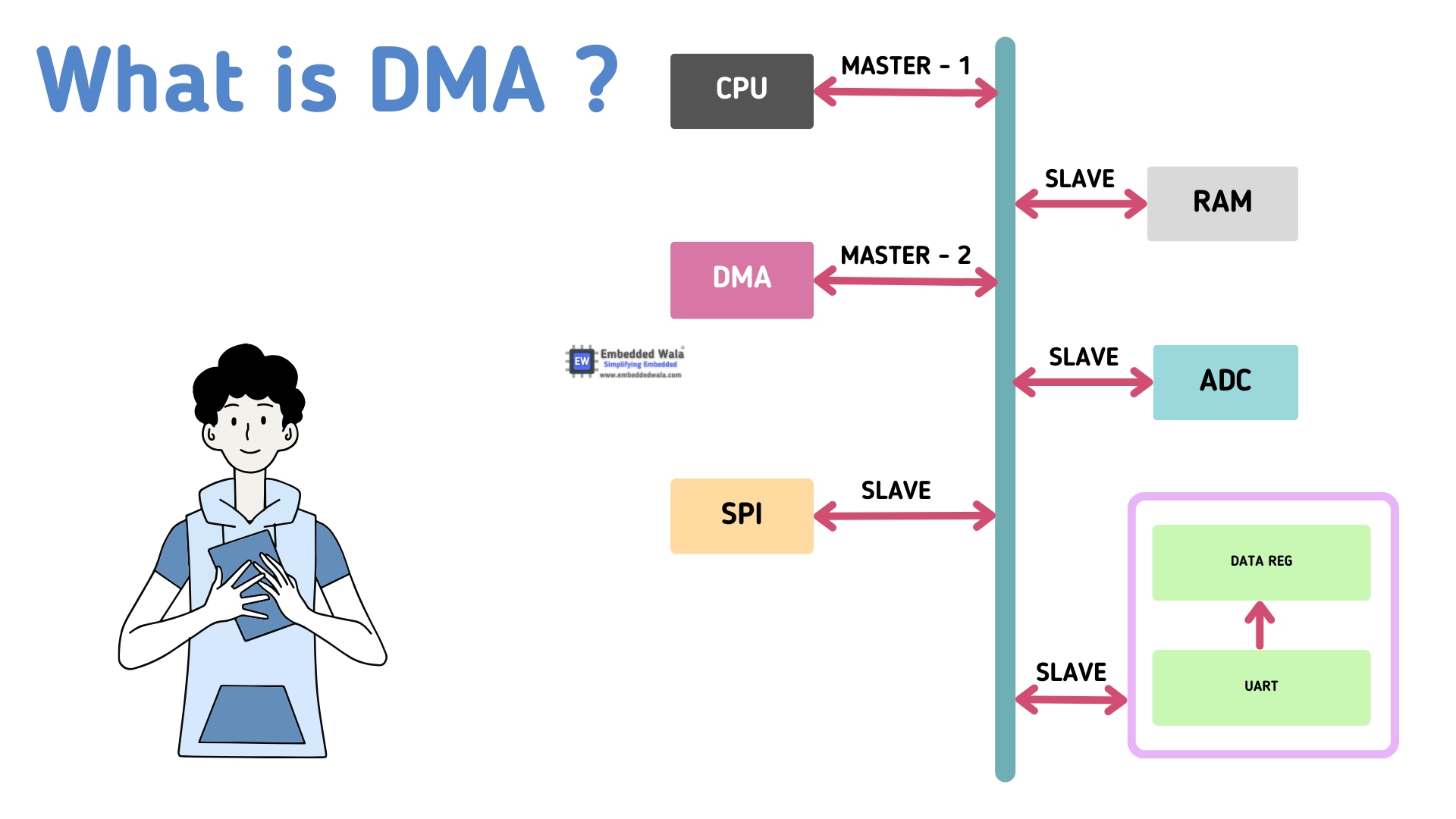
DMA stands for Direct Memory Access. When students study computer hardware, they often begin by asking what DMA is. In simple words, DMA is a feature that allows hardware devices to transfer data directly to system memory without constant help from the CPU. The processor still starts the process, but it does not control each step.
In traditional data transfer, the CPU reads data from a device and then writes it to memory. This process repeats many times. It increases CPU usage and slows down performance. DMA changes this method. Once configured, it lets the device communicate with memory directly. That is why people researching what DMA transfer is usually explore what DMA is first.
DMA is commonly used in modern operating systems. It supports faster storage devices and high-speed communication hardware. It improves multitasking and overall efficiency. Understanding what DMA is makes it easier to grasp the full idea of how DMA works in real computer systems.
Key Features of DMA
- Allows direct transfer between the device and the memory
- Reduces CPU involvement
- Improves system speed
- Supports large data blocks
- Controlled by a DMA controller
- Works with storage and network devices
- Enhances multitasking
- Saves processing time
Part 2: What is DMA Transfer?
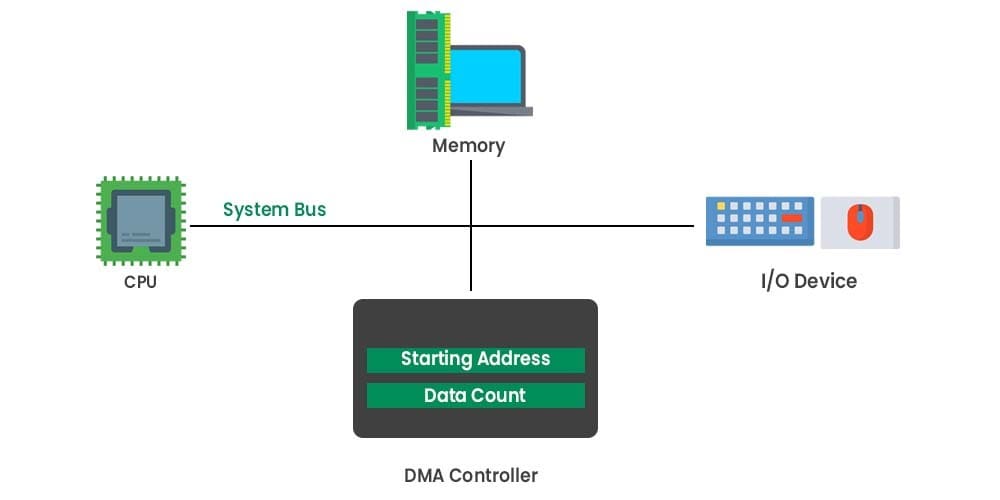
Now, let us understand clearly what is DMA transfer. DMA transfer refers to the process in which a device sends data directly to memory through the DMA controller. The CPU sets up the transfer. After that, the DMA controller manages the entire operation.
This method is different from programmed input and output. In that older method, the CPU handled every data movement. DMA transfer removes that burden. The processor can work on other tasks while the data moves in the background. That is why many system engineers ask what is DMA transfer when analyzing system speed.
When large files are copied from a hard drive to memory, DMA is usually involved. Network communication also depends on this method. Printers and sound cards use it as well. It is very useful in systems that require constant data flow.
The key reason behind its popularity is efficiency. It improves performance and reduces delay. That is the practical answer to what is DMA transfer in simple terms.
Part 3: How Does DMA Work?
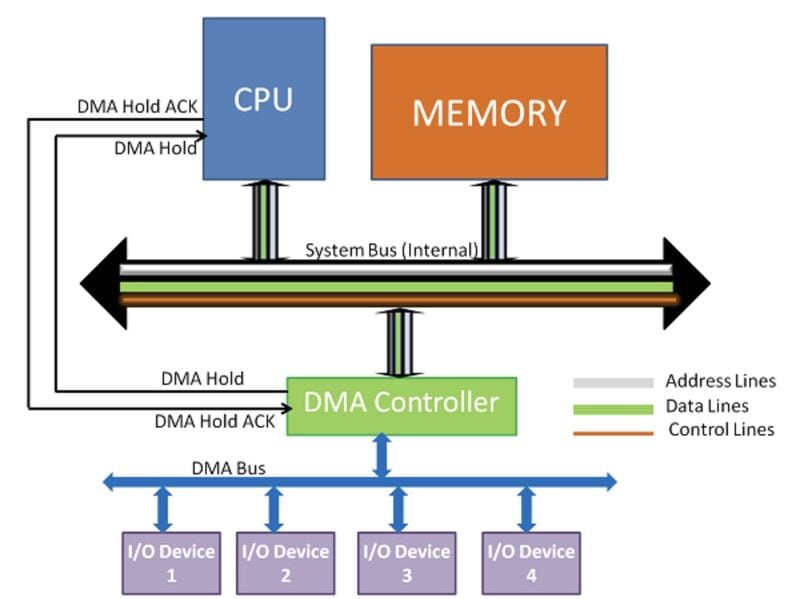
To fully understand the process, we must explain how DMA works step by step. First, the CPU gives instructions to the DMA controller. It specifies the memory address, the size of data, and the direction of transfer.
Once configured, the DMA controller requests control of the system bus. After receiving permission, it transfers the data directly between the device and memory. The CPU is free during this time. After the transfer finishes, the DMA controller sends an interrupt signal to inform the processor.
Many learners often type how does DMA works into search engines because they want a clear sequence. The process is simple in structure but powerful in result. It involves setup, transfer, and completion notification.
The speed depends on the transfer mode. The efficiency depends on hardware design. Understanding how does DMA works also helps in diagnosing hardware problems and planning data recovery steps when errors occur.
Part 4: Types of DMA Transfers
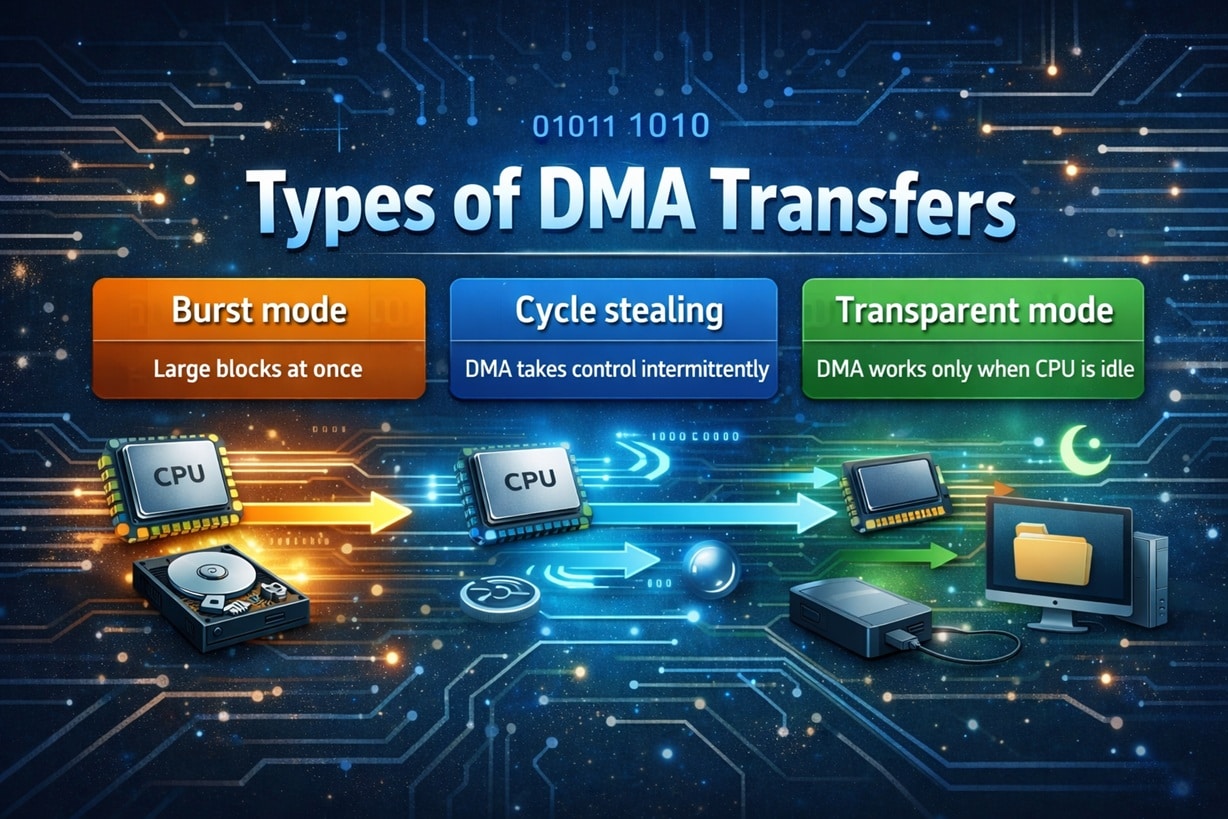
DMA transfers are not all the same. Different modes are used based on system needs. Each type offers specific advantages. The main goal remains efficient data movement.
Burst Mode (Large Blocks at Once)
In burst mode, the DMA controller takes full control of the bus. It transfers a large block of data in one continuous operation. During this period, the CPU must wait.
This method is very fast. It is useful when transferring big files. However, the CPU cannot access the memory during the transfer. That may cause a slight delay in processing other tasks.
Key Features
- Transfers large data blocks
- High-speed performance
- CPU waits during transfer
- Efficient for storage devices
- Reduces repeated bus requests
Cycle Stealing (DMA Takes Control Intermittently)
In cycle-stealing mode, the DMA controller transfers one data unit at a time. It shares the bus with the CPU.
The CPU continues working between DMA cycles. This method balances performance and CPU activity. It slightly slows down the processor but does not stop it completely.
Key Features
- Shares a bus with the CPU
- Transfers small data units
- Balanced performance
- Minimal CPU interruption
- Good for moderate data loads
Transparent Mode (DMA Works Only When CPU Is Idle)
In transparent mode, DMA works only when the CPU is not using the bus. It avoids interrupting the processor.
This mode is slower compared to burst mode. However, it ensures smooth CPU operation. It is suitable for background transfers.
Key Features
- Operates during CPU idle time
- No CPU interruption
- Lower transfer speed
- Smooth multitasking
- Ideal for non-urgent transfers
Part 5: How DMA Transfer Improves System Performance
DMA transfer plays a vital role in improving computer efficiency. It helps systems handle large tasks without slowing down. Reducing processor involvement, it allows better multitasking and faster execution.
Benefits of DMA Transfer
- Reduces CPU workload and frees resources
- Speeds up data movement
- Improves multitasking capability
- Supports high-speed devices
- Decreases system latency
- Enhances disk performance
- Improves network efficiency
- Enables smooth large file transfers
These benefits explain why professionals often explore what DMA transfer is when studying system optimization.
Part 6: Common Issues with DMA Transfers
Even though DMA is efficient, problems can occur. Hardware conflicts, driver errors, or configuration issues may interrupt the process. When this happens, systems may slow down or freeze.
Users sometimes face missing files after interrupted transfers. In such cases, people start searching recover missing data after DMA transfer because the issue affects important documents.
Common Problems
- Driver conflicts: Conflicts between device drivers can disrupt DMA operations. If two drivers attempt to control the same resource, data transfer may fail or slow down.
- Hardware compatibility issues: Some older hardware may not fully support modern DMA features. Incompatible components can cause unstable transfers or repeated system errors.
- Data corruption: Improper transfers or unexpected interruptions may damage files. Corrupted data can become unreadable or incomplete after the process ends.
- Interrupted transfers: Stopping a transfer midway can result in missing or partially written files. This often happens during system crashes or forced shutdowns.
- DMA channel conflicts: Multiple devices may attempt to use the same DMA channel. When channels overlap, it can create communication errors and system instability.
- BIOS misconfiguration: Incorrect BIOS settings related to storage or transfer modes can prevent DMA from functioning correctly. Proper configuration is important for stable performance.
- Outdated firmware: Old firmware versions may contain bugs that affect data transfer. Updating firmware can improve compatibility and reliability.
- Power interruptions: Sudden power loss during data movement can damage files and interrupt DMA activity. A stable power supply helps prevent such issues.
When errors appear, users also look for how to fix DMA errors. In serious cases, they search how to recover lost data when DMA fails to restore critical information safely.
Part 7: How to Recover Missing Data After DMA Transfer: Recoverit Data Recovery Tool
Data loss can be stressful. If a DMA transfer fails, files may become inaccessible. Some files may disappear. In such situations, users try to recover missing data after DMA transfer using professional tools.
Recoverit Data Recovery Tool is designed to restore lost files from hard drives, SSDs, and external devices. It scans storage deeply. It finds deleted or corrupted files. Many users depend on it when searching for how to recover lost data when DMA fails.
The software supports many file formats. It offers a simple interface. It allows a preview before recovery. If you want a solution to how to fix DMA errors related to data loss, this tool can help.

Why Use Recoverit
- Deep scan technology
- Supports many file types
- Recovers from formatted drives
- Works on external devices
- Simple interface
- Safe recovery process
Recovery Steps
Step 1: Install and launch Recoverit on your computer.

Step 2: Select the affected drive and start deep scan mode.

Step 3: Preview recovered files and save them to a different secure drive.

These steps help users recover missing data after DMA transfer safely and efficiently.
Part 8: Smart Tips for Managing DMA Transfers
Proper management reduces errors. A few simple precautions can prevent failures. These tips improve stability and reliability.
- Keep device drivers updated: Updated drivers improve compatibility between hardware and the operating system. They also fix bugs that may cause DMA-related problems.
- Check BIOS settings regularly: Make sure DMA options are properly enabled in the BIOS. Incorrect settings can reduce performance or create transfer errors.
- Avoid sudden shutdowns: Do not turn off the system while data transfer is in progress. Abrupt power loss can interrupt DMA operations and corrupt files.
- Monitor disk health: Use disk checking tools to detect bad sectors or early signs of failure. A healthy storage device reduces the risk of DMA transfer issues.
- Use a stable power supply: Voltage fluctuations can affect hardware performance. A reliable power source or UPS helps protect ongoing transfers.
- Update firmware: Firmware updates for storage drives and controllers improve stability and fix known transfer issues.
- Perform regular backups: Backups ensure your data is safe even if a DMA error causes corruption or file loss.
- Scan the system for hardware conflicts: Check the device manager for conflicts between components. Resolving hardware clashes prevents DMA channel errors and system instability.
Following these steps also reduces the need to search for how to fix DMA errors later.
Conclusion
DMA technology improves overall system speed and efficiency. It reduces the workload on the CPU and allows devices to communicate directly with system memory. This direct access saves processing time and makes data movement smoother. When users clearly understand what DMA transfer is, they can better manage hardware performance and troubleshoot related issues.
In this guide, we explained what is DMA, how does DMA works, its main types, key benefits, and common problems. We also covered practical steps on how to recover lost data when DMA fails with the help of reliable recovery software. With proper system maintenance, updated drivers, and regular backups, most DMA-related issues can be avoided.
FAQs
-
1. Is DMA transfer faster than CPU-controlled transfer?
Yes. DMA transfer is usually faster than CPU-controlled transfer because the processor does not manage every single data step. Once the transfer is set up, the DMA controller moves data directly between the device and memory. This reduces CPU workload and improves overall system speed, especially when handling large files. -
2. Can DMA errors cause data loss?
Yes. DMA errors can cause data loss if a transfer is interrupted, corrupted, or stopped due to hardware or driver problems. When this happens, some files may become incomplete or inaccessible. In such situations, users often try to recover missing data after DMA transfer using reliable data recovery software. -
3. How can I prevent DMA-related issues?
You can prevent DMA-related issues by keeping device drivers updated, checking BIOS settings, and ensuring hardware compatibility. It is also important to avoid sudden shutdowns and maintain regular backups. These steps lower the risk of system instability and reduce the need to search for how to fix DMA errors later.


