

 TL;DR:
Recovering lost data from Kubernetes Persistent Volumes depends on the failure type and storage configuration, utilizing methods like rebinding retained volumes, restoring CSI snapshots, or extracting files via temporary Pods.
● If a Persistent Volume Claim (PVC) is deleted but the reclaim policy is set to Retain, the underlying storage remains intact and can be manually remounted by removing the claim reference from the PV configuration and binding a new, matching PVC.
● Persistent Volume snapshots can restore volumes to a previous state, provided the storage driver supports CSI features and database writes were paused prior to snapshot creation to ensure data consistency.
● For healthy volumes attached to failed Pods, mount the existing PVC to a temporary diagnostic Pod to extract files using kubectl cp; for deleted files on local block storage, detach the disk to a separate secure system before using tools like Recoverit to prevent data overwriting.
Ask AI for a summary
 ChatGPT
 Perplexity
 Gemini
 Claude
 Grok
Grok
Data is the foundation of modern applications. Containers are designed to be temporary. They can start, stop, or restart at any time. However, application data must remain safe and available.
Many organizations rely on Kubernetes to manage containerized workloads. These workloads often include databases, uploaded files, logs, and configuration data. If storage fails or is misconfigured, valuable data can be lost. For this reason, many administrators search for how to recover data from Persistent Volumes in Kubernetes.
Learning what is a Persistent Volume (PV) & Persistent Volume Claim (PVC) helps you understand how data is attached to Pods. It is equally important to understand how storage is handheld in Kubernetes, because the abstraction layer hides physical details.
Try Recoverit to Recover Lost Data
 Security Verified. Over 7,302,189 people have downloaded it.
Table of Contents:
Part 1: What are Persistent Volumes in Kubernetes?

Before learning recovery, you must clearly understand the storage architecture. Many beginners first ask what is Kubernetes. Kubernetes is an open source container orchestration platform. It automates deployment, scaling, and management of containerized applications. Containers are lightweight and portable. However, they do not store data permanently inside themselves. When a container is deleted, its internal storage disappears.
What are Persistent Volumes?
This is where Persistent Volumes become essential. To understand what is Persistent Volumes, think of them as independent storage resources within a cluster. A Persistent Volume is created separately from a Pod. It exists even if a Pod is destroyed. This design ensures that business data survives container restarts or failures. Persistent Volumes can be backed by cloud block storage, network file systems, or local disks.
It is also important to understand what is a Persistent Volume (PV) & Persistent Volume Claim (PVC). A PV represents actual storage capacity inside the cluster. A PVC is a request made by a user or application for storage. Kubernetes binds the PVC to a suitable PV automatically. This separation allows flexibility and scalability. Developers only request storage size and access mode. They do not manage the physical disk.
This binding process shows how storage is handheld in Kubernetes. The system abstracts storage management from application developers. Administrators define storage classes and policies. The cluster then allocates resources based on those definitions. This structure improves portability and cloud compatibility. However, incorrect configuration or policy selection can still cause data problems. That is why understanding how to recover data from a Persistent Volume is a vital administrative skill.
Part 2: Common Causes of Persistent Volume Data Loss or Corruption
Data loss in Kubernetes environments can happen for many reasons. Even well-managed clusters are not immune to mistakes or infrastructure failures. Understanding the cause makes it easier to decide how to recover data from Persistent Volumes in Kubernetes effectively.
- Accidental PVC deletion: An administrator may delete a Persistent Volume Claim without realizing its importance. If the reclaim policy is not set carefully, the underlying storage may also be affected.
- Incorrect reclaim policy: When a PV uses the Delete policy, the actual storage may be removed after PVC deletion. This can permanently erase stored files.
- Storage backend failure: Cloud disks, SAN systems, or NFS servers may experience outages. Hardware faults can corrupt stored data.
- File system corruption: Sudden node crashes or power failures can damage file systems inside volumes. Applications may then fail to read or write data.
- Application errors: Misconfigured applications may overwrite or truncate critical files.
- Unauthorized access: Improper security settings may allow users to modify or remove files accidentally.
- Scaling and migration errors: Rapid scaling operations or node migrations may detach volumes unexpectedly.
- Manual YAML misconfiguration: Editing storage definitions incorrectly can break bindings between PVs and PVCs.
Recognizing these risks helps administrators respond calmly and apply the correct recovery strategy.
Part 3: How to Recover Data from Persistent Volumes in Kubernetes
Recovering data requires careful assessment. You must confirm whether the PV still exists. You should check the reclaim policy and storage backend. Different situations require different solutions. Below are structured methods explaining how to recover data from Persistent Volumes in Kubernetes in a controlled and safe manner.
Method 1: Use Recoverit Data Recovery Software

This method is suitable when a Persistent Volume maps directly to a local disk or attached block device. If files were deleted at the file system level, data recovery software may help.
Recoverit scans the raw disk sectors to identify deleted data fragments. It works best when no new data has overwritten the deleted files. This approach is often used when direct backup copies are unavailable.
It provides a user-friendly interface. Even administrators without deep forensic experience can use it effectively. This method demonstrates how to recover data from a Persistent Volume outside the Kubernetes control plane.
Step 1: Detach or unmount the disk associated with the PV from the node. Connect the disk to a secure system. Install Recoverit and perform a deep scan.

Step 2: Wait for the scan. Preview the recoverable files.

Step 3: Select the required data carefully. Restore it to a separate storage device to prevent overwriting.

Method 2: Use the Retain Reclaim Policy to Manually Remount PVs
The reclaim policy determines what happens to storage after a claim is deleted. If the policy is set to Retain, the data remains intact even after PVC removal.
This approach is very effective when an administrator deletes a PVC accidentally. The PV usually moves to the Released state. The storage content remains untouched.
This process shows how storage is handheld in Kubernetes through clearly defined lifecycle rules. Administrators can manually rebind volumes without losing data.
Step 1: Edit the Persistent Volume configuration. Remove the claim reference section. Change the state so it becomes available again.

Step 2: Create a new PVC with matching specifications. Bind it to the original PV. Mount it to a Pod and verify that files are accessible.
Method 3: Restore from Persistent Volume Snapshots
Snapshots capture the state of a volume at a specific time. They provide reliable rollback capability for critical workloads.
Many cloud environments support CSI snapshot features. Snapshots are commonly used for database volumes and production applications.
Using this method explains how to recover data from a Persistent Volume when planned backups exist within the cluster.
Step 1: List available snapshots using kubectl commands. Identify the correct snapshot based on creation time.

Step 2: Create a new PVC from the snapshot definition. Attach it to a Pod. Validate restored data before placing the application back in production.
Method 4: Attach PVs to a New Pod for Manual Data Extraction
In some situations, the original Pod may fail while the volume remains healthy. In such cases, direct attachment to another Pod is effective.
Create a temporary diagnostic Pod. Mount the existing PVC. Access the file system manually to inspect or copy important files.
This technique is straightforward and often resolves minor configuration issues quickly.
Step 1: Prepare a simple Pod configuration that references the existing claim.

Step 2: Use kubectl exec to enter the Pod. Copy files to a secure external location using kubectl cp.
Method 5: Use Backup Tools for Cluster-Wide Recovery
Cluster-level backup tools provide long-term protection. They capture both Kubernetes objects and associated volume data.
These tools store backups in remote object storage. They support scheduled backups and policy management.
This method is ideal for disaster recovery. It is one of the most reliable answers to how to recover data from a Persistent Volume after cluster-wide failure.
Step 1: Install and configure the backup tool with storage credentials.
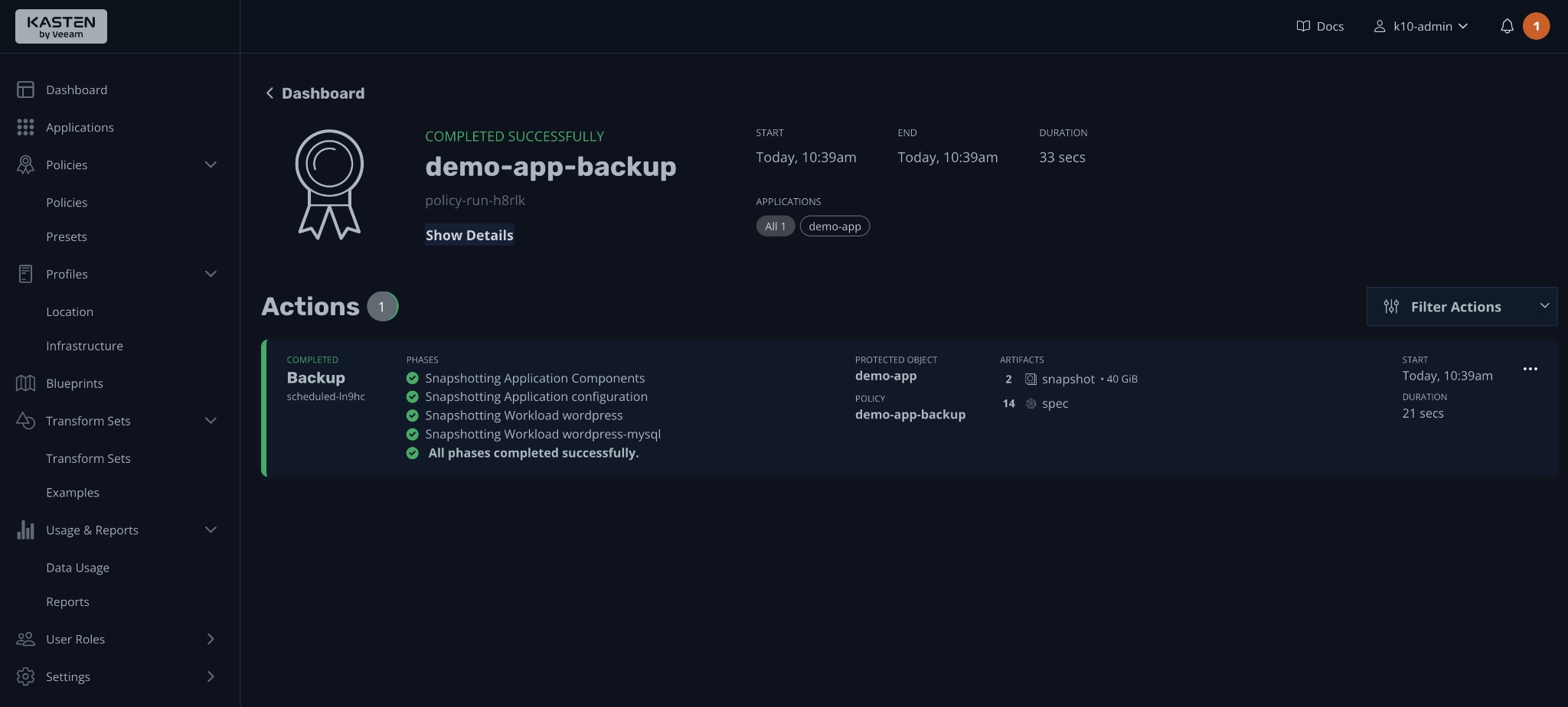
Step 2: Run a restore operation specifying the backup snapshot. Monitor the restoration process. Confirm workload stability.
Part 4: Tools and Techniques for Persistent Volume Recovery
Persistent Volume recovery often requires a combination of tools. You must evaluate your infrastructure type, cloud provider, and backup policy. Understanding what a Persistent Volume (PV) & Persistent Volume Claim (PVC) is improves your troubleshooting ability. Knowing how storage is handheld in Kubernetes also helps you trace lifecycle events more accurately.
A layered recovery strategy is recommended. This includes file-level recovery, snapshot restoration, and cluster backup restoration. Below are commonly used tools that assist in how to recover data from Persistent Volumes in Kubernetes environments.
- Recoverit Useful for file-level recovery from local or detached disks. It performs deep scanning and a preview before restoration.
- Velero Provides cluster backup and disaster recovery support. It captures Kubernetes resources and volume snapshots.
- Stash Designed for application-aware backups. It integrates with Kubernetes workloads for scheduled protection.
- Restic A flexible backup utility. Often integrated with cluster tools for incremental backups.
- CSI Snapshot Controller Enables native snapshot features for supported storage drivers.
Conclusion
Persistent storage is essential for stateful applications running in Kubernetes clusters. Without proper understanding, even small configuration mistakes can cause serious data loss. Learning what is Kubernetes, what is Persistent Volumes, and what is a Persistent Volume (PV) & Persistent Volume Claim (PVC) builds a strong foundation.
Data recovery is possible in many cases. Whether you use snapshots, reclaim policies, backup tools, or recovery software, careful action improves success rates. Understanding how storage is handheld in Kubernetes helps you prevent errors before they happen. With structured planning and reliable backups, administrators can confidently handle situations involving how to recover data from Persistent Volumes in Kubernetes.
FAQs:
-
Can I recover data after deleting a PVC?
Yes, recovery is often possible after deleting a PVC, but it depends on your storage settings. If the reclaim policy is set to Retain, the underlying Persistent Volume usually remains intact, and you can rebind it to a new claim. Recovery is also possible if you created volume snapshots or regular backups before deletion. Acting quickly is important because changes to the storage backend may reduce recovery chances over time. -
Are Persistent Volume snapshots reliable for databases?
Persistent Volume snapshots are reliable for databases when they are supported by the storage driver and configured correctly. However, database consistency must be considered. It is best to pause writes or use database-aware backup procedures before taking a snapshot. When done properly, snapshots provide a dependable way to restore database volumes to a previous stable state. -
Is manual disk recovery safe in production clusters?
Manual disk recovery can be safe if handled carefully and performed with proper planning. It is recommended to detach the disk from the production node and work on a separate system to prevent accidental overwriting. Avoid writing new data to the affected volume, as this may permanently erase recoverable files. Careful steps and restricted access reduce the risk of further damage.


