

 TL;DR:
HAMR (Heat-Assisted Magnetic Recording) drives use microscopic lasers to achieve ultra-high enterprise storage density, but if they fail, immediately stopping use to determine if the damage is logical or physical is critical for successful data recovery.
● If the drive suffers logical corruption but is still detected by the operating system, run data recovery tools like Recoverit or CHKDSK from a separate healthy drive without formatting the damaged disk.
● When physical failures occur, such as internal laser wear, cooling system malfunction, or clicking sounds from head crashes, DIY software cannot repair the drive and professional cleanroom recovery services are required.
● Because Seagate HAMR technology relies on heat-based magnetic writing for heavy data center workloads, maintaining strict environmental cooling and automated off-site backups is necessary to mitigate hardware degradation.
Ask AI for a summary
 ChatGPT
 Perplexity
 Gemini
 Claude
 Grok
Grok
Modern storage needs are growing very fast. People store large videos, system backups, games, business files, and research data every day. Traditional hard drives have limits. To solve this problem, engineers created a new recording method called HAMR. Many users search online to understand what is HAMR and why it is important for future storage devices.
At the same time, new technology can bring new concerns. Some users face sudden drive errors and start looking for answers about what is HAMR failure and possible recovery solutions.
This guide explains everything in simple and clear language. You will also learn how to recover lost data from hard drive when HAMR occurs using safe and practical methods.
Table of Contents
Part 1: What is HAMR Drive?
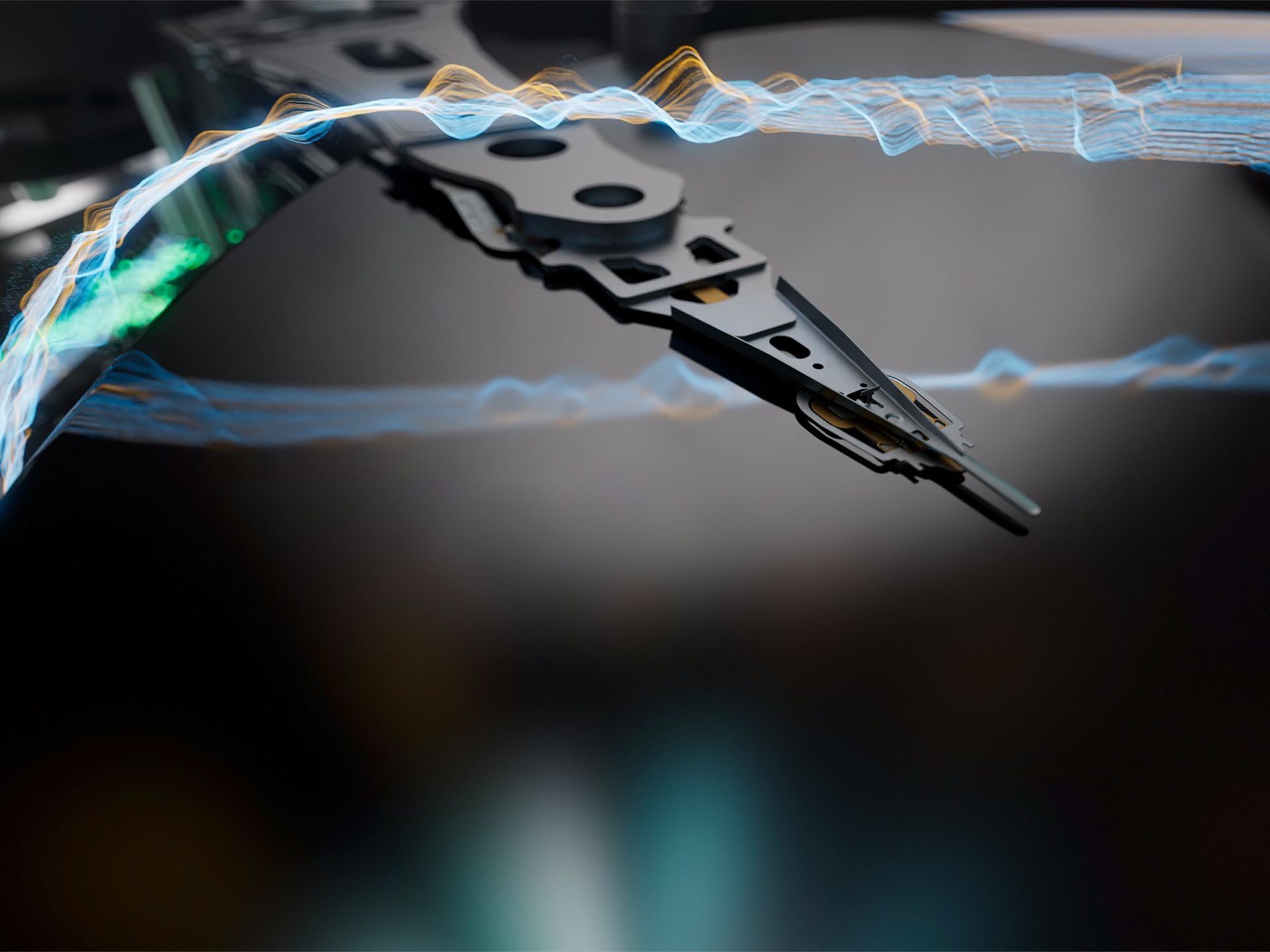
Many users ask what is HAMR in simple words. HAMR stands for Heat-Assisted Magnetic Recording. It is a storage technology used inside advanced hard drives. This method allows engineers to store more data on the same physical disk platter.
To better understand what HAMR is, imagine a traditional hard drive. It writes data by changing the magnetic direction on the disk surface. In HAMR drives, a tiny laser briefly heats a very small area of the platter. The heat makes the magnetic material easier to change. After cooling, the data remains stable and secure. This process allows extremely high storage density.
One of the companies leading this development is Seagate Technology. Their Seagate HAMR technology focuses on large-scale enterprise storage. Data centers use these drives to store petabytes of information. Seagate HAMR solutions aim to provide higher capacity without increasing drive size.
HAMR drives are designed mainly for enterprise use, but the technology may expand to consumer products in the future. Understanding what HAMR is helps users make better decisions when buying high-capacity storage systems.
Part 2: Key Features of HAMR Hard Drive
After learning what HAMR is, it is helpful to explore the important features that make these drives different from older magnetic drives. HAMR drives are designed for performance, capacity, and long-term scalability.
Key Features
Laser-assisted recording Each drive includes a microscopic laser diode. It heats a tiny point for a short moment to allow precise magnetic writing.
Extremely high storage density HAMR enables data bits to be placed closer together. This allows massive storage in standard-sized drives.
Enterprise-focused design Most Seagate HAMR drives are built for servers and data centers. They are optimized for heavy workloads.
Advanced magnetic materials The platters use materials that remain stable after cooling. This improves long-term data retention.
Better long-term scalability Seagate HAMR technology allows manufacturers to increase storage capacity in future models without major design changes.
Similar external structure Despite new internal technology, the physical shape of HAMR drives is similar to traditional hard drives.
These features explain why many organizations consider adopting this technology for large data environments.
Part 3: Why Does HAMR Failure Occur?
Every storage device has limits. Even advanced systems can experience problems. To understand what is HAMR failure, it is necessary to look at the possible causes behind drive malfunction. Failures may be logical or physical.
Below are the most common reasons behind what is HAMR failure.
Laser component wear The internal laser operates constantly during writing tasks. Over long usage, it may weaken or fail.
Cooling system problems Excess heat can affect internal parts. Poor airflow or faulty cooling systems increase risk.
Firmware corruption Damaged firmware may prevent the drive from initializing properly. The system may fail to detect the disk.
Head crash The read and write heads may accidentally touch the platter surface. This can damage stored data.
Power surge damage Electrical spikes may harm internal electronic components.
Mechanical wear Moving parts such as motors and bearings can degrade over time.
Manufacturing defects Early production batches of Seagate HAMR drives may show isolated hardware defects.
Improper handling Dropping or shaking the drive can cause internal misalignment.
Many users ask, are HAMR hard drives reliable compared to traditional drives? In enterprise testing, Seagate HAMR models show strong durability and stable performance. However, no storage device is completely immune to failure.
Part 4: How to Recover Lost Data When HAMR Failure Occurs
If your drive fails, quick action is important. Avoid repeated power cycling. Do not format the disk immediately. This section explains how to recover lost data from a hard drive when HAMR occurs using five structured methods. The correct method depends on the type of damage.
Method 1: Use the Recoverit Tool
Software recovery works when the drive is still detected by the operating system, even if it opens slowly or shows errors. This is often the safest first step in How to recover lost data from a hard drive when HAMR occurs. At this stage, the damage is usually logical rather than physical. The drive may appear as RAW, inaccessible, or unallocated, but the internal data may still exist on the platters.

Recoverit performs a deep scan of the affected disk. It checks damaged sectors carefully and rebuilds missing file tables. The tool can recover documents, photos, videos, and large project files. It supports formatted, corrupted, and RAW partitions. It also allows file preview before saving, which helps confirm successful recovery.
Step 1: Install Recoverit on a separate healthy drive. Connect the affected HAMR drive to your computer using SATA or an external enclosure.

Step 2: Run a deep scan on the damaged disk. Wait for sometime.

Step 3: After the scan, preview the recoverable file. Save them to a different storage device.

This method is effective for logical errors and accidental deletion.
Method 2: Run CHKDSK or Disk Repair Utilities
If the problem is related to file system corruption, built-in utilities can help restore access. File system errors may occur after sudden shutdowns, improper drive removal, or minor software conflicts. In such cases, the data may still be present, but the system cannot read it properly. Repair tools check the disk structure and attempt to correct these logical issues.
CHKDSK repairs logical errors in NTFS drives by scanning for bad sectors and fixing file system inconsistencies. It can repair directory errors and recover readable information from damaged clusters. However, it cannot repair serious physical damage such as head crashes, motor failure, or internal laser problems inside HAMR drives.
Step 1: Open Command Prompt with administrator rights. Type chkdsk X: /f /r and press Enter. Replace X with the drive letter.
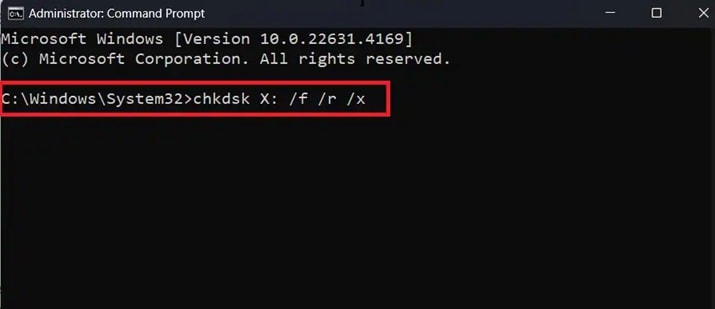
Step 2: Allow the scan to complete fully. Restart the system and check whether the drive becomes accessible.
This method is useful when what is HAMR failure relates to minor logical corruption.
Method 3: Update Firmware or Drivers
Sometimes the drive is not physically damaged. The problem may be caused by outdated firmware or incompatible storage drivers. When the firmware becomes corrupted or old, the system may fail to recognize the drive correctly. In some cases, the drive appears in BIOS but not inside the operating system.
Manufacturers such as Seagate HAMR provide official firmware updates to correct known bugs and improve stability. These updates may fix detection errors, performance issues, or compatibility problems with newer systems. Installing the correct firmware version can restore normal communication between the drive and the motherboard controller.
Step 1: Press Windows + X and open Device Manager. Expand Disk drives. Right-click your HAMR drive and choose Update driver. Select Search automatically for updated driver software.
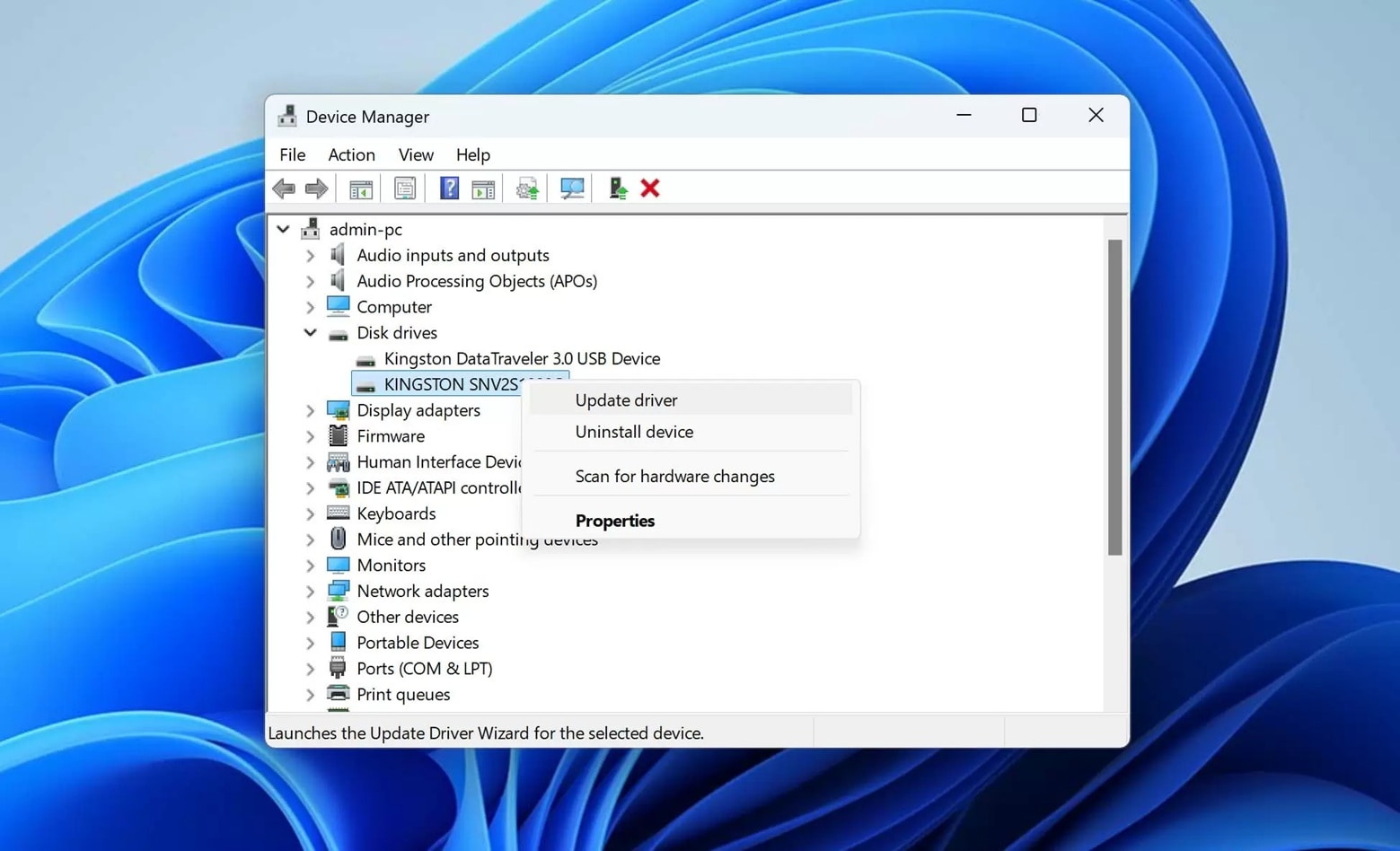
Step 2: After updating the driver, visit the official manufacturer support page to check for firmware updates. Install the correct firmware version carefully and restart the system to apply the changes.
Firmware updates may restore drive detection problems.
Method 4: Restore from System Backups or Cloud Storage
Backups provide the safest form of data protection. When a drive fails, a recent backup can prevent panic and major business disruption. Instead of trying risky repair steps, users can simply restore their files from a secure copy. This method avoids further stress on the damaged drive.
Many enterprise environments using Seagate HAMR maintain automated daily backups as part of their data management policy. These systems often create incremental or full backups at scheduled times. Some companies also store copies in cloud platforms or off-site servers. This layered approach ensures that critical data remains accessible even if hardware failure occurs.
Step 1: Open your backup software or cloud account. Locate the most recent available restore point.
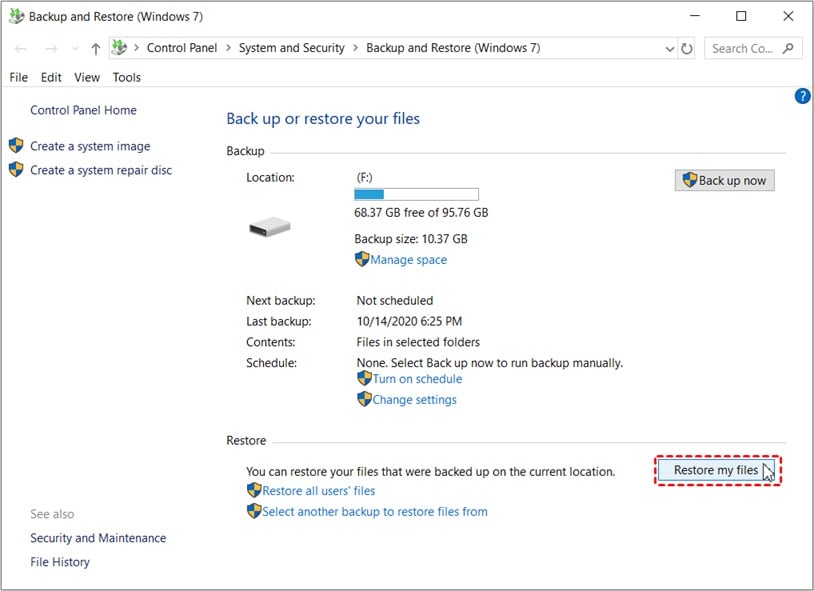
Step 2: Select the required files or complete system image. Restore them to a healthy storage device.
This approach avoids further risk to the damaged drive.
Method 5: Seek Professional Data Recovery Services
If the drive makes clicking sounds or stops spinning, the damage may be mechanical. In such cases, do not attempt DIY repair.
Professional data recovery labs use cleanroom environments. They can replace damaged heads or internal parts safely.
Step 1: Stop using the drive immediately to prevent further platter damage.Step 2: Contact a certified data recovery service that has experience handling HAMR drives.
This option is recommended for severe physical damage cases.
Part 5: Pros and Cons of HAMR Hard Drive
Before investing in this technology, it is important to understand both advantages and limitations.
When considering are HAMR hard drives reliable, most research shows strong enterprise reliability. Still, proper maintenance and cooling are important for long-term stability.
Part 6: Essential Tips Before Recovering Data from HAMR Drives
Before starting any recovery attempt, careful preparation can prevent further loss. These practical steps help protect your data.
Stop using the drive immediately Continued writing may overwrite lost sectors.
Do not format the drive Formatting reduces recovery chances.
Avoid repeated restart attempts Constant power cycling increases mechanical stress.
Check cables and connections Loose cables can cause detection issues.
Monitor unusual sounds Clicking or grinding sounds may indicate hardware damage.
Use recovery software on a separate disk Never install tools on the damaged drive.
Keep proper cooling Excess heat can worsen internal damage.
Maintain regular backups Backup systems greatly reduce data loss risk in Seagate HAMR environments.
These precautions increase the success rate of how to recover lost data from hard drive when HAMR occurs.
Conclusion
HAMR is a major advancement in storage technology. Understanding what is HAMR helps users recognize how modern high-capacity drives operate. With the support of Seagate HAMR technology, storage limits continue to expand in enterprise environments.
However, failures can still happen. Knowing what is HAMR failure and the correct recovery steps reduces panic and improves outcomes. Whether using software tools, firmware updates, or professional services, quick action improves success rates. Users who also ask are HAMR hard drives reliable should remember that proper maintenance and backups remain essential for long-term safety.
FAQs
-
1. What is HAMR in simple terms?
What is HAMR refers to Heat-Assisted Magnetic Recording, a storage method used in advanced hard drives. It works by using a very small laser to briefly heat a tiny spot on the disk surface during the writing process. This heat makes it easier to store data in a much tighter space. As a result, the drive can hold far more data than traditional magnetic drives of the same size. -
2. Are HAMR hard drives reliable for long-term use?
Many users ask are HAMR hard drive reliable for extended use. Enterprise testing shows strong reliability results under controlled conditions. Seagate HAMR models are built for data centers and continuous heavy workloads. Still, like all mechanical drives, they depend on proper cooling, a stable power supply, and regular backups to maintain long-term performance and data safety. -
3. What should I do first if an HAMR failure happens?
If what is HAMR failure becomes your concern due to sudden drive errors, power off the system immediately to prevent further damage. Disconnect the drive carefully and avoid repeated restart attempts. After that, check whether the issue appears logical or physical. You can then choose between software recovery methods or professional recovery services based on the symptoms.


