

 TL;DR:
Shingled Magnetic Recording (SMR) hard drives maximize storage capacity at a lower cost per terabyte by partially overlapping data tracks, making them ideal for archiving but heavily prone to slow write speeds during frequent file modifications.
● SMR drives are optimal for write-once backup storage and media libraries, but should be strictly avoided for system drives, gaming, or heavy editing because modifying a single track forces the drive to rewrite entire neighboring data zones.
● To stabilize write performance and assist the internal controller in managing overlapping zones, you must maintain at least 20 to 30 percent free space on the drive and periodically run built-in defragmentation tools.
● If data loss occurs, immediately disconnect the drive to prevent massive zone overwriting, install professional software like Wondershare Recoverit on a healthy secondary drive, and save the reconstructed files to an entirely different storage device.
Ask AI for a summary
 ChatGPT
 Perplexity
 Gemini
 Claude
 Grok
Grok
Hard drives are still widely used across the world. Many people store photos, office files, videos, software, and backups on them. Even with the rise of SSDs, traditional hard disk drives remain popular because they offer large storage at a lower price. Among the different types of hard drives available today, SMR drives have gained attention. Many users search What is SMR drive because they want to understand how it differs from other drives and whether it fits their needs.
An SMR drive uses a special recording method that allows more data to be stored on the same physical disk surface. This technology increases storage capacity without greatly increasing manufacturing cost. However, it also changes how data is written on the drive.
In this complete guide, you will clearly understand what is SMR drive, the features of an SMR hard drive, and what is SMR data overlap. You will also learn how SMR data overlap works, how to fix SMR data overlap, the pros and cons of SMR hard drives.
Table of Contents
What is SMR Drive?
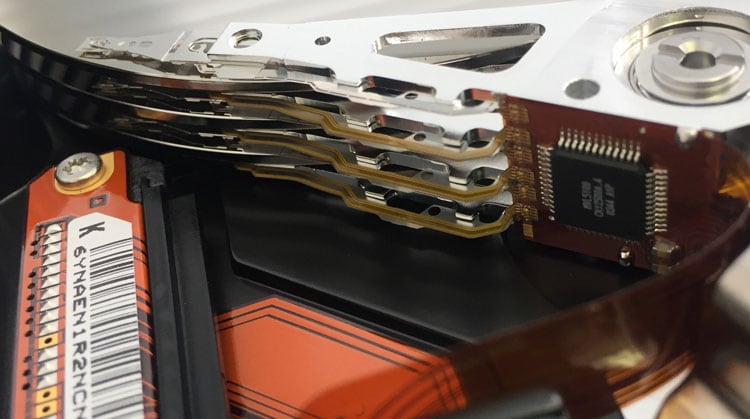
To begin with, it is important to understand what is SMR drive in simple terms. SMR stands for Shingled Magnetic Recording. It is a recording technology used in traditional hard disk drives. Instead of writing data tracks side by side with clear gaps, SMR writes each new track slightly over the previous one. This design increases the amount of data that can fit on the disk platter.
When people ask what is SMR drive, they usually want to know how it affects performance. The main goal of SMR technology is higher storage density. By overlapping tracks, manufacturers can offer drives with larger capacities at a lower cost. However, because tracks overlap, rewriting data becomes more complex. The drive must manage neighboring tracks carefully. This leads directly to what is SMR data overlap and how SMR data overlap works in daily usage.
Key Features of SMR Hard Drive
Understanding the features of SMR hard drive helps you decide whether it suits your storage needs. These drives are designed mainly for high capacity and cost efficiency rather than high-speed performance.
- High storage density: SMR allows more tracks on each platter surface. This increases total capacity without increasing physical size.
- Overlapping track design: Data tracks overlap partially. This design is directly related to what is SMR data overlap.
- Lower cost per terabyte: Because more data fits on the same disk, the price per terabyte is usually lower than that of many other drives.
- Suitable for backup storage: These drives work well for storing files that are written once and rarely modified.
- Firmware-based data management: The internal controller manages overlapping zones automatically.
- Slower sustained random write speeds: If many small files are changed often, performance may drop.
- Large capacity options: SMR drives are often available in multi-terabyte sizes for home and business users.
These features of the SMR hard drive make it popular for archiving, media libraries, and long-term data storage.
What is SMR Data Overlap?
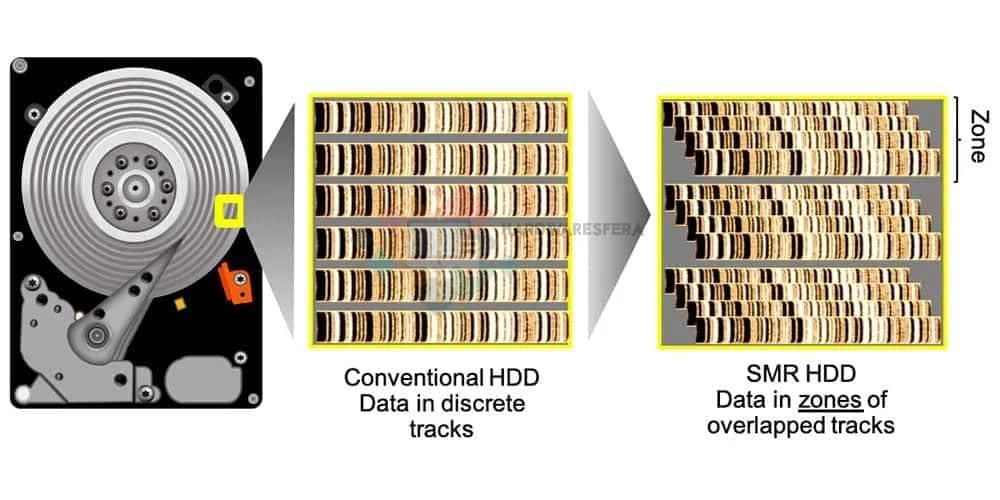
To fully understand what SMR data overlap is, imagine roof shingles placed on a house. Each shingle overlaps the one below it. In an SMR drive, data tracks are written in a similar overlapping pattern. This overlap allows more tracks to fit in the same space.
What is SMR data overlap in practical terms? It means that when one track is rewritten, nearby tracks may also need to be adjusted. The drive handles this process internally. This explains how the SMR data overlap works. The system groups tracks into zones.
When new data is written, it may rewrite an entire zone instead of a single track. This increases complexity but improves capacity.
How to Fix SMR Data Overlap?
Many users search for how to fix SMR data overlap when they notice slower write speeds. It is important to understand that overlap itself is part of the design. It cannot be removed. However, you can reduce performance issues by using the drive correctly.
If you know how SMR data overlap works, you can avoid tasks that stress the drive. Below are practical methods related to how to fix SMR data overlap and improve performance.
Fix 1: Limit frequent small writes: Avoid installing heavy software on the drive. Do not edit large projects repeatedly. This reduces the rewriting caused by SMR data overlap.
Fix 2: Keep sufficient free space: Maintain at least 20 to 30 percent free space. This allows smoother zone management. It supports better handling of how SMR data overlap works.
Fix 3: Use the drive mainly for cold storage: Store backups, movies, and archived files. Avoid using it as a system drive. This minimizes repeated rewriting cycles.
Fix 4: Defragment periodically: Use built-in disk optimization tools. This arranges fragmented blocks more efficiently. It may help stabilize write performance.
Fix 5: Update firmware if available: Visit the official manufacturer website. Install firmware updates carefully. Updated firmware may improve internal data handling.
These steps offer realistic guidance on how to fix SMR data overlap in daily use.
Pros and Cons of SMR Hard Drive
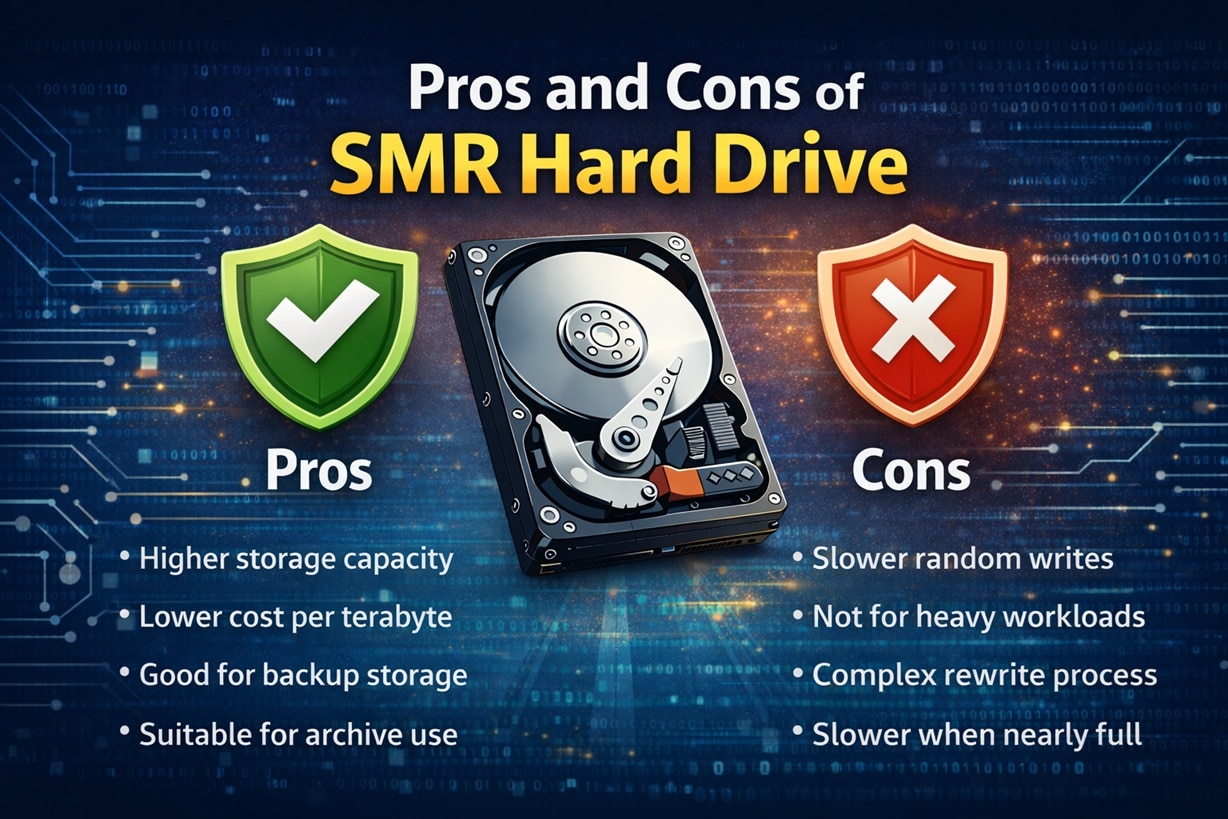
Before buying one, it is important to understand the pros and cons of SMR hard drive. These drives are designed mainly for high-capacity storage at a lower price. They work well in some situations, but they are not suitable for every workload.
How to Recover Lost or Deleted Data from SMR Hard Drive
Data loss can happen for many reasons. Files may be deleted accidentally. Partitions can become corrupted. The drive may be formatted by mistake. In such cases, users often search how to recover lost or deleted data from SMR hard drive. Recovery is possible in many situations if quick action is taken.
Below are four practical methods explaining how to recover lost or deleted data from SMR hard drive safely.
Method 1: Stop Using the Drive Immediately to Prevent Further Overwriting
The first and most important step is to stop using the drive. When files are deleted, the data may still exist until it is overwritten. Continued usage increases the risk of permanent loss.
Because of how SMR data overlap works, rewriting zones can overwrite multiple tracks. This reduces recovery chances. Acting quickly improves success.
Steps:
- Safely disconnect or power down the system containing the drive.
- Avoid saving, copying, or installing anything on that SMR drive.
Method 2: Use Professional Recovery Software like Recoverit
Recovery software can scan the disk surface and detect recoverable files that are no longer visible in the system. When a file is deleted, the data often remains on the drive until it is overwritten. Many modern recovery tools are compatible with SMR technology and can handle its zone-based writing structure. They scan sector by sector to locate file fragments and rebuild them.
Recoverit is designed to perform a deep scan and reconstruct lost file structures with high accuracy. It supports recovery from deleted files, formatted partitions, corrupted volumes, and common logical errors. The program allows file preview before saving, which helps confirm recovery results.
The scanning process may take time, especially on large-capacity drives, but a complete scan usually improves recovery success.

Step 1: Download Recoverit. Install it on a healthy internal drive or an external USB drive. Open Recoverit. Select the affected SMR drive from the main interface under “Hard Drives and Locations,” and click “Start”.

Step 2: Wait until the deep scan completes for maximum results.

Step 3: Use the preview feature to check recoverable files, select the required data, then click “Recover” and save the files to a different storage device, never back to the same SMR drive.

This method is widely recommended for recovering lost or deleted data from an SMR hard drive.
Method 3: Restore from Backups or Cloud Storage
If you maintain regular backups, recovery becomes simple. Many users store copies on external drives or cloud services.
Restoring from backup avoids complex scanning procedures. It is often the safest method for recovering lost or deleted data from an SMR hard drive.
Steps:
- Access your backup software or cloud account, like Google Drive.
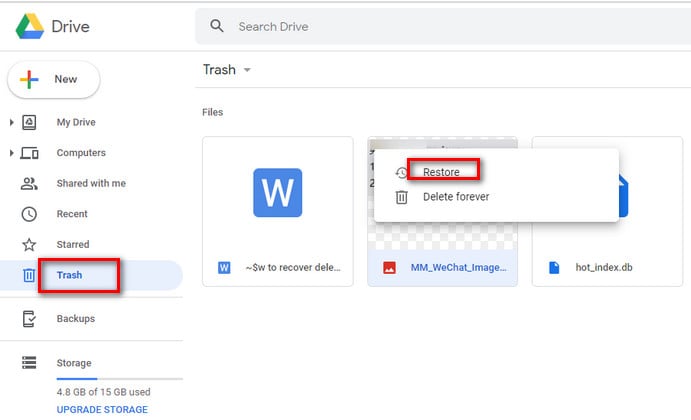
- Go to the Trash section. Restore the required files to a different storage location.
Method 4: Seek Expert Help for Physically Damaged Drives
If the drive produces unusual noise or is not detected by the system, there may be physical damage. In this case, do not attempt software recovery.
Professional data recovery laboratories use clean room environments. They can repair internal components and extract data safely.
Steps:
- Turn off the device immediately.
- Contact a certified data recovery specialist for evaluation.
Part 7: Key Points to Consider Before Using an SMR Drive
Before purchasing, it is wise to understand more than simply what is SMR drive. Proper planning ensures better performance and a longer lifespan.
SMR drives are effective when used correctly. Follow these practical guidelines to avoid common issues.
- Use primarily for storage Ideal for backup files and media libraries.
- Avoid heavy multitasking workloads: Do not use for constant editing or database tasks.
- Maintain free space: Keeping extra space helps manage rewriting zones.
- Learn how SMR data overlap works: Understanding the process improves expectations.
- Always create backups: Protect important files regularly.
- Verify drive specifications: Confirm whether the model uses SMR technology.
- Monitor performance patterns: Watch for unusual slowdowns during write tasks.
Conclusion
Now you have a clear understanding of what is SMR drive and how it functions. SMR technology increases storage density by overlapping data tracks. This design reduces cost while offering high capacity.
You have also learned the features of the SMR hard drive, what is SMR data overlap, and how SMR data overlap works in real usage. In addition, you explored how to fix SMR data overlap, reviewed the pros and cons of SMR hard drive, and understood how to recover lost or deleted data from SMR hard drive using safe methods.
With this knowledge, you can confidently decide whether an SMR drive matches your storage needs.
FAQs
-
Is an SMR drive suitable for daily office work?
Yes, an SMR drive can handle normal office tasks such as storing documents, spreadsheets, PDFs, and presentations. It performs well when files are saved and not constantly edited. However, if your work involves frequent large file updates or heavy database activity, you may notice slower write speeds because of the overlapping track design. -
Does SMR technology reduce drive lifespan?
SMR technology does not directly reduce the lifespan of a hard drive. The overall durability depends on usage habits, workload intensity, and build quality. If the drive is mainly used for backups or archive storage with limited rewriting, it can last for many years without major issues. -
Can deleted files be fully recovered from an SMR drive?
Deleted files can often be recovered if they have not been overwritten. Acting quickly is very important. Stop using the drive immediately and use reliable recovery software or restore from backup. If data is overwritten due to further writing activity, recovery becomes much more difficult.


