

 TL;DR:
ZNS (Zoned Namespace) SSDs are specialized NVMe storage devices that shift data placement control to the host system and require sequential writing within designated zones, effectively reducing internal garbage collection and extending drive endurance.
● These drives are explicitly designed for enterprise cloud environments and large databases with predictable workloads, making them entirely unsuited for consumer desktops or applications that rely on random small writes.
● Deployment strictly requires host-level software capable of managing zone boundaries and reset rules, alongside confirmed motherboard and operating system compatibility with the NVMe ZNS standard.
● ZNS technology prevents partial block overwriting by requiring a complete zone reset to modify data, meaning data recovery with tools like Recoverit is only possible if performed on a separate healthy drive before the original zone is permanently reset.
Ask AI for a summary
 ChatGPT
 Perplexity
 Gemini
 Claude
 Grok
Grok
Digital storage systems are changing very fast. Businesses create huge amounts of data every day. Cloud services store files for millions of users. Video platforms manage large media libraries. Databases handle constant updates. Traditional SSDs work well, but they have hidden limits. Over time, write speed can drop. Internal processes can slow performance. Drive wear can also increase.
This is why many experts now ask what is ZNS SSD and why it matters. ZNS stands for Zoned Namespace. It is a modern storage approach designed to improve efficiency. It gives more control to the host system instead of the drive. It reduces unnecessary background activity. It also improves lifespan under heavy workloads.
In this guide, you will learn how it works, its benefits, its limits, and how to recover data safely.
Table of Contents
Part 1: What is ZNS SSD?
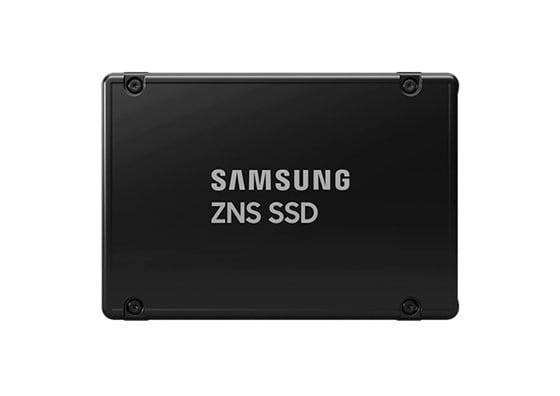
Many people want a simple answer to what ZNS SSD is. A ZNS SSD is a type of solid-state drive that organizes storage space into zones. Each zone must be written in sequence. You cannot randomly overwrite small sections inside the zone. This structured method reduces internal drive workload.
The term NVMe ZNS refers to ZNS drives that use the NVMe interface. In this model, the host system controls how data is placed. The drive performs fewer hidden background tasks. This improves efficiency and reduces write amplification. When users ask what is ZNS SSD, they are usually comparing it to traditional SSD technology.
ZNS drives are mainly used in enterprise systems. They are common in cloud servers and data centers. They are not yet popular on home computers. Their design focuses on performance stability and endurance.
Key Features
- Storage is divided into logical zones
- Sequential write requirement inside each zone
- Reduced internal garbage collection
- Lower write amplification
- Better endurance under heavy workloads
- Improved performance consistency
- Host-managed data placement
- Designed for enterprise and cloud use
Understanding what ZNS SSD is helps you see why it suits structured and high-volume environments.
Part 2: Zoned Namespace Devices (ZNS) Explained
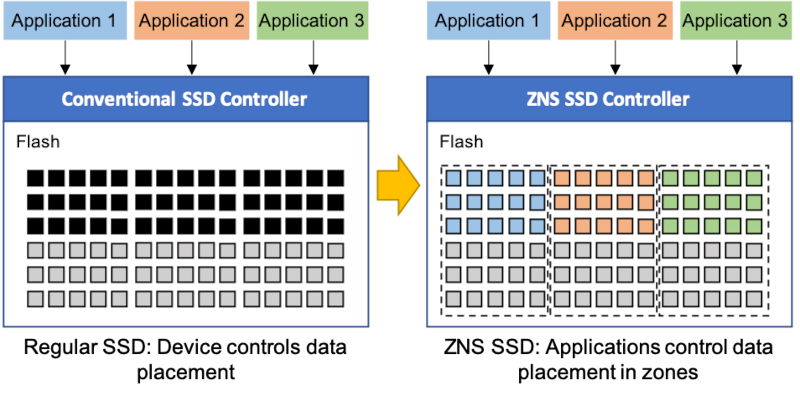
Zoned namespaces Devices are built around a simple rule. Data inside each zone must be written sequentially. A zone must be reset before it can be rewritten. This rule prevents random write behavior that causes internal movement of data.
In traditional SSDs, the drive handles complex internal mapping. It moves data blocks during garbage collection. This causes extra write cycles. Zoned namespaces Devices remove much of this hidden activity. The host application now manages data placement. This reduces internal stress on the drive.
NVMe ZNS builds on this zoned model using the NVMe interface standard. It keeps high-speed communication between the system and the storage device. The result is better workload control. Large database systems benefit the most from this structure.
Zoned namespaces Devices also make performance more predictable. Since data writes follow a defined order, there are fewer sudden slowdowns. This is important in enterprise environments.
Part 3: What is ZNS SSD Technology for Digital Storage?
To understand what is ZNS SSD technology for digital storage, you must compare it with traditional flash storage. Normal SSDs hide their internal design from the user. They manage blocks and pages internally. When data is overwritten, old blocks are cleaned in the background. This creates write amplification.
What is ZNS SSD technology for digital storage trying to solve?
It reduces hidden drive operations. Instead of random overwrites, the system writes data in an organized sequence. This reduces internal data movement. Less movement means less wear.
What is ZNS SSD technology for digital storage, also focuses on endurance.
Flash memory cells have limited write cycles. By reducing unnecessary rewriting, ZNS helps extend lifespan. This is very important for data centers that operate 24 hours a day.
What is ZNS SSD technology for digital storage in simple terms?
It is a smarter way of handling flash storage. It gives more responsibility to the software. It makes the system aware of the storage layout. This creates better long-term reliability.
Part 4: Pros and Cons of ZNS Hard Drive
Before choosing this technology, you must understand the pros and cons of ZNS hard drive solutions. These drives are powerful, but they are not suitable for every user. They work best where software is designed to support zoned storage.
Below are the major pros and cons of ZNS hard drive systems.
When reviewing the pros and cons of ZNS hard drive technology, most benefits appear in enterprise workloads. Casual users may not notice large differences.
Part 5: How ZNS Data Overlap Works?
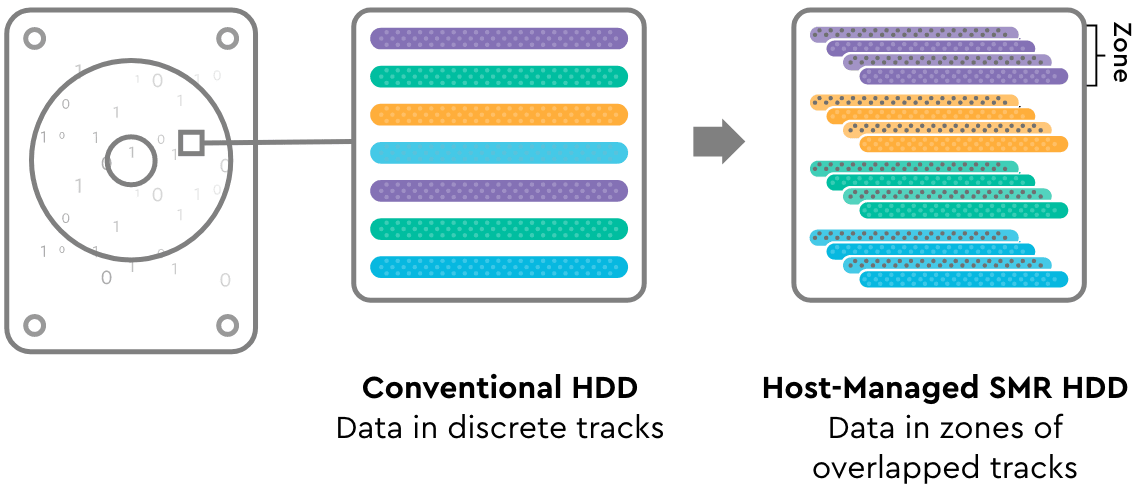
ZNS data overlap does not work like traditional overwriting. In a normal SSD, you can overwrite small parts of data anytime. The drive internally relocates data and clears blocks later. This creates hidden background operations.
In a ZNS SSD, data must follow a sequential pattern inside each zone. You cannot simply replace a small block. If a change is needed, the zone may need to be reset. This means old data is cleared in a structured way.
This method prevents fragmented writes. It also reduces unnecessary internal copying. As a result, performance remains stable under heavy workloads.
ZNS data overlap management requires application awareness. Software must understand zone boundaries. It must write data carefully. Proper handling ensures maximum endurance and stable throughput.
Part 6: How to Recover Lost Data from ZNS SSD? Use Recoverit Software for Data Recovery
Data loss can still happen on a ZNS SSD. Files may be deleted by mistake. Power failure can interrupt processes. Zones may be reset accidentally. System errors may also occur. In such cases, you need a reliable recovery solution.
Recoverit is a professional data recovery software designed to restore lost files from different storage devices. It supports SSD recovery and can handle advanced storage structures. It is suitable for both beginners and professionals.
If you are wondering how to recover lost data from a ZNS SSD, a trusted tool makes the process easier. Recoverit performs deep scanning. It locates recoverable files. It allows a preview before saving data.
Understanding how to recover lost data from ZNS SSD is important for enterprise users. Structured storage still needs protection.

Why Use Recoverit?
- Supports SSD and advanced storage devices
- Deep scan mode for better recovery
- User-friendly interface
- Preview before recovery
- Safe recovery process
- Works with formatted drives
Many professionals choose this tool when learning how to recover lost data from ZNS SSD systems.
Recovery Steps
Step 1: Install Recoverit on a healthy drive. Do not install it on the affected ZNS SSD. Launch the program and select the damaged drive.

Step 2: Start a deep scan. The software will analyze storage zones and locate lost files. This may take some time, depending on capacity.

Step 3: Preview the recovered files. Select the files you want to restore. Save them to a different storage location to avoid overwriting.

These steps simplify how to recover lost data from ZNS SSD safely.
Part 7: Pro Tips to Remember Before Using ZNS SSDs
ZNS technology requires planning. It is not plug-and-play like standard SSDs. You must understand workload requirements before deployment.
Here are important tips to remember:
- Ensure your system supports NVMe ZNS before purchasing or deploying the drive. Check motherboard, firmware, and operating system compatibility. Not all environments are ready for zoned storage.
- Use software designed for zoned storage. Applications must understand zone boundaries and sequential write rules. Without proper support, performance and endurance benefits will not appear.
- Plan workload patterns in advance. ZNS works best with predictable and sequential data writes. Evaluate how your applications handle data before implementation.
- Avoid random small writes whenever possible. Random write behavior reduces the efficiency of zoned storage and can create management challenges.
- Monitor zone usage regularly. Track which zones are active, full, or ready for reset. Proper monitoring helps prevent performance drops and storage errors.
- Implement strong backup strategies. Even though ZNS improves endurance, data loss risks still exist. Maintain regular backups to protect critical information.
- Test compatibility before deployment. Run controlled trials in a staging environment. Confirm that hardware, drivers, and applications function correctly with zoned storage.
- Train IT teams about zone management. Administrators should understand reset operations, write rules, and workload planning to ensure smooth long-term operation.
- Careful preparation ensures smooth performance.
Conclusion
ZNS SSD is a modern storage approach designed for structured workloads. It reduces hidden drive operations that normally happen in traditional SSDs. This lowers write amplification and limits unnecessary data movement. As a result, the drive experiences less wear over time. It increases endurance and helps maintain steady performance under heavy workloads. Another important change is that it shifts control from the drive to the host system, allowing software to manage how and where data is written.
Many organizations are now exploring what is ZNS SSD to improve large scale storage systems such as cloud platforms and database servers. It is especially useful in environments where data is written in large, predictable patterns.
While it offers strong benefits, it requires proper software support and planning before deployment. It is not ideal for casual home users or systems that rely on random small writes. When used correctly in the right environment, it delivers stability, longer drive life, and better long-term efficiency.
FAQs
-
1. Is ZNS SSD better than traditional SSD?
A ZNS SSD can be better than a traditional SSD in enterprise environments that handle large, sequential data writes. It reduces write amplification and improves endurance, which helps maintain stable performance over time. However, for everyday desktop use or workloads with frequent random writes, a traditional SSD may be more practical and easier to manage. -
2. Do ZNS drives require special software?
Yes, ZNS drives require host-level software that understands zoned storage rules. The system must manage how data is written within zones and when zones are reset. Without proper software support, the drive cannot deliver its expected performance and efficiency benefits. -
3. Can data be recovered from ZNS SSD?
Yes, data can be recovered from a ZNS SSD using professional recovery tools, provided the data has not been permanently overwritten or the zone has not been fully reset. Recovery success depends on the timing and the condition of the drive. Acting quickly after data loss increases the chances of successful restoration.


