


 TL;DR:
BTRFS metadata functions as the internal structural map of the file system, organizing directories, permissions, and block references within balanced B-tree structures separately from actual file content to enable copy-on-write updates and rapid snapshots.
● The diagnostic command btrfs check carries a high risk of further corruption and must only be executed on unmounted partitions, whereas btrfs scrub safely corrects minor checksum errors on actively mounted filesystems utilizing existing redundancy.
● When severe metadata damage prevents standard partition mounting, utilizing the read-only recovery mount option (mount -o recovery,ro) allows temporary access to previous stable transaction states for immediate file extraction.
● BTRFS assigns structural information to dedicated chunks independently of data, meaning metadata exhaustion will completely halt system writes even if standard storage space remains available.
Ask AI for a summary
 ChatGPT
 Perplexity
 Gemini
 Claude
 Grok
Grok
Modern storage systems must handle large volumes of information every day. Every saved file needs structure so the system can organize and retrieve it quickly. A file system provides this structure. BTRFS is a modern file system used in many Linux environments. It is designed for reliability, scalability, and built-in data protection. Many users who manage Linux servers or desktops often ask a clear question: what is BTRFS metadata. The answer explains how BTRFS keeps records of files and maintains order across the storage system.
To understand what is BTRFS metadata, it is important to separate file content from file information. The content is the actual data inside a document or image. Metadata is the description of that data. It records file names, sizes, locations, permissions, and timestamps. If metadata becomes damaged, the system may lose access to files even though the data blocks still exist.
In serious situations, administrators may need to explore how to reconstruct BTRFS metadata tree. This procedure, known as BTRFS metadata tree reconstruction, becomes necessary when structural corruption prevents normal access.
Table of Contents
What is BTRFS Metadata?
When someone asks What is BTRFS metadata, the most accurate explanation is simple. It is the internal information that defines how files are stored and managed inside a BTRFS file system. It includes directory entries, file names, permissions, timestamps, allocation maps, and references to disk blocks. It also tracks sub volumes and snapshots. All this information is stored separately from the actual data blocks.
BTRFS organizes its metadata using B-tree structures. These trees keep information balanced and searchable. Each node inside the tree contains keys and pointers. The keys describe objects such as files or directories. The pointers direct the system to the next block.
Because of this design, BTRFS scales well across large disks. However, if these trees become inconsistent, recovery becomes difficult. That is when administrators look into how to reconstruct the BTRFS metadata tree in order to regain access to storage volumes.
Key Features of BTRFS Metadata
Uses a B-tree-based structure for indexing: BTRFS organizes metadata inside balanced B-tree structures. This design keeps records sorted and easy to locate. Searches remain fast even when the storage size becomes very large. The tree structure also helps maintain stability during updates.
- Stores checksums for both data and metadata: The file system calculates a checksum for every block. This includes both file content and metadata blocks. When data is read, the system verifies the checksum. If it does not match, the system detects corruption early.
- Supports copy-on-write updates: BTRFS does not overwrite existing metadata blocks directly. Instead, it writes new blocks and updates references. This reduces the chance of permanent damage during a crash. It also keeps older versions safe until changes are confirmed.
- Enables fast snapshot creation: Snapshots are created by copying metadata references rather than full data blocks. This process is quick because only structural information changes. It allows users to capture system states without a large storage overhead.
- Tracks subvolumes independently: Each subvolume has its own metadata structure. This separation allows better control and flexible management. Users can create, delete, or restore subvolumes without affecting others.
- Separates metadata chunks from data chunks: BTRFS allocates metadata in dedicated chunks. This separation improves organization and helps prevent conflicts between file content and structural information. It also allows better space management.
- Supports multiple device configurations: Metadata can be stored with redundancy across multiple drives. Profiles such as RAID1 help protect structural information from single disk failure. This increases reliability in multi-device setups.
These features help the system stay stable during normal operations. They also reduce direct overwrite risks.
How Does BTRFS Metadata Work?
BTRFS relies on a copy-on-write mechanism. When a file changes, the system writes new metadata blocks instead of overwriting old ones. This ensures that previous versions remain intact until a transaction is fully committed. If a crash happens during an update, the file system can revert to the last stable state.
Metadata is grouped into chunks. These chunks are allocated separately from data chunks. Each chunk may use a redundancy profile such as RAID1 or RAID10. When the system reads a file, it first checks metadata to locate the correct data blocks. The process is fast because the tree structure is indexed and balanced.
During each transaction, BTRFS updates its root tree and extent tree. These internal structures manage references between files and disk blocks. If corruption affects these areas, the file system may fail to mount. In extreme cases, BTRFS metadata tree reconstruction may be required to restore the logical layout of files.
Pros and Cons of Btrfs Metadata
BTRFS metadata provides powerful functionality. However, it also introduces certain operational challenges.
Common Issues with Btrfs Metadata
Even advanced systems can face problems. BTRFS metadata issues usually appear after hardware faults, unexpected shutdowns, or firmware bugs. Users may experience mount failures or read errors. Below are common problems and short explanations.
- Checksum mismatch: The stored checksum does not match the calculated value.
- Corrupted tree nodes: B-tree blocks become unreadable.
- Missing root item: The main file system root cannot be located.
- Metadata space full: The disk has space for data but not metadata.
- Extent reference errors: Incorrect links between metadata and data blocks.
- Snapshot inconsistency: Snapshot metadata references break.
- Transaction abort: System crash during metadata update.
- Device write error: Physical disk issues damage metadata blocks.
Each of these issues may require careful troubleshooting.
How to Recover BTRFS Metadata
When metadata corruption occurs, users often focus on how to recover lost BTRFS metadata as quickly as possible. The correct method depends on severity. Some cases allow simple repairs. Others require file extraction before repair attempts. Below are four structured recovery approaches.
Method 1: Use Recoverit

Recoverit is a professional data recovery tool designed to retrieve files from damaged or inaccessible file systems. When metadata corruption prevents a BTRFS partition from mounting, direct repair attempts can sometimes increase risk. In such situations, the safer approach is to first recover important files. This method focuses on extracting data before attempting structural repairs.
This tool scans the storage device at a deep level. It looks beyond normal file system structures and searches disk sectors for recognizable file patterns. Even if metadata is damaged, file content may still exist physically on the disk. Recoverit attempts to rebuild files from these raw sectors, which makes it useful in severe corruption cases.
Step 1: Connect the affected drive to a working system. Install Recoverit and select the damaged BTRFS partition. Start a full scan.

Step 2: Review the scan results carefully.

Step 3: Preview files to confirm integrity. Click Recover. Save them to a different healthy storage device.

Method 2: Use BTRFS check to scan and Repair Metadata Inconsistencies
The btrfs check command is a built-in diagnostic tool for examining internal file system structures. It scans metadata trees and reports logical inconsistencies. This includes problems such as missing references, invalid nodes, or checksum mismatches. It is commonly used when the system refuses to mount the partition.
However, this tool must be used carefully. It should never be run on a mounted file system. Running it incorrectly can cause further corruption. The repair option is powerful but risky. It should only be used when backups are available, and other safer recovery options have failed.
Step 1: Unmount the affected partition. Run the command: btrfs check /dev/sdX
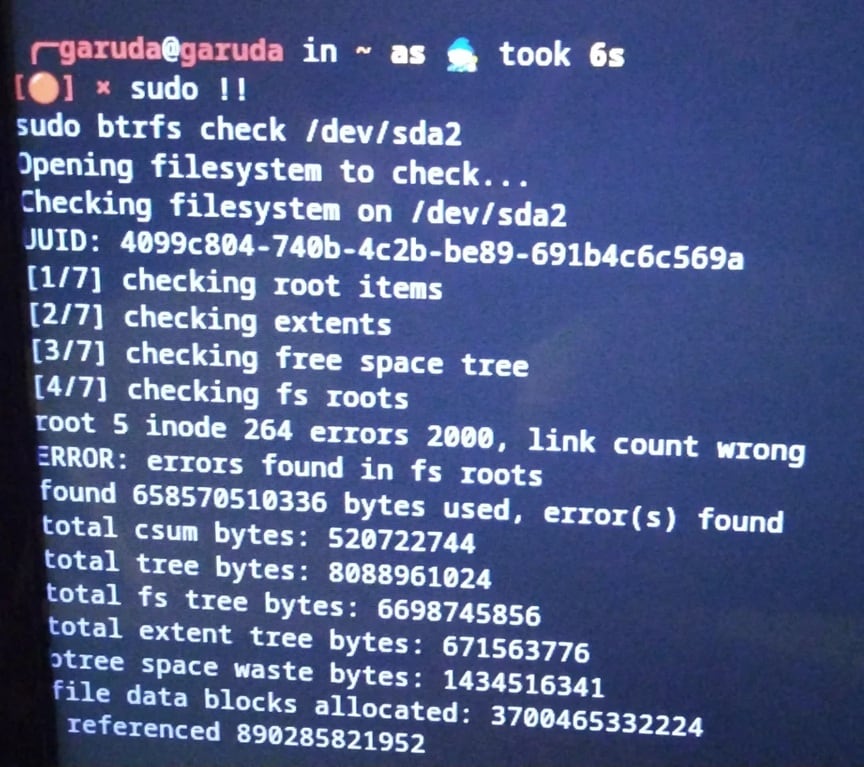
Step 2: If errors are reported and backups exist, run: btrfs check --repair /dev/sdX
Method 3: Run btrfs scrub to Verify and Fix Checksum Errors
The btrfs scrub command is designed to verify data integrity. It reads every data and metadata block stored in the file system. During this process, it recalculates checksums and compares them with stored values. If a mismatch appears and redundancy exists, the system attempts automatic correction.
Unlike btrfs check, scrub operates on a mounted file system. It is considered safer because it does not directly modify structural metadata unless a correct copy is available. This method is helpful when corruption is minor and redundancy profiles are in use.
Step 1: Mount the BTRFS partition normally in read-write mode.
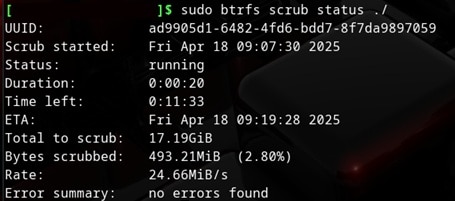
Step 2: Run the command: btrfs scrub start /mountpoint Then monitor progress using: btrfs scrub status /mountpoint
Method 4: Mount with Recovery Options
Sometimes a BTRFS partition cannot mount using standard parameters. In such cases, recovery mount options may allow access to older metadata roots. The file system maintains previous transaction states. Recovery mode attempts to use one of these earlier stable points.
This method does not repair metadata directly. Instead, it provides temporary access in read-only mode. The goal is to copy important files before deeper repair attempts. It is often used when metadata damage prevents normal mounting, but older tree structures are still readable.
Step 1: Open a terminal and run: mount -o recovery,ro /dev/sdX /mnt
Step 2: If mounting succeeds, immediately copy critical files to another storage device.
Pro Tips to Prevent Metadata Issues in BTRFS
Prevention reduces downtime and stress. A few disciplined practices can protect metadata structures.
- Maintain regular full backups: Create complete backups of important data at fixed intervals. Store copies on external drives or remote servers. If possible, keep at least one backup offline to protect against system-wide failures.
- Avoid hard power cuts: Sudden power loss can interrupt metadata updates and cause corruption. Always shut down systems properly. For servers or critical machines, use a UPS to provide backup power during outages.
- Monitor SMART disk health: Use SMART monitoring tools to check drive status regularly. Look for warning signs such as reallocated sectors or read errors. Replace failing drives before they cause data or metadata damage.
- Keep sufficient free metadata space: BTRFS requires dedicated space for metadata operations. If the disk becomes nearly full, metadata allocation may fail. Maintain safe free space levels to ensure smooth performance.
- Schedule scrub operations monthly: Run btrfs scrub on a regular schedule. This process verifies checksums for data and metadata blocks. Early detection of errors allows correction before problems spread.
- Update the Linux kernel carefully: Kernel updates may include changes to BTRFS behavior. Test updates in a non-production environment first. Confirm stability before applying them to important systems.
- Use reliable storage hardware: Choose high-quality drives from trusted manufacturers. Avoid using damaged or unstable hardware. Reliable components reduce the risk of silent corruption.
Conclusion
Understanding what is BTRFS metadata helps users manage Linux storage more confidently. Metadata is the structural map of the file system. Without it, data becomes unreachable. BTRFS strengthens protection using checksums and copy-on-write logic.
When corruption happens, knowing how to recover lost BTRFS metadata becomes essential. Basic tools like scrub or check can solve moderate errors. Severe cases may require learning how to reconstruct BTRFS metadata tree using expert procedures. BTRFS metadata tree reconstruction should always be done with full backups and careful planning.
FAQs
-
1. Can damaged BTRFS metadata always be repaired?
Not always. Minor errors can often be fixed using built-in tools. Severe structural corruption may require professional recovery software or backups. -
2. What triggers metadata corruption in BTRFS?
Common causes include sudden power loss, failing storage hardware, memory errors, or incorrect system shutdown. -
3. Is metadata more important than data blocks?
Both are important. However, without metadata, the system cannot locate data blocks, which makes recovery more difficult.


