
 TL;DR:
Permanently deleted Snapchat Memories cannot be recovered from Snapchat's servers or by Snapchat Support, meaning successful retrieval relies entirely on locating separate saved copies in your device's photo library, cloud backups, or external storage.
● Before assuming a Memory is deleted, troubleshoot loading issues by updating the app and clearing the cache, but never log out or switch devices unless "Backup Progress" in settings displays "Complete" to avoid wiping unbacked local app data.
● Check for surviving local duplicates in Apple's Recently Deleted folder (available for 30 days), Google Photos Trash (60 days for backed-up items, 30 days for unbacked), or download existing server files through Snapchat's My Data export.
● Use Wondershare Recoverit exclusively to scan for local copies on readable external drives, memory cards, or computer storage, as no software can scan Snapchat servers, extract from locked iPhone internal storage, or bypass the encryption of a reset My Eyes Only passcode.
Ask AI for a summary
 ChatGPT
 Perplexity
 Gemini
 Claude
 Grok
Grok
Can you recover deleted Snap Memories? If the Memory was permanently deleted from Snapchat, the direct answer is no. Snapchat says deleted Memories are erased from its servers as soon as possible and cannot be recovered by Snapchat Support. There is no Snapchat Recently Deleted folder for Memories.
That does not mean every missing Snap is gone. A Memory may be missing because it is not loading, the backup never finished, you signed into a different account, or a separate copy still exists in Camera Roll, iCloud Photos, Google Photos, a chat, a computer, or an external drive. This guide separates those cases so you do not waste time on fake "deleted Memories" fixes.
Wondershare Recoverit Photo Recovery is useful only for deleted local copies that once existed on readable storage, such as a computer, memory card, USB drive, external drive, or exported photo folder. It cannot scan Snapchat's servers, restore My Eyes Only after a passcode reset, bypass account protection, or recover a cloud-only Memory that was never saved locally.
Try Wondershare Recoverit to Recover Deleted Snapchat Memories
 Security Verified. Over 7,302,189 people have downloaded it.
In this article
-
- Method 1. Fix Snapchat Memories That Are Missing or Not Loading
- Method 2. Download Existing Memories Through Snapchat My Data
- Method 3. Check Camera Roll, iCloud Photos, Google Photos, or Other Backups
- Method 4. Look for Shared, Exported, Downloaded, or Offline Copies
- Method 5. Recover Local Snap Copies With Wondershare Recoverit
- Method 6. Contact Snapchat Support Only for Account or Loading Issues
Part 1. Can You Recover Deleted Snapchat Memories?
Sometimes you can get a Snap back. But you are not usually recovering it from Snapchat after deletion. You are either fixing a loading issue, exporting a Memory that still exists, or finding another copy outside Snapchat.
Missing Snapchat Memories vs Deleted Memories
A missing Memory may still exist in your account. Snapchat's Memories page recommends updating Snapchat, restarting the app or device, checking your internet connection, and clearing cache when saved Snaps are missing from Memories. Snapchat also says clearing cache will not delete Memories, Snaps, or Chats.
A deleted Memory is different. Snapchat says its support team cannot recover lost or deleted Memories. If you tapped Delete and there is no separate copy, Snapchat is not the place to restore it.
Backed-Up Memories vs Memories That Never Finished Backing Up
Snapchat warns users not to log out, uninstall Snapchat, or switch devices before Memories are backed up. In Snapchat settings, Memories > Backup Progress should read Complete. The official backup guidance says unbacked Memories may be lost.
This is why "snapchat deleted my Memories how do I get them back" often has two answers. If the Snap was fully backed up and only failed to load, troubleshooting may bring it back. If it never finished backing up and the local app data is gone, there may be nothing left inside Snapchat.
Does Snapchat Have a Recently Deleted Folder for Memories?
No. Snapchat Memories do not have a Recently Deleted album like iPhone Photos or a Trash folder like Google Photos. Once a Memory is deleted from Snapchat, there is no in-app grace period to restore it. You can still check Recently Deleted or Trash in your phone's photo apps if the Snap was also saved to Camera Roll.
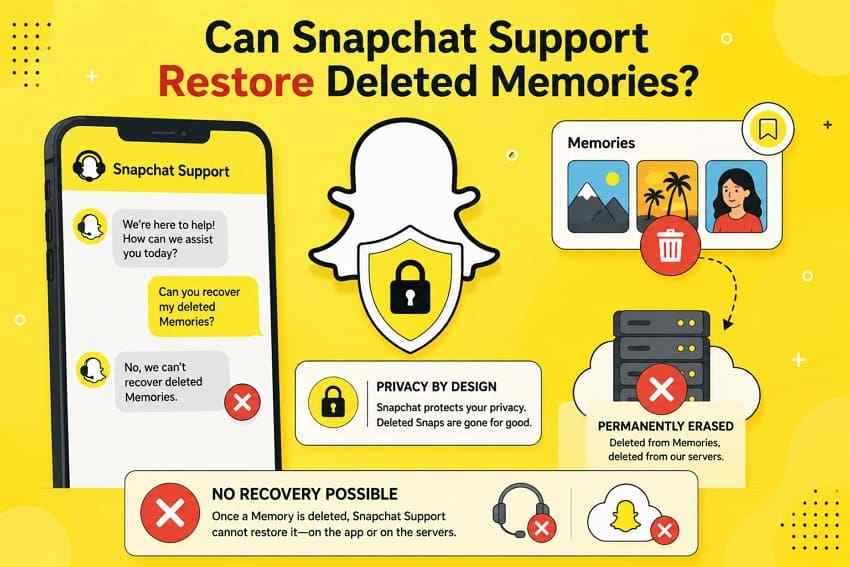
Can Snapchat Support Restore Deleted Memories?
No. Snapchat Support can help with sign-in, app loading, backup, or account issues. It cannot restore a Memory after permanent deletion. Snapchat explains that deleted Memories are designed to be erased from its servers as soon as possible.
When a Copy of a Deleted Memory May Still Exist Elsewhere
Deleting a Memory inside Snapchat does not necessarily delete every copy you created outside Snapchat. Check these places before giving up:
- Camera Roll or Gallery: The Snap may have been saved locally when you posted or exported it.
- iCloud Photos or Google Photos: A Camera Roll copy may have synced to cloud storage.
- Recently Deleted or Trash: Your phone's photo app may still hold a local copy for a limited period.
- Chats, Stories, messages, or email: You may have sent, exported, or downloaded the Snap somewhere else.
- Computer, USB drive, SD card, or external drive: A transferred local copy can be recovered like other deleted photos or videos if it has not been overwritten.
Part 2. Why Snapchat Memories Disappear?
The right recovery path depends on what happened. Use this table before you try cache clearing, My Data, phone recovery, or local file recovery.
| Situation | What It Means | Recovery Possibility |
| Memory was accidentally deleted | The Snapchat-server copy was removed | Not through Snapchat; only separate copies may remain |
| Memory was not completely backed up | Backup Progress was not Complete before logout, uninstall, or device switch | Limited; check Camera Roll or local copies |
| Snapchat Memories are missing or not loading | The Memory may still exist but the app is not displaying it | Possible through app troubleshooting |
| App cache or device storage problem | Low storage, old app version, bad network, or cache issue blocks loading | Possible if the Memory still exists |
| User logged out, switched devices, or reinstalled too early | Unbacked local app data may have been removed | Only if another copy exists |
| My Eyes Only content was lost after a passcode reset | Resetting the forgotten passcode deletes the Snaps protected by the old passcode | No Snapchat recovery; only separate copies outside My Eyes Only |
My Eyes Only has its own hard boundary. Snapchat's My Eyes Only passcode page says it cannot recover a forgotten passcode, and resetting it deletes everything currently in My Eyes Only. Recovery software cannot bypass that encryption or recover a server-side My Eyes Only item after reset.
Part 3. What to Check Before Trying Snapchat Memories Recovery
Do these checks before installing recovery tools or deleting app data.
- Update Snapchat to the latest version: App bugs can hide Memories or block loading.
- Check whether the Memory is missing or actually deleted: Search your Memories timeline, Stories, My Eyes Only, Camera Roll, and Chats before assuming permanent deletion.
- Verify Memories Backup Progress: Open Snapchat settings, go to Memories, and confirm Backup Progress says Complete.
- Check Camera Roll and local photo folders: Look in Photos, Gallery, Downloads, Files, DCIM, Snapchat, and exported folders.
- Check other devices or storage locations: Search iCloud Photos, Google Photos, an old phone, a computer, a USB drive, an external disk, and messaging apps.
- Avoid removing local copies until all locations are checked: Do not uninstall Snapchat, erase the phone, empty Recently Deleted, or overwrite a computer drive that may hold exported Snaps.
Part 4. How to Get Deleted Snapchat Memories Back
These methods are ordered by likelihood and safety. Start with missing-Memories fixes, then export what Snapchat still holds, then search for separate copies.
Method 1. Fix Snapchat Memories That Are Missing or Not Loading
If the Memory was not deleted, basic app fixes may make it visible again. These steps do not recover a permanently deleted Memory; they refresh the app and connection.
Check your internet connection. Switch between Wi-Fi and mobile data. Memories stored on Snapchat's servers need a stable connection to load.
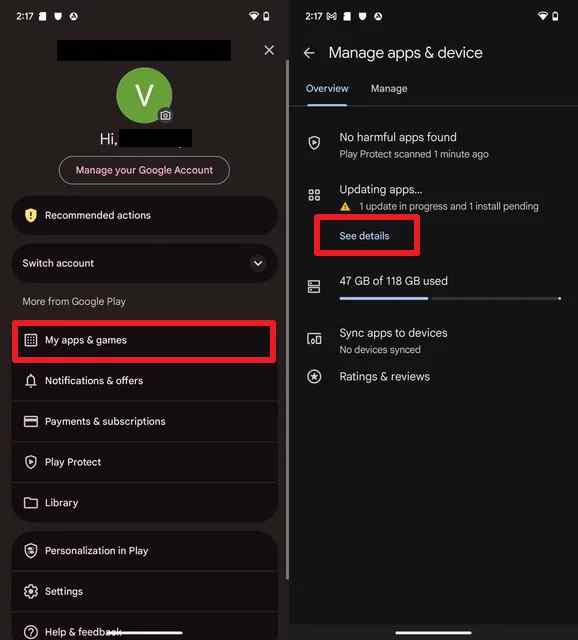
Update Snapchat on Android. Open Google Play, tap your profile, go to Manage apps and device, and update Snapchat if an update is available.
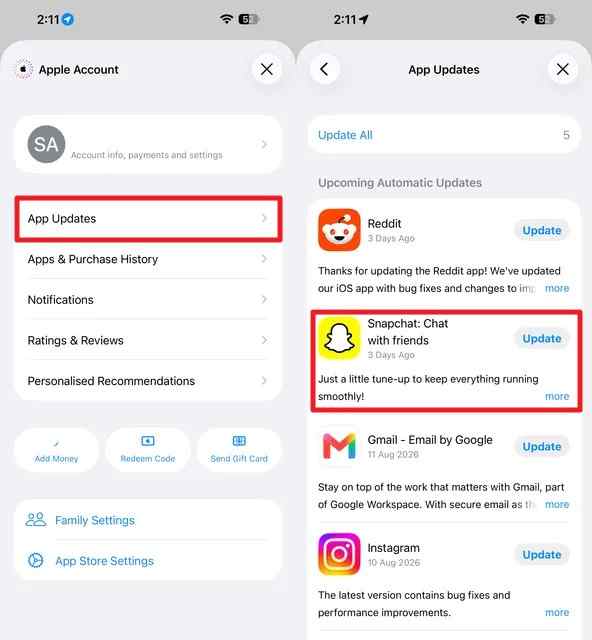
Update Snapchat on iPhone. Open the App Store, tap your profile icon, and update Snapchat if it appears in the update list.
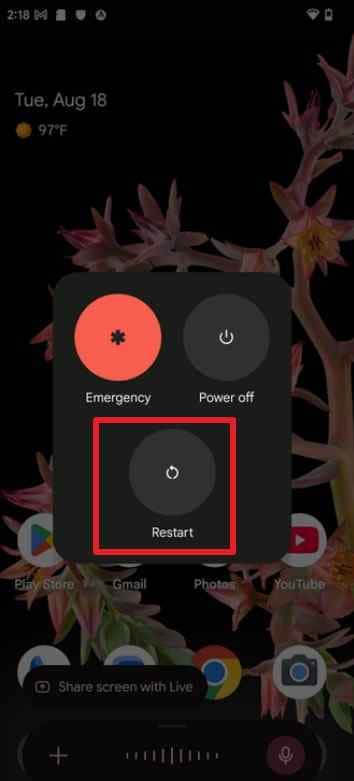
Restart your Android phone. Hold the power button or the power-button combination your device uses, then restart.
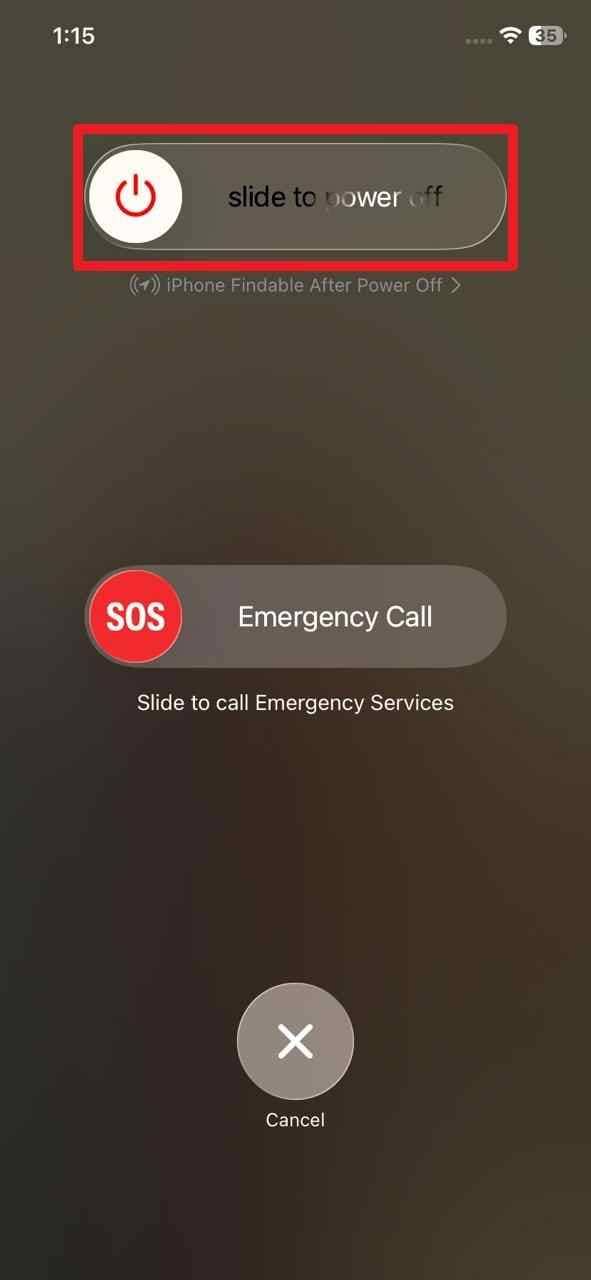
Restart your iPhone. Power it off, wait about 30 seconds, then turn it back on and check Memories again.
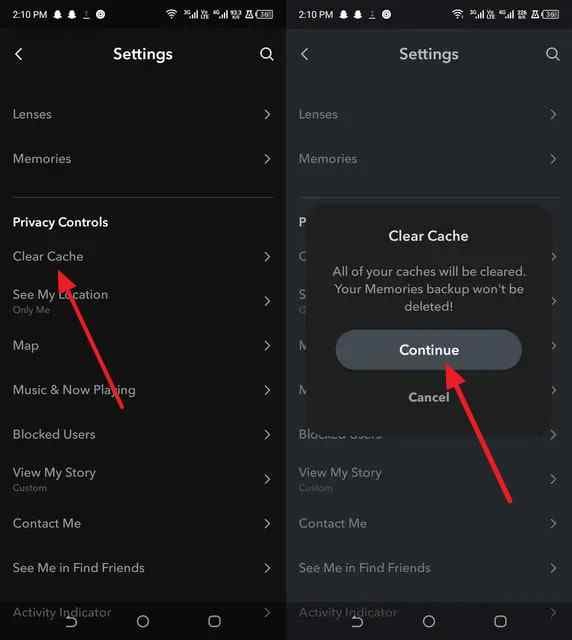
Clear Snapchat cache on Android. Open Snapchat settings and choose Clear Cache. Snapchat says clearing cache does not delete Memories, Snaps, or Chats.
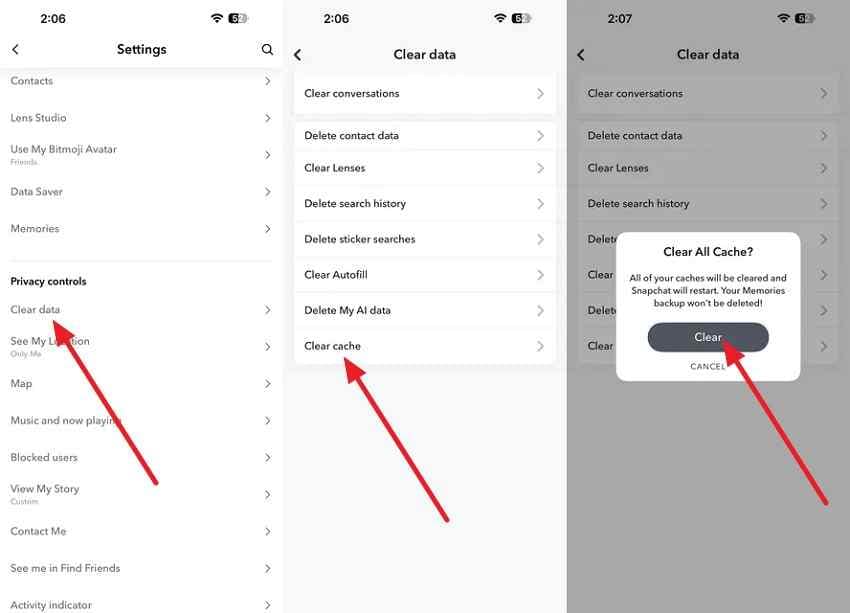
Clear Snapchat cache on iPhone. In Snapchat settings, choose Clear Data, then Clear Cache, and reopen Memories.
Method 2. Download Existing Memories Through Snapchat My Data
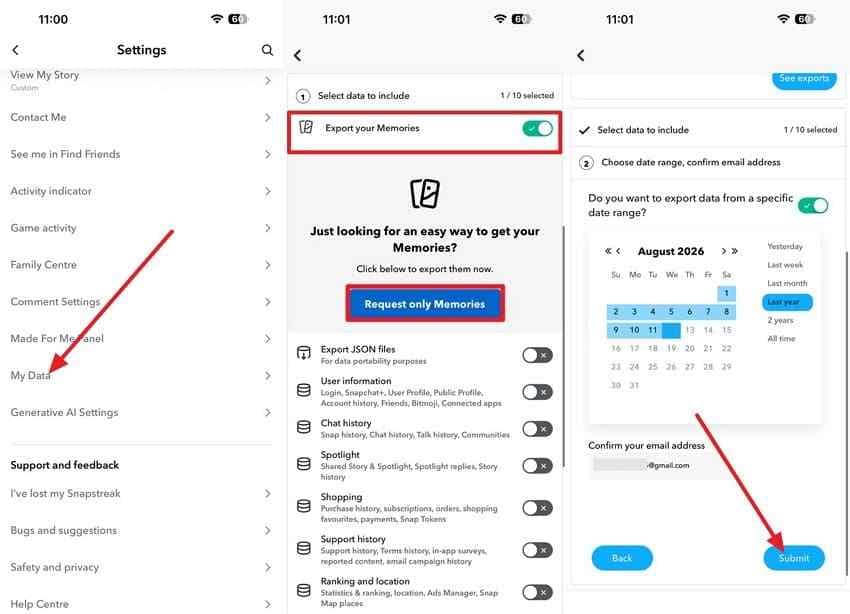
Snapchat My Data can export account data and, when available, Memories that Snapchat still holds. It cannot restore a Memory that has already been permanently deleted from Snapchat's servers.
Step 1. Open Snapchat settings, go to My Data, choose the Memories export option if it is available, set the date range and email, then submit the request.
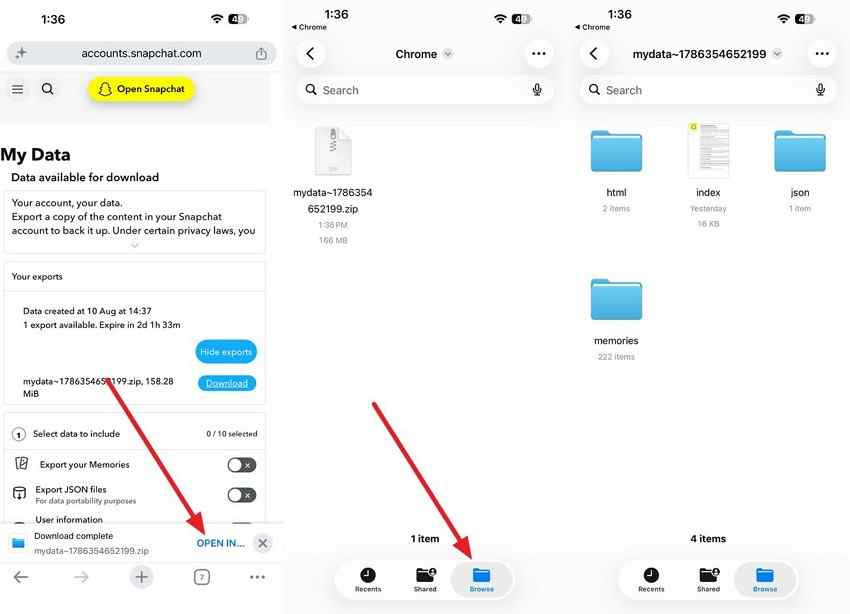
Step 2. When Snapchat emails the export link, open it, download the archive, and unzip it in Files, Finder, or File Explorer.
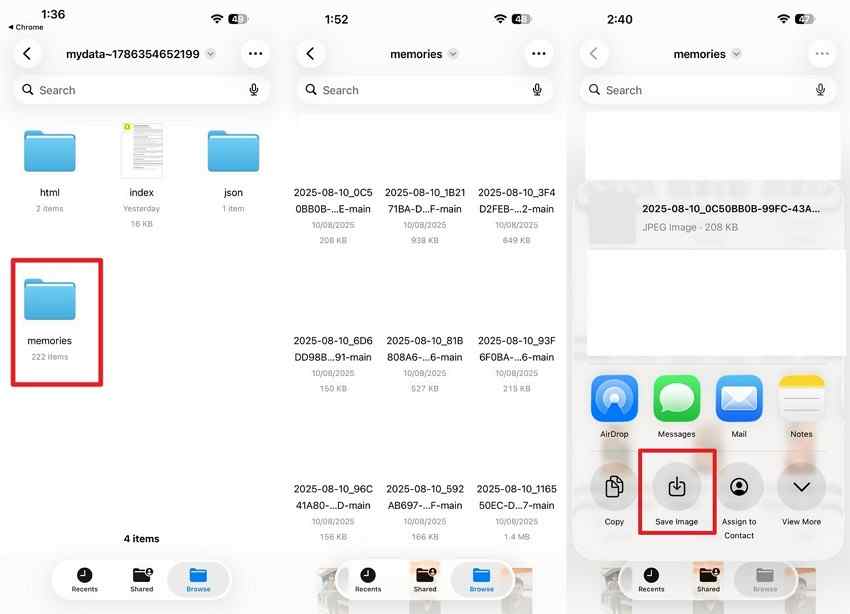
Step 3. Open the Memories folder inside the export. Save the media files you still need to a safe local folder.
Method 3. Check Camera Roll, iCloud Photos, Google Photos, or Other Backups
If the Snap was saved outside Snapchat, check the phone's photo library first. Apple says deleted photos and videos remain in Recently Deleted for 30 days before permanent deletion. Google Photos says backed-up photos and videos stay in Trash for 60 days, while items that were not backed up stay for 30 days.
Also check Downloads, Files, Gallery, DCIM, iCloud Photos, Google Photos, OneDrive, Dropbox, Google Drive, and any phone backup you created before the Memory disappeared. A local copy is separate from the Snapchat-server Memory.
Method 4. Look for Shared, Exported, Downloaded, or Offline Copies
Ask where the Snap went before it disappeared. Did you send it in a chat, post it as a Story, save it to a computer, export it for editing, email it, or post it to another social app? Another person may still have a copy of a Snap you sent, and a downloaded file may exist on an old laptop, SD card, or external drive.
Method 5. Recover Local Snap Copies With Wondershare Recoverit
Use Recoverit when the missing Snap was once saved as a normal photo or video file on readable local storage and then deleted or lost. Examples include an exported Snapchat folder on a Windows PC or Mac, a camera roll backup copied to an external drive, a USB archive, or a memory card used to transfer videos.
Do not use Recoverit as a Snapchat-account recovery tool. It cannot scan Snapchat servers, directly scan locked iPhone internal storage, restore cloud-only Memories, bypass My Eyes Only, or recover overwritten data.
- Photo and video recovery: Helps recover deleted local Snapchat photos and videos when file data still remains.
- Storage-device support: Scans readable computers, external drives, USB drives, memory cards, and other supported local storage.
- Format coverage: Supports common media types such as JPG, PNG, HEIC, MP4, and MOV when recoverable data is present.
- Preview before saving: Lets you check found media before recovering it.
- Separate-save workflow: Saves recovered files to another drive so the source is not overwritten.
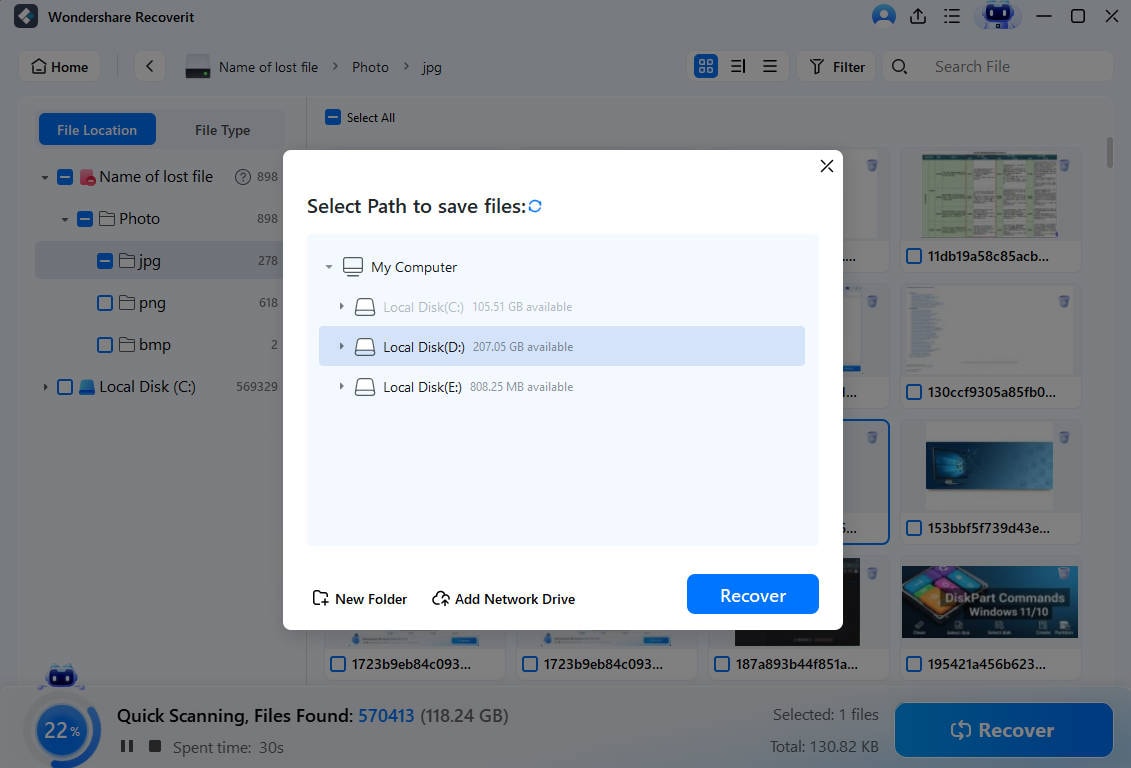
Step 1. Choose the storage to search.
Connect the computer drive, USB drive, memory card, or external drive that once held the exported Snap files. Open Recoverit and select that location.

Step 2. Filter down to photos and videos.
Scan the device, then use File Type, date, and path filters to narrow results to Snapchat photo and video formats.

Step 3. Preview and save the recovered files.
Preview the found photos and videos, select the files you need, and recover them to a different drive or folder.
Try Wondershare Recoverit to Recover Deleted Snapchat Memories
Security Verified. Over 7,302,189 people have downloaded it.
Method 6. Contact Snapchat Support Only for Account or Loading Issues
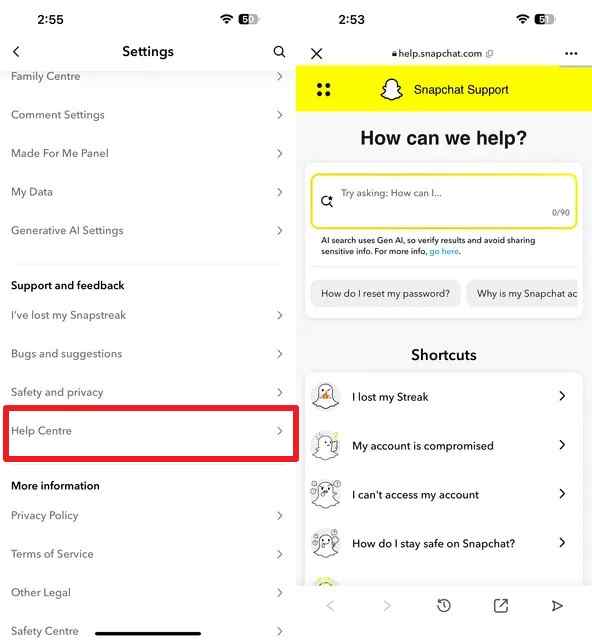
Contact Snapchat Support for account access, sign-in, backup, or Memories that are missing or not loading. Do not expect Support to restore a Memory you already deleted. Frame the request accurately: "Memories are missing/not loading" is different from "I deleted a Memory."
Open Snapchat settings, go to Help Center, and describe the issue. Include the device, app version, whether Backup Progress was Complete, and whether the Memory appears in My Data.
Part 5. Which Snapchat Memories Recovery Option Applies to You?
If you are still asking "can I recover deleted Snap Memories," match your case here.
| Scenario | Best Place to Check | Can Snapchat Help? | Can a Phone-Recovery Tool Help? | Can Recoverit Help? | Main Limitation |
| Memory is missing but was not deleted | Snapchat app after update, restart, cache clear, and internet check | Yes, for loading or account issues | No, not needed first | No | The Memory must still exist in Snapchat |
| Memory was backed up and still exists in Snapchat | Memories timeline or Snapchat My Data | Yes, for access/export issues | No | No | My Data only exports data Snapchat still has |
| Memory was permanently deleted from Snapchat servers | Separate copies outside Snapchat | No | Only if accessible local phone data exists | Only for deleted local copies on supported storage | The Snapchat-server copy cannot be restored |
| Memory was saved to Camera Roll | Photos, Gallery, iCloud Photos, Google Photos, Recently Deleted, or Trash | No | Possible in phone-local cases | Possible after the copy was exported to readable computer or removable storage | Trash and Recently Deleted windows expire |
| Memory was exported to a computer or external storage | Computer, external drive, USB drive, memory card, backup disk | No | No | Yes, if the storage is readable and files are not overwritten | New data can overwrite deleted files |
| Memory never finished backing up | Camera Roll, if dual save was enabled; old phone before app data is removed | No for permanently lost unbacked Memories | Limited to accessible local data | Only for copies moved to supported local storage | The unbacked Snap may never have reached Snapchat servers |
Part 6. What Cannot Recover Deleted Snapchat Memories?
These methods are often suggested online, but they cannot reverse a permanent Snapchat deletion.
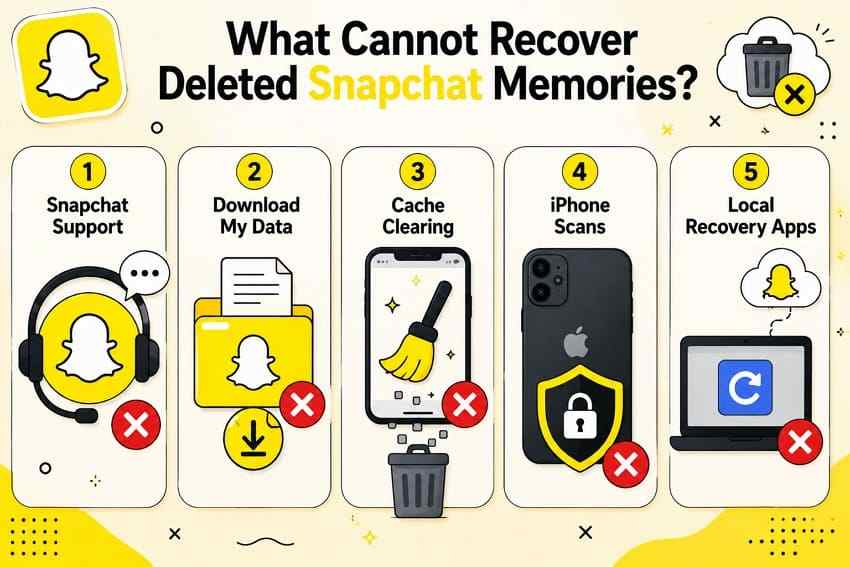
- Snapchat Support after permanent deletion: Support cannot restore a deleted Memory from Snapchat's servers.
- My Data after the Memory has been erased: My Data exports information Snapchat still holds. It is not a deleted-Memory restore point.
- Clearing cache as a deleted-Memory recovery method: Cache clearing can fix loading issues. It does not bring back a permanently deleted Memory.
- Phone recovery tools when no accessible local data remains: A phone-side scan can only help if usable local data or backups are still accessible. It cannot restore a cloud-only Snapchat server item.
- Recoverit when no local copy was ever saved: Recoverit scans supported local and connected storage. It cannot scan Snapchat's cloud, locked iPhone internal storage, My Eyes Only encryption, or data that never existed as a local file.
Part 7. How to Prevent Snapchat Memories From Being Lost
The best Snapchat Memories recovery plan is to keep a second copy before deletion, device changes, or app reinstall.
- Check that Memories Backup Progress says Complete: Confirm this before logging out, uninstalling Snapchat, switching devices, or clearing major phone storage.
- Use Memories and Camera Roll for important Snaps: Snapchat's Save Button setting can save Snaps to Memories, Memories & Camera Roll, or Camera Roll, creating a separate local copy when you choose the dual-save option.
- Keep separate copies of irreplaceable photos and videos: Save important Snaps to a computer, external drive, or another cloud library.
- Do not log out or reinstall Snapchat before backup finishes: Unbacked Memories can be lost when local app data is removed.
- Export important Memories periodically: Use Snapchat My Data while the Memories still exist, not after deletion.
- Back up local Snap copies to another storage location: A Camera Roll copy can still be deleted, lost, or replaced. Keep at least one independent backup.
Conclusion
Deleted Snapchat Memories are not like deleted photos in a phone trash folder. Snapchat does not provide a Recently Deleted folder for Memories, and Snapchat Support cannot restore a Memory after permanent deletion. First decide whether the Memory is missing, still backed up, not loading, never backed up, or truly deleted.
Then check the places that can still help: app troubleshooting, Backup Progress, My Data, Camera Roll, iCloud Photos, Google Photos, shared copies, old devices, and exported folders. Use Recoverit only for deleted local Snap copies on readable storage, and save recovered files to another drive. If the only copy lived inside Snapchat and was permanently deleted, no tool can recreate it.
Try Wondershare Recoverit to Recover Deleted Snapchat Memories
Security Verified. Over 7,302,189 people have downloaded it.
FAQ
-
Can deleted Snapchat Memories leave temporary files on an iPhone?
Possibly, but you should not rely on it. iPhone apps run in protected storage, and standard desktop recovery tools cannot freely scan locked iPhone internal storage. If a local Camera Roll copy existed, check Photos, Recently Deleted, iCloud Photos, and phone backups first. -
Does reinstalling Snapchat remove local cached data?
Yes, reinstalling can remove local app data. Snapchat specifically recommends making sure Backup Progress says Complete before logging out, switching devices, or uninstalling the app. Unbacked Memories may be lost if local app data is removed. -
Can another person still have a copy of a deleted Memory?
Yes. If you sent the Snap, posted it, exported it, or shared it through another app, another person or platform may still have a separate copy. Ask recipients and check chats, messages, emails, cloud drives, and social posts. -
Does changing iPhones affect Memories that are already backed up?
Fully backed-up Memories should reappear after you sign in to the same Snapchat account on the new phone. The risk is with Memories that did not finish backing up before you changed phones, logged out, or uninstalled Snapchat. Check Backup Progress before the move.