
 TL;DR:
You can recover deleted WhatsApp photos and videos without a WhatsApp backup by locating independently saved copies in device galleries, local storage folders, or computer drives, as WhatsApp servers do not archive missing media for retrieval.
● On Android, inspect the Internal storage > Android > media > com.whatsapp > WhatsApp > Media directory, while iPhone users should check Apple Photos and Files, including their respective 30-day Recently Deleted folders for previously exported items.
● Do not uninstall WhatsApp or clear app data to search for missing attachments, as this risks erasing surviving local files, and note that expired View Once media or empty chat thumbnails cannot be converted into full-resolution files.
● Software like Recoverit can only restore media if it was previously saved to a readable computer drive or removable SD card and subsequently deleted; it cannot scan protected internal phone storage or retrieve data from Meta servers.
Ask AI for a summary
 ChatGPT
 Perplexity
 Gemini
 Claude
 Grok
Grok
Wondering how to recover deleted WhatsApp photos without backup after clearing a chat or losing an attachment? The missing picture or video may still exist in the conversation, a phone gallery, a recently deleted folder, or a copy saved on another device. Photos and videos generally follow the same recovery logic, although their WhatsApp storage folders and save settings can differ.
Start with accessible copies instead of reinstalling WhatsApp. This guide walks through Android and iPhone checks, saved computer downloads, and the limits of unavailable attachments. If the media was previously saved to a readable computer drive or removable card and later deleted, Recoverit may help recover that local copy. It cannot recover vanished media directly from WhatsApp's servers.
In This Article
Part 1. Check What Still Exists Before Attempting Recovery
A missing WhatsApp chat backup does not necessarily mean every photograph is gone. First identify the last location where the actual file could be opened: the chat, a gallery, an ordinary folder, an exported download, or an SD card.
Separate a Missing WhatsApp Backup From Missing Media Copies
A WhatsApp backup is not the same thing as a saved photo. A chat backup can contain conversations and eligible media; a separately exported JPG or MP4 can remain accessible even if the conversation is erased. WhatsApp uses Google Account backups on supported Android devices and iCloud backups on iPhone, but those are not individual-file download portals.
According to WhatsApp's privacy policy, delivered messages are generally stored on users' devices rather than kept as a recoverable WhatsApp server archive. The fact that a chat still shows a thumbnail does not prove that the full-resolution file is available to download.
| What you still have | Best next check | What it can recover |
| An existing chat with playable attachments | Open the chat's Media section | Attachments still accessible in that chat |
| A gallery or exported copy | Search Photos, Gallery, Files, Downloads, or a card | Independently stored photos and videos |
| Files in a deleted-items folder | Review its actual retention period | Items still eligible for restoration |
| Only a missing thumbnail; no backup or other copy | Ask the sender or another participant | Only a surviving copy held by someone else |
Avoid Uninstalling WhatsApp, Clearing App Data, or Resetting the Phone
Do not uninstall WhatsApp simply to look for one photo if you do not have a usable backup. Reinstalling, deleting app data, or resetting a phone can remove chat context or remaining app-specific files. WhatsApp's backup troubleshooting guidance explains that restoration depends on having a valid backup; it cannot reconstruct your chats from WhatsApp's servers.
Before changing anything: save any attachments that still open, check the date and contents of any existing backup without starting a restore, and avoid cleaner apps or new downloads that may overwrite deleted local files. On Android, shared media may survive app changes, but this depends on where it was saved; do not assume uninstalling is harmless.
Identify Whether the Media Was Saved to a Gallery, Folder, or Computer
Think about how the missing item was used. Was it manually saved to iPhone Photos? Downloaded through WhatsApp Web? Copied from an Android WhatsApp folder to a memory card? A folder inside WhatsApp or on the same phone is not an independent off-device backup.
- Phone gallery: Look for an already saved photo or video, not just the preview in WhatsApp.
- Computer: Check Downloads, Pictures, exported chats, and earlier transfers from the phone.
- SD card or USB drive: Check only if you previously copied the file there; current WhatsApp storage on the phone is not automatically an SD-card copy.
- Another account or person: An independently saved copy may remain in a different cloud account or with another chat participant.
Part 2. Find Available WhatsApp Photos and Videos on Android
On Android, check the chat first, then shared WhatsApp media folders, and finally the gallery and file-management trash. These locations answer different questions: whether the attachment is still available, whether a downloaded file remains, and whether a deleted copy can be restored.
Check Existing Chats for Attachments That Are Still Available
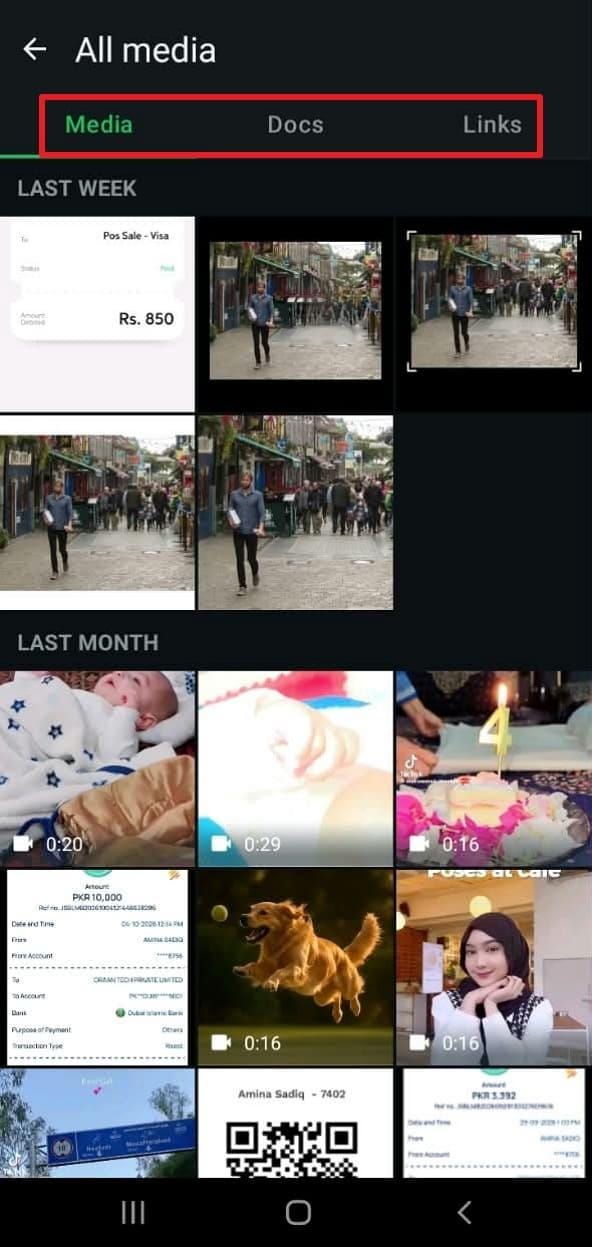
Step 1. Open the relevant one-to-one or group chat. Tap the contact or group name and choose Media, links, and docs (the labels may vary by version). Browse the Media tab for the lost image or video.
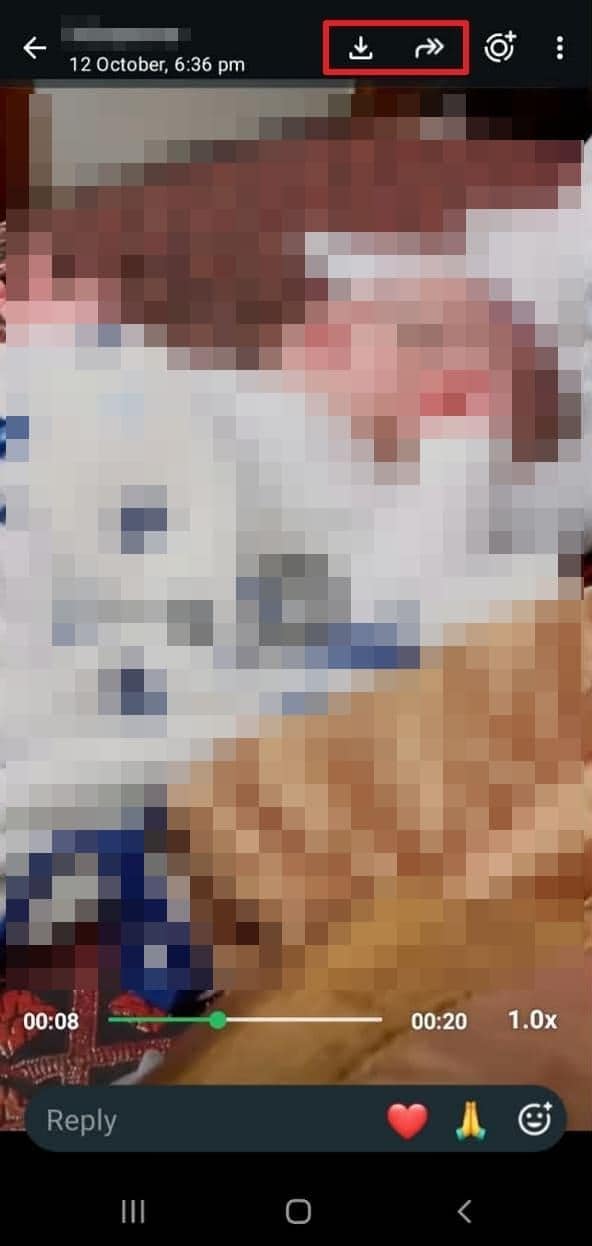
Step 2. Open the item. If the full file still loads, use its available Save, Share, or Download action to create a separate copy. Confirm that the copied file opens outside WhatsApp before deleting anything else.
Important: A thumbnail with a download error is not a recovered file. If WhatsApp reports that the media is no longer on the device or cannot be downloaded, search other copies rather than repeatedly reinstalling the app.
Look in Accessible WhatsApp Media Folders for Saved Copies
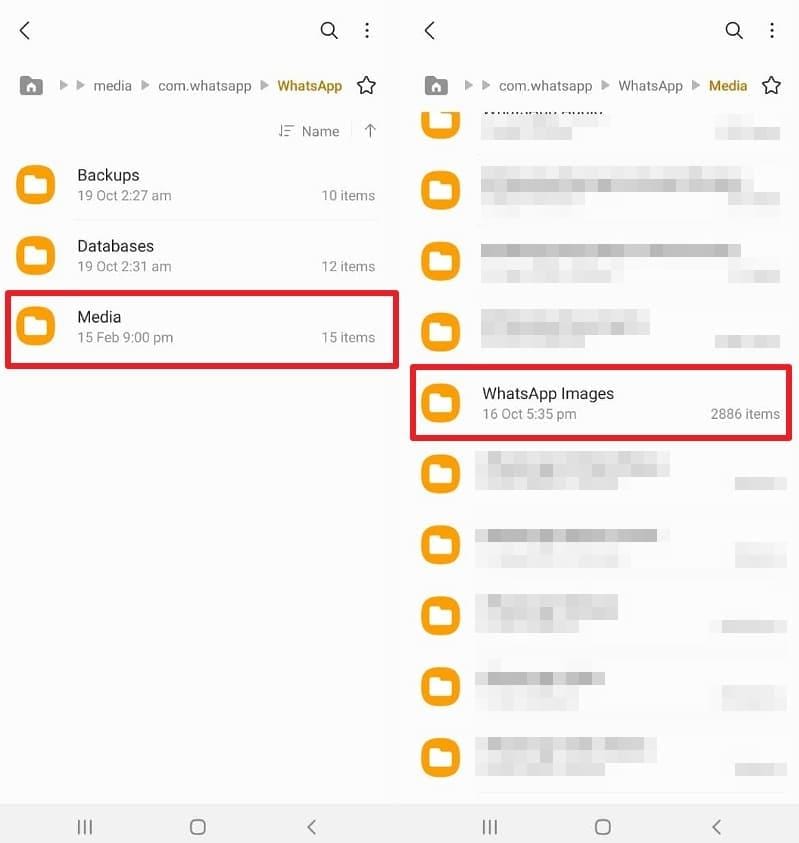
Many current Android devices store ordinary downloaded WhatsApp attachments under Internal storage > Android > media > com.whatsapp > WhatsApp > Media. Some older installations use Internal storage > WhatsApp > Media. This reflects Android's app-specific media directory model; WhatsApp Business, Android versions, and phone manufacturers may use different folders or access permissions.
Step 1. Open a file manager such as My Files. Navigate to Internal storage > Android > media > com.whatsapp if that path is accessible.
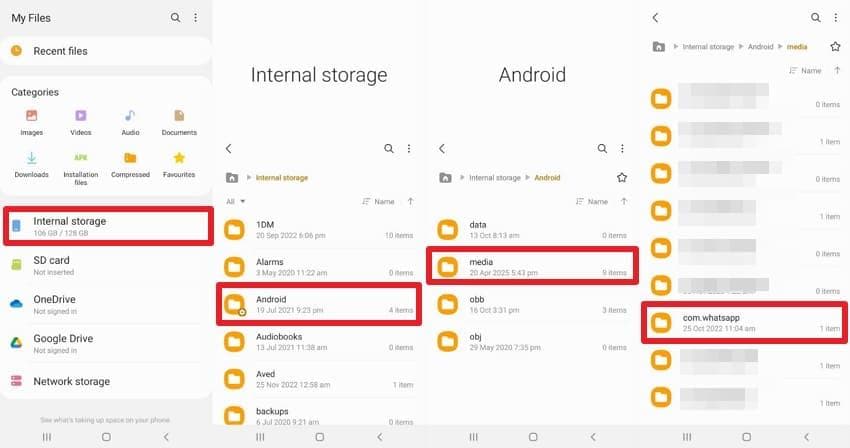
Step 2. Open WhatsApp > Media and inspect WhatsApp Images, WhatsApp Video, and any Sent subfolders for files that still exist. Copy important finds to a safe folder or computer rather than moving the originals.
Step 3. In Google Photos, open Collections > On this device, where available, and inspect WhatsApp media folders. Google notes that files from other apps and device folders may not all be included in Photos backup.
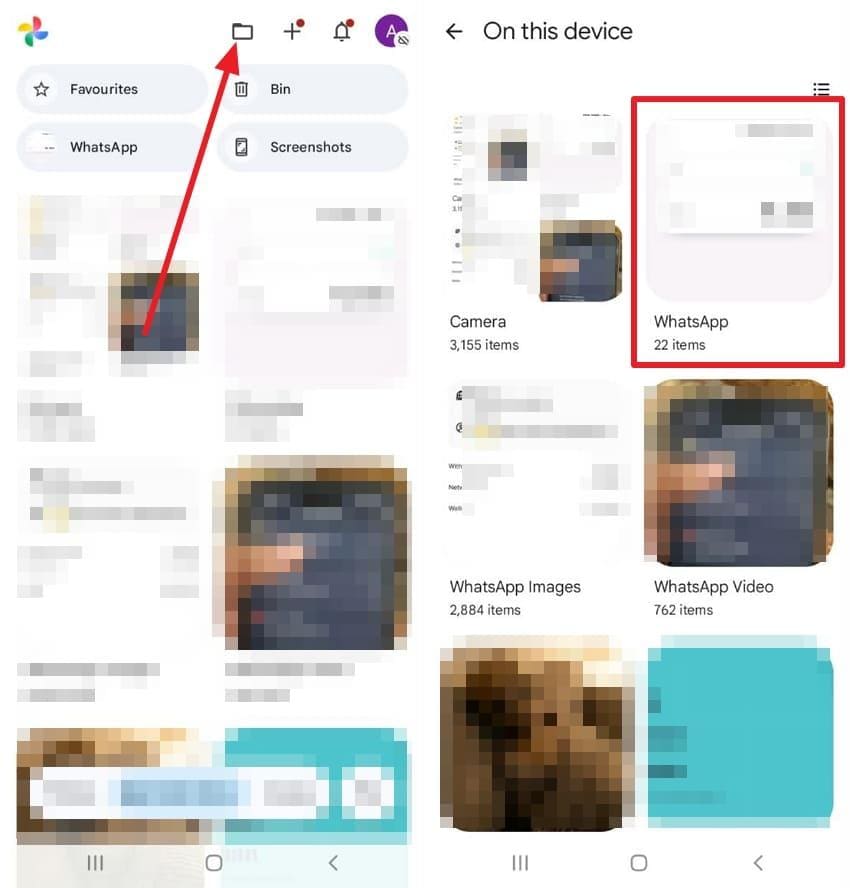
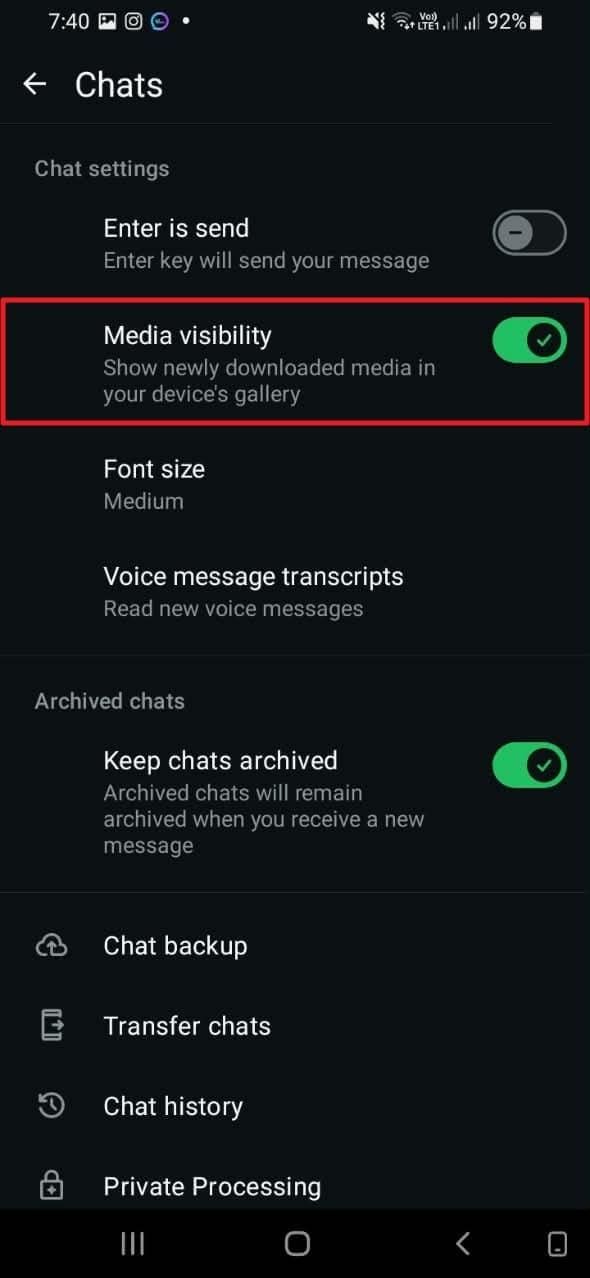
Note: WhatsApp's Media visibility setting determines whether eligible newly downloaded media appears in Gallery. It does not restore deleted files, create an independent backup, or bypass Android's storage restrictions.
Restore Eligible Items From Gallery, Google Photos, or File-App Trash
If you deleted a media copy from a gallery or file manager, check that specific app's Trash. Each application decides whether the item was moved to Trash, immediately erased, or never stored there.
| Location | Current ordinary retention | Where to restore |
| Samsung Gallery | 30 days for items moved to Gallery Trash | Gallery > Menu > Trash > select > Restore |
| Google Photos | 30 days for items in Trash | Collections > Trash > select > Restore |
| Files by Google | 30 days for items moved to Trash | Menu > Trash > select > Restore |
Samsung explains how to restore photos from Gallery Trash. Under Google Photos' current Trash rules, eligible items remain recoverable for 30 days; the older 60-day guidance is outdated. Files by Google's restore instructions also specify 30 days for files moved to Trash. Emptying Trash or permanently deleting an item can end these recovery options sooner.
Do not assume a WhatsApp chat deletion sends its attachment to one of these Trash folders. The item must actually have existed and been deleted through the relevant gallery or file app. For Android-only backup and app variations, see the related WhatsApp image recovery on Android guide.
Part 3. Find Saved WhatsApp Media on iPhone

On iPhone, WhatsApp chat attachments and photos previously saved into Apple Photos are not necessarily the same file. Begin with the conversation, then inspect Photos and Files for independent copies.
Save an Attachment That Is Still Available in an Existing Chat
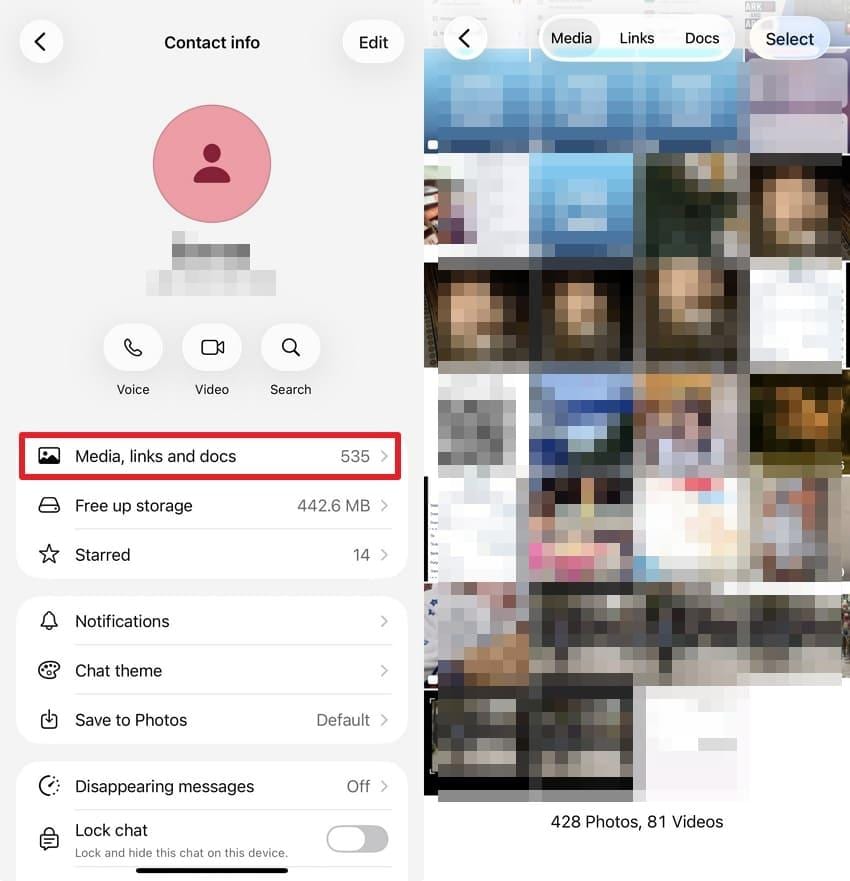
Step 1. In WhatsApp, open the contact or group info screen, then Media, Links, and Docs. Check the images and videos in the original conversation before assuming they have been deleted.
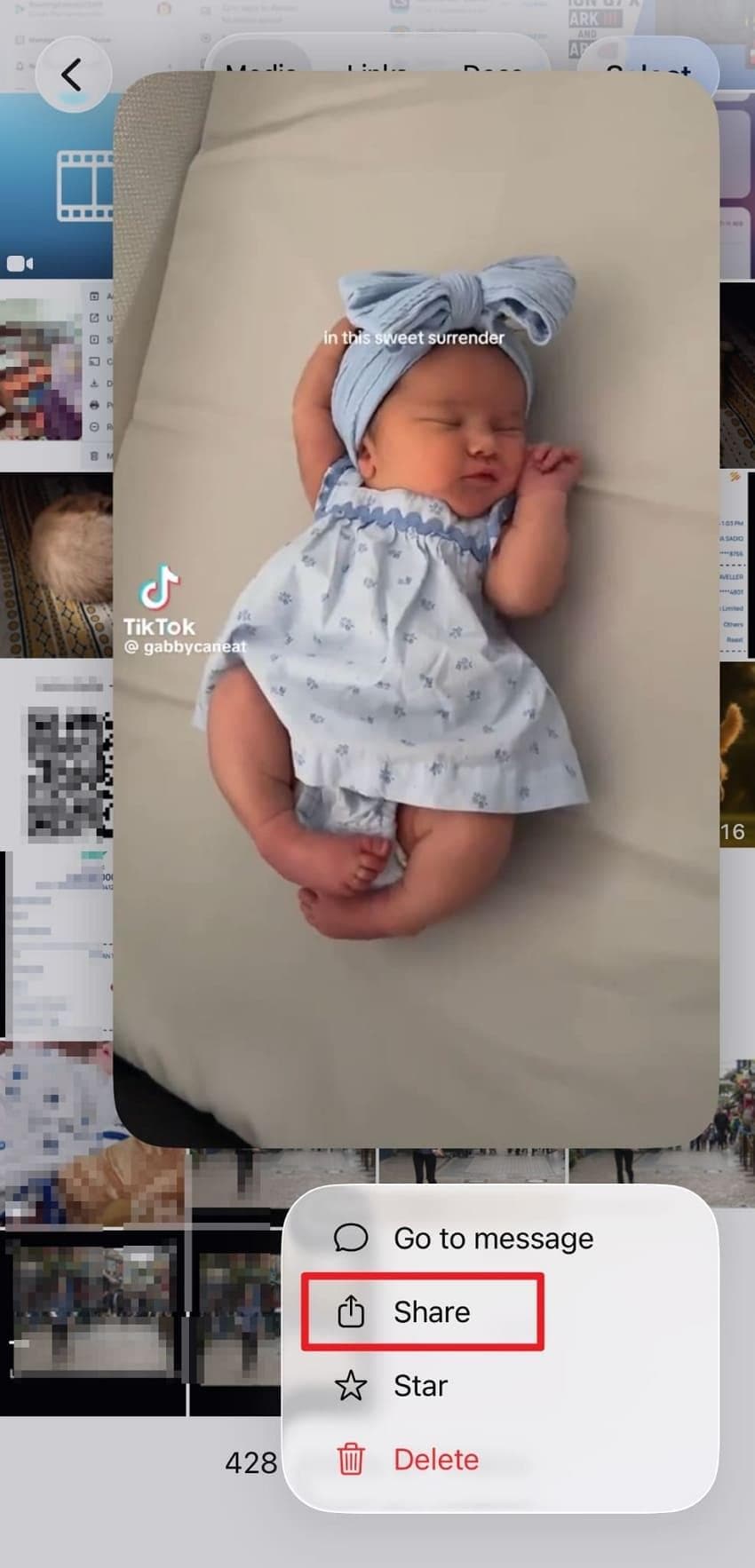
Step 2. If the full attachment opens, use Share and select the available save destination, such as Save Image, Save Video, or Save to Files. Open the saved copy outside WhatsApp to verify that it is complete.
View Once media is different: it is designed not to remain available for repeated viewing or ordinary saving. Do not recommend screenshot workarounds, modified WhatsApp apps, or supposed View Once recovery downloads.
Check Photos and Recently Deleted for Previously Saved Media
Step 1. Open the Apple Photos app and search for the saved WhatsApp image or video in the main library. If missing, go to Collections > Recently Deleted under Utilities and unlock the album as prompted.
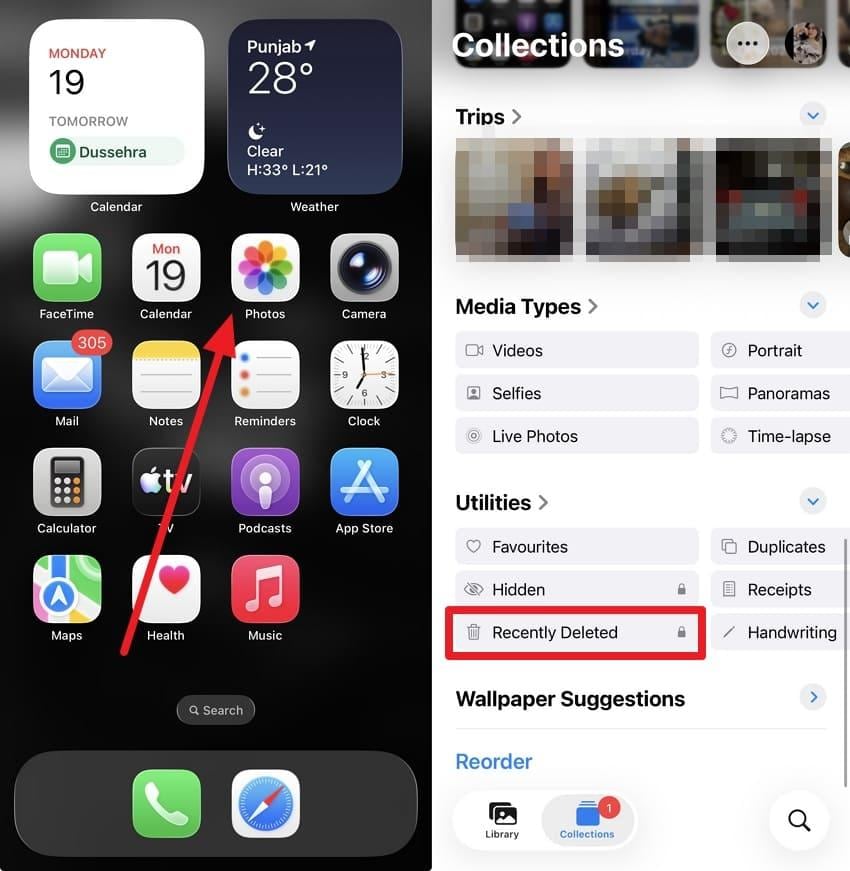
Step 2. Select the item and tap Recover. As Apple's photo recovery guide explains, eligible photos and videos remain in Recently Deleted for 30 days unless permanently removed sooner.
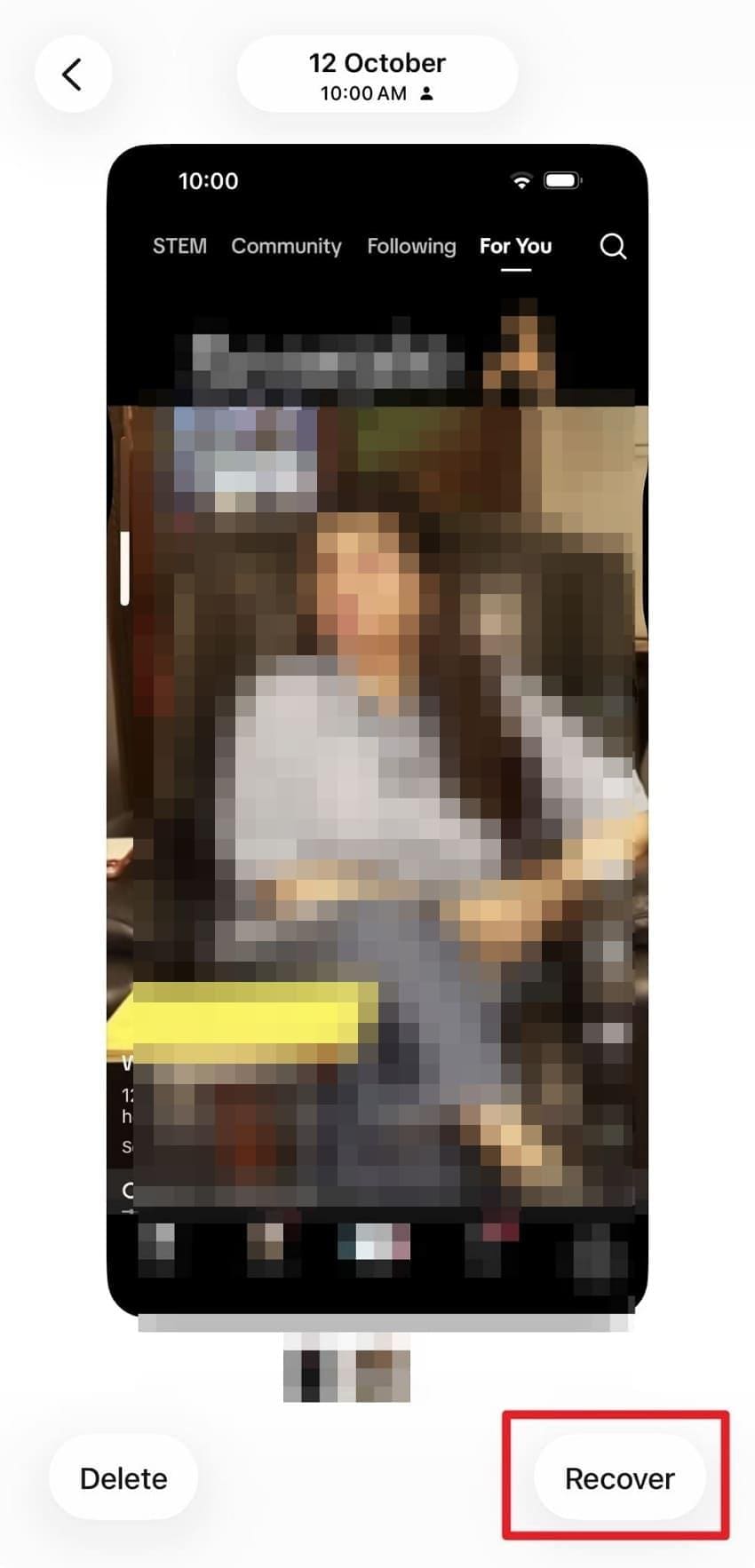
Note: This route only works for WhatsApp media previously saved to Apple Photos. A picture that existed only inside an unavailable WhatsApp message is not automatically in Recently Deleted.
Look for Existing Copies in Files and Other Synced Locations
Open Files > Browse and check On My iPhone, iCloud Drive, and folders used when you shared or downloaded an attachment. If a file was deleted through the Files app, Apple's Files recovery guide provides a Recently Deleted route for eligible items for 30 days.
Also search independent photo backups, sent emails, and computer folders where the item was manually downloaded. A copied file may remain even if the chat was deleted; a cloud placeholder or thumbnail without underlying file data is not enough for local recovery.
Part 4. Recover Deleted Computer or Memory-Card Copies With Recoverit
When the WhatsApp message and its ordinary saved copies are gone, a previously downloaded copy on a computer drive, USB device, or removable memory card may still be recoverable. This is the appropriate role for Recoverit. It cannot connect to WhatsApp servers to retrieve vanished attachments, scan modern phone app storage as an ordinary desktop disk, or guarantee files cleared by overwriting or SSD TRIM.
Confirm That the Readable Storage Actually Contained the Missing Media
Manages over 500 data loss situations, such as deletion, formatting, and disk corruption.The user-friendly interface allows you to recover data in just a few clicks.

Before installing recovery software, identify the original storage device, not just the computer that can currently connect to the phone. For example, an MP4 you downloaded from WhatsApp Web to a laptop can be scanned on that laptop's drive if deleted later. A JPG copied to a microSD card can be scanned through a card reader. But connecting an iPhone or Android phone over USB usually does not give desktop software raw access to its protected internal storage.
If you previously downloaded the file through WhatsApp Web, check the browser download history and the location described in Chrome's instructions for finding downloads. If the copy was later deleted, minimize writes to the original drive and install recovery software elsewhere where practical.
Select the Source Storage and Scan for Photos or Videos
Step 1. Select the correct drive. In Recoverit, choose the detected computer drive or external storage that actually held the WhatsApp copy. If you used an SD card, connect it through a compatible reader; do not format it if your system prompts you.

Step 2. Scan the media files. Scan that source for supported photo and video formats. Use search and file-type filters to narrow results to JPG, PNG, MP4, MOV, and other relevant files, depending on the version and what is recoverable.

Step 3. Preview and recover elsewhere. Preview available photos and videos, select the correct items, and save the recovered files to a different healthy drive. A file that appears in scan results may still be incomplete or damaged, so open it afterward.

Know the Limits Before Relying on a Recovery Scan
Recoverit supports the recovery of eligible local files, but success depends on whether the drive remains readable and the underlying photo or video data still exists. Internal phone flash storage, unopened View Once items, and unsaved cloud-only attachments are not equivalent to a removable SD card. If a drive disappears repeatedly or has physical damage, stop repeated scanning and seek professional advice.
For media deleted from compatible computer drives or removable storage, see the relevant Recoverit recovery option below. These tools scan local devices; they do not restore WhatsApp chats or files that existed only in the app.
Part 5. What If There Is No Remaining Copy?
Sometimes an old chat entry remains while its attachment can no longer be downloaded. In a Reddit discussion about a years-old WhatsApp video that would not download, the sender still saw the message but could not retrieve the original video. This is a user-reported example, not proof that every missing attachment is unrecoverable.
Ask a Sender or Recipient to Resend Media They Still Have
Contact the person who originally sent the file or another participant who might have saved it. In a group, a recipient could retain a copy in their gallery or Downloads folder even if yours was deleted. Ask for the original file when possible rather than a compressed screenshot or screen recording.
If the file belonged to you originally, also check the phone or camera that created it, and any earlier export to a laptop or external drive. This is often more realistic than attempting to recreate an expired WhatsApp download.
Understand Unavailable and View-Once Attachments
WhatsApp's View Once guidance states that unopened View Once media expires after 14 days, and recipients cannot normally save, forward, or reopen viewed content. Ordinary attachments can also become unavailable because the full file is no longer on the device and cannot be downloaded again.
| What happened | Useful remaining route | Limit |
| Chat was deleted but a gallery copy exists | Use Gallery, Photos, or independent storage | The gallery copy must actually exist |
| Old attachment will not download | Ask another chat participant for the original | Thumbnail or message history alone is insufficient |
| Opened View Once media | Ask the sender if they retained their original | No repeat viewing through WhatsApp |
| Local file deleted from a readable SD card or computer | Stop writing and evaluate local recovery | Overwritten or trimmed data may be unrecoverable |
Recognize When Recovery Cannot Be Promised
If neither the sender nor any device has a surviving copy, and the attachment was never saved to separately readable storage, there may be no practical recovery method. Apps that claim to retrieve any permanently deleted WhatsApp photo directly from Meta's servers should not be trusted without verifiable evidence. Avoid sharing WhatsApp verification codes, passwords, or private chat databases with unverified recovery services.
For more video-specific scenarios, see Recoverit's guide to deleted WhatsApp videos. It covers additional video-loss conditions, while this article prioritizes recovery routes that do not require a WhatsApp backup.
Part 6. Keep WhatsApp Media Recoverable in the Future
You cannot control whether a chat participant keeps a file or whether WhatsApp can download an old attachment again. You can, however, make important images and videos less dependent on a single chat.
Save Important Attachments Outside the Chat
On Android, save important photos and videos to an accessible folder or independent device. To check whether new downloaded media appears in the Gallery, review the Media visibility setting; it does not restore files already deleted.
Step 1. Open WhatsApp > Settings > Chats on Android.
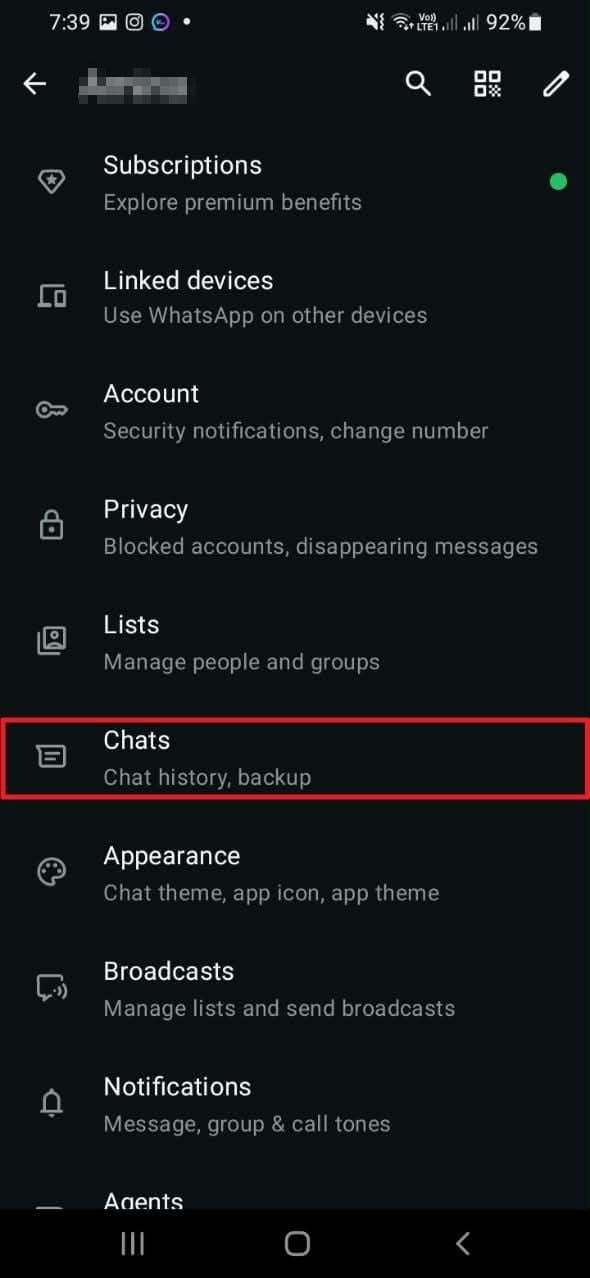
Step 2. Review Media visibility if you want eligible new downloads displayed in Gallery. This affects display behavior, not whether your media has been backed up elsewhere.
On iPhone, save important attachments to Apple Photos or Files and then copy them to an independent backup destination. Check that files saved through the Share sheet are accessible outside WhatsApp before relying on them.
Maintain Both a Chat Backup and Independent Media Copies
Use an appropriate WhatsApp chat backup for messages and eligible media, and keep an additional copy of irreplaceable photos or videos on a computer, external drive, or separate cloud account. Check backup dates and whether videos are included; a backup created after an item was deleted may no longer contain that item.
Practical check: Once in a while, open a saved photo and play an exported video from the independent location. A visible thumbnail or backup toggle does not prove that the full file is recoverable.
Conclusion
To recover deleted WhatsApp photos without backup, first inspect existing chats, Android media folders, iPhone Photos, and recently deleted items. The same approach can help recover WhatsApp videos without backup, although the storage folders differ. If no attachment remains, ask someone from the conversation for a saved copy and check earlier computer downloads. Recoverit may recover deleted files that were actually stored on a readable computer drive or removable card, but it cannot retrieve missing WhatsApp server content. Save valuable attachments independently and maintain current backups to reduce future losses.
FAQ
-
Can I recover permanently deleted WhatsApp photos without backup?
Only when another usable copy remains, such as a photo saved by a participant, a gallery file, an independent cloud backup, or recoverable data on a readable computer drive or memory card. Permanent deletion from WhatsApp does not create a server-side restore option. -
How can I recover WhatsApp videos without backup after deleting a chat?
Check whether the video was separately saved in your Android WhatsApp Video folder, phone gallery, iPhone Photos, Files, or computer Downloads. If another group participant has it, ask them to resend it. Recovery software is relevant only for copies deleted from supported local storage. -
Can I recover deleted WhatsApp photos after uninstalling WhatsApp?
Possibly, if the photos still exist outside the app in Gallery, Photos, a shared storage folder, or an independent copy. Reinstalling WhatsApp without a usable backup does not restore lost conversations or media that no longer exist elsewhere. -
Can WhatsApp photos and videos be recovered after 30 days?
Yes, if an independent copy survives, regardless of when the WhatsApp message was deleted. Trash deadlines are application-specific: Google Photos, Samsung Gallery, and Apple Photos currently use 30 days for eligible deleted items. Files permanently removed from those bins cannot be restored through the bins themselves.



