

 TL;DR:
You can enhance picture quality for free using browser-based AI tools, built-in operating system editors, or mobile apps, though these free solutions often restrict maximum resolution or add watermarks.
● Online AI platforms like ImgUpscaler, Picsart, and Unblurimage automatically upscale resolution and fix blur, but they require an internet connection and upload your files to external servers.
● Built-in offline tools like Windows Photos and macOS Preview, alongside mobile apps like Snapseed, are best for safely making basic brightness, contrast, and sharpness adjustments without privacy risks.
● If images are missing or corrupted due to storage errors, enhancement tools cannot fix them; you must first restore the original files using deep-scan recovery software like Recoverit.
Ask AI for a summary
 ChatGPT
 Perplexity
 Gemini
 Claude
 Grok
Grok
Photos help us save memories. They capture special days, family events, travel moments, and simple daily scenes. But not every picture looks clear. That is why many people search how to enhance picture quality free without buying expensive software.
Today, you do not need professional editing skills to fix your photos. Many free tools to enhance picture quality are available online, on computers, and on mobile phones. These tools help correct lighting, improve sharpness, and adjust colors.
In this guide, you will learn how to improve picture quality using simple methods and how to recover corrupted images safely.
Try Recoverit to Recover Lost Data
 Security Verified. Over 7,302,189 people have downloaded it.
Table of Contents
Part 1: What Does Enhancing Picture Quality Mean?
Enhancing picture quality means improving the visual appearance of an image. It focuses on clarity, brightness, color accuracy, and sharpness. When people ask how to improve picture quality, they usually want their photos to look more professional and more detailed. Photo enhancement does not mean changing the original memory. It means improving how clearly that memory appears.
Enhancement can include several adjustments. Each adjustment serves a different purpose.
- Adjusting brightness: Brightness controls how light or dark the image looks. Increasing brightness helps dark images appear more visible.
- Correcting contrast: Contrast increases the difference between light and dark areas. Good contrast adds depth to the photo.
- Improving sharpness: Sharpness makes edges look clear. It helps subjects stand out from the background.
- Reducing image noise: Noise looks like grain in photos taken in low light. Reducing noise makes the image smoother.
- Fixing blur: Blur may happen due to movement or camera shake. AI tools can reduce mild blur.
- Enhancing color balance: Proper color balance makes skin tones natural and backgrounds realistic.
- Increasing resolution: Upscaling increases the image size while trying to keep details clear.
- Removing compression marks: Some images show pixel blocks after saving. Enhancement tools reduce these marks.
Learning how to enhance photo quality helps you improve both new and old pictures.
Part 2: Free Tools to Enhance Picture Quality
Many people want results without paying for premium software. Thankfully, several free picture quality enhancers provide good results. Some are browser-based. Others are built into your device. Some work best for quick edits. Others work better for detailed improvements.
Below are three effective methods you can try.
Method 1: Online AI Photo Enhancers (ImgUpscaler, Picsart, Unblurimage)
Online AI tools are simple to use. They work directly in your web browser. You do not need installation or technical skills. These platforms analyze your image using artificial intelligence. They detect edges, faces, and textures. Then they recreate missing details.
Websites such as ImgUpscaler, Picsart, and Unblurimage act as a free image quality enhancer. They are ideal for users searching for how to enhance picture quality free in the fastest way possible. You upload an image and receive an improved version within seconds.
These free picture quality enhancers are useful for improving portraits, social media posts, and old family photos. They often include options to upscale images, remove blur, and reduce noise.
Step 1: Upload the Image Visit the chosen website. Click Upload. Select your image file. Choose enhancement settings such as upscale or sharpen.
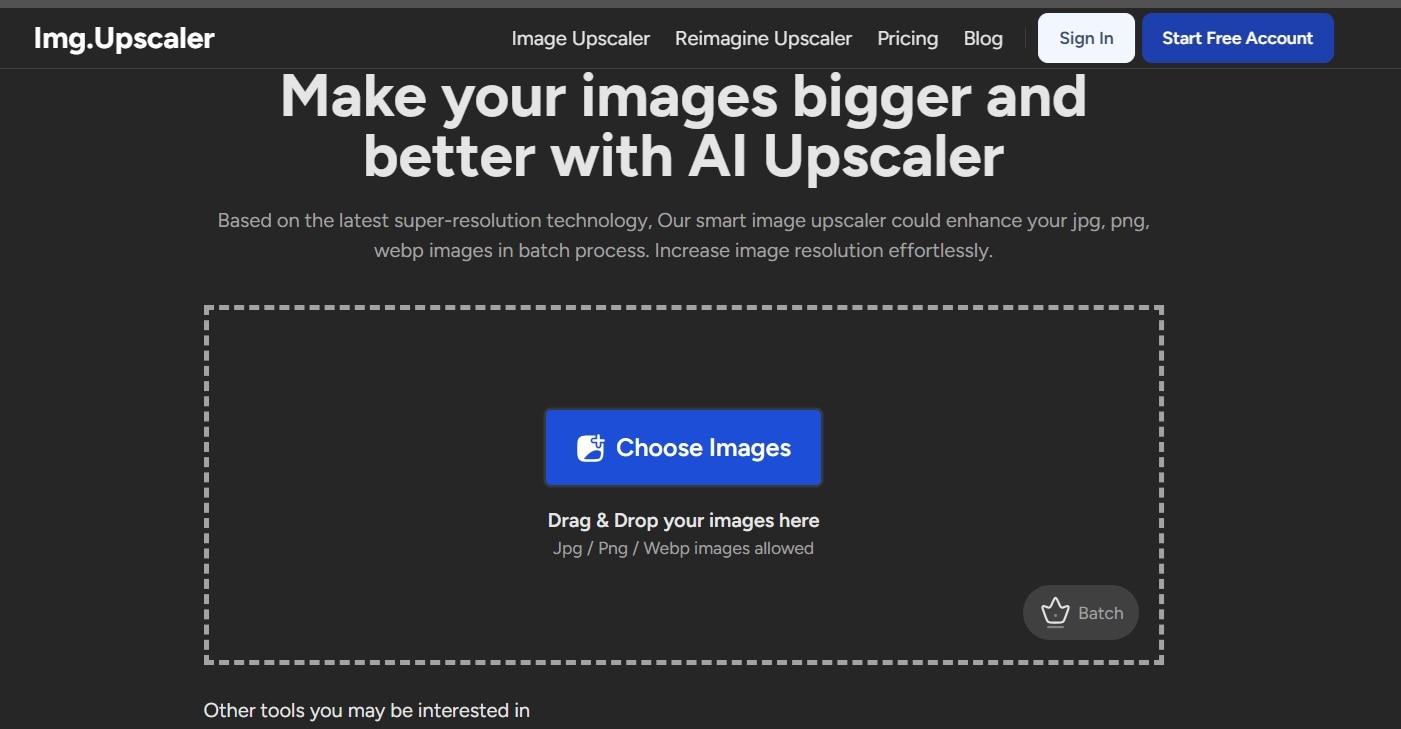
Step 2: Download the Result Wait for processing. Preview the improved image. Download and save it to your device.
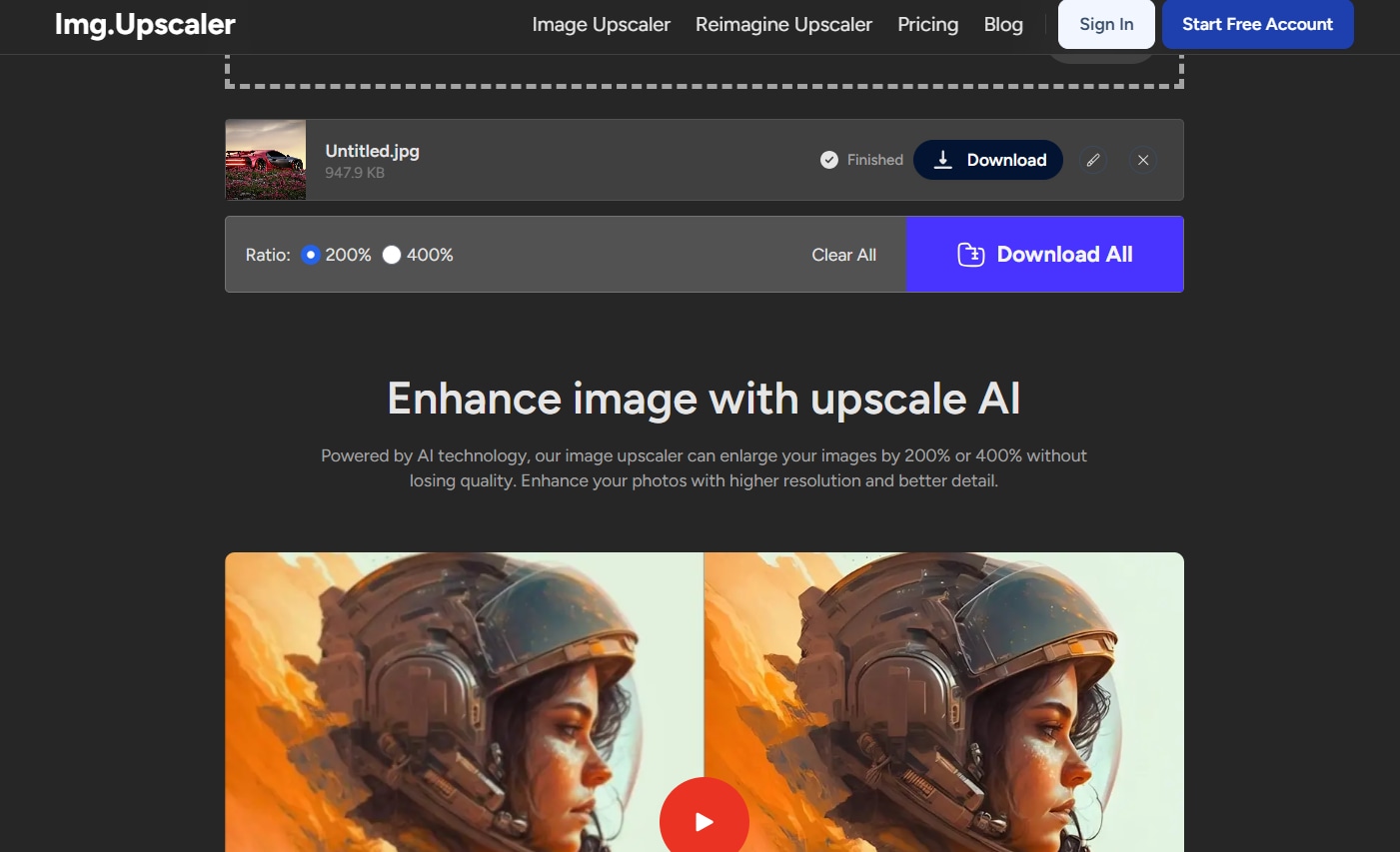
This method is helpful if you want quick results without using desktop software.
Method 2: Built-in OS Tools (Windows Photos, macOS Preview)
Your computer already includes basic editing tools. These built-in options are easy and safe. They do not require internet access. They are helpful for small corrections.
Windows Photos allows adjustments such as brightness, contrast, and clarity. macOS Preview includes color correction and sharpening options. These are reliable free tools to enhance picture quality when you need small edits.
Built-in tools are useful when you want to learn how to improve picture quality in a simple environment. They do not offer advanced AI features. However, they are effective for everyday corrections.
Step 1: Open the Photo Right-click your image. Choose Open with Photos or Preview. Click the Edit option.
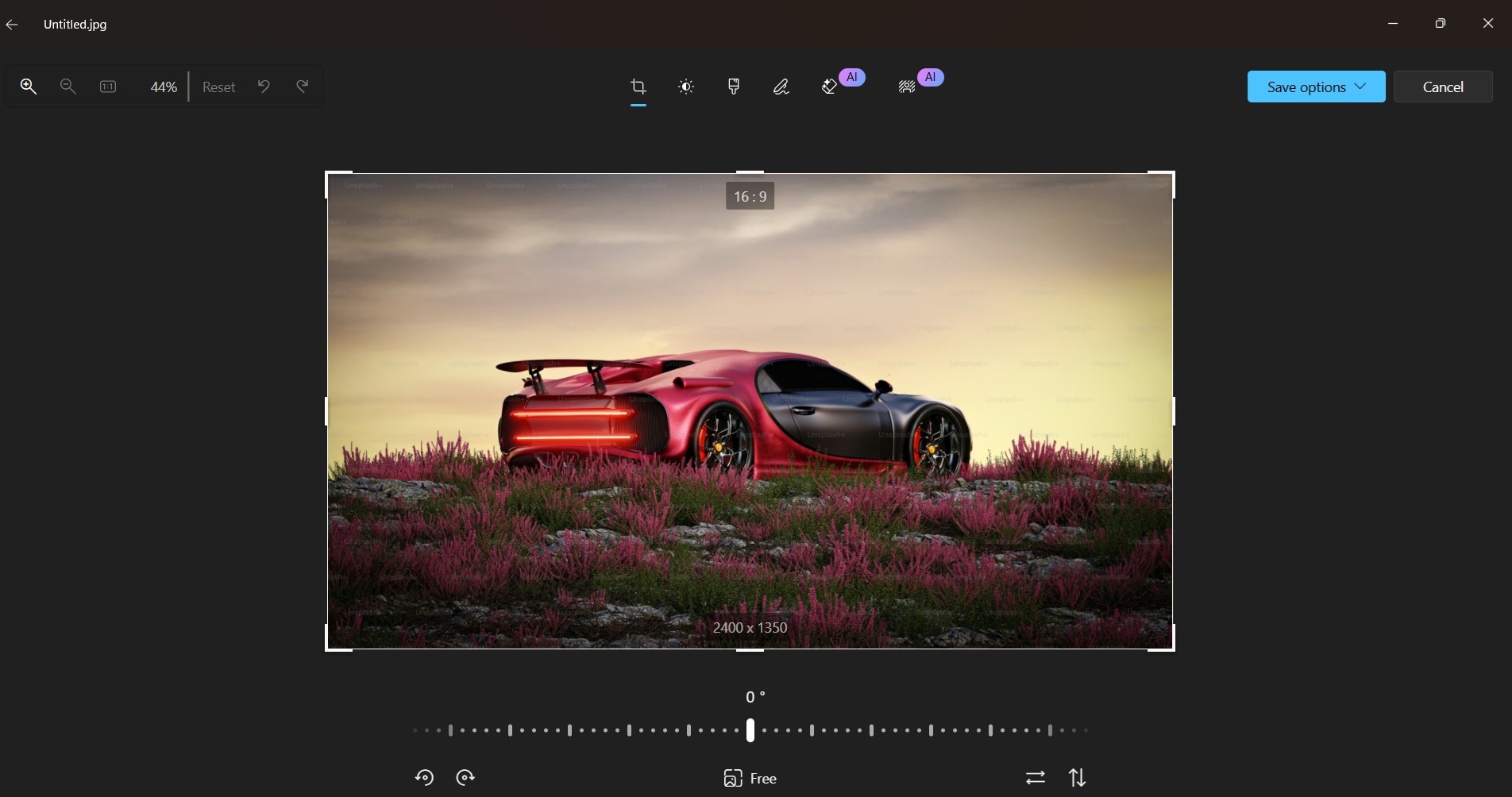
Step 2: Adjust and Save Modify brightness, contrast, and sharpness. Save the edited copy to avoid replacing the original.
This approach is practical when you want to enhance images offline.
Method 3: Free Mobile Apps for Quick Enhancement
Mobile editing is common today. Many free apps include automatic enhancement options. These tools are useful for instant improvement before sharing photos online.
Apps such as Picsart and Snapseed allow one-tap enhancement. For example, Snapseed offers features like Tune Image, Details, and Sharpening. These tools help adjust brightness, contrast, structure, and clarity in a simple way. Some apps also allow selective editing, which means you can improve only certain parts of the photo instead of changing the entire image.
If you are wondering how to enhance photo quality on your phone, this method is very convenient. It works well for selfies, travel pictures, product images, and social media posts.
Step 1: Install and Import Download Snapseed from your app store (Android, iOS). Open the app and tap the plus icon to import your photo.

Step 2: Use Enhancement Tools Select Tune Image to adjust brightness and contrast. Then open Details to increase sharpness and structure carefully. Save the improved image to your gallery.
Part 3: How to Recover Lost Pictures Using Recoverit
Sometimes the problem is not poor quality. Sometimes photos are missing completely. You may open a folder and find it empty. Images may be deleted by mistake while cleaning storage. A memory card may stop working. A hard drive may show an error. Storage devices can become corrupted after a sudden power loss or unsafe removal. Viruses and malware may also damage picture files or make them unreadable. In these situations, editing or enhancement will not solve the issue. You first need to restore the original files before improving them.
Recoverit is a data recovery solution designed to restore deleted and damaged files. It works with internal drives, external hard drives, USB drives, SD cards, and even formatted partitions. If you are searching for how to recover lost pictures after accidental deletion, this tool follows a clear scanning and recovery process. It checks the selected storage area carefully and lists all recoverable files. This helps users identify missing photos without technical knowledge.
It is also helpful for users who want to understand how to recover corrupted images that no longer open properly. The software uses deep scan technology to locate hidden, fragmented, or partially damaged files. It rebuilds file structures whenever possible. Recoverit supports common image formats such as JPG and PNG, along with many other photo file types. This makes it suitable for both personal and professional photo recovery needs.

Steps to Recover Photos
Step 1: Select the Location Launch Recoverit. Choose the folder or drive where the pictures were lost. Click Start to begin scanning.

Step 2: Scan and Preview Allow the scan to complete. Preview found images to confirm their condition.

Step 3: Recover and Save Select the required photos. Click Recover. Save them to a different storage location.

This method provides a practical solution if your files disappear or become inaccessible.
Part 4: Pros and Cons of Free Picture Quality Enhancers
Free solutions are popular because they reduce costs. However, they also have limitations. Understanding both aspects helps you choose wisely.
Using a free image quality enhancer is suitable for regular users. Professionals may require advanced editing software.
Conclusion
Enhancing photos no longer requires expensive software or professional skills. Many users now search for how to enhance picture quality free and find effective solutions online and offline. With the right tools, you can adjust brightness, sharpen details, and improve colors easily.
You have also learned how to improve picture quality using online AI tools, built-in operating system features, and mobile apps. In addition, you understand how to enhance photo quality carefully without over-editing. If files are missing, you now know how to recover lost pictures and how to recover corrupted images using a reliable recovery method.
With patience and the right approach, your images can look clear and meaningful again.
FAQs
-
Can I really enhance images without paying?
Yes, you can improve images without spending money. Many free tools to enhance picture quality provide useful features such as brightness adjustment, sharpening, noise reduction, and basic AI enhancement. While they may not offer professional-grade controls, they are effective for everyday use, social media posts, school projects, and personal memories. -
Do online enhancers reduce image privacy?
Online enhancers process images on external servers, which means you must upload your files to a website. Reputable platforms usually explain how they handle user data in their privacy policy. However, you should avoid uploading sensitive or private photos if you are unsure about the platform’s security practices. -
Can damaged photos be restored completely?
The success of restoration depends on the level of damage. If images are accidentally deleted or slightly corrupted, recovery software can often restore them. However, if a file is heavily overwritten or severely damaged, full recovery may not be possible. Acting quickly improves the chances of successful recovery.


