


 TL;DR:
You can successfully recover deleted photos and videos from a Pentax camera using data recovery software like Recoverit, provided the lost files have not been overwritten by new data.
● Stop using the camera and remove the SD card immediately after deletion to prevent new media from overwriting the recoverable storage space.
● Connect the SD card to a computer to check for files hidden by system errors in the DCIM folder, or use Recoverit to perform a deep scan for JPG, RAW, MP4, and MOV files even if the card was formatted.
● Opt for professional data recovery laboratory services if the SD card or camera slot has sustained physical damage, as software tools are only effective for logical issues like accidental deletion, formatting, or file system errors.
Ask AI for a summary
 ChatGPT
 Perplexity
 Gemini
 Claude
 Grok
Grok
Photos and videos stored on a camera often hold meaningful memories. Many of these moments cannot be captured again. Family gatherings, trips, and work projects are usually saved on a small SD card. When the files suddenly disappear, it can feel overwhelming. In most situations, though, the data is not removed right away. It usually stays on the memory card until new information overwrites it.
If you are searching for how to recover deleted photos from Pentax camera, this detailed guide will help you. It explains how to recover permanently/accidentally deleted photos from cameras after pressing the wrong button.
Try Recoverit to Recover Lost Data
 Security Verified. Over 7,302,189 people have downloaded it.
Table of Contents
Why Photos/Videos Get Deleted from Pentax Cameras?
Before learning how to recover deleted photos from Pentax camera, it is important to understand the possible causes. Many users panic and immediately search for how to recover permanently deleted photos/videos from a Pentax camera without checking what happened first.
When you understand why Pentax camera files get lost, you can avoid repeating the same mistakes. It also helps you choose the correct recovery method.
Below are the most common reasons.
- Accidental deletion: While reviewing images, you may select the wrong file and press delete. Sometimes multiple images are selected at once. This situation explains how to recover accidentally deleted photos from cameras in many cases.
- Formatting the SD card: Formatting removes all stored data. Users may format the card by mistake. Sometimes the camera requests formatting due to a storage error.
- SD card corruption: Memory cards can become corrupted. This can happen if the card is removed without turning off the camera.
- Virus infection: If the SD card is connected to an infected computer, malware may hide or damage files.
- File system errors: Improper shutdown or interrupted transfers can damage the file structure. The files may still exist, but cannot be accessed.
- Physical damage: A damaged SD card or camera slot can cause data to disappear.
- Firmware malfunction: Occasionally, camera software may fail during saving.
- Low battery during saving: If the battery drains while a file is being written, the file may become incomplete.
Understanding why Pentax camera files get lost is the first step toward proper recovery. You may bealso interested in: How to Recover Deleted Photos from a Bronica Camera?
How to Recover Deleted Photos/Videos from Pentax Camera (Step-by-Step)
If your files are missing, stop using the camera immediately. Do not capture new photos or videos. New data may overwrite deleted content. This can reduce the success rate when learning how to recover deleted photos/videos from a Pentax camera. Acting quickly improves recovery results.
The following methods explain how to recover deleted photos from a Pentax camera safely and effectively. These solutions also help users who are searching for how to recover accidentally deleted photos from cameras using professional and manual approaches.
Method 1: Use Recoverit

Recoverit is a professional data recovery program. It scans memory cards deeply and finds deleted files that are not visible. It works even after formatting in many cases. It is a strong option for users learning how to recover deleted photos from Pentax camera without technical knowledge.
The software supports photo formats such as JPG, RAW, and PNG. It also supports video formats like MP4 and MOV. The interface is simple and clear. You can preview files before restoring them. This is helpful when searching for specific images.
Recoverit performs both quick scans and deep scans. The deep scan searches sector by sector. This improves the chances when attempting how to recover permanently deleted photos/videos from Pentax camera.
Step 1:Remove the SD card from your Pentax camera. Insert it into a card reader. Connect it to your computer.
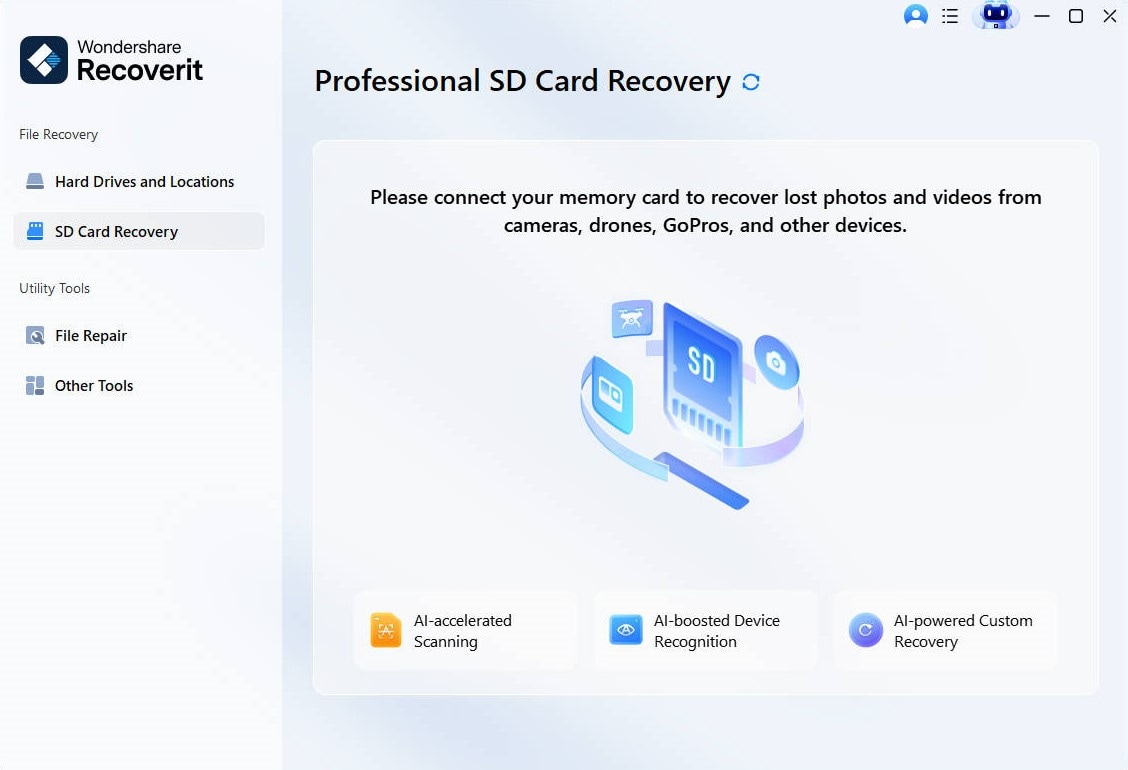
Step 2:
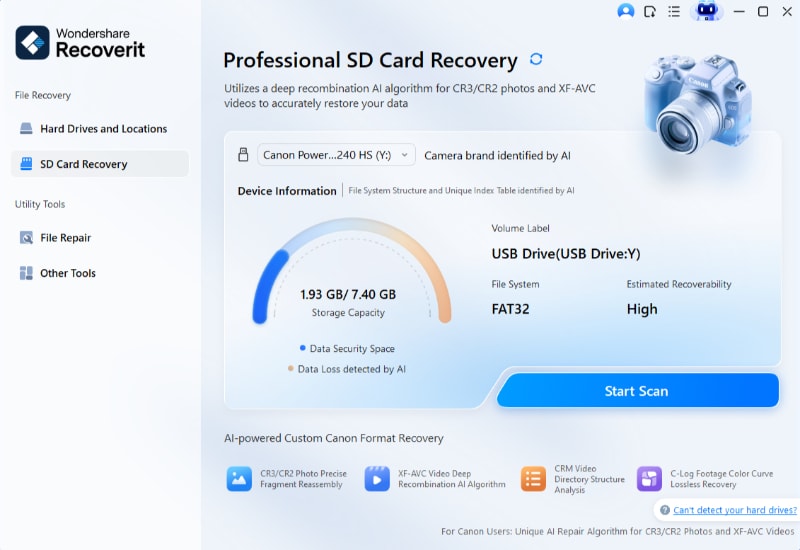
Open Recoverit and select the memory card from the list of drives. Click Scan to start the search process.
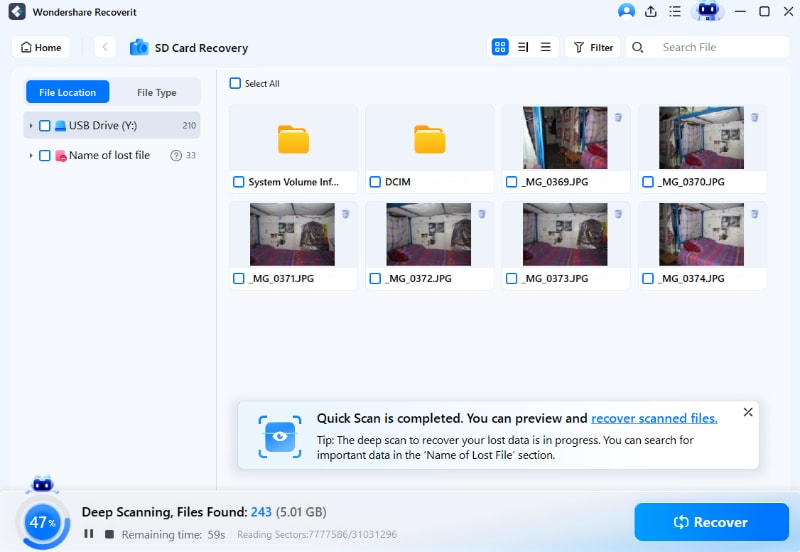
Step 3: Wait for the scan to complete. Preview the recovered photos and videos. Select the files you want. Click Recover. Save them to a different location, not the same SD card.
Method 2: Check the Camera’s Internal Trash or Backup
Some camera models include a limited recovery option. Although not all Pentax cameras have a recycle bin, it is worth checking. Certain models may allow file protection instead of permanent deletion.
If the file was protected before deletion, it may still exist. Also, check whether any images were transferred automatically to a connected device.
This method is simple and quick. It may help users who are searching for how to recover accidentally deleted photos from cameras immediately after deletion.
Step 1: Turn on the camera. Open the playback menu. Look for options such as protected files, file management, Shooting Data, or restore.

Step 2: Check if deleted files are available. If found, remove deletion protection and transfer them to a computer immediately.
Method 3: Connect the Pentax Camera or SD Card to a Computer
Sometimes files are not deleted. They may only be hidden due to file system errors. Connecting the device to a computer can help you check.
Use a reliable USB cable or card reader. Avoid unstable connections. A computer may detect hidden files that are not visible on the camera screen.
This basic method can help before moving to advanced recovery tools.
Step 1: Connect the camera or SD card to your computer. Open File Explorer on Windows or Finder on Mac. Enable “Show Hidden Files” in settings.

Step 2: Browse the DCIM folder. Look for missing photos or unusual file names. Copy any available files to your computer immediately.
Method 4: Restore from Backup (Cloud or External Drive)
If you regularly back up your data, recovery becomes simple. Many users copy photos to external drives. Some also upload them to cloud storage platforms.
Check services such as Google Drive, iCloud, Dropbox, or external hard drives. Backups provide a safe solution without complex recovery procedures.
This method avoids stress and reduces dependency on software tools.
Step 1: Log in to your cloud storage account like Google Drive.

Step 2: Search for the missing photos or videos. Download them to your computer and create an additional backup copy.
Method 5: Seek Professional Data Recovery Services
If the SD card is physically damaged, professional services may help. These services use advanced laboratory tools.
Technicians can repair damaged chips and extract data safely. However, professional recovery can be expensive. Choose this option only if the data is very important.
Search for certified data recovery centers with positive reviews.
Step 1: Stop using the SD card. Do not attempt repairs at home.

Step 2: Contact a professional service. Explain the problem clearly and request a cost estimate before proceeding.
Conclusion
Losing camera files can be upsetting, but recovery is often possible. Quick action improves success. Stop using the device immediately. Choose a suitable method based on your situation.
This guide explained how to recover deleted photos from Pentax camera using software, manual checks, backups, and professional services. It also covered how to recover permanently deleted photos/videos from Pentax camera and how to recover accidentally deleted photos from cameras in practical ways. Most importantly, you now understand why Pentax camera files get lost and how to prevent future loss.
FAQs:
-
Can I recover files after formatting my SD card?
Yes, in many cases, you can recover files even after formatting the SD card, as long as you have not saved new data on it. Formatting usually removes the file index, not the actual data immediately. If the storage space has not been overwritten, recovery software can scan the card and rebuild the lost photos and videos. However, the success rate depends on how quickly you act and the condition of the memory card. -
Are permanently deleted photos really gone?
Not always. When photos or videos are permanently deleted, the system only marks the storage space as free. The actual data often remains on the card until it is replaced by new files. This means recovery is still possible in many situations. If you stop using the camera right away and use reliable recovery software, you have a strong chance of restoring the missing files. -
What should I do immediately after deleting photos?
First, stop using the camera to prevent new data from overwriting the deleted files. Turn off the device and remove the SD card carefully. Do not format the card or attempt random fixes. Instead, connect the card to a computer and use a trusted recovery method or check your backup. Acting quickly increases the chances of successful recovery.


