
Many gamers look forward to tearing up the virtual tracks without any lag. However, a sudden FH6 error code FHE01 game crash ruins the fun. This frustrating issue kicks players right back to their desktop screens. Nonetheless, several proven and simple fixes can stop this crash. Players will discover the causes behind solutions to fix the Forza Horizon 6 error code FHE01 in this guide.
Try Recoverit to Perform Data Recovery
 Security Verified. 3,591,664 people have downloaded it.
In this article
Part 1. What Is Error Code FHE01, and What Causes It
Error code FHE01 is a critical startup bug in Forza Horizon 6. This issue triggers an unexpected crash right after you launch the title. It acts as a generic crash code rather than a detailed diagnostic. Therefore, you must check your entire system configuration to fix the trouble. Review the table to understand what triggers this specific racing game error:
| Cause | Why It Triggers FHE01 |
| Background Software Conflicts | Overlays such as Discord or GeForce Experience can interfere with the game during startup. |
| Corrupted Game Files | Missing or altered game files prevent Forza Horizon 6 from completing the launch process. |
| Conflicting Peripherals | Connecting multiple input devices, including racing wheels or controllers, may create hardware conflicts that affect game initialization. |
| Outdated GPU Drivers / Overclocks | Older graphics drivers or unstable RAM overclock settings, including XMP/EXPO profiles, can lead to crashes and startup errors. |
| Hardware Compatibility Issues | Systems with unsupported hardware may struggle to meet the requirements of the game's graphics engine. |
Part 2. Stop Forza Horizon 6 FHE01 Crashes with These Top Fixes
There are multiple ways to stop Forza Horizon 6 from crashing on PC. Hence, players need to try the given 7 fixes to resolve this issue:
Fix 1. Restart Your PC and Relaunch
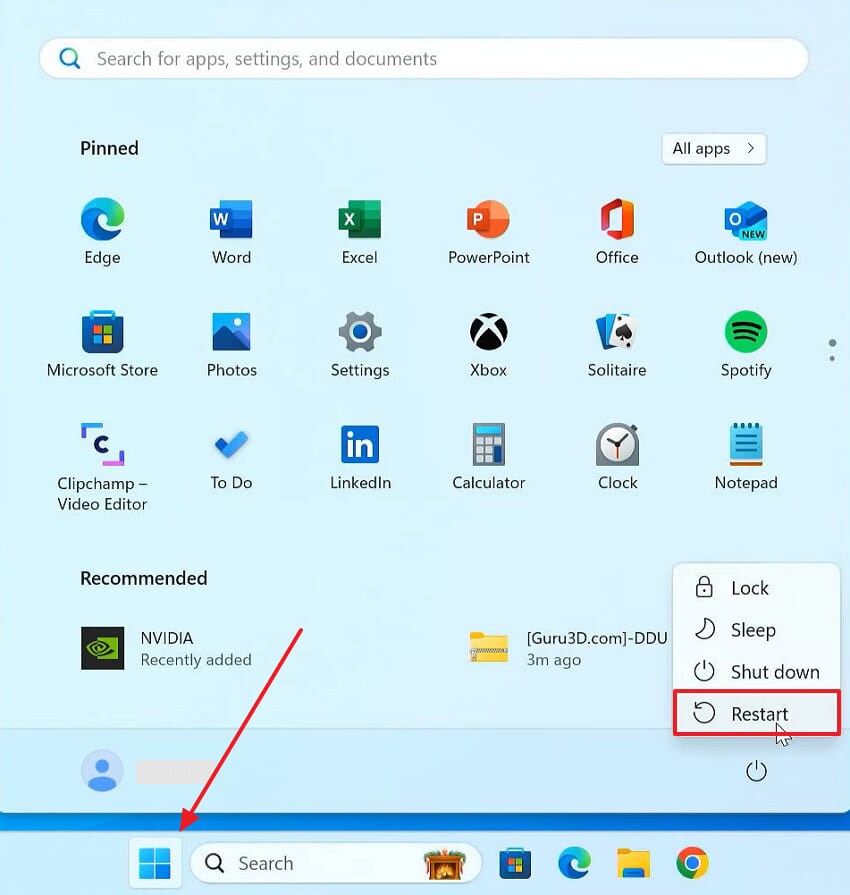
There may be background processes on your computer that interfere with the FH6 loading. When you restart it, your system refreshes the memory caches and active hardware. Alongside this, gamers then need to relaunch the game afterward, which fixes crashes. Adhere to these steps to restart your device and game to resolve FH6 crashes:
Instruction. Gamers need to click the “Start” menu and select the “Power” icon. From the power options, choose “Restart” to allow your system to restart and relaunch the game.
Fix 2. Disconnect Controllers, Racing Wheels, and USB Peripherals
Multiple connected devices may also confuse Forza Horizon 6 during startup. Most likely, racing wheels and sim pedals often trigger this specific crash. USB peripherals sometimes send conflicting signals that the game simply cannot process. Therefore, disconnecting every single extra device removes this likely source of the conflict. During testing time, only your keyboard and mouse should be connected.
Fix 3. Disable Steam Input
Steam Input remaps controller signals before they even reach the actual game. Forza Horizon 6 then receives mixed input signals during the loading screen. This sudden input mismatch frequently leads to a game crash. Disabling Steam Input, therefore, removes this exact conflict for most affected players. Hence, go through these simple steps below to turn off this specific feature and fix the Forza Horizon 6 FHE01 game crash:
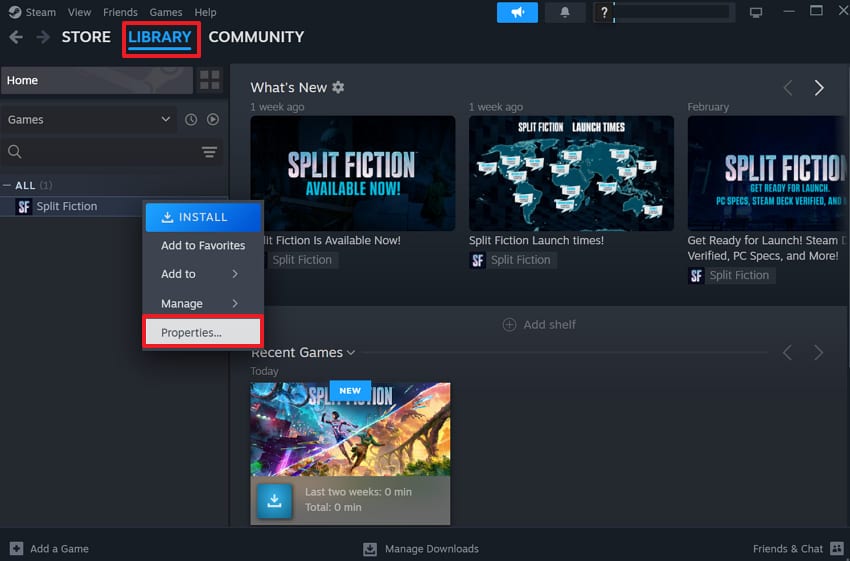
Step 1. Open your game launcher and head to “Library,” where your installed games are listed. Once there, gamers need to right-click the “Forza Horizon 6” game and choose “Properties.”
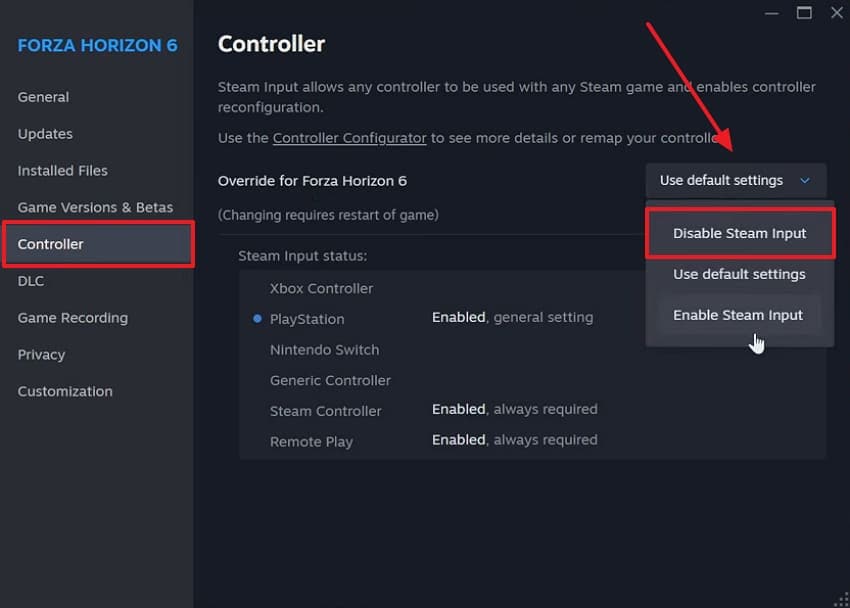
Step 2. As you head to the “Controller” tab, expand the “Users Default Settings” drop-down. In the upcoming options, you need to select the “Disable Steam Input” option.
Fix 4. Disable Virtual Input Drivers
Virtual input drivers create extra fake game controllers recognized by your system. Software like DS4Windows or reWASD often installs these extra hidden virtual devices. Your system then detects multiple controllers and becomes confused. Yet, disabling such unnecessary virtual drivers removes all confusing duplicate controller signals. So, follow the steps to fix the FHE01 "Has Hit an Unexpected Error" crash via this method:
Step 1. Upon right-clicking the “Start” menu, you need to click the “Device Manager” option.
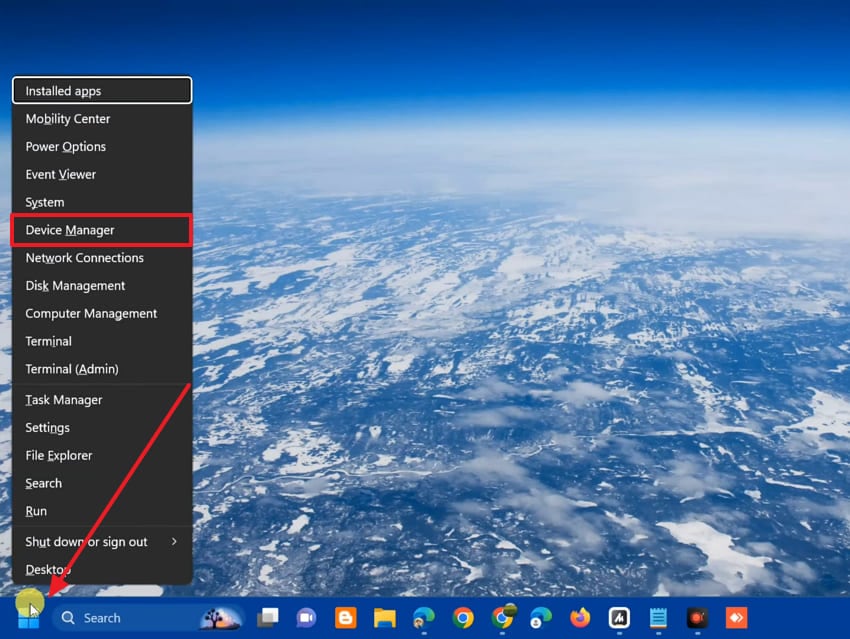
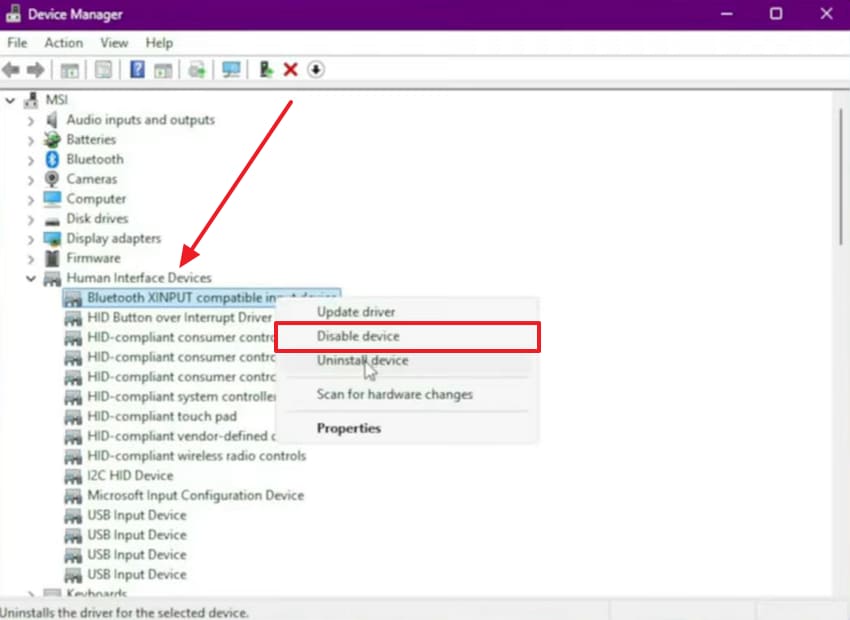
Step 2. You will then need to expand “Human Interface Devices” and right-click the virtual input devices entries. Moving forward, click the “Disable Device” option to remove the virtual driver.
Fix 5. Disable Discord and GeForce (and other) Overlays
Many overlay tools inject extra code into your running game process. Discord and GeForce Experience are common overlays installed on most gaming PCs. These overlays may trigger the sudden FHE01 crash right after game launch. Nonetheless, you will experience smoother frames by removing these tools. Review the steps below to turn off each background overlay tool:
Disable Discord Overlays
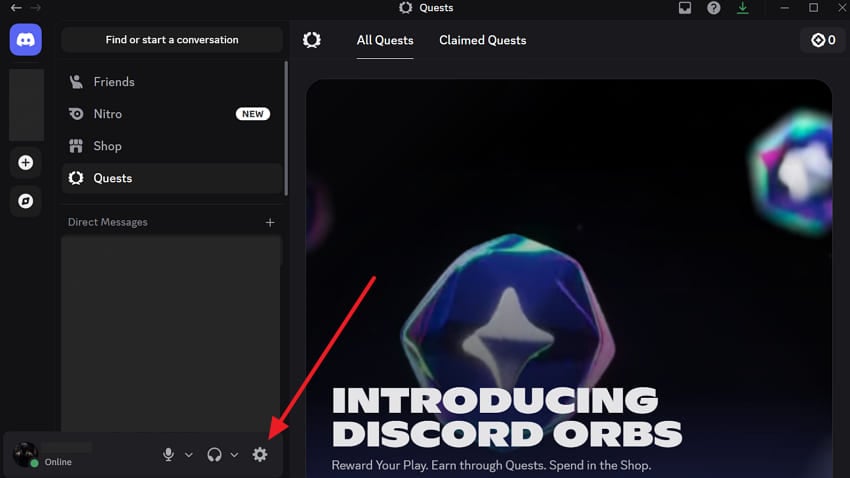
Step 1. Initially, click the “User Settings” icon when you run “Discord” to access new options.
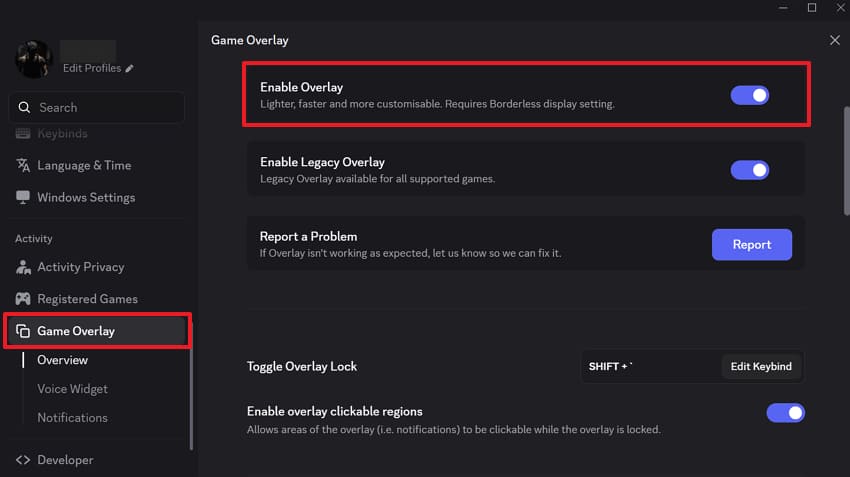
Step 2. Moving forward, go to “Game Overlay” to find its options. Now, disable the “Enable Overlay” feature to stop the app from injecting overlays into running games.
Disable GeForce Overlays
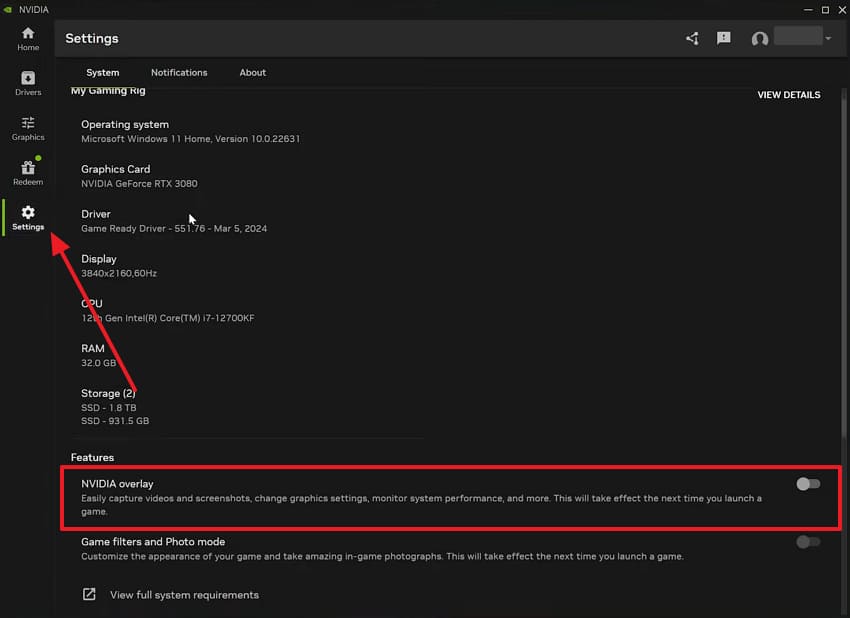
Instructions. You need to launch the “NVIDIA” app and open its “Settings” menu. Then, switch off the “NVIDIA Overlay” feature to prevent it from interfering with game startup.
Fix 6. Verify / Repair Game Files
Other issues that may be causing FH6 to not load include corrupted or missing game files. These damaged files often trigger the sudden FHE01 crash during game startup. On Reddit, even players report that one bad file can trigger FHE01 crashes. The majority of gaming platforms have a built-in tool to check game files. Anyways, gamers need to go through the steps to fix the Forza Horizon 6 FHE01 game crash:
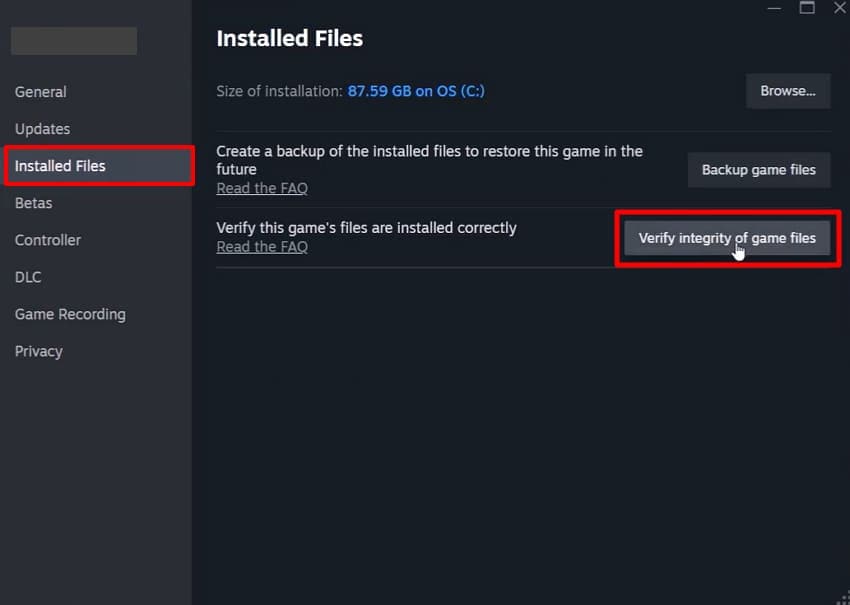
Instructions. From the game’s “Properties,” move to “Installed Files” and select “Verify Integrity of Game Files.” The launcher will then scan the installation to detect corrupted data and download replacement files.
Fix 7. Reinstall Visual C++ Redistributables (x64 and x86)
Games, including Forza Horizon 6, rely on Visual C++ runtime libraries to function. While launching, errors may occur due to outdated or missing redistributables. Both x64 and x86 versions are required for complete game compatibility. Follow these easy steps below to update your system runtime libraries and stop Forza Horizon 6 from crashing on PC:
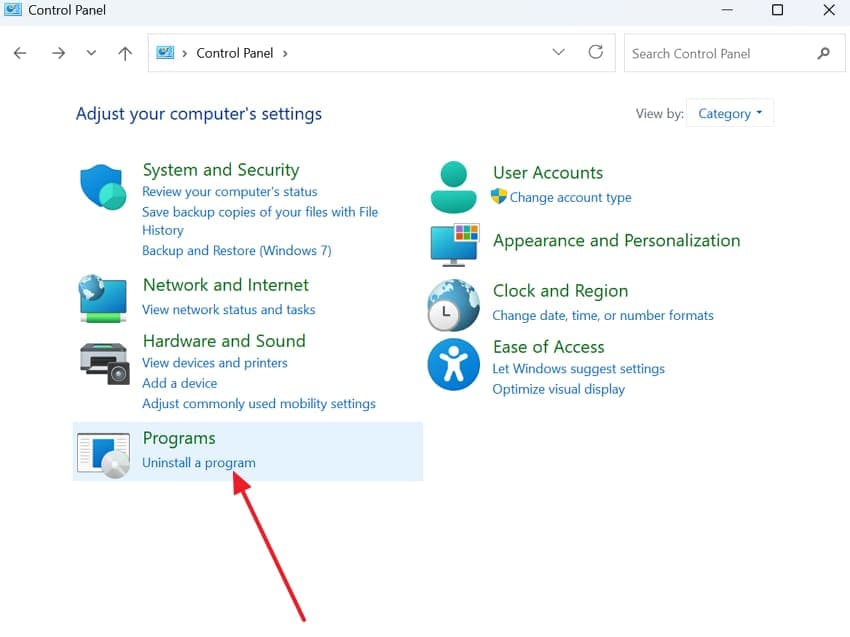
Step 1. Players should choose “Programs and Features” while they are running the “Control Panel” app.
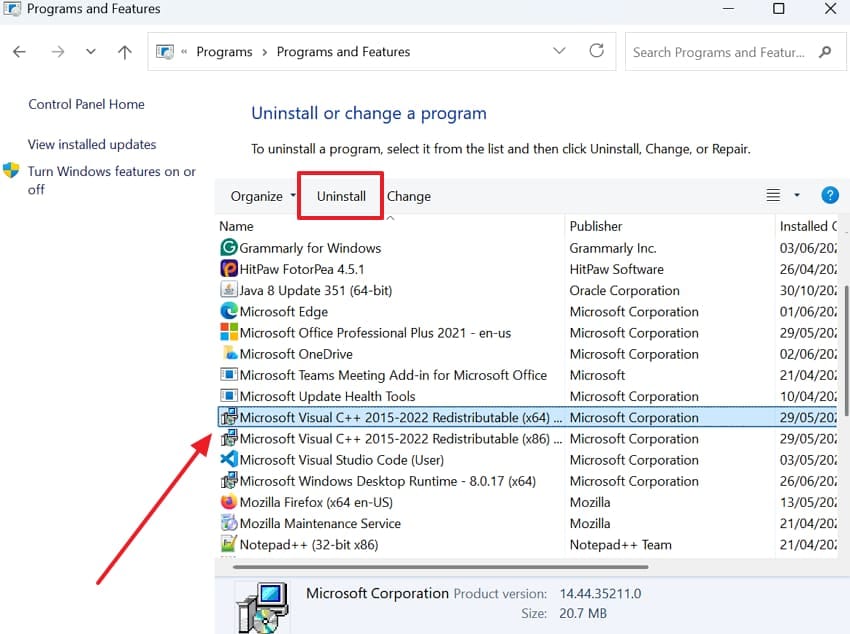
Step 2. Opt for each “Visual C++ Redistributable” and press “Uninstall” to remove them.
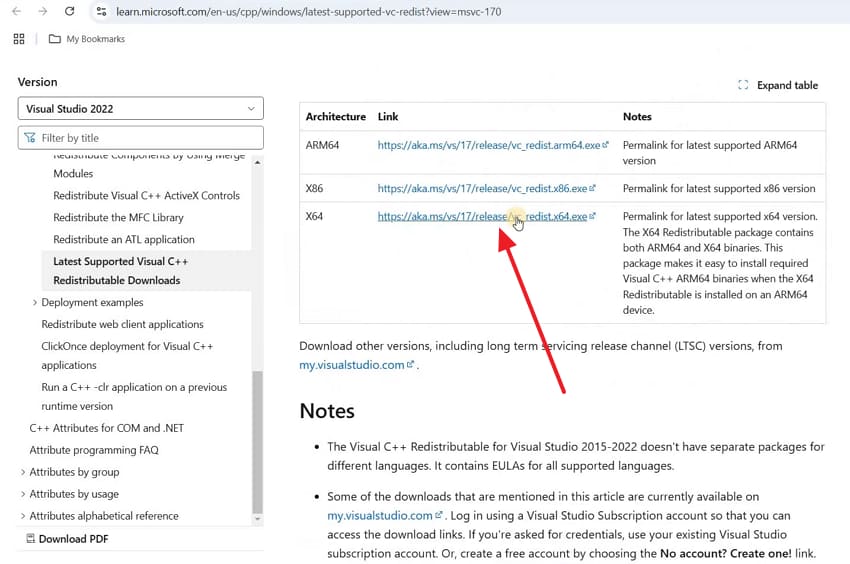
Step 3. Go ahead and visit the official “Microsoft Visual C++ Redistributable” download page. Now, download the latest “x64” and “x86” installation files compatible with your system version.
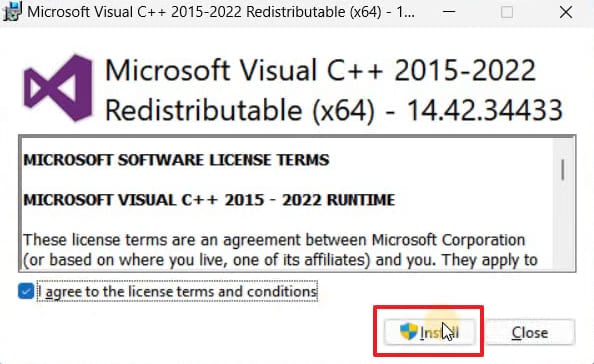
Step 4. As you run the installer file, accept the license terms and click “Install.”
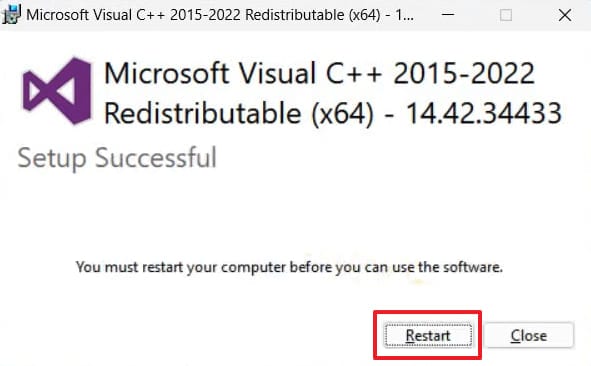
Step 5. Go further and click the “Restart” button once both packages have been installed.
Pro Tip. Recover Lost Game Files After Crashes or Reinstallation Using Recoverit
In many instances, learning ways to fix the Forza Horizon 6 FHE01 game crash could cause you to lose data. Moreover, saved data may be lost if a patch or DLC is not installed properly. Here are a few common reasons behind this frustrating game data loss problem:
- Save Files Missing: Startup failures may corrupt save folders and erase progress unexpectedly.
- Mistaken Delete: If a player tries to fix crashes, they may end up deleting necessary game files.
- Incomplete Reinstallation: If the games are being reinstalled, they may also erase progress and damage existing files.
- Failed Updates: In certain cases, it might even replace or delete game resources when updates fail.
Reliable recovery becomes necessary if crashes or reinstalls cause missing files. In such cases, tools such as Recoverit can restore valuable game data before permanent loss occurs. Gamers can even achieve 99.5% success rate for lost game files and data restoration.
Moreover, Recoverit scans storage devices deeply to locate lost or hidden game files. You can also use this AI-powered data recovery tool when facing crashes and more than 10,000 data loss scenarios. In addition, players can even restore their valuable gaming data in 3 effortless steps.
Key Features
- Preview Ability: Allows you to view recovered FH6 game files before finalizing the entire restoration.
- Accepts Formats: The program supports over 1,000 formats, including your FH6 game files.
- Filter Search: You can filter results by file name to quickly find specific Forza Horizon 6 saves.
Guide to Recover Lost Game Files of FH6 Using Recoverit
Players need to review the steps given below to recover lost FH6 game files using this tool:
Step 1. Locate the FH6 Game Files for Recovery
Open the “Hard Drive and Locations” section and select the drive or folder where your lost FH6 game files were stored.

Step 2. Restore Your Lost Forza Horizon 6 Game Data
Upon choosing the FH6 lost data location, the scanning process starts right after. Subsequently, Recoverit searches the storage and displays all detected recoverable FH6 game files.

Step 3. Save the Retrieved FH6 Game Files
Going ahead, players can find the scan results and preview the recovered game data. After a few moments, click “Recover” to restore your FH6 game files to a secure location.

Part 3. 5 Advanced Fixes for Persistent FHE01 Crashes
The above-mentioned basic fixes may fail to fix the FHE01 "Has Hit an Unexpected Error" crash. Players can now explore these 5 advanced fixes that target deeper crash causes:
Fix 1. Disable Hardware-Accelerated GPU Scheduling
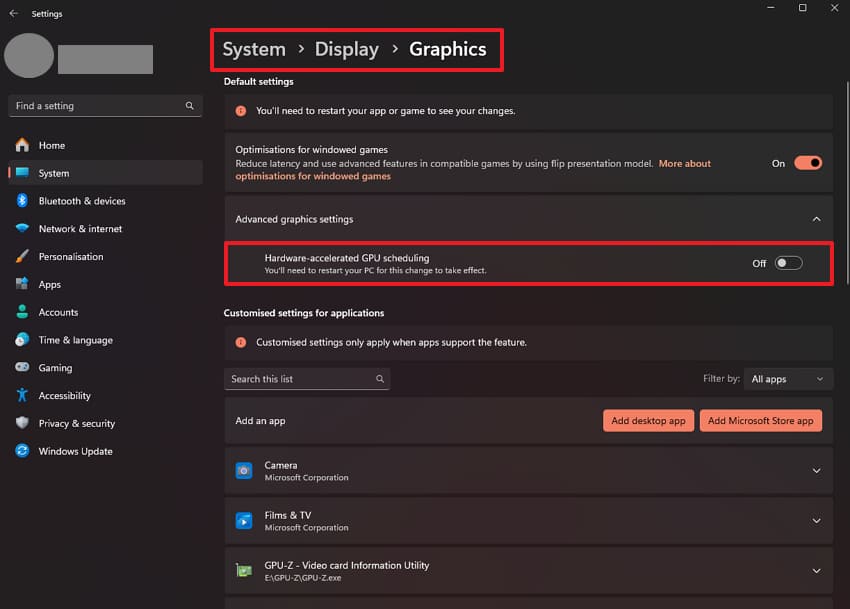
Your system includes a feature called Hardware-Accelerated GPU Scheduling for graphics processing. Some GPU drivers handle this feature poorly, causing sudden game instability issues. Review the simple steps below to turn off this specific GPU feature:
Instruction. As you press “Windows + I,” go to the “System” section. Select “Display” and open “Graphics” settings under the advanced display options. Subsequently, find “Hardware-Accelerated GPU Scheduling” and turn the toggle off.
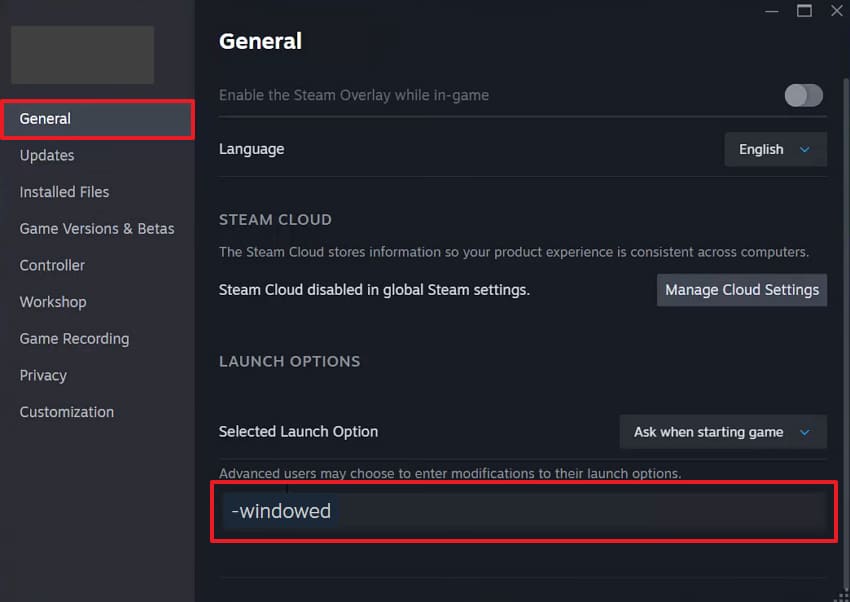
Fix 2. Launch in Windowed (or Borderless) Mode
Fullscreen display modes may also cause severe stability conflicts during startup. Using other screen layouts will help achieve a more stable graphics engine memory. This will reduce GPU rendering pressure and remove exclusive display control. To cater to this fix, adhere to the given steps below to switch the display mode:
Instruction. From the FH6 properties via the game launcher, go to the “General” tab. Then paste the contents of “-windowed” in the “Launch Options” field.
Fix 3. Check Antivirus Exclusions
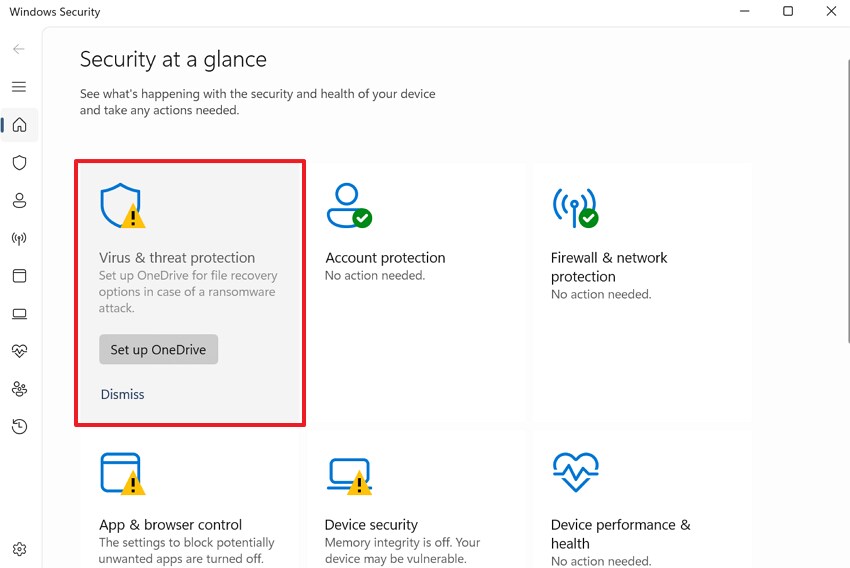
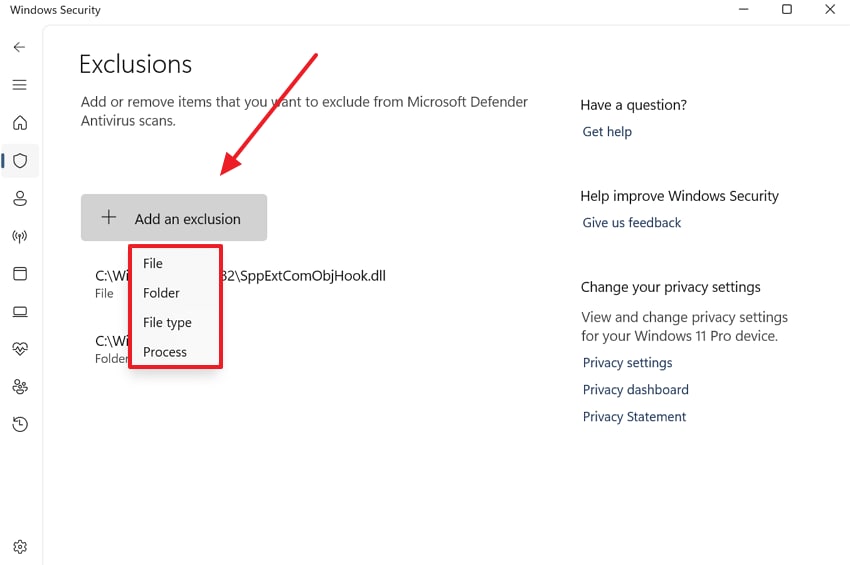
Your antivirus software may mistakenly flag Forza Horizon 6 files as security threats. These false positives quarantine important game files without giving you any warning. Therefore, players should add the game folder to their exclusions list to prevent antivirus interference. Go through the following guide to address and fix the FHE01 "Has Hit an Unexpected Error" crash:
Step 1. From “Windows Security,” you need to click “Virus & Threat Protection.”
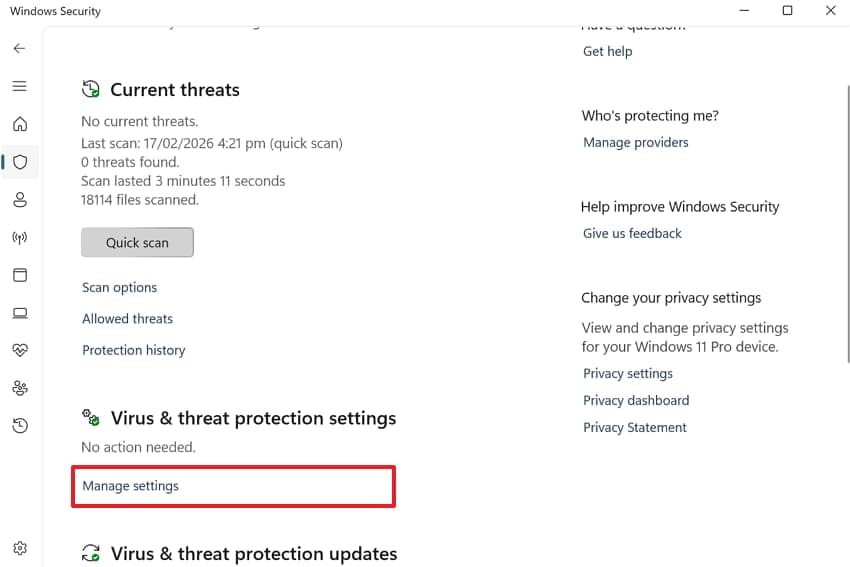
Step 2. Go ahead and press “Manage Settings” under the protection settings section.
Step 3. Scroll down within the settings page and select “Add or Remove Exclusions” to manage files.
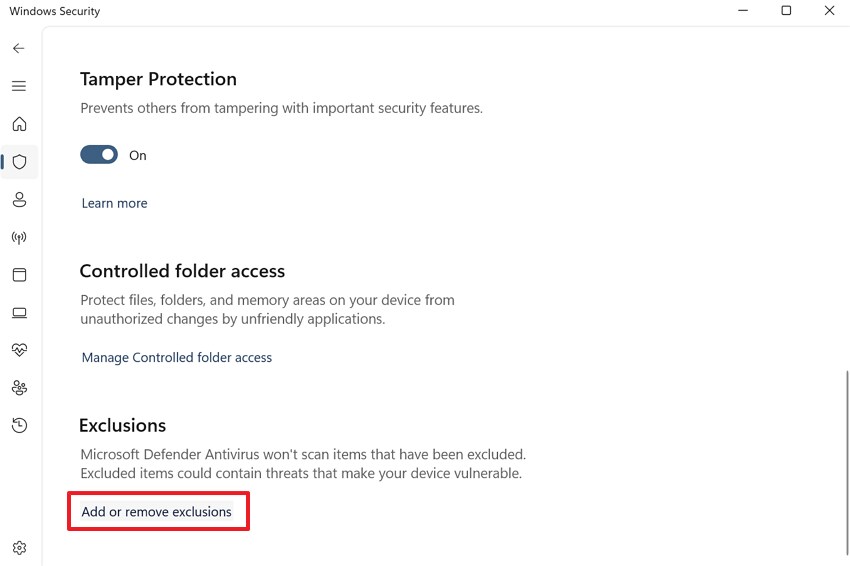
Step 4. Next, click “+ Add an Exclusion” and choose the appropriate option, like file or folder. Then, select the FH6 folder and confirm to prevent it from being blocked.
Fix 4. Set Frame Rate to Unlocked and Turn Off VSync
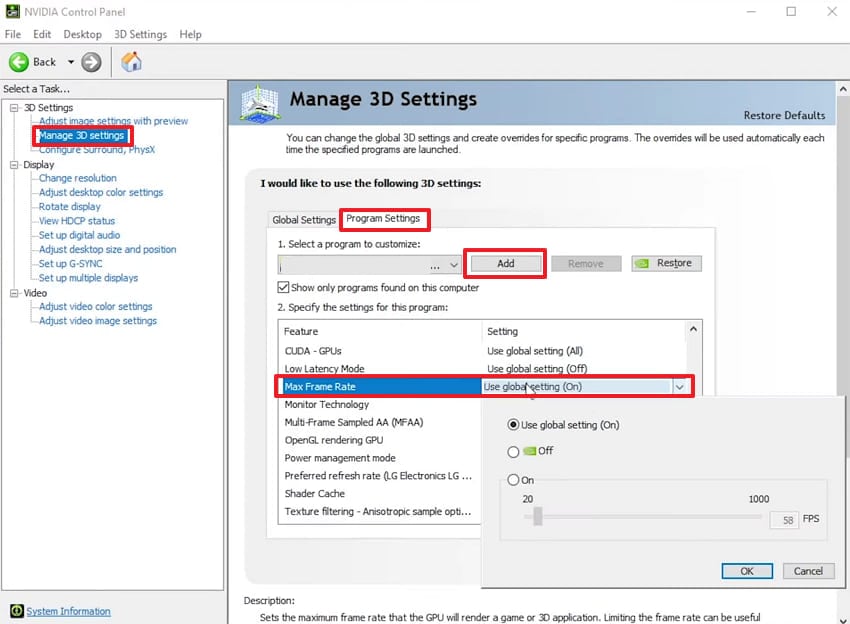
A locked frame rate sometimes creates GPU timing conflicts during FH6 startup. VSync adds extra synchronization overhead that can destabilize your game during loading. Yet, removing these restrictions allows your graphics card to process visual information naturally. Follow these easy steps below to change your default display frame configurations:
Step 1. As you launch “NVIDIA Control Panel,” access “Manage 3D Settings.” Then, click the “Program Settings” tab and press “Add" to select the FH6 game. After that, expand the "Max Frame Rate" settings and set it to a value equal to your monitor refresh rate.
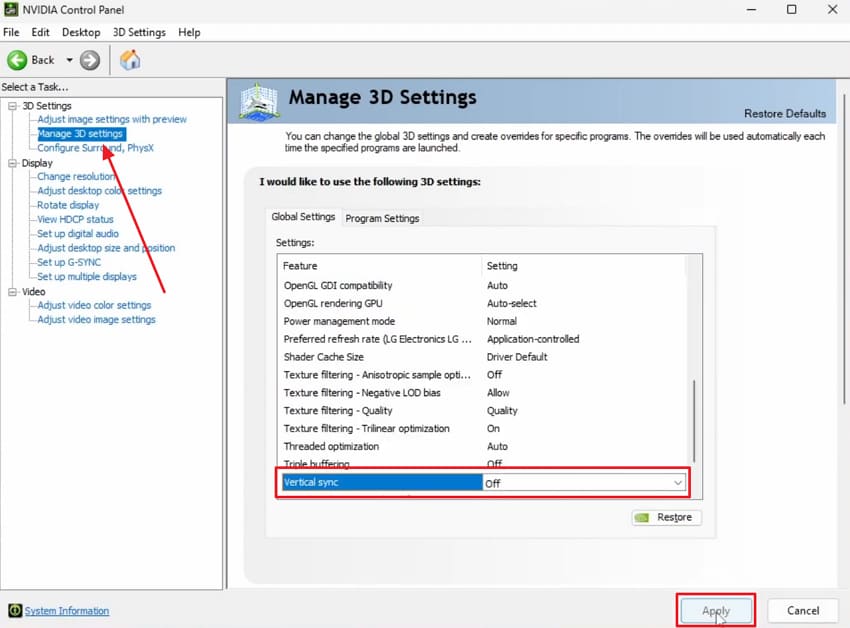
Step 2. Moving forward, navigate to “Global Settings” and set “Vertical Sync” to “Off.”
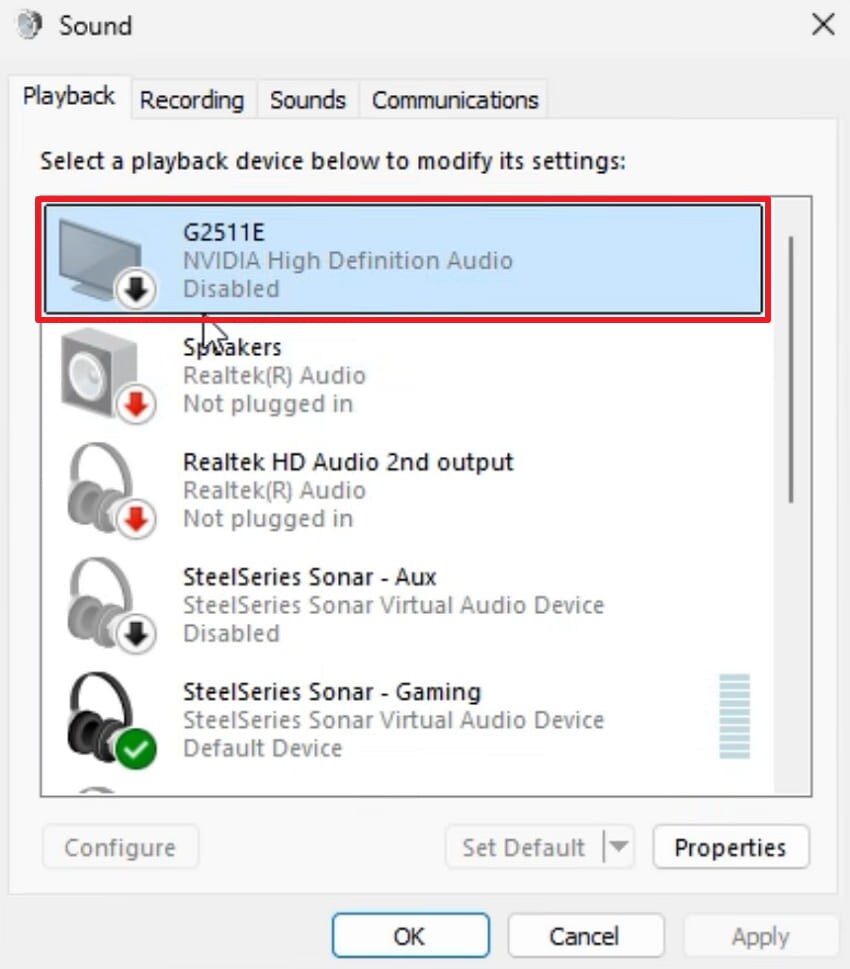
Fix 5. Disable NVIDIA Audio Devices (High Definition Audio + Virtual Audio Device)
NVIDIA installs its own audio devices alongside your graphics driver during installation. These extra audio devices sometimes conflict with Forza Horizon 6. Your system then struggles to initialize multiple audio outputs simultaneously during launch. Therefore, disabling such audio devices removes this hidden conflict from your system. Let’s dive below to disable the problematic NVIDIA audio devices:
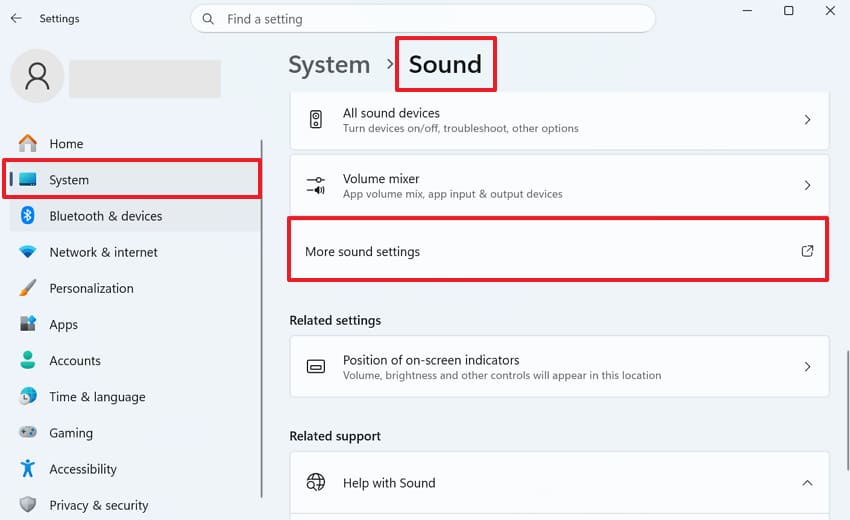
Step 1. Players have to access the “System” settings and go to the “Sound” section. After that, scroll down to find and click the “More Sound Settings” option.
Step 2. Upon seeing a new panel, you need to disable the available NVIDIA audio device.
Conclusion
To summarize, exploring how to fix the Forza Horizon 6 error code FHE01 requires systematic fixes. Applying the explored simple and advanced fixes will stabilize your racing performance. However, unexpected computer crashes or fresh installations may delete your save data. Therefore, you should utilize software like Recoverit that can rescue your lost gaming files.
FAQ
-
Q1. Can insufficient RAM cause the Forza Horizon 6 FHE01 crash?
Yes, running FH6 with insufficient RAM may trigger startup crash errors. The game requires enough memory to load its assets during the initialization phase. Therefore, gamers should upgrade their RAM or close background apps to improve game stability. -
Q2. Does the FHE01 error occur due to a corrupted Windows user profile?
A corrupted system’s user profile can sometimes prevent games from launching. FH6 relies on user profile data to initialize its settings during startup. Hence, creating a fresh Windows user account and relaunching the game often resolves this. -
Q3. Is there a way to recover lost FH6 progress after a system crash?
System crashes can wipe your Forza Horizon 6 saved game progress entirely. To cater to this need, tools like Recoverit can scan your storage drive to locate and restore deleted saves. It supports over 1,000 file formats and handles complex data loss scenarios.


