

 TL;DR:
To resolve missing engine noises, static, or muffled audio in Forza Horizon 6, you must manually align your Windows default audio output, disable conflicting Bluetooth hands-free profiles, or reset core system audio services.
● In Windows Playback settings, disable "Hands-Free Audio" to force Bluetooth headsets into standard stereo mode and prevent low-quality sound drops.
● Press Win + R to open `services.msc` and restart both "Windows Audio" and "Windows Audio Endpoint Builder", or use Steam's "Verify Integrity of Game Files" to replace corrupted sound assets.
● Connecting new hardware like headphones or HDMI monitors will automatically hijack the system's default output, causing audio to work in menus but fail during races until manually reassigned in the taskbar.
Ask AI for a summary
 ChatGPT
 Perplexity
 Gemini
 Claude
 Grok
Grok
On a random day, if you have launched Forza Horizon 6 expecting engine roars and smooth music, but instead hear static and muffled sound. It breaks the whole racing experience and leaves you searching for a quick fix. Many users now face the Forza Horizon 6 audio not working issue and wonder what the main reason is.
Thus, this guide will explain the causes of the sound issues and how to fix Forza Horizon 6 sound not working on PC with 6 solutions. It will also cover easy ways to restore clear audio and help you get back to immersive racing without interruptions.
Try Recoverit to Perform Data Recovery
 Security Verified. 3,591,664 people have downloaded it.
In this article
Part 1. Why Forza Horizon 6 Audio Problems Occur
Before exploring the right Forza Horizon 6 no sound fix, review the 5 reasons for this issue in detail:
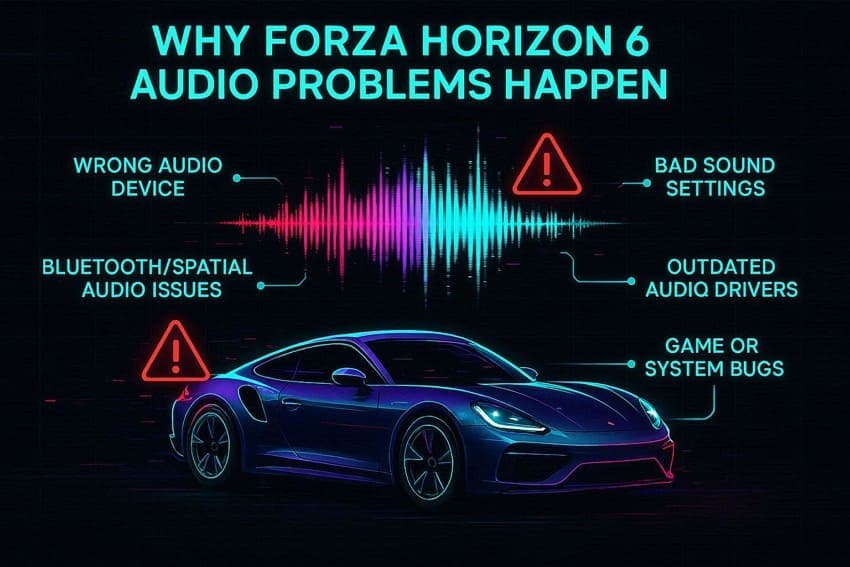
- Wrong Audio Device Selected: Sometimes Windows sends sound to the wrong device, like a monitor or a disabled headset. Thus, this makes Forza Horizon 6 seem to have no sound or very low audio.
- Bluetooth or Spatial Sound Problem: Bluetooth headsets may switch to low-quality mode and make sound muffled or crackly. Spatial audio like Dolby or Sonic can also mess up game audio and cut out voices or engine sounds.
- Wrong Sound Settings: Bad Windows sound settings or in-game audio options can reduce or remove game sounds. Additionally, things like mono mode or wrong volume settings can make key sounds quiet.
- Old Audio Drivers: Outdated drivers can cause no sound, audio delays, or audio crackling in the game. Furthermore, Windows updates or driver issues can also break audio completely.
- Game or System Bug: Sometimes game files are broken, or the system is overloaded, which causes sound issues. Thus, this can stop engine sounds or cutscenes until the game is fixed or verified.
Part 2. How to Fix Forza Horizon 6 Sound Not Working on PC? 6 Ways
Regarding the Forza Horizon 6 crackling audio fix, try the 6 simple ways mentioned in this section:
Way 1. Set Correct Audio Output Device
This solution ensures the game uses the correct speakers and headset properly and fixes the issues where the menu works, but the engine and voices are missing. Moreover, it helps prevent sudden audio dropouts when switching or reconnecting devices like Bluetooth headsets. So, if you follow the above-mentioned steps, you can lower the conflict with spatial sound and enhancements:
From Windows
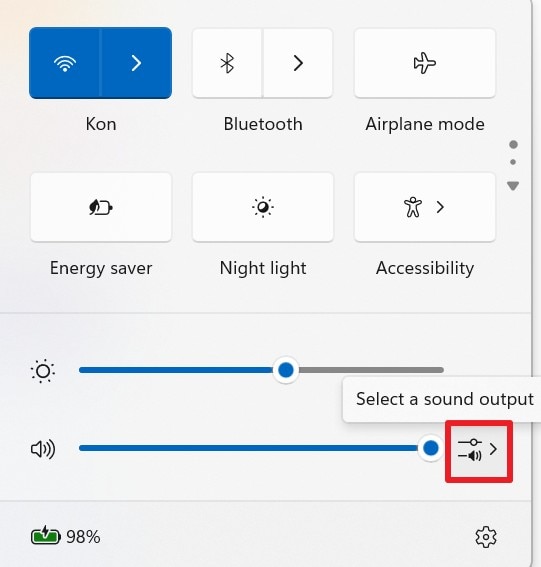
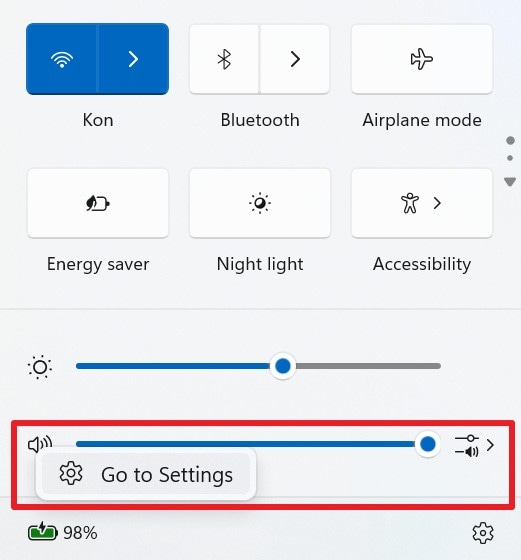
Step 1. Tap the “Speaker” icon in the taskbar and pick the “Select a Sound Output” menu.
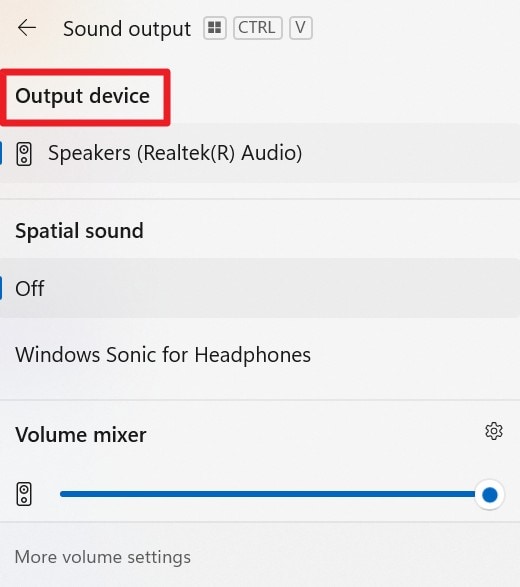
Step 2. Choose the “Output Device” you use for FH6 or your Bluetooth headset’s Stereo output. After that, test the sound to confirm the audio comes from the correct device.
From Sound Settings
Step 1. Right-click on the Speaker icon to choose the “Go to Settings” option.
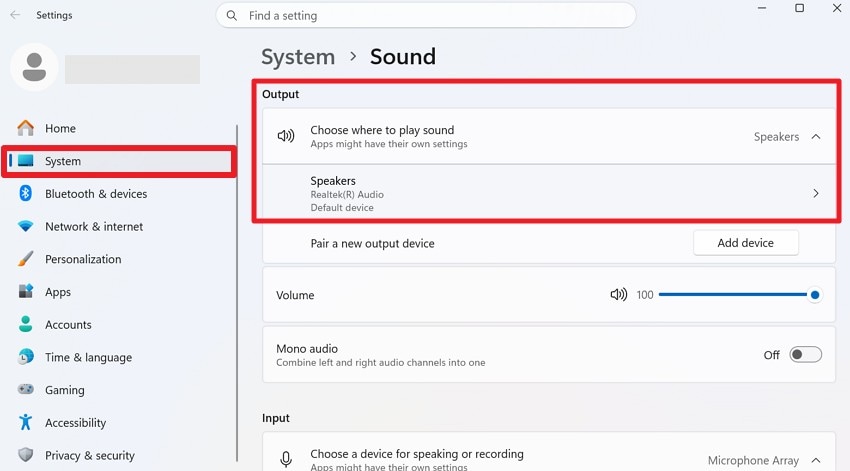
Step 2. In the System Sound Settings, locate the “Output” tab and ensure the preferred device is selected as the default.
Way 2. Update Audio Drivers
For the Forza Horizon 6 muffled audio fix on PC, you have to update the audio drivers to restore missing audio and fix no sound issues. It can properly connect the game to speakers or headsets, or to a DAC, and remove distortion during gameplay. Furthermore, new drivers improve compatibility with Windows updates and fix problems with missing channels, as guided:
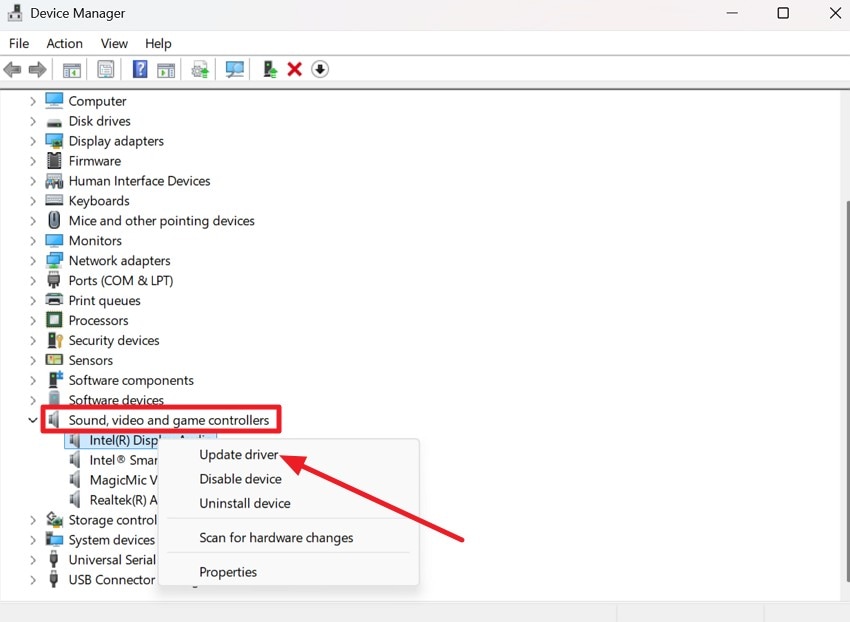
Step 1. In the Device Manager, go to the “Sound, Video, and Game Controllers” menu and choose the driver to press “Update Driver.”
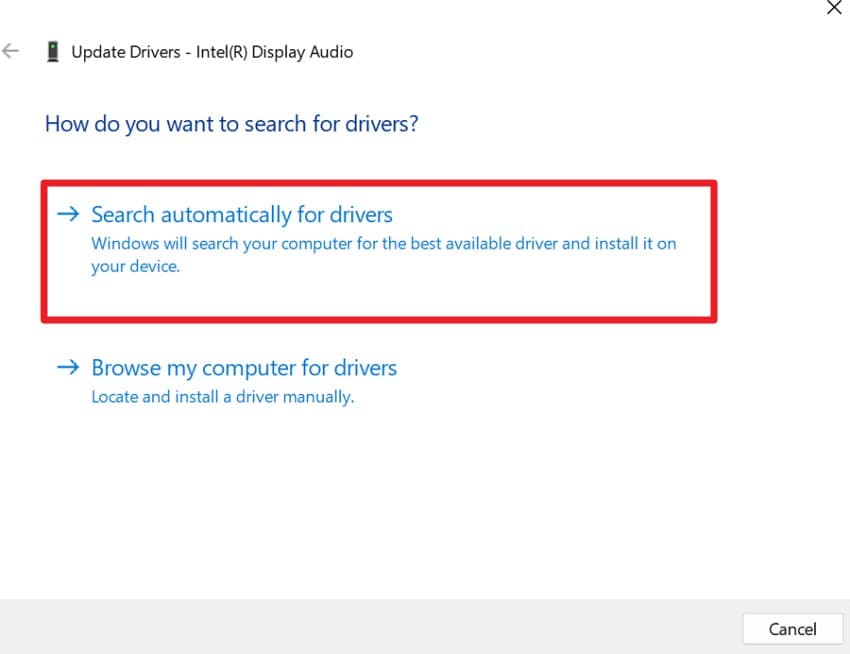
Step 2. On the new popup menu, tap on the “Search Automatically for Drivers” option to confirm the action.
Way 3. Run Audio Troubleshooter
You can also try this Forza Horizon 6 popping static sound fix because it automatically finds and repairs common issues. In addition, it can restart Windows audio services so the game connects properly to your speaker or headset again. Sometimes, it might suggest driver fixes if it detects a deeper issue causing missing sounds. As for the steps, the detailed directions to run the troubleshooter are given ahead:
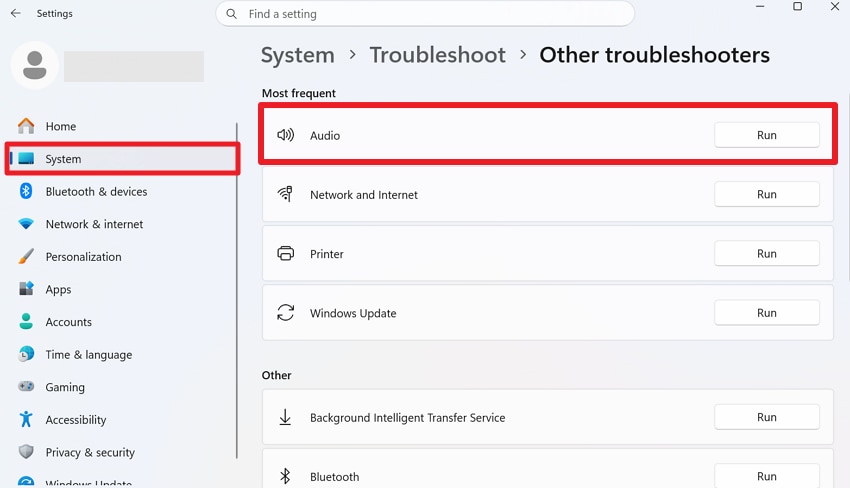
Step 1. In the System settings, choose “Troubleshoot and Other Troubleshooters” to click “Run” for the “Audio.”
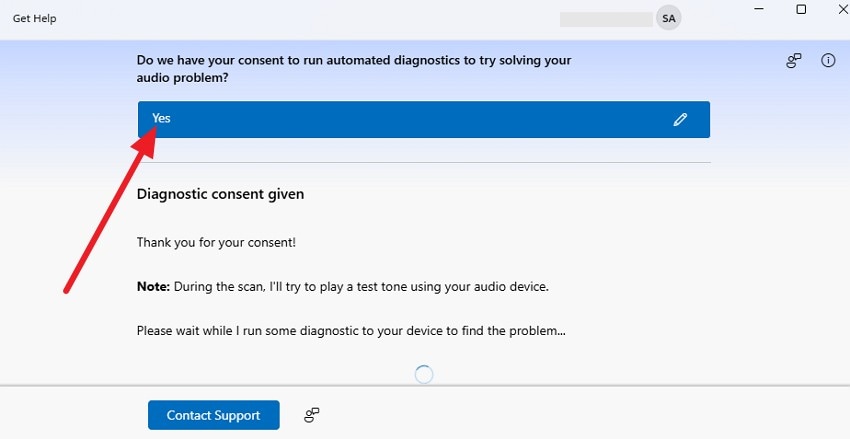
Step 2. When prompted in the new window, give consent to the diagnosis by selecting “Yes.” Then, select the suggestions, follow the instructions, and restart Forza Horizon 6 to test the sound.
Way 4. Restart Windows Audio Service
This solution also refreshes the whole Windows sound system and removes glitches that may stop game audio from working. Additionally, it can restore missing sounds if the audio service gets stuck or broken while the game is running. Most of all, it forces Forza Horizon 6 to reconnect to the correct output device, once the listed steps are performed correctly:
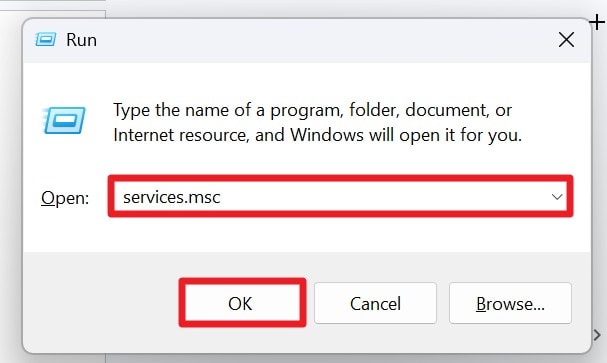
Step 1. Type “services.msc” as you press “Win + R” and click on the “Ok” option.
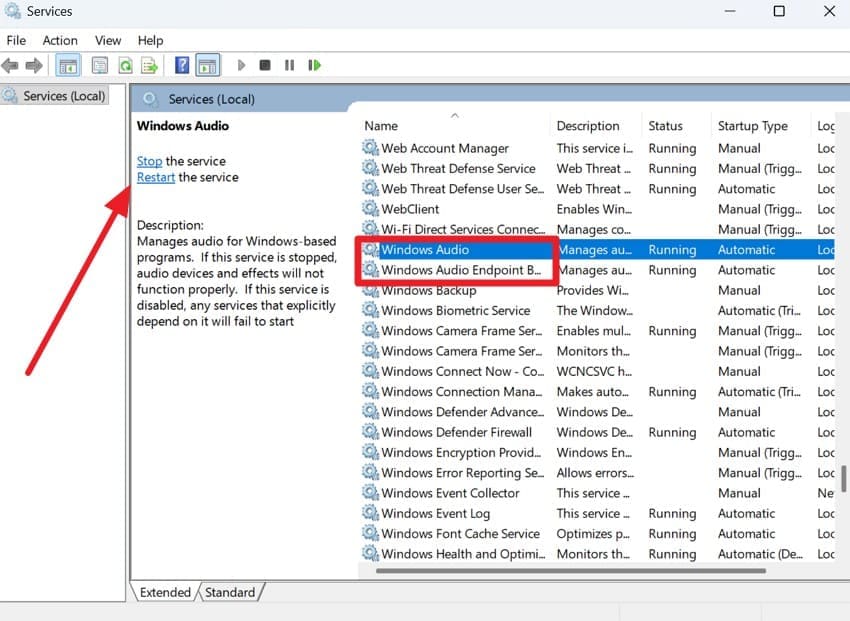
Step 2. In the Services tab, pick the “Windows Audio” and “Windows Audio Endpoint Builder” options. Double-click Windows Audio, and if “Restart” is greyed out, click “Stop,” wait a few seconds, then choose “Start” again. Do the same for the “Windows Audio Endpoint Builder” and relaunch Forza Horizon 6 and test the sound.
Way 5. Verify Game Files
If the Forza Horizon 6 audio is not working, this solution can fix the sound issue. This is because it repairs missing, corrupted, or incomplete audio files for engine sounds and voice effects. Moreover, it can resolve issues caused by failed or interrupted updates by ensuring all game files are correctly installed and matched. Regarding the guide, follow the given instructions in detail for better clarity:
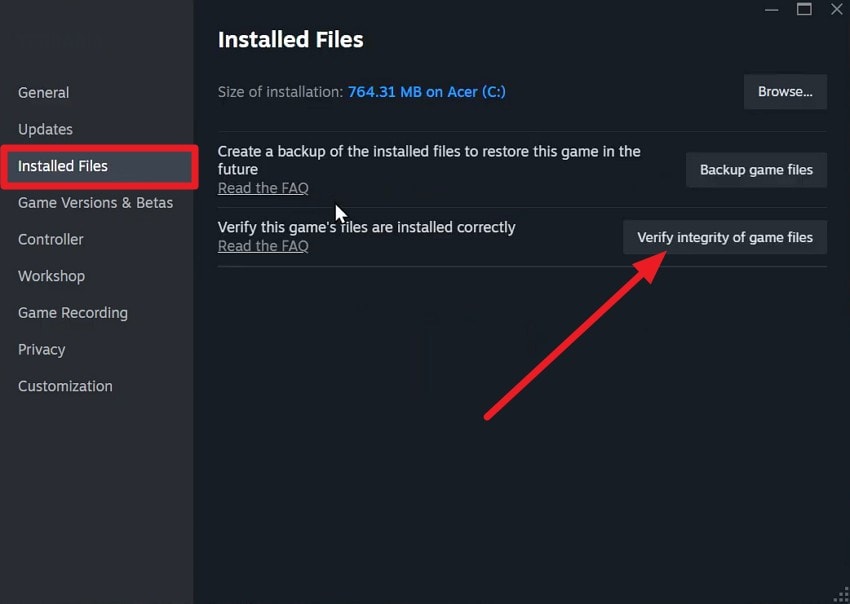
Instructions. On Steam, go to the Forza Horizon 6 Properties and choose the “Installed Files” tab. There, press the “Verify Integrity of Game Files” option, and when the progress bar ends, restart the PC.
Way 6. Disable Bluetooth Audio Lag Devices
When Bluetooth headsets often switch to low-quality hands-free mode, try this solution. When you turn off this mode, the headset remains in proper stereo for clear sound. Furthermore, it reduces stutter and audio drops caused by Bluetooth conflicts or background activity. Since this also prevents sudden switching between outputs, here is how it can be done:
Step 1. Right-click on the “Speak” icon to go to settings and pick the “More Sound Settings” option.
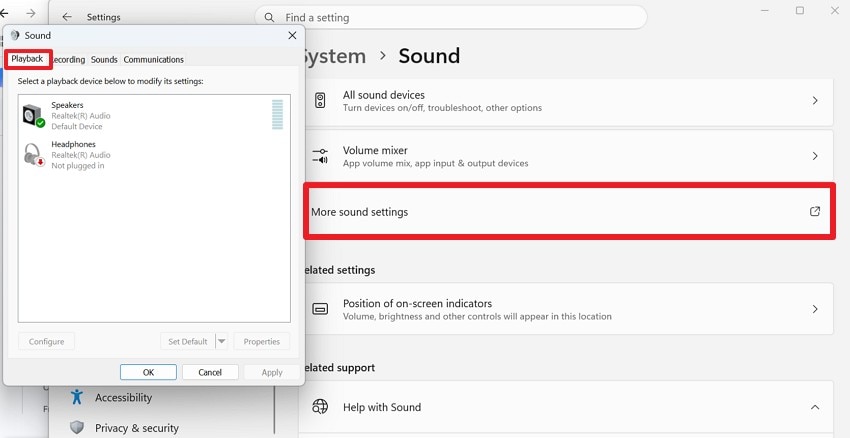
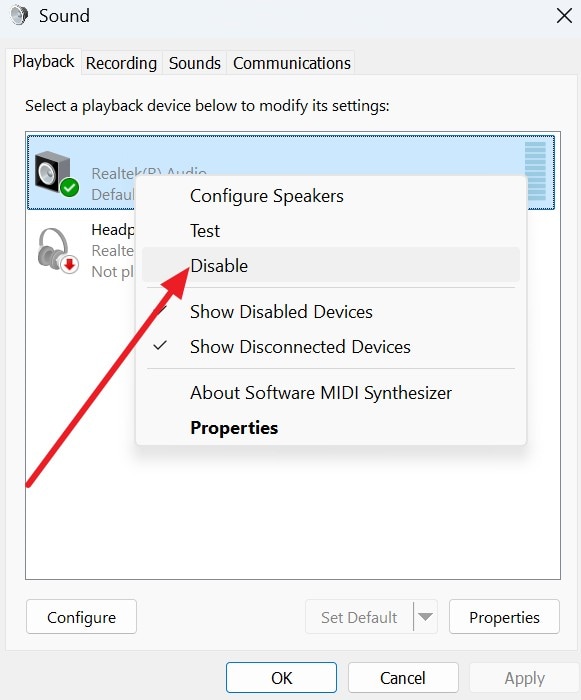
Step 2. Go to the “Playback” tab and right-click on the “Hands‑Free Audio” to choose the “Disable” option. Ensure the Stereo or Headphones version of your game is set to the default, then relaunch FH6 to test.
Pro Tip. Restore Lost Screen Recordings and Local Game Files with Recoverit
As you seek a Forza Horizon 6 no sound fix, sometimes audio problems and crashes can lead to data loss. This can mainly affect your saved screen recordings and game files, which Recoverit can help restore. Though it has nothing to do with the Forza Horizon 6 sound not working issue, it can scan the HDDs, SSDs, SD cards, and USB drives.
When using the Quick and Advanced scans, they can retrieve data after formatting, partition loss, or file‑system issues. Additionally, you can preview files by location and type, and control the scan to ensure selective, controlled data retrieval. Thus, you can recover images, video, and audio, along with game files, in batches using the separate tabs and detailed guides.
Key Features
- Crashed PC Recovery: You can create a bootable USB to access files from a crashed or black/blue screen PC.
- NAS & Linux Recovery: Recoverit also supports advanced systems like NAS and Linux servers to recover data from complex storage setups.
- Video Fragment Recovery: This tool can recover fragmented 4K/8K Forza Horizon 6 video recordings, so they play normally again.
Guide to Recover Lost Data Forza Horizon 6 with Recoverit
While learning about the Forza Horizon 6 crackling audio fix, ensure the data remains the same with Recoverit. So, follow the mentioned guide and learn how to retrieve game data when Recoverit is accessed on Windows or Mac:
Step 1. Choose the Lost File Location in Hard Drives & Locations
Choose from “Hard Disk Drives,” “External Drivers,” or “Quick Access” to pick the lost data location in the “Hard Drives and Locations” tab.

Step 2. Start the Scan & Filter Forza Horizon 6 Data
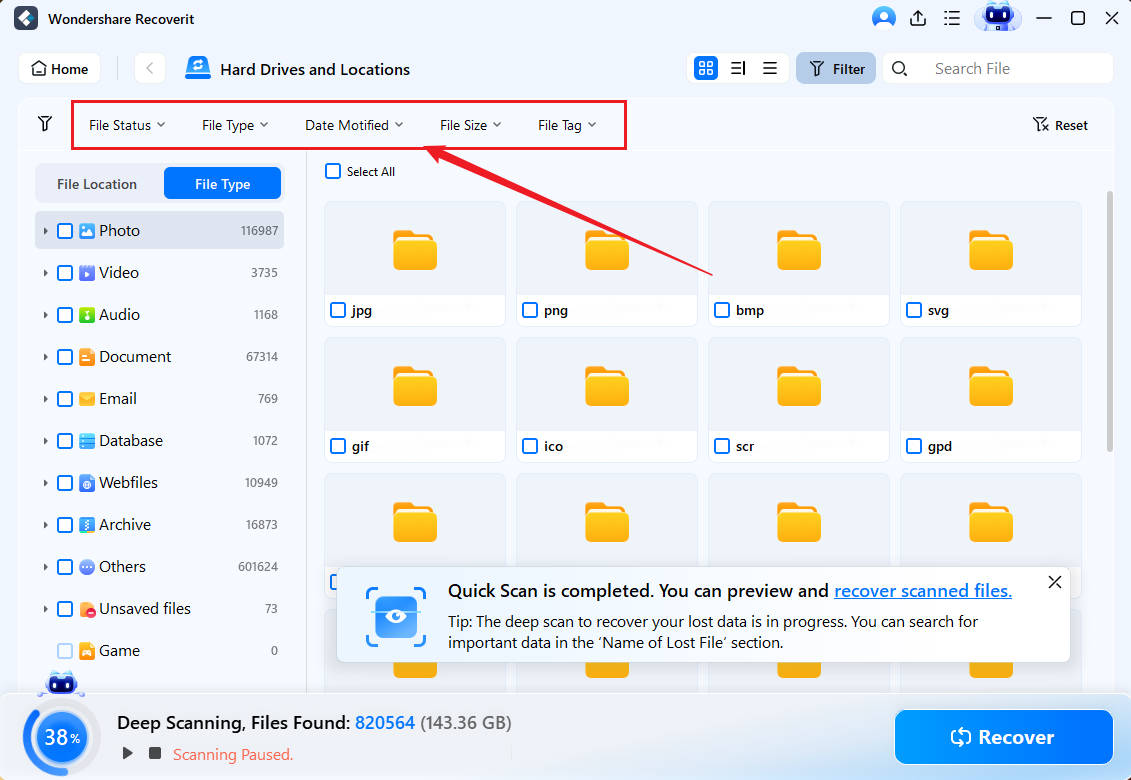
When the “Quick Scan” starts, filter the files by location and type from the given menus.
Step 3. Choose to Recover the Forza Horizon 6 Data
Upon data retrieval, tap the “Recover” button as you preview the files and choose “OK” to save.

Conclusion
When users face the Forza Horizon 6 audio not working issue, they immediately look for the reasons and fixes. Thus, this guide has explained 6 simple solutions with detailed causes to use the correct audio source. Nonetheless, in cases where your game files or recording gets lost, you can use Recoverit to retrieve the data in batches with Quick AI scan.
FAQ
-
1. Why does Forza Horizon 6 audio work in the menu but not in the race?
This usually happens when Windows switches output devices, or when Windows routes game audio to the wrong output. Thus, setting one correct default audio output device in Windows can fix this issue. -
2. Why does FH6 sound cut out after I plug in headphones?
Windows often auto-switches the default audio device when new hardware is connected. Hence, this can mute or re-route the game audio to the wrong device. -
3. Can HDMI monitors cause no sound in Forza Horizon 6?
Yes, if HDMI audio is selected as the default, sound may go to the monitor instead of your speaker or headset. -
4. Why is FH6 audio delayed or out of sync?
Audio delay is usually due to Bluetooth latency, outdated drivers, or a heavy system load that affects real-time sound processing.


