
 TL;DR:
Free online ZIP password recovery tools can sometimes unlock simple or partly remembered passwords using dictionary lists or user-provided hints, but they are generally ineffective against long, AES-encrypted passwords and require uploading your archive, which creates severe privacy risks for sensitive data.
● Aspose ZIP Password Recovery, LostMyPass Pro, and PasswordRecovery.io are best suited for non-confidential files you are authorized to access, provided you can narrow down the search with exact length limits or known character patterns.
● If the ZIP archive itself was deleted or lost from a formatted drive, you must first restore the original file using data recovery software like Recoverit, though this software cannot crack or remove the password after recovery.
● When a known correct password fails to open a ZIP file, the archive is likely corrupted or incompatible with your current extractor, meaning you should try opening it with 7-Zip or WinRAR before attempting further password recovery.
Ask AI for a summary
 ChatGPT
 Perplexity
 Gemini
 Claude
 Grok
Grok
Forgetting a ZIP password can block access to work files, photos, projects, client documents, backups, and shared archives. Free online ZIP password recovery tools may look convenient, but they are not magic unlock buttons. They usually test possible passwords, use dictionary lists, or check limited password patterns. If the original password was short, reused, or partly remembered, they may help. If it was long, random, and protected with strong encryption, recovery may be unrealistic.
Before uploading a ZIP file to any online service, you should also consider privacy. A ZIP archive may contain personal photos, business files, financial records, legal documents, or confidential project data. Uploading it to a third-party website can expose sensitive information.
This guide explains what online ZIP file password recovery can and cannot do, how free tools work, when offline recovery is safer, what to try if online recovery fails, and how Recoverit helps when the ZIP archive itself is deleted or lost.
In this article
Quick Answer: Can You Recover a ZIP Password Online for Free?
Sometimes. Online ZIP password recovery may help only when the ZIP belongs to you or you have permission to access it, the password is short or partly remembered, and the recovery tool can test the right password pattern. Free online tools usually work best with simple passwords, known words, dates, names, or limited guessing ranges.
They cannot guarantee recovery for long random passwords or strong AES-protected archives. They also require uploading the ZIP file, which can be risky for private or confidential data.
If the ZIP file itself was deleted, lost, or missing, password recovery tools cannot help because they need the original archive. In that case, recover the ZIP file first with file recovery software such as Recoverit. Recoverit can help recover deleted or lost ZIP archives from storage devices, but it cannot crack, remove, or bypass ZIP passwords.
Password Recovery vs Password Removal vs ZIP Opener vs ZIP File Recovery
| Term | What It Means | Best Used For | Main Limit |
| Password Recovery | Finds or guesses the ZIP password | Forgotten simple or partly remembered passwords | Strong passwords may take too long or never be found |
| Password Removal | Removes protection after access is confirmed | Files you can already unlock | Usually needs the correct password first |
| ZIP Opener | Opens an accessible ZIP archive | Normal ZIP extraction | Cannot break strong encryption |
| ZIP File Recovery | Recovers deleted, lost, or missing ZIP archives | Deleted ZIP files, formatted drives, lost partitions | Does not recover or remove passwords |
If your ZIP file is missing, use ZIP file recovery first. If your ZIP file exists but is password-protected, you need password recovery or the original password. If your ZIP file exists and you know the password but it will not open, the issue may be corruption or extractor compatibility.
Part 1. Quick Diagnosis: Which ZIP Recovery Path Fits Your Case?
Before choosing a free online ZIP password recovery method, diagnose your file situation first.
| Your Situation | Best Next Step | Avoid |
| You remember part of the password. | Use hints and narrow the password length, words, dates, or character set. | Broad brute-force ranges that may take too long. |
| The password is short, common, or reused. | Try an online recovery check or an offline tool. | Uploading sensitive files without checking privacy terms. |
| The ZIP uses strong AES encryption and a long random password. | Search for the original password record. | Expecting fast or free guaranteed recovery. |
| You know the password, but the ZIP will not open. | Try another extractor and check for file corruption. | Repeated password recovery attempts. |
| The ZIP file is large. | Check upload size limits or use offline tools. | Long uploads to services with unclear limits. |
| The ZIP contains private or confidential files. | Prefer offline recovery or original password records. | Uploading sensitive archives online. |
| The ZIP file was deleted or lost. | Recover the ZIP archive first with Recoverit or another data recovery tool. | Password recovery tools without the original ZIP file. |
| Free online attempts failed. | Check password managers, notes, sender records, or try offline tools. | Uploading the same private file to many websites. |
Part 2. Limits and Risks of Online ZIP Password Recovery
Free online ZIP password recovery has important limits. Understanding them helps you avoid wasted time and privacy problems.
- Strong Passwords May Be Unrealistic to Recover: Online tools work better when clues reduce the number of guesses needed first.
- Strong Password Limits: Long, random passwords can take years to create, especially with modern online ZIP encryption methods.
- Large File Restrictions: Many websites reject large archives, and slow uploads can unexpectedly interrupt recovery sessions.
- Privacy Exposure: Uploaded ZIPs may contain personal files, so sensitive archives should be handled offline instead.
- Free Tool Limits: Queues, trial caps, and limited checks may prevent recovery from completing, even with clues.
- ZIP Opener Confusion: A ZIP opener extracts accessible files, but it cannot recover forgotten passwords on its own.
- Tool Safety Checks: Review ownership, privacy terms, and processing methods before trusting any recovery website.
Part 3. Free Online ZIP Password Recovery Tools: What They Are Best For
The tools below may help in limited cases. Use them only for archives you own or are authorized to access, and avoid uploading sensitive files.
| Tool | Best For | Free Limit | Privacy Note |
| Aspose ZIP Password Recovery | Short passwords with hints, length ranges, or remembered words. | Depends on service settings and password range. | Requires upload. Avoid sensitive archives. |
| LostMyPass Pro ZIP Password Recovery | Online free check and deeper recovery options. | Free check may not mean full recovery. | Requires upload and email. Review service terms. |
| PasswordRecovery.io ZIP File Password Recovery | Password-list based attempts for authorized archives. | Check current upload size and plan limits. | Requires upload. Not ideal for private files. |
Tool 1. Aspose ZIP Password Recovery
Aspose ZIP Password Recovery can help when you own the archive and remember useful password clues. It lets you set recovery options such as password length, known words, and character types.
Use it when:
- The ZIP does not contain sensitive data.
- You remember part of the password.
- You can narrow the password length.
- You know likely words, numbers, or symbols.
- You accept uploading the archive to an online service.
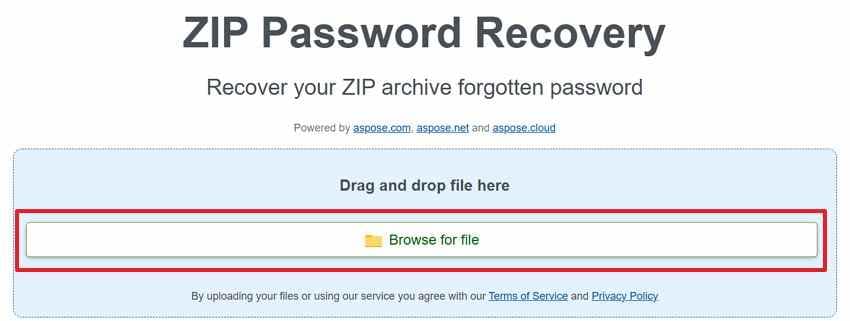
Step 1. In Aspose ZIP Password Recovery, click “Browse for File” in the upload box. Select your locked ZIP archive, then wait until the upload finishes.
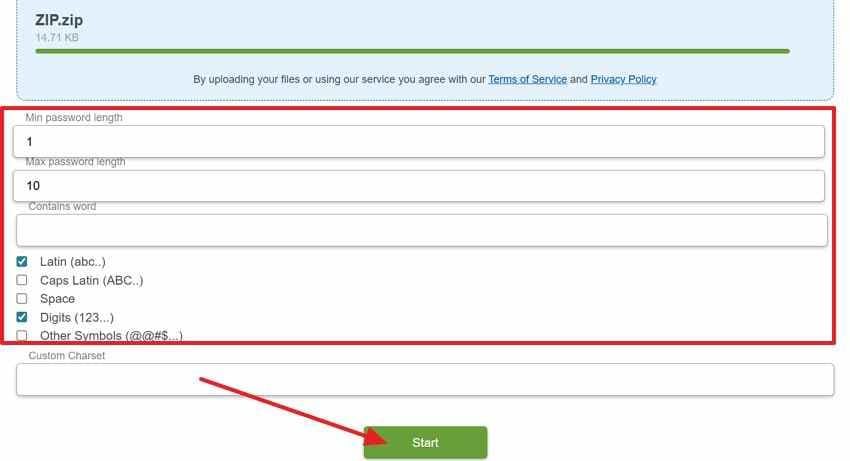
Step 2. Enter the minimum and maximum password length, then add any remembered word if available. Choose matching character types, review the settings carefully, and press “Start” to begin recovery.
Cons
- Uploading private ZIP files may expose sensitive data.
- Wide password ranges can make recovery very slow.
- Strong random passwords may not be recovered.
Tool 2. LostMyPass Pro ZIP Password Recovery
LostMyPass Pro offers online ZIP password recovery checks for encrypted archives. It may start with a free check before deeper recovery options are offered.
Use it when:
- You want an online password check.
- You own the ZIP archive.
- You accept service-based recovery.
- The archive does not contain highly sensitive data.
- You understand that deeper recovery may not be free.
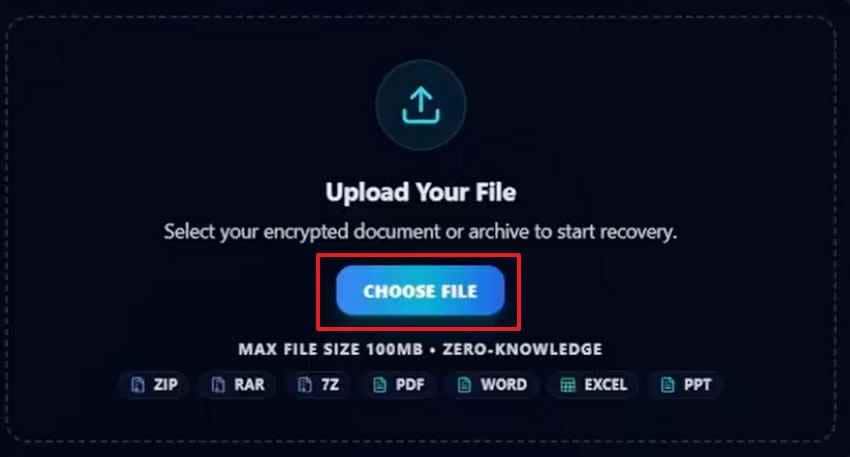
Step 1. Go to LostMyPass Pro ZIP Password Recovery and press “Choose File” to upload the encrypted ZIP archive.
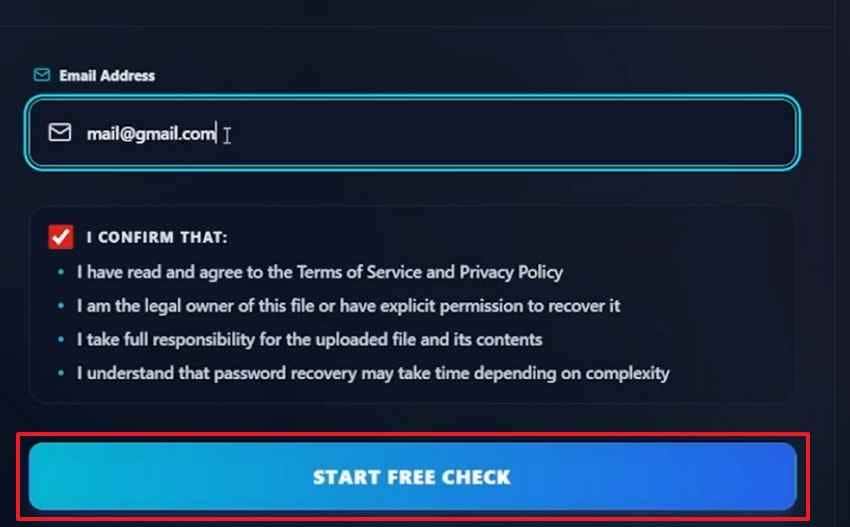
Step 2. Enter your email and click the “Start Free Check” button.
Cons
- Free check does not always mean full free recovery.
- Deeper recovery may involve paid tiers.
- Complex AES encryption can keep results uncertain.
- Uploading archives can create privacy concerns.
Tool 3. PasswordRecovery.io ZIP File Password Removal
PasswordRecovery.io provides online attempts for password-protected archives by testing uploaded files against password lists or recovery methods.
Use it when:
- The archive belongs to you.
- You want a browser-based recovery attempt.
- The ZIP is not sensitive.
- You accept upload and service limitations.
- You check the current size and plan limits first.
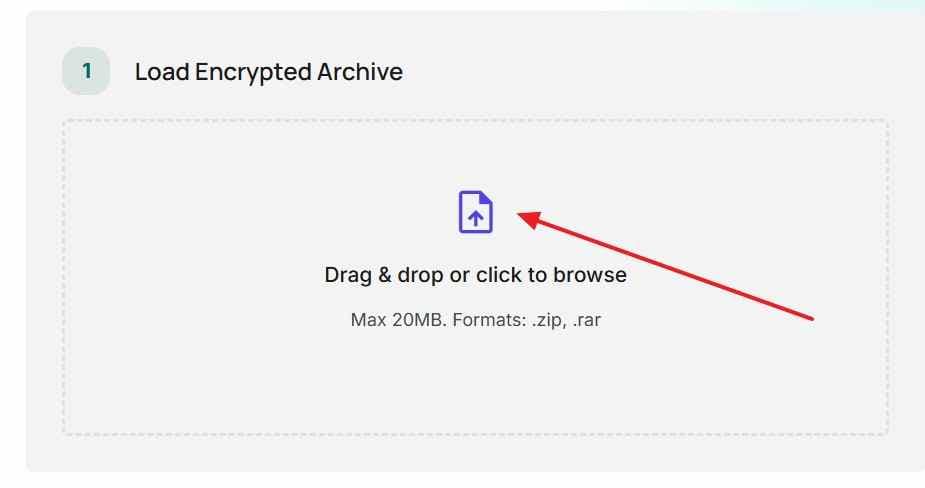
Step 1. Open PasswordRecovery.io ZIP File Password Removal and click the “Initiate Recovery” button. You can drag and drop your ZIP file or browse from your device.
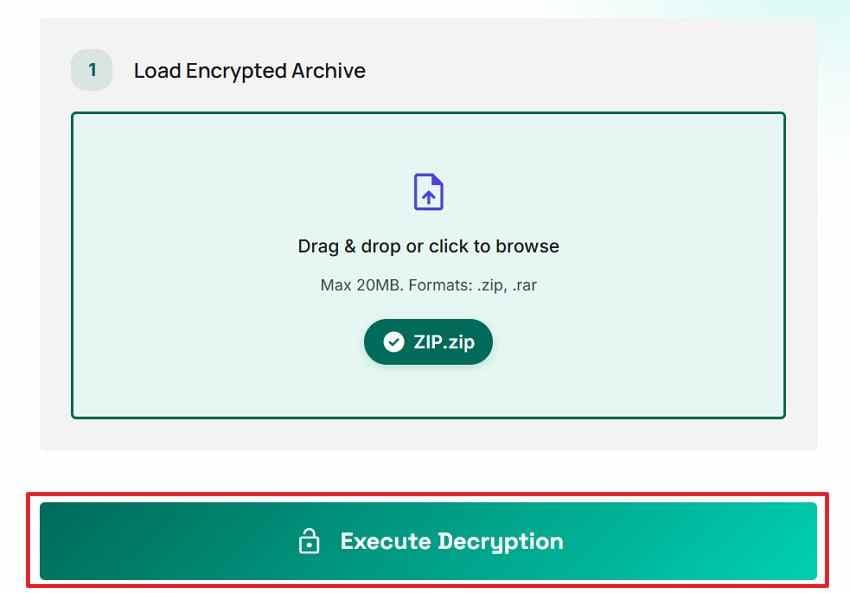
Step 2. After the archive appears selected, review the uploaded file name carefully. Select the “Execute Decryption” to start the password recovery attempt for your authorized archive.
Cons
- Password lists may miss unique phrases or uncommon patterns.
- Upload size and plan limits may apply.
- Sensitive archives should not be uploaded without reviewing privacy terms.
- Strong passwords may remain unrecovered.
Part 4. What to Do If Online ZIP Password Recovery Fails
If free online ZIP password recovery fails, do not keep uploading the same private archive to more random websites. Try safer checks first.
- Try Password Variations You Have Used Before: Think beyond the exact password and rebuild likely combinations from memory. Add old dates, initials, nicknames, project words, or symbols you often used.
- Check Your Password Manager, Notes, Emails, or Cloud Documents: A saved clue may sit in places you rarely check now. Look through password managers, phone notes, email drafts, and shared cloud folders.
- Search Old Messages and Project Records: Passwords are sometimes sent separately from the ZIP file for safety. Check chats, project boards, delivery emails, and client conversations by file name.
- Contact the Original Sender or Source: The simplest solution may come from the person who created the archive. Ask for the password again, or request a fresh unlocked copy.
- Try an Offline ZIP Password Recovery Tool Only for Your Own Archive: Offline software avoids uploading private files to unknown online servers. Use it only when the archive belongs to you or your work.
- Consider Professional Help for High-Value Files: Some files are too important to rely on repeated trial-and-error. In that case, choose a trusted recovery service with clear privacy handling.
- Accept That Strong ZIP Passwords May Not Be Recoverable: A long random password can make recovery unrealistic, even with advanced tools. Finding the original password record may then be the practical route.
Part 5. Recover Deleted or Lost ZIP Files with Recoverit
Sometimes the problem is not the ZIP password. The archive itself may be missing, deleted, lost after formatting, hidden by a partition issue, or stored on a drive that is no longer accessible.
Online ZIP password recovery cannot help if you do not have the ZIP file. You must recover the archive first.
Recoverit ZIP Recovery helps when the ZIP archive itself is missing, deleted, lost after formatting, or stored on an inaccessible drive. It does not recover, remove, crack, or bypass ZIP passwords. If the recovered ZIP file is still password-protected, you still need the correct password to open it.
Key Features
- Deleted ZIP File Recovery: Scans for ZIP files deleted from folders or emptied from the Recycle Bin.
- Formatted Drive Recovery: Helps recover ZIP archives lost after formatting disks, USB drives, or memory cards.
- Lost or RAW Partition Recovery: Searches inaccessible partitions where ZIP files no longer appear normally.
- Selective ZIP Recovery: Lets users recover specific ZIP files instead of restoring all detected data.
- Preview Before Recovery: Helps confirm the correct file before restoring when preview is available.
- Safe Export: Saves recovered ZIP files to another drive to avoid overwriting data.
What Types of ZIP File Loss Can Recoverit Help With
| ZIP File Problem | Can Recoverit Help? | Note |
| ZIP file deleted by mistake. | Yes, if not overwritten. | Stop using the drive immediately. |
| ZIP file lost after formatting. | Yes, sometimes. | Recovery depends on overwrite and drive condition. |
| ZIP file missing from USB drive. | Yes, if the USB is readable. | Save recovered files to another drive. |
| ZIP file lost from RAW or inaccessible partition. | Yes, if the storage can be scanned. | Do not format before recovery. |
| ZIP file corrupted. | Maybe recover another copy from storage. | Recoverit does not repair ZIP structure. |
| ZIP password forgotten. | No. | Recoverit does not crack or remove passwords. |
| ZIP archive still encrypted after recovery. | No password bypass. | You still need the password to open it. |
How to Recover Deleted or Lost ZIP Files from Your Computer
Follow these steps to scan your computer and recover the missing ZIP file with Recoverit.
Step 1. Select the Lost File Location
Launch Recoverit and open “Hard Drives and Locations" from the left panel. Choose the drive, folder, desktop, Recycle Bin, or external device where the ZIP file was stored.

Step 2. Scan and Find the ZIP File
Recoverit will start scanning the selected location for deleted or lost files. Use the “File Type,” “File Location,” “Filter,” or search option to narrow results and find the missing ZIP archive faster.

Step 3. Preview and Complete the Recovery
Review the scan result and select the ZIP file you want to restore, then press “Recover” and save the recovered archive to a safe location.

Part 6. What If You Know the ZIP Password, But the File Still Not Opening?
When the right password still fails, online ZIP file password recovery is not the main issue. Try the following fixes to address extraction errors, file damage, or unsupported ZIP formats:
- Check Password: Paste the password from trusted notes, then remove spaces around it carefully. Next, type it manually and check symbols, capitals, or keyboard layout settings.
- Use Another Opener: Built-in extractors may reject archives using newer encryption or compression methods. Try 7-Zip, WinRAR, or another trusted opener before changing the password again.
- Download Again: A broken download can look complete but fail during extraction unexpectedly later. Download the ZIP again from its original source, using a stable internet connection.
- Check Corruption: Correct passwords still fail when central ZIP records are missing inside the archive. Compare file size, review errors, and test repair options before retrying.
- Request Fresh Copy: The sender may still have a clean archive saved on their device. Ask for a new ZIP when transfer damage seems likely.
Part 7. How to Avoid Losing ZIP File Passwords in the Future
To avoid relying on ZIP file password recovery online again, build safer password habits before creating or sharing your next encrypted archive.
- Use Password Manager: Store ZIP passwords in a trusted manager with secure device syncing enabled. Add archive names and dates, so each saved entry stays recognizable later.
- Keep Separate Hint: Keep a clue separate, but never write the full password nearby. Use hints that guide memory without directly exposing private words or numbers.
- Create Memorable Passphrase: Build a passphrase from unrelated words, numbers, and one meaningful symbol. Long phrases are often easier to remember than short random strings alone.
- Label Archives Clearly: Name ZIP files by project, client, date, or content category only. Avoid titles that reveal confidential details, passwords, financial records, or identities.
- Test Password Immediately: Open the protected ZIP once before sending, moving, or storing it. This quick check confirms the password works and prevents future access issues.
- Back Up Originals: Save unencrypted copies of important files in a secure backup location. Then encrypt the ZIP after confirming your original files remain accessible.
- Avoid Password Reuse: Do not protect every archive with the same repeated password pattern. One leaked password could expose multiple ZIP files across different projects.
Conclusion
Online ZIP password recovery can help only in limited, authorized cases. It works best when the ZIP password is short, common, reused, or partly remembered. Strong AES-protected archives with long random passwords may remain unrecoverable, especially through free online tools.
Before uploading any ZIP file, consider privacy. Do not upload sensitive personal, financial, business, medical, legal, or confidential archives to online services unless you fully trust the provider and understand its terms.
If online recovery fails, check password managers, notes, emails, project records, old messages, and the original sender. For sensitive files, offline password recovery is safer. If the ZIP file itself is deleted or lost, use Recoverit to recover the archive first. Recoverit can recover lost ZIP files from storage devices, but it cannot crack, remove, or bypass ZIP passwords.
FAQs
-
Can I recover a ZIP password online for free?
Sometimes. Free online tools may recover simple passwords when you remember patterns, words, dates, or length ranges. They usually struggle with long random passwords protected by stronger ZIP encryption. -
Is online ZIP password recovery safe for private files?
It depends on the service and the sensitivity of your archive. Uploading confidential ZIP files can create privacy risks. For personal, financial, business, medical, or legal files, offline recovery is safer. -
Can online tools recover AES-encrypted ZIP passwords?
They may try, but strong AES-protected archives with long random passwords are usually very difficult to recover. Online tools work best when you have useful password clues. -
What is the difference between ZIP password recovery and ZIP file recovery?
ZIP password recovery tries to find or guess the forgotten password. ZIP file recovery restores a deleted, lost, or missing ZIP archive from a storage device. -
Can Recoverit recover a forgotten ZIP password?
No. Recoverit can recover deleted or lost ZIP files, but it cannot crack, remove, recover, or bypass ZIP passwords. -
What if I know the password but the ZIP will not open?
The ZIP file may be corrupted, incomplete, or unsupported by your current extractor. Try another opener, download the file again, compare file size, or request a fresh copy. -
Should I use online tools for confidential ZIP files?
No, offline methods are safer for sensitive archives. Avoid uploading private, financial, legal, medical, business, or client files to online recovery services. -
What should I do if the ZIP file itself is missing?
Recover the ZIP file first with data recovery software such as Recoverit. After the archive is restored, you still need the correct password if it is protected.