
 TL;DR:
Recovering a forgotten RAR password is only possible through dictionary or mask attacks if the password is short or partially remembered, as strong, random passwords cannot be instantly bypassed or cracked.
● Use offline tools like SysTools to perform brute-force or mask attacks using known password clues, or Aspose for online recovery, provided the archive contains no sensitive data.
● Data recovery software like Recoverit is strictly limited to restoring deleted or lost RAR archives from formatted or inaccessible drives and cannot remove, recover, or bypass the password of the retrieved file.
● If a known password fails to open the RAR, do not use recovery tools; instead, update to the latest version of WinRAR, check for missing split parts, or use WinRAR's built-in repair feature to fix corruption or checksum errors.
Ask AI for a summary
 ChatGPT
 Perplexity
 Gemini
 Claude
 Grok
Grok
Forgetting a RAR password can be frustrating, especially when the archive contains work files, family photos, project documents, backups, or files you created years ago. Many users search for RAR password recovery, free RAR password recovery, or a WinRAR password recovery tool hoping for a quick unlock.
The truth is more careful. RAR password recovery is possible only in some cases. If you remember part of the password, old words, dates, patterns, or likely length, recovery tools may test those clues. If the password was long, random, and protected by strong encryption, recovery may not be practical.
This guide explains what RAR password recovery can and cannot do, how to safely search for a forgotten RAR password, when recovery tools may help, what to check when the correct password still fails, and how Recoverit helps when the RAR archive itself is deleted or lost. Use these methods only on RAR files you own or have permission to access.
In this article
-
- Method 1. Try Common Password Variations You Have Used Before
- Method 2. Check Your Password Manager, Notes, Email, or Cloud Documents
- Method 3. Search Old Messages, Download Sources, and Project Records
- Method 4. Contact the Original Sender or File Owner for the Password
- Method 5. Use a Dedicated RAR Password Recovery Tool for Your Own Archive
- Method 6. Use Online RAR Password Recovery Only for Non-Sensitive Archives
Quick Answer: Can You Recover a Forgotten RAR Password?
Sometimes. You may recover a forgotten RAR password if the archive belongs to you, the password is short or partly remembered, and a recovery tool can test the right word, mask, or pattern.
RAR password recovery does not instantly reveal a hidden password. It usually works by guessing possible passwords and checking whether one opens the archive. This can work for weak, reused, short, or pattern-based passwords. It may be unrealistic for long random passwords with mixed letters, numbers, and symbols.
Recoverit cannot recover, remove, crack, or bypass RAR passwords. Recoverit helps when the RAR file itself is deleted, lost, missing after formatting, or stored on an inaccessible drive. If the recovered RAR file is still password-protected, you still need the correct password to open it.
Part 1. RAR Password Recovery: What It Can and Cannot Do
Before using any RAR password recovery software, understand the real limits.
| RAR Password Recovery Can Do | It Cannot Do |
| Test possible passwords for your own archive. | Instantly reveal a strong unknown password. |
| Use dictionary, mask, or brute-force attempts. | Guarantee recovery for long random passwords. |
| Help when you remember words, dates, length, symbols, or patterns. | Bypass RAR encryption without finding the password. |
| Work better on weak, reused, or simple passwords. | Make unsafe online uploads private. |
| Help confirm whether a remembered password is wrong. | Repair a damaged RAR file by itself. |
| Require the original RAR archive for password testing. | Recover a deleted RAR file from storage. |
Only Try RAR Password Recovery on Authorized Files
Use RAR password recovery only for files you own or have clear permission to access. Trying to recover passwords for someone else’s archive without permission may be illegal and may violate the terms of recovery tools.
Why RAR Passwords Are Hard to Recover
RAR archives can use strong encryption. Recovery tools do not “break” encryption directly. They test password guesses. Each guess must be checked against the archive, which takes time. The longer and more random the password is, the harder recovery becomes.
When Recovery Is More Realistic
RAR password recovery is more realistic when:
- You remember part of the password.
- The password used familiar words.
- You know the likely length.
- You remember the date, project name, nickname, or symbol pattern.
- The password was reused from another archive.
- The password was short or simple.
- You can create a focused list of likely guesses.
When Recovery May Not Be Practical
Recovery may not be realistic when:
- The password was long and random.
- It used mixed uppercase, lowercase, numbers, and symbols.
- You remember no clues at all.
- It was generated by a password manager.
- It was unique and never reused.
- Previous recovery attempts found nothing after testing likely patterns.
There is no guaranteed “instant unlock” for a strong unknown RAR password.
Part 2. Quick Diagnosis: Which RAR Recovery Path Fits Your Case?
Choose the right path based on your actual problem.
| Your Situation | Best Next Step | Avoid |
| You remember part of the password. | Use a mask attack or dictionary attack with hints. | Full brute force over every possible character. |
| You remember old words, dates, or patterns. | Build a focused password list from your habits. | Testing random guesses with no structure. |
| You may have saved the password. | Check password managers, notes, emails, cloud files, and messages. | Downloading random “instant unlock” tools first. |
| Someone sent you the RAR. | Ask the sender for the password or a fresh copy. | Trying to recover a password without permission. |
| You know the password, but it fails. | Check typing errors, extractor support, corruption, and missing RAR parts. | Assuming the password is wrong immediately. |
| The archive shows CRC failed or checksum errors. | Check corruption, re-download, repair, or request a clean copy. | Running password recovery only. |
| The RAR file is missing or deleted. | Recover the RAR archive first with Recoverit. | Password recovery without the original archive. |
| The RAR contains sensitive files. | Prefer offline recovery and original password records. | Uploading the archive to unknown online tools. |
| You remember nothing about the password. | Search records and old passwords first. | Expecting guaranteed recovery from free tools. |
Part 3. Safe Ways to Recover or Find a Forgotten RAR Password
Start with memory-based and record-based methods before using heavy recovery tools.
Method 1. Try Common Password Variations You Have Used Before
Many archive passwords are based on familiar patterns. Rebuild likely combinations from your own habits.
Try variations based on:
- Project name plus year
- File name plus number
- Pet name plus symbol
- Initials plus date
- Old account password plus suffix
- Client name plus month
- Favorite word plus special character
- Uppercase and lowercase changes
- Keyboard layout differences
- Common endings like 123, 2024, or !
Do not spend hours manually trying random guesses. If you remember a pattern, use it later with a mask or dictionary recovery tool.
Method 2. Check Your Password Manager, Notes, Email, or Cloud Documents
You may have saved the password somewhere and forgotten the location.
Search in:
- Password manager entries
- Phone notes
- Desktop notes
- Cloud documents
- Email drafts
- Sent emails
- Screenshots
- Text files
- Project folders
- Browser-saved notes
- Team knowledge bases
Useful search terms include:
- RAR
- WinRAR
- archive
- password
- extract
- unzip
- file name
- project name
- sender name
- client name
Method 3. Search Old Messages, Download Sources, and Project Records
RAR passwords are often shared separately from the archive. Check:
- Chat history
- Email threads
- Project management tools
- Client delivery notes
- Download pages
- Shared folders
- Ticket systems
- Team messages
Search by the archive name, project name, or file owner. This is often faster and safer than running recovery tools.
Method 4. Contact the Original Sender or File Owner for the Password
If someone else sent the RAR file, ask them for the password or a new archive. The sender may still have:
The original password
- A password hint
- An unlocked copy
- A fresh RAR archive
- A different transfer link
- The original uncompressed files
This should be the first option for shared archives.
Method 5. Use a Dedicated RAR Password Recovery Tool for Your Own Archive
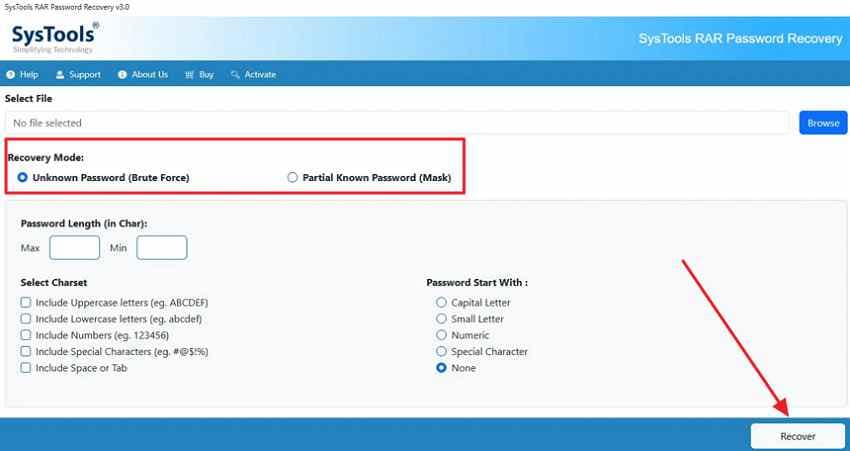
Among many, SysTools offers 2 recovery modes, namely Brute Force and Mask Attack, both of which facilitate password recovery. You can describe the characteristics of your password that help skip impossible combinations and speed up the recovery process. Follow the tutorial and set the expected password length to find the correct password quickly:
- Download SysTools > Browse Locked RAR > Choose “Recovery Mode” > Set the Password Length > Click “Recover”.
Method 6. Use Online RAR Password Recovery Only for Non-Sensitive Archives
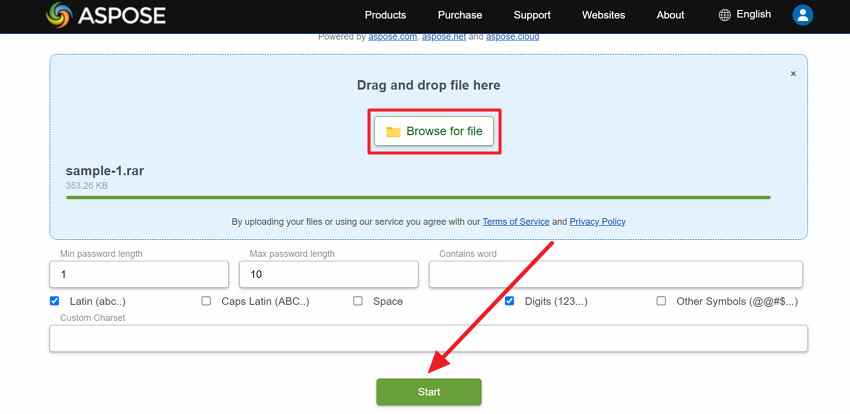
Occasionally, you already know the password but cannot open the archive because you're using a device with no extraction tool. Use Aspose RAR Password Recovery to recover passwords created by any popular archiving tool. To experience automatic recovery, along with flexible password search options, follow the guided tutorial:
- Visit Aspose > Press “Browse for File” > Add locked RAR > Set Password lengths > Specify other settings > Click “Start.”
Important: An online RAR opener is different from a password recovery tool. A RAR opener helps extract files when you already know the password. A password recovery tool attempts to find the forgotten password.
Part 4. What to Know Before Using RAR Password Recovery Software
RAR password recovery software can help in some cases, but it has limits.
When a Tool May Help
A tool may help when:
- You legally own the archive.
- You remember part of the password.
- The password is short.
- The password is based on words or dates.
- You know the likely length.
- You can build a focused mask or dictionary.
Limits of Free RAR Password Recovery Tools
Free tools may limit:
- Password length
- Attack modes
- Speed
- Saved results
- GPU support
- File size
- Number of attempts
- Full password display
- Advanced settings
“Free RAR password recovery” does not always mean unlimited recovery.
Why Strong Passwords May Not Be Recoverable
The number of possible passwords grows quickly as length and character variety increase. A short lowercase password is very different from a long random password with uppercase, lowercase, numbers, and symbols.
Hardware speed can help test more guesses, but it cannot make a strong unknown password easy to recover.
Risks of Downloading Unknown Tools
Avoid tools that claim:
- Instant RAR unlock
- Guaranteed recovery
- Free password remover
- No password needed
- Cracked WinRAR unlock
- Bypass RAR encryption
These tools may contain malware, steal files, or expose private data.
Risks of Uploading to Online Tools
Online tools may be convenient, but they require uploading your archive. For confidential RAR files, offline recovery is safer because the archive stays on your own device.
If the Tool Cannot Recover It
If a tool fails after testing your best clues, the password may be too strong, too random, or too different from what you remember. At that point, search for the original password record, ask the sender, or accept that the archive may remain locked.
Part 5. Recover Deleted or Lost RAR Files with Recoverit
Sometimes the real issue is not the RAR password. The archive itself may be deleted, missing, lost after formatting, hidden on an inaccessible drive, or removed during a transfer error.
RAR password recovery tools cannot help if you do not have the RAR archive. Recover the RAR file first.
Recoverit helps when the RAR archive itself is deleted, lost, missing after formatting, or stored on an inaccessible drive. It does not recover, remove, crack, or bypass RAR passwords. If the recovered RAR is still password-protected, you still need the correct password to open it.
When Recoverit Helps with RAR Files
Recoverit may help when:
- The RAR file was deleted by mistake.
- The RAR file was emptied from the Recycle Bin.
- The archive was lost after drive formatting.
- The RAR was stored on a RAW or inaccessible partition.
- The file disappeared after a system crash.
- The RAR was lost from a USB drive or external hard drive.
- The archive was affected by accidental cleanup or transfer failure.
- The file is missing and password recovery tools cannot start without it.
Key Features
- Deleted RAR File Recovery: Scans for RAR archives deleted from folders, drives, or the Recycle Bin.
- Formatted Drive Recovery: Helps recover RAR files lost after formatting disks, USB drives, or external storage.
- Lost Partition Recovery: Searches partitions where RAR files no longer appear normally.
- File Type Filter: Helps locate archive files faster in scan results.
- Search by Name: Lets users find a specific RAR file when the file name is known.
- Safe Export: Saves recovered RAR files to another drive to avoid overwriting data.
What Recoverit Can and Cannot Do for RAR Files
| Situation | Can Recoverit Help? | Note |
| RAR file deleted by mistake. | Yes, if not overwritten. | Stop using the drive immediately. |
| RAR lost after formatting. | Sometimes. | Recovery depends on overwrite and drive condition. |
| RAR missing from USB or external drive. | Yes, if the device is readable. | Save recovered files to another drive. |
| RAR stored on a lost or RAW partition. | Sometimes. | Do not format before recovery. |
| RAR file password forgotten. | No. | Recoverit does not crack passwords. |
| RAR is recovered but still locked. | No password bypass. | You still need the correct password. |
| RAR archive structure is damaged. | Not a password solution. | Try archive repair or request a fresh copy. |
How to Recover Deleted or Lost RAR Files from Your Computer
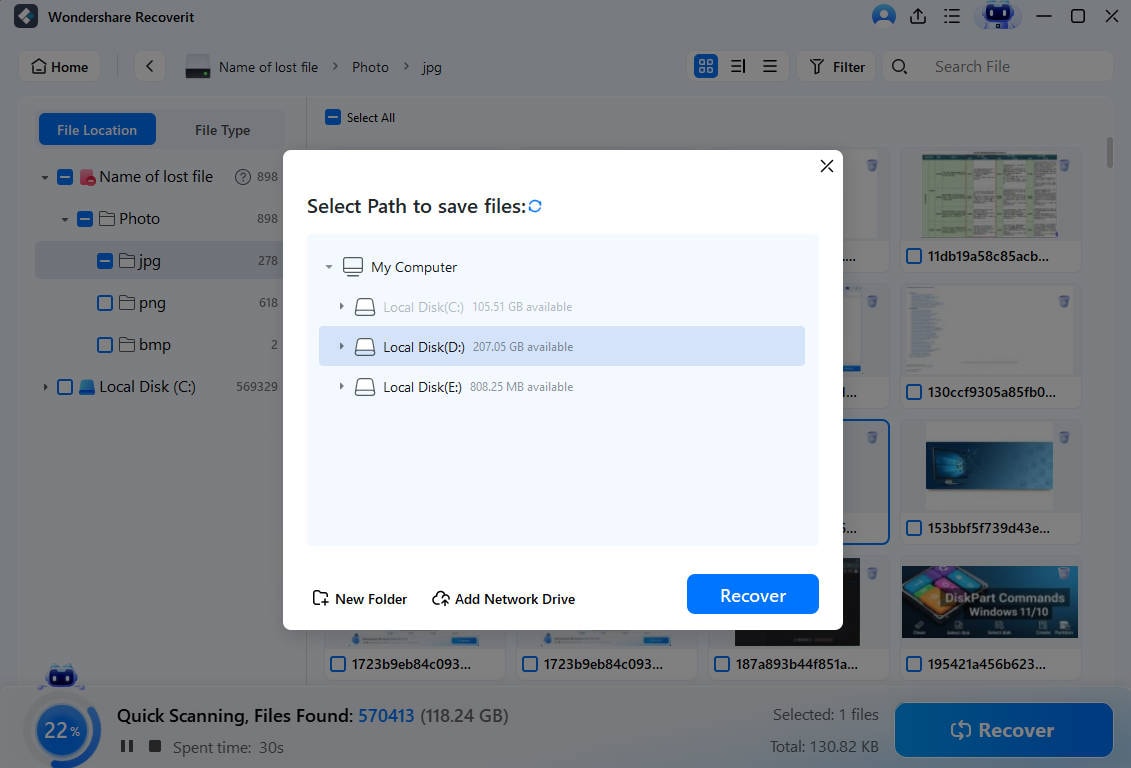
When a RAR goes missing, RAR password recovery methods become useless, and one needs guidance on file recovery:
Step 1. Choose RAR Recovery Location
After launch, access "Hard Drives and Location” > Choose location for scan > Press “Start” button.

Step 2. Scan the Selected Location for Missing RAR
The program will start an all-around scan automatically > Analyze real-time scanning results.

Step 3. Preview Files and Choose Path to Save Them
Examine RAR after scan > Click “Recover” to retrieve > Choose a path to save recovered files.
Part 6. What If You Know the RAR Password, But the File Still Will Not Open?
If you know the password but the RAR file still fails, password recovery may not be the right solution. The archive may be corrupted, incomplete, unsupported, or missing parts.
1. Check the Password Carefully
Retype the password slowly and check:
- Caps Lock
- Num Lock
- Extra spaces
- Keyboard layout
- Uppercase and lowercase letters
- Similar-looking characters
- Copy-paste hidden spaces
- Old password variations
If you saved the password somewhere, paste it into a plain text field first to check for accidental spaces.
2. Try the Latest WinRAR First
RAR is WinRAR’s native archive format. If a RAR file will not open, try the latest WinRAR version first. Some older extractors may not fully support newer RAR formats or encryption settings.
You can also try 7-Zip or another trusted archive tool to compare error messages.
3. Re-Download or Re-Copy
A broken download or interrupted transfer can make a correct password fail.
Try this:
- Download the RAR again from the original source.
- Copy it again from the original drive or sender.
- Compare file size with the original if possible.
- Save it to a simple local path, such as Desktop.
- Try opening it again with the correct password.
4. Check for Corruption
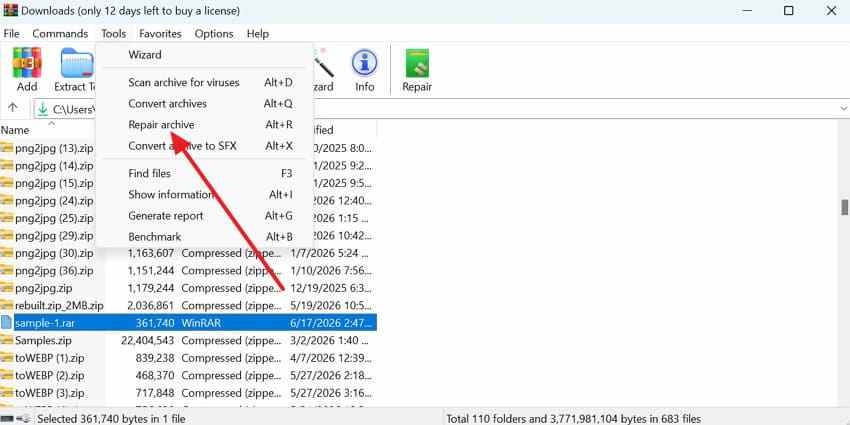
Errors such as “CRC failed,” “checksum error,” “unexpected end of archive,” or “not a valid RAR file” may indicate corruption.
In this case, the password may be correct, but the archive data may be damaged.
Step 1. In WinRAR > Select RAR file > Access “Tools” tab > Choose “Repair Archive.”
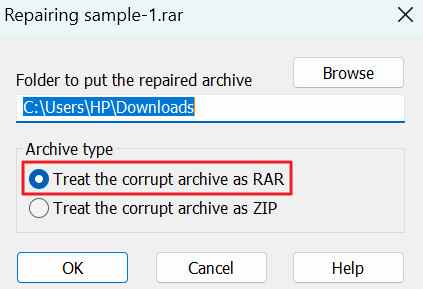
Step 2. Browse the destination > Select “Treat the Corrupt Archive as RAR” > Click “OK.”
5. Ask for a Fresh Copy
If the RAR came from another person, ask for:
- A new RAR file
- The original folder
- A different download link
- All split archive parts
- The correct password
- A non-compressed copy if possible
This may solve the issue faster than password recovery.
Part 7. How to Avoid Forgetting RAR Passwords Again
Before you end up with “I forgot my RAR password” situation again, build some of the listed habits into your routine:
| Practices | What to Do |
| Password Manager | Save each RAR password in a trusted password manager after creating it. |
| Separate Hint | Write a simple hint (project name + year) in a note; not the complete password. |
| Memorable Phrase | Use a long, memorable passphrase instead of a short, strange string. |
| Clear Labels | Name your RAR files to easily link them with the right password. |
| Test Right Away | Once the password is set, close RAR and reopen it using the password to confirm. |
| Secure Backups | Keep a backup of important files before you lock them in a RAR. |
| Unique Passwords | Generate separate passwords for each RAR file, instead of one shared password. |
Conclusion
RAR password recovery is possible in some cases, but it depends on the password. If the password is short, reused, or partly remembered, recovery tools may test likely words, dates, masks, or patterns. If the password is long, random, and strongly encrypted, recovery may not be practical.
Start with safe methods first. Check password managers, notes, emails, old messages, project records, and the original sender. Use reputable RAR password recovery software only for archives you own or have permission to access. Avoid cracked tools, instant unlock claims, and uploading sensitive RAR files to unknown online services.
If the RAR file itself is deleted or lost, use Recoverit to recover the archive first. Recoverit can help restore missing RAR files from storage devices, but it cannot recover, remove, crack, or bypass RAR passwords. If the RAR opens with the correct password but extraction still fails, check for corruption, missing parts, extractor compatibility, or request a fresh copy.
FAQs
-
Q1. Can I recover a forgotten RAR password?
Sometimes. Recovery is more realistic if the password is short, reused, or partly remembered. Long random passwords may be unrealistic to recover. -
Q2. Is RAR password recovery always successful?
No. Success depends on password strength, length, character types, clues, archive format, recovery tool capability, and hardware speed. -
Q3. Can WinRAR recover a forgotten password?
No. WinRAR can open archives when you know the correct password and may repair some damaged archives, but it does not provide a built-in forgotten password recovery feature. -
Q4. Can Recoverit recover a RAR password?
No. Recoverit can recover deleted or lost RAR files from storage devices, but it cannot crack, remove, recover, or bypass RAR passwords. -
Q5. What is the difference between RAR password recovery and RAR file recovery?
RAR password recovery tries to find or guess the forgotten password. RAR file recovery restores a deleted, lost, or missing RAR archive from a storage device. -
Q6. What if I know the password but the RAR will not open?
The archive may be corrupted, incomplete, missing split parts, or unsupported by your current extractor. Try the latest WinRAR, check all parts, re-download the file, or request a fresh copy. -
Q7. Is online RAR password recovery safe?
It depends on the service and the file sensitivity. Avoid uploading private, financial, business, legal, medical, or confidential RAR archives to online tools. -
Q8. What should I do if my RAR file is missing?
Recover the RAR archive first with Recoverit or another data recovery tool. After the file is restored, you still need the correct password if the archive is protected.



