 TL;DR:
You can recover lost, deleted, or hidden files from a pen drive using data recovery software like Wondershare Recoverit, built-in system tools like CMD, or professional services depending on the cause of data loss.
● Use Wondershare Recoverit to scan and restore files from formatted, corrupted, or emptied drives, ensuring you save the recovered data to a different location to prevent overwriting.
● Run Command Prompt (CMD) to unhide files and repair shortcut errors caused by virus attacks without installing third-party recovery tools.
● Send the device to a professional data recovery service if the pen drive is physically broken, bent, or burned, as software cannot retrieve data from physically dead drives.
Ask AI for a summary
 ChatGPT
 Perplexity
 Gemini
 Claude
 Grok
Grok
Many users rely on pen drives for work files, study notes, photos, and other items. The small size and easy handling make them a common choice. Still, a pen drive can stop working without warning. When this happens, users fear their files may be lost. This is why many search for pen drive recovery and simple ways to restore their data.
The good thing is that lost files can be recovered in most cases. You can use pen drive recovery software or manual steps to recover pen drive data and get back what you lost. With the right method, it becomes easy to recover data from a pen drive even when it looks empty or unreadable. This guide explains everything you need to know about how to recover files from a pen drive in simple words.
Try Recoverit to Recover & Repair Video/Photo/Docs etc.
 Security Verified. Over 7,302,189 people have downloaded it.
How to Recover Files from a Pen Drive?
Many users do not know what to do when their pen drive stops showing files. Some panic and try random methods. This can make the situation worse. The right approach is to stay calm and start with simple methods. You can recover files from a pen drive if you follow each step carefully. You can also use pen drive recovery software if the simple steps do not work.
Below are the best and safest ways to recover pen drive data. Each method is explained with steps and how it helps. These methods will help you learn how to recover files from a pen drive in different situations.
Method 1: Use Recoverit Data Recovery Tool
Data recovery tools are the most reliable option for deep recovery. Pen drive recovery software like Recoverit can scan the drive and restore files even if they were deleted or lost a long time ago. This method also works when the drive shows errors. It is useful when users need pen drive file recovery software for damaged or formatted drives.

Recoverit can recover data from a pen drive even if the folder looks empty or unreadable. It is simple to use and gives a high success rate. Many people choose this method when they want fast and safe flash drive recovery.
Steps
Step 1: Download Recoverit and install it on your computer. Open the tool and wait for the home screen to load. Make sure the pen drive is plugged in before you begin.

Step 2: Recoverit shows all connected drives on the screen. Click on your pen drive to select it. Start the scan so the tool can search for deleted or lost files. The scan may take time if the pen drive is large or damaged.

Step 3: Once the scan ends, you will see a list of recoverable files. Use the preview option to check each file. Select what you want to restore and save it to a safe place on your computer. Avoid saving it back to the same pen drive.

Method 2: Check the Recycle Bin
If the files were deleted while the pen drive was connected to the computer, they may be in the Recycle Bin. Many people forget to check this. It is the simplest way to recover files from pen drive. It does not require pen drive recovery software. It also works quickly, so it is worth checking before trying other methods.
Recycle Bin recovery is helpful for light cases of data loss. It is often the first method recommended before using pen drive file recovery software.
Steps
- Open the Recycle Bin on your desktop.
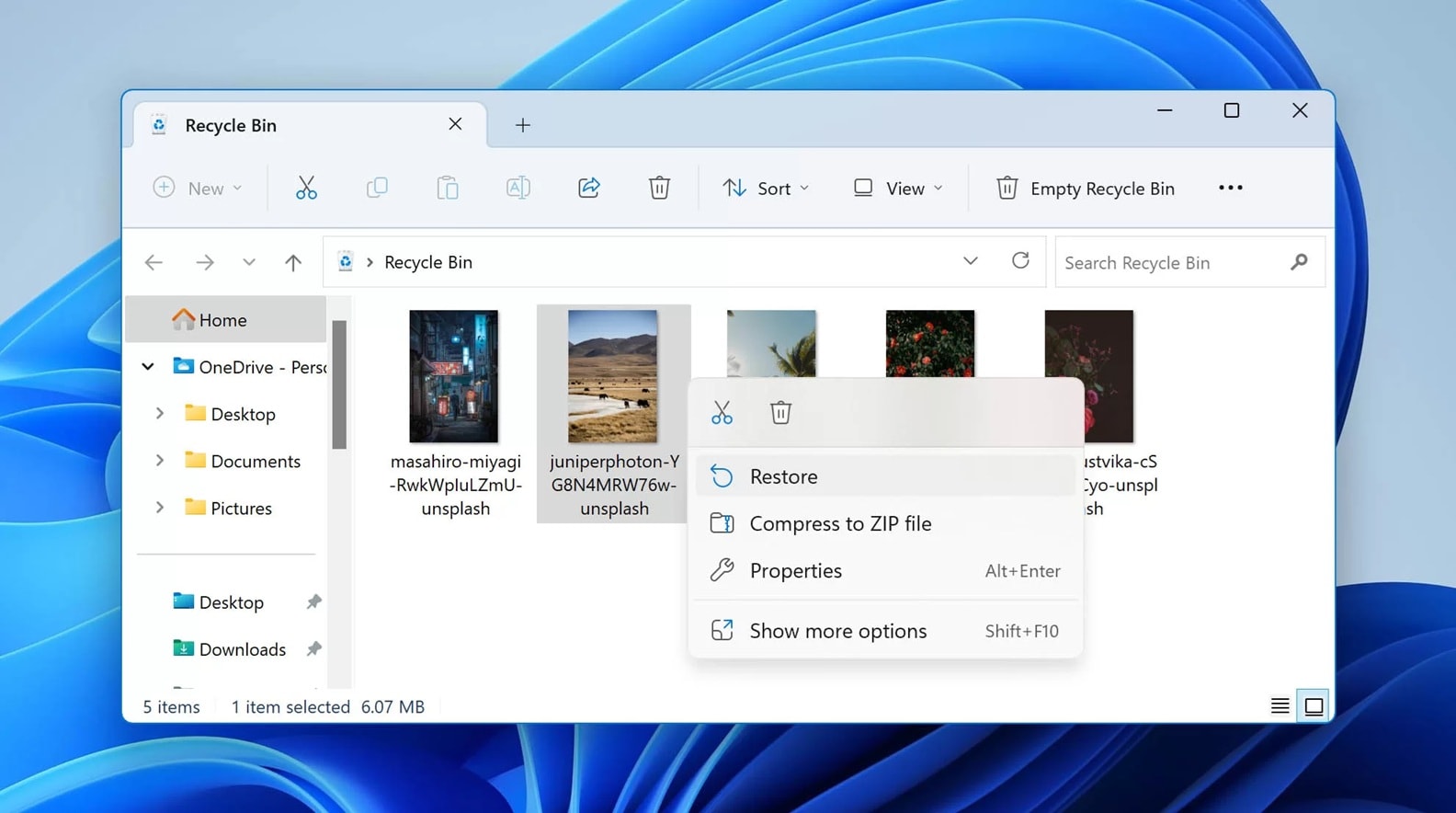
- Restore the deleted files if you see them in the list.
Method 3: Use Command Prompt (CMD)
CMD helps when files are hidden due to virus attacks or corruption. It can make hidden files visible again. Many people use CMD when they want to recover pen drive data without installing recovery tools. It is effective in cases where the flash drive recovery needs basic repair.
CMD commands can recover data from a pen drive when the folders turn into shortcuts. It is a safe method for users with basic computer knowledge. This method also helps when users search for how to recover files from a pen drive in virus-related situations.
Steps
- Press Windows + R and type cmd.
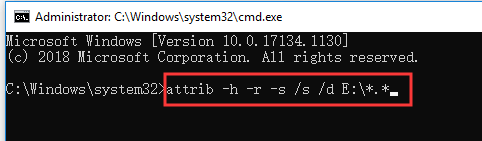
- In CMD, type the command to show hidden files.
Method 4: Restore Files from Backup
Backups are a safe way to avoid heavy recovery. If the user keeps a local backup or uses cloud storage, files can be restored quickly. This removes the need for pen drive recovery software. It works best when users take regular backups of work or family photos.
Backups help in many situations. Even if the pen drive is damaged, you can still recover files from pen drive by restoring them from the backup. This method also reduces stress and stops users from trying risky steps.
Steps
- Open your backup folder or cloud storage.
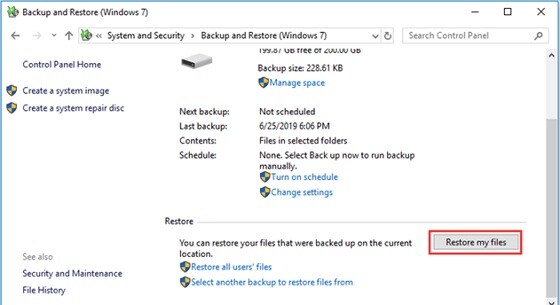
- Restore your files to the computer.
Method 5: Professional Data Recovery Services
If the pen drive is physically damaged, software cannot help. In such cases, you must take the drive to a professional recovery service. This is useful when the pen drive is broken, bent, or burned. Experts use special machines to perform flash drive recovery safely. It is the last option but gives high success rates.
Professionals can recover pen drive data even when the drive is not detected. They take apart the drive, fix the parts, and use advanced tools. Many users search for how to recover files from pen drive when the device is dead. In most cases, only experts can fix such drives.
Steps
Step 1: Contact a professional data recovery service.

Step 2: Give them the pen drive for inspection and recovery.
Conclusion
Pen drives remain a simple and trusted way to store files. Still, data loss can happen at any time. When this happens, users look for fast ways to recover files from a pen drive. With the right tools and steps, most files can be restored. You can use pen drive recovery software or manual steps depending on the situation. Even damaged drives can be repaired with expert help.
The best approach is to stay calm and follow each method step by step. If one method does not work, try the next.
You can recover pen drive data in most cases, even when the drive looks empty or corrupt. With regular backups and safe usage, you can avoid many problems in the future.
FAQs
-
Can I recover files from a pen drive after formatting?
Yes, you can recover files from a pen drive after formatting by using a trusted pen drive recovery software. These tools scan deeper and restore lost data. -
Why is my pen drive showing empty even when it has data?
This may happen due to virus attacks or hidden files. You can use CMD steps or pen drive file recovery software to bring the files back. -
3. Is it safe to use free flash drive recovery tools?
Some free tools work well, but they may not give full results. Paid tools give better recovery. If the drive is damaged, professional help is safer.


