 TL;DR:
You can recover deleted files from shared drives by checking the trash, restoring from version history, utilizing admin tools, accessing cloud backups, or using data recovery software like Recoverit if basic methods fail.
● The simplest methods for users are checking the shared drive's Trash or Recycle Bin and looking through Version History or File Activity Logs to restore a previous state.
● If user-accessible options fail, you must contact an admin to use the Admin Console for deeper storage retrieval, or rely on IT support to restore from cloud backup services (e.g., iDrive) or server logs.
● For permanently deleted files or synced local folders where other methods fail, third-party software like Wondershare Recoverit can deep-scan storage devices without requiring admin rights.
Ask AI for a summary
 ChatGPT
 Perplexity
 Gemini
 Claude
 Grok
Grok
Have you ever opened a shared drive and found that an important file is gone? This can happen to anyone. Shared storage holds folders and documents for many people. When many hands are involved, mistakes happen. Someone might remove a file without warning. You might think the file is gone for good. It is not always lost.
In many cases, you can fix the problem. Shared storage has recovery tools. These tools help you bring missing files back. It only takes a few careful steps. By learning these methods, you can act fast and recover deleted files from shared drives.
Try Recoverit to Recover Lost Data
 Security Verified. Over 7,302,189 people have downloaded it.
Table of Contents:
How to Recover Deleted Files from Shared Drives
Many simple tools can restore lost files. Some tools are built into cloud drives. Others need admin help. The right method depends on how the file was removed. The goal is quick action. The sooner, the better.
Method 1: Check the Shared Drive Trash or Recycle Bin
This is the first step for how to recover deleted files from a shared drive. Most shared storage has a trash area. When you remove a file, it does not leave the system at once. It stays in the trash for a short time. You can restore it from there.
This is also a helpful step for how to recover a deleted file from a shared drive. It is simple. Most users can do it without help. If no one emptied the trash, you can get your file back. Look for the trash and review removed items.
How to Check the Shared Drive Trash or Recycle Bin:
- Open the shared drive and go to Trash.
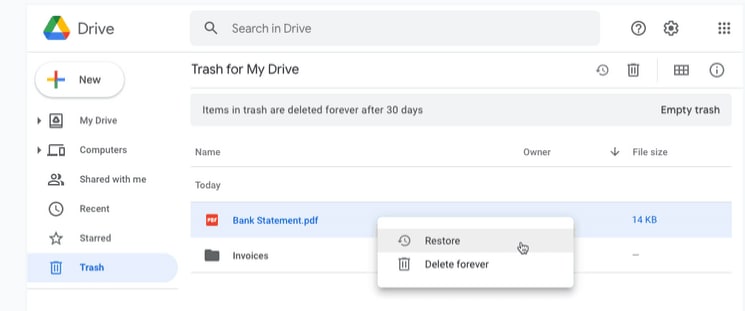
- Find the file and click Restore.
Method 2: Restore from Version History or File Activity Logs
This step helps with how to recover deleted files from a shared folder and how to recover shared drive deleted files. Many shared drives save older copies. You can look at past changes. If someone changed or removed your file, you can take an older copy.
Two things help here. Version history keeps old states. File logs tell who made changes. By looking at these, you might find your missing data. If the file is gone, a past version may still be there. You can make a fresh copy.
How to Restore from Version History or File Activity Logs:
- Open Version History or Activity Log.
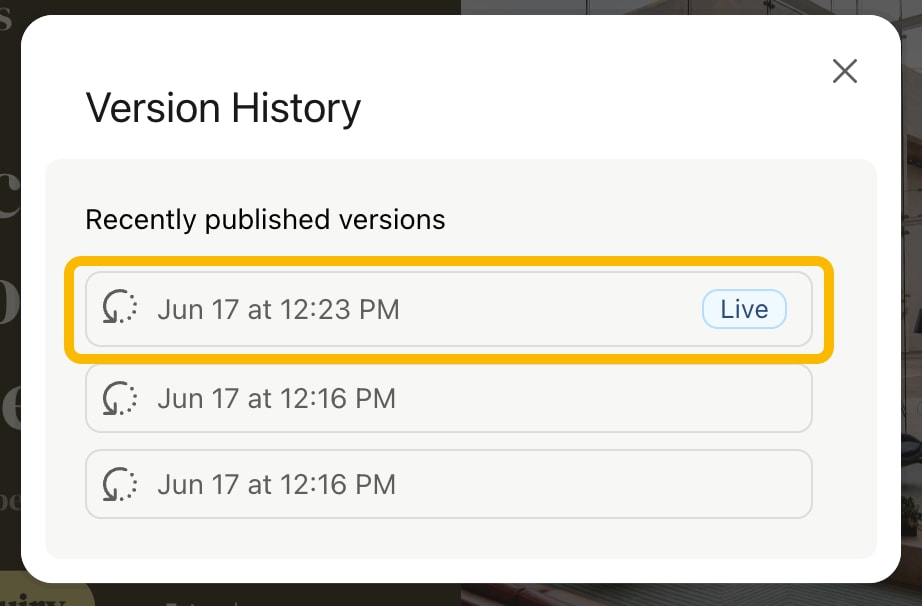
- Pick the version and restore or copy
Method 3: Use Admin Console or Drive Management Tools
This path helps with how to recover a file deleted from a shared drive. If the file is not in the trash or history, an admin may help. Admin tools reach deeper storage. These tools can restore files after trash is cleared. Only admins can do this.
You must ask your admin to look. They can open the console. There may be backup or log data. They can search the file by name or date. If found, they can bring it back. This is a strong way to fix issues. It needs higher rights.
How to Use Admin Console or Drive Management Tools:
- Contact the admin or open the console.
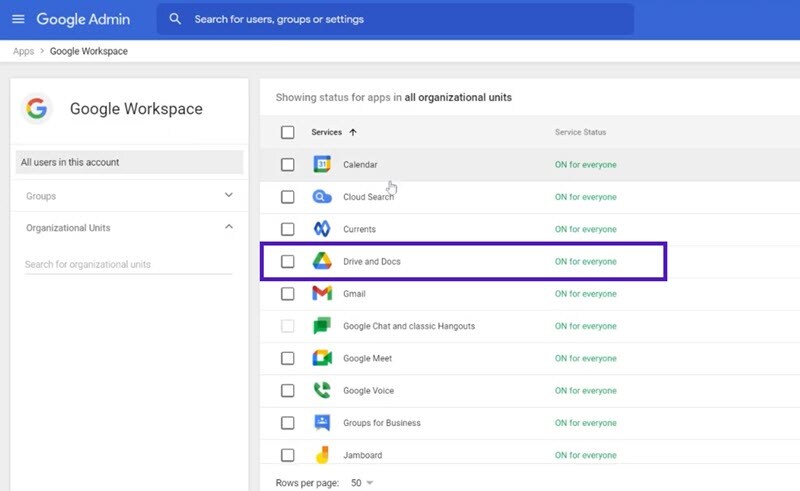
- Search for and restore the file
Method 4: Recover from Cloud Backup Services
This method supports how to recover deleted files from a shared network drive. Many teams use cloud backup. These tools save copies at set times. If your shared folder has lost data, the backup can help. You must know when the file was there. Then open the backup from that time.
Backup tools keep several restore points. Pick the one you need. Restore to the shared spot. Everyone will see the file again. This step can fix large damage. It works best when files are removed by malware or system issues.
When to use this • You know backup exists • File was lost after sync • Many files are gone
- Open the backup tool like iDrive.
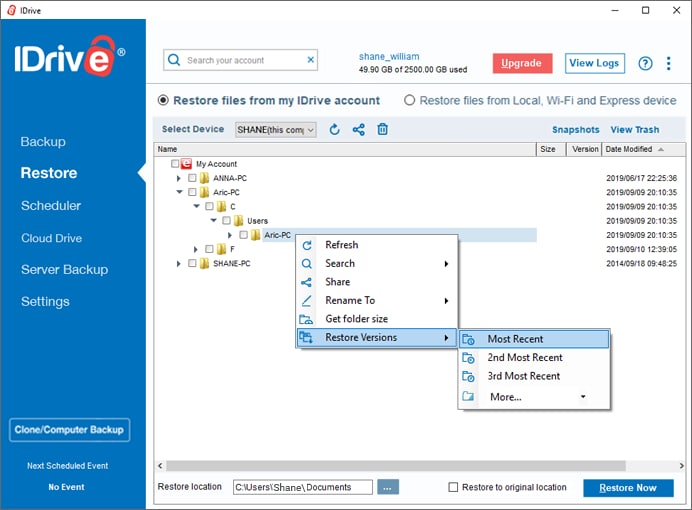
- Pick a date and restore.
Method 5: Contact IT Support or Drive Administrator
If nothing else works for how to recover deleted files from shared drive, contact the IT team. They know advanced tools. They can check hidden logs. They can test devices. They can look at server space. They may fix deeper issues.
When simple steps fail, this is the right path. Give them the file name. Share the time it was removed. Share who edited it last. They can run recovery. They can check backup servers. This step is helpful when systems break.
How to Contact IT Support or Drive Administrator:
- Reach IT or contact drive administrator.

- Share full details
To keep all phrases covered at least four times, we repeat here for clarity:
Many ask how to recover deleted files from shared drive when content is lost. You can also learn how to recover a deleted file from a shared drive by checking the trash and backups.
If you need how to recover a file deleted from a shared drive, try version history. If you need how to recover deleted files from shared folder, look at logs.
Lost Shared Drive Files? Use Recoverit
Some people try every basic fix and still cannot find the file. In this case, try the Recovery software. Recoverit is a known tool. It helps many users find lost data. It works on different devices. It can scan deep storage. It does not care if the file was lost by mistake or system failure.
Recoverit looks for bits of data left on storage. These bits stay for a short time. The tool rebuilds them. It does not need admin rights for many tasks. It also works on shared folders synced to your system. Once found, you can save your file to a safe place.
This is a good option when simple methods fail. It gives users hope. If your file is gone from trash, history, or backup, Recoverit can help. Many people use it because it is easy. It guides you step by step. You do not need deep technical skills.
Steps:
Step 1. Install Recoverit on your computer and open the program. Give the tool a moment to load so it can check available drives and folders.

Step 2. Choose the shared folder or drive where the files were removed. Start the scan. The tool searches gently through the storage to find traces of missing files.

Step 3. When the scan finishes, look through the items shown. Select the files you want to bring back. Save them to a safe place on your computer or another drive.

How to Recover Deleted Pictures From Laptop?

Conclusion
Shared storage helps teams work together. It brings many files to one place. Still, loss can happen. Someone might delete a file. Sync might fail. A virus might strike. When this happens, do not worry. Many simple methods help you fix the problem.
You have many ways to restore data. Check trash. Look at the version history. Ask your admin. Use backup. Try a recovery tool. With these steps, most people can succeed. Keep good habits to avoid trouble in the future. Your data will stay safe.
Try Recoverit to Recover Lost Data
Security Verified. Over 7,302,189 people have downloaded it.
FAQs
-
Can I restore a file that was deleted weeks ago?
It depends on the tool. Trash holds items for a short time. Version history can help. Backup may help even after weeks. You can also try a recovery tool. -
Can someone without admin rights restore files?
Yes, if the file is in the trash or version history. If not, you may need an admin. They can open deeper systems. -
3. What if the shared drive is not cloud-based?
You can still restore from backup if the company uses it. A recovery tool can also scan local synced folders. Ask IT for help.



