

 TL;DR:
To restore access to a corrupted or unmountable APFS-encrypted sparse bundle on macOS, users must first verify credentials via Keychain Access, as decryption is strictly impossible without the exact password or original recovery key.
● Bypass unresponsive graphical interfaces by executing hdiutil attach and diskutil unlockVolume directly within the macOS Terminal to manually force the encrypted volume to mount.
● Deploy deep-scanning data recovery software like Wondershare Recoverit to extract remaining data blocks if structural band files are heavily damaged and Disk Utility First Aid fails to resolve input or output errors.
● Acknowledge that absolute data loss occurs if both the password and recovery key are permanently missing, making a full restoration from a Time Machine or iCloud backup the only viable recovery path.
Ask AI for a summary
 ChatGPT
 Perplexity
 Gemini
 Claude
 Grok
Grok
Encrypted disk images are widely used on Mac computers. They help users store files in a secure format. One common format is the APFS encrypted sparse bundle. It is flexible, safe, and efficient for backups and personal storage.
However, problems can occur. The bundle may fail to mount. The password may not work. The system may report an error. In such cases, users start searching for reliable APFS-encrypted sparse bundle recovery methods. This guide explains the causes and solutions in clear and simple steps.
Encrypted bundles are often used for Time Machine backups, external drives, and network storage. They protect sensitive data from unauthorized access. At the same time, encryption also adds complexity. If something goes wrong, recovery can feel difficult.
This article explains each solution in detail. You will learn how to recover APFS-encrypted sparse bundle files using safe methods. Every section follows a logical order so that you can apply the fixes one by one.
Table of Contents:
-
- Fix 1: Mount the bundle with the correct password or recovery key
- Fix 2: Use Terminal commands like hdiutil attach or diskutil unlock volume to access its contents
- Fix 3: How to mount the Time Machine bundles using Disk Utility or Terminal
- Fix 4: How to mount general APFS sparse bundles with proper authentication
- Fix 5: Check macOS Keychain for stored credentials
- Fix 6: Restore from Time Machine or iCloud backups
- Fix 7: Run First Aid in Disk Utility
Part 1: What is an APFS Encrypted Sparse Bundle?
Before starting any repair, it is important to understand what is APFS encrypted sparse bundle. It is a disk image format used on macOS. It stores data in small band files instead of a single large file. This design helps save space and improve flexibility.
The internal file system is APFS. It supports strong encryption. Access is protected by a password or recovery key. Without authentication, the data remains unreadable.
Sparse bundles are commonly used for network backups and Time Machine storage. They grow in size as more data is added. They do not occupy full disk space in advance. This makes them efficient for large backups.
However, because they are encrypted, recovery requires careful steps. A small error in credentials or file structure can prevent mounting. That is why understanding how to recover APFS-encrypted sparse bundle files is essential for Mac users.
Part 2: Why Do APFS Encrypted Sparse Bundles Become Inaccessible?
Encrypted sparse bundles can fail to open for many reasons. The problem may be minor or serious. Below are the most common causes.
- Wrong password Even a small typing mistake will block access. The system requires the exact correct password.
- Forgotten recovery key If the password is lost, the recovery key is needed. Without it, unlocking becomes difficult.
- Corrupted band files Sparse bundles store data in segments. Damage to these band files can break the structure.
- Improper drive ejection Removing a drive without safe eject can corrupt data.
- macOS update conflicts Updates may change system permissions or mount rules.
- Interrupted Time Machine backups A sudden shutdown during backup can damage the bundle.
- APFS file system errors File system corruption may prevent mounting.
- Hardware failure A failing external drive can cause read errors and mounting issues.
- Understanding the cause helps in selecting the correct APFS-encrypted sparse bundle recovery methods.
Part 3: APFS Encrypted Sparse Bundle Recovery Methods
There are several ways to fix access issues. Always try simple fixes first. Move to advanced steps only if needed. These APFS-encrypted sparse bundle recovery methods are arranged from basic to advanced.
Fix 1: Mount the bundle with the correct password or recovery key
The most common problem is incorrect authentication. Encryption protects data strictly. If the password is wrong, access will fail.
Carefully check the spelling of your password. Confirm keyboard language settings. Make sure Caps Lock is off.
To mount the bundle with the correct password or recovery key, double-check stored notes or password managers.
Steps:
- Double-click the sparse bundle file and enter the password carefully.
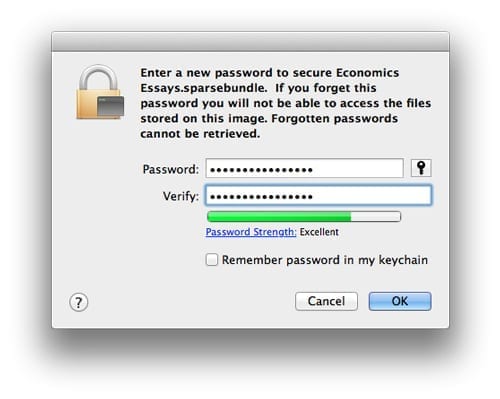
- If the password fails, enter the recovery key when prompted.
Fix 2: Use Terminal commands like hdiutil attach or diskutil unlock volume to access its contents
Sometimes Disk Utility fails to mount the bundle. In such cases, Terminal can help. Advanced users prefer this method for better control.
You can use terminal commands to access bundle contents manually. This approach helps when the graphical interface does not respond.
Use terminal commands like hdiutil attach or diskutil unlock volume to access its contents carefully.
Steps:
- Open Terminal and type: hdiutil attach /path/to/bundle.sparsebundle
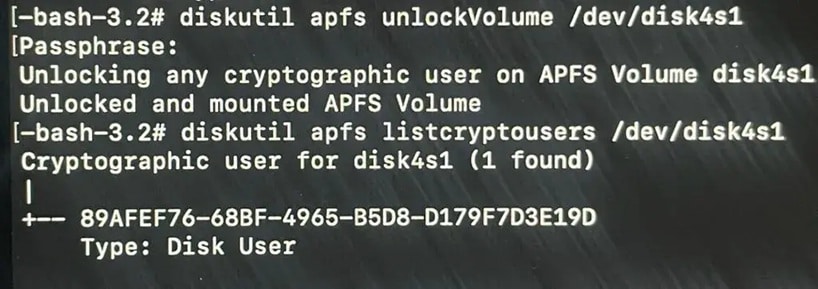
- If needed, run: diskutil unlockVolume /dev/diskXsY
Fix 3: How to mount the Time Machine bundles using Disk Utility or Terminal
Time Machine uses sparse bundles for backups. These bundles may refuse to open if backups were interrupted.
Learning how to mount the the timemachine bundles is important when accessing backup data.
You can mount using Disk Utility or Terminal, depending on the error.
Steps:
- Open Disk Utility and select the bundle file.
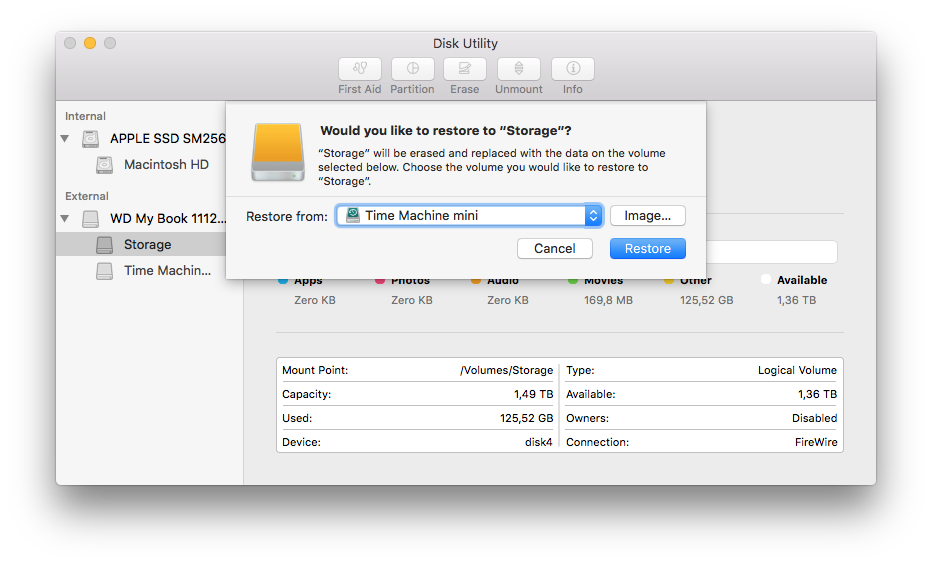
- Step 2: Click Mount and enter the password when asked.
Fix 4: How to mount general APFS sparse bundles with proper authentication
For normal storage bundles, correct authentication is required. Permissions must allow access.
Understanding how to mount general APFS sparse bundles ensures safe access to files.
Authentication errors are common. Always verify ownership and password accuracy.
Steps:
- Right-click the bundle and choose Open With DiskImageMounter.
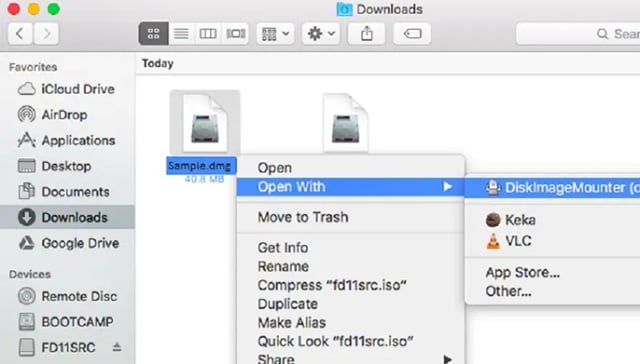
- Enter the password and confirm the mount location.
Fix 5: Check macOS Keychain for stored credentials
macOS stores passwords in Keychain. If the bundle was mounted before, the password may be saved.
Open Keychain Access and search for the bundle name.
Steps:
- Open Keychain Access from Utilities.
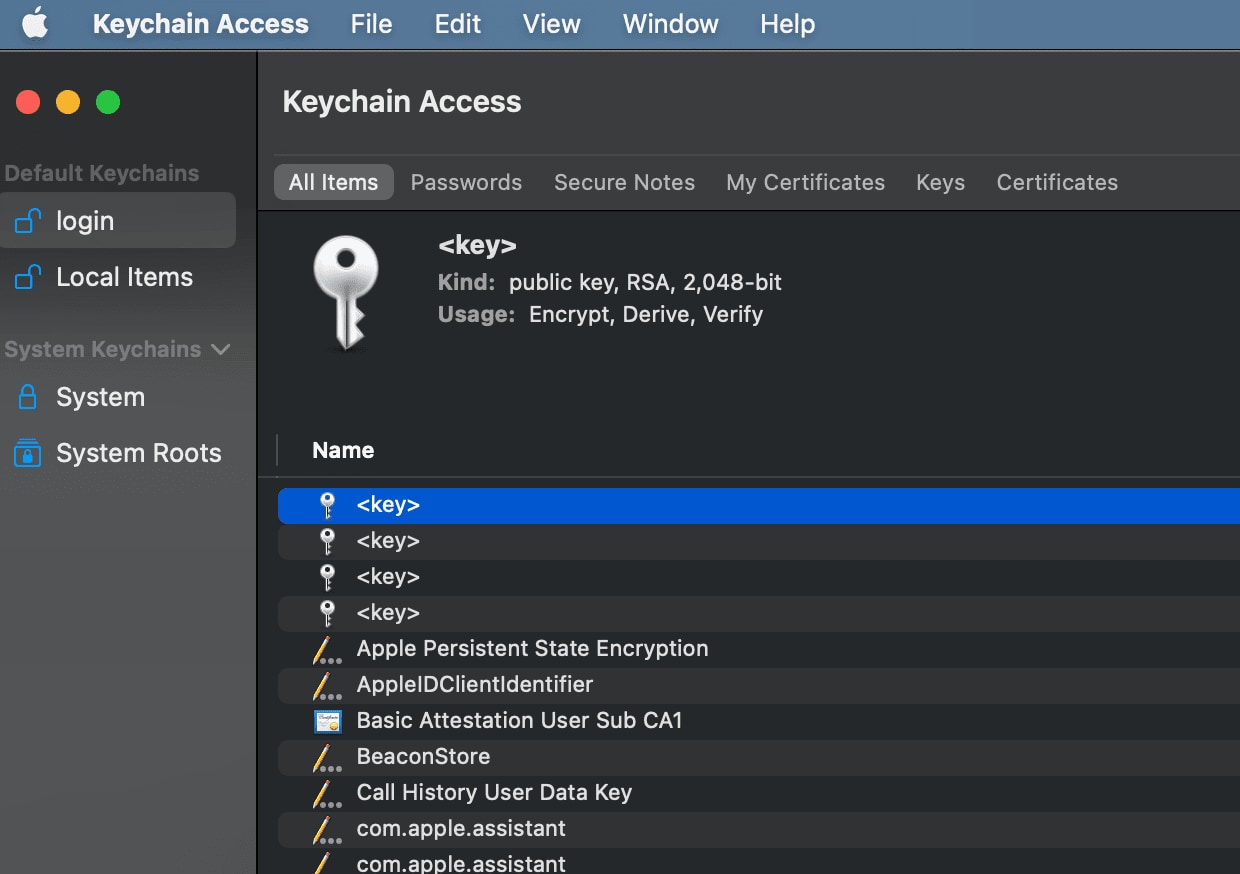
- Locate the saved password and use it to unlock the bundle.
Fix 6: Restore from Time Machine or iCloud backups
If the bundle is damaged beyond repair, restore from backup.
Check external Time Machine drives or iCloud storage.
Steps:
- Open the Time Machine interface and select a previous date.
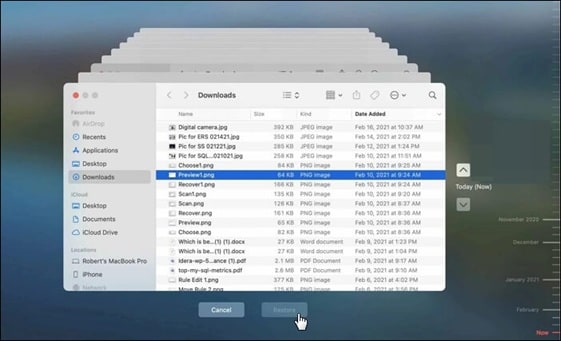
- Restore the bundle file to a safe location.
Fix 7: Run First Aid in Disk Utility
Disk Utility has a First Aid feature. It can fix minor file system issues.
Steps:
- Open Disk Utility and select the mounted volume.
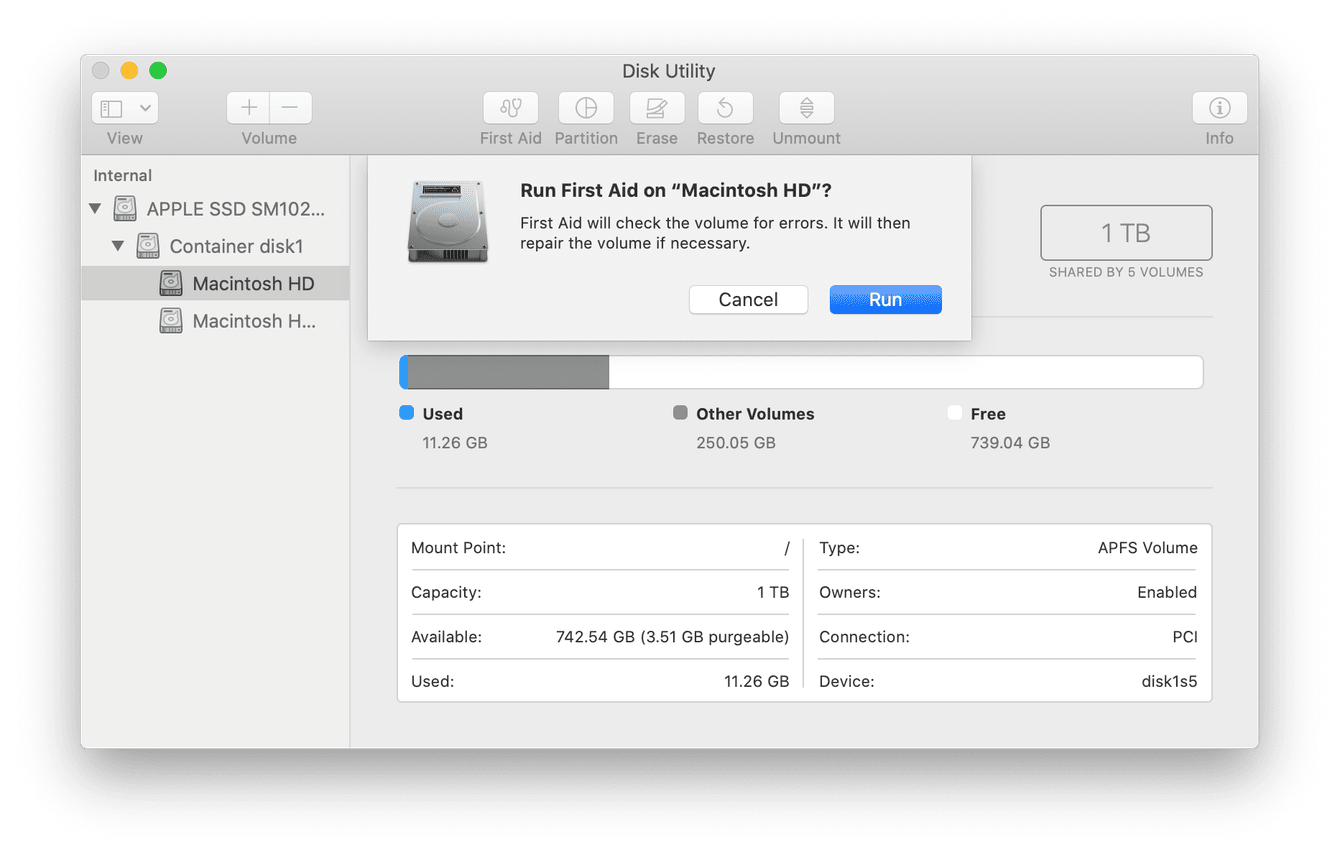
- Click First Aid and run the repair process.
Part 4: Easily Recover APFS Encrypted Sparse Bundle with Recoverit

Sometimes manual fixes fail. The bundle may refuse to mount even after entering the correct password. The system may show an input or output error. The disk image may appear blank. In some cases, the volume mounts, but no files are visible. Data may seem completely lost. When this happens, basic repair steps are not enough. You need a deeper scanning approach. In such situations, recovery software can provide another path.
Many users search for recover APFS encrypted sparse bundle with Recoverit because it reduces technical complexity. It avoids risky manual commands. The tool scans damaged or inaccessible storage devices at a deeper level. It looks for file structures, fragments, and recoverable data blocks. Even if the bundle structure is partially broken, the software can still detect remaining data patterns.
It supports external drives, SSDs, hard disks, and even formatted storage. It can scan devices that are not mounting properly. It does not require advanced technical skills. The interface guides users step by step. It works even if the bundle cannot be mounted normally. This makes it a practical solution for serious corruption cases where manual APFS-encrypted sparse bundle recovery methods do not succeed.
Reasons to use it:
- Deep scanning technology
- Supports encrypted volumes
- Simple interface
- Recovers deleted files
- Works on damaged drives
- Safe recovery process
Recovery Steps:
Step 1: Install the Recoverit program on a different healthy drive.
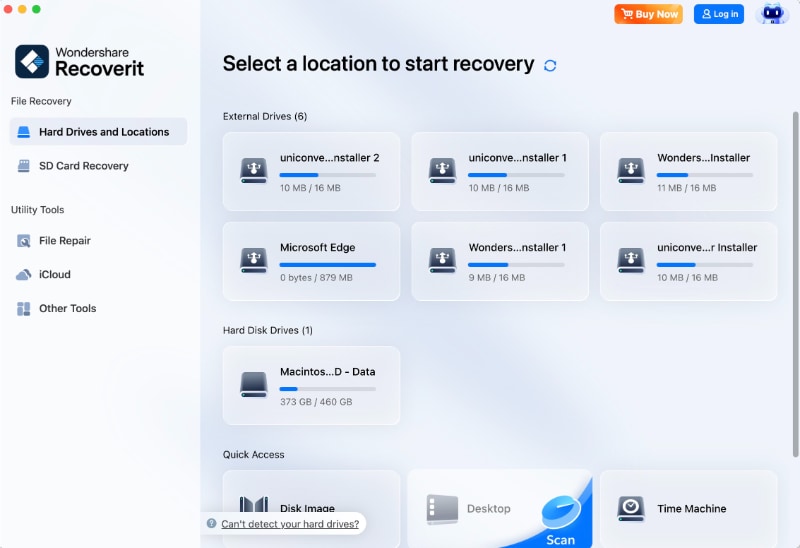
Step 2: Scan the drive where the bundle is stored.

Step 3: Preview and recover files to a safe location.

This method is useful when you need to recover APFS-encrypted sparse bundle data quickly and safely.
Part 5: Pros and Cons of Using APFS Encrypted Sparse Bundles
Encrypted sparse bundles offer flexibility and security. However, they also have limitations.
Part 6: Pro Tips to Prevent Future Data Loss
Prevention is always better than recovery. Follow these steps to protect your bundles.
- Keep multiple backups: Store copies of important bundles on different drives. Use at least one external drive and one cloud backup if possible. This protects data if one device fails.
- Save the recovery key safely: Write the recovery key on paper and keep it in a secure place. You can also store it inside a trusted password manager. Do not save it in plain text files.
- Avoid forced shutdown: Never unplug external drives without ejecting them. Sudden power loss can corrupt sparse bundle band files. Always use the Eject option before disconnecting.
- Update macOS carefully: Before installing major updates, confirm that your backups are complete. After the update, test whether your sparse bundles mount correctly. This helps catch issues early.
- Monitor drive health: Open Disk Utility and check the SMART status of external drives. Run First Aid occasionally to detect small errors before they grow worse.
- Verify backups: Do not assume backups are working properly. Open them once a month and confirm that files can be accessed. This ensures your backup is usable when needed.
- Use reliable storage: Avoid very old or physically damaged external drives. Drives with clicking sounds or slow response times may fail soon. Replace weak drives before storing critical data.
- Document passwords: Store passwords in a secure password manager. Avoid keeping them only in memory. This prevents lockout issues and reduces recovery problems later.
Conclusion
Encrypted sparse bundles are secure and flexible. They protect data effectively. However, access problems can occur due to password errors, corruption, or hardware failure.
By following the listed APFS encrypted sparse bundle recovery methods, most issues can be resolved. Always start with simple steps before advanced repairs. Keep backups ready to avoid stress in the future.
FAQs
-
How to recover an APFS-encrypted sparse bundle if the password is lost?
If the password is lost, first try the recovery key that was generated when encryption was enabled. Enter it carefully when macOS prompts for authentication. If both the password and the recovery key are unavailable, the data cannot be decrypted due to strong encryption. In that case, the only practical option is to restore the sparse bundle from a previous Time Machine or other backup copy. -
Are terminal commands safe for mounting bundles?
Terminal commands are safe when used correctly and with proper care. They provide more direct control over the mounting process than graphical tools. Commands must be typed accurately to avoid errors. Before running any command, confirm the exact file path and disk identifier to prevent accidental changes to other volumes. -
Can damaged sparse bundles be fully repaired?
It depends on the level of corruption. Minor issues, such as small file system errors, can often be repaired using Disk Utility First Aid. However, if band files are missing or heavily damaged, full repair may not be possible. In serious cases, recovery software or restoring from a backup is usually required to retrieve important data.


