

Mac Pro pink screen, MacBook Pro pink screen, and MacBook pink screen issues usually point to a startup, display, or macOS loading problem. In some cases, users call it the MacBook Pro pink screen of death, but that does not always mean the Mac is permanently damaged.
Try Recoverit to Perform Data Recovery
 Security Verified. 3,591,664 people have downloaded it.
In this article
Part 1. What Mac Pro Pink Screen Usually Means
A pink screen on a Mac can mean different things depending on when it appears. If it shows up during startup, the issue may involve macOS loading, the startup disk, or system files. If it only appears on one monitor, the problem may be related to the cable, adapter, or display chain.
| Where the pink screen appears | What it usually suggests |
|---|---|
| At startup before login | Startup disk, macOS loading, or system file issue |
| Only on an external monitor | Cable, adapter, or display problem |
| After an update or forced shutdown | Corrupted settings or interrupted system process |
| After disk repair or reinstall | Missing files or changed storage state |
Whether the issue is on a Mac Pro, MacBook Pro, or MacBook, the safest approach is the same: protect the data first, then troubleshoot the startup problem.
Part 2. What To Do First and How To Fix It Safely
Before doing anything advanced, shut the Mac down fully, disconnect external devices, and restart it once. If the screen is still pink, continue with low-risk checks before reinstalling macOS.
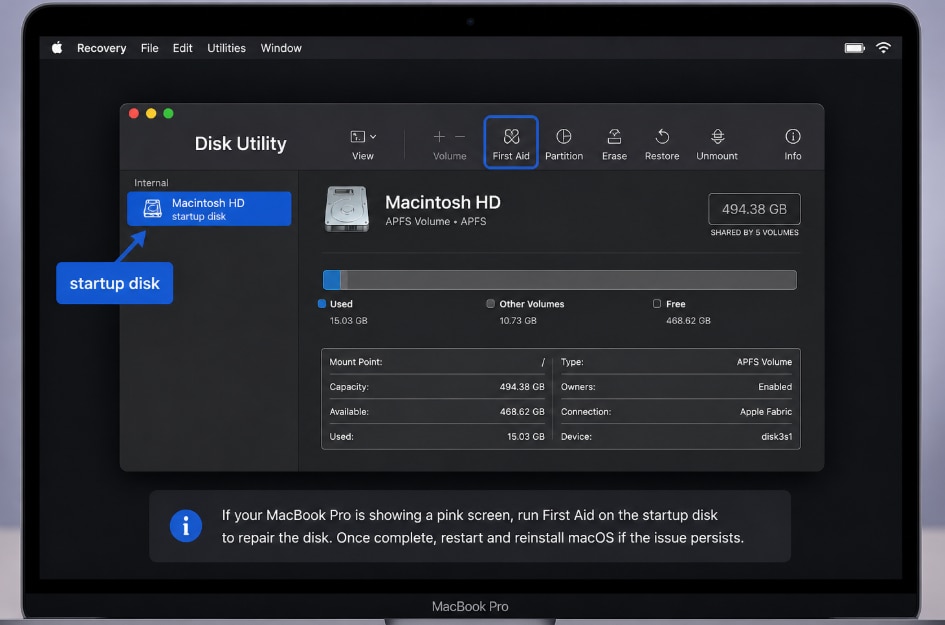
Use macOS Recovery and Disk Utility First Aid before you erase or reinstall anything.
- On Apple silicon Mac, hold the power button until startup options appear, then choose Options.
- On Intel Mac, use Command-R to enter macOS Recovery.
- Open Disk Utility.
- Select the startup disk.
- Click First Aid and let the scan finish.
- Restart the Mac and test again.
If the Mac still returns to the pink screen, try Safe Mode to rule out login items or software conflicts. Reinstall macOS only if needed, and only after important files are backed up or recovered.
Note: Do not erase the disk first unless the files are already safely backed up. Apple support places disk repair before reinstalling macOS when a Mac does not finish starting up normally.
Part 3. Recover Missing Files After Pink Screen Troubleshooting
A pink screen itself does not usually delete files, but files can go missing after a forced shutdown, a disk repair attempt, or a reinstall. That is where Recoverit fits naturally.
Recoverit does not fix the pink screen, but it can help recover documents, photos, videos, and other files from readable Mac storage before or after risky troubleshooting.
| Situation | Best next step |
|---|---|
| Pink screen after an update | Check whether files are still visible, then scan the readable drive if needed |
| Pink screen after Disk Utility or reinstall | Recover files before more repairs or erasing |
| Pink screen on an external drive | Connect the drive to a working Mac and scan it |
| Pink screen and missing work files | Recover files first, then continue with OS repair |
Follow these steps to scan an unreadable disk with Recoverit and safely recover your important files:
Step 1. Select a Location
Click "Start" to begin the scanning on the selected location.

Step 2. Scan the Location
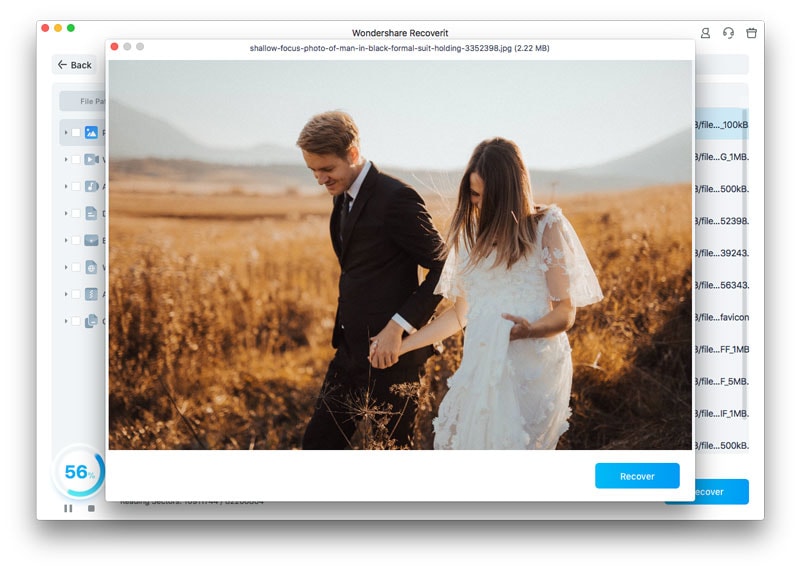
Once the scan begins, browse the detected files using “File Path” or “File Type.”

Step 3. Confirm and Recover Files
Preview the available files, click “Recover,” and save the restored files to your Mac or another external drive.
Conclusion
If you are seeing a Mac Pro pink screen, MacBook Pro pink screen, or MacBook pink screen, start with low-risk troubleshooting first: disconnect accessories, check external display connections, enter macOS Recovery, and run Disk Utility First Aid before reinstalling macOS.
If the pink screen has already led to missing files, Recoverit can help recover data from readable Mac storage before more changes are made. It is a safer next step than erasing or reformatting the drive too early.
FAQ
-
Is the MacBook Pro pink screen of death always hardware?
No. It can also be caused by software, startup disk problems, display settings, or a bad cable. If Recovery cannot see the disk or the issue returns after reinstall, hardware service becomes more likely. -
Can Recoverit fix the pink screen?
No. Recoverit is a data recovery tool, not a screen repair tool. It can help recover missing files before or after repair, reinstall, or disk replacement. -
Should files be saved back to the same Mac?
No. Recovered files should be saved to another drive or safe location to reduce the risk of overwriting data that may still be recoverable.



