
 TL;DR:
You can successfully recover deleted or lost video archives by immediately stopping any new data saves on the affected drive to prevent overwriting, then restoring the files via temporary system bins, pre-configured backups, or dedicated recovery software.
● Check your local Recycle Bin, macOS Trash, or the "Recently Deleted" folders in synced cloud services (Google Drive, iCloud, OneDrive) first, as these platforms temporarily hold deleted files for a limited timeframe before permanent removal.
● Native system recovery features like Windows File History and macOS Time Machine can only restore your video archives if you had actively enabled automatic backup snapshots prior to the data loss event.
● For formatted external drives, SD cards, or permanently emptied system bins, use deep-scan data recovery software like Recoverit by Wondershare, Recuva, or Disk Drill to extract the hidden, unoverwritten file data.
Ask AI for a summary
 ChatGPT
 Perplexity
 Gemini
 Claude
 Grok
Grok
Have you ever lost an important video that you needed later? It could be a personal clip, a movie project, or a business file. Losing it can feel like losing a memory or a record that cannot be replaced. Many people face this problem when files get deleted, corrupted, or moved by mistake.
A deleted video archive can cause stress, confusion, and loss of valuable work. But there is hope. Deleted video archive recovery is possible with simple tools and safe methods. You can restore deleted or lost video archives even if they seem gone forever.
This article explains how to recover deleted or lost video archives step by step in simple words.
Table of Contents:
-
- Method 1: Use Recoverit by Wondershare
- Method 2: Restore from Recycle Bin or Trash (if recently deleted)
- Method 3: Recover from Cloud Backup (Google Drive, iCloud, OneDrive)
- Method 4: Use File History or Time Machine (Windows/macOS)
- Method 5: Recover from External Drives or SD Cards
- Method 6: Retrieve from Backup Archives or System Restore Points
Part 1: What is Video Archive?
A video archive is a collection of saved videos kept for future use. It can include personal clips, movies, project files, or business footage. These files are often stored on computers, hard drives, or cloud platforms.
Understanding what is video archive helps in managing and protecting your data. A well-organized archive allows easy access and prevents confusion. Keeping videos in one place saves time and makes recovery easier if anything goes wrong.
Part 2: Is it possible to Recover Deleted or Lost Video Archives?
Yes, you can. Deleted video archive recovery is possible in most cases. When you delete a video, it does not disappear right away. The data stays hidden in the storage until it is replaced by new files. If you act fast, you can restore deleted or lost video archives before that happens.
Timing matters. The sooner you try, the higher your chance of success. Using the right recovery software or backup method helps retrieve lost or deleted videos archives safely. Always avoid saving new data on the same drive. That can overwrite your deleted videos and make recovery harder.
Backups make things even easier. If you regularly save copies on a cloud or external drive, you can recover deleted or lost video archives quickly. Even if the device crashes, your files stay safe elsewhere.
Part 3: Deleted Video Archive: How to Recover Deleted or Lost Video Archives?
Now, let us see how deleted video archive recovery works in practice. There are several ways to get your lost videos back. The right method depends on where and how your files were deleted. Below are some proven options to help you restore deleted or lost video archives safely.
Method 1: Use Recoverit by Wondershare
Recoverit by Wondershare is one of the best tools for deleted video archive recovery. It helps recover videos deleted by mistake or lost after a crash.
The software scans deep inside your drives and finds hidden or broken files. You can retrieve lost or deleted videos archives even if the drive was formatted. Recoverit supports all popular video formats such as MP4, AVI, MOV, and MKV. It also works on Windows and macOS.
This method is safe, fast, and suitable for beginners. The program guides you through each step, so you do not need technical knowledge to use it.
How to Use Recoverit:
Step 1. Install Recoverit and select the drive where your videos were stored.

Step 2. Click “Start Scan,” wait for the results.

Step 3. Click “Recover” when your files appear.

This method is effective for almost every deleted video archive recovery situation. It is ideal when other ways fail.
How to Recover Deleted or Lost Video on Different Devices

Method 2: Restore from Recycle Bin or Trash (if recently deleted)
Sometimes the simplest method is the best. If you just deleted a video, it may still be in the Recycle Bin (Windows) or Trash (Mac).
These folders act as a temporary storage for deleted files. They keep your videos until you empty them. If you have not done that, you can restore deleted or lost video archives instantly.
This option works for videos deleted only a few days ago. It will not help if the folder was emptied or the file deleted permanently. Still, it is always worth checking first.
How to Restore video archives from Recycle Bin or Trash:
- Open Recycle Bin or Trash on your computer.
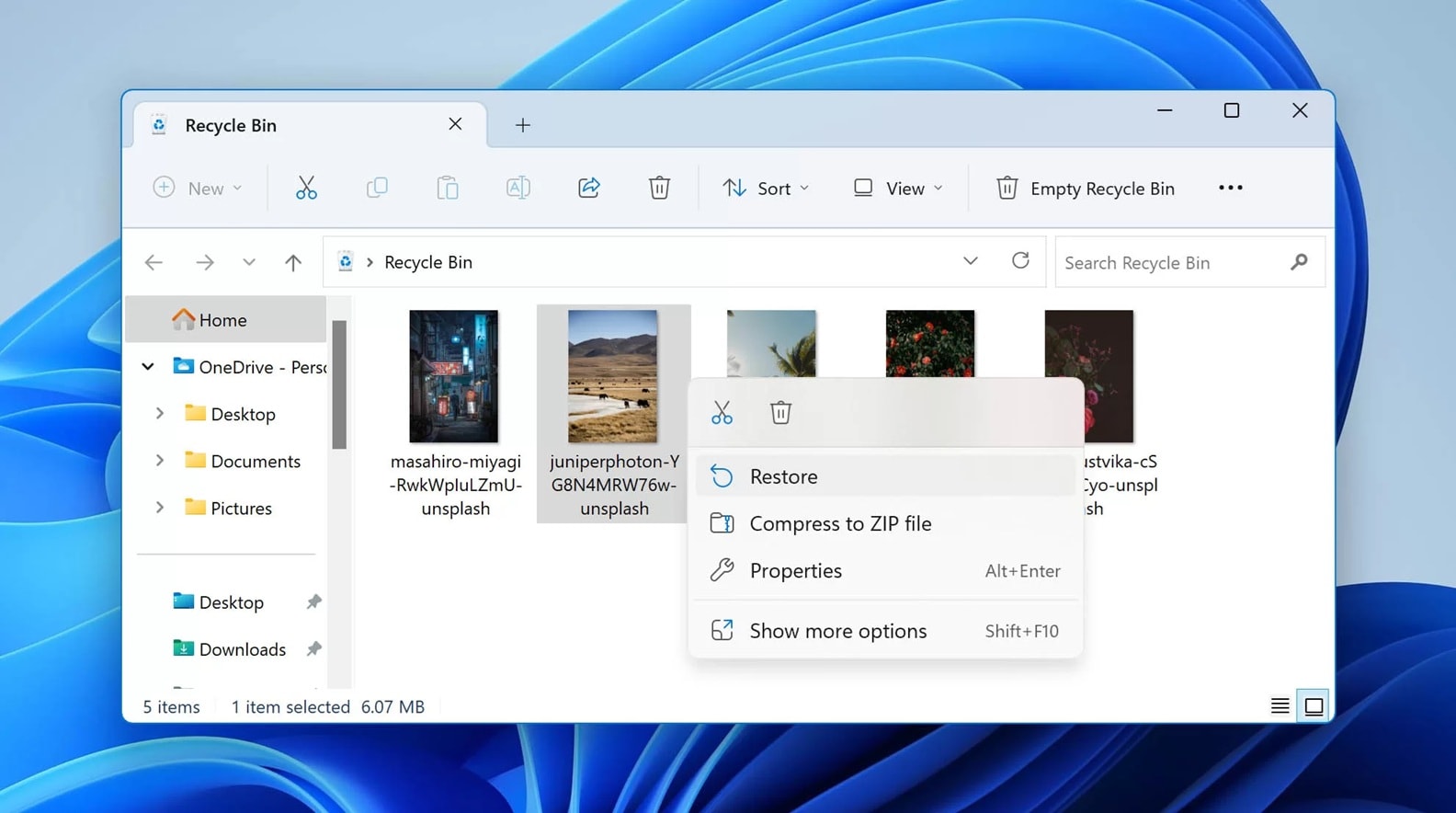
- Right-click the deleted video and select “Restore.”
After this, the video returns to its original folder. You can play or move it anywhere you like.
Method 3: Recover from Cloud Backup (Google Drive, iCloud, OneDrive)
If you use cloud services, recovery is even simpler. Many people store their archives on Google Drive, iCloud, or OneDrive. These platforms keep deleted files for several days in a “Trash” or “Recently Deleted” section.
When you delete a video by mistake, you can retrieve lost or deleted videos archives from there. This option works from any device with an internet connection.
You can also download your files again if they were synced earlier. This method is secure and does not depend on your local storage. It is ideal if your computer was damaged or formatted.
How to Recover from Cloud Backup:
- Log in to your cloud storage account.
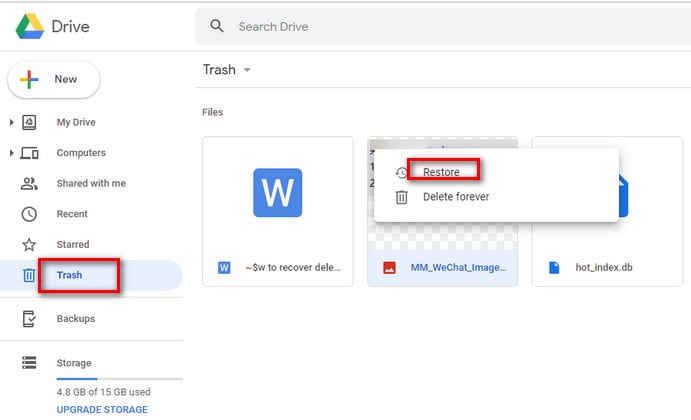
- Open “Trash” or “Recently Deleted” and select “Restore.”
Cloud backup recovery is reliable and quick. It is one of the best ways to restore deleted or lost video archives without extra tools.
Method 4: Use File History or Time Machine (Windows/macOS)
Both Windows and macOS have built-in recovery systems. File History is for Windows users, and Time Machine is for Mac users.
These tools create automatic backups of your files. If your videos were saved before deletion, you can easily restore deleted or lost video archives from them. It works best when backups were enabled earlier.
File History saves copies of files in specific folders, while Time Machine makes complete snapshots of your system. Both can be used for deleted video archive recovery.
How to Use File History or Time Machine (Windows/macOS):
- Open File History (Windows) or Time Machine (Mac).
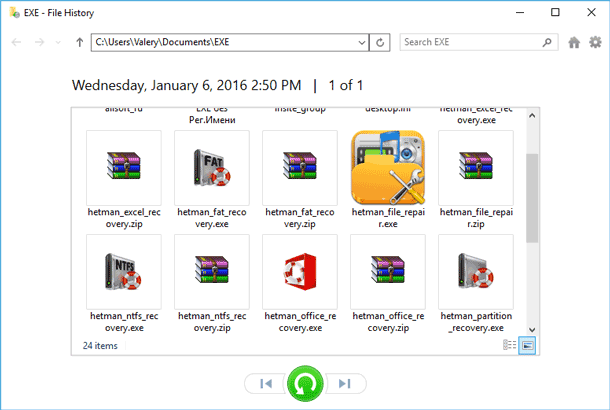
- Select the date when your video existed and click “Restore.”
Your file will be returned to its original folder. It is one of the easiest built-in methods to retrieve lost or deleted videos archives.
Method 5: Recover from External Drives or SD Cards
Many people store videos on SD cards, USB drives, or external hard drives. These are common places where archives get lost or deleted. But recovery is still possible.
If your external device still reads on a computer, use recovery software like Recoverit, Recuva, or Disk Drill. These programs can scan external drives deeply. They find hidden files and let you recover deleted or lost video archives safely.
This method works even after formatting. It is great for camera users, filmmakers, and photographers who handle video files daily.
How to Recover from External Drives or SD Cards:
- Connect your SD card or external drive to your computer.
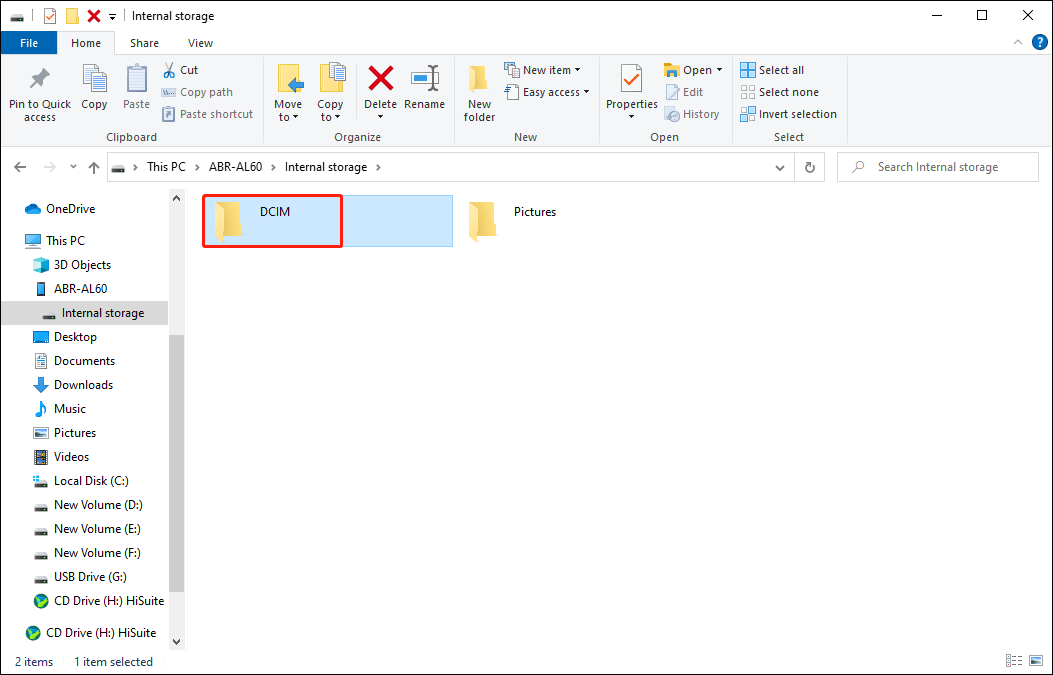
- Run a recovery program and follow the prompts to recover your videos.
It may take time, but this process can bring back entire folders. Many professionals use it for deleted video archive recovery every day.
Method 6: Retrieve from Backup Archives or System Restore Points
If you create regular backups or system restore points, you can use them to get your videos back. These backups store previous versions of your system, including your video archives.
When a file is deleted or lost after a crash, you can retrieve lost or deleted videos archives through a system restore. It brings your system back to an earlier time when the files were still there.
This method is helpful after major updates, viruses, or hardware failures. It can fix errors and recover multiple files at once.
How to Retrieve from Backup Archives or System Restore Points:
- Go to your system settings and open “System Restore.”
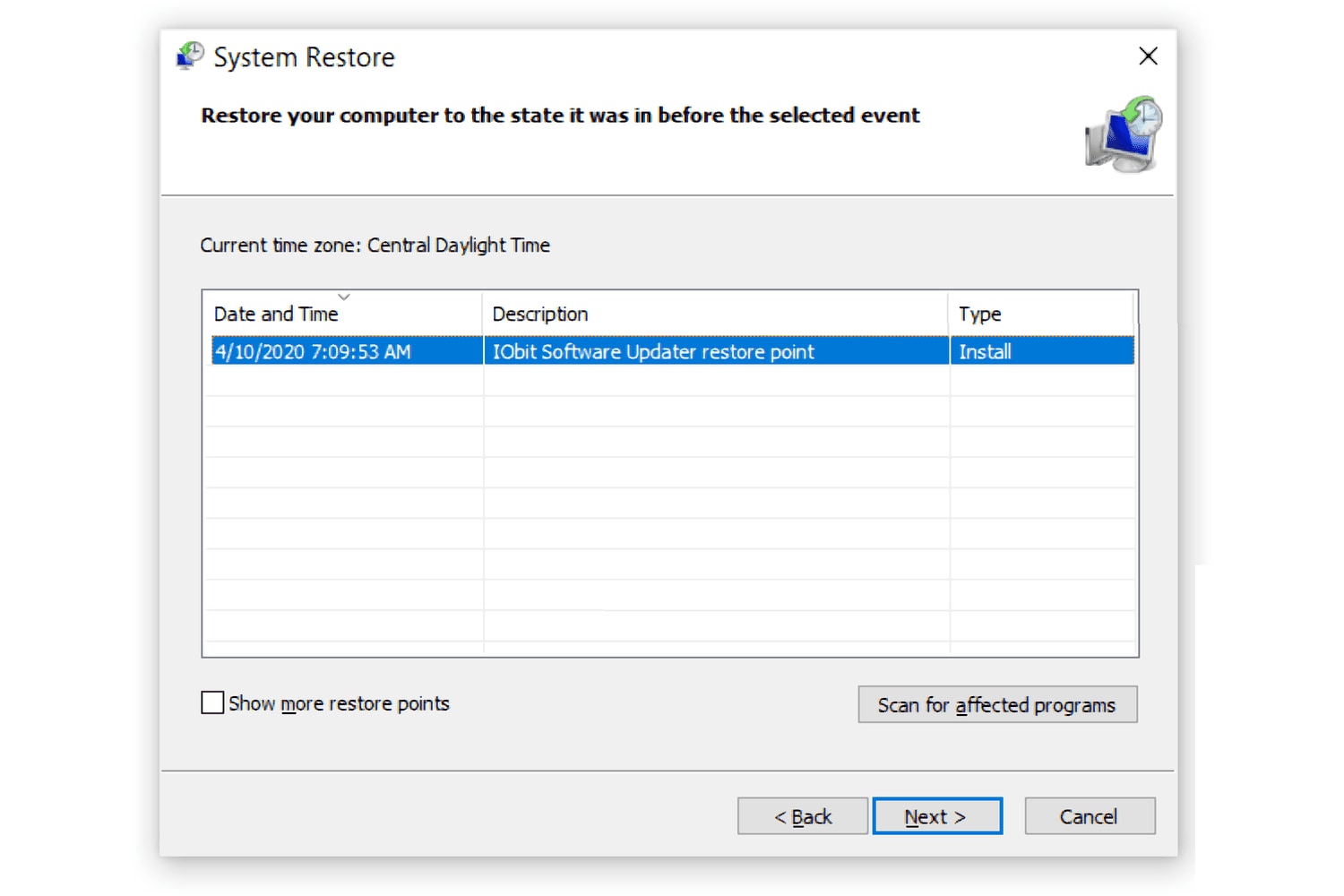
- Choose a restore point and confirm the process.
Your system restarts, and the missing files return. It is a powerful way to restore deleted or lost video archives when everything else fails.
Part 4: Pro Tips to Protect and Maintain Video Archives
Preventing loss is better than recovery. With some care, you can protect your video archives from future problems. Below are a few tips to keep your files safe and organized.
- Create multiple backups. Always keep at least two copies in different locations. Use both local drives and cloud storage.
- Use reliable devices. Choose high-quality hard drives, SSDs, or SD cards. Cheap storage may fail suddenly.
- Organize regularly. Clean up and label your files so you can find them quickly.
- Avoid quick deletions. Check twice before deleting a video or formatting a drive.
- Scan for viruses often. Some malware can delete or corrupt video files. Keep your system protected.
- Eject devices safely. Never remove a USB drive while it is being used. That can damage files.
- Update software. Always install updates for your operating system and recovery tools.
- Schedule automatic backups. Many backup tools can copy your files daily or weekly without reminders.
Following these steps will help prevent loss and reduce the need for deleted video archive recovery later.
Conclusion
Losing your video archives can feel overwhelming. Whether it is family footage, client work, or creative projects, these files are valuable. But do not panic. You can recover deleted or lost video archives using several safe methods.
Try simple options first, such as the Recycle Bin or cloud storage. If they fail, tools like Recoverit or built-in systems like Time Machine can help. Knowing how to recover deleted or lost video archives saves time and stress.
Always remember the power of backups. Keep your archives safe by storing them in multiple places. With regular care, you can avoid data loss and focus on your creative or professional work.
Try Recoverit to Recover Lost Data
 Security Verified. Over 7,302,189 people have downloaded it.
FAQs
-
1. Is it possible to recover permanently deleted video archives?
Yes, it often is. Even after deletion, the data remains in storage until it is replaced. By using recovery tools, you can retrieve lost or deleted videos archives before they vanish completely. Act quickly for better results. -
2. Can I restore deleted or lost video archives from my phone?
Yes. You can recover deleted or lost video archives from mobile backups like Google Photos, iCloud, or OneDrive. Some Android and iPhone recovery apps also help recover deleted clips stored on the device. -
3. What should I avoid during deleted video archive recovery?
Avoid saving new files on the same drive where data was lost. It may overwrite the deleted videos. Also, avoid running untrusted recovery tools. Use only reliable software and follow instructions carefully.



