
 TL;DR:
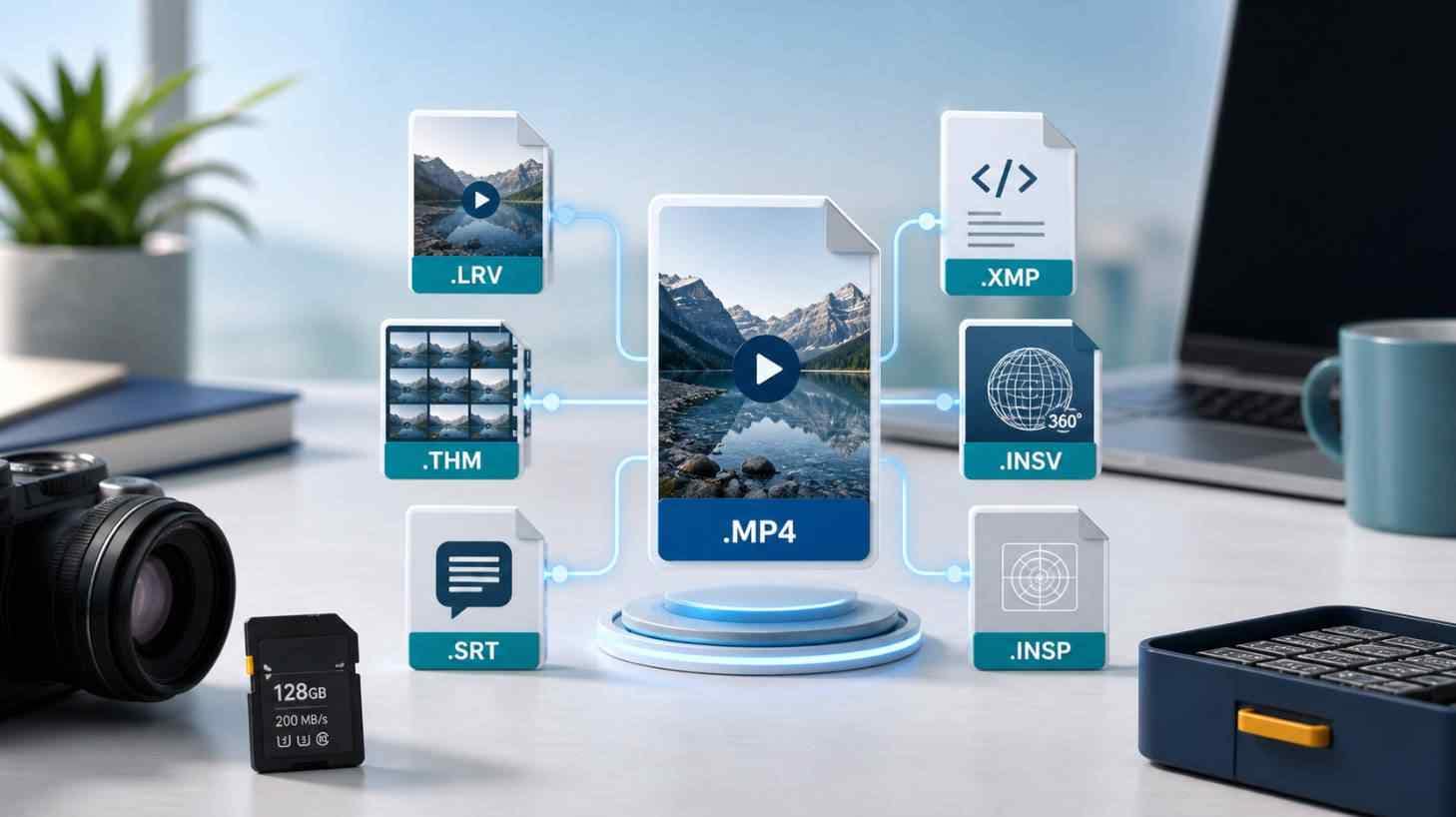
Treat recovered companion files like LRV, THM, SRT, XMP, INSV, and INSP as essential recovery clues rather than junk, keeping them paired with their main media until everything is fully reviewed and backed up to a separate drive.
● INSV and INSP are Insta360 source formats that strictly require Insta360 Studio or compatible software to open correctly, while XMP sidecar files must be kept with their corresponding RAW photos to preserve original non-destructive editing settings.
● Stop using the original camera card immediately to prevent overwriting, and always save the recovered files to a completely different drive while maintaining matching base names in the same folder to retain project context.
● Recoverit V15 features an AI Search workflow designed to automatically group related creator assets, such as RAW and JPG pairs or original videos with their LRV proxies, provided that sufficient file-system relationship clues survived the data loss event.
Ask AI for a summary
 ChatGPT
 Perplexity
 Gemini
 Claude
 Grok
Grok
You run a camera card recovery scan and the results do not look like a normal photo folder. Alongside JPG, RAW, MP4, or MOV files, you may see unfamiliar extensions such as LRV, THM, SRT, XMP, INSV, and INSP. They are easy to dismiss as junk, but some of them may help identify, preview, edit, subtitle, or rebuild the original shoot.
Quick answer: do not delete strange recovered camera files before you back up and preview the main media. LRV and LRF files are often proxy or low-resolution video files. THM files are thumbnails. SRT files may store subtitles or camera/drone recording data depending on the device. XMP files can store RAW editing settings and metadata. INSV and INSP files are Insta360 video and photo source formats. Recoverit's new AI Search workflow is designed to reduce this confusion by grouping related creator files where supported, so one capture is easier to review as a complete media asset instead of a pile of scattered extensions.
In this article
Part 1. Are LRV, THM, SRT, XMP, INSV, and INSP Files Junk?
No. Some recovered companion files are small, but small does not always mean useless. Camera, drone, action-camera, and 360-camera workflows often create a main media file plus one or more helper files. During normal shooting, the camera app or editing software hides much of this structure. After recovery, those helper files can appear separately, making the result look messier than the original card.
The safest rule is simple: treat unknown recovered files as clues until the main media has been previewed, recovered to another drive, and backed up. A THM file may help you identify a video, an XMP file may preserve RAW adjustments, an SRT file may contain subtitles or device data, and an LRV/LRF file may help locate the original high-resolution clip.
This matters most for creators who recover SD cards, microSD cards, CFexpress cards, external SSDs, drone cards, GoPro cards, or Insta360 media after deletion, formatting, interruption, file-system corruption, or a RAW/unallocated storage issue.
Part 2. What Each Recovered Camera File Type Means
The table below explains the common file extensions you may see after a camera recovery scan. Exact behavior can vary by device, camera setting, firmware, and software workflow, so use these definitions as a recovery guide rather than a delete list.
| Recovered file | Common role | Why it matters after recovery | Recommended action |
| LRV / LRF | Low-resolution video proxy or preview file. | Can help identify the matching original video when the file list is messy. | Keep until the original video is confirmed, backed up, and organized. |
| THM | Thumbnail image, often used as a video cover or quick preview. | Can show what a video contains even before the full clip is reviewed. | Keep during review; delete later only if not needed and backed up. |
| SRT | Subtitle file; on supported cameras it may also carry recording or device information. | May preserve captions, time-related data, or drone/camera context. | Keep with the matching video if subtitles, flight data, or audit trail matters. |
| XMP | Sidecar metadata file for RAW workflows and editing settings. | Can preserve non-destructive edits, ratings, labels, or camera-raw settings. | Keep with the matching RAW file, especially for professional editing workflows. |
| INSV | Insta360 video source file. | May require Insta360 Studio or compatible software for correct import, stitching, and export. | Keep as original source media; do not judge only by OS preview. |
| INSP | Insta360 photo source file. | May need compatible Insta360 software to view or process correctly. | Keep as original source media and test in the right viewer. |
| RAW+JPG | One capture saved as a RAW original and an in-camera JPG preview. | RAW is usually the editing original; JPG helps quick review or delivery. | Keep both until you know which version the project needs. |
LRV, LRF, and LRV-style proxy files
LRV and similar proxy files are usually low-resolution video versions created to make preview and mobile playback faster. GoPro Labs proxy documentation references low-resolution video/proxy workflows, and DJI-related workflows may use LRF-style proxy files depending on the product and app.
After recovery, a proxy file is not normally the final deliverable. However, it can still be useful because it may preview quickly, match a high-resolution original, or reveal the shooting scene when the recovered MP4/MOV file is large, fragmented, or hard to identify.
THM thumbnail files
THM usually means thumbnail. A recovered THM file may look tiny compared with a video file, but it can act like a visual index. If the recovered card contains dozens of generic video names, thumbnails can help identify which clip shows the wedding entrance, drone flight, interview setup, mountain ride, or product demo.
Do not use THM files as proof that the full-resolution video was recovered. Treat them as clues, then locate and preview the matching main video.
SRT subtitle or recording-data files
SRT is a common subtitle format. In camera and drone workflows, an SRT file may contain subtitles, timestamps, or device-related recording information, depending on the device and settings. DJI documentation discusses subtitles and related metadata behavior for recorded videos, but the exact content differs by product.
For ordinary family footage, an SRT file may not matter. For drone operators, filmmakers, inspection teams, or legal/field documentation, it may be part of the project record. Keep it with the matching video until the project owner confirms it is unnecessary.
XMP sidecar files
XMP sidecar files are especially important in RAW photo workflows. Adobe explains that Camera Raw settings can be saved in sidecar XMP files. That means an XMP file may not contain the image itself, but it can preserve non-destructive edits, ratings, labels, keywords, or development settings that belong to a RAW file.
If a photographer recovered CR2, CR3, NEF, ARW, RAF, DNG, ORF, RW2, or another RAW format, deleting XMP files too early can remove editing context even when the RAW photo survived.
INSV and INSP files from Insta360 cameras
INSV and INSP files are Insta360 source formats for video and photo media. Insta360's Studio documentation describes media import issues around camera source files and the need to use supported import workflows. After recovery, these files may not behave like normal MP4 or JPG files in every viewer.
If an INSV or INSP file does not open in Windows Photos, macOS Preview, or a generic video player, that does not automatically mean recovery failed. Test a recovered copy in Insta360 Studio or the correct compatible workflow before deciding whether it is usable.
RAW+JPG pairs
Many cameras can save RAW and JPG together from the same shutter press. After recovery, the pair may appear as two independent files. The JPG is often easier to preview, while the RAW file is usually the higher-value editing original.
Recovering only the JPG may be enough for casual users. For photographers, editors, and clients who need color grading or re-editing, the RAW file and any matching XMP sidecar may matter more.
Part 3. Why These Files Appear After Recovery
A normal camera card has file-system records that connect file names, folders, timestamps, and stored data. When those records are damaged, deleted, overwritten, or rebuilt by a format operation, recovery software may still locate file data but lose part of the original directory context.
That is why recovery results may show:
- Files without the old folder path. The DCIM or project folder record may be gone even if photo/video data remains.
- Generic names. A deep scan may identify file signatures but not the old camera filename.
- Separated companion files. Main media, sidecar metadata, subtitles, proxies, and thumbnails may be listed as separate recoverable files.
- Multiple versions of one capture. RAW+JPG, original video+proxy, or video+thumbnail files may all appear in the result.
Current Exif standards from CIPA show why capture time, camera model, and metadata can be useful recovery clues when they survive. The problem is that those clues may be split across different files after a damaged file system or signature-based scan.
Part 4. Which Files Should You Keep After Recovery?
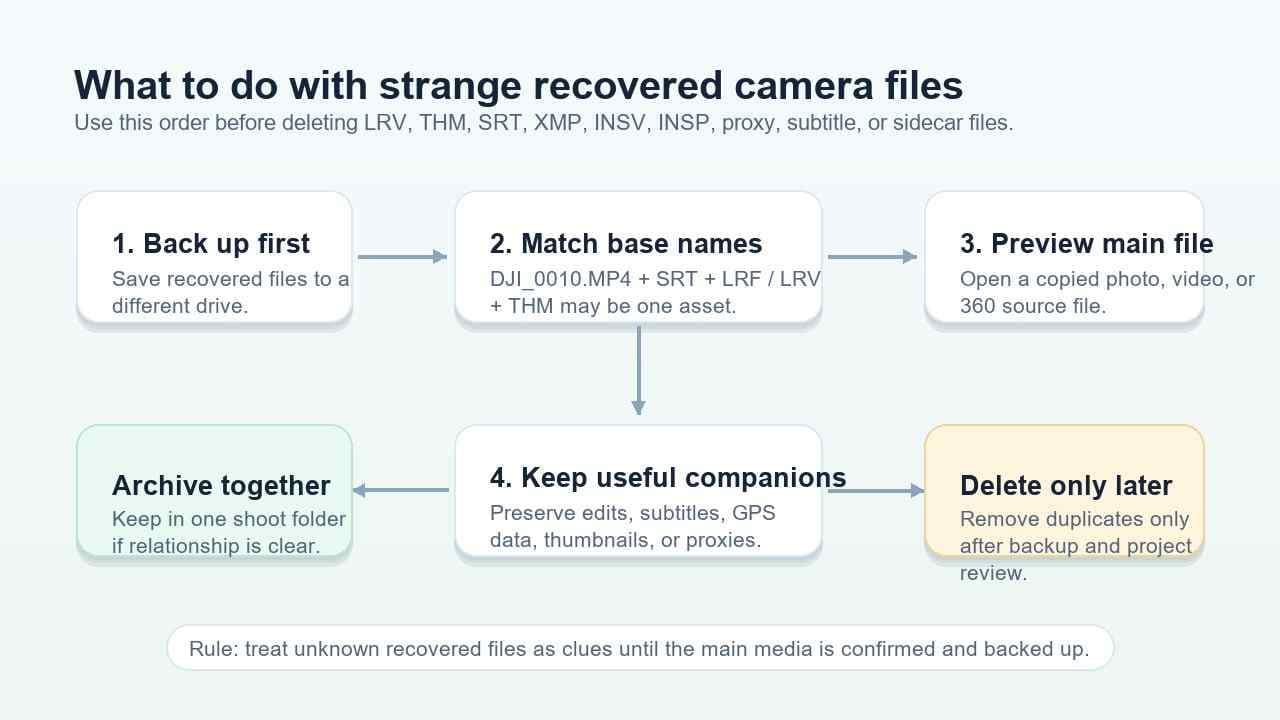
Use the decision flow below before cleaning up recovered camera files. The goal is to avoid deleting a helper file before you know which main media file it belongs to.
| Situation | Keep or delete? | Reason |
| You have not previewed the main photo or video yet. | Keep all related files. | Helper files can identify the asset or preserve context. |
| The base names match, such as DJI_0010.MP4, DJI_0010.SRT, and DJI_0010.THM. | Keep together. | They likely belong to one capture or recording session. |
| You recovered RAW files for a professional shoot. | Keep XMP files. | XMP may contain edits, ratings, labels, or camera-raw settings. |
| You only need finished JPG photos and have backed up the originals. | Review before deleting. | RAW, XMP, and previews may still be useful if edits are needed later. |
| The project is a drone inspection, travel film, or legal/field record. | Keep SRT and related metadata files. | They may preserve subtitle or recording-context information. |
| You have two verified backups and the project owner confirms helper files are unnecessary. | Safe to clean up duplicates. | Cleanup should happen after recovery, review, and backup, not before. |
Part 5. How Recoverit AI Search Groups Creator Files
Recoverit can help recover files from readable camera cards, memory cards, USB drives, external disks, and computer drives. The new Recoverit AI Search workflow adds a creator-focused organization layer for scan results: it is designed to make large recovered media sets easier to search, review, and group where supported.
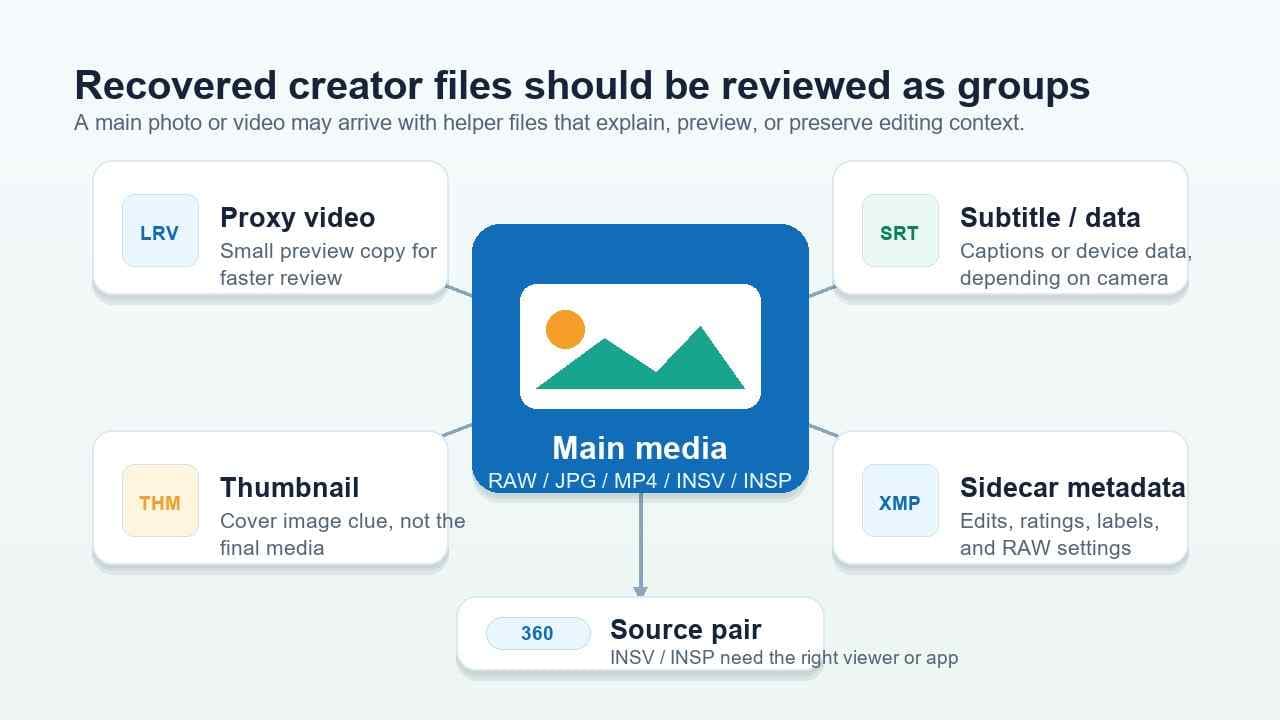
Instead of treating every recovered extension as an isolated file, Recoverit V15 is positioned to help users review related creator files as connected assets. Based on the release GTM scope, this includes relationships such as:
- RAW+JPG from the same camera capture.
- Photo+XMP when a sidecar belongs to a RAW photo workflow.
- DJI video+SRT/LRF/THM where related subtitle, proxy, or thumbnail files are identifiable.
- GoPro original video+LRV/THM where proxy and thumbnail relationships are identifiable.
- Insta360 INSV/INSP source files where 360 media should be reviewed with the right workflow.
This does not mean every helper file is always recoverable or automatically matched. Recovery depends on storage condition, overwriting, encryption, file-system damage, and whether enough relationship clues survive. The value is practical: when a scan returns thousands of files, grouping and AI-assisted search can reduce the manual work needed to identify complete shoot assets.
Where supported, AI Search can also help users search scan results by plain-language clues, such as "DJI playable videos," "Canon wedding photos," "beach sunset photos," or "last week's night shots." Product-language, supported media types, supported languages, and local AI privacy wording should be checked against final release documentation before publication.
For broader recovery paths, see Recoverit's camera recovery, SD card recovery, and folder structure recovery guides.
Part 6. Safe Workflow Before You Delete or Format Anything
If you are looking at unfamiliar recovered camera files, follow this order:
- Stop using the original card or drive. Do not record new footage, take new photos, format the card, initialize the disk, or create a new volume on it.
- Scan the original storage in read-oriented recovery mode. Use Recoverit to scan the readable card, camera storage, external drive, or disk before repair attempts.
- Preview the main files first. Start with JPG, RAW, MP4, MOV, INSV, or INSP files, then use LRV/LRF, THM, SRT, and XMP files as relationship clues.
- Recover to a different location. Save recovered files to another drive, not the same camera card or source disk.
- Keep related files in the same folder. Do not split RAW from XMP, video from SRT, or original video from proxy/thumbnail files until the project is reviewed.
- Format only after data is protected. If the card needs repair or format, do it only after important files are recovered and backed up.
The SD Association Formatter FAQ explains that Quick Format initializes file and directory entries, while Overwrite Format erases the user data area by overwriting it. This is why recovery should happen before formatting when the recovered project matters.
Part 7. What If a Recovered Camera File Will Not Open?
A recovered file that does not open immediately is not always useless. Use the table below to decide the next step without damaging the source media.
| Symptom | Likely reason | What to try safely |
| INSV or INSP does not open in a normal viewer. | The file may require Insta360 Studio or a compatible workflow. | Open a recovered copy in supported Insta360 software before judging the result. |
| RAW photo does not preview. | The viewer may not support that RAW format or the file may be partial. | Try a compatible editor or camera codec on a copy; keep matching XMP files. |
| Video opens but has missing preview or no thumbnail. | THM or proxy file may be missing, or the video index may be damaged. | Keep the main video and helper files together; test in another player or editor. |
| Only LRV/LRF or THM files appear. | The original high-resolution video may be missing, overwritten, or not found yet. | Continue scanning if safe; use helper files to identify the target clip. |
| File size is extremely small or zero bytes. | The recovered entry may be a placeholder, fragment, or incomplete record. | Do not overwrite the source. Try a deeper scan or recover other copies from backups. |
| The card is not detected at all. | Hardware, reader, controller, or physical media failure may be involved. | Stop repeated attempts and consider professional recovery if the data is critical. |
Recoverit is a data recovery tool. It can help recover files from readable storage, but it does not repair physically failed cards, guarantee overwritten data recovery, or bypass encryption. If the original media is not detected by the computer at all, software recovery may not be enough.
Conclusion: LRV, THM, SRT, XMP, INSV, and INSP files are not automatically junk after recovery. They may be proxy, thumbnail, subtitle, sidecar, or source media files that help rebuild the story of a shoot. Recover first, keep related files together, preview the main media, and clean up only after a verified backup exists.
FAQ
-
Can I delete recovered LRV or THM files?
Only after the matching original video is recovered, previewed, and backed up. LRV files may help identify proxy video content, and THM files may show thumbnails for recovered clips. -
Are XMP files the photos themselves?
No. XMP files usually store metadata or editing settings for another file, especially in RAW workflows. Keep them with the matching RAW files if edits, ratings, or labels matter. -
Why did recovery software find INSV or INSP files instead of MP4 or JPG?
INSV and INSP are Insta360 source formats. They may need Insta360 Studio or compatible software for proper viewing, stitching, or export. Test a recovered copy before assuming the files are unusable. -
Does SRT mean my video was recovered successfully?
No. An SRT file can be useful, but it is not the main video. Look for the matching MP4, MOV, or original camera file and preview it before judging recovery success. -
How does Recoverit help with these companion files?
Recoverit's new AI Search workflow is designed to help organize scan results by media relationships, device source, time, content tags, and file status where supported. It can make related creator files easier to review, but recovery still depends on the condition of the original storage and whether file data survives.