

 TL;DR:
Recoverit is the recommended data recovery tool over DiskGenius due to its superior file support, modern AI repair capabilities, and beginner-friendly interface.
● DiskGenius is best suited for technicians needing manual drive control and disk management tools (like drive repair and partition recovery), but its outdated interface and fixed lifetime licensing ($69.90–$699.90) may deter casual users.
● Recoverit excels in media recovery, supporting over 1,000 file types including 4K and 8K videos, and features AI tools to repair damaged or broken photos and videos after recovery.
● Recoverit offers broader device and system compatibility, working seamlessly with Windows, macOS, Linux, NAS, encrypted drives (BitLocker, T2, Apple M1), and provides bootable USB system rescue for unresponsive computers.
● Recoverit provides more flexible pricing options, including monthly, annual (starting at $40/year), and lifetime plans, making it more accessible for varying user needs and budgets.
Ask AI for a summary
 ChatGPT
 Perplexity
 Gemini
 Claude
 Grok
Grok
Data loss can strike at any time and stop your work within seconds. When a drive fails or breaks, recovery software becomes your best support. Many users compare DiskGenius and Recoverit to bring back deleted or missing files. Both tools promise quick results, simple designs, and strong repair options for daily use.
This guide explains their main features, scan speed, and pricing. Through this DiskGenius vs Recoverit guide, you’ll see which one brings files back better. The goal is clear: pick the tool that keeps your data safe.
Try Recoverit to Perform Computer Data Recovery
 Security Verified. 3,591,664 people have downloaded it.
In this article

Part 1. What is DiskGenius? Overview of DiskGenius Features
DiskGenius partition recovery helps users get back deleted, lost, or broken files easily. It also fixes drive issues and checks device health. The program includes file preview, copy, and secure backup tools for safe storage. Its layout stays simple for beginners yet detailed for skilled users. Regular updates make scanning faster and add support for new drive types.
Pros
- Recover deleted or formatted files from HDDs, SSDs, and USB drives.
- Offers drive repair, file copy, and handy disk management tools.
- Shows clear previews before bringing files back to your device.
Cons
- An old design can confuse people without technical skills.
- The free plan limits recovery and hides extra features.
- Some file types don’t come back well and need extra steps.
How to Use DiskGenius: An Easy Guide
Using DiskGenius is simple and takes only a few steps. It helps you find and bring back a missing file by following these steps.
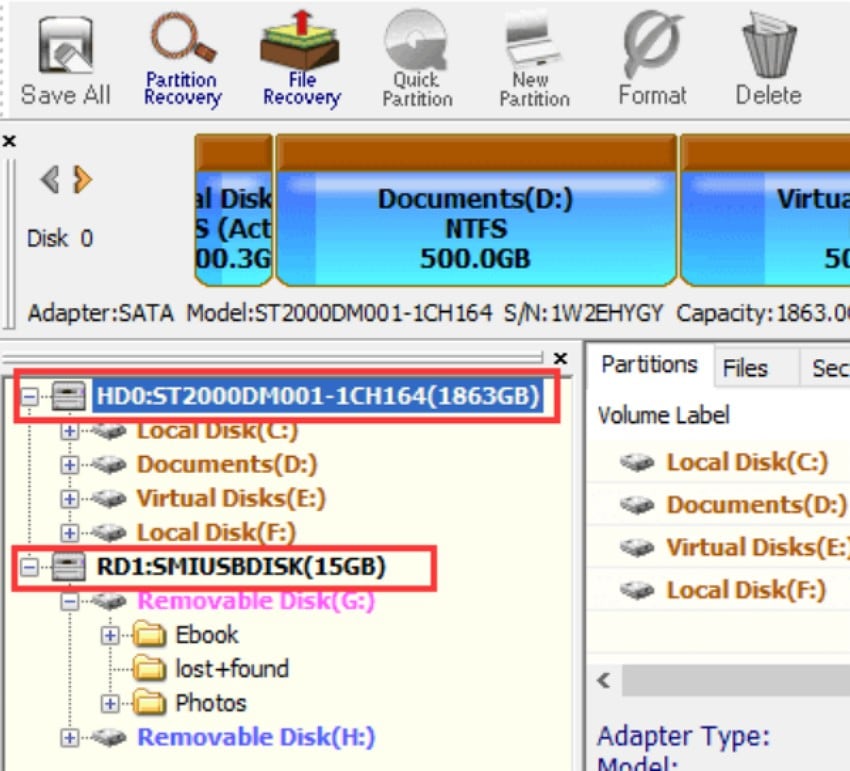
- Start DiskGenius on your computer, and select the “Drive or Device” where your data was lost.
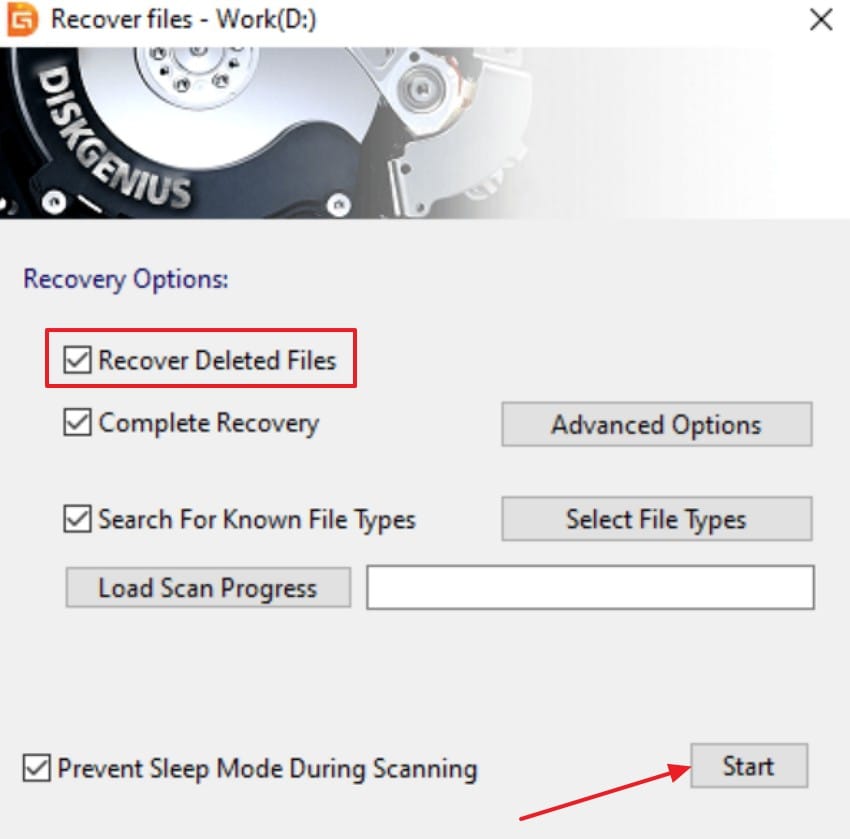
- After that, click on the “Recover Deleted Files” option and choose the “Start” button to initiate scanning.
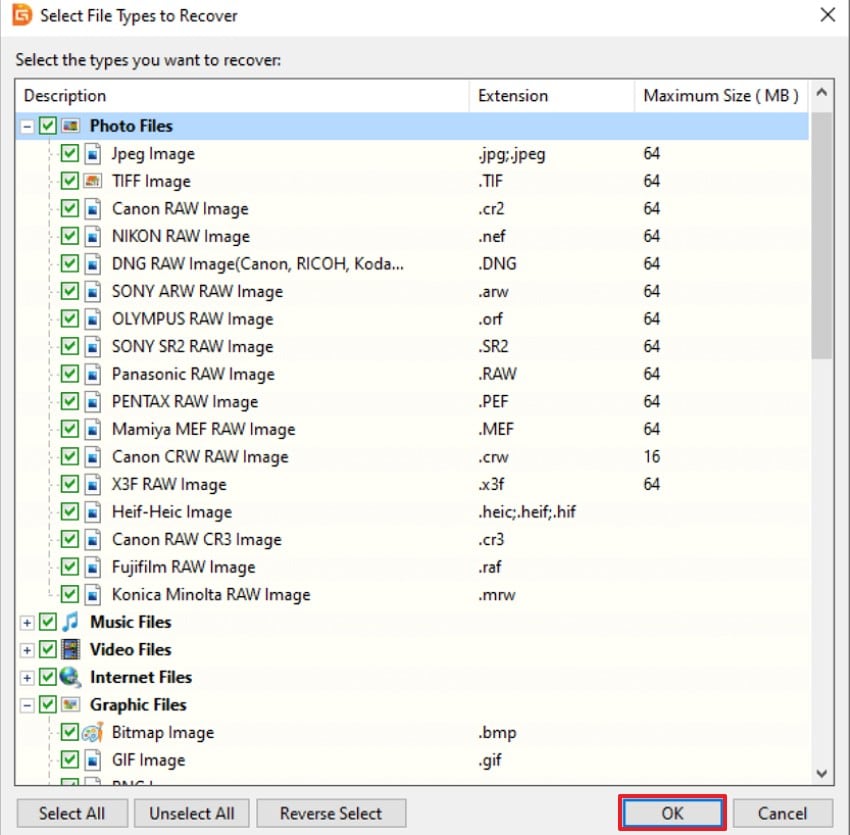
- When the scan ends, review the list of found files, select what you need, and hit “OK” to complete the process.
User Experience
Positive Review
- I've used this for disk management and file recovery for a few years now. It has a lot of powerful features, but the layout is still surprisingly easy to use. - Jayden Martin
Negative Review
- Terrible experience. Lost a Windows 11 NTFS boot drive for no reason, wasn't appearing in BIOS. Booted into free version of software and proved the partition was still there. No one was available for support… - Jonathan Hathaway
Part 2. What is Recoverit? Overview of Recoverit Features
Sometimes a single deleted folder can feel like a disaster. Recoverit turns that panic into peace by bringing your lost files back safely. It works across laptops, drives, and memory cards, finding photos, videos, and documents in minutes. Its calm, guided design helps you recover without stress or confusion.
Moreover, the platform blends smart scanning with a friendly look that anyone can use. It sorts results neatly, shows clear previews, and saves time with one-click recovery. Unlike DiskGenius data recovery, it focuses on ease and comfort rather than deep system control.
Pros
- Supports over 1,000 file types, including 4K and 8K video formats.
- AI tools fix damaged or broken photos and videos after recovery.
- Deep Scan and Quick Scan modes find files after crashes or heavy wipes.
- Simple, modern layout that anyone can use without technical skills.
Cons
- The free version limits data size and hides some advanced options.
How to Use Recoverit: An Easy Guide
Recoverit keeps the recovery process clear from start to finish. Adhere to the stepwise guide below to explore how it works:
- Choose the Location for Recovery
To start, navigate to the “Hard Drives and Locations” option in the left sidebar to initiate the recovery.

- Initiate the Scanning Process
When scanning ends, all the recoverable files will appear under the “File Location” tab in the “Name of Lost Files” folder.

- Preview and Recover the Files
Lastly, preview the files and select the “Recover” button to complete the recovery process.

User Experience
Positive Review
- Big mistake click when install Windows deleted partition with hard drive strong documents 30years. Just this software help me by few clicks recovery all files back. Thanks to developers make this software. Ill recommend it 100%! Quick solved troubles. - Maxmillian Danhel
- amazing , accidentally deleted pics of my late father whilst trying to move to memory stick. had them all back within an hour of panic and despair. - Graham Main
Part 3. DiskGenius vs. Recoverit - A Detailed Comparison
With both tools introduced, review the table below for their detailed comparison:
| Feature | DiskGenius | Recoverit |
|---|---|---|
| Core Function | Outdated interface; needs some technical skill. | File recovery, AI repair, crashed PC fix, and encrypted drive support. |
| File Type | 400+ types; weaker for videos and Apple file systems. | 1,000+ types, including 4K and 8K videos. |
| Device Support | Works with HDDs, SSDs, USBs, SD cards, and RAID drives. | Works on Windows, macOS, Linux, NAS, and encrypted devices. |
| Scan Modes | Quick and Deep Scan; moderate speed overall. | Quick and Deep Scan: faster and more detailed results. |
| Preview Option | Offers a simple preview before saving files. | Provides rich previews with clear file thumbnails. |
| Best For | Technicians need manual drive control. | Beginners and creators want AI-driven recovery. |
Part 4. Pricing Comparison: DiskGenius vs. Recoverit
The cost and license flexibility are also factors in selecting the appropriate recovery tool. The free versions of DiskGenius vs Recoverit are similar, yet the premium services vary in price significantly. To make a comparison between pricing, plans, and license options, see the table below:
| Product | Free Version | One-Time Payment | Annual Plan | Monthly Plan | Starting Price | License Notes |
|---|---|---|---|---|---|---|
| DiskGenius | Yes | Yes | No | No | $69.90 (Standard) $99.90 (Professional) |
Lifetime license only $299.90 Family / $699.90 Technician |
| Recoverit | Yes | Yes | Yes (Lifetime) | Yes | $40 per year (Professional) $64.99 –$100 per year |
Flexible — 1 PC to 500 PCs Average $79.95 per year; Lifetime, annual, or monthly options |
Part 5. DiskGenius vs Recoverit - Why Recoverit Is the Foremost Choice?
Recoverit stands out because it handles media files, broken videos, and more devices easily. Its smart AI tools repair files automatically, giving faster, clearer results every time. Below are the best use cases where Recoverit works better than DiskGenius recover partition:
- Media Recovery: Perfectly suited to recover the 4K or 8K videos and high-quality photos. It will help the creators to access content in cameras, drones, and damaged memory cards.
- System Rescue: This is an excellent tool to be used when Windows or Mac is unresponsive and will not boot. It runs through a bootable USB, restoring access without a technical setup required. It runs through a bootable USB, restoring access without a technical setup required.
- Device Coverage: Works with thousands of devices, from SSDs to NAS and camcorders. You can scan without unplugging hardware, keeping your workflow simple and steady.
- Secure Retrieval: Handles encrypted drives like BitLocker, T2, and Apple M1 devices safely. It protects sensitive data while recovering large files without corruption or delay.
- Quick Restoration: Restores deleted files after quick formatting or accidental removal with precision. It supports DOCX, JPG, and MP4 formats, providing accurate progress and timing.
- Easy Guidance: Ideal for beginners who want clear previews and guided recovery steps. Its simple layout ensures stress-free recovery without confusion or extra settings.
Conclusion
In the end, the DiskGenius vs Recoverit comparison showed that both tools handle recovery effectively. In this article, we explored features, pricing, and real use cases in depth. However, Recoverit offers wider file support, AI repair, and a beginner-friendly design overall. If you need smooth performance, clear guidance, and reliable results, Recoverit is strongly recommended.
FAQ
-
1. Can Recoverit fix damaged or broken video files automatically?
Yes, Recoverit is an AI-based repair software that allows one to fix lost or broken video files with ease. It reinstates unobtrusive playback of 4K and 8K videos on cameras, drones, or SD cards. -
2. Which tool offers better value in the DiskGenius vs. Recoverit comparison?
Recoverit provides flexible plans with monthly, yearly, and lifetime licenses for different users. Its ease of use and AI features offer greater value than fixed DiskGenius licenses. -
3. Is Recoverit suitable for beginners with no technical background?
Yes, Recoverit’s guided interface makes recovery simple, even for first-time or non-technical users. Clear steps, live previews, and automatic scanning ensure smooth recovery without expert knowledge. -
4. Does DiskGenius support recovery from external drives and memory cards?
Yes, DiskGenius can recover lost data from HDDs, SSDs, USBs, and SD cards. It also provides file preview options before saving recovered items to secure storage locations.


