
 TL;DR:
DiskGenius (version 6.2.0.1829) is a comprehensive Windows-only utility best suited for technical users needing data recovery combined with partition management and disk cloning, though its complex interface and disk-altering features make Wondershare Recoverit a safer alternative for standard file recovery tasks.
● To prevent permanent data loss, you must save recovered files to a different healthy drive and strictly avoid using DiskGenius's partition formatting, resizing, or secure erase tools until all missing files are fully recovered and verified via the preview function.
● While Wondershare Recoverit offers guided data recovery for both Mac and Windows users dealing with common deleted files or formatted storage, DiskGenius lacks a native Mac app and requires a paid Professional license to unlock full recovery capabilities beyond the restricted free evaluation tier.
● File recovery success is inherently limited by the specific storage condition: SSDs with TRIM enabled may rapidly and permanently clear deleted data, encrypted BitLocker drives strictly require the valid password or recovery key, and physically clicking drives should not be scanned directly to avoid worsening hardware failure.
Ask AI for a summary
 ChatGPT
 Perplexity
 Gemini
 Claude
 Grok
Grok
DiskGenius is a Windows disk utility that combines data recovery, partition management, disk cloning, backup, bad-sector checking, file browsing, and secure erase tools in one program. That wide scope makes it more powerful than a simple file recovery app, but it also means users must be careful: some partition and erase operations can permanently change a disk.
This updated DiskGenius review checks its current 2026 version, recovery workflow, safety, supported file systems, pricing, user feedback, best use cases, and limits. It also compares DiskGenius with Wondershare Recoverit, an easier alternative for common deleted-file, formatted-drive, SD card, USB drive, external drive, and crashed-computer recovery tasks.
To keep the review practical, we evaluate DiskGenius by scenario rather than by feature count alone. A tool is only useful when it fits the storage case, avoids writing to the source disk, lets users preview recoverable files, and gives clear guidance before risky partition actions.
Data safety first: do not install DiskGenius or any recovery tool on the drive you want to recover. Do not save recovered files back to the same source drive. If a disk clicks, disconnects, overheats, shows severe read errors, or is no longer detected reliably, avoid direct scans and create a sector-level backup first where possible.
In this article

Part 1. DiskGenius Review Verdict
Quick verdict: DiskGenius is worth considering if you need a Windows utility that can recover files, manage partitions, clone disks, inspect sectors, back up partitions, check bad sectors, and perform disk maintenance in one interface. It is less ideal if you only need a simple, guided file recovery tool, especially because its interface is technical and several disk-management features can change partitions permanently.
As checked from official DiskGenius pages on July 30, 2026, the latest listed version is DiskGenius 6.2.0.1829, released on June 8, 2026. The official English buying page currently promotes DiskGenius Professional with one-month, one-year, and lifetime personal license options, while the product still provides a free edition with limited recovery and disk utility functions.
| Review Area | Rating | 2026 Review Notes |
| Overall rating | 4.0/5 | Strong all-in-one Windows utility, but the interface and mixed feature scope make it less beginner-friendly. |
| Data recovery depth | 4.1/5 | Good for deleted files, formatted partitions, lost partitions, RAW partitions, and common Windows/Linux file systems. |
| Partition tools | 4.4/5 | Powerful for resizing, formatting, cloning, partition backup, partition table operations, and disk inspection. |
| Ease of use | 3.2/5 | The UI exposes many technical controls and can feel crowded for first-time users. |
| Safety for beginners | 3.4/5 | Recovery scanning can be safe when used read-only, but partition, erase, and repair tools require caution. |
| Pricing value | 3.8/5 | Professional pricing is reasonable for users who need both recovery and disk management, but too much for simple recovery only. |
Review Scorecard
| Question | Short Answer | Review Detail |
| Is DiskGenius free? | Partly. | The free edition can perform some tasks, but file recovery and advanced functions are restricted. Professional licensing is needed for full recovery use. |
| Is DiskGenius safe? | Yes, with care. | Scanning and previewing files is low-risk if you avoid writing to the source drive. Partition operations, erase tools, and repair actions can be destructive if used incorrectly. |
| Is DiskGenius good for beginners? | Mixed. | The recovery workflow is understandable, but the full interface is closer to a technician disk utility than a consumer recovery wizard. |
| Does DiskGenius work on Mac? | No native Mac app. | DiskGenius is Windows software. Mac users normally need a Windows PC to work with external drives, or they should choose a Mac-compatible recovery tool. |
| Is Recoverit a real alternative? | Yes, for file recovery. | Recoverit is a better fit for guided recovery from readable drives and common storage devices. DiskGenius remains stronger for partition management and disk utility work. |
How We Evaluated DiskGenius
This review compares DiskGenius against the expectations of users searching for a DiskGenius review: whether it can recover files, whether it is safe, whether the free edition is enough, whether pricing is current, and whether a simpler alternative is better for common recovery tasks.
| Evaluation Area | What We Checked | Why It Matters |
| Official freshness | Download page, current version, release date, and buy page. | Review articles become misleading when version and pricing information is outdated. |
| Recovery fit | Deleted files, formatted partitions, lost partitions, RAW drives, SSD deletion, BitLocker drives, and damaged storage. | Users need to know whether the software fits their exact loss scenario. |
| Safety | Read-only recovery behavior, destination-drive warnings, bad-sector handling, cloning, erase tools, and partition editing risks. | Disk utilities can help recovery, but they can also make damage worse if used in the wrong order. |
| Usability | Navigation, scan setup, preview, result filtering, feature placement, and beginner learning curve. | A strong tool is not always the right tool for a non-technical user under pressure. |
| Alternative positioning | Where Recoverit is easier and where DiskGenius remains better. | Recoverit should be recommended for data recovery, not as a replacement for every partition-management feature. |
Who Should Use It
| User Type | DiskGenius Fit | Reason |
| Windows power users | Good fit | DiskGenius combines recovery, partitioning, cloning, sector editing, and backup tools in one place. |
| Users with lost or RAW partitions | Good fit | Its partition search and file recovery tools can help inspect damaged partition structures. |
| Users upgrading from HDD to SSD | Good fit | Cloning and system migration tools are useful when the source disk is healthy. |
| Beginners recovering photos or documents | Mixed fit | DiskGenius can work, but Recoverit is easier for guided scan, filter, preview, and recovery. |
| Mac-only users | Poor fit | DiskGenius is Windows software and does not provide a native Mac recovery app. |
| Physically failing drive owners | Use caution | Do not run repeated scans or repair operations on an unstable disk. Image the disk or use a professional service. |
Part 2. What Is DiskGenius?
DiskGenius software is a Windows-based disk management and data recovery application. It is not only a recovery tool. It also includes partition management, file browsing, disk cloning, OS migration, bad-sector testing, S.M.A.R.T. information, virtual disk support, and secure erase features. This makes it practical for users who want one technical utility for multiple storage tasks.
Current Version, System Support, and File Systems
The current official download page lists DiskGenius 6.2.0.1829, released on June 8, 2026. It is available for Windows, and the latest version page notes that the newest build does not support Windows XP. Users on older systems should check the official older-version guidance before installing.
| Category | DiskGenius Support | Review Notes |
| Host operating system | Windows | No native macOS app. Mac storage users need a Windows machine or a different recovery tool. |
| Latest version checked | 6.2.0.1829 | Official release date: June 8, 2026. |
| Windows file systems | NTFS, FAT32, exFAT, FAT12/16, and other Windows storage formats. | Useful for common PCs, USB drives, memory cards, and external drives. |
| Linux file systems | EXT2/EXT3/EXT4 access and recovery features are promoted by DiskGenius. | Helpful when Windows users need to browse or recover from Linux partitions. |
| Apple file systems | Limited fit. | DiskGenius is not a Mac-native recovery product and should not be treated as the best choice for APFS/HFS+ Mac recovery. |
| Storage devices | HDDs, SSDs, USB drives, memory cards, external disks, virtual disks, and disk images. | Recovery depends on overwriting, TRIM, file system condition, encryption, and drive detectability. |
Key Features Breakdown
When it comes to a feature list, DiskGenius looks unusually broad. The important question is not whether the feature exists, but when it helps and when it introduces risk.
- Data recovery: DiskGenius can scan for deleted, lost, or formatted files from readable storage devices. The result depends on whether the lost data has been overwritten, trimmed, encrypted, or damaged.
- Partition management: It can create, format, resize, split, hide, back up, restore, and convert partitions. These tools are useful, but they should not be run before recovery if data is already missing.
- Lost partition search: DiskGenius can search for lost partitions and attempt to locate damaged partition structures. This is one of its stronger technical uses.
- Disk cloning and migration: It supports disk and partition cloning, which is useful for drive upgrades or for working from a backup copy instead of a failing source disk.
- Bad-sector checking: The software can check disk sectors and report problems. Repeated full scans on failing hardware should still be avoided.
- Disk and partition backup: Backup functions can reduce risk before partition edits, migration, or repair attempts.
- Secure erase: Erase free space and erase sector tools are privacy features. They are destructive by design and should never be used on a disk that still contains data you may need to recover.
- File browsing and preview: Users can browse found files and preview many recoverable files before copying them to a safe destination.
Is DiskGenius Safe?
DiskGenius can be safe for data recovery when used in a read-only way: select the source disk, scan it, preview found files, and copy recoverable files to a different storage device. The risk rises when users mix recovery with partition repair, formatting, resizing, conversion, or secure erase before copying out important files.
| DiskGenius Action | Risk Level | Safe Practice |
| Scanning for lost files | Low | Install DiskGenius on another drive and save recovered files elsewhere. |
| Previewing files | Low | Use preview to confirm file usability before buying or recovering large batches. |
| Copying recovered files | Low to medium | Copy to another healthy drive, not the damaged or formatted source. |
| Partition resize, format, or conversion | High | Recover or back up important data first. |
| Bad-sector repair attempts | Medium to high | Clone or image important data first if the drive is unstable. |
| Secure erase or erase free space | Destructive | Use only when you intentionally want data to be unrecoverable. |
Part 3. DiskGenius Data Recovery Deep Review
DiskGenius recovery is strongest when the drive is still detected and the lost data has not been overwritten. It can help with deleted files, formatted partitions, lost partitions, and some RAW drive cases. It cannot guarantee recovery, undo secure erase, recover overwritten data, or bypass encryption without the correct password or recovery key.
How to Use DiskGenius for File Recovery
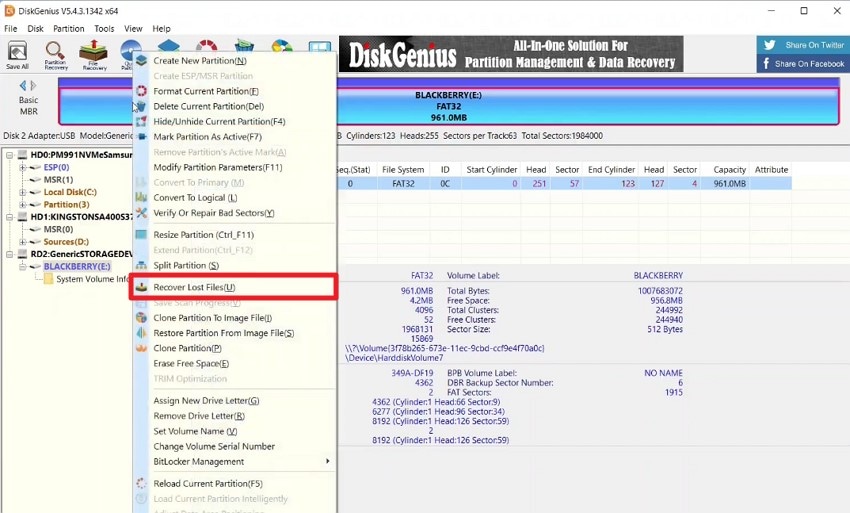
- Select the source drive and choose recovery.
After launching DiskGenius, select the drive or partition where files were lost. Right-click it and choose the recover lost files option. If the partition is missing or RAW, choose the physical disk or the most relevant detected partition candidate.
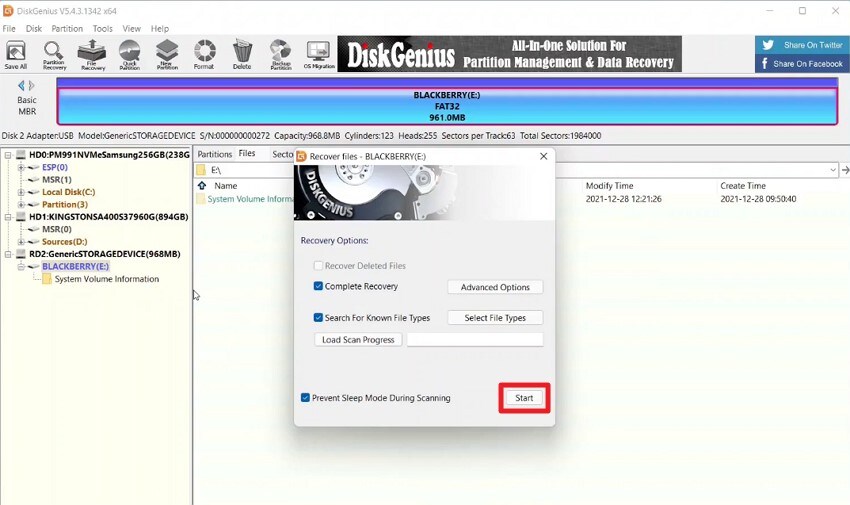
- Choose scan options and start scanning.
In the recovery dialog, choose file type filters when you know what you need, such as photos, documents, videos, or archives. For formatted or badly damaged partitions, run a deeper scan and avoid using the source drive while scanning.
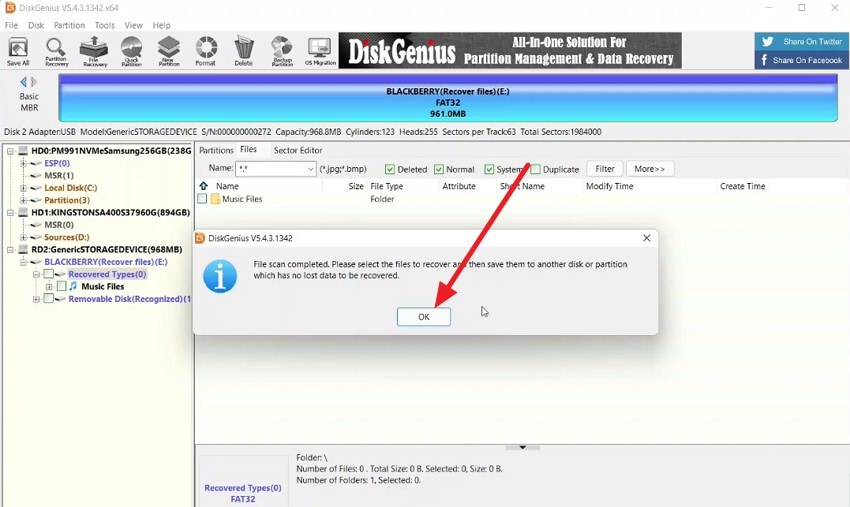
- Review the scan completion message.
When scanning finishes, DiskGenius shows a result message and file list. Do not treat the file count as proof of successful recovery. The more important step is previewing and opening files after saving them.
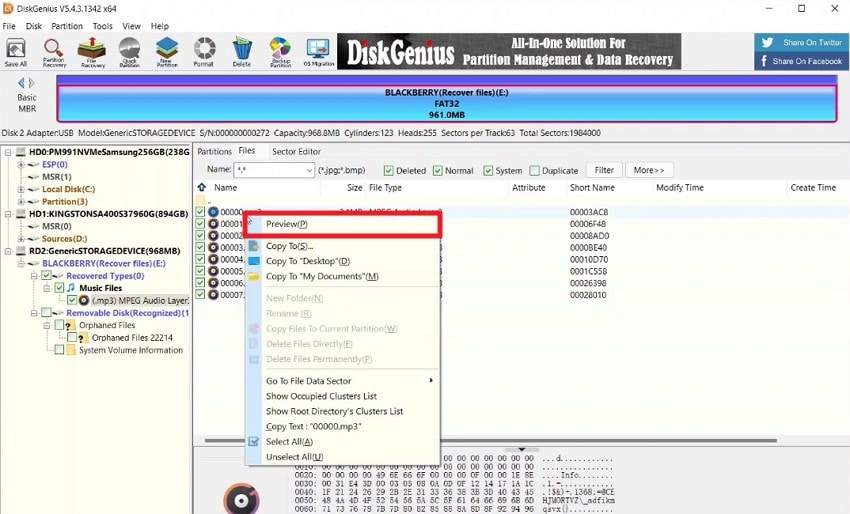
- Preview important files.
Select a file and use preview to check whether it is readable. Preview is especially important for photos, documents, and videos because scan results may include partially damaged or overwritten files.
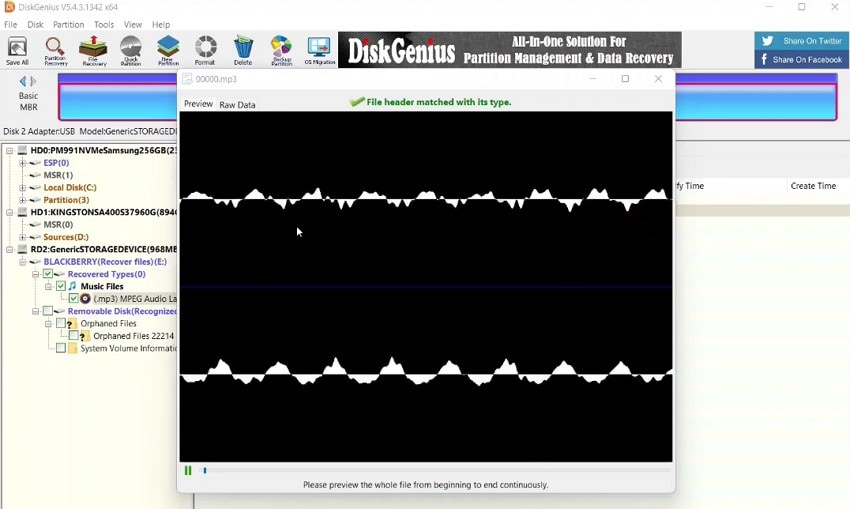
- Check file quality before batch recovery.
Preview more than one sample file from the same folder or file type. If many previews fail, try another scan result, change scan options, or stop if the disk shows signs of hardware failure.
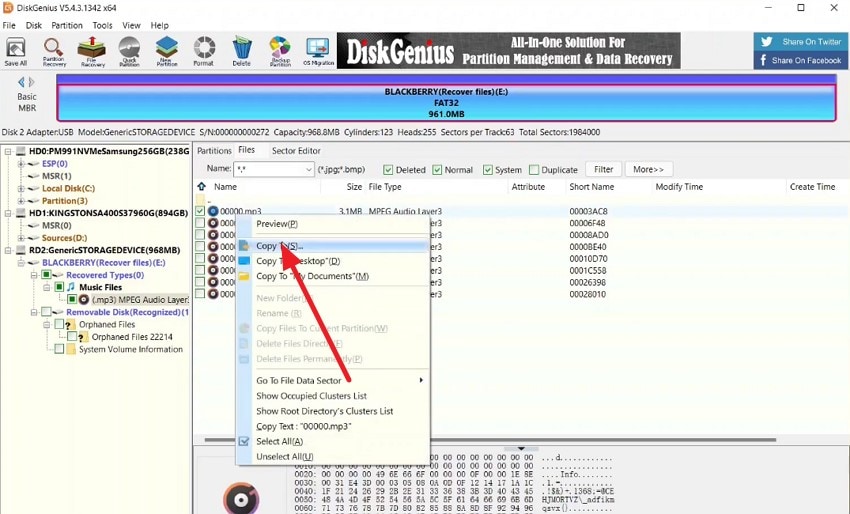
- Copy recovered files to another drive.
Use the copy option to save selected files to a different healthy disk. Do not copy recovered files back to the original drive, because that can overwrite other data that is still recoverable.
Scenario-Based Recovery Analysis
| Recovery Scenario | DiskGenius Fit | What to Watch | Review Takeaway |
| Recently deleted files from HDD | Good | Continued use can overwrite deleted file clusters. | DiskGenius is suitable if the drive is healthy and files preview correctly. |
| Formatted USB drive or memory card | Good | Folder names and original paths may not always survive a deep scan. | Use file type filters and preview before copying many files. |
| Lost partition | Good | Do not create or format a new partition before recovery. | Partition search is one of DiskGenius' stronger technical features. |
| RAW partition | Good for advanced users | Repairing the file system before copying files can be risky. | Recover data first, then consider partition repair. |
| SSD deleted files | Uncertain | TRIM may remove recoverable data quickly. | Stop using the SSD immediately; recovery may not be possible. |
| BitLocker-encrypted drive | Limited | Valid password or recovery key is required. | No recovery software should be presented as an encryption bypass tool. |
| Clicking or undetected drive | Poor DIY fit | Direct scanning can worsen hardware issues. | Stop and consider professional service. |
What Scan Results Really Mean
A deep scan can produce a long list of files, but that does not automatically mean every file is recoverable. File names, folders, size, preview status, and post-recovery opening tests all matter. This is where many users misunderstand recovery software.
| Scan Result | Meaning | Next Step |
| Original folders are visible | File system metadata may still be intact. | Preview key files and recover to another drive. |
| Files appear only by type | DiskGenius may have found raw signatures without full metadata. | Filter by file type, size, and date; expect renamed files. |
| Preview works for some files only | Some files may be overwritten, fragmented, or damaged. | Recover working files first, then test another scan mode. |
| Large videos fail to open | Video files may be fragmented or partially overwritten. | Do not assume the scan list equals playable recovery. |
| Scan stalls or drive disconnects | The storage device may be unstable. | Stop direct scanning and work from an image if possible. |
Part 4. User Experience and Interface
DiskGenius feels like a utility built for users who already understand disks. The left-side disk tree, partition map, file browser, sector tools, and recovery dialogs provide dense information, but first-time users may not know which operation is safe. This is especially true because recovery, formatting, cloning, partition editing, and erasing live close together in the same program.
The recovery workflow itself is not hard, but the overall interface can feel outdated and busy compared with modern recovery apps. The safest way to use it is to treat DiskGenius as a technical toolkit: use recovery and preview first, copy important files out, and only then consider repair, resize, convert, format, or erase actions.
| Experience Area | What Works Well | What Feels Weak |
| Navigation | Advanced users can access many disk tools quickly. | Beginners may find too many options in one interface. |
| Recovery setup | Right-click recovery workflow is direct once you know where to start. | Scan modes and file type options need clearer beginner explanations. |
| Preview | Helpful for checking recoverability before copying files. | Preview support can vary by file type and file condition. |
| Partition tools | Very useful for disk management and migration. | Risky if used before data is recovered or backed up. |
| Visual polish | Functional and information-dense. | Not as clean as modern consumer recovery tools. |
Part 5. User Feedback: Pros and Cons
User feedback around DiskGenius is mixed in a predictable way. Power users often value its cloning, partition, and recovery tools. Less technical users are more likely to complain about complexity, support, or the risk of using the wrong disk operation. Treat third-party reviews as user experience signals, not as guarantees of recovery performance.
Positive Feedback
A Handy Recovery review describes DiskGenius as strong for deleted, lost, and formatted data recovery, with support for multiple file systems such as FAT32, NTFS, and EXT4. This aligns with DiskGenius' main value: it is more than a basic undelete tool.
A Trustpilot reviewer reported a smooth hard-drive-to-SSD cloning experience using the free version. This reflects one of DiskGenius' strongest non-recovery use cases: disk migration on healthy drives.
Negative Feedback
Negative reviews usually involve high-stress storage failures, support expectations, or confusion around data-loss outcomes. One Trustpilot reviewer described a poor support experience after a Windows 11 NTFS boot drive became inaccessible. Another Trustpilot reviewer accused the product/company of damaging data.
These reviews should be read carefully. A disk utility can expose serious existing drive problems, and partition tools can be risky if misused. For any drive containing important files, the safer sequence is clear: stop writing to the disk, recover or image data first, then attempt partition repair or disk changes.
| Pros | Cons |
| Combines recovery, partition management, cloning, and disk utilities. | Interface can feel outdated and technical. |
| Good support for common Windows and Linux file systems. | Free recovery is limited and may not be enough for real-world cases. |
| Useful for lost partitions, RAW drives, disk cloning, and migration. | No native Mac app for Mac-only users. |
| Preview and file browsing help users verify recoverable files. | Partition and erase tools are dangerous if used before recovery. |
Part 6. Pricing and Editions
Original DiskGenius articles often list older Standard and Professional one-time prices. The official English buy page checked for this review now focuses on DiskGenius Professional with personal license terms. Because software pricing can change, always verify the official buy page before publishing or purchasing.
Current Pricing Snapshot
| Plan | Current Official Price Checked | What It Means |
| Professional Personal License, 1 month | $69.90 | Short-term access for one recovery or disk-management case. |
| Professional Personal License, 1 year | $99.90 | Better value if you expect repeated recovery, partition, or cloning tasks during the year. |
| Professional Personal License, lifetime | $129.90 | Best fit for power users who expect to keep using DiskGenius on Windows. |
| Family or Technician options | Available on the official buy page | Check current official terms if you need multi-user, household, or service use. |
Free vs Professional: What Changes?
The free edition is useful for evaluation and some disk utility tasks, but users should not assume it can complete every recovery job. DiskGenius Professional unlocks broader recovery and advanced functions. Use the free edition to confirm whether files can be found and previewed, then decide whether the paid version is justified.
| Feature Area | Free Edition Fit | Professional Edition Fit |
| Basic disk inspection | Useful for viewing disks, partitions, and some file structures. | Also supported. |
| File recovery | Useful for checking results, but limited for practical recovery. | Better fit for real recovery work. |
| Partition management | Some common tasks may be available. | More complete disk and partition operations. |
| Disk cloning and migration | Helpful for some basic cloning cases. | Better choice for serious migration and backup workflows. |
| Advanced recovery and technical tools | Restricted. | Intended for users who need deeper recovery and disk management. |
Which License Should You Choose?
| User Goal | Recommended Choice | Reason |
| One-time deleted file recovery | Try the free edition first, then compare Recoverit if you want an easier workflow. | DiskGenius Professional may be more than you need. |
| Formatted partition or lost partition recovery | Professional one-month or one-year license after preview confirms useful results. | Advanced recovery functions are more relevant here. |
| Frequent disk cloning and partition management | Professional lifetime license. | The tool becomes more valuable when used repeatedly. |
| Household or technician use | Check Family or Technician terms on the official buy page. | License scope matters if more than one user or client machine is involved. |
| Mac-only recovery | Use a Mac-compatible recovery tool instead. | DiskGenius is Windows software. |
Part 7. Best Use Cases and Caution Areas
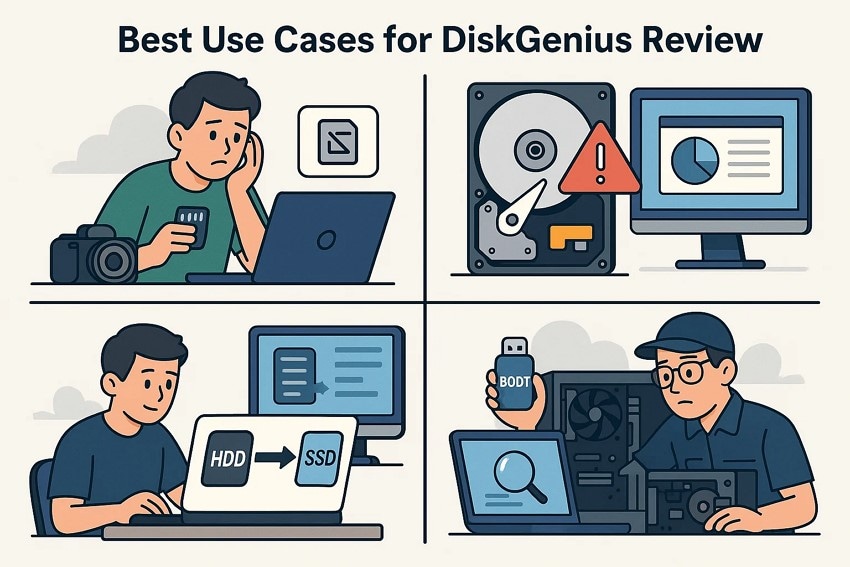
DiskGenius is most useful when users need both recovery and disk management. However, the order of operations matters. If data is missing, recover or back up files before partition repair, resizing, formatting, conversion, cloning, or secure erase.
| Best Use Case | Why DiskGenius Helps | Caution |
| Accidental file deletion | It can scan the drive and show recoverable files for preview. | Stop using the source disk immediately. |
| Formatted drive or partition | Deep scan and lost file search can help locate recoverable content. | Do not reformat or copy new data to the drive. |
| Lost or damaged partition | Partition search and file browsing can help identify old structures. | Recover files before applying partition changes. |
| HDD to SSD migration | Disk and partition cloning tools can save reinstall time. | Only clone from a healthy source disk when possible. |
| Bad-sector diagnosis | Disk checks can help evaluate drive health. | Repeated scans on a failing drive can add stress. |
| Secure erase before disposal | Erase tools help make old data unrecoverable. | Never use erase tools before confirming all needed files are backed up. |
Part 8. DiskGenius vs Recoverit: Which Is Better for Data Recovery?
Wondershare Recoverit is not a full partition manager like DiskGenius. It is a dedicated data recovery tool. That makes it easier for users whose real goal is not resizing partitions or cloning disks, but recovering deleted, formatted, or lost files from readable storage.
| Comparison Area | Recoverit | DiskGenius |
| Main purpose | Guided data recovery. | Data recovery plus partition management, cloning, backup, and disk utilities. |
| Ease of use | Easier for beginners. | More technical and crowded. |
| Best for | Deleted files, formatted drives, external drives, USB drives, memory cards, cameras, and crashed-computer recovery. | Windows disk management, partition recovery, cloning, migration, and technical storage tasks. |
| Risk profile | Focused on scanning, previewing, and recovering files. | Includes powerful partition and erase tools that require caution. |
| Mac support | Windows and Mac versions are available. | Windows software only. |
| Best choice | Choose Recoverit for straightforward file recovery. | Choose DiskGenius when you also need partition management or disk cloning. |
Why Recoverit Can Be Easier for Common Recovery
- Guided recovery flow: Recoverit focuses on choosing a location, scanning, filtering, previewing, and recovering files.
- Common storage devices: It can help recover files from readable internal drives, external drives, USB drives, SD cards, cameras, and supported storage devices.
- Windows and Mac support: Users can choose Recoverit for Windows or Recoverit for Mac.
- Useful file filters: File type, name, size, and path filters help users narrow scan results faster.
- Media-focused recovery paths: Recoverit provides resources for CF card recovery, SD card recovery guidance, Transcend memory card recovery, video recovery, and 8K video recovery guidance.
How to Recover Files With Recoverit
Use Recoverit on a readable storage device and save recovered files to another drive. It cannot repair a physically failed disk, recover overwritten files, or bypass encryption without valid credentials.
- Choose the recovery location.
Open Recoverit and select the storage drive, folder, external device, or accessible location where the files were lost. The scan begins after selection.

- Scan and select files for recovery.
Let the scan run, then use file type, name, size, date, or path filters to find the files you need. Preview important files before selecting a large batch.
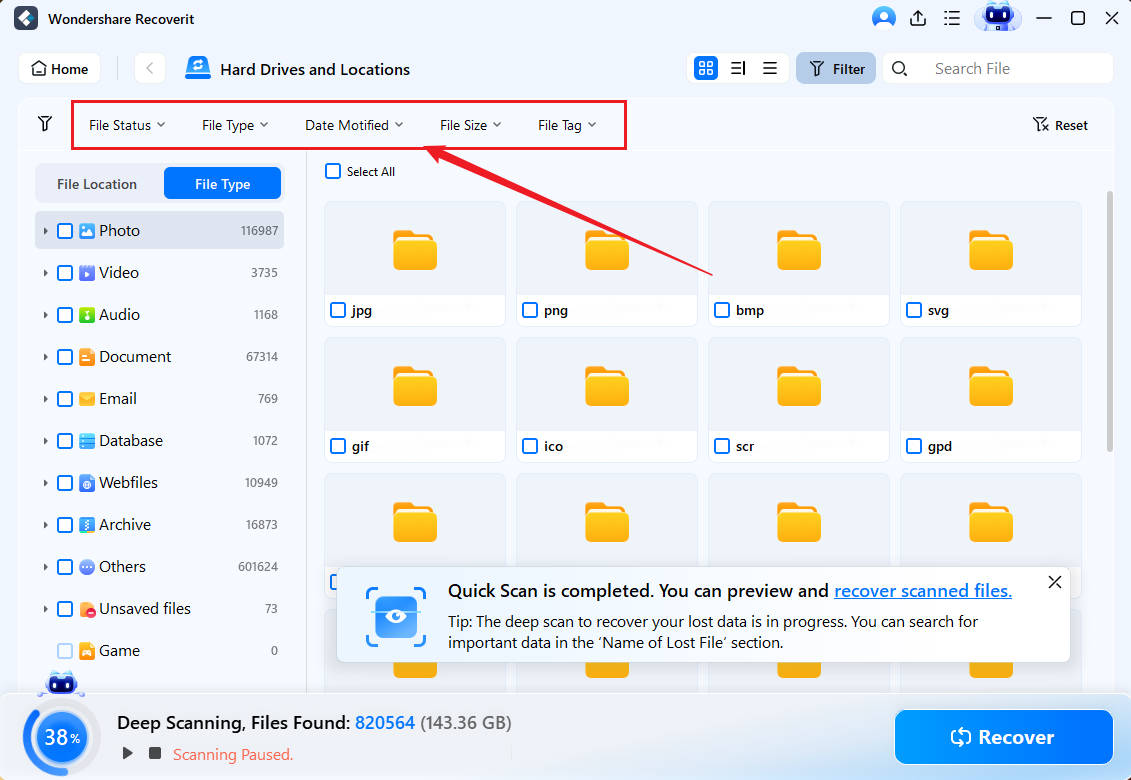
- Preview and save files safely.
Preview recoverable files when possible, select the files you want, and save them to a different healthy storage device.


Part 9. Final Verdict
DiskGenius is a capable Windows disk toolkit for users who want more than file recovery. Its biggest strengths are partition work, lost partition search, file recovery, cloning, disk migration, and diagnostics in a single application. Its biggest weaknesses are interface complexity, limited Mac fit, restricted free recovery, and the risk of using powerful disk operations before data is backed up.
If you need partition management and recovery in one Windows utility, DiskGenius is worth testing. If your main need is a cleaner way to recover deleted or lost files from readable storage, Recoverit is the easier alternative. In either case, the safest sequence is the same: stop using the source drive, scan or image carefully, preview recoverable files, and save recovered data to another healthy device.
FAQ
-
Is DiskGenius good for data recovery?
Yes, DiskGenius can be good for deleted files, formatted partitions, lost partitions, RAW drives, and common Windows/Linux file systems when the drive is still detected and the data has not been overwritten. -
Is DiskGenius free?
DiskGenius has a free edition, but practical recovery and advanced disk features are restricted. The official English buy page currently promotes Professional personal license options for one month, one year, and lifetime use. -
What is the latest DiskGenius version?
As checked on July 30, 2026, the official download page lists DiskGenius 6.2.0.1829, released on June 8, 2026. -
Can DiskGenius recover data from SSDs?
DiskGenius can scan detected SSDs, but deleted SSD files may be unrecoverable if TRIM has cleared the data. Stop using the SSD immediately after data loss. -
Can DiskGenius recover BitLocker data?
Only if the drive can be unlocked with the correct password or recovery key. DiskGenius and other recovery tools cannot bypass encryption legally or technically without valid credentials. -
Is DiskGenius safe for partition repair?
Partition repair and resize tools can be useful, but they should not be used before important files are recovered or backed up. If data is missing, recover files first. -
What is the best DiskGenius alternative?
Recoverit is a strong DiskGenius alternative for users who mainly need guided data recovery from readable drives, USB drives, SD cards, external disks, cameras, and crashed computers. DiskGenius remains better for partition management and cloning.


