
 TL;DR:
Wondershare Recoverit V14 is the best all-around MiniTool Power Data Recovery alternative for cross-platform media and NAS recovery, while technical users should choose Disk Drill 6.3 for byte-to-byte backups, R-Studio 9.5 for complex RAID configurations, or Recuva for completely free basic Windows undeletion.
● If exceeding MiniTool's 1GB cap is your primary goal, DMDE 4.4.4 allows saving 4,000 files from a single directory per operation, EaseUS 20.5.0 advertises up to 2GB, and PhotoRec or Windows File Recovery offer unlimited free extraction but lack guided graphical interfaces or metadata retention.
● To prevent permanent data destruction during an active loss incident, you must install your chosen application on a separate physical drive and never save the recovered files back to the original source partition.
● Software alone cannot reverse completed SSD TRIM garbage collection, bypass BitLocker encryption without the valid password or 48-digit recovery key, or fix physically failing drives that click or repeatedly disconnect.
Ask AI for a summary
 ChatGPT
 Perplexity
 Gemini
 Claude
 Grok
Grok
MiniTool Power Data Recovery offers 1GB free on Windows, but it is not the best fit for every SSD, camera card, RAID, Mac, or unbootable PC. This guide compares eight current alternatives by real saving limits, recovery workflow, platform support, and failure boundaries.
Fact-checked on August 18, 2026: Versions, free recovery allowances, operating systems, and license prices were verified against current official product pages. Prices and promotions can change by region and checkout date.
In this article
Part 1. Quick Verdict: Which MiniTool Alternative Should You Choose?
A useful alternative is not simply a program with a larger feature list. It must match the source device, file system, failure type, budget, and technical skill of the person doing the recovery. The safest choice for a deleted Word file on a healthy NTFS HDD can be a poor choice for a failing drive, BitLocker volume, fragmented camera video, RAID, or Windows PC that no longer boots.
Best Choice by Data-Loss Scenario
| Recovery scenario | Best first choice | Why it fits | Main limitation |
| Deleted photos, videos, documents, or archives from a Windows PC or external drive | Recoverit | Guided scanning, file filters, previews, disk-image support, and broad storage coverage. | The free edition saves up to 500MB. |
| Formatted SD, CFexpress, camera card, or fragmented video | Recoverit or Disk Drill | Both include media-oriented recovery beyond a generic undelete scan. | No tool can restore overwritten recording blocks. |
| Need an image before scanning an unstable but readable drive | Disk Drill, DMDE, or R-Studio | All provide disk imaging or cloning workflows. | A drive that clicks or repeatedly disconnects may require a lab, not DIY imaging. |
| Need more than MiniTool's 1GB without paying | DMDE, Recuva, PhotoRec, or Windows File Recovery | These options do not use a 1GB commercial quota. | DMDE is technical, Recuva is Windows-only and basic, PhotoRec loses metadata, and Windows File Recovery uses commands. |
| Need RAID, BitLocker, Storage Spaces, or network recovery | R-Studio | Provides advanced array reconstruction, encryption-aware access, images, and remote recovery. | Steep learning curve and a paid license for practical recovery. |
| Recently deleted a small folder from a healthy NTFS HDD | Recuva | Unlimited free basic recovery with a simple Windows interface. | Not the best fit for complex file systems, RAID, NAS, or professional imaging. |
| Need raw carving after severe file-system damage | PhotoRec | Ignores damaged file-system metadata and searches for known signatures. | Original names, dates, and folders are commonly lost. |
| Want an official Microsoft utility and accept command-line work | Windows File Recovery | Free Microsoft tool for local NTFS, FAT, and exFAT recovery. | No graphical interface, cloud recovery, network-share recovery, or same-drive destination. |
| Drive has physical failure symptoms | Professional data recovery service | Hardware tools and controlled imaging may prevent further damage. | Continuing software scans can reduce the remaining recovery window. |
When Recovery Software Is the Wrong Tool
Before installing anything, check Recycle Bin, File History, OneDrive, a NAS snapshot, email attachments, previous exports, and application version history. Restoring an intact backup is safer than reconstructing deleted storage.
Stop DIY recovery and consider professional help if the drive clicks, spins down repeatedly, reports the wrong capacity, disappears from Disk Management, smells burned, or has suffered liquid, impact, or electrical damage. Data recovery software needs the storage device to remain readable by the operating system. It cannot replace failed heads, NAND chips, controllers, or power components.
Part 2. MiniTool Power Data Recovery in 2026: The Baseline
MiniTool Power Data Recovery is a current Windows recovery application for deleted files, formatted storage, RAW or inaccessible volumes, lost partitions, Recycle Bin loss, and logically damaged drives. The product can scan internal HDDs and SSDs, USB drives, external disks, SD cards, and other storage recognized by Windows.
Current Version, Free Limit, and Pricing
- Current release: MiniTool's product hub identifies Power Data Recovery V13.0.
- Supported Windows versions: The official free product page lists Windows 11, 10, 8, and 7, plus several Windows Server editions.
- Free saving limit: The Free edition recovers up to 1GB in total.
- Current official prices: The edition table displays $69 for a monthly subscription, $89 for an annual subscription, and $129 for Personal Ultimate.
- License differences: Monthly and annual plans are auto-renewing unless canceled. Personal Ultimate is described as a perpetual license for three PCs with lifetime free upgrades.
- Bootable recovery: WinPE bootable media is a paid capability for recovering files when Windows cannot start.
- Mac positioning: MiniTool's current data-recovery hub directs Mac users to Stellar Data Recovery for Mac. Its legacy MiniTool Mac Data Recovery Enterprise page lists only macOS 10.13 and older, so it is not a current equivalent for modern Apple silicon Macs.
MiniTool remains reasonable for a Windows user who needs less than 1GB, likes its workflow, and has a healthy readable source. The stronger case for an alternative appears when the job requires cross-platform licensing, more free saving, disk imaging, advanced camera-media recovery, modern Mac support, RAID reconstruction, network recovery, or a more transparent failure boundary.
MiniTool Power Data Recovery Is Not Partition Wizard
Search results frequently mix two different MiniTool products:
- MiniTool Power Data Recovery: Scans storage and copies recoverable files to another destination.
- MiniTool Partition Wizard: Creates, resizes, converts, moves, and manages partitions. Some editions also include recovery-related functions, but its primary job is disk management.
A data recovery alternative does not automatically replace Partition Wizard. Recoverit, Recuva, and PhotoRec are recovery tools, not full partition managers. If the real intent is to resize or convert partitions, compare partition-management software separately. During an active data-loss incident, do not resize, format, initialize, or convert the affected disk because those writes can destroy recoverable metadata.
Part 3. Why Look for a MiniTool Alternative?
- You need a safer image-first workflow: MiniTool's current consumer comparison emphasizes scanning and WinPE recovery, while Disk Drill, DMDE, and R-Studio provide clearer disk imaging or cloning paths. An image lets you scan a copy instead of repeatedly stressing the original.
- You need more than 1GB for free: Recuva and PhotoRec have no commercial byte quota. DMDE uses a 4,000-file single-directory rule rather than a byte cap. Windows File Recovery is free from Microsoft.
- You recover camera media: Large MP4, MOV, ProRes, drone, action-camera, and 4K or 8K recordings can be fragmented. Recoverit Enhanced Recovery and Disk Drill Advanced Camera Recovery are designed around this problem.
- You need RAID or network control: R-Studio and DMDE expose array parameters, images, and technical storage structures that a consumer wizard hides.
- You use a current Mac: MiniTool's current hub sends Mac users to a different vendor's product, while Recoverit, Disk Drill, EaseUS, DMDE, R-Studio, and PhotoRec provide their own current cross-platform paths.
- You want different licensing: MiniTool's monthly and annual plans renew, while several alternatives offer free, perpetual, or differently scoped licenses. Always inspect the final checkout and renewal language.
- You need honest SSD expectations: Deleted-file recovery from SSDs is unpredictable after TRIM and garbage collection. A tool that explains this limit is more useful than one that promises a universal recovery rate.
What an Alternative Cannot Fix
| Condition | What software can do | What software cannot do |
| Recently deleted file on a healthy HDD | Search file-system records and raw signatures if the space was not overwritten. | Recreate sectors that now contain new data. |
| Deleted file on an SSD | Scan any blocks and metadata that remain readable. | Reverse TRIM after the controller has cleared the deleted blocks. |
| BitLocker volume | Scan after the volume is unlocked with valid credentials or recovery key. | Bypass BitLocker or reconstruct a missing encryption key. |
| RAW or formatted volume | Reconstruct files or folders from remaining metadata and signatures. | Guarantee original names, folders, or intact fragmented files. |
| Clicking or electrically damaged drive | Nothing safely if the device cannot maintain stable reads. | Repair heads, platters, controller boards, firmware, or failed NAND. |
Part 4. How We Evaluated the Alternatives
This comparison is based on current vendor documentation and scenario fit, not unverifiable marketing success rates. A valid recovery-rate test would need the same device, file system, file set, deletion or formatting process, overwrite state, encryption state, scan mode, and validation criteria for every product. Without that controlled protocol, percentages from different vendors cannot be compared responsibly.
- Real saving allowance: We distinguish scanning, previewing, and actually saving recovered files.
- Current platform support: We checked official Windows, macOS, Linux, and processor requirements where published.
- Source protection: Read-only scanning, disk imaging, cloning, and separate-destination guidance receive more weight than visual polish.
- File-system and device fit: NTFS, FAT, exFAT, ReFS, APFS, HFS+, ext, BitLocker, NAS, RAID, and camera storage are evaluated separately.
- Recovery depth: We looked for formatted-drive recovery, partition reconstruction, raw carving, media fragmentation support, and unbootable-PC workflows.
- Usability: A beginner should not be pushed into a hex editor or RAID constructor for a simple deleted file.
- Failure boundaries: A credible tool must acknowledge overwrite, SSD TRIM, encryption, and physical damage.
Editorial disclosure: This article appears on the Recoverit website, and Recoverit is one of the compared products. To keep the recommendation useful, the article also identifies situations where Recuva, DMDE, PhotoRec, Windows File Recovery, Disk Drill, EaseUS, R-Studio, a backup, or a professional laboratory is the better first choice.
Part 5. The 8 Best MiniTool Power Data Recovery Alternatives
1. Wondershare Recoverit: Best Overall for Guided, Media, and Cross-Platform Recovery
Recoverit is the strongest all-around MiniTool alternative for users who need a clear Windows or Mac interface plus dedicated workflows for internal disks, external drives, disk images, memory cards, cameras, NAS, Linux storage, BitLocker volumes, and an unbootable computer. The current Recoverit V14 free comparison lists 500MB of saving, disk-image recovery, BitLocker recovery, NAS and Linux recovery, and Enhanced Photo and Video Recovery.

The practical differentiator is media handling. Ordinary signature recovery may find a fragmented video but return only a partial or unplayable file. Recoverit's Enhanced Recovery searches for related fragments and is more relevant to camera cards, drone footage, action cameras, and high-bitrate recordings than a basic undelete engine. Premium adds bootable recovery for a Windows or Mac system that will not start and corrupt-video repair after recovery.
Best for: Home users, creators, photographers, videographers, IT support staff, and cross-platform users who need an approachable workflow without giving up disk images, NAS, Linux, or advanced media recovery.

2. Disk Drill: Best Recovery Toolkit and Byte-to-Byte Backup
Disk Drill 6.3.1398 for Windows was released on July 22, 2026. Its current Windows page lists Windows 10 and 11, including Windows 11 on ARM, plus NTFS, FAT, exFAT, ReFS, HFS/HFS+, APFS, ext2/3/4, Btrfs, and RAW storage. It combines Universal Scan and Advanced Camera Recovery with free byte-to-byte backup, S.M.A.R.T. monitoring, Recovery Vault, cleanup, and duplicate-finding tools.
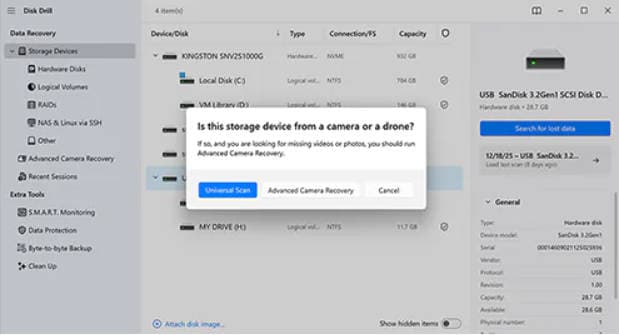
Disk Drill's biggest advantage over MiniTool is source protection. Creating a byte-to-byte image before scanning a logically unstable drive can reduce repeat reads. Its biggest current disadvantage is easy to miss in older comparison pages: the official Windows free saving allowance is now 100MB, not 500MB. The Mac edition provides scanning and preview, plus recovery for data protected in advance by Recovery Vault, but ordinary deleted-file saving generally requires PRO.
Best for: Users who value a polished interface, disk imaging, health monitoring, and camera recovery more than a large free allowance. Verify the current limit and release details on the official Disk Drill page.
3. EaseUS Data Recovery Wizard: Best Familiar Alternative With Up to 2GB Advertised Free
EaseUS Data Recovery Wizard 20.5.0 is a direct MiniTool competitor for Windows users who want a similarly guided interface. The current page lists Windows 11, 10, 8, and 7, support for Windows Server editions, FAT, exFAT, NTFS, ReFS, HFS+, and ext2/3, plus BitLocker, NAS, corrupted-media repair, document repair, and bootable WinPE recovery in the feature comparison.
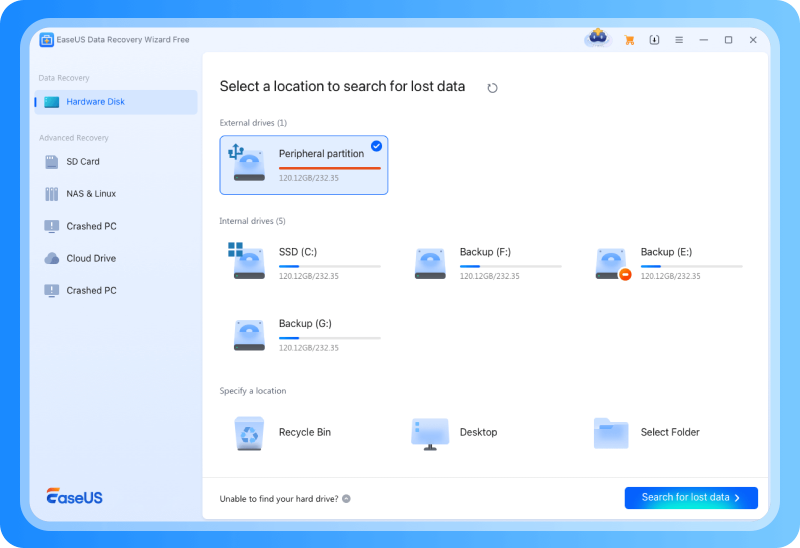
The current official page advertises up to 2GB for Free and displays a $69.95 Pro offer at fact-check time. Confirm the allowance shown inside the downloaded build and read checkout renewal terms before purchase, since promotions and license duration can change.
Best for: A user who wants an interface close to MiniTool, more advertised free saving, and current Windows or Mac support. See the official EaseUS Free comparison.
4. DMDE: Best Advanced Free Allowance
DMDE 4.4.4 is the value leader for technical users. The free edition recovers up to 4,000 files from one chosen directory per operation, with unlimited repetitions. It runs on Windows, macOS, Linux, and DOS and recognizes FAT, exFAT, NTFS, ReFS, ext2/3/4, HFS+/HFSX, APFS, and Btrfs independent of the host operating system.
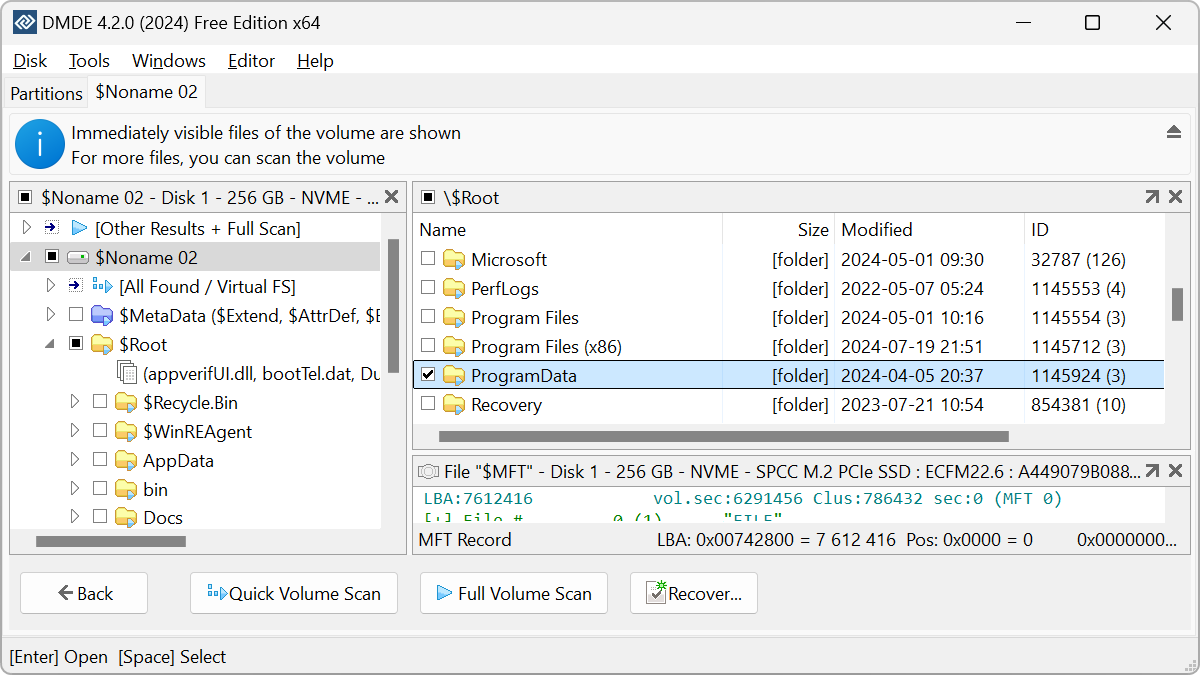
The free package also includes image and clone creation, a simple partition manager, a RAID constructor, image preview, and a disk editor. That is considerably more storage visibility than MiniTool Free. It is also considerably easier to misuse. Work from an image and avoid write operations on the source unless you understand exactly what will change.
Best for: Technical users who need a generous free allowance, image creation, lost-partition analysis, or virtual RAID construction. Check the official DMDE feature and edition page.
5. R-Studio: Best for RAID, BitLocker, Network, and Professional Recovery
R-Studio 9.5 build 191810 for Windows was released on June 20, 2026. It supports Windows 11 through older versions and Server 2025 through older Server editions. The $79.99 R-Studio license is permanent and includes advanced file systems, RAID levels, Windows dynamic volumes, Storage Spaces, Apple software RAID, Fusion Drive, LVM, mdadm, BitLocker, virtual disks, disk images, S.M.A.R.T., hex tools, and network recovery.
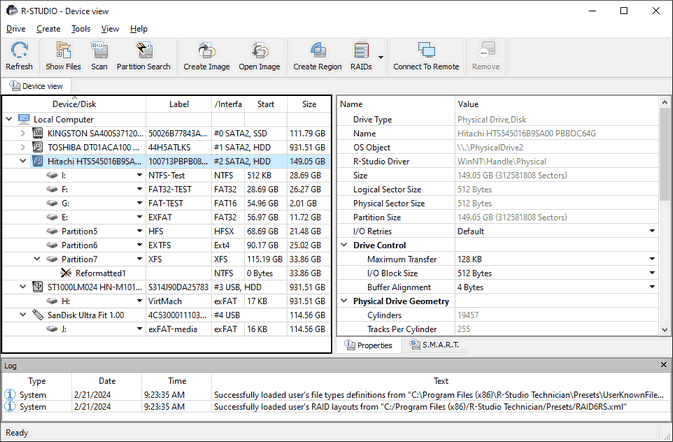
Older comparisons often state that the R-Studio demo recovers only files up to 256KB. The official 2026 download page now states 1024KB. That is still too small for most photos and videos, but it can save small documents and lets users preview larger files before registering.
Best for: IT administrators, recovery technicians, RAID users, and BitLocker or network cases. Verify current terms on the official R-Studio comparison and current download page.
6. Recuva: Best Unlimited Free GUI for Basic Windows Recovery
Recuva remains the simplest free MiniTool alternative for a recent deletion from a healthy Windows drive, Recycle Bin, USB stick, memory card, or camera card. Its official page provides unlimited Advanced File Recovery in the free edition. Deep Scan and a straightforward wizard make it approachable, while the current $24.95 Professional offer adds virtual hard drive support, automatic updates, and priority support.
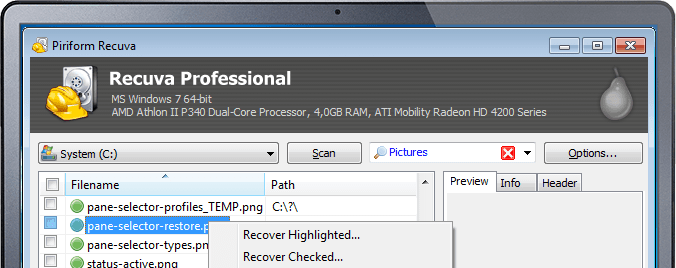
Recuva's strength is basic undelete, not advanced storage analysis. The official page does not position it as a RAID, NAS, APFS, ReFS, disk-imaging, or cross-platform workstation. It is a poor first tool for a physically unstable disk because it lacks the image-first controls available in Disk Drill, DMDE, and R-Studio.
Best for: A Windows user recovering recently deleted documents, photos, or small videos from a healthy NTFS, FAT, or exFAT source. Download it from the official Recuva page.
7. PhotoRec: Best Unlimited Open-Source Raw Recovery
PhotoRec 7.2 is a free, open-source, multi-platform carver for Windows, macOS, Linux, and other systems. It uses read-only source access and ignores damaged file-system metadata, searching raw storage for known signatures. Its official documentation lists more than 480 extensions across about 300 file families and support for hard drives, optical media, memory cards, USB drives, DD images, and EnCase E01 images.
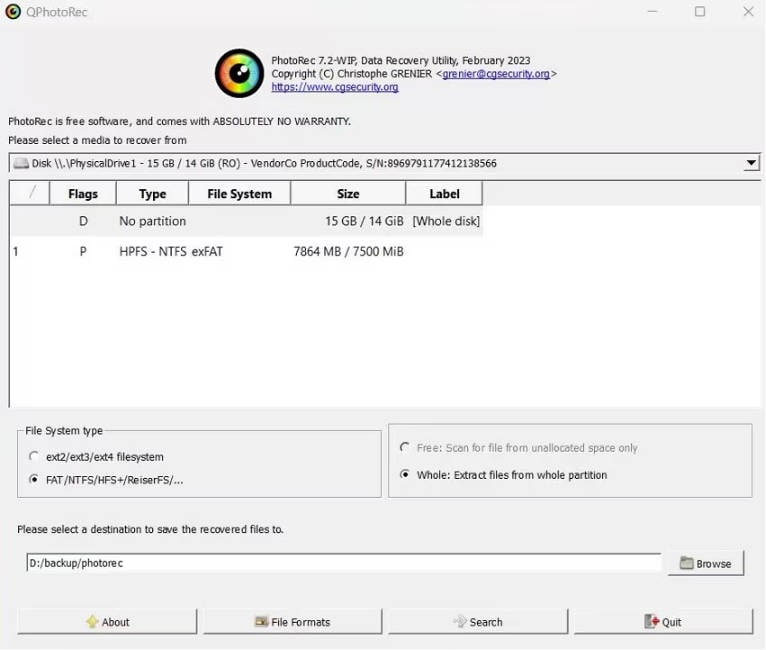
This design is useful after formatting or serious file-system damage. It also creates a difficult result set. When file-system records are unavailable, recovered files usually lose original names, paths, and timestamps. Fragmented files may be incomplete because the content is not stored in one continuous range.
Best for: Users who need free raw recovery and can manually sort anonymous results. Use the official PhotoRec documentation rather than a third-party repackaged download.
8. Windows File Recovery: Best Official Microsoft Command-Line Alternative
Windows File Recovery is Microsoft's free command-line application for files deleted from local internal drives, external drives, and USB devices. It supports Windows 11 and Windows 10, although free support for Windows 10 ended on October 14, 2025. Microsoft documents Regular mode for recently deleted files on a healthy NTFS volume and Extensive mode for older deletion, formatted or corrupted storage, FAT, and exFAT.
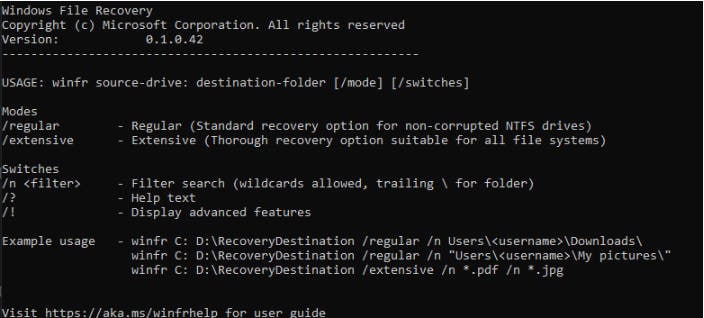
The source and destination must be different drives. That safety rule is good recovery practice, but the lack of a graphical interface makes the tool harder for users who are uncomfortable with drive letters, paths, wildcards, and command switches. It also does not recover from cloud storage or network shares.
Best for: A Windows user who wants a free Microsoft utility, has a separate destination drive, and is comfortable working in Command Prompt.
Part 6. MiniTool vs. the Best Alternatives
| Software | Best for | Current platforms | True free saving rule | Image or RAID tools | Key limitation |
| MiniTool Power Data Recovery V13.0 | Guided Windows recovery | Windows | 1GB total | WinPE in paid editions; not positioned as a full imaging or RAID workstation | Windows-centered product and 1GB cap |
| Recoverit V14 | General recovery, media, disk images, NAS, Linux, crashed systems | Windows and macOS | 500MB | Disk-image recovery; NAS and Linux support; bootable toolkit in Premium | Advanced boot and repair features require payment |
| Disk Drill 6.3 | Imaging, health tools, camera recovery | Windows and macOS | 100MB on Windows; Mac ordinary recovery generally paid | Free byte-to-byte backup, S.M.A.R.T.; RAID and NAS support listed | Very small current Windows free allowance |
| EaseUS 20.5.0 | Beginner-friendly Windows or Mac recovery | Windows and macOS | Up to 2GB advertised | NAS and WinPE in feature comparison; not a specialist RAID workstation | Verify checkout, renewal, and in-app allowance |
| DMDE 4.4.4 | Advanced low-cost recovery and partition analysis | Windows, macOS, Linux, DOS | 4,000 files from one selected directory per operation | Images, clones, RAID constructor, partition manager | Technical interface and folder restriction |
| R-Studio 9.5 | RAID, BitLocker, network, forensic-style work | Windows, macOS, Linux | Demo saves files no larger than 1024KB | Advanced RAID, images, Storage Spaces, network recovery | Steep learning curve |
| Recuva | Recent basic Windows undelete | Windows | Unlimited basic recovery | No professional imaging or RAID workflow | Limited advanced and cross-platform capabilities |
| PhotoRec 7.2 | Unlimited raw carving | Windows, macOS, Linux, and more | Unlimited, open source | Reads DD and E01 images; no RAID reconstruction interface | Names and folders usually lost |
| Windows File Recovery | Official Microsoft command-line recovery | Windows 11 and Windows 10 | Unlimited | No disk imaging or RAID assembly | Command line and local storage only |
Do not rank these tools by the word "free" alone. A 1GB allowance is more useful than unlimited recovery if the unlimited tool cannot reconstruct the required file. An image-first tool is more valuable than a fast wizard when the source is unstable. A RAID workstation is unnecessary for a deleted Word document. Match the recovery engine and workflow to the actual loss.
Part 7. How to Recover Lost Data With Recoverit
Check Recycle Bin and backups first. If recovery software is necessary, stop writing to the affected storage. Install Recoverit on another physical drive when practical, connect a healthy destination with enough free space, and never save recovered output back to the source.
Step 1. Choose the Affected Location
Launch Recoverit and select the exact disk, partition, external drive, SD card, or specific location where the data was lost. If a card came from a camera, stop recording and connect it through a reliable card reader. If a BitLocker drive is locked, unlock it with valid credentials before expecting file-level results.

Step 2. Scan and Narrow the Results
Start the scan and let Recoverit examine the selected source. Use path, file type, size, date, and status filters as results appear. Pause if you find the required data. Stop immediately if a physical drive begins clicking, disconnecting, overheating, or slowing dramatically because continued reads can make a hardware problem worse.

Step 3. Preview and Recover to Another Drive
Preview representative files to verify content, not just names or thumbnails. For a document, inspect several pages. For a video, play multiple points from beginning to end. Select the files you need, click Recover, and choose a different healthy physical device as the destination.

If a camera video is found but incomplete or unplayable, run Enhanced Recovery on the original card or an image of it. This can help with fragmented recordings, but it cannot recreate blocks that were overwritten or cleared by an SSD controller.
Part 8. How to Protect the Source Before You Scan
- Stop normal use: Pause downloads, games, Windows Update, cloud sync, exports, and recording to the affected device.
- Do not install onto the source: Put recovery software on another physical disk or use a portable workflow where supported.
- Do not initialize or format: Windows may offer to initialize, format, or repair an unreadable disk. Cancel until valuable data has been preserved.
- Do not run CHKDSK first: CHKDSK changes file-system metadata. Image or recover valuable files before attempting repair.
- Unlock encryption correctly: Use the BitLocker password or 48-digit recovery key. Do not experiment with destructive formatting to remove encryption.
- Create an image when appropriate: If a drive is logically damaged but stable enough to read, clone it sector by sector to healthy storage and scan the image.
- Preview before purchase: Confirm that several important files display valid content. A filename alone is not proof of recoverability.
- Save elsewhere: Recovered files must go to a different physical device to avoid overwriting material that has not yet been restored.
- Validate before repair: Open recovered documents, compare image resolution, extract archives, and play videos before wiping or repairing the source.
- Stop for physical failure: Clicking, scraping, burn smell, severe heat, repeated resets, or unstable capacity requires professional evaluation.
SSD Recovery Deserves Special Caution
Windows sends TRIM commands to supported SSDs so the controller can reclaim deleted blocks. Once the relevant blocks are cleared, no MiniTool alternative can recover them. Disabling TRIM after deletion does not bring cleared blocks back. Continued Windows use, browser caches, application updates, and recovery-software installation can also overwrite data before garbage collection finishes.
For more focused device guidance, see Recoverit's pages for SSD partition recovery, camera recovery, and CFexpress recovery.
Part 9. Final Verdict
MiniTool Power Data Recovery V13.0 is still a capable Windows recovery wizard with a useful 1GB free allowance. Replacing it only makes sense when another product solves the actual job better.
Choose Recoverit for a balanced Windows or Mac workflow, disk-image scanning, current media recovery, NAS and Linux sources, and an unbootable-system option. Choose Disk Drill when byte-to-byte backup and drive-health tools matter more than free saving. Choose EaseUS for a similar wizard and a larger advertised free allowance. Choose DMDE for technical value, R-Studio for RAID and network recovery, Recuva for unlimited basic Windows undelete, PhotoRec for unlimited raw carving, or Windows File Recovery for a free Microsoft command-line path.
The right result depends more on source condition, overwrite state, SSD TRIM, encryption, fragmentation, and safe handling than on a vendor's headline recovery percentage. Scan once, preview carefully, save elsewhere, and stop when the symptoms point to hardware failure.
FAQs
-
What is the best MiniTool Power Data Recovery alternative?
Recoverit is the best balanced alternative for guided Windows and Mac recovery, disk images, camera media, NAS, Linux storage, and fragmented video. Disk Drill is better for free byte-to-byte imaging, while R-Studio is better for complex RAID and network recovery. -
What is the best free MiniTool alternative with no 1GB limit?
Recuva offers unlimited basic recovery through a graphical Windows interface. PhotoRec is unlimited and open source but commonly loses filenames and folders. Windows File Recovery is free from Microsoft but uses Command Prompt. DMDE allows 4,000 files from one selected directory per operation. -
How much data can MiniTool Power Data Recovery recover for free?
The current MiniTool Power Data Recovery Free edition recovers up to 1GB in total. MiniTool's official page lists paid prices of $69 monthly, $89 annually, and $129 for the perpetual three-PC Personal Ultimate license at fact-check time. -
Is Disk Drill still a 500MB free MiniTool alternative?
No. Disk Drill's official Windows page currently states a 100MB free saving limit. Older comparison articles that list 500MB are outdated. The free edition still provides scanning, preview, byte-to-byte backup, and several supporting utilities. -
Can a MiniTool alternative recover files from an SSD?
Sometimes, but SSD TRIM and garbage collection can clear deleted blocks quickly. Recovery is more plausible if the blocks remain readable, the SSD was disconnected promptly, or the external connection did not pass TRIM. No free or paid tool can restore blocks after the controller has erased them. -
Can these tools recover a BitLocker drive without the recovery key?
No. Recoverit, EaseUS, and R-Studio can work with supported BitLocker storage after valid access is supplied, but they do not bypass encryption. Use the password or 48-digit recovery key associated with the volume. -
Can data recovery software repair a physically damaged drive?
No. Software may scan a logically damaged drive that remains stable and readable, but it cannot repair failed heads, platters, motors, controllers, power components, or NAND. Clicking, repeated disconnection, burn smell, impact, liquid damage, or unstable capacity requires professional assessment. -
Should I install a MiniTool alternative on the affected drive?
No. Downloading and installing software writes new data that can overwrite deleted files. Install the application on another physical drive where practical, scan the source, and save recovered files to separate healthy storage. -
Does finding a filename mean the file is recoverable?
No. File-system metadata or a thumbnail may survive after the content was overwritten or cleared by TRIM. Preview the complete file and validate the saved copy. For video, play several points from beginning to end.


