

 TL;DR:
Facebook does not reveal old passwords, meaning you must either reset your account using an accessible email or phone number on the official recovery page, or find your existing login saved within trusted device managers like Apple Passwords or Google Password Manager.
● If you lose access to your recovery contacts or suspect unauthorized changes, use Facebook's "No Longer Have Access to These?" option or the official Hacked Account flow to initiate manual ownership verification.
● The Recoverit software cannot bypass, reset, or retrieve Facebook account passwords; it is strictly limited to recovering locally downloaded Facebook files, such as photos or data export ZIPs, that were deleted from your computer's hard drive.
Ask AI for a summary
 ChatGPT
 Perplexity
 Gemini
 Claude
 Grok
Grok
Forgetting your Facebook password can feel stressful, especially when the account holds messages, photos, pages, groups, business access, saved settings, or memories you do not want to lose. Many users search for how to recover a forgotten password on Facebook or how to retrieve a forgotten Facebook password, but the safe answer is important: Facebook does not show your old password.
You cannot view or retrieve your old Facebook password through Facebook. The safe path is to reset the password through official Facebook or Meta recovery methods, use a still-logged-in trusted device, or check saved passwords on your own phone, browser, or password manager.
This guide explains how to recover Facebook account access safely, what to do if reset codes do not arrive, how to check saved Facebook passwords on trusted devices, and how Recoverit can help only when Facebook-related files saved on your computer are deleted or lost.
In this article
-
- Pre-Requirement. Use the Forgot Password Option to Confirm Your Account
- Method 1. Reset Your Password with Your Email Address or Phone Number
- Method 2. Reset Your Password from a Device Where You Are Still Logged In
- Method 3. Use Facebook or Meta Account Recovery If You Cannot Access Login Codes
- Method 4. Use the Hacked Account Recovery Flow If Something Looks Suspicious
Quick Answer: Can You Recover an Old Facebook Password?
No. Facebook does not let you view or reveal your old password. If you forgot your Facebook password, you need to reset it through official Facebook recovery options, such as email, phone number, trusted device, account verification, or hacked account recovery.
You may also check whether the password was saved on your own trusted device, such as Chrome, Edge, Apple Passwords, Google Password Manager, or another password manager.
Recoverit cannot recover, reset, reveal, or bypass Facebook account passwords. It can only recover deleted local files that were previously saved on your computer, such as downloaded Facebook photos, saved videos, Messenger attachments, screenshots, or Facebook data export files.
Part 1. Facebook Password Recovery vs Password Reset
Many users say “Facebook password recovery,” but Facebook usually helps you reset the password, not recover the old one.
| Facebook Account Recovery Can Do | It Cannot Do |
| Help you reset the password through email, phone, trusted device, or account verification. | Show your old Facebook password. |
| Help identify the account using email, phone, name, username, or profile. | Bypass ownership verification. |
| Let you change your password from a logged-in session in some cases. | Guarantee recovery if no verification method is available. |
| Help secure a hacked account through official recovery flows. | Recover passwords through third-party viewer tools. |
| Let you check saved passwords on your own trusted device. | Recover a Facebook password with Recoverit. |
| Recoverit can recover local Facebook-related files. | Recover content stored only on Facebook servers from your hard drive. |
Why Facebook Does Not Let You View Your Old Password
Facebook does not display old passwords, even after you verify account ownership. This protects accounts from stolen devices, shared computers, malware, and unauthorized access. The goal is to prove you own the account and create a new password, not reveal the old one.
Password Recovery vs Password Reset on Facebook
Many users confuse password recovery with password reset when having Facebook login problems. This difference helps explain how to recover a forgotten Facebook password safely.
| Aspect | Password Recovery on Facebook | Password Reset on Facebook |
| Main Purpose | Helps you regain access to an inaccessible account. | Creates a new password after verification. |
| When It Starts | Begins when you cannot sign in or access recovery methods. | Begins after you choose a recovery method and receive a reset option. |
| What Facebook Checks | Whether the account matches available recovery information. | Whether the reset code or approved method is valid. |
| What You Do | Follow recovery prompts to prove ownership. | Create and save a new password for future logins. |
| What It Does Not Do | It does not reveal the old password. | It does not bypass verification. |
Avoid fake password viewer apps, recovery services, browser extensions, or random links that claim to reveal your old Facebook password. They can steal your account.
Part 2. Quick Diagnosis: Choose the Right Facebook Account Recovery Path
Before deciding how to recover a forgotten password for Facebook, match your issue with the right recovery path.
| Your Situation | Best Next Step |
| You can access the email or phone linked to Facebook. | Use Facebook’s official password reset page and choose that contact method. |
| You are still logged in on one device. | Update recovery details, then change your password securely. |
| You do not know which email or phone is linked. | Search old emails, SMS messages, browser records, and Facebook notifications. |
| Your reset code does not arrive. | Check spam, blocked messages, and entered contact details. Wait before requesting another code. |
| You no longer have access to the old email or phone. | Use no-access or account recovery options if Facebook shows them. |
| Your account may be hacked. | Use Facebook’s official hacked account recovery flow. |
| Your password may be saved on a device. | Check saved passwords on your own trusted browser, phone, or password manager. |
| Facebook-related files were deleted from your computer. | Use Recoverit for local file recovery only, not account password recovery. |
Part 3. Reset Your Facebook Password with Official Methods
Use official Facebook or Meta recovery pages only. Do not click password reset links from random messages, comments, emails, or people claiming to be support.
Pre-Requirement. Use the Forgot Password Option to Confirm Your Account
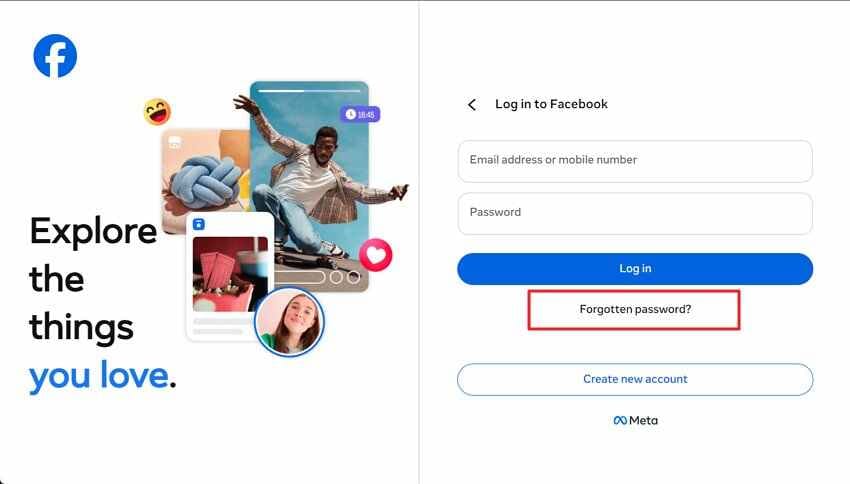
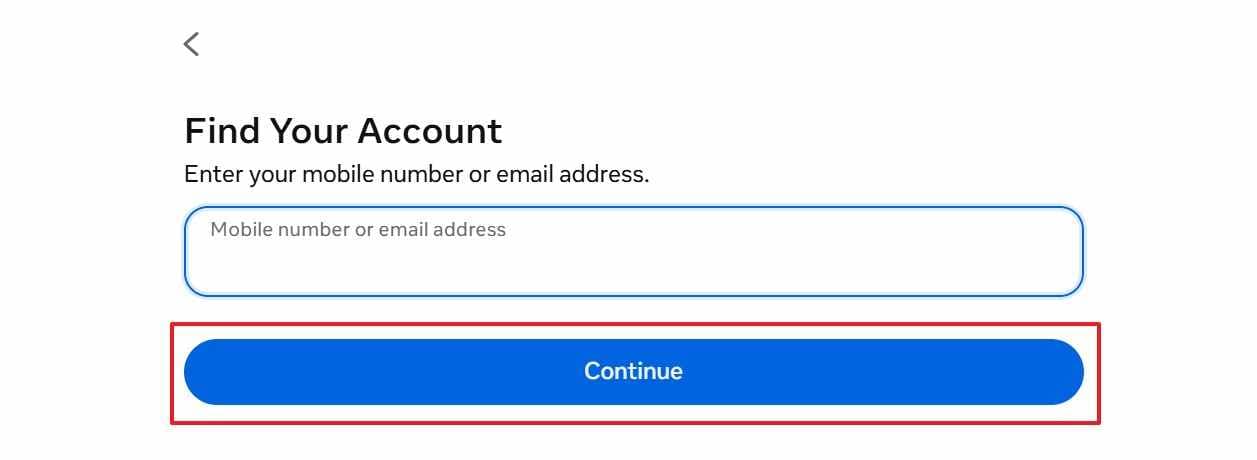
For learning how to retrieve a forgotten FB password, this is Facebook’s primary reset route. It identifies your account using email, phone, username, or profile search details. Adhere to the steps below to try this method with ease:
Step 1. Access the Facebook login page and select “Forgotten password?” under the password field.
Step 2. Enter your mobile number or email address linked with Facebook. Then, click “Continue” so Facebook can search the matching account.
Method 1. Reset Your Password with Your Email Address or Phone Number
A registered email address or phone number gives Facebook a verified channel for sending reset codes. After resetting, sign out of unknown sessions and update recovery information.
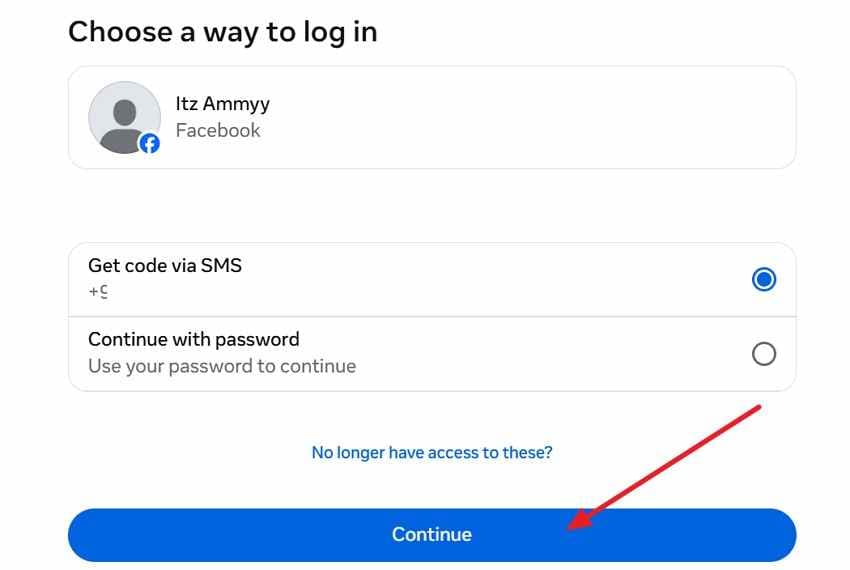
Step 1. After Facebook finds your account, select the available recovery option, such as SMS or email. Click “Continue” to let Facebook send the verification code.
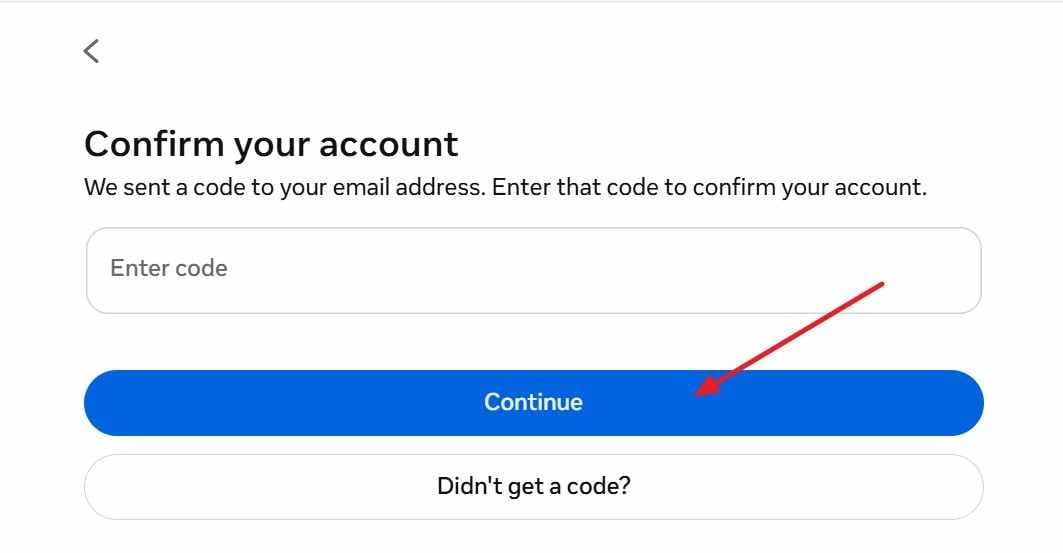
Step 2. Check your selected email inbox or phone messages for the Facebook code. Enter the code in the field and press “Continue” to verify ownership.
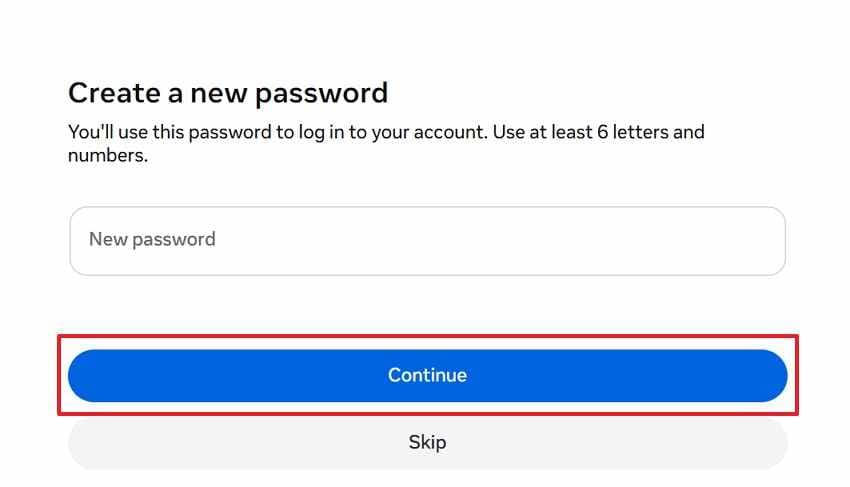
Step 3. Type a new password using at least six letters and numbers. Afterward, select “Continue” to save it and use it for future Facebook logins.
Method 2. Reset Your Password from a Device Where You Are Still Logged In
If you are still signed in on a trusted browser or phone, use that session quickly before it expires.
Before logging out, check and update:
- Recovery email
- Phone number
- Two-factor authentication
- Trusted devices
- Active sessions
- Backup codes if available
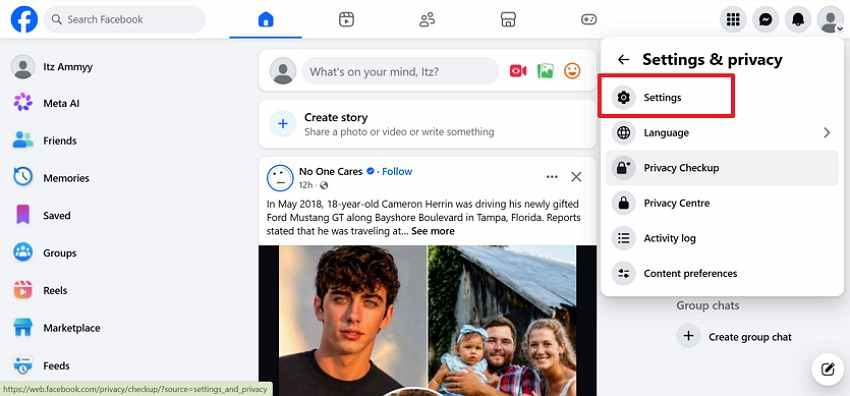
Step 1. From the logged-in Facebook account, click the “Profile” menu and open “Settings & Privacy > Settings” to reach account controls.
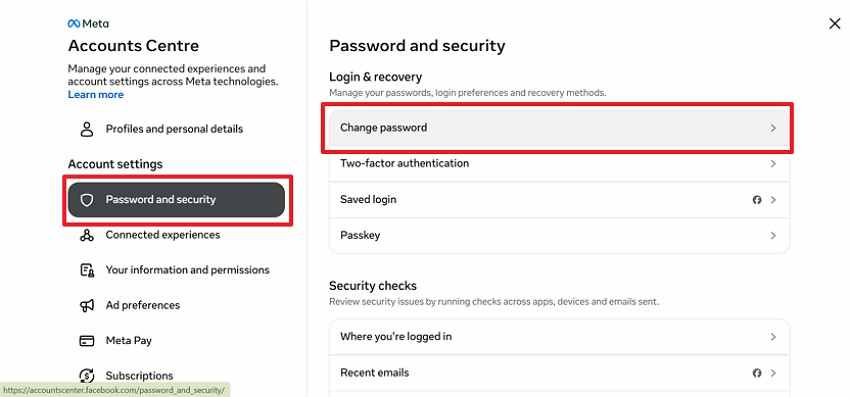
Step 2. In Accounts Center, choose “Password and Security > Change Password.”
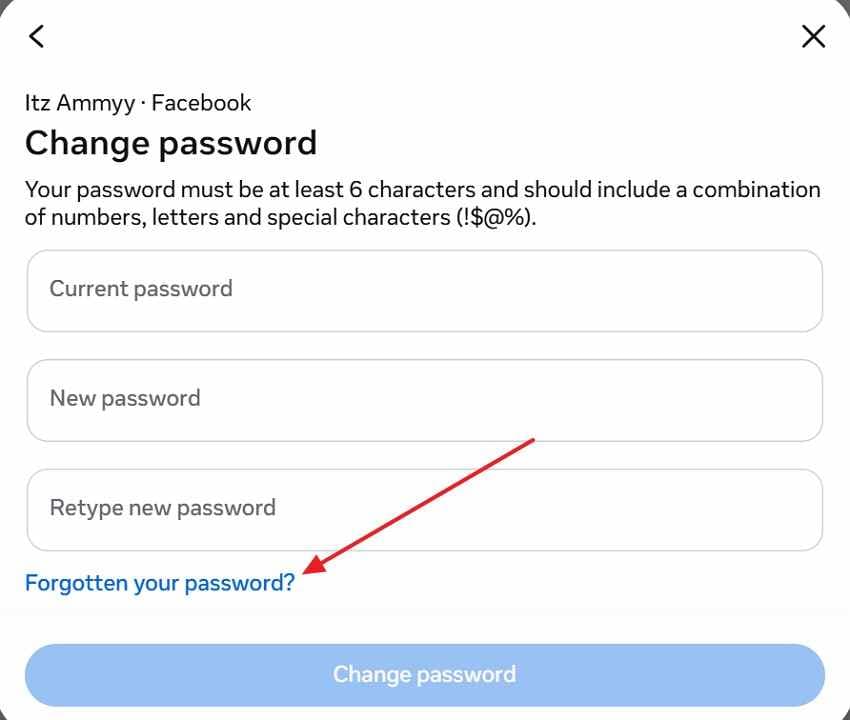
Step 3. Try entering your current password if you remember, then add a new password, and retype the new password. In case your tries fail, click “Forgotten your password?” and continue verification.
Method 3. Use Facebook or Meta Account Recovery If You Cannot Access Login Codes
If you cannot receive email or SMS codes, Facebook may show additional recovery options depending on your account, device, location, and security status.
Facebook may use account details, previous devices, login history, identity checks, or other verification signals. Use accurate information and submit documents only through official Facebook or Meta pages.
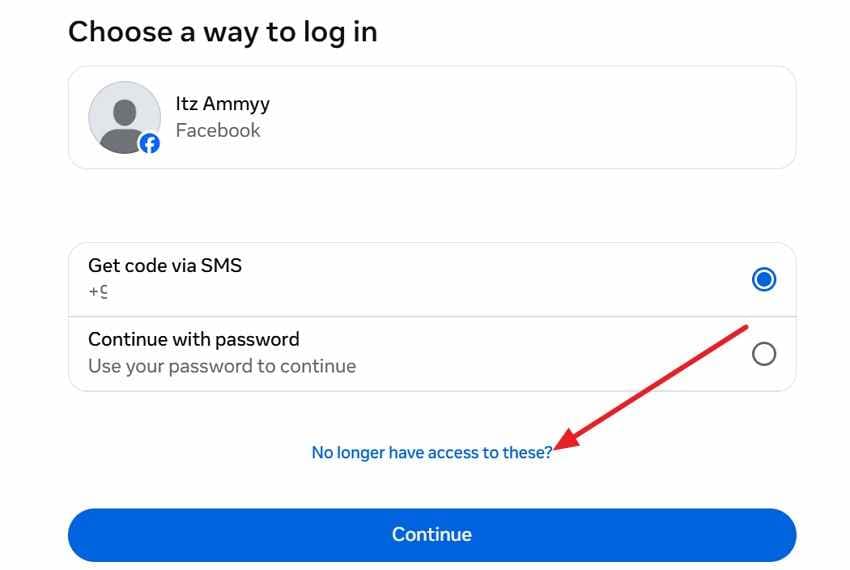
Step 1. On the recovery screen, click “No Longer Have Access to These?” if you cannot receive SMS or email codes. Facebook will move you from normal reset to account ownership verification.
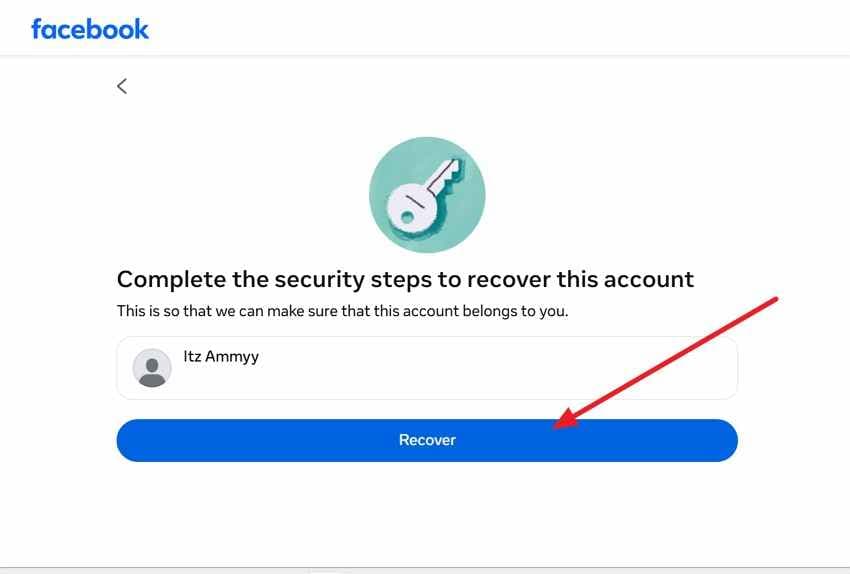
Step 2. On the security recovery screen, check that the correct account is selected. Choose “Recover” so Facebook can begin ownership checks and show the next verification instructions.
Method 4. Use the Hacked Account Recovery Flow If Something Looks Suspicious
Use Facebook’s hacked account recovery flow if you notice:
- Password changed without permission
- Email or phone changed
- Unknown posts or messages
- Strange login locations
- Unknown devices
- Friends receiving suspicious messages
- Recovery information removed
- Name or profile details changed
Follow official hacked account recovery steps before repeating normal password reset attempts. After regaining access, remove unknown emails, phone numbers, sessions, and connected apps.
Part 4. What If Facebook Password Reset Does Not Work?
When reset codes, recovery contacts, or login details fail, troubleshooting becomes necessary. The following points explain how to recover a forgotten password on Facebook without any problem:
- Reset Code Missing: Check spam, promotions, and blocked messages before requesting another Facebook reset link. Too many attempts can delay delivery, so pause briefly before requesting again.
- Lost Contact Access: Old recovery contacts create problems when inboxes close or numbers change permanently. Choose Facebook’s no-access option, then prepare identity details for manual verification review.
- Unknown Linked Contact: Search old emails, SMS alerts, and browser records for Facebook notifications. These traces often reveal which contact originally connected with your account.
- Possible Account Hack: Changes to names, new email addresses, or strange posts may signal an account takeover. Go to Facebook’s hacked account page before trying normal password resets.
- Identity Check Required: Facebook may request ID when usual recovery signals look incomplete. Submit clear documents only through official pages, not message links.
- Suspicious Account Changes: Quickly review recent login locations, email updates, and unfamiliar recovery settings. Remove any unknown details after access is returned, then update your password.
- Support Limits Explained: Facebook Help Center provides recovery guidance, but cannot reveal your old password. It also cannot bypass verification when ownership details do not match.
Part 5. How to Check If Your Facebook Password Is Saved on Your Device
If reset does not work, your Facebook password may be saved on your own device. Only check saved passwords on a trusted personal device.
Safety rules before viewing saved passwords:
- Do not reveal passwords on a public computer.
- Do not check saved passwords on someone else’s device.
- Do not take screenshots of revealed passwords.
- Do not send passwords through chat or email.
- Do not copy passwords into unsafe notes.
- Change the password if you suspect it was exposed.
- Enable two-factor authentication after signing in.
1. Check Saved Facebook Passwords in Microsoft Edge
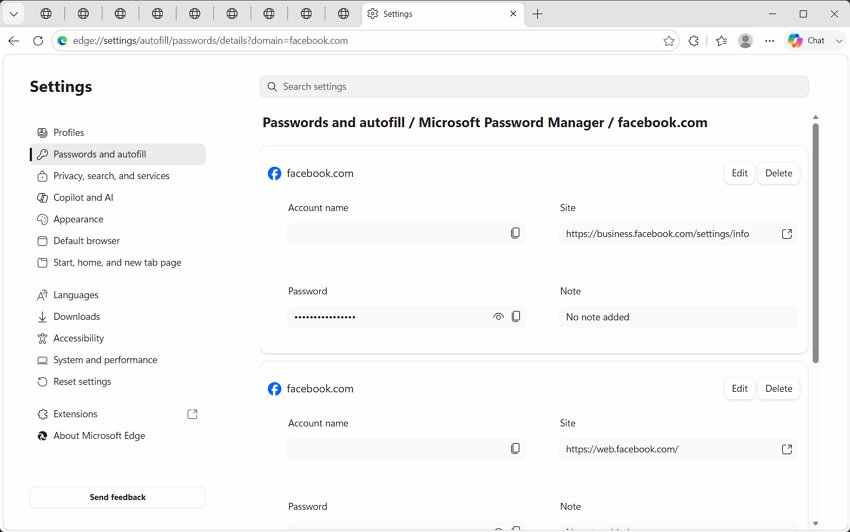
A Windows laptop may have your Facebook login saved through Edge password sync.
Open Edge settings, go to Profiles, then Passwords. Search for Facebook and verify your device identity to view or copy the saved password.
2. Check Saved Facebook Passwords in Apple Passwords or iCloud Keychain
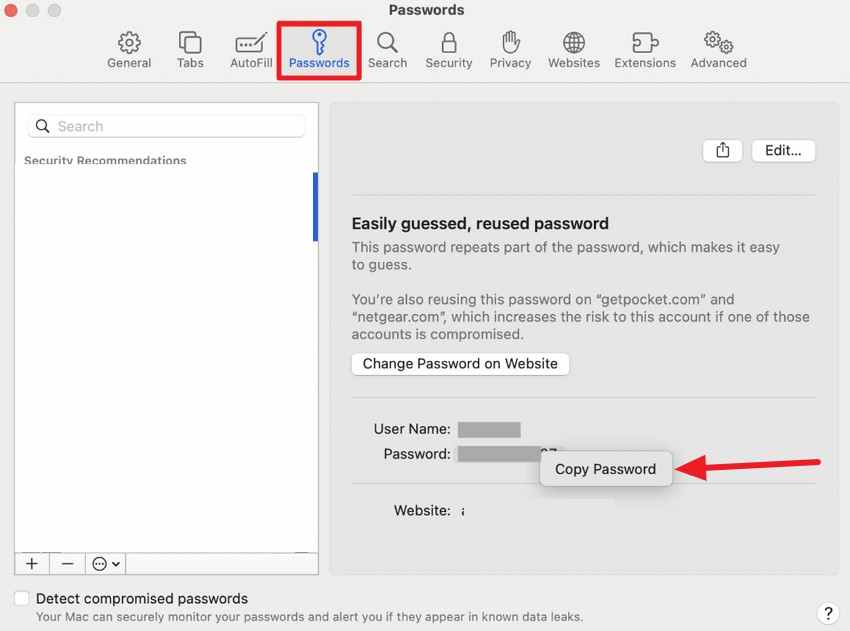
On iPhone, iPad, or Mac, saved Facebook logins may be stored in Apple Passwords and protected by Face ID, Touch ID, or your device passcode.
Open the Passwords app or Settings > Passwords, search for Facebook, and verify your identity.
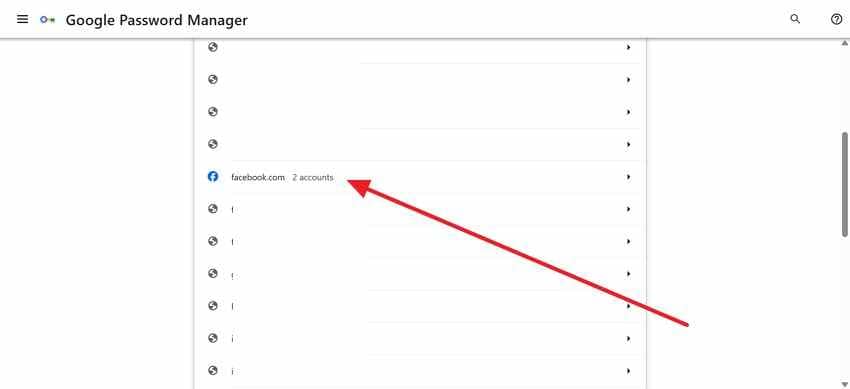
3. Check Saved Facebook Passwords with Google Password Manager
Google Password Manager may have your Facebook login saved from Chrome or Android.
Open Chrome Password Manager, Google Password Manager, or Android Settings > Google > Password Manager. Search for Facebook and verify your identity.
4. Check Saved Facebook Passwords in a Trusted Password Manager
If you use a password manager such as 1Password, Bitwarden, Dashlane, NordPass, or another trusted vault, search for Facebook, Meta, or the email address linked to your account.
If you find the password, sign in only through the official Facebook website or app. Then change the password if it is weak, reused, or old.
Part 6. Recover Deleted Facebook-Related Files from Your Computer with Recoverit
Recoverit does not recover Facebook account passwords. It cannot reset, retrieve, reveal, or bypass Facebook passwords or verification codes.
Use Recoverit only when Facebook-related files were previously saved on your computer and later deleted or lost. These may include downloaded Facebook photos, Messenger attachments, saved videos, screenshots, profile images, backup ZIP files, or Facebook data export files.
Recoverit cannot recover Facebook content stored only on Facebook servers if it was never downloaded to your computer.
| Recoverit Can Help Recover | Recoverit Cannot Recover |
| Deleted downloaded Facebook photos | Your Facebook account password |
| Saved Facebook videos | Facebook reset codes |
| Messenger attachments saved locally | Two-factor authentication codes |
| Facebook data export ZIP files saved on your computer | Access to a locked Facebook account |
| Screenshots or profile image files | Deleted Facebook messages from Facebook servers |
| Local backup files | Posts or photos never saved to your device |
Key Features
- Recycle Bin Recovery: Helps restore local Facebook-related files removed from the Recycle Bin before they are overwritten.
- External Device Recovery: Retrieves deleted files from memory cards, cameras, USB drives, and portable storage devices.
- Photo and Video Recovery: Helps recover downloaded photos, saved videos, screenshots, and media files.
- File Filter and Preview: Lets users locate files by type and preview recoverable items before saving.
- Safe Export: Saves recovered files to another location to avoid overwriting deleted data.
How to Recover Deleted Facebook Downloads, Photos, Videos, or Data Exports
Use these steps only for local files that were saved on your computer or storage device.
Step 1. Choose Where the Facebook File Was Saved
In Recoverit, go to “Hard Drives and Locations” from the sidebar. Select the folder, drive, Desktop, Recycle Bin, or external storage from where your Facebook files are lost.

Step 2. Scan the Location and Filter Results
Recoverit will scan the selected location for deleted or missing files, and all the recoverable files will appear under the “File Location” tab.

Step 3. Preview and Recover Needed Facebook Files
Review the files and select the file you want to recover, and press the " Recover” button to complete the recovery process.

Part 7. Secure Your Facebook Account After Getting Back In
After learning how to retrieve a forgotten password on Facebook, focus on securing access before another login issue occurs.
- Unique Password Setup: Choose a new password that is long, unique, and not used anywhere else. Avoid birthdays, old passwords, pet names, account names, or repeated patterns.
- Two-Factor Protection: Enable two-factor authentication. An authenticator app or security key is usually safer than relying only on SMS when phone numbers change or SIM security is a concern.
- Recovery Details Update: Make sure your recovery email and phone number are current and accessible. Remove old addresses or numbers you no longer control.
- Save Backup Codes Safely: If backup codes are available, store them offline in a secure place. Do not save them only inside your Facebook messages..
- Review Active Sessions: Check logged-in devices and locations. Sign out of devices you do not recognize.
- Remove Suspicious Connected Apps: Remove third-party apps you do not recognize, trust, or actively use. Suspicious app permissions can expose account data.
- Secure Your Email Account Tool: Your email account is often the key to Facebook recovery. Change your email password if needed and enable two-factor authentication there too.
- Watch for Phishing Links: Fake Facebook pages often copy logos, buttons, warnings, and urgent language. Type Facebook’s address yourself or use the official app instead of trusting random login links.
- Never Share Reset Codes: Treat reset codes like passwords. Facebook will not ask for your reset code through chats, calls, comments, or messages from “support” accounts.
Conclusion
If you forgot your Facebook password, you cannot view or retrieve the old password through Facebook. The safe solution is to reset it through official Facebook or Meta recovery methods, use a trusted logged-in device, or check saved passwords on your own device.
If you cannot access the linked email or phone, use available account recovery options and provide accurate details. If the account may be hacked, use the official hacked account recovery flow and secure your email, password, sessions, two-factor settings, and connected apps.
Recoverit cannot recover or bypass Facebook account passwords. It is only useful when Facebook-related files were saved locally on your computer and later deleted, such as downloaded photos, Messenger attachments, saved videos, screenshots, or Facebook data export files.
FAQs
-
Q1. Can Facebook show my old password after account verification?
No. Facebook does not reveal old passwords after verification. It only helps users reset access through approved ownership checks. -
Q2. How do I recover a forgotten Facebook password?
Use Facebook’s official password reset process through email, phone, trusted device, or account verification. You will create a new password instead of viewing the old one. -
Q3. What if I no longer have access to my Facebook email or phone number?
Use account recovery or no-access options if Facebook shows them. Provide accurate details and use a trusted device if possible. -
Q4. What if my Facebook account was hacked?
Use Facebook’s official hacked account recovery flow. After regaining access, remove unknown emails, phone numbers, sessions, and connected apps, then enable two-factor authentication. -
Q5. Can saved browser passwords help recover Facebook login access?
Yes, saved passwords may help if they are stored on your own trusted device. Check Chrome, Edge, Apple Passwords, Google Password Manager, or your trusted password manager. -
Q6. Can Recoverit recover my forgotten Facebook password?
No. Recoverit cannot reset, retrieve, reveal, or bypass Facebook account passwords. It only recovers deleted Facebook-related files saved locally on your computer storage. -
Q7. What Facebook files can Recoverit recover?
Recoverit may help recover locally saved Facebook photos, videos, Messenger attachments, screenshots, profile images, or Facebook data export files if they were deleted from your computer and not overwritten. -
Q8. How do I protect my Facebook account after recovery?
Use a unique password, enable two-factor authentication, update recovery email and phone, review active sessions, remove suspicious apps, secure your email account, and avoid phishing links.


