
 TL;DR:
Online RAR password recovery tools rely on dictionary or brute-force attacks that are only realistic for unlocking weak, short, or partly remembered passwords, while exposing your uploaded archives to significant privacy risks.
● Desktop recovery software provides a safer alternative for sensitive files compared to upload-based services like Password-Online or LostMyPass, keeping data local while potentially offering hardware acceleration against strong RAR5 encryption.
● Browser-based tools serve highly specific conditions: Aspose is best when you can input known password parameters like length or character types, while ezyZip strictly functions as an extractor when you already possess the correct password.
● Recoverit File Recovery is designed strictly to salvage deleted, lost, or corrupted .rar and .part files from storage drives, but it cannot crack, reveal, or bypass the archive's password protection.
Ask AI for a summary
 ChatGPT
 Perplexity
 Gemini
 Claude
 Grok
Grok
A locked RAR file can block access to documents, photos, videos, project folders, backups, and other important files. That is why many users search for RAR password recovery online or WinRAR password recovery online free when they forget the archive password.
Online tools can be useful, but they are not magic. Modern RAR archives can use strong encryption, and long random passwords may be impractical to recover. Many online tools also require uploading the archive, which creates privacy concerns if the file contains personal, business, legal, or client data.
This guide compares practical online RAR password recovery options, explains when recovery is realistic, and shows what to do if the RAR file itself is lost, deleted, or corrupted. Important note: Recoverit File Recovery can recover lost or deleted RAR files, but it does not crack, reveal, remove, or bypass RAR passwords.
In this article
-
- Option 1. Password-Online RAR Password Recovery
- Option 2. Aspose Online RAR Password Recovery
- Option 3. LostMyPass RAR Password Recovery
- Option 4. ezyZip for Opening Password-Protected RAR Files
- Option 5. Ask the Sender or Original Creator for the Password
- Online RAR Password Recovery Tool Comparison
Part 1. What Does RAR Password Recovery Online Mean?
RAR password recovery online means using a browser-based service to attempt to identify the password protecting a .rar archive. These tools do not bypass encryption directly. Instead, they test possible passwords through methods such as dictionary attacks, brute-force attempts, masks, or password hints.
RAR archives are designed to protect file contents when a strong password is used. RAR5 increased encryption strength compared with older RAR formats, which makes password recovery much harder when the password is long and random.
Forgotten RAR Password vs Corrupted RAR File
A forgotten RAR password means the archive may be intact, but you cannot open it because you do not know the password. A corrupted RAR file means the archive itself is damaged, incomplete, or unreadable. These are different problems and need different tools.
| Problem | What It Means | Correct Next Step |
| Forgotten password | The RAR file exists but is locked | Try password hints, sender contact, or authorized password recovery |
| Corrupted RAR file | The archive is damaged or incomplete | Recover or repair the file before testing passwords |
| Deleted RAR file | The archive is missing from the drive | Use file recovery software first |
RAR Password Recovery vs Online RAR Opener
An online RAR password recovery tool attempts to find a forgotten password. An online RAR opener extracts or previews files only when the archive is not encrypted or when you already know the correct password. A normal opener cannot unlock an encrypted RAR file without the password.
Free RAR Password Recovery vs Paid Recovery Services
Free RAR password recovery online tools usually test common passwords, short passwords, or limited patterns. Paid services may offer longer recovery attempts, larger dictionaries, or stronger hardware. Even paid services cannot guarantee recovery if the password is strong enough.
When RAR Password Recovery Is Realistic and When It Is Not
Recovery is more realistic when you remember part of the password, the length, a common word, a date, a naming pattern, or a character set. It becomes unrealistic when the RAR file uses a long, random, unique password with no remembered clues.
Legal and Privacy Risks Before Uploading a Locked RAR File
Only attempt recovery on RAR archives you own or have explicit permission to access. Upload-based services may expose file names, metadata, or archive contents if the password is found. Do not upload private, business, legal, financial, or client archives to unknown websites.
Part 2. What to Check Before Trying Any RAR Password Recovery Tool
Before trying any online RAR password recovery free service, run these checks. They can save time and reduce privacy risk.
Confirm You Have the Legal Right to Access the Archive
Use recovery tools only for archives you own or have permission to access. Do not attempt password recovery on another person's archive, company file, client file, or shared file without authorization.
Make a Copy of the RAR File Before Testing Tools
Keep the original archive unchanged. Make a duplicate copy and test tools only on the copy. This protects the original file if a tool crashes, upload fails, or the archive becomes damaged.
Try Password Variations and Old Hints First
Manual guessing is often faster than automated recovery when you remember clues. Try old passwords, uppercase and lowercase changes, birth dates, project names, initials, symbols, and spelling variations.
Check Password Managers, Browsers, Notes, Emails, and Messages
Search your password manager, notes app, browser-saved entries, old email threads, chat apps, cloud documents, and file transfer messages. The RAR password may already be stored somewhere from when the archive was created or shared.
Avoid Uploading Sensitive RAR Files to Unknown Websites
If the archive contains private records, customer files, legal contracts, tax documents, source code, or personal photos, avoid unknown online tools. Use a trusted offline option or contact the original creator.
Part 3. Best RAR Password Recovery Online Options to Try
The tools below can help in different situations. Treat them as recovery attempts, not guaranteed fixes.
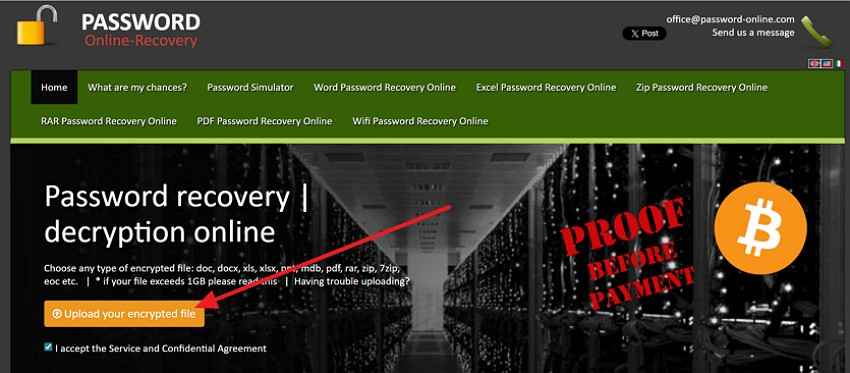
Option 1. Password-Online RAR Password Recovery
Password-Online RAR Password Recovery is an upload-based service that attempts server-side RAR password recovery. It may help when the archive is not sensitive and you are comfortable submitting it to a third-party service.
How to use it:
Step 1. Open the Password-Online RAR Password Recovery page and click Upload your encrypted file.
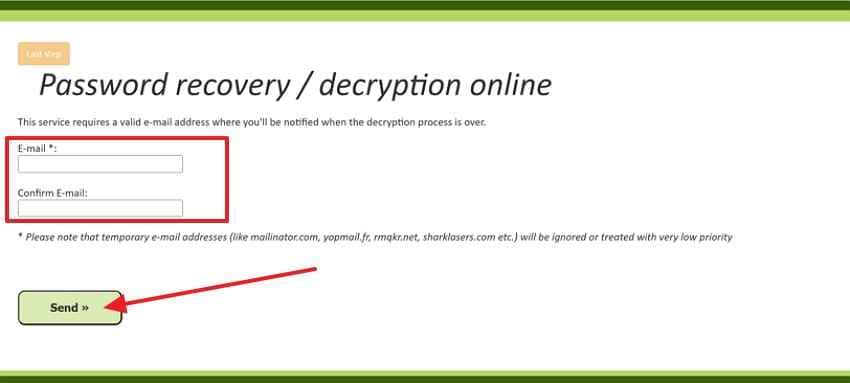
Step 2. Enter and confirm your email address, then click Send.
Step 3. Check the status page or email updates for the recovery result.
Use this option only for files you are allowed to access, and review the service terms before uploading private files.
Option 2. Aspose Online RAR Password Recovery
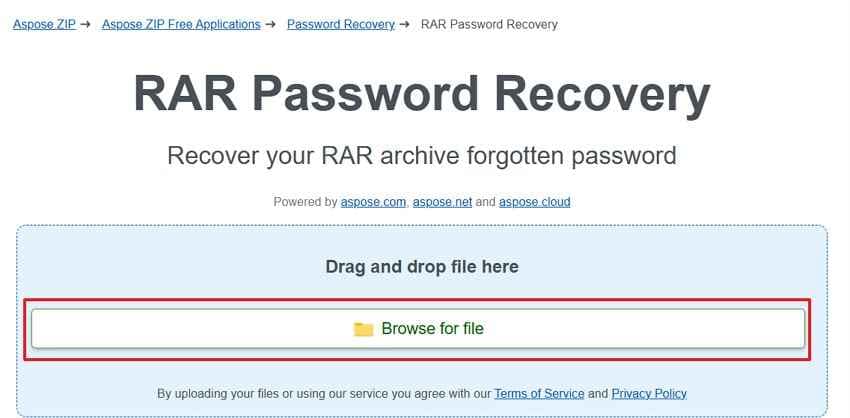
Aspose Online RAR Password Recovery is a browser-based tool for protected RAR archives. It is useful when you remember password details such as length, known words, or character types.
How to use it:
Step 1. Open the Aspose RAR Password Recovery page and click Browse for file.
Step 2. Select the locked RAR archive from your device.
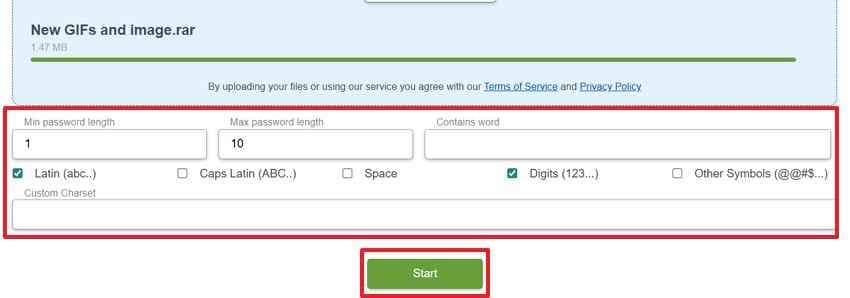
Step 3. Enter the minimum and maximum password length, add any remembered words, choose character types, and click Start.
Step 4. If the password is recovered, copy it and use it to open the archive in WinRAR, 7-Zip, or another archive tool.
Option 3. LostMyPass RAR Password Recovery
LostMyPass offers online recovery checks for multiple protected file types, including archive formats. It may provide a quick first check for common passwords before more advanced paid recovery attempts.
How to use it:
Step 1. Open the LostMyPass page and choose the encrypted RAR file from your device.
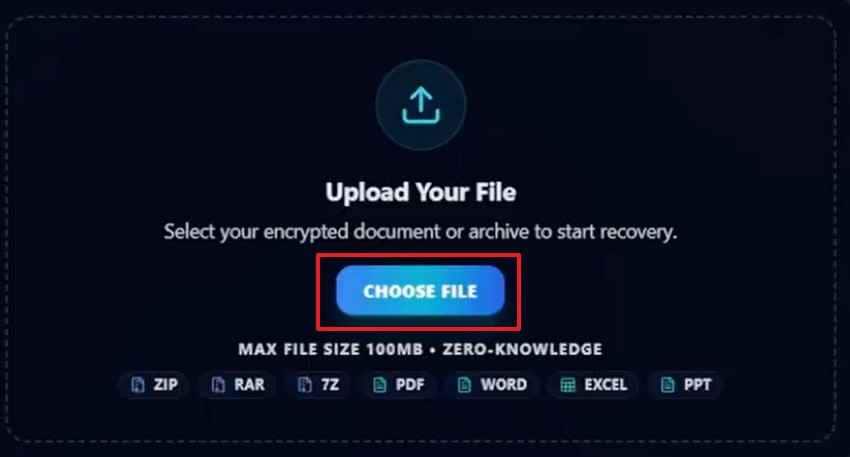
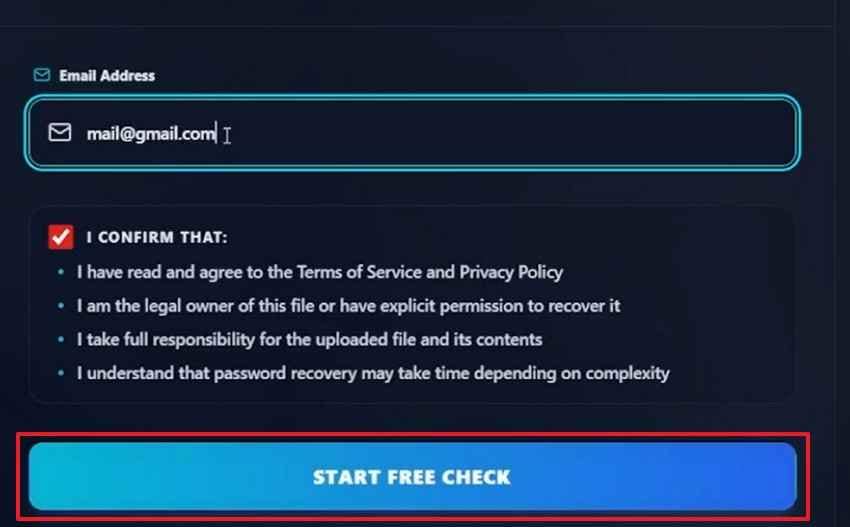
Step 2. Enter your email address after the file loads.
Step 3. Click Start Free Check to begin the initial password scan.
Do not upload sensitive archives unless you have reviewed and accepted the service privacy terms.
Option 4. ezyZip for Opening Password-Protected RAR Files
ezyZip is useful when you already know the password and want to open a password-protected RAR file in the browser. It is not the same as recovering a forgotten password, but it can help confirm whether a password you found is correct.
If you do not know the password, use password recovery options or contact the archive creator instead.
Option 5. Ask the Sender or Original Creator for the Password
The safest and fastest method is often to ask the person who created or shared the RAR file. They may still have the password in a password manager, project note, email thread, or transfer record.
Online RAR Password Recovery Tool Comparison
| Tool | Best For | Privacy Consideration | Main Limit |
| Password-Online | Server-side RAR password recovery attempts | Requires file upload and email | Not ideal for sensitive archives |
| Aspose RAR Recovery | Password attempts with known length, words, or character clues | Requires file upload | Wrong settings can slow recovery |
| LostMyPass | Quick check against common passwords and paid recovery paths | Requires file upload and email | Strong recovery may require payment and still is not guaranteed |
| ezyZip | Opening a RAR file when you already know the password | Better for known-password extraction than recovery | Does not recover an unknown password |
| Sender or creator | Shared files and old project archives | No upload required | Depends on whether the creator still has the password |
Part 4. Online Tools vs Desktop RAR Password Recovery Software
Online and desktop tools both attempt password guessing, but they differ in privacy, control, and recovery duration.
What Free Online RAR Recovery Can Actually Do
Free online tools can test weak passwords, common words, short combinations, or password ranges you provide. They are best for small, non-sensitive archives where you remember useful clues.
Why Strong RAR Passwords May Be Impossible to Recover Quickly
Modern RAR archives can use strong encryption and slow password verification. If the password is long, random, and unique, even powerful tools may need impractical amounts of time to test all combinations. Recovery tools work best when human memory narrows the search.
When Desktop Recovery Software Is Safer Than Uploading Files Online
Desktop recovery software is safer for confidential archives because the RAR file can remain on your computer. It may also allow masks, custom dictionaries, longer sessions, and hardware acceleration, depending on the tool.
| Feature | Online RAR Recovery | Desktop RAR Recovery |
| Setup | No installation required | Requires installation |
| Privacy | Often requires upload | File stays local |
| Best case | Simple or partly remembered passwords | Sensitive files and longer recovery attempts |
| Main limit | Upload risk, time limits, file size limits | Still cannot guarantee strong password recovery |
When You Should Stop Trying and Look for Backups
Stop repeated attempts when you remember no length, words, dates, symbols, or patterns. Search for backups, uncompressed originals, old email attachments, cloud folders, external drives, NAS storage, or the original device where the files were created.
Part 5. What If the RAR File Is Lost, Deleted, or Corrupted?
Sometimes the real problem is not the forgotten password. The RAR file may be deleted, missing, damaged, or stored on a failing drive. Password recovery tools cannot help until you have a usable archive file.
Lost RAR File vs Forgotten RAR Password
| Problem | What It Means | Correct Tool |
| Forgotten RAR password | The archive exists but cannot be opened | Password recovery tool or original password source |
| Deleted RAR file | The archive itself is missing | File recovery software |
| Corrupted RAR file | The archive is damaged or incomplete | File recovery or archive repair options |
| Lost source files | You need the original files that were compressed into the archive | File recovery from the original storage device |
When Recoverit File Recovery Can Help
Recoverit File Recovery can help when RAR archives or original source files were deleted, lost after formatting, stored on a crashed drive, or missing from an external device. It helps recover the file first so you can then open it with the known password or continue authorized password recovery.
What RAR and File Recovery Cases Recoverit Supports
| Recovery Case | What It Covers |
| RAR archive recovery | Deleted, lost, formatted, or inaccessible .rar files |
| Split RAR recovery | Recoverable .part files or volume files still present on storage |
| Encrypted RAR file recovery | Restores encrypted RAR files as files, without removing password protection |
| Storage device recovery | Internal drives, external drives, USB drives, SD cards, and memory cards |
| Original file recovery | Documents, photos, videos, audio, archives, and other source files |
How to Recover a Lost or Deleted RAR File Before Trying Password Recovery
Stop using the drive where the RAR file was stored. New files may overwrite recoverable archive data.
Step 1. Select Where the RAR File Was Lost
Open Recoverit, go to Hard Drives and Locations, and choose the drive, folder, or external storage device where the RAR file was last stored.

Step 2. Scan the Location for Deleted Files
Recoverit starts scanning the selected location. Use file type filters, file location, or the search bar to find the missing RAR archive faster.

Step 3. Choose the RAR File and Recover It
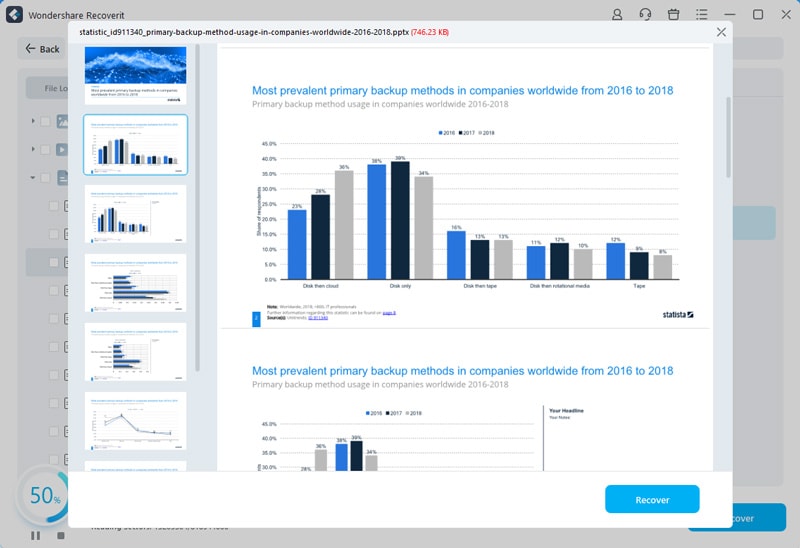
Select the RAR file from the scan results, check its details, click Recover, and save the restored archive to another safe location.
Important Note: Recoverit Does Not Crack RAR Passwords
Recoverit can recover deleted, lost, formatted, or inaccessible RAR files. It cannot reveal, bypass, remove, or crack the password of an encrypted RAR archive. If the recovered archive is still password-protected, you still need the correct password or a separate authorized recovery method.
Part 6. How to Avoid Losing RAR Passwords Again
Use these habits to reduce the need for WinRAR password recovery online later.
Store RAR Passwords in a Password Manager
Save every archive password in a trusted password manager. Include the archive name, date, project, or storage location so the password is easy to find later.
Keep Secure Password Hints Separate From the Archive
Create a hint that helps you remember the password without exposing it. Store the hint separately from the archive, not in the same folder.
Share RAR Files and Passwords Through Separate Channels
If you send a RAR file by email, send the password through a different secure channel. Do not put the archive and password in the same message.
Keep an Unencrypted Backup When Password Protection Is Not Needed
For non-sensitive files, keep a normal backup copy on an external drive, NAS, or trusted cloud service. A backup is often faster than password recovery.
Use Reputable Archive and Recovery Tools
Use trusted archive software and avoid unknown recovery installers that request unnecessary permissions. Suspicious tools can create more risk than the locked archive itself.
Conclusion
RAR password recovery online tools can sometimes help with simple, short, or partly remembered passwords. They are much less useful against strong RAR passwords, especially when the password is long, random, and unknown. For sensitive archives, avoid upload-based tools unless you trust the service and understand the privacy terms.
If the RAR file is lost, deleted, or corrupted, recover the archive first with Recoverit File Recovery. Recoverit restores RAR files and original files; it does not crack RAR passwords.
FAQ
-
Can I recover a RAR password online for free?
Sometimes. Free online tools may recover short, weak, common, or partly remembered RAR passwords. They usually fail against long, random, unique passwords protected by modern RAR encryption. -
Are online RAR password recovery tools safe?
Not always. Many online tools require users to upload private archives. Use trusted services only, read privacy terms, and avoid uploading sensitive, business, legal, or client files. -
Can Recoverit recover my RAR password?
No. Recoverit does not crack, reveal, or bypass RAR passwords. It can recover lost, deleted, formatted, or corrupted RAR files from storage devices. -
What should I do if the RAR file is corrupted instead of password-protected?
Recover or repair the damaged RAR file before trying password recovery. Check backups, external drives, cloud storage, and file recovery tools if the archive is missing or unreadable. -
What is the safest way to recover a WinRAR password?
The safest first step is to search your password manager, notes, emails, and old messages, then contact the archive creator. For sensitive files, avoid uploading the archive to unknown online tools and use a trusted local method if needed.



