 TL;DR:
To recover a Roblox account without an accessible email address, you must either use a previously linked phone number to receive a reset code or contact Roblox Support directly with concrete proof of ownership.
● Valid ownership evidence for a Support ticket includes the account's first billing email address, Robux or Premium payment receipts, and redeemed gift card codes, which remain critical even if a hacker altered the current login details.
● Recoverit Windows Data Recovery can only restore lost local files like billing PDFs and screenshot receipts from a drive to support your claim, but it cannot reset your Roblox password or bypass server verification.
● Before submitting a request, check all devices for an active login session, as accessing an already logged-in account allows you to directly add a new recovery email or phone number in the account settings.
Ask AI for a summary
 ChatGPT
 Perplexity
 Gemini
 Claude
 Grok
Grok
Losing access to Roblox without an email address can feel frustrating, especially if the account has Robux, Premium history, limited items, saved progress, or years of activity. Many users search for how to recover Roblox account without email because the normal password reset path does not work for them.
The key point is simple: if no email or phone number is linked, Roblox cannot send an automatic password reset link or verification code. You need to contact Roblox Support and prove that you are the real account owner. Roblox may review account details, original email or billing information, purchase history, and other ownership evidence before making changes.
This guide explains the official recovery options, what to do if you have no email or phone number, how to handle a hacked account, and how Recoverit Windows Data Recovery can help recover local receipts, screenshots, or saved files that support your ownership claim. Important note: Recoverit cannot recover your Roblox password or log in to your Roblox account.
In this article
-
- Method 1. Reset With a Linked Phone Number
- Method 2. Use the Roblox Support Form
- Method 3. Provide Purchase or Gift Card Evidence
- Method 4. Recover Through Parent or Guardian Information
- Method 5. Use an Old Logged-In Device to Add Recovery Details
- Method 6. Check Whether an Old Secondary Email Was Linked
Part 1. Can You Recover a Roblox Account Without Email?
Yes, it may be possible to recover a Roblox account without email, but it is not the same as using the automatic password reset feature. Roblox's official password help says that if you did not add an email address or phone number, you cannot reset the password with the self-service recovery feature. In that case, you need to contact Customer Support and verify account ownership.
This is why users searching for how to recover Roblox account without email or phone number need to prepare proof before submitting a request.
What Roblox Lets You Do With a Verified Email Address
If a verified email address is linked to the account, you can use the Forgot Password or Username page. Roblox sends password reset instructions to the email currently associated with the account.
What Roblox Lets You Do With a Linked Phone Number
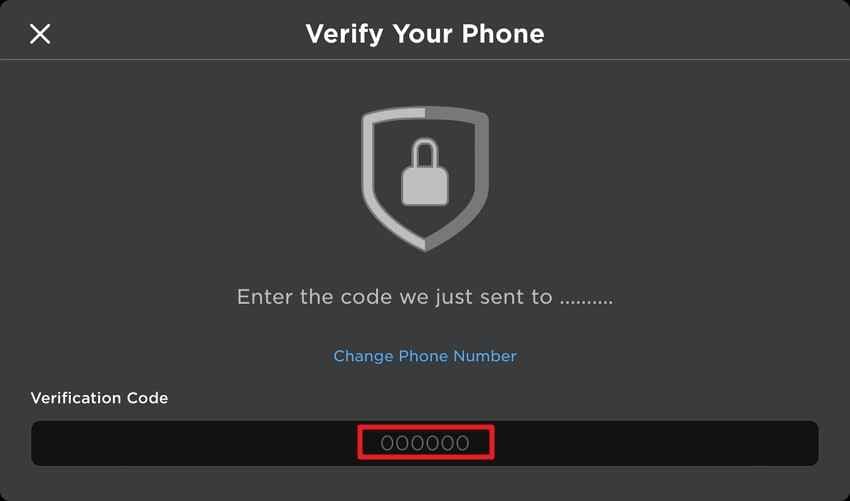
If no email is available but a phone number is linked, Roblox lets you use the Phone tab on the recovery page. Roblox sends a 6-digit code to the phone number, and you can use it to reset the password. Phone recovery may not be available in every country or region.
What Happens If You Have No Email or Phone Linked
If the Roblox account has no linked email and no linked phone number, automatic password reset is not available. You need to submit a detailed Roblox Support request and provide ownership evidence. Roblox may review account history before changing any account information.
Forgot Password vs Hacked Account vs Locked Account
| Situation | What It Means | Best Next Step |
| Forgot password | You know the username but cannot remember the password | Use email, phone, or Roblox Support if no recovery method exists |
| Account hacked | Someone may have changed your password, email, phone, or settings | Secure your device and contact Roblox Support quickly |
| Account locked | Roblox restricted access due to suspicious activity, security, or policy issues | Follow the on-screen instructions or contact Support with details |
Why Roblox Support Must Verify Ownership
Roblox must verify ownership because a username alone is not proof. Account checks help protect Robux, Premium subscriptions, limited items, personal information, and child accounts from unauthorized takeover. Roblox also notes that providing helpful information does not guarantee recovery, because Support still reviews account details.
Part 2. Identify Your Roblox Recovery Situation
The right recovery method depends on what information is still available.
You Remember the Username but Have No Email
If you remember only the username, you cannot trigger an automatic email reset. You need to contact Roblox Support and provide additional account ownership evidence.
You Have a Phone Number but No Email
Use the Roblox recovery page and choose the phone option. This is the fastest path if the number is still linked and you can receive the verification code.
You Have No Email and No Phone Number
This is the hardest case. Submit a Roblox Support request with the username, account history, purchase records, first billing email, gift card evidence, or other details that may help verify ownership.
You Lost Access to the Linked Email or Phone Number
If the contact method exists but you no longer control it, try to recover that email or phone number first. If that fails, explain the situation to Roblox Support and provide ownership proof.
Someone Changed Your Roblox Login Details
If your email, phone, or password was changed without permission, treat it as a compromised account. Remove malware or unsafe browser extensions, then contact Roblox Support as soon as possible.
You Are Recovering a Child's Roblox Account
For younger users, parent or guardian information may help. Roblox allows parental recovery emails for users under 13, and parent or guardian payment records may support the recovery request.
Part 3. What Proof Can Help Roblox Verify Ownership?
Roblox does not publicly list every verification signal it may use. However, official Roblox hacked-account guidance highlights the importance of the first email address added to the account and the billing email used for the first payment. Other accurate account details may also help Support review your request.
Username and Account Creation Details
Prepare the exact username, display name, approximate creation year, old login habits, and any account details you clearly remember. Avoid guessing wildly. Consistent information is more useful than vague claims.
First Email Address or Billing Email Address
Roblox says the first email address added to the account and the billing email address used for the first payment can be valuable for verification, even if the account was compromised and the email was changed.
Robux Receipts, Premium Payments, and Gift Card Proof
Payment receipts, Apple App Store or Google Play receipts, PayPal confirmations, credit card billing records, Roblox Premium invoices, and redeemed gift card codes can help prove account ownership.
Previous Passwords, Devices, and Login History
Old passwords, devices used to play Roblox, approximate locations, and browser history may help you explain account history. Do not share sensitive payment card numbers or unrelated personal documents unless Roblox specifically requests them through official support channels.
Parent or Guardian Information for Younger Accounts
If the account belongs to a child, parent or guardian details may help. For accounts under 13, Roblox recommends using a parental recovery email so a parent can help recover the account if the password is forgotten.
Part 4. What to Do Before Contacting Roblox Support
Before submitting a request, collect evidence and check whether easier recovery options still exist.
Check Whether You Are Still Logged In on Any Device
Check phones, tablets, laptops, consoles, and browsers where Roblox may still be logged in. If you can access the account, add and verify an email address immediately from account settings.
Search Every Inbox for Old Roblox Emails
Search all email accounts you have used for Roblox, Robux, Premium, gift card, password reset, verification, or purchase messages. This may reveal the email that was linked to the account.
Check Password Managers and Browser-Saved Passwords
Check your password manager and browser-saved passwords for Roblox entries. If you find an old password, try it only through the official Roblox login page.
Gather Purchase Receipts and Gift Card Records
Collect screenshots, PDFs, emails, transaction IDs, billing email addresses, and gift card redemption proof. Keep copies before submitting the request.
Avoid Fake Roblox Account Recovery Services
Do not pay random social media accounts, Discord users, or third-party websites that promise to "recover" or "hack back" a Roblox account. These are often scams and may steal more information. Use only official Roblox recovery pages and Support forms.
Part 5. How to Recover a Roblox Account Without Email
Start with the fastest official option that still applies to your account.
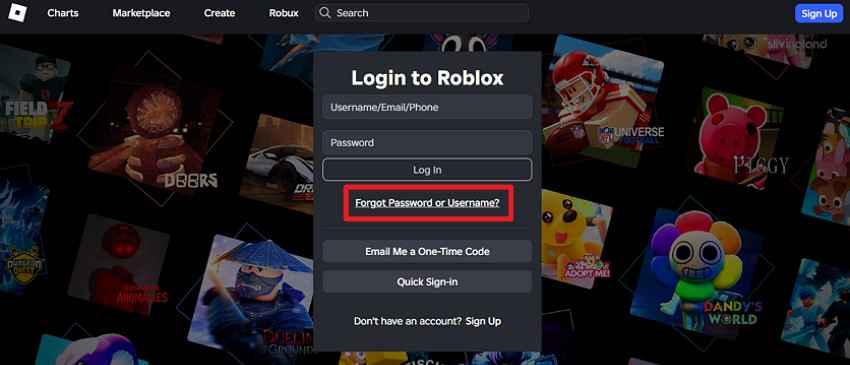
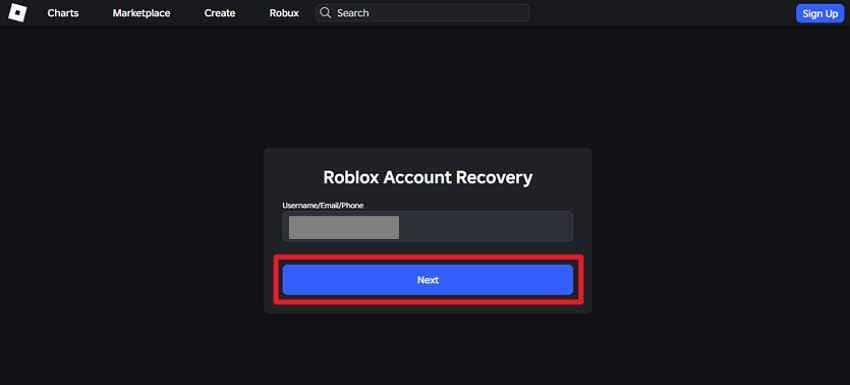
Method 1. Reset With a Linked Phone Number
If the account has a linked phone number, use the Roblox password recovery page.
Step 1. Go to the Roblox login page and click Forgot Password or Username?
Step 2. Choose the phone option, select your country code, enter the linked phone number, and continue.
Step 3. Enter the 6-digit verification code sent to your phone and reset the password.
Method 2. Use the Roblox Support Form
If you have no email or phone number, use the official Roblox Support form.
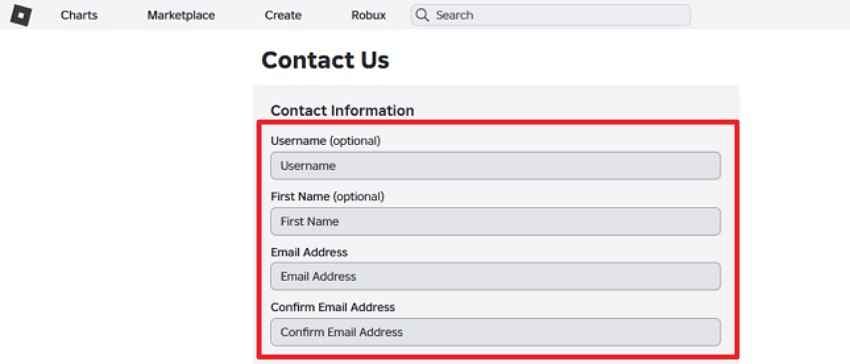
Step 1. Open the Roblox Support page and enter your contact email, username, device, and issue details. The contact email does not have to be the old email linked to the account, but it should be one you can access now.
Step 2. Choose an account login category, such as Account Hacked or Can't Log In, then explain that you no longer have access to the email or phone number.
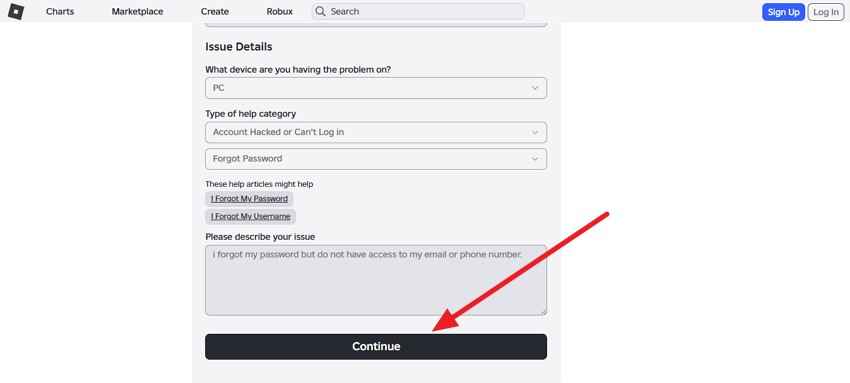
Step 3. Include ownership evidence in the message, such as first billing email, purchase records, gift card proof, old usernames, or account history. Submit the form and wait for Roblox Support to respond.
Method 3. Provide Purchase or Gift Card Evidence
If you bought Robux, Premium, or gift cards, gather evidence before submitting your Support request. Purchase proof can be one of the strongest ownership signals.
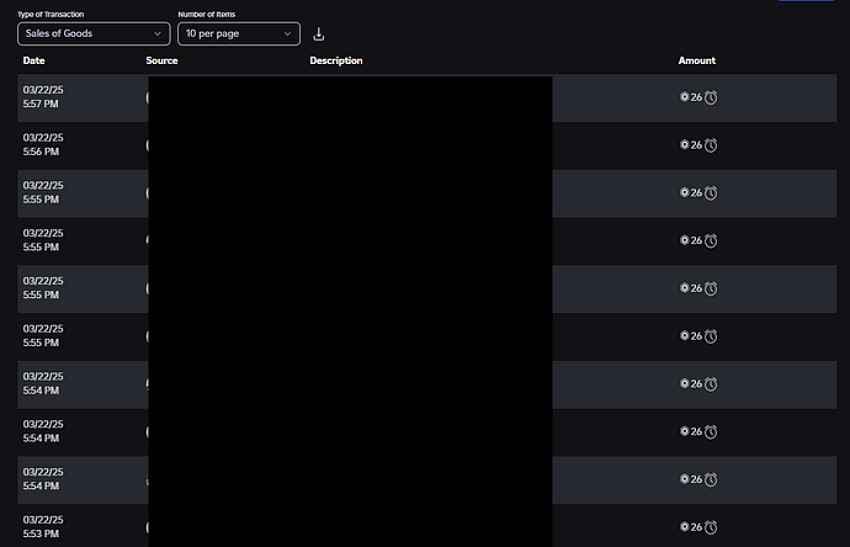
Include only relevant details. Do not post receipts publicly or send them to unofficial accounts.
Method 4. Recover Through Parent or Guardian Information
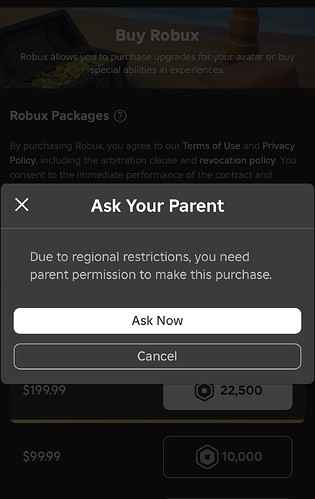
If the Roblox account belongs to a child, a parent or guardian may help verify ownership. Use the parent or guardian email, billing records, purchase receipts, or parental recovery email if one was set up.
Method 5. Use an Old Logged-In Device to Add Recovery Details
If you are still logged in on another device, secure the account immediately.
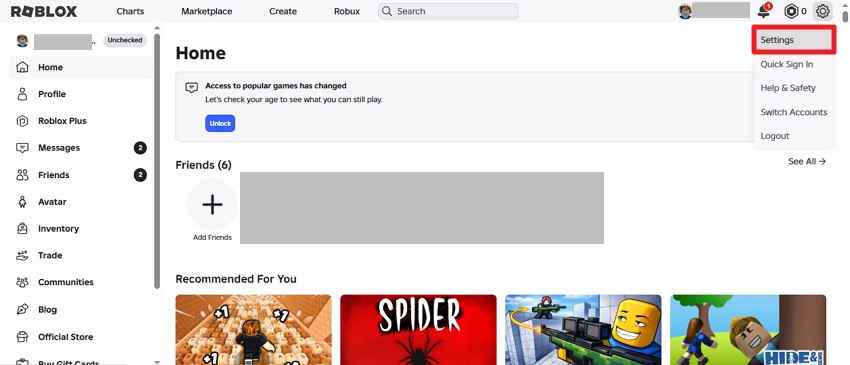
Step 1. Open Roblox on the logged-in device and go to Settings.
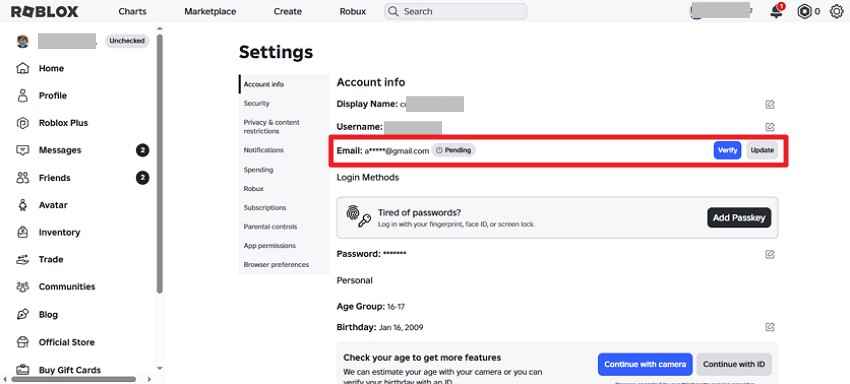
Step 2. Go to Account Info, add an email address or phone number, and complete verification.
Step 3. Change the password and enable two-step verification after adding recovery details.
Method 6. Check Whether an Old Secondary Email Was Linked
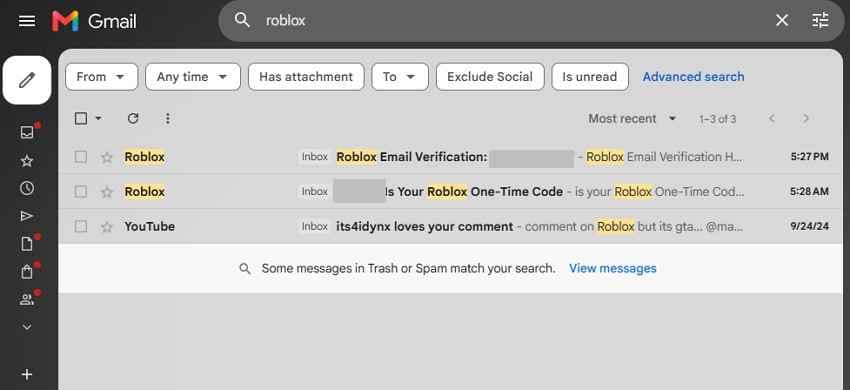
An older email may still be associated with the Roblox account. Search every inbox for Roblox verification or billing messages. If you find the linked email, use it on the password recovery page or mention it in the Support request.
Part 6. What If Your Roblox Account Was Hacked?
If the account was compromised, act quickly. Roblox hacked-account guidance recommends removing unsafe downloads or browser extensions, scanning for malware, resetting the password if possible, and enabling two-step verification.
Signs Your Roblox Account Was Compromised
- Your password no longer works.
- Your email address or phone number was changed.
- Robux, items, or settings changed without your action.
- Friends, groups, messages, or avatar items look unfamiliar.
- You received security emails you did not trigger.
What Roblox Recommends After an Account Hack
Remove suspicious downloads and browser extensions first. Run a full virus scan and restart the computer. Then reset the password if you still can. If password reset does not work, contact Roblox Support.
What Evidence to Include in a Hacked Account Request
Include your username, what changed, when you noticed the compromise, any first email or billing email, purchase proof, and evidence that you owned the account before the takeover. Roblox says original account information can still be valuable even if the account email was changed.
What to Know About Lost Robux, Items, or Currency
Roblox does not guarantee that a compromised account will be restored to its previous state or that lost virtual items or currency will be recovered. If your account was compromised and you need assistance, contact Roblox quickly through official Support.
Part 7. Recover Proof of Ownership From a Lost or Broken Device
Sometimes the proof you need is stored locally on a broken, crashed, or inaccessible Windows computer. This may include screenshots, downloaded receipts, gift card photos, billing PDFs, or saved support notes.
When Recoverit Can Help
Recoverit Windows Data Recovery can help recover local files from hard drives, SSDs, USB drives, memory cards, and crashed Windows computers. It is useful when ownership proof was saved on your device and later deleted, lost, formatted, or trapped on a non-booting PC.
When Recoverit Cannot Help
Recoverit cannot reset your Roblox password, bypass Roblox verification, access Roblox servers, recover a cloud-only email, or guarantee that Roblox Support will approve your request. It only helps recover local files that may support your claim.
What Roblox-Related Proof Recoverit May Recover
| Proof Type | Examples |
| Purchase records | Robux receipts, Premium invoices, payment confirmations, billing PDFs |
| Gift card proof | Gift card photos, code screenshots, redemption records |
| Account evidence | Profile screenshots, username records, support notes, old exported files |
| Device files | Images, documents, PDFs, browser downloads, and saved screenshots |
How to Recover Roblox Receipts, Screenshots, or Saved Files With Recoverit
Stop using the drive where the missing proof was stored. Saving new files may overwrite recoverable evidence.
Step 1. Select the Location
Launch Recoverit, go to Hard Drives and Locations, and choose the drive or folder where the Roblox receipts, screenshots, or saved files were stored.

Step 2. Scan the Storage Device
Recoverit scans the selected location for deleted or lost files. Use filters or search keywords such as Roblox, Robux, receipt, screenshot, gift card, or invoice.

Step 3. Preview and Recover the Files
Preview recoverable files when available, select the proof you need, click Recover, and save the files to a different safe location.

Part 8. How to Secure Your Roblox Account After Recovery
Once you regain access, secure the account immediately so the same problem does not happen again.
Add and Verify an Email Address
Add a current email address in Settings > Account Info and complete verification. This gives you a faster reset path next time.
Add a Phone Number If Available
If phone verification is available in your country or region, add a phone number as another recovery channel.
Turn On Two-Step Verification
Enable two-step verification in Settings > Security. Roblox recommends 2-Step Verification as an added layer of account protection.
Change Weak or Reused Passwords
Use a new password that is strong and unique. Do not reuse an old Roblox password or a password from another website.
Save Backup Proof and Receipts Securely
Keep copies of purchase receipts, billing emails, gift card records, and important support messages in a secure place. They may help if you ever need account recovery again.
Conclusion
Recovering a Roblox account without email is possible in some cases, but it depends on what proof you can provide. If a phone number is linked, use the phone recovery option first. If no email or phone is linked, submit a detailed Roblox Support request and prepare ownership evidence such as first billing email, purchase records, gift card proof, or account history.
If your proof is stored on a lost, deleted, or broken Windows device, Recoverit Windows Data Recovery can help recover local receipts, screenshots, and documents. It cannot recover a Roblox password or guarantee Support approval, but it can help you gather the evidence needed for a stronger recovery request.
FAQ
-
Can I recover my Roblox account without email or phone?
Possibly, but not through automatic password reset. If no email or phone number is linked, Roblox says you need to contact Customer Support and verify ownership before account information can be changed. -
How do I recover my Roblox password without email?
If a phone number is linked, use the Phone tab on the Roblox recovery page. If no phone is linked, submit a Support request with your username, account history, first billing email, purchase proof, or other ownership evidence. -
Can Roblox Support give my account back without proof?
Generally, no. Roblox reviews account details to verify ownership. Providing information may help, but Roblox does not guarantee recovery for every request. -
What if my Roblox account was hacked and the email was changed?
Contact Roblox Support quickly. Roblox says the first email address added to the account or the billing email used for the first payment can still be valuable for verification, even if the account email was changed. -
Can Recoverit recover my Roblox account password?
No. Recoverit cannot recover or reset a Roblox password. It can recover local files such as screenshots, receipts, billing PDFs, and saved documents that may help prove account ownership.



