
 TL;DR:
You can recover a Yahoo account without a phone number or backup email by navigating the Yahoo Sign-In Helper, answering preset security questions, or submitting a detailed manual verification request to Yahoo Support.
● Bypass the default verification in the Yahoo Sign-In Helper by selecting "I don't have access to this phone" to trigger alternative prompts, or answer your legacy security questions using the exact original capitalization.
● For manual verification via the Yahoo Help Center, you must provide specific historical account data such as the creation date, recent email subjects, and frequent contacts, which requires a 24 to 48-hour wait for staff review.
● Avoid all third-party password recovery tools due to scam and malware risks; if the account is permanently lost, you can only restore previously downloaded Yahoo emails or attachments from your local hardware using data recovery software like Recoverit.
Ask AI for a summary
 ChatGPT
 Perplexity
 Gemini
 Claude
 Grok
Grok
Access issues with your Yahoo account can be tough. Many people run into this every day. Emails, contacts, and important info stay locked away. Maybe your phone number changed. Maybe your backup email no longer works. Getting back in can feel really hard.
But don't worry. There are ways to get your account back. You can learn how to recover Yahoo password without phone number and alternate email.
This guide will show you step-by-step methods. Each method is simple and easy to follow. You'll find the right solution for your situation.

Table of Contents:
Part 1: Why Password Recovery Is Critical for Yahoo Users?
Password recovery is essential for maintaining access to your digital life. Your Yahoo account holds years of important information. Without access, you lose connection to people and services.
Here's why password recovery matters:
- Email access: Your inbox contains vital messages, receipts, and conversations you need daily.
- Lost contacts: All your saved email addresses and phone numbers become unavailable instantly.
- Service disruptions: Many apps and websites use your Yahoo email for login and verification purposes.
- Financial records: Important bank statements, payment confirmations, and tax documents arrive through email regularly.
- Work communications: Professional correspondence and project files may be stored in your account permanently.
- Account hijacking: Someone else might access your account and misuse your personal information maliciously.
- Recovery difficulty: The longer you wait, the harder it becomes to prove account ownership.
- Data loss: Without proper recovery, you might lose photos, documents, and attachments stored forever.
Part 2: Understanding Yahoo's Recovery System
Yahoo has built a multi-layer security system. This system protects your account from unauthorized access. When you forget your password, Yahoo needs proof of identity. The standard method uses your phone number. It can also use your alternate email address.
But what happens when these options don't work? Yahoo has backup systems in place. The platform offers several alternative verification methods. These methods help legitimate users regain access. They also keep hackers out. Understanding these options is key. It helps you choose the right recovery path.
Part 3: How to Recover Yahoo Password Without Phone Number and Alternate Email?
Getting back into your Yahoo account is possible. You don't need your phone number or alternate email. Several proven methods can help you. Each method works in different situations. Try them in order until one succeeds.
Method 1: Use Yahoo Sign-In Helper
Yahoo Sign-In Helper is your first option. This tool is designed for account recovery. It guides you through different verification steps. The system adapts based on your account setup.
This free tool works directly on Yahoo's website. You don't need to download anything. It's the official recovery method from Yahoo. The helper asks simple questions about your account. It then shows you available recovery paths.
How to Use Yahoo Sign-In Helper:
Step 1: Go to the Yahoo Sign-In Helper page. Enter your Yahoo email address or username. Click "Continue" to proceed to the next screen.
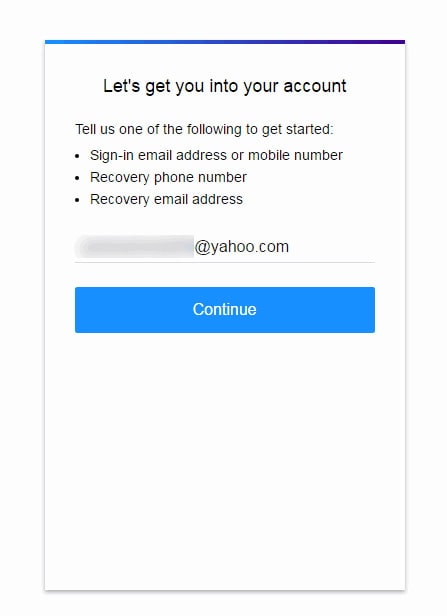
Step 2: Yahoo will show available recovery options. These might include old recovery emails or phone numbers. Select "I don't have access to this phone" or similar options.

Step 3: Follow the prompts. Yahoo may ask personal questions. Answer them carefully. The system might request the account creation date. It could ask for recent email subjects. Provide as much detail as possible.
Method 2: Answer Security Questions (If Previously Set)
Security questions are a classic recovery method. You may have set these up years ago. These questions ask for personal information that only you know. They provide an extra layer of verification.
How to use Answer Security Questions:
Step 1: Start at the Yahoo Sign-In Helper. Enter your email address. Select the option to answer security questions. Yahoo will display your preset questions.
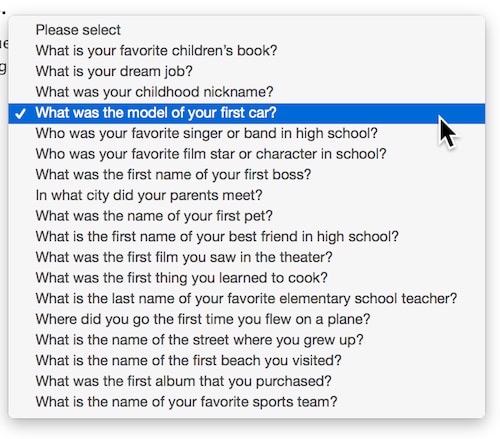
Step 2: Answer carefully. These are your old security questions. Match your original answers exactly, including capitalization. Common topics: mother's maiden name, first pet, birthplace. Submit once all are filled.
Method 3: Verify Identity Through Yahoo Support
Yahoo Support can manually verify your identity. This method takes more time. It requires detailed information about your account. Yahoo staff will review your case personally.
How to Verify Identity Through Yahoo Support:
Step 1: Visit the Yahoo Help Center. Search for "account recovery support" in the search box. Find the contact form or support ticket option. Fill out all required fields. Include your Yahoo email address. Provide your full name. Enter your account creation date if known. Describe when you last accessed your account.

Step 2: Clearly explain that you can't access your phone or alternate email. Share any account details you recall, recent email subjects, frequent contacts, purchase history, and past passwords if known. Then submit the form.
NOTE: Yahoo typically responds within 24-48 hours. Check your submission email regularly. Follow any instructions Yahoo provides promptly.
Method 4: Create a New Yahoo Account and Transfer Data (If Recovery Fails)
Sometimes recovery becomes impossible. All methods might fail. In this case, creating a new account is practical. You can then try to recover your data.
How to use Create a New Yahoo Account and Transfer Data:
Step 1: Visit Yahoo's main page. Click "Sign Up" to create a new account. Choose a new email address. Set a strong password. Add current phone number and alternate email. Verify your new account through these methods.
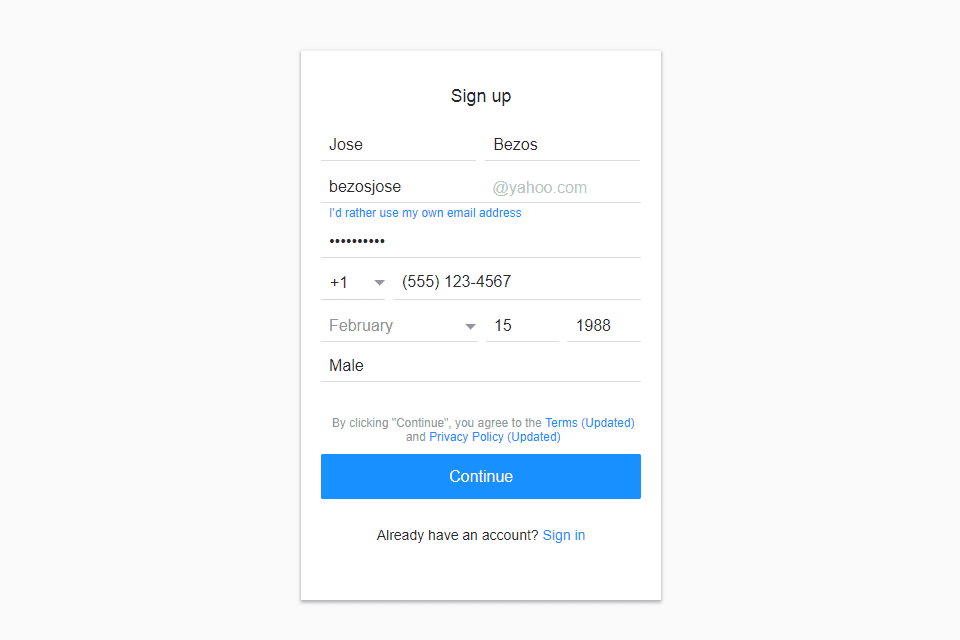
Step 2: Contact Yahoo Support from your new account. Explain that you're trying to recover your old account. Provide your old email address. Include all known details about it. Request any possible data transfer. Yahoo may retrieve some information.
At a minimum, inform your contacts about your new address. Send them emails explaining the situation. Ask them to update their contact lists.
Part 4: Bonus Tip: Protect Your Data with Recoverit
Data loss is a real concern during account recovery. Sometimes important files disappear. Emails might be deleted accidentally. Attachments can vanish during transfer processes. This is where Recoverit becomes valuable.
Recoverit is a powerful data recovery tool. It helps you retrieve lost files from your computer. If you downloaded Yahoo emails or attachments before the lockout, Recoverit can restore them. The software works on various file types. It recovers documents, photos, videos, and emails. Many users rely on it daily.
The tool scans your entire system. It finds deleted or lost files. Recoverit can recover data from crashed computers. It works on formatted drives too. The software has a high success rate. It supports Windows and Mac systems.
Step 1: Download Recoverit. Install it on your computer. Launch the application after installation completes.

Step 2: Select the location where your files were stored. This could be your main hard drive. It might be an external drive. Choose the specific folder if you know it. Click "Start" to begin scanning.

Step 3: Wait for the scan to complete. Review the found files. You can preview them before recovering. Select the files you need. Click the "Recover" button. Choose a safe location to save them. Never save to the same location where they were lost.

Related Video >>: How to Recover Permanently Deleted Files from PC?

Part 5: Preventive Tips for Future Account Recovery
Prevention is better than recovery. Taking simple steps now saves trouble later. You can avoid lockout situations entirely. Here's how to protect your account access.
Set up these protections today:
- Update recovery options regularly: Check your phone number and alternate email every few months.
- Use multiple recovery methods: Don't rely on just one phone or email for verification.
- Enable security questions: Set memorable questions with answers you won't forget over time.
- Keep account activity current: Log in regularly to keep your account active and updated.
- Document account details: Write down your account creation date and other important information securely.
- Use password managers: Store your passwords in encrypted managers like LastPass or Bitwarden.
- Enable two-factor authentication: Add extra security that also provides alternative recovery paths available.
- Save important emails locally: Download critical emails to your computer for backup using email clients.
Conclusion
Learning how to recover Yahoo password without phone number and alternate email is essential. Your account contains valuable data. Losing access doesn't mean losing everything.
Multiple recovery methods exist for different situations. Start with Yahoo Sign-In Helper first. Try security questions if you set them up. Contact Yahoo Support for manual verification. Create a new account as a last resort. Remember to protect your data with tools like Recoverit.
Most importantly, set up preventive measures now. Update your recovery options regularly. This ensures you'll never face this problem again. Your digital life deserves protection. Take action today to secure your Yahoo account.
FAQs
-
Q1: Can I recover my Yahoo password if I don't remember any account details?
Recovery becomes challenging without account details. However, you can still try Yahoo Support. They might verify your identity through other means. Provide any information you can remember. This includes contacts you emailed frequently. Mention any Yahoo services you used, like Fantasy Sports. List any purchases made through your account. Even partial information helps. Yahoo staff may ask additional questions to verify ownership. The process takes longer but remains possible. Be patient. -
Q2: How long does Yahoo Support take to respond to recovery requests?
Yahoo Support typically responds within 24 to 48 hours. Complex cases might take up to one week. Response time depends on case volume. It also depends on information completeness. Providing detailed account information speeds up the process. Check your email regularly for responses. Sometimes replies go to spam folders. If you don't hear back in one week, submit a follow-up request. -
Q3: Is it safe to use third-party tools to learn how to recover Yahoo password?
Third-party password recovery tools are risky. Many are scams or contain malware. They cannot actually access Yahoo's servers. Yahoo doesn't authorize these tools. Some steal your information instead. Stick to official Yahoo recovery methods only. Use Yahoo Sign-In Helper directly. Contact Yahoo Support through official channels. Never pay anyone claiming to hack your account. These are fraudulent services.



