If your search to find an Office 2010 product key has led nowhere, start with your original purchase records: the software packaging, product key card, or purchase confirmation email. A compatible key finder can sometimes read a stored key from an existing installation, but Microsoft’s own OSPP.VBS script shows only the last five characters. Previously saved license documents and backups give you additional places to check.
Keep in mind that Office 2010 ended support on October 13, 2020, and Microsoft no longer hosts the usual 2010 installer download. Having the key is not necessarily enough to reinstall the software.
In This Article
-
- Method 1. Check the Original Office 2010 Packaging or Product Key Card
- Method 2. Find the Product Key in Purchase Emails and Order History
- Method 3. Check the Certificate of Authenticity on a Preinstalled PC
- Method 4. Find the Installed Office 2010 Key Details Using Command Prompt
- Method 5. Retrieve the Office 2010 Product Key Using a Key Finder
- Method 6. Search Saved Product Key Files and Backups
Part 1. Where Is the Microsoft Office 2010 Product Key Located?
The Office 2010 product key location varies by purchase method and license type. According to Microsoft, some copies include a key on an Office Certificate of Authenticity (COA), but not every license identifier can activate the software.
Neither the Product ID nor the partial key shown on an installed computer is enough to activate Office. The table below distinguishes a valid product key from other identifiers.
| Code | Format | Where It Appears | Can Activate Office 2010? |
| Product key | 25 alphanumeric characters in 5 groups | Box label, key card, purchase email, Office COA | Yes, if valid and edition-compatible |
| Product ID | Numeric or alphanumeric identifier | Office Help screen | No |
| Partial product key | Last 5 characters of the installed key | OSPP.VBS /dstatus output | No |
| Windows COA key | 25 alphanumeric characters | Windows authenticity label on the PC | No, it activates Windows |
| Key card PIN | 27 characters on applicable cards | Office 2010 PIN-based purchase cards | No, PIN redemption has ended |
What Does an Office 2010 Product Key Look Like?
According to Microsoft’s Office 2010 key guide, a product key contains 25 alphanumeric characters in five groups separated by hyphens, shown here as XXXXX-XXXXX-XXXXX-XXXXX-XXXXX. Unlike a Product ID, this code validates the license during activation. Some purchase cards carried a 27-character PIN that users previously redeemed for a product key.
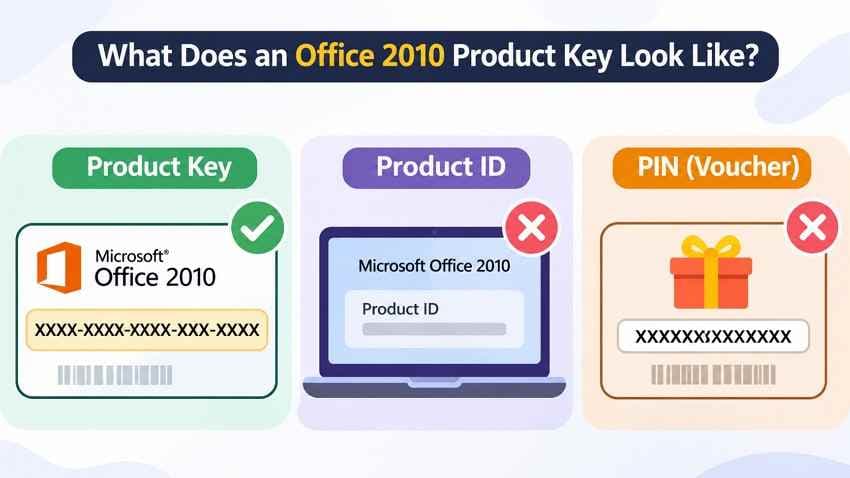
Note: Microsoft warns that product keys sold separately from the software may be stolen or unauthorized. Avoid suspicious third-party key sellers.
Can You Find the Full Office 2010 Product Key on an Installed PC?
A compatible key finder can sometimes read the full Office 2010 product key from an existing installation, but Microsoft’s built-in OSPP.VBS script reveals only the last five characters. Successful retrieval depends on the license type and available installation data; volume-licensed copies can return generic keys that do not work for retail activation. For employer-issued licenses, contact your organization’s IT department.
Important: Microsoft ended Office 2010 support on October 13, 2020, so the software no longer receives security updates or technical support.
Part 2. How to Find Microsoft Office 2010 Product Key
The right method to find a Microsoft Office 2010 product key depends on your purchase history and access to the original computer. Some methods reveal the complete key, while others only verify existing license information.
| Method | What It Reveals | Main Limitation |
| Packaging or key card | Full 25-character key or redemption PIN | Damaged labels or discontinued PIN redemption |
| Purchase email or order history | Original product key, if available | Deleted emails or inaccessible store accounts |
| Office COA label | Product key for eligible preinstalled copies | Missing or unreadable Office COA |
| OSPP.VBS /dstatus | License status and last 5 key characters | Cannot display the complete key |
| ProduKey key finder | Stored product key and Product ID | License restrictions or unavailable key data |
| Saved files and backups | Previously saved product key information | Deleted, corrupted, or overwritten files |
Method 1. Check the Original Office 2010 Packaging or Product Key Card
Retail copies of Office 2010 typically include a product key label inside the case or on an accompanying card. According to Microsoft, the exact location depends on how you purchased the software. Some older purchase cards contain a 27-character PIN instead of a key, and Microsoft no longer accepts these PINs for redemption.
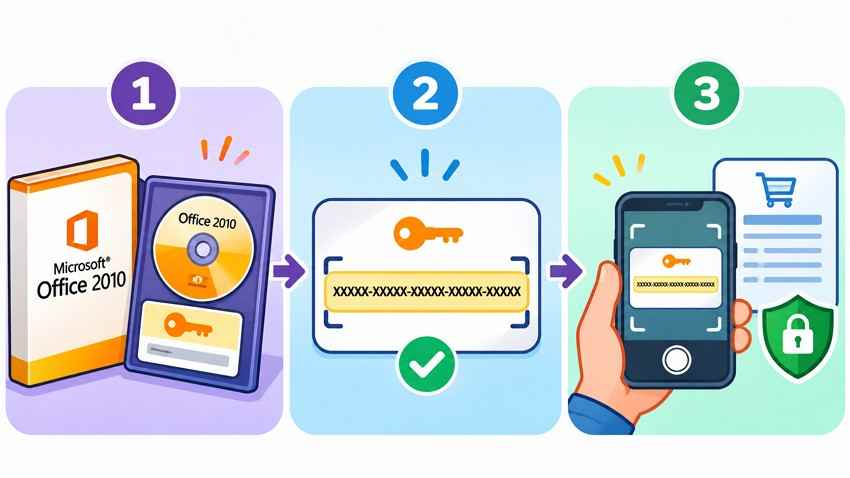
Step 1. Open the case. Check the inside cover, disc holder, and accompanying product key card.
Step 2. Locate the key. Find the 25-character product key and verify it follows the XXXXX-XXXXX-XXXXX-XXXXX-XXXXX format.
Step 3. Record it. Take a clear photograph of the label and store it with your purchase invoice.
Method 2. Find the Product Key in Purchase Emails and Order History
Digital purchases often included product keys in confirmation emails or online order records. Microsoft identifies Microsoft Store order history and Digital River’s lookup service as possible sources, but Digital River suspended services for most customers by early 2025, so older records through that service may be inaccessible.
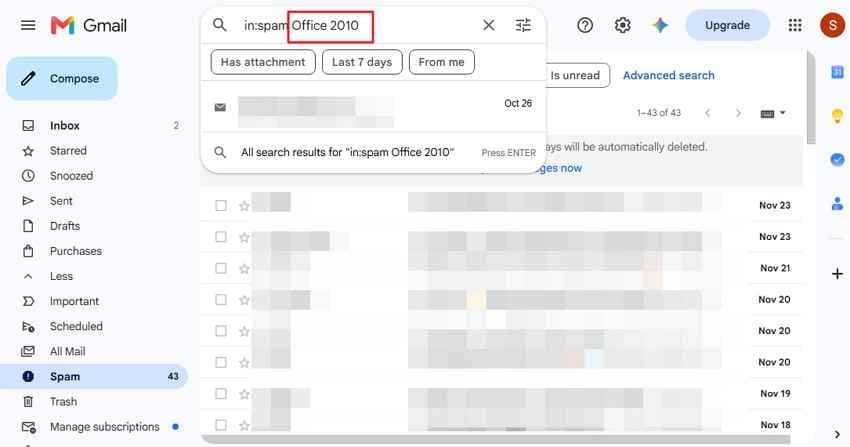
Step 1. Search email. Search your inbox, spam, and archived email for "Office 2010", "Product Key", or the retailer’s name.
Step 2. Check order history. Log in to the account used for the original purchase and locate your Office 2010 order.
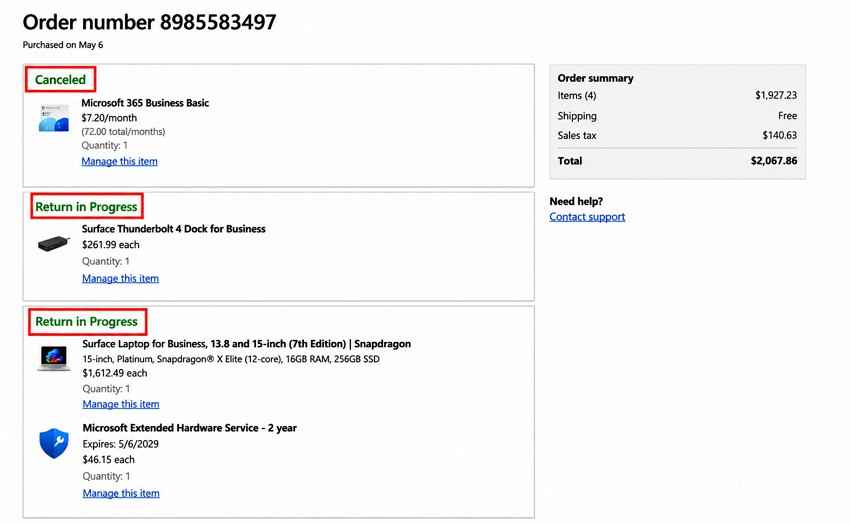
Step 3. View the key. Check the order details or press Install Office, if available, to view the product key.
Method 3. Check the Certificate of Authenticity on a Preinstalled PC
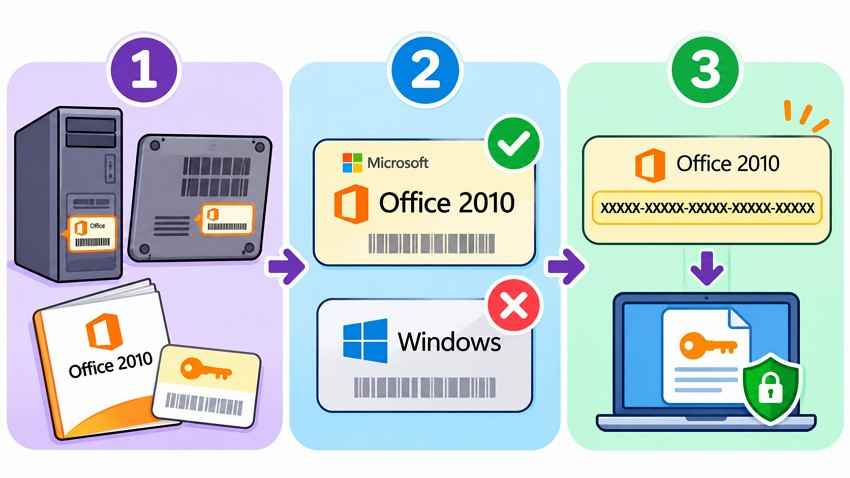
Computers sold with a licensed copy of Office 2010 may include a separate Certificate of Authenticity (COA). A Microsoft moderator recommends checking for a label that specifically identifies Microsoft Office 2010.
The Windows COA contains licensing information for the operating system, not Office. Confirm the label references Office before relying on it.
Step 1. Check the machine. Look at the computer case, underside, and original documentation for an Office authenticity label or key card.
Step 2. Verify the label. Confirm it identifies Microsoft Office 2010 rather than Windows.
Step 3. Record the key. Copy the 25-character product key, if present, for future installation or activation.
Method 4. Find the Installed Office 2010 Key Details Using Command Prompt
Command Prompt gives you a built-in way to check Office 2010 licensing information. According to Microsoft Learn, running OSPP.VBS requires administrator privileges, and its /dstatus option shows license details without changing activation settings. It reports the last five characters of the installed key, not the full key.
| Office and Windows Setup | Default OSPP.VBS Folder |
| 32-bit Office on 32-bit Windows | C:\Program Files\Microsoft Office\Office14 |
| 64-bit Office on 64-bit Windows | C:\Program Files\Microsoft Office\Office14 |
| 32-bit Office on 64-bit Windows | C:\Program Files (x86)\Microsoft Office\Office14 |
Step 1. Open Command Prompt. Open the Start menu, type cmd, right-click Command Prompt, and select Run as Administrator.
Step 2. Navigate to the Office14 folder. For 32-bit Office on 32-bit Windows or 64-bit Office on 64-bit Windows, run:
cd /d "C:\Program Files\Microsoft Office\Office14"
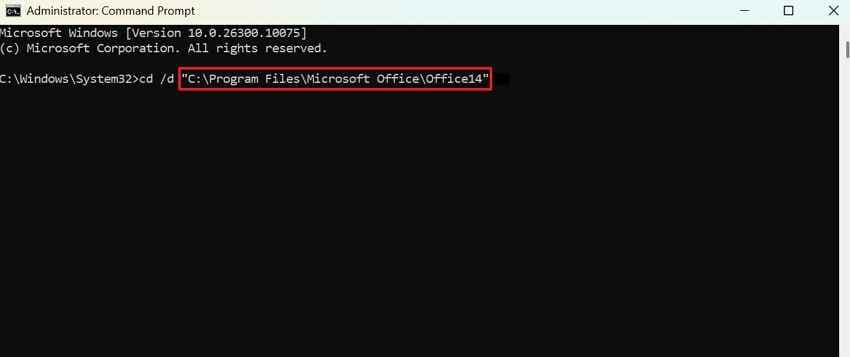
For 32-bit Office on 64-bit Windows, run:
cd /d "C:\Program Files (x86)\Microsoft Office\Office14"
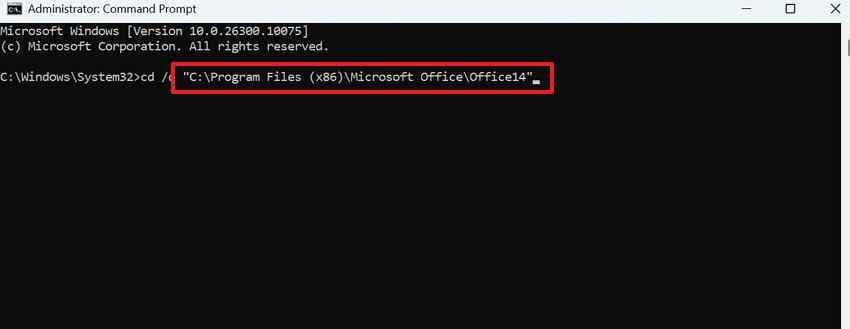
Step 3. Run the status command. Enter and run:
cscript ospp.vbs /dstatus
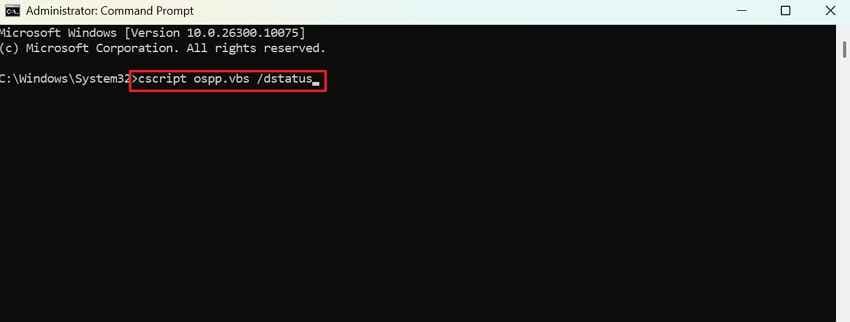
Step 4. Read the result. Find the "Last 5 Characters of Installed Product Key" entry and compare it with your existing records.
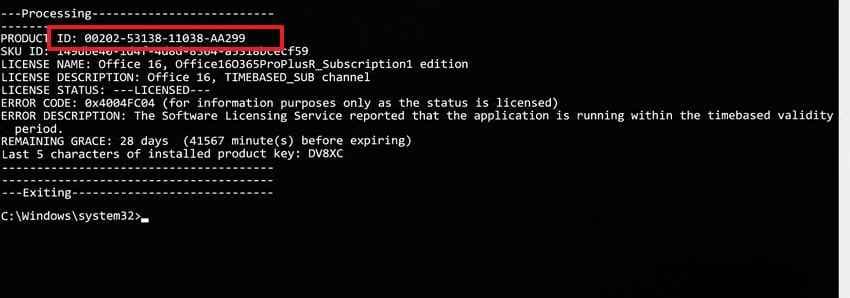
Note: This command only shows license information; it does not reveal the full key or modify activation status.
Method 5. Retrieve the Office 2010 Product Key Using a Key Finder
NirSoft ProduKey is a portable utility for viewing stored Office licensing information, including detected software, Product IDs, and available product keys. Treat a key finder as an optional, unverified third-party tool: it reads existing license data and does not guarantee a full key or successful activation.
Some antivirus programs flag ProduKey because it accesses sensitive licensing data, so download it only from NirSoft’s official website and avoid unofficial copies.
Step 1. Download ProduKey. Visit the official NirSoft page and download the ZIP for your Windows architecture. Extract and run ProduKey.exe without installing.
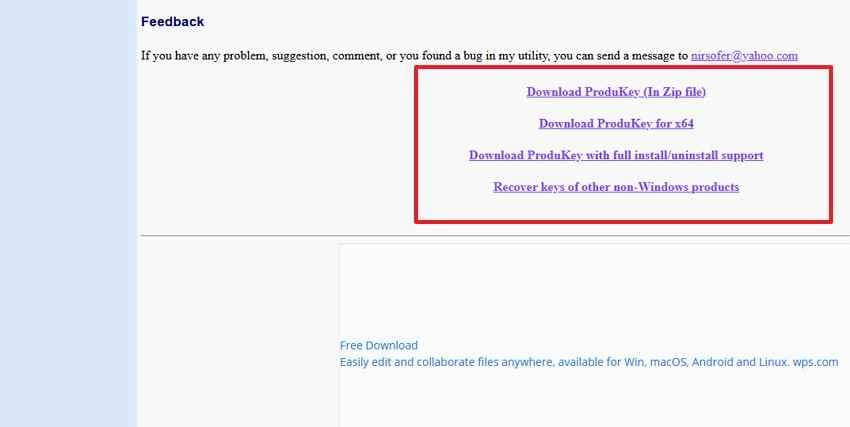
Step 2. Find Office 2010. Locate Microsoft Office 2010 in the detected software list and check its Product Key column.
Step 3. Verify. Compare the last 5 characters of the retrieved key with the OSPP.VBS output from Method 4.
Note: Matching characters do not guarantee activation; ProduKey retrieves existing license information rather than generating new keys.
Method 6. Search Saved Product Key Files and Backups
Previously recorded keys can remain in local folders, external drives, or cloud backups. According to Microsoft’s search guide, searching from This PC is more thorough than from Home. Expand your search to password managers and older backups.
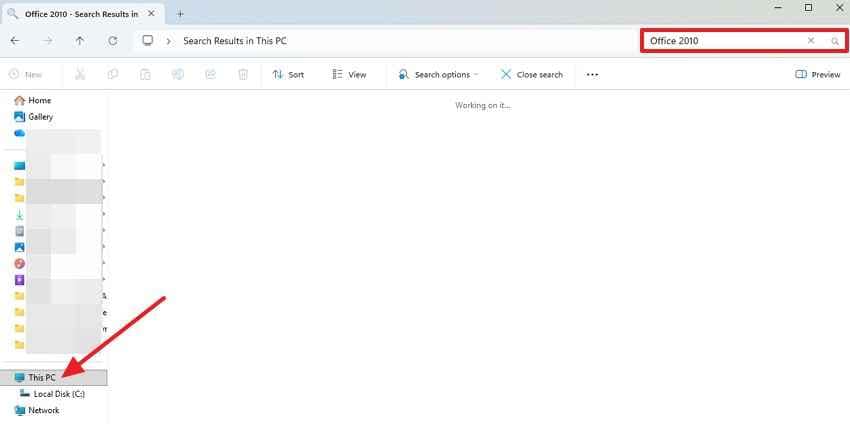
Step 1. Search This PC. Open File Explorer, select This PC, and search for "Office 2010", "Product Key", or "License". Repeat across external drives and cloud folders.
Step 2. Check trash. Open the Recycle Bin or your cloud storage’s trash folder and restore any deleted license files. Microsoft confirms OneDrive retains deleted files for 30 days on personal accounts, and 93 days on work or school accounts unless an admin changes it.
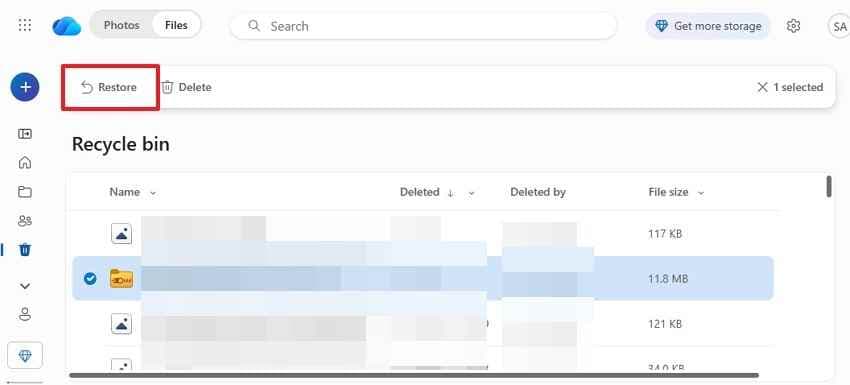
Step 3. Read the key. Open the located document and check for the complete 25-character key.
Part 3. What to Do If You Cannot Find Your Office 2010 Product Key
Losing access to your key does not necessarily mean losing your license. Gather receipts, invoices, and available license details to establish proof of purchase, but Microsoft’s discontinued Office 2010 support limits assistance for older licenses.
| Situation | Evidence to Gather | Next Step |
| Only the last 5 characters available | OSPP.VBS output, invoices, purchase emails | Match existing records or contact your organization’s IT department |
| Key lost or label damaged | Purchase receipt, key card, packaging, COA photos | Contact the original retailer or PC manufacturer |
| Key found, installer missing | Product key, Office edition, installation records | Locate compatible installation media or upgrade to a supported version |
1. The Product Key Is Missing From the Installed PC
If key finders cannot retrieve the full key, the original license data may be inaccessible. Avoid unauthorized key generators and activation patches, which can expose your computer to malware and violate licensing terms. Compare purchase records with the last 5 characters shown by OSPP.VBS; if nothing matches, contact the retailer or your organization’s IT department.
2. The Original Office 2010 Product Key Is Lost or Damaged
A faded label or misplaced card makes it harder to recover the key. Microsoft’s product key guidance says purchase documentation can help owners of damaged keys get assistance, but it does not guarantee replacement keys for discontinued Office versions.
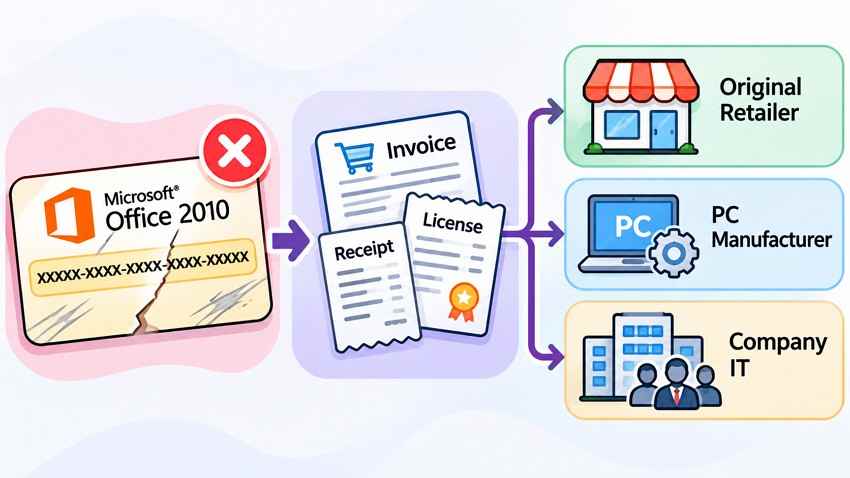
Ask the retailer or PC manufacturer whether they keep historical purchase records. For volume-licensed copies, an authorized licensing administrator can check your organization’s records.
3. You Have the Product Key but Cannot Reinstall Office 2010
A valid key alone is not enough without compatible installation files. Microsoft’s setup error guide confirms Office.com/setup no longer supports Office 2010 keys. Reinstallation requires the original disc or saved setup files plus an edition-compatible key; newer Office keys and Microsoft 365 subscriptions cannot activate Office 2010.
Continuing to use Office 2010 exposes your computer to unpatched security vulnerabilities. Microsoft’s end-of-support notice confirms Office 2010 stopped receiving security updates in October 2020, so consider upgrading to a supported version.
Part 4. Recover Deleted Office 2010 Product Key Files Using Recoverit
If you still cannot find your key, you may be able to recover previously saved license records such as product key screenshots, digital purchase receipts, text documents, or archived confirmation emails. Accidental deletion, drive formatting, or an emptied Recycle Bin can make these files inaccessible, but recovery is possible when the original data remains intact and the storage device is readable.
Recoverit File Recovery retrieves lost files from internal drives, external hard drives, USB drives, and memory cards. It supports over 1,000 file formats, including TXT, DOCX, PDF, PNG, PST, and EML. Recoverit restores previously saved license files rather than extracting or generating Office product keys, and it cannot bypass activation. Recovery success depends on storage conditions, data overwriting, and SSD TRIM.
Key features:
- AI-powered search: uses natural-language queries to locate product key screenshots without original filenames.
- File filters: narrows scan results by file type, size, and date to locate specific license records.
- Formatted drive recovery: retrieves license documents from accidentally formatted storage.
- Emptied Recycle Bin recovery: restores deleted product key files after emptying the Windows Recycle Bin, if data remains recoverable.
- Crashed computer recovery: creates bootable recovery media to retrieve files from computers that will not start.
How to Recover Deleted Office 2010 Product Key Files With Recoverit
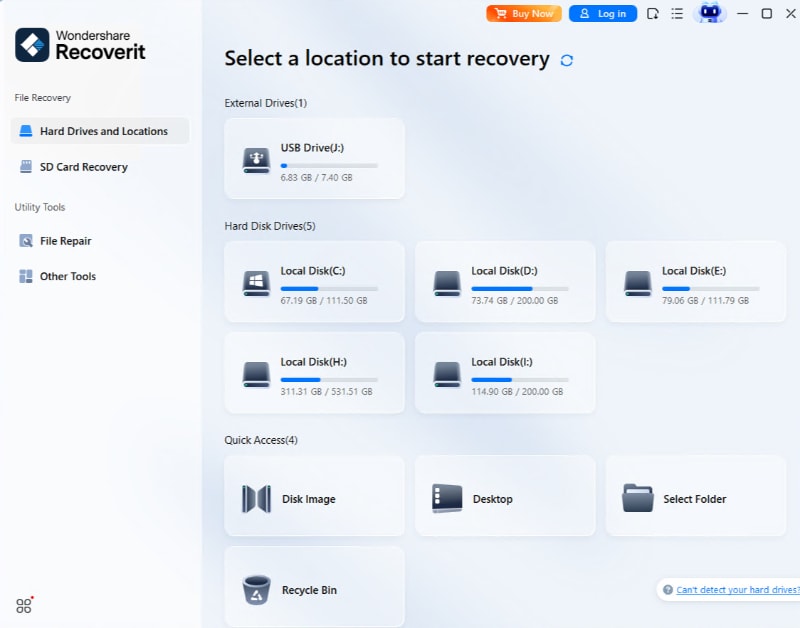
Step 1. Scan the drive. Launch Recoverit and select Hard Drives and Locations from the left sidebar. Choose the drive where your license documents were stored.
Step 2. Search for files. As the scan progresses, narrow results using file type filters or use AI Search to locate product key screenshots.
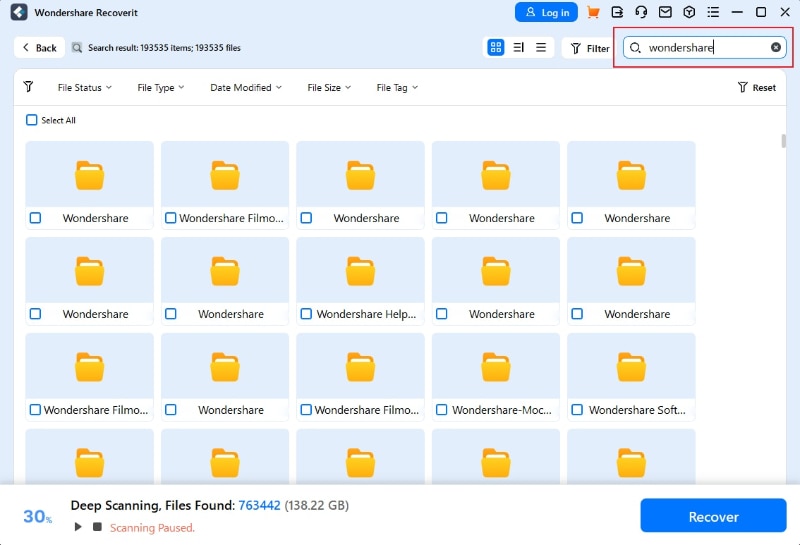
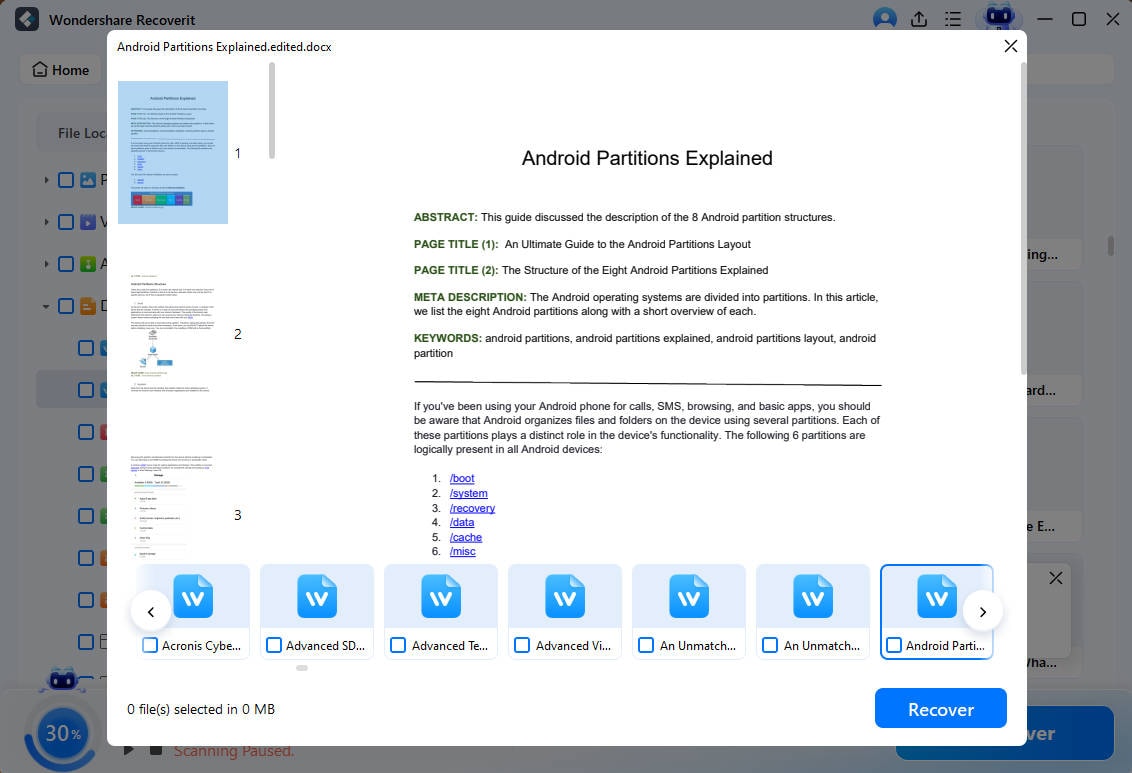
Step 3. Preview and recover. Check recoverable files with the preview feature, then hit Recover and save them to a different drive.
Conclusion
Finding a lost Office 2010 product key starts with your proof of purchase: the packaging, key card, purchase email, or a COA label. On an installed PC, OSPP.VBS shows only the last five characters, and a key finder reads existing license data rather than guaranteeing a full key. Confirm you still have the original installation media before relying on the key to reinstall.
If your license details were stored in a deleted document, Recoverit File Recovery can help restore that file from readable storage. Recoverit cannot generate an Office license or bypass activation, and continuing to use unsupported Office 2010 carries security risks.
FAQ
-
Can I find my Office 2010 product key in the Windows Registry?
The Windows Registry can contain encoded Office 2010 key data, but Registry Editor does not display the complete key in readable form. Tools like ProduKey can decode available data, while OSPP.VBS shows only partial keys. -
Can I find my Office 2010 product key without the original computer?
Check physical purchase records, receipt emails, and license documents from another device. You can also connect the old drive through a USB adapter and use ProduKey’s /external option to read available keys from a supported Windows installation on that drive. -
Can I use an Office 2010 product key to activate a newer Office version?
Office 2010 product keys activate compatible editions such as Home and Student or Professional. Microsoft’s online setup portal no longer supports Office 2010 keys, and newer versions including Office 2024 and Microsoft 365 require separate licenses or subscriptions.


