
 TL;DR:
Choose the Samsung EVO Plus for dependable, everyday storage on devices like phones or the Nintendo Switch, but upgrade to the Samsung PRO Plus if your workflow requires sustained write performance for 4K video recording and heavy file transfers.
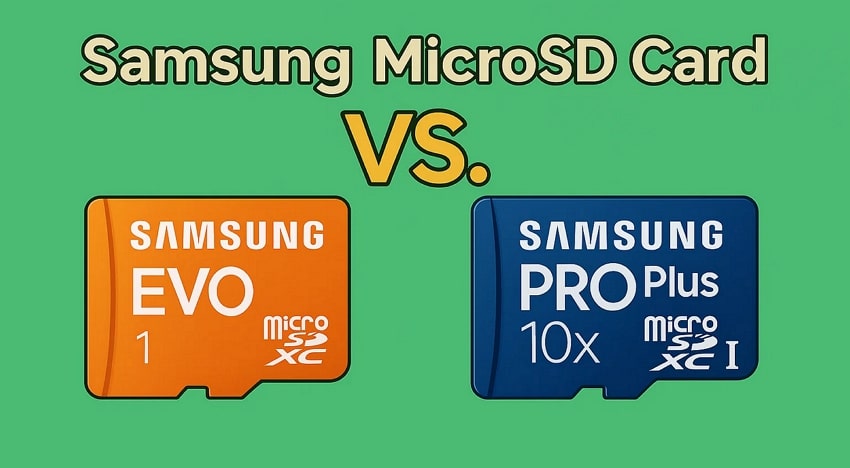
● The PRO Plus card features faster advertised read speeds up to 180MB/s and an A2 app class rating, while the EVO Plus peaks around 130MB/s with an A1 rating.
● Paying extra for the PRO tier is only justified if your hardware actually utilizes U3 or V30 video-class speeds, because everyday casual usage will not benefit from this higher performance headroom.
● Always secure or extract the existing files on your old microSD card before repurposing or formatting it, noting that data recovery tools cannot retrieve files if the card hardware has physically failed.
Ask AI for a summary
 ChatGPT
 Perplexity
 Gemini
 Claude
 Grok
Grok
⚡ TL;DR: Fast Buying Answer
● Buy Samsung EVO Plus if you need dependable extra storage for a phone, tablet, Nintendo Switch, or everyday photos and videos.
● Buy Samsung PRO Plus if you record 4K video, use an action camera or drone, or want faster sustained performance and more creator headroom.
● The upgrade is not automatically worth it: if you never shoot demanding video or move large files often, EVO Plus is usually enough.
● The real difference is workload, not just branding: PRO Plus is the more performance-oriented card, while EVO Plus is the better-value mainstream card.
● Before replacing your old Samsung card, protect the files on it first: copy them out or recover them before formatting or reuse.
Quick answer: In most everyday use, Samsung EVO Plus is the smarter buy because it gives you solid storage performance without making you pay extra for speed you may never use. Samsung PRO Plus becomes the better choice when your device or workflow actually benefits from stronger sustained write performance, higher video-class support, and faster creator-style transfers.
If you are searching samsung evo plus vs pro plus, you usually want one of three answers fast: which one is better, whether PRO Plus is really worth paying more for, and whether the extra speed changes anything on your actual device. This guide is built to answer those pain points directly instead of burying them under generic microSD explanations.
In This Article
Part 1. The Real Buying Verdict: EVO Plus Or PRO Plus?
If you want the shortest honest answer, choose EVO Plus for mainstream storage and choose PRO Plus for heavier capture and faster transfer work.
| If You Need... | Better Pick | Why |
| Phone or tablet storage | Samsung EVO Plus | You usually do not need to pay more for creator-grade write headroom |
| Nintendo Switch storage | Samsung EVO Plus | It is usually the better-value card for game installs and screenshots |
| 4K action camera or drone recording | Samsung PRO Plus | Higher-speed, creator-focused positioning makes it the safer fit |
| Frequent large file transfers | Samsung PRO Plus | The stronger performance profile helps more in repeated transfer workflows |
| Best value for everyday use | Samsung EVO Plus | You avoid overspending on speed your device may never use |
That is the real answer behind most searches like samsung pro vs evo, evo plus vs pro, and samsung pro sd card vs evo: PRO Plus is not automatically better for everyone, but it is better when your use case is demanding enough to benefit from it.
Part 2. First, Clear Up The Name Confusion
A big reason this keyword cluster exists is naming confusion. Searchers mix up EVO, EVO Plus, PRO, PRO Plus, and even phrases like samsung evo plus vs evo pro. If you are comparing current Samsung microSD cards, the practical mainstream comparison is usually EVO Plus vs PRO Plus, not an abstract "EVO vs PRO" discussion detached from current product naming.
| Name You See In Search | What You Should Focus On | Why It Matters |
| EVO / EVO Plus | Mainstream everyday line | Usually the better value for normal storage needs |
| PRO / PRO Plus | Higher-performance line | More relevant for heavy recording and faster transfer work |
| EVO Plus vs PRO Plus | The real buyer comparison | This is where most purchase decisions happen today |
This clarification matters because a comparison page should reduce confusion, not echo it. If you are choosing what to buy now, focus less on legacy naming noise and more on whether you need a mainstream card or a performance-oriented card.
Part 3. Samsung EVO Plus vs PRO Plus Specs That Actually Affect Your Choice
Specs only matter when they change your real-world experience. That is why the useful comparison is not just a list of numbers. It is what those numbers mean for your device and workload. B&H's Samsung EVO Plus listing highlights EVO Plus around up to 130MB/s read performance and A1-class app use, while B&H's Samsung PRO Plus listing highlights a faster profile up to 180MB/s with A2 and creator-oriented positioning. For video and capture workloads, Kingston's memory card speed class guide is also useful because it explains why classes such as U3 and V30 matter more once you move into heavier recording.
| Spec Area | Samsung EVO Plus | Samsung PRO Plus | What It Means In Real Use |
| Advertised read speed | Up to about 130MB/s | Up to about 180MB/s | PRO Plus helps more when moving larger files or working faster between devices |
| App class | A1 | A2 | PRO Plus is the stronger fit if you care about heavier app-style storage behavior |
| Video / creator positioning | Mainstream use | U3 / V30 oriented | PRO Plus is the safer choice for demanding video workflows |
| Typical buyer fit | Phone, tablet, Switch, casual storage | Action cam, drone, 4K capture, faster transfer use | The best choice depends on workload, not just brand preference |
1. Write Performance Matters More Than Read-Speed Marketing
Many shoppers focus on the biggest read-speed number first, but your frustration often shows up during writing, not reading. If you only store media and browse files, EVO Plus may feel perfectly fine. If you push the card with longer recording sessions or heavier capture, the stronger performance headroom on PRO Plus matters more.
2. Device Fit Is More Important Than Winning On Paper
A "better" card on paper is not automatically the better buy for you. If your device and use case never stress the card, the extra money for PRO Plus may add very little in daily use. That is why this comparison has to stay tied to workload, not just numbers.
Part 4. Which Card Should You Buy For Your Device?
| Device / Use Case | Recommended Card | Why |
| Android phone for photos, media, and downloads | Samsung EVO Plus | Strong enough for mainstream storage without unnecessary extra spend |
| Nintendo Switch | Samsung EVO Plus | Better-value storage for games and screenshots |
| Full HD dash cam or casual recording | Samsung EVO Plus | Often enough if your workload is modest |
| 4K action camera or drone | Samsung PRO Plus | The stronger creator-oriented profile makes it the safer fit |
| Frequent creator transfer workflow | Samsung PRO Plus | More sensible if you move large media files often |
For Switch buyers, storage value matters more than creator-grade write speed. Nintendo's microSD support guidance confirms the Switch is built around microSD storage use, which is why many shoppers do fine with EVO Plus unless they simply want a higher-end card for broader reuse elsewhere.
Part 5. When Is PRO Plus Worth Paying More For?
This is the decision point most comparison pages fail to answer clearly. PRO Plus is worth paying more for only when the extra performance changes your real use.
- Buy EVO Plus if your main goal is dependable storage for a phone, tablet, or Switch.
- Buy PRO Plus if you record 4K, use creator gear, or transfer larger files often enough to benefit from higher performance.
- Do not pay more just for the name if your actual workload stays in casual storage and ordinary media use.
If you are still unsure, ask one direct question: Will this card be used for demanding capture or heavy repeated transfers? If yes, PRO Plus is the safer long-term choice. If no, EVO Plus is usually the smarter value buy.
Part 6. What To Do Before Replacing Or Reusing Your Samsung SD Card
Buying the new card is the easy part. The real risk starts when you remove the old one. If your current Samsung card still contains photos, videos, recordings, or project files, do not format it or repurpose it until those files are safely copied out.
If the old card becomes unreadable, shows missing files, or gets formatted by mistake during the move, Recoverit SD card recovery can help recover files from a readable Samsung SD card or microSD card before you try to reuse it.
- Connect And Select The Card: Insert the Samsung card into a stable card reader and open Recoverit on your computer.
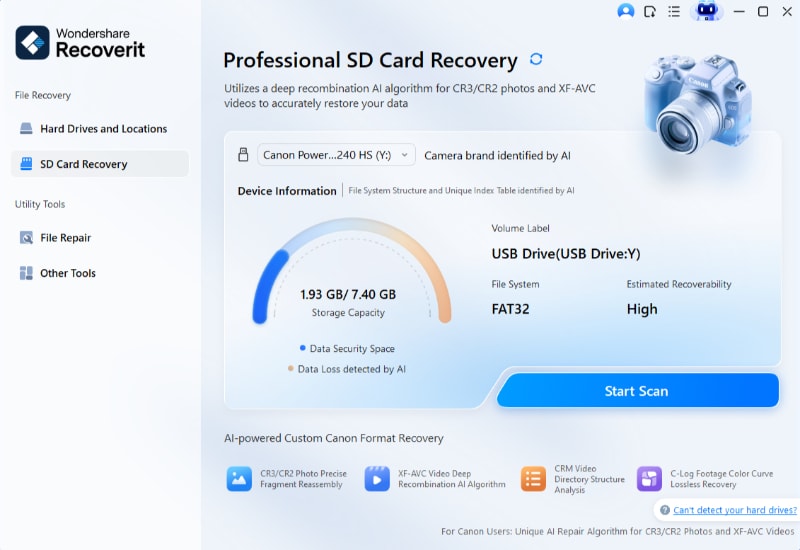
- Scan The Card: Let Recoverit scan for deleted, hidden, or lost files before you do anything destructive.
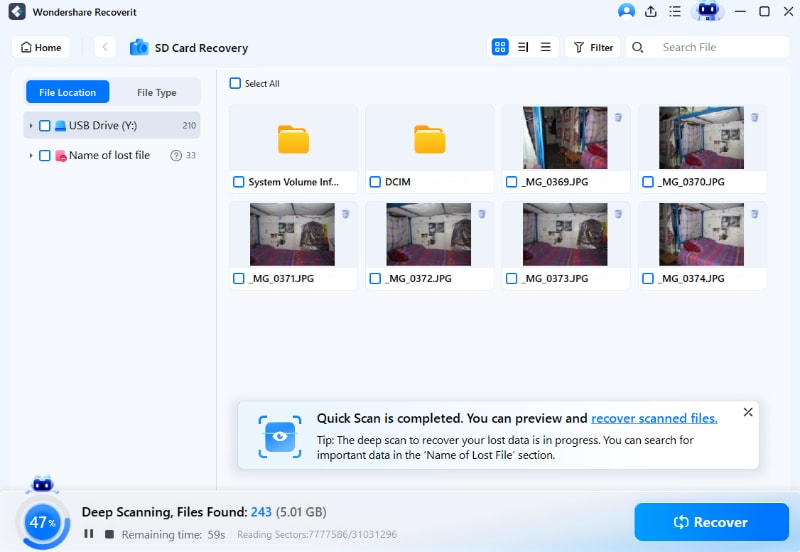
- Preview And Save Elsewhere: Recover what you need and save it to another drive, not back to the same card.

Recoverit can help recover files from readable storage, but it cannot repair physically failed card hardware or guarantee recovery in every case.
Try Wondershare Recoverit to Perform Data Recovery
 Security Verified. Over 7,302,189 people have downloaded it.
Conclusion
If your goal is everyday storage with good value, choose Samsung EVO Plus. If your goal is heavier recording, faster transfers, and more performance headroom, choose Samsung PRO Plus. That is the real answer behind most searches comparing Samsung EVO and PRO lines.
The smartest upgrade move is simple: match the card to the workload, not the marketing tier, and protect your old files before you switch cards.
FAQ
-
Is Samsung EVO Plus Or PRO Plus Better?
PRO Plus is the stronger performance card, but EVO Plus is usually the better-value option for mainstream storage needs. -
Is Samsung EVO Plus Good Enough For Nintendo Switch?
Yes. For many buyers, EVO Plus is enough for Switch storage because it offers dependable everyday performance without making you pay extra for creator-grade speed. -
Is Samsung PRO Plus Better For 4K Recording?
Yes. If you shoot 4K video on action cameras, drones, or other more demanding gear, PRO Plus is usually the safer choice. -
What Is The Real Difference Between Samsung PRO Vs EVO SD Card Lines?
The real difference is workload. EVO cards fit mainstream storage better, while PRO cards make more sense for heavier capture and faster transfer use. -
When Is PRO Plus Worth Paying More For?
It is worth paying more for when your real use includes 4K recording, more demanding creator gear, or repeated large-file transfers. If not, EVO Plus is often the smarter value choice.


