 TL;DR:
H.265 (HEVC) provides up to 50% better compression efficiency than H.264 (AVC), enabling smaller file sizes and lower bandwidth streaming without sacrificing video quality.
● H.264 supports resolutions up to 1080p and requires lower processing power, making it the required choice for maximum compatibility on older devices, basic mobile video, and smoother editing workflows on legacy hardware.
● H.265 supports advanced 4K and 8K resolutions for high-efficiency storage, but its complex encoding means playback relies heavily on newer hardware or turning on hardware acceleration in your media player to decode smoothly.
Ask AI for a summary
 ChatGPT
 Perplexity
 Gemini
 Claude
 Grok
Grok
What makes one video file smaller than another while still looking sharp? This happens because of video compression formats. These formats reduce size and keep picture quality good enough for daily use.
Two common formats are H.264 and H.265. Most people meet these when recording on phones, streaming movies, or uploading clips online. You may see both and wonder how they differ. You might also ask which one works better for your device or project.
This guide explains H.264 vs H.265 in clear terms, so you understand what is H264 and what is H265. It also shows when each format is useful and how to choose the right one.
Table of Contents
Part 1: Understanding the H.264 and H.265 Formats
To begin, we need to understand what is H264. H.264 is also called AVC. The full name is Advanced Video Coding. It became popular because it provided good quality at moderate file sizes.
Most phones, cameras, and online platforms support it. When you watch online streams at standard quality, there is a strong chance the video is H.264. This explains why many people talk about H.264 vs H.265. The video codec H.264 vs H.265 is important for storage, playback, and sharing.
Now, let us look at what is H265. H.265 is also known as HEVC. The full name is High Efficiency Video Coding. It came after H.264. Many people look at H.264(AVC) vs H.265 (HEVC) because H.265 can reduce file size more than H.264. H.265 keeps more detail at a lower bitrate.
Many online services now use it to save space. Phones and TVs also support it. The difference between H.264 and H.265 lies mostly in how much compression you get. People often ask is H265 better than H264. The short answer is yes in many cases. Yet there are reasons to still use H.264.
Part 2: Quick Comparison: H.264 vs H.265
People often compare H264 vs H265 to pick the right format. The comparison is simple. H.265 compresses video more than H.264. It keeps better detail at a smaller size.
This helps when you stream or store large files. The video codec H.264 vs H.265 question matters when you need smooth playback with low bandwidth. We now present a table. It shows the basic difference between H.264 and H.265. This helps answer is H265 better than H. H264 for your use.
Comparison Table:
Here’s a quick comparison table highlighting the key differences between H.264 (AVC) and H.265 (HEVC):
| Feature | H.264 (AVC) | H.265 (HEVC) |
| Compression Efficiency | Moderate | High (up to 50% better than H.264) |
| File Size | Larger | Smaller for the same quality |
| Video Quality | Good | Better at the same bitrate |
| Supported Resolutions | Up to 1080p | Up to 8K |
| Encoding Complexity | Lower | Higher (requires more processing power) |
| Decoding Requirements | Less demanding | More demanding (needs newer hardware) |
| Streaming Efficiency | Less efficient | More efficient (saves bandwidth) |
| Compatibility | Widely supported across devices/platforms | Limited support on older devices |
| Use Cases | Web streaming, mobile video | 4K/8K video, high-efficiency storage |
The table shows the core points in the H.264(AVC) vs H.265 (HEVC) comparison. It guides your choice.
Part 3: Why Users Compare H.264 vs H.265? Common Reasons
People look at H.264 vs H.265 because video is part of daily life. The difference between H.264 and H.265 affects storage, playback, and sharing. Many also review H264 vs H265 before editing or uploading. They also ask what is H264 and what is H265 when they see file details.
Here are common reasons.
• Smaller files Smaller files are easier to upload and share. H.265 helps reduce the size more than H.264.
• Better quality Some users want better quality at the same bitrate. They compare video codec H.264 vs H.265 to see which is sharper.
• Streaming needs Smooth playback matters. Users ask is H265 better than H264 for streaming. They want fewer pauses.
• Hardware support Not all devices support H.265. Users compare H.264(AVC) vs H.265 (HEVC) to see if their device plays the video.
• Editing work Editors need a smooth workflow. They compare H264 vs H265 to pick formats that are easy to edit.
• Playback issues Sometimes a file will not play. This leads to questions about what is H265. Many check the hardware or software.
• Storage space Large collections need space. A video codec H.264 vs H.265 review helps reduce storage cost.
Part 4: How to Identify and Work with H.264 or H.265 Files
Users often find files that look the same. Yet one uses H.264. Another uses H.265. You may ask what is H264 or what is H265. It helps when you know which format you have. You can check this using simple tools. You can also work with these files. You may convert them. You may adjust devices for playback.
Below are useful methods.
Method 1: Check Codec Information Using Media Players
You can check the details inside a file. Many players show codec info. This helps you see the difference between H.264 and H.265. It also helps you compare H.264 vs H.265 when you check files.
Step 1. Open the video in a player.
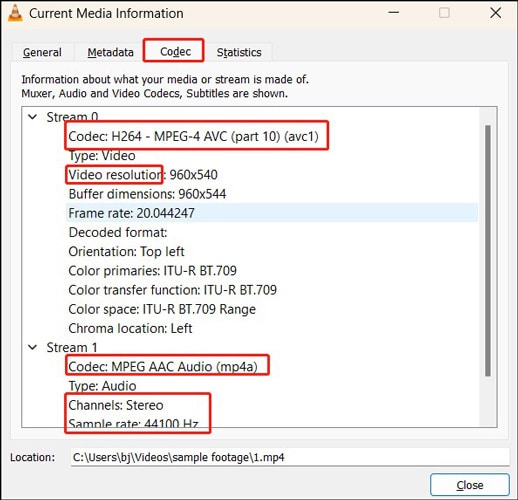
Step 2. Open the file info or properties to view the codec name.
Method 2: Convert Between H.264 and H.265
You can change the format using simple tools. This helps when you want a smaller size. It helps when you test if H.265 is right for you. Many users do this when they ask is H265 better than H264.
Step 1. Load your video into a converter.
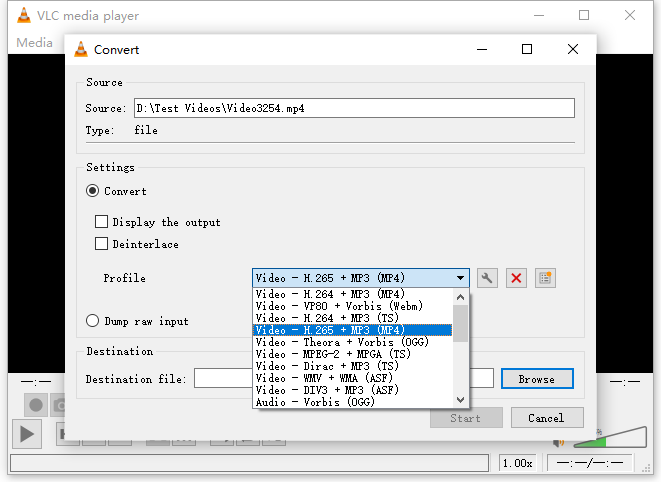
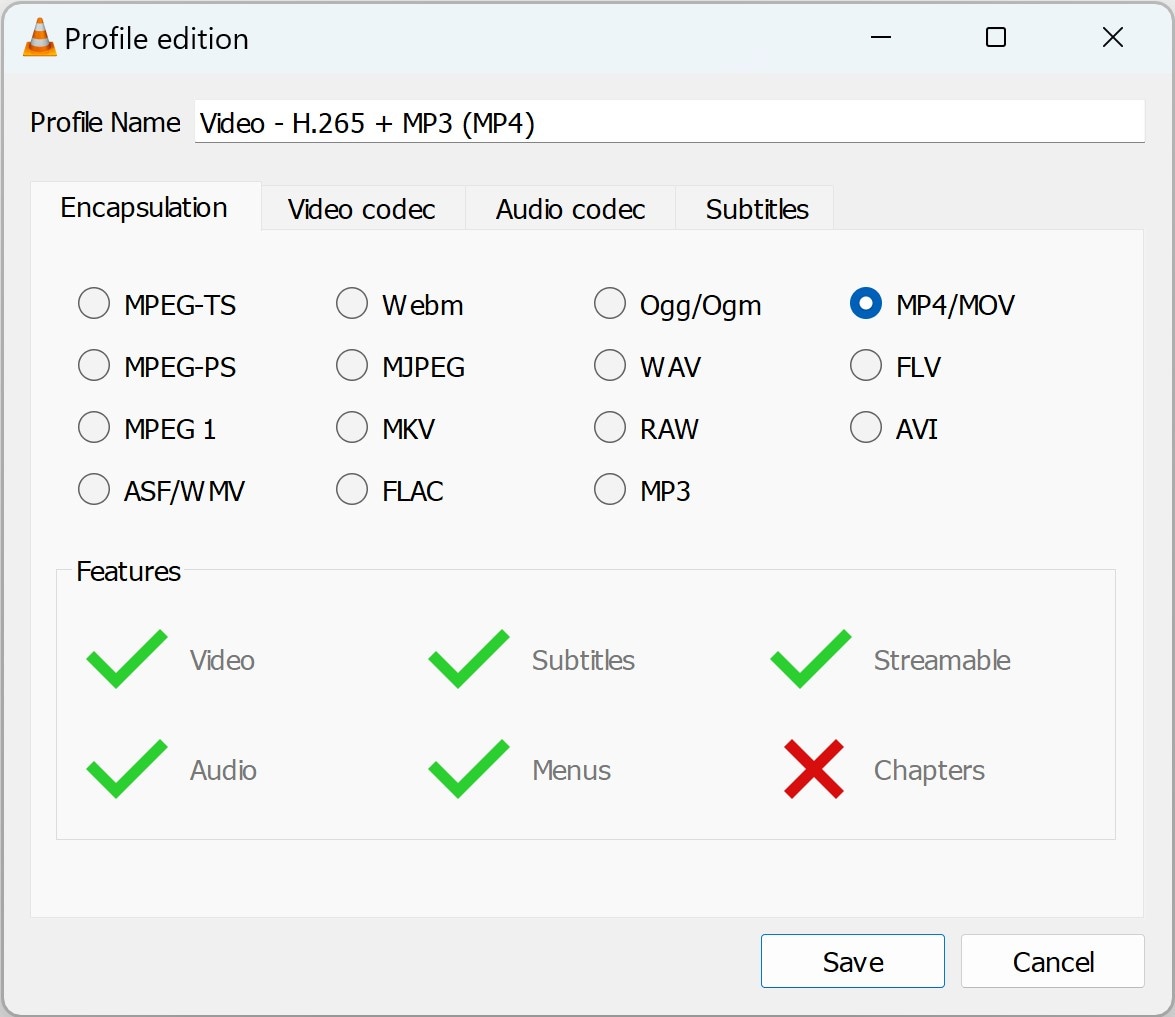
Step 2. Pick the new format and save the file
Method 3: Use Compatible Devices and Software
Some older devices only support H.264. Some newer ones support both. You compare H264 vs H265 to see which fits. This also explains why people ask what is H265. They want to know if their TV or phone plays this format.
Step 1. Check device specs.
Step 2. Install updates or new apps if needed
Method 4: Troubleshoot Playback Issues
Sometimes you cannot play a file. Then you check if the file is H.264 or H.265. The difference between H.264 and H.265 matters. A device may support one and not the other. When you know the answer, you can fix the problem.
Step 1. Check the file codec.
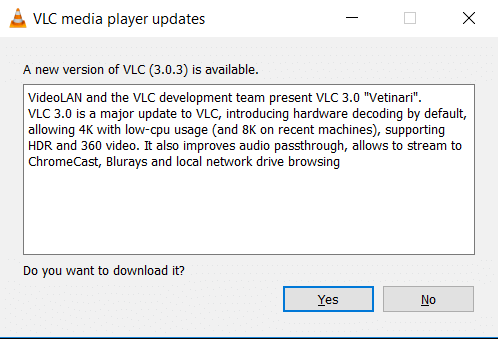
Step 2. Update the media player or convert the file
Method 5: Use Hardware Acceleration for Better Performance
Some devices have chips to help decode H.265. This helps with smooth playback. Users often compare video codec H.264 vs H.265 when they buy new devices. It also helps answer is H265 better than H264.
Step 1. Turn on hardware acceleration in the player.
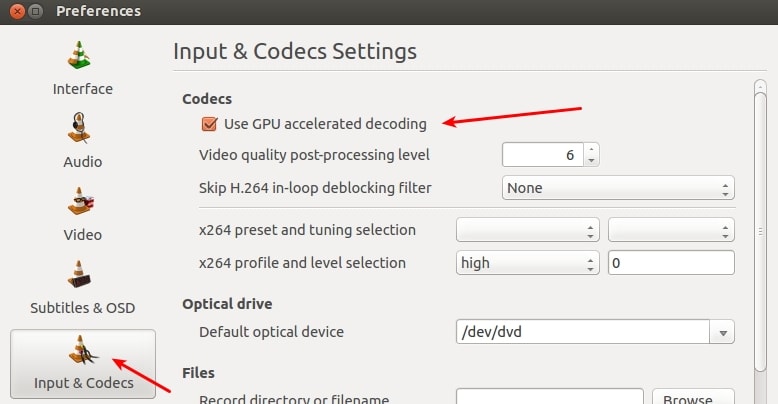
Step 2. Play the file again
Part 5: Lost Video Files During Conversion? Use Recoverit Today
You may convert files from H.264 to H.265. You may compare H.264 vs H.265 to pick the format. Sometimes things go wrong. Files may vanish during transfer. You worry about the lost video. You want a tool to help. Recoverit can help restore lost files. It can protect your clips. It is safe and easy. Many users depend on it.
The tool works with many types of files. It helps recover both H.264 and H.265. It is helpful when you check what is H264 and what is H265. This is important if your H264 vs H265 conversion fails.
Recoverit can help you get files back. It works on many devices. It also helps when you face differences between H.264 and H.265 issues. This is useful if you ask is H265 better than H264 and you try both formats.
Steps to use Recoverit:
Step 1. Get Recoverit and install it on your computer or device. Open Recoverit, select the location where your video files were lost, and start the scan.

Step 2. Browse through the scanned results.

Step 3. Preview your video files, and click "Recover" to restore them.

Part 6: Pro Tips for Choosing Between H.264 and H.265
Many people compare H.264(AVC) vs H.265 (HEVC) before they upload or record. They also ask what is H264 and what is H265. They read about H264 vs H265. They want to know the difference between H.264 and H.265. They ask is H265 better than H264. The video codec H.264 vs H.265 question is common. Below are simple tips.
• Check device support Not all devices play H.265. Check specs first.
• Look at bitrate needs H.265 gives better compression. This helps reduce size.
• Test playback Try small files before large work.
• Compare file size H.265 saves space. Pick it if storage is low.
• Check editing needs Some editors work better with H.264.
• Check streaming plans H.265 helps with a slow network. It helps smooth playback.
• Think long term H.265 is newer. It may help with future needs.
Conclusion
Video is part of modern life. Many people record, watch, and share video. When they do, they compare H.264 vs H.265. They ask what is H264 and what is H265. They look at H264 vs H265 to make choices. They see the difference between H.264 and H.265. They ask is H265 better than H264. In many cases, H.265 is better. Yet H.264 is still common.
The video codec H.264 vs H.265 question depends on your need. If you want broad support, use H.264. If you want a smaller size and better quality, try H.265. Compare H.264(AVC) vs H.265 (HEVC) based on your tools. Both formats help you enjoy video. Both are useful. Pick the one that suits your device and workflow.
Try Recoverit to Perform Data Recovery
 Security Verified. Over 7,302,189 people have downloaded it.
FAQs
-
1. Does H.265 offer better compression than H.264
Yes. H.265 provides higher compression. This reduces the size. Many users compare H264 vs H265. They ask is H265 better than H264. In most cases, yes. -
2. Can I convert H.264 to H.265
Yes. You can convert files. Check what is H264 before work. Pick a converter. Then save the file as H.265. Many compare H.264 vs H.265 to test size. -
3. Why do some devices fail to play H.265
Some devices do not support H.265. They only support H.264. This shows the difference between H.264 and H.265. Check device specs to avoid issues.



